Add String Attribute |
The Add String Attribute processor adds a new String attribute with a given value to all records input to it.
There are a number of uses of the Add String Attribute processor. For example:
This processor does not require any inputs, as it adds an attribute to all records input to it.
|
Option |
Type |
Purpose |
Default Value |
|
New Attribute Value |
Free Text |
Allows you to specify the value of the new attribute you wish to add |
None |
|
Data attribute |
Type |
Purpose |
Value |
|
NewString |
Added |
The new String attribute that you are adding |
The value specified in the Option above. |
None
|
Execution Mode |
Supported |
|
Batch |
Yes |
|
Real time Monitoring |
Yes |
|
Real time Response |
Yes |
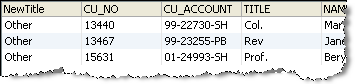
The Add String Attribute processor does not output any summary data. The new attribute is shown to the left of all other attributes in the data view.
None
In this example, Add String Attribute is used to tag all records that had data in the Title attribute, but where that data did not match a list of Valid Titles, with a NewTitle attribute with a value of 'Other'. A No Data Check and a List Check are used to filter the records to the required set:
Oracle ® Enterprise Data Quality Help version 9.0
Copyright ©
2006,2011 Oracle and/or its affiliates. All rights reserved.
