
|
|
Character Replace |
The Character Replace processor replaces individual characters. This enables the standardization or normalization of characters matching a Reference Data map.
Inconsistent characters such as accented letters or variants on symbols (such as open and closed quotes) can mask otherwise similar data. Use the Character Replace processor to replace all instances of the character in the Reference Data map with its replacement character.
In some cases, Character Replace may be used for simple character-to-character transliteration, by mapping characters from one writing system to another.
Any String or String Array type attributes where you wish to replace characters. Number and Date attributes are not valid inputs.
Note that if you input an Array attribute, the transformation will apply to all array elements, and an Array attribute will be output.
|
Option |
Type |
Purpose |
Default Value |
|
Ignore Case |
Yes / No |
To enable the replacement of both upper and lower case forms of characters (where they exist) |
No |
|
Transform Map Reference Data |
Reference Data |
Maps a character to its replacement character |
*Standardize Accented Characters |
|
Data attribute |
Type |
Purpose |
Value |
|
[Attribute Name].CharReplace |
Derived |
A new String or Array attribute with the replaced characters. |
The original attribute value, after character replacement |
None
None
|
Execution Mode |
Supported |
|
Batch |
Yes |
|
Real time Monitoring |
Yes |
|
Real time Response |
Yes |
The Character Replace processor presents no summary statistics on its processing.
In the Data view, the input attributes are shown with the new attribute, containing the character-substituted string, to their right.
None
In this example the Character Replace processor is used to standardize accented letters in a First name attribute.
Transformation Map Reference Data:
|
Lookup |
Map |
Comment |
|
É |
E |
E acute |
|
È |
E |
E grave |
|
ô |
o |
o circumflex |
Ignore case = Yes
Results:
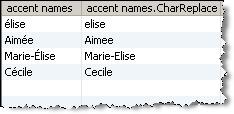
Note: upper case É is transformed to E and lower case é is transformed to e.
Oracle ® Enterprise Data Quality Help version 9.0
Copyright ©
2006,2011 Oracle and/or its affiliates. All rights reserved.