
|
|
Concatenate |
The Concatenate processor concatenates two or more attribute values with an optional user-defined character or String as the ‘glue’ between the column values.
Use the Concatenate processor to create a concatenated key or concatenated value across multiple attributes to feed into other processors for further analysis.
It is also often useful to concatenate data when cleansing data for the purpose of matching - for example in order to create a single attribute for the whole of an address.
Any String or String Array attributes that you wish to concatenate into a single attribute.
Note that if you input an Array attribute, the element values in the array will be concatenated to form a String output.
Example of setting the Ignore nulls option to Yes
This means that when concatenating the following data with a comma separator...
|
Address_3 |
Address_4 |
Postcode |
|
Cambridge |
{empty String} |
CB4 0GF |
...the output would be a new attribute with the value 'Cambridge, CB4 0GF' rather than 'Cambridge,,CB4 0GF'
|
Data attribute |
Type |
Purpose |
Value |
|
Concat |
Added |
Stores the result of the concatenation |
A concatenation of the input attribute values, with the specified separator String between them. |
None
|
Execution Mode |
Supported |
|
Batch |
Yes |
|
Real time Monitoring |
Yes |
|
Real time Response |
Yes |
The Concatenate transformer presents no summary statistics on its processing.
In the Data view, the input attributes are shown with the new added concatenated attribute to their right.
None
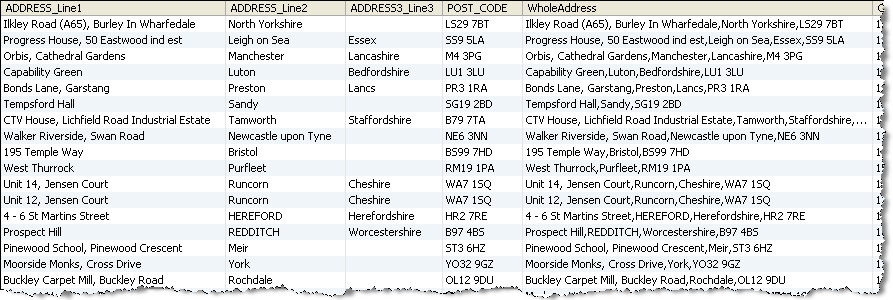
In this example a number of Address attributes are concatenated using a comma separator String to form a new attribute renamed WholeAddress .
In this case, the option to Ignore empty Strings is set to Yes.
Oracle ® Enterprise Data Quality Help version 9.0
Copyright ©
2006,2011 Oracle and/or its affiliates. All rights reserved.