Date Difference |
The Date Difference processor compares two date values and returns the difference between the two dates. The difference may be returned in whole years, months, weeks or days, or a combination of these, according to specified options.
Use Date Difference to derive the difference between two dates. For example, if you have a data set of individuals with a Date of Birth attribute, you can use Add Current Date and then Date Difference to calculate the current age of each of the individuals.
Date Difference requires exactly two Date attributes to be input.
The options are used to drive how Date Difference outputs the difference between the two date values for each record. A separate output attribute will be output for Years, Months, Weeks and Days, but the options may be used in combination. For example, if only the Whole days? option is set to Yes, the difference between the dates will be output simply as a number of whole days, but if all options are set to Yes, the difference will comprise a number of years, a number of months, a number of weeks and a number of days, and in this case the number of days can only be a value between 0 and 6 (as 7 days would be a whole week).
|
Option |
Type |
Purpose |
Default Value |
|
Whole years? |
Yes/No |
Determines whether or not to output the date difference in whole years |
No |
|
Whole months? |
Yes/No |
Determines whether or not to output the date difference in whole months |
No |
|
Whole weeks? |
Yes/No |
Determines whether or not to output the date difference in whole weeks |
No |
|
Whole days? |
Yes/No |
Determines whether or not to output the date difference in whole days |
No |
|
Time zone (subtract from) |
Time Zone |
Determines the time zone used to interpret the Subtract From Date. |
Director Time Zone |
|
Time zone (subtracted) |
Time Zone |
Determines the time zone used to interpret the Subtracted Date. |
Director Time Zone |
|
Data attribute |
Type |
Purpose |
Value |
|
WholeYears |
Added |
Stores the number of whole years between the two date values |
The number of whole years between the two dates. |
|
WholeMonths |
Added |
Stores the number of whole months between the two date values |
The number of whole months between the two dates. If WholeYears is also output, the number of whole months in addition to the last whole year (that is, a number between 0 and 11). |
|
WholeWeeks |
Added |
Stores the number of whole weeks between the two date values |
The number of whole weeks between the two dates. If WholeMonths is also output, the number of whole weeks in addition to the last whole month (that is, a number between 0 and 4). |
|
WholeDays |
Added |
Stores the number of whole days between the two date values |
The number of whole days between the two dates. If WholeWeeks is also output, the number of whole days in addition to the last whole week (that is, a number between 0 and 6). |
|
Note: If either of the date values being compared is Null, the Date Difference processor cannot calculate a difference between the dates, and so will output null values in all selected output attributes. |
None
|
Execution Mode |
Supported |
|
Batch |
Yes |
|
Real-time Monitoring |
Yes |
|
Real-time Response |
Yes |
The Date Difference processor does not output any summary data. The new date difference attribute(s) are shown to the left of all other attributes in the data view.
None
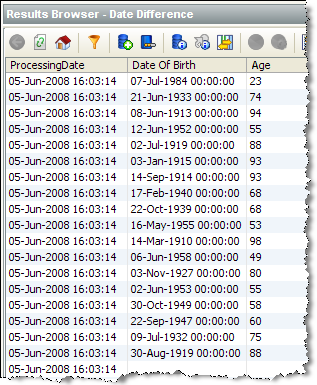
In this example, Date Difference is used to derive the age of customers in whole years by comparing a Date of Birth attribute with the current Processing Date. The output attribute is renamed from WholeYears to Age:
Oracle ® Enterprise Data Quality Help version 9.0
Copyright ©
2006,2011 Oracle and/or its affiliates. All rights reserved.
