Denoise |
The Denoise processor removes user-defined 'noise' characters from text attributes, and returns the denoised value in a new output attribute.
The list of noise characters can be entered as a list on–screen, or a reference list may be used, or both.
Inconsistent formatting, punctuation and spurious control characters etc. can mask otherwise consistent values in data.
Use the Denoise processor to remove these 'noise' characters from text attributes, prior to other processing, such as before performing a List Check on a text attribute.
Any String or String Array type attributes that you wish to denoise. Number and Date attributes are not valid inputs.
Note that if you input an Array attribute, the transformation will apply to all array elements, and an Array attribute will be output.
|
Option |
Type |
Purpose |
Default Value |
|
Reference Data |
List of noise characters |
*Noise Characters |
|
|
Noise characters |
Free text |
Additional noise characters |
None |
|
Data attribute |
Type |
Purpose |
Value |
|
[Attribute Name].Denoise |
Derived |
The denoised version of the attribute value. This may be a String or an Array, depending on the input attributes. |
The original attribute value, denoised. |
None
|
Execution Mode |
Supported |
|
Batch |
Yes |
|
Real time Monitoring |
Yes |
|
Real time Response |
Yes |
The Denoise transformer presents no summary statistics on its processing.
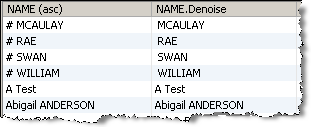
In the Data view, each input attribute is shown with its new derived denoised attribute to the right.
None
In this example the Denoise processor is used to remove all hash characters (#) from a NAME attribute:
Oracle ® Enterprise Data Quality Help version 9.0
Copyright ©
2006,2011 Oracle and/or its affiliates. All rights reserved.
