Extract Values |
The Extract Values processor extracts values, or parts of values, to a new attribute, where those values match a reference list.
The matching against the list may be done in one of five ways:
This affects the way that values are extracted. For example, if you want to extract Business Suffixes from a Company Name attribute, you may want to extract them only if the value ends with the value in the list.
Use Extract Values to create a new attribute containing a distinct part of an input attribute that you want to treat separately.
For example, if you have a Product_Description attribute containing values that represent the units of a product (for example, PINTS, PNTS, PTS etc.) you may want to extract these values to a separate attribute.
A single String attribute from which you want to extract values that match a list.
Values
|
Option |
Type |
Purpose |
Default Value |
|
Reference Data |
Reference Data |
List of values to extract |
None |
|
Option |
Type |
Purpose |
Default Value |
|
Ignore Case? |
Yes/No |
Whether or not to ignore case when matching values against the list |
Yes |
|
Match list by |
Selection (Whole Value/Starts With/Ends With/Contains) |
Drives how to match the list |
Contains |
|
Delimiters |
Free text entry |
When matching values to the list by splitting the data using delimiters, this allows you to specify the delimiter characters to use. |
Space |
|
Data attribute |
Type |
Purpose |
Value |
|
[Attribute Name].ExtractedValue |
Derived |
A new attribute with the part of the value that matched the list extracted |
Where there was a match against the list, the value that matched the list. Where there was no match against the list, a Null value. |
|
Flag attribute |
Purpose |
Possible Values |
|
ExtractedFlag |
Indicates whether data has been extracted |
Y/N |
|
Execution Mode |
Supported |
|
Batch |
Yes |
|
Real time Monitoring |
Yes |
|
Real time Response |
Yes |
The Extract Values processor produces a summary view of its results, showing the following statistics:
|
Statistic |
Meaning |
|
Extracted |
The number of records which matched the list, and so where an extraction was performed. |
|
Unextracted |
The number of records which did not match the list and so no extraction was performed. |
The following output filters are available from the Extract Values processor:
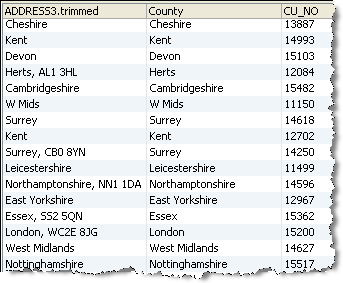
In this example, Extract Values is used to extract the County value from an ADDRESS3 attribute which normally just contains the County, but in some cases contains both the County and other trailing information, such as a Postcode. In this case, the list is matched using a Starts With option, and the matching values extracted to an output attribute named County:
Oracle ® Enterprise Data Quality Help version 9.0
Copyright ©
2006,2011 Oracle and/or its affiliates. All rights reserved.
