Replace |
The Replace processor uses a Reference Data map to transform data - for example in order to standardize it. The first column of the map is used to match values against, and the second column is used to control the replacement.
The replacement performed may be a simple whole value replacement - for example to replace the value 'Oracle Ltd' with 'Oracle Limited', or it may be a replacement of a part of the input value - for example to replace 'ltd' with 'limited' if it is found at the end of a CompanyName attribute, or to replace the String 'decsd' with 'deceased' wherever it is found. The way the Reference Data is matched, and thus the data is replaced, is controlled using one of the following options:
The matching against the Reference Data may also be case sensitive or case insensitive.
Note that when using the Contains, Starts with, or Ends with options, there may be multiple matches against the lookup column of the reference data. In this case, Replace always makes one, and only one, replacement. So, for example when performing a 'Contains' replacement where the value 'PT' is replaced by 'PINT', the value '10PT - APTITUDE BITTER' would be transformed into '10PINT - APTITUDE BITTER' and not '10PINT APINTITUDE BITTER'.
If you choose to use the Delimiter match option, and split up the data before matching using delimiters, any of the split values that match the lookup column of the replacement map will be replaced, even if there are many matches in the input value.
The way the Replace processor decides how to make its replacement where there are multiple matches can be controlled using a configuration option.
By default, the map is simply checked in order, and the first match against the map from the input data is used for the replacement. So, for example, if your replacement map contains the values 'Lyn' and 'Lynda', where 'Lyn' appears first in the list, the input value 'Lynda' would undergo the replacement using the lookup value 'Lyn' in the map.
However, you can control this using the 'Match longest value' option. If you select this option, each matched reference entry will be assessed for length, and the longest match used. So, in the example above, the replacement using the lookup value 'Lynda' in the map would be performed.
Use the Replace processor for standardization - for example to standardize all CompanyName values so that different suffixes that mean the same thing are represented in a standard way (for example, Ltd/Limited, Assoc/Assc, Cncl/Council etc.)
It is possible to use Replace to replace Date values. However, for this to work, the date values in the Reference Data map must be in the standard ISO format; that is, either YYYY-MM-DD (for example, 1900-01-01), or YYYY-MM-DD HH:mm:ss (for example, 1900-01-01 00:00:00). Note that it is possible to replace a Date with a Null value - for example to remove invalid dates.
A single attribute from which you wish to replace values using a reference data map. The attribute may be a String, or a String Array. If an array is input, the replacements will be made at the array element level, and an array (with the data after the replacements have been performed) will be output.
|
Option |
Type |
Purpose |
Default Value |
|
Replacements |
Reference Data |
Matches the attribute values against the lookup column in the map. Where there is a match, the matching value is replaced by the value in the right-hand column. |
None
|
|
Match longest value? |
Yes/No |
Controls which replacement to perform where there are multiple matches against the map, in Starts With, Ends With, or Contains replacement. |
No |
|
Ignore case? |
Yes/No |
Determines whether or not to ignore case when matching the lookup column of the map. |
Yes |
|
Match list by |
Selection (Whole Value/Starts With/Ends With/Contains/Delimiter Match) |
Drives how to match the map, and therefore which part of the original value to replace. |
Whole Value |
|
Delimiters |
Free text entry |
When matching values to the map by splitting the data using delimiters, this allows you to specify the delimiter characters to use. |
Space |
|
Data attribute |
Type |
Purpose |
Value |
|
[Attribute Name].Replaced |
Derived |
A new String or Array attribute with the replaced value(s). |
The replaced value. Note that where there was no match from the input attribute value to the map, the original attribute value is carried forward into the new attribute. |
|
Flag attribute |
Purpose |
Possible Values |
|
[Attribute Name].ReplaceSuccess |
To indicate whether the RegEx Replace was successful, unsuccessful or invalid |
Y/N/- |
|
Execution Mode |
Supported |
|
Batch |
Yes |
|
Real time Monitoring |
Yes |
|
Real time Response |
Yes |
The Replace processor produces a summary view of its transformations, showing the following statistics:
Note: It is possible to use the Replace processor with attributes of any data type - Strings, Arrays, Numbers, or Dates. However, as Replace always uses the data type of the input attribute for the output attribute, there are some transformations you can choose to make that will mean the replaced value is invalid for the data type of the output attribute. For example, if you attempt to replace the Date value '2006-04-14' with 'Bad date' using a map, the value 'Bad date' is not a valid Date, and so the replacement fails. If you have any invalid replacements, you may need to convert the original attribute to a different data type before performing the replacements, or you may need to modify your Reference Data map to remove any invalid replacements.
The following output filters are available from the Replace processor:
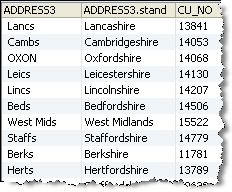
In this example, the Replace processor is used to standardize English Counties and other similar data in attribute Address3 from the Customers table in the example Service Management database. The output attribute has been named Address3.stand.
In this case a Whole Value replacement was used. The following is an excerpt from the drill-down view of transformed records:
Oracle ® Enterprise Data Quality Help version 9.0
Copyright ©
2006,2011 Oracle and/or its affiliates. All rights reserved.
