
|
|
Replace All |
The Replace All processor uses a Reference Data map to transform data across multiple attributes. Values specified in the first column of the map are replaced by the corresponding value in the second column.
The replacement performed may be a simple whole value replacement - for example to replace the country name 'France' with the ISO standard country code 'FR', or it may use delimiters to split the data in the input attribute into tokens which are considered separately. The way the Reference Data is matched, and thus the data is replaced, is controlled using one of the following options:
The matching against the Reference Data may also be case sensitive or case insensitive.
If you choose to use the Delimiter match option, and split up the data before matching using delimiters, any of the split values that match the lookup column of the replacement map will be replaced, even if there are many matches in the input value.
Use the Replace All processor to replace one value with another across multiple attributes. Common examples include a string intended to represent 'no data', and conversion of country names to ISO standard country codes across multiple fields.
A set of attributes in which you wish to replace values using a reference data map. The attributes may be Strings, or String Arrays. If an array is input, the replacements will be made at the array element level, and an array (with the data after the replacements have been performed) will be output.
|
Option |
Type |
Purpose |
Default Value |
|
Replacements |
Reference Data |
Matches the attribute values against the lookup column in the map. Where there is a match, the matching value is replaced by the value in the right-hand column. |
None
|
|
Ignore case? |
Yes/No |
Determines whether or not to ignore case when matching the lookup column of the map. |
Yes |
|
Match list by |
Selection (Whole Value/Delimiter Match) |
Drives how to match the map, and therefore which part of the original value to replace. |
Whole Value |
|
Delimiters |
Free text entry |
When matching values to the map by splitting the data using delimiters, this allows you to specify the delimiter characters to use. |
Space |
|
Data attribute |
Type |
Purpose |
Value |
|
[Attribute Name].AllReplaced |
Added |
A new String or Array attribute with the replaced value(s). |
The replaced value. Note that where there was no match from the input attribute value to the map, the original attribute value is carried forward into the new attribute. |
|
Flag attribute |
Purpose |
Possible Values |
|
[Attribute Name].ReplaceAllFlag |
To indicate whether or not any replacements were made in the record. |
Y/N |
|
Execution Mode |
Supported |
|
Batch |
Yes |
|
Real time Monitoring |
Yes |
|
Real time Response |
Yes |
The Replace All processor produces a summary view of its transformations, showing the following statistics:
|
Statistic |
Meaning |
|
Transformed |
The number of records where a replacement was performed. Drill down on the number to see the records. |
|
Untransformed |
The number of records where a replacement was not performed. |
The following output filters are available from the Replace All processor:
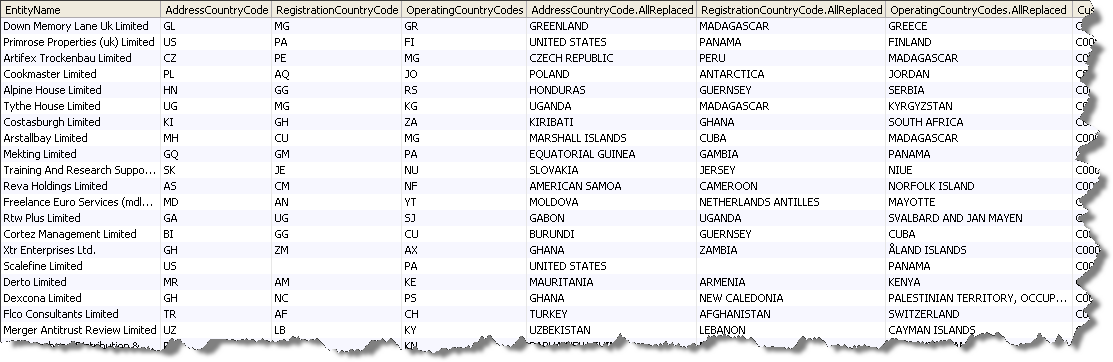
In this example, the Replace All processor is used to convert ISO standard two-character country codes into standardized country names. The replace operation is applied to three attributes simultaneously, eliminating the requirement for multiple replace processors. The following is an excerpt from the drill-down view of transformed records:
Oracle ® Enterprise Data Quality Help version 9.0
Copyright ©
2006,2011 Oracle and/or its affiliates. All rights reserved.