Trim Whitespace |
The Trim Whitespace processor trims whitespace characters (that is, spaces and other non-printing characters) from text attribute values. You can control whether to trim whitespace from just the left-hand side of a value (leading whitespace), just the right-hand side (trailing whitespace), from both sides, or across the whole of the original value.
The result of the trim is output as an additional attribute.
Use Trim Whitespace to normalize a text value down to its 'real' value. For example, you may wish to remove any spurious extra spaces from any attributes that you wish to use in a Duplicate Check.
Note that Trim Whitespace uses a fixed definition of whitespace that will remove all whitespace and non-printing characters from attribute values.
Any String or String Array type attributes from which you wish to trim whitespace. Number and Date attributes are not valid inputs.
Note that if you input an Array attribute, the transformation will apply to all array elements, and an Array attribute will be output.
|
Option |
Type |
Purpose |
Default Value |
|
Trim options |
Selection (Left/Right/Left and Right/All) |
Determines where to trim whitespace from |
All |
|
Data attribute |
Type |
Purpose |
Value |
|
[Attribute Name].Trimmed |
Derived |
The trimmed version of the attribute value |
The original attribute value, with whitespace trimmed using the options specified. |
None
|
Execution Mode |
Supported |
|
Batch |
Yes |
|
Real time Monitoring |
Yes |
|
Real time Response |
Yes |
The Trim Whitespace transformer presents no summary statistics on its processing.
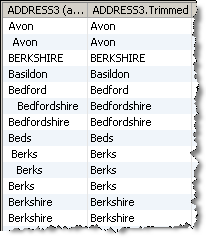
In the Data view, each input attribute is shown with its new derived trimmed attribute to the right.
None
In this example, Trim Whitespace is used to trim leading whitespace from the left of an ADDRESS3 attribute:
Oracle ® Enterprise Data Quality Help version 9.0
Copyright ©
2006,2011 Oracle and/or its affiliates. All rights reserved.
