GNR Get Best Culture |
The GNR Get Best Culture processor uses GNR's 'classification' API and returns the single best culture for the Given Name and Surname according to the API.
Use GNR Get Best Culture to use Global Name Recognition to derive the cultures for names so that they can be matched accurately using linguistic rules which may vary for different cultures.
The Given Name and Surname culture values are required by the GNR Search processor for both the working data and the reference data it searches against, so that it can associate the appropriate comparison parameters (comp_parms) for the name cultures when matching.
GNR Get Best Culture requires the input of Given Name and Surname attributes.
None
Culture values are added to the data as simple string attributes. The following culture values are possible:
|
Data attribute |
Type |
Value |
|
GivenNameCulture |
Added |
The most likely origin culture of the supplied Given Name value. |
|
SurnameCulture |
Added |
The most likely origin culture of the supplied Surname value. |
|
FullNameCulture |
Added |
The most likely origin culture of the Full name (derived from the Given Name and Surname values). |
None
|
Execution Mode |
Supported |
|
Batch |
Yes |
|
Real-time Monitoring |
Yes |
|
Real-time Response |
Yes |
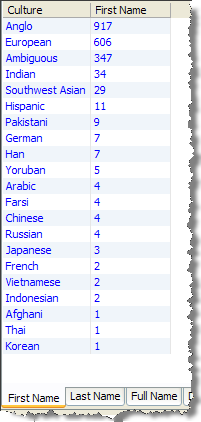
Separate summary views are provided to summarize the distribution of best culture values for Given Names, Surnames, and Full Names (which are derived from the Given Name and Surname).
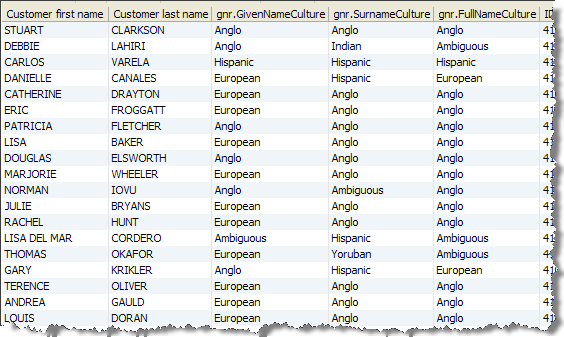
Note that the same record may have different best culture values for the different name fields. You can see these in the Data View, and find all the records where this is the case using a Cross-Attribute Check on the Given Name Culture and Surname Culture attributes.
|
Statistic |
Meaning |
|
Culture Value |
The number of records with the specified culture value as one of the possible cultures for the name. |
None
The following example shows how GNR Get Best Culture adds name culture values to a set of individual names.
Summary Views
Data View
Oracle ® Enterprise Data Quality Help version 9.0
Copyright ©
2006,2012 Oracle and/or its affiliates. All rights reserved.
