GNR Search |
The GNR Search processor is the most important GNR processor, used to match query data (for example, customer names) with reference data (for example, names of individuals on watchlists). The GNR Search processor wraps various GNR APIs from the NameHunter package.
Use GNR Search to use linguistic, culture-sensitive rules to match names between data sets. GNR Search provides access to large dictionaries of name variants across a wide range of origin cultures. GNR Search also includes transliteration rules for Russian, Greek and Arabic so that matches may be made between names even where they are represented in different scripts.
Note that in order to provide a single processor that works in both real time and batch execution, the GNR Search processor reads in its Reference Data (the "Search List") into memory using OEDQ’s standard Reference Data capability, and matches query names on a record-by-record basis.
The GNR Search processor expects input names with their best culture values added; that is, the following specific input attributes:
Use GNR Get Best Culture to add the required culture values to names before running GNR Search, and use GNR Parse or a configuration of the Parse processor to split unstructured names into a Given Name and Surname structure, if required.
|
Option |
Type |
Purpose |
Default Value |
|
Configuration |
Selection |
Sets the configuration options of the GNR Search processor using a configuration file. |
A default configuration file is provided (called 'Default'). Additional configuration files may be added to the server by an administrator. |
|
Maximum number of matches |
Integer |
Sets the maximum number of matches to return for a single input record. This is in order to protect performance where a very loose matching configuration is used. |
None (No maximum) |
|
Search List |
Reference Data |
Specifies the set of Reference Data used for the Search operation. See note below. |
None |
|
Note: The Search List data must have a specific structure, and will therefore normally be a Lookup onto Staged Data that has been written out by an OEDQ process that prepares the required data for the search into the required structure, for example using GNR Get Best Culture to add the required culture values to the reference data names. |
The required structure is as follows:
This structure is order-sensitive; that is, the Reference Data or Lookup used must have the columns configured in the order above.
Any matching records from the Search List are added to the data in array attributes, as follows. The outputs are arrays as there may be multiple matches for each input record in the search list.
|
Data attribute |
Type |
Value |
|
GivenNames |
String Array |
The Given Names of the matching record in the Search List |
|
Surnames |
String Array |
The Surname of the matching record in the Search List |
|
Tokens |
String Array |
The Tokens (record identifiers) of the matching record in the Search List |
|
GivenNameScores |
Number Array |
The score by which the Given Name matched |
|
SurnameScores |
Number Array |
The score by which the Surname matched |
|
FullNameScores |
Number Array |
The overall score by which the Full Name matched. This is normally computed from the Given Name and Surname scores. |
|
Flag |
Purpose |
Possible Values |
|
SearchSuccess |
A flag with the high level result of the search for each record, to indicate whether or not the any Search List records were matched. |
Y - if the input record matched one or more records in the Search List N - if the input record did not match any Search List records |
|
ResultsTruncated |
A flag to indicate on the record where results were truncated, because the configured maximum number of matches was exceeded. |
Y - if the configured maximum number of matches was exceeded for the input record N - if the configured maximum was not exceeded |
|
Execution Mode |
Supported |
|
Batch |
Yes |
|
Real-time Monitoring |
Yes |
|
Real-time Response |
Yes |
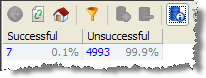
A summary view is included that summarizes the search results by success or failure:
|
Statistic |
Meaning |
|
Successful |
The number of records where one or more matches was found against the Search List data |
|
Unsuccessful |
The number of records where no matches were found against the Search List data |
The following output filters are available from the GNR Search processor:
In this example, GNR Search is used to match customer records against a Search List of individuals on a Sanctions List.
Summary View
Data View

Oracle ® Enterprise Data Quality Help version 9.0
Copyright ©
2006,2012 Oracle and/or its affiliates. All rights reserved.
