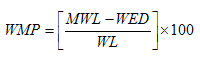
The Word Match Percentage comparison determines how closely two multi-word values match each other by calculating the Word Edit Distance between two Strings, and also taking into account the length of the longer or the shorter of the two values, by word count.
In mathematical terms, the Word Match Percentage comparison uses the following formula to calculate its results:
where:
WMP = Word Match Percentage
MWL = Maximum Word Length (that is, the maximum number of words in the two values being compared)
WED = the Word Edit Distance between two String values, and
WL = Either the Maximum or Minimum Word Length, depending on the setting of the Relate to shorter input option. If Relate to shorter input is set to No (as by default), the Maximum Word Length is used. If Relate to shorter input is set to Yes, the Minimum Word Length is used (that is, the number of words in the shorter of the two values by word count).
So, for the pair of values "Andy Joseph Cole" and "Andy Cole":
WED (Word Edit Distance) = 1
MWL (Maximum Word Length = 3, and
mWL (Minimum Word Length) = 2
So, if the Relate to shorter input option is set to No, the Word Match Percentage (WMP) is calculated as follows:
MWL (3) - WED (1) = 2, divided by MWL (3) = 0.66, multiplied by 100 = 66%.
If Relate to shorter input is set to Yes, the calculation is different:
MWL (3) - WED (1) = 2, divided by mWL (2) = 1, multiplied by 100 = 100%
Use the Word Match Percentage comparison to find matches in multi-word values (such as names), which may contain extra information (for example, extra words) that might blur the ability to match them using a Character Match Percentage comparison, or similar. For example, the values "Ali Muhammed Saadiq" and "Ali Saadiq" return a weak Character Match Percentage of only 53% (assuming whitespace is stripped), but a strong Word Match Percentage of 66% (or 100% if the Relate to shorter input option is set to Yes). The greater the likely number of words in the identifier values to be matched, the more accurate the Word Match Percentage comparison will be. Note that with a small number of words, a Word Match Percentage of 60% or higher is often indicative of a fairly strong result, whereas a Character Match Percentage of 60% is often indicative of a fairly weak result.
This comparison supports the use of result bands.
|
Option |
Type |
Purpose |
Default Value |
|
Match No Data pairs? |
Yes/No |
This option determines the result of a comparison when it compares two No Data (Null, or containing only whitespace characters) values for an identifier. If set to False, the comparison will give a 'no data' result when comparing a No Data value against another No Data value. If set to True, the comparison will return a result of 0 when comparing a No Data value against a No Data value (as the number of matching words will be 0). A 'no data' result will only be returned if a No Data value is compared against a populated value. |
No |
|
Ignore case? |
Yes/No |
Sets whether or not to ignore case when comparing values. For example, if case is ignored, the Word Match Percentage between "Joseph Andrew COLE" and "Joseph Andrew Cole" will be 100%. If case is not ignored, it will be 67%. |
Yes |
|
Character error tolerance |
Integer
|
This option specifies a number of character edits that are 'tolerated' when comparing words with each other. All words with a Character Edit Distance of less than or equal to the specified figure will be considered as the same. For example, if set to 1, the Word Match Percentage between "95 Charnwood Court, Mile End, Parnham, Middlesex" and "95 Charwood Court, Mile End, Parnam, Middlesex" would be 100%, as all words match each other considering this tolerance. |
0 |
|
Ignore tolerance on numbers? |
Yes/No |
This option allows the Character error tolerance to be ignored for words that consist entirely of numerics. For example, if set to Yes, and using a Character error tolerance of 1, the Word Match Percentage between "95 Charnwood Court, Mile End, Parnham, Middlesex" and "96 Charnwood Court, Mile End, Parnam, Middlesex" would be 86%, because the numbers 95 and 96 would be considered as different, despite the fact that they only differ by a single character. If set to No, numbers will be treated like any other words, so in the example above, the Word Match Percentage would be 100% as 95 and 96 would be considered as the same. |
Yes |
|
Treat tolerance value as percentage? |
Yes/No |
This option allows the Character error tolerance to be treated as a percentage of the word length in characters. For example, to tolerate a single character error for every five characters in a word, a value of 20% should be used. This option may be useful to avoid treating short words as the same when they differ by a single character, but to retain the ability to be tolerant of typos in longer words - for example, to consider "Parnham" and "Parnam" as the same, but to treat "Bath" and "Batt" as different. If set to Yes, the Character error tolerance option should be entered as a maximum percentage of the number of characters in a word that you allow to be different, while still considering each word as the same. For example, if set to True, a Character error tolerance of 20% will mean "Parnam" and "Parnham" will be considered as the same, as they have a Character Edit Distance of 1, and a longer word length of 7 characters - meaning a Character Match Percentage error of 14%, which is below the 20% threshold. The values "Bath" and "Batt", however, will not considered as the same, as they have a Character Match Percentage error of 25% (1 error in 4 characters). If set to No, the Character error tolerance option will be treated as a Character Edit Distance tolerance between words. |
No |
|
Ignore word order? |
Yes/No |
If set to Yes, the order of the words in each value will not influence the result. For example, the Word Match Percentage between "Nomura International Bank" and "International Bank Nomura" would be 100%. If set to No, the order of the words in each value will be considered. So, the Word Match Percentage between "Nomura International Bank" and "International Bank Nomura" would be 0%. |
No |
|
Relate to shorter input? |
Yes/No |
This option drives the calculation made by the Word Match Percentage comparison. If set to Yes, the result is calculated as the percentage of words from the shorter of the two inputs (by word count) that match the longer input. If set to No, the result is calculated as the percentage of words from the longer of the two inputs (by word count) that match the shorter input. |
No |
Example configuration
In this example, the Word Match Percentage comparison is used to match whole company names. The following options are specified:
Match No Data pairs? = No
Ignore case? = Yes
Character error tolerance = 20
Ignore tolerance on numbers? = Yes
Treat tolerance value as percentage? = Yes
Ignore word order? = No
Relate to shorter input? = Yes
A Denoise transformation is added to remove punctuation (commas and full stops) from the values being compared.
Example results
With the above configuration, the following table illustrates some comparison results:
|
Value A |
Value B |
Comparison result (Word Match Percentage) |
|
Federal Mogul Camshafts Ltd |
Federal Mogul Camshafts Castings Ltd |
100% |
|
Federal Mogul Camshafts Ltd |
Federal Mogul Eurofriction Ltd |
75% |
|
Stamford High School |
Stamford School |
100% |
|
Eurofleet Bodyshop Ltd |
Eurofleet Ltd |
100% |
|
Phoenix Food Ltd |
Phoenix Manufacturing Ltd |
66% |
|
Cumerland Wood and Chair Corp |
Cumberland Wood Corp |
100% |
Oracle ® Enterprise Data Quality Help version 9.0
Copyright ©
2006,2011 Oracle and/or its affiliates. All rights reserved.