

- Revision History
- Oracle Profitability and Cost Management Cloud, May Update
-
- Announcements
-
- Removal of Support for Transport Layer Security Protocol 1.0 and 1.1
- New Version of the EPM Automate Utility
- New Version of Oracle Smart View for Office
- New REST API Resource to Merge Slices of Data
- Data Management: New Workflow Mode
- Ability to Define Whether Missing, Error, and Zero Values Are Plotted on Charts in Financial Reporting Web Studio
-
- Upcoming Changes
- Defects Fixed
| Date | Feature | Notes |
|---|---|---|
| 25 APR 2019 | Created initial document. |
Oracle Profitability and Cost Management Cloud, May Update
This document outlines the upcoming Oracle Profitability and Cost Management Cloud update.
Oracle will apply the latest updates to your test environments starting at 22:00 UTC (15:00 PDT) on Friday, May 3, 2019 and to your production environment on Friday, May 17, 2019, also starting at 22:00 UTC. The updates will be applied to your environments during the first subsequent daily maintenance.
The Oracle Help Center provides access to updated documentation. The updates will be available in the Help Center on May 3, 2019. Some of the links to new feature documentation included in this document will not work until after the Oracle Help Center update is complete.
NOTE: Backing up the daily maintenance snapshot and restoring the environment as needed are self-service operations. Oracle recommends that you download the maintenance snapshot every day to a local server.
Please Join Oracle Cloud Customer Connect
Please take a moment to join the Cloud Customer Connect forums for EPM Cloud services. Oracle Cloud Customer Connect is a community gathering place for members to interact and collaborate on common goals and objectives. This is where you will find the latest release information, upcoming events, or answers to use-case questions. Joining takes just a few minutes. Join now!
https://cloud.oracle.com/community
NOTE: The Settings and Actions menu now contains a link to Cloud Customer Connect. To access this link, from the Home page, click the down arrow next to the user name (in the upper right-hand corner of the screen), and select Cloud Customer Connect.
Give Us Documentation Feedback
We welcome your comments and suggestions to improve the content of the What's New document and the product documentation. Please send us your feedback at EPMdoc_ww@oracle.com. In the body or title of the email, state that you are inquiring or providing feedback, and indicate for which EPM Cloud service and the monthly update cycle.
For the latest updates and information about EPM Cloud, follow us on YouTube, Twitter, Facebook, and LinkedIn at Hyperion EPM Info.
Use learning paths to interactively perform tasks and access related documentation, videos, and tutorials.
-
Creating Allocation Rules in Profitability and Cost Management Cloud
Learn how to create an allocation rule to reassign occupancy expenses from corporate, where the expenses are paid, to the cost centers that use the facilities in Profitability and Cost Management Cloud.
- Creating Custom Calculation Rules in Profitability and Cost Management Cloud
Learn how to create a custom calculation rule to increase corporate utility expense by 15% in Profitability and Cost Management Cloud.
Removal of Support for Transport Layer Security Protocol 1.0 and 1.1
As announced in previous readiness documents, starting with this update (Release 19.05) to EPM Services, Oracle will support only Transport Layer Security protocol version 1.2 (TLS 1.2) to communicate with EPM Cloud. To ensure the highest level of authentication and data encryption security, TLS 1.0 and TLS 1.1 will no longer be supported after your environments are updated on May 3, 2019.
NOTE: Support for TLS versions 1.0 and 1.1 will be removed for both your Test and Production environments on May 3, 2019.
Because most modern operating systems and browsers support TLS 1.2; users of such systems and browsers will not be affected by the deprecation of TLS 1.0 and 1.1. EPM Automate and Smart View are also not affected by this change.
After TLS 1.1 is deprecated, you cannot use client operating systems that do not support TLS 1.2 (for example, Red Hat Enterprise Linux 5 and Microsoft Windows 2002) to run operating system-specific commands (for example, code to run cURL tools to transfer data and custom code that integrates with the Rest APIs) against EPM Cloud. Additionally, Smart View installed on such systems will also fail to communicate with EPM Cloud. Similarly, you cannot use browsers that do not support TLS 1.2 protocol to access EPM Cloud environments.
If you are using on-premises FDMEE to integrate with EPM Cloud you must update your on-premises EPM 11.1.2.4 deployment to support TLS 1.2. Refer to the following Oracle Support document to enable TLS 1.2 support:
New Version of the EPM Automate Utility
A new version of the EPM Automate Utility is available with this update. This version includes support for Mac OS and the ability to run multiple sessions of the utility from the same directory. This version also includes new commands (ApplicationAdminMode, MergeSlices, and SortMember) and updates to the replay command to support Lagtime parameter and to the ProvisionReport command, which now, by default, generates the simplified version of the Provisioning report instead of the classic version. You must install this version of the utility to use these enhancements.
- Support for Mac OS
The EPM Automate Utility can now be installed on Mas OS computers.
- Ability to run multiple instances of the utility from the same directory
The EPM Automate utility now supports the execution of multiple instances of the utility against an environment from the same directory. You can now
- Run multiple instances of the utility from the same directory
- Execute the utility from separate directories
In both these scenarios, each instance of the utility works independently; logging out of one instance does not log you out of other instances.
- New ApplicationAdminMode command
This command places the application in administration mode so that access to the application is limited to Service Administrators only. This command is useful to prevent users from working on the application when Service Administrators are performing administrative operations.
- New MergeSlices command
This command merges incremental data slices into the main database cube and, optionally, removes the Essbase cells containing 0 (zero) as value to make the cube compact.
- New sortMember command
This command sorts members of Entity, Account, Scenario, and Versions dimensions and of custom dimensions. This command is useful for sorting dimension members after loading members into Planning.
-
New lagTime parameter for replay command
lagTime, an optional parameter, allows you to set the number of seconds that the replay command should wait between the execution of each HAR file included in the replay file. Because user activities are not usually initiated simultaneously, setting this parameter helps to create a more realistic simulation of load on an environment.
- The provisionReport command now produces a simplified version of the report by default
The provisionreport command now, by default, generates the simplified version of the Provisioning Report identical to the report that is displayed on the Provisioning Report tab of the Access Control screen. You can generate the classic version of the report, which lists the component roles that are subsumed into the pre-defined roles to which users are assigned and the application roles assigned to the user (directly or through groups), by using the format=classic parameter.
Key Resources
- Working with EPM Automate for Oracle Enterprise Performance Management Cloud
New Version of Oracle Smart View for Office
Oracle Smart View for Office 11.1.2.5.900 will be available in May 2019. This version includes new features and fixed defects.
New features include:
- Enhanced ad hoc features, including cell-based POV, submit without refresh, additional free-form functionality support, and multiple-grid ad hoc.
- New Extension Alert dialog to notify you of extension updates upon login.
- Support for Microsoft Office 2019.
- New Health Check option, Browser Emulation Mode, to ensure that browser-based screens, such as the Oracle Cloud login dialog, render properly.
- Informational dialog showing the POV of the drill-through report launch point.
This release also fixes a number of defects.
The Smart View 11.1.2.5.900 Readme, available on the Help Center, will contain a complete list of features and defects addressed in this version. You must install this version to ensure access to the new functionalities.
New REST API Resource to Merge Slices of Data
A new REST API resource, Merge Slices for Oracle Profitability and Cost Management Cloud, merges all incremental data slices into the main database slice and optionally removes the cells with zero values to make the Essbase cube compact.
Steps to Enable
Review the REST service definition in the About REST API for Oracle Enterprise Performance Management Cloud guide to leverage (available from the Oracle Help Center > your apps service area of interest > REST API).
Key Resources
- Merge Slices for Oracle Profitability and Cost Management Cloud in REST API for Oracle Enterprise Performance Management Cloud
Data Management: New Workflow Mode
The new Workflow mode provides a scalable solution when processing large volumes of data. By default the data load process in Data Management is designed with a well-defined process flow that provides a full audit of the data load process as well as the ability to drill down and view data in Workbench. However, a full data flow may contribute to lengthy processing times due to archiving of data for audit purposes. There are many data load use cases that the audit is not required and performance is a key requirement.
The full data flow is the default mode for loading data. Data is loaded in the standard way between the staging tables, data can be viewed in Workbench, and drill down is supported.
A full (no archive) data flow loads data in the same manner as the full mode, but data is deleted from the staging tables at the end of the data load process. Data can be viewed in the Workbench only after the import step. No drill down is available with the full (no archive) mode. This method is useful when you want to review and validate the data during load process but auditing or drill down is not a requirement. This method does not provide performance improvement but limits space usage since data is not persisted for future reference.
The simple workflow mode limits data movement between the staging tables. No drill down is available and the data cannot be viewed in the Workbench. This method provides performance improvement and is useful when you do not require auditing or drill down.
Key Resources
- Managing Simple Data Loads in Administering Data Management for Oracle Enterprise Performance Management Cloud
Ability to Define Whether Missing, Error, and Zero Values Are Plotted on Charts in Financial Reporting Web Studio
A new server setting, Chart Plotting Ignores Data Values allows you to define whether #MISSING, #ERROR and #ZERO values are plotted on charts.
Key Resources
- Managing Server Settings in Designing with Financial Reporting Web Studio for Oracle Enterprise Performance Management Cloud
In a future update, there will be a revised interface with enhanced navigation and a new theme called Sky Blue.
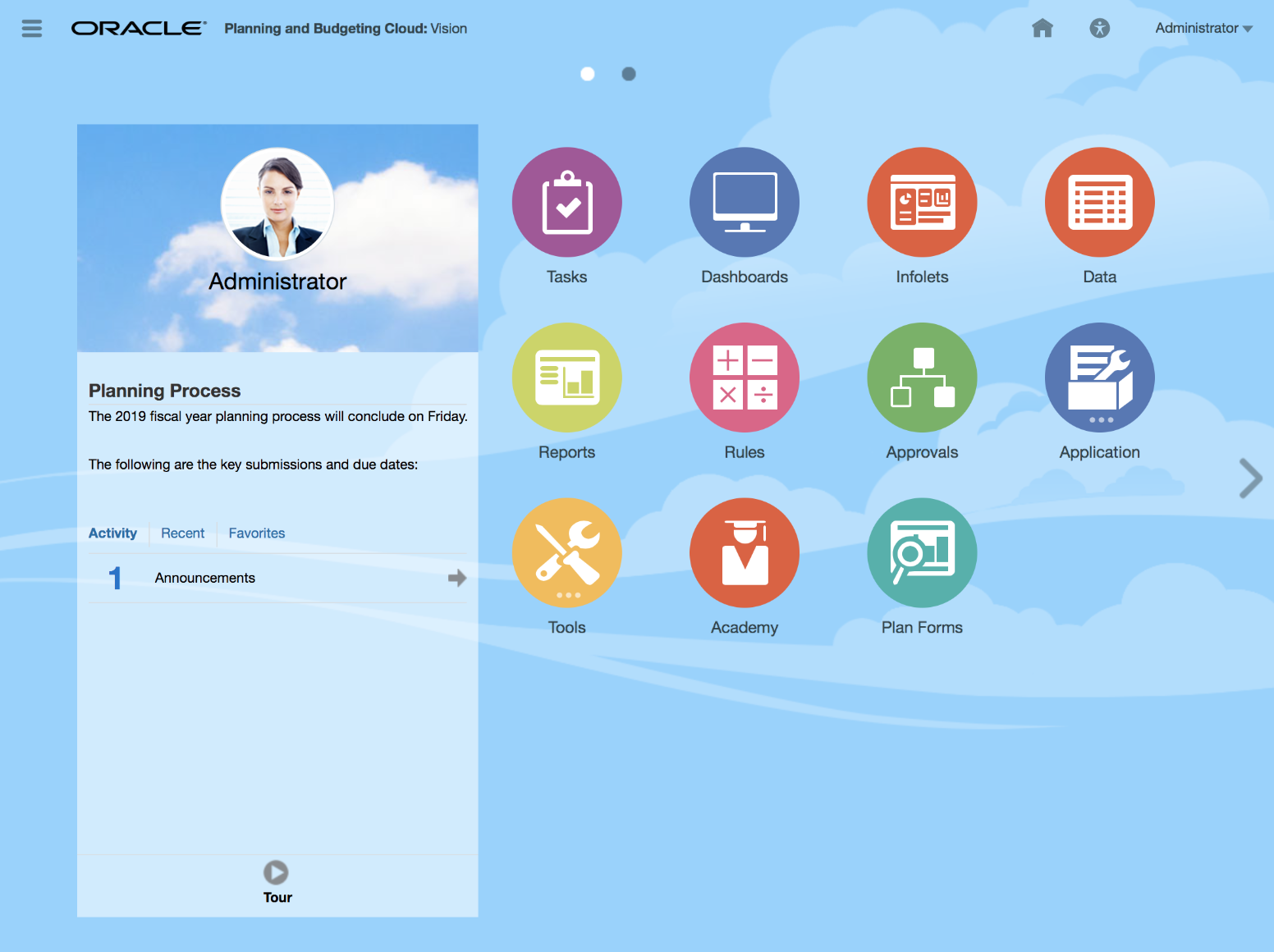
New Interface of Planning and Budgeting Cloud
The following services will adopt this new theme as their default interface:
- Oracle Planning and Budgeting Cloud
- Oracle Enterprise Planning and Budgeting Cloud
- Oracle Financial Consolidation and Close Cloud
- Oracle Tax Reporting Cloud
- Oracle Profitability and Cost Management Cloud
- Oracle Account Reconciliation Cloud
- Oracle Strategic Workforce Planning Cloud
- Oracle Sales Planning Cloud
The revised interface retains existing functionality and enhances your Home page experience with a more responsive design. The Welcome panel and the global header readjust after resizing, which means less scrolling. Clearer announcements and notification areas are added to the Welcome panel, as are arrows to help you navigate easily between the Home page and your infolets. A bigger Navigator menu has improved usability, more themes for customization are included, and a bigger work area has more space to maneuver and provide better visibility. The interface is more consistent with other Oracle products, such as Fusion Applications.
After the interface is released, all new customers will use the new lighter-colored Sky Blue theme, and existing customers will keep their current theme. You can switch themes using Tools, and then Appearance.
- Watch Overview: Preview EPM Cloud's New Look and Feel video to view highlights of the new user interface theme.
Software issues addressed each month will be posted to My Oracle Support.
---

Copyright © 2019, Oracle and/or its affiliates. All rights reserved.
This document is provided for information purposes only, and the contents hereof are subject to change without notice.This document is not warranted to be error-free, nor subject to any other warranties or conditions, whether expressed orally or implied in law, including implied warranties and conditions of merchantability or fitness for a particular purpose. We specifically disclaim any liability with respect to this document, and no contractual obligations are formed either directly or indirectly by this document. This document may not be reproduced or transmitted in any form or by any means, electronic or mechanical, for any purpose, without our prior written permission.
Oracle and Java are registered trademarks of Oracle and/or its affiliates. Other names may be trademarks of their respective owners.
Intel and Intel Xeon are trademarks or registered trademarks of Intel Corporation.All SPARC trademarks are used under license and are trademarks or registered trademarks of SPARC International, Inc. AMD, Opteron, the AMD logo, and the AMD Opteron logo are trademarks or registered trademarks of Advanced Micro Devices. UNIX is a registered trademark of The Open Group.
