
- Revision History
- Overview
- Pre-Update and Post-Update Tasks
- Optional Uptake of New Features (Opt In)
- Feature Summary
- Collaboration Messaging Framework
- Order Management
- IMPORTANT Actions and Considerations
This document will continue to evolve as existing sections change and new information is added. All updates appear in the following table:
| Date | Product | Feature | Notes |
|---|---|---|---|
| 27 APR 2022 | Collaboration Messaging Framework |
Retrieve Large Purchase Order Payloads for B2B Messaging | Updated document. Added a feature that was backported to update 22B in the May monthly maintenance pack. |
| 05 APR 2022 | Order Management | Selected Order Management Bug Fixes in This Update | Updated document. Revised description. |
| 28 MAR 2022 | Order Management | Selected Order Management Bug Fixes in This Update | Updated document. Revised description. |
| 18 MAR 2022 | Created initial document. |
IMPORTANT NOTE: If you are being updated directly from 21D to 22B you should review the content of both 22A and 22B sections to ensure you see all the changes included in the update.
 HAVE AN IDEA?
We’re here and we’re listening. If you have a suggestion on how to make our cloud services even better then go ahead and tell us. There are several ways to submit your ideas, for example, through the Ideas Lab on Oracle Customer Connect. Wherever you see this icon after the feature name it means we delivered one of your ideas.
GIVE US FEEDBACK
We welcome your comments and suggestions to improve the content. Please send us your feedback at oracle_fusion_applications_help_ww_grp@oracle.com.
DISCLAIMER
The information contained in this document may include statements about Oracle’s product development plans. Many factors can materially affect Oracle’s product development plans and the nature and timing of future product releases. Accordingly, this Information is provided to you solely for information only, is not a commitment to deliver any material, code, or functionality, and should not be relied upon in making purchasing decisions. The development, release, and timing of any features or functionality described remains at the sole discretion of Oracle.
This information may not be incorporated into any contractual agreement with Oracle or its subsidiaries or affiliates. Oracle specifically disclaims any liability with respect to this information. Refer to the Legal Notices and Terms of Use for further information.
Pre-Update and Post-Update Tasks
Depending on the features you're using in your Cloud applications, you may be required to perform certain steps immediately before or after your quarterly update. For details of these pre-update and post-update steps and the product areas that are affected, refer to Oracle SCM Cloud: Performing Your Quarterly Update (doc ID 2337485.1) on My Oracle Support.
Optional Uptake of New Features (Opt In)
Oracle Cloud Applications delivers new updates every quarter. This means every three months you'll receive new functionality to help you efficiently and effectively manage your business. Some features are delivered Enabled meaning they are immediately available to end users. Other features are delivered Disabled meaning you have to take action to make available. Features delivered Disabled can be activated for end users by stepping through the following instructions using the following privileges:
- Review Applications Offering (ASM_REVIEW_APPLICATIONS_OFFERINGS_PRIV)
- Configure Oracle Fusion Applications Offering (ASM_CONFIGURE_OFFERING_PRIV)
Here’s how you opt in to new features:
- Click Navigator > My Enterprise > New Features.
- On the Features Overview page, select your offering to review new features specific to it. Or, you can leave the default selection All Enabled Offerings to review new features for all offerings.
- On the New Features tab, review the new features and check the opt-in status of the feature in the Enabled column. If a feature has already been enabled, you will see a check mark. Otherwise, you will see an icon to enable the feature.
- Click the icon in the Enabled column and complete the steps to enable the feature.
In some cases, you might want to opt in to a feature that's not listed in the New Features work area. Here's how to opt in:
- Click Navigator > My Enterprise > Offerings.
- On the Offerings page, select your offering, and then click Opt In Features.
- On the Opt In page, click the Edit Features (pencil) icon for the offering, or for the functional area that includes your feature.
- On the Edit Features page, complete the steps to enable the feature.
For more information and detailed instructions on opting in to new features for your offering, see Offering Configuration.
Opt In Expiration
Occasionally, features delivered Disabled via Opt In may be enabled automatically in a future update. This is known as an Opt In Expiration. If your cloud service has any Opt In Expirations you will see a related tab in this document. Click on that tab to see when the feature was originally delivered Disabled, and when the Opt In will expire, potentially automatically enabling the feature. You can also click here to see features with Opt In Expirations across all Oracle Cloud Applications.
Column Definitions:
Report = New or modified, Oracle-delivered, ready to run reports.
UI or Process-Based: Small Scale = These UI or process-based features are typically comprised of minor field, validation, or program changes. Therefore, the potential impact to users is minimal.
UI or Process-Based: Larger Scale* = These UI or process-based features have more complex designs. Therefore, the potential impact to users is higher.
Features Delivered Disabled = Action is needed BEFORE these features can be used by END USERS. These features are delivered disabled and you choose if and when to enable them. For example, a) new or expanded BI subject areas need to first be incorporated into reports, b) Integration is required to utilize new web services, or c) features must be assigned to user roles before they can be accessed.
Collaboration Messaging Framework
Retrieve Large Purchase Order Payloads for B2B Messaging
Configure Oracle Collaboration Messaging Framework to process large purchase orders (typically more than 2,000-lines) when you initiate B2B communication. The payload for a large purchase order is retrieved in small parts from Oracle Purchasing and then combined and delivered as one purchase order, resulting in improved performance. This feature is available in the May monthly maintenance pack for update 22B.
After you enable the feature, enter a value in the Large PO Processing section of the Manage Collaboration Messaging Configuration page in the Large PO Minimum Line Count field to specify the minimum number of lines in a large PO. Then enter a value in the PO Lines Retrieved in a Single Query field to specify the number of lines to retrieve from Oracle Purchasing in each part (1000 lines by default). The values you set in the Large PO Delivery Duration (30 minutes by default) and Large PO Delivery Attempt Interval (3 minutes by default) fields indicate how long and how often to attempt delivery of the PO.

Large Purchase Order Processing in Manage Collaboration Messaging Configuration
Steps to Enable
Use the Opt In UI to enable this feature. For instructions, refer to the Optional Uptake of New Features section of this document.
Offering: Order Management
Tips And Considerations
A purchase order with more than 2,000 lines is considered a large purchase order, but you can determine the minimum line count for your large purchase orders based on your specific business needs.
Key Resources
- Oracle Supply Chain Management Cloud: Configuring and Managing B2B Messaging guide available on the Oracle Help Center.
Role Information
You have a couple of options for giving people access to this feature, depending on whether you're assigning them predefined job roles or your own configured job roles.
- Users who are assigned this predefined job role can access this feature:
- B2B Administrator (ORA_CMK_B2B_ADMINISTRATOR_ABSTRACT)
- Users who are assigned configured job roles that contain this privilege are able to access this feature:
- Manage Collaboration Messaging Configuration (CMK_MANAGE_COLLAB_MESG_CONFIG_PRIV)
Project-Driven Supply Chain is an end-to-end, integrated solution across the Oracle Fusion Cloud Supply Chain Management and Oracle Fusion Cloud Project Management applications. This solution is designed to support various business processes of manufacturing and asset-intensive companies.
You can use the Project-Driven Supply Chain solution to manage your supply chain processes in the context of projects without creating separate organizations for each project. You can also capture supply chain costs as project expenditures.
After you opt in to the feature named Project-Driven Supply Chain, you can use the feature described in this section.
Release Recommendations for Transfers of Project Supplies
In a variety of project-driven enterprises, only a subset of supplies of an item can be used to satisfy the demand for that item. The typical approach is to dedicate supplies to particular projects or tasks by striping the supplies and demands by project and task attributes. For example, on-hand inventory or purchase orders would be striped by project and task. In this scenario, only the on-hand or purchase order supply that match the project and task requirements can be used to satisfy say, a sales order demand. However, this approach may lead to situations where you have excess supplies for some projects.
To reduce inventory costs, it’s useful to check for excess supplies across projects prior to ordering new supply for a project. You can set up flexible rules to enable this type of search when plans are created using the Oracle Fusion Cloud Supply Planning work area.
With this update, the result of such a plan will produce a recommendation to move supplies from one project or task with excess to another with a shortage. Planners can choose to reduce excess in your project supplies by releasing recommendations from the plan to change the project attribution on the following documents, and the subsequent execution steps will proceed accordingly:
- Purchase order schedules that aren't received or invoiced
- Transfer order lines that aren't shipped
- Work orders with unreleased status
- On-hand inventory which is either striped with project and task or not striped with project ans task common inventory
Example of how you can configure plan options to release recommendations for transfer of project supplies:

Example of how you can release recommendations for transfer of project supplies from Supply Planning:

Example of how you can release recommendations for transfer of common supplies to a project from Supply Planning:

Enable efficient use of on-hand and on-order supplies in a project-driven supply chain environment.
Watch a Demo.
Steps to Enable
Use the Opt In UI to enable this feature. For instructions, refer to the Optional Uptake of New Features section of this document.
Offering: Supply Chain Planning
Enable the Plan Project-Specific Supply feature as follows:
- If your enterprise doesn’t use Oracle Supply Chain Execution Cloud:
- In the Offerings work area, select the Supply Chain Planning offering. Click Opt In Features.
- On the Opt In: Supply Chain Planning page, click the Features icon for the Supply Chain Planning offering.
- Enable the Project-Driven Supply Chain feature, and then enable the Plan Project-Specific Supply feature.
- If your enterprise uses Oracle Supply Chain Execution Cloud and has already opted in to the Project-Driven Supply Chain feature:
- In the Offerings work area, select either the Manufacturing and Supply Chain Materials Management offering or the Supply Chain Planning offering. Click Opt In Features.
- On the Opt In page, click the Features icon for the offering.
- Enable the Plan Project-Specific Supply feature.
- If your enterprise uses Oracle Supply Chain Execution Cloud and hasn't already opted in to the Project-Driven Supply Chain feature:
- In the Offerings work area, select either the Manufacturing and Supply Chain Materials Management offering or the Supply Chain Planning offering. Click Opt In Features.
- On the Opt In page, click the Features icon for the offering.
- Enable the Project-Driven Supply Chain feature, and then enable the Plan Project-Specific Supply feature.
- Perform the required setup for the Project-Driven Supply Chain feature. For details, refer to the Project-Driven Supply Chain chapter in the Implementing Manufacturing and Supply Chain Materials Management guide on the Oracle Help Center.
After opt in is enabled, perform these steps to begin consuming forecasts by planning attributes including project and task:
- Create an unconstrained supply plan or demand and supply plan
- Assign an attribute-based netting rule with Project Group, Project, and Task planning attributes
- Select the Enable movement of supply between projects and tasks option in the General subtab of the Supply tab
- Run the plan
- Release recommendations for transfer of project supplies to Oracle Cloud SCM
Tips And Considerations
- Common supplies reserved to project demands can't be released for transfer of project supplies to Oracle Cloud SCM.
- Common and project In-transit shipments, shipments in receiving, and purchase requisition supplies pegged to project demands with a different project and task can't be released for transfer of project supplies to oracle Cloud SCM.
- Common transfer orders interfaced to order management pegged to project demands can't be released for transfer of project supplies to Oracle Cloud SCM.
- On hand project transfers in Inventory will be transacted in First In First Out basis
- The Number of Days to Calculate Pegging plan option should be either null or equal to plan horizon. Release of recommendations for transfer of project supplies is supported for supplies and demands for which pegging is computed by the plan.
Key Resources
Role Information
- Users who are assigned any of these predefined job roles or configured job roles that contain these privileges in Supply Chain Planning are automatically able to access this feature and release recommendations:
- Job Roles
- Supply Chain Planner (ORA_MSC_SUPPLY_CHAIN_PLANNER_JOB)
- Materials Planner (ORA_MSC_MATERIALS_PLANNER_JOB)
- Privileges
- Monitor Supply Planning Work Area (MSC_MONITOR_SUPPLY_PLANNING_WORK_AREA_PRIV)
- Monitor Demand and Supply Planning Work Area (MSC_MONITOR_DEMAND_AND_SUPPLY_PLANNING_WORK_AREA_PRIV)
- Job Roles
- Users who are assigned any of these predefined job roles or configured job roles that contain these privileges in Supply Chain Orchestration are automatically able to access this feature and release recommendations:
- Job Role
- Supply Chain Operations Manager (ORA_DOS_SUPPLY_CHAIN_OPERATIONS_MANAGER_JOB)
- Privileges
- Edit Supply Orders (DOS_EDIT_SUPPLY_ORDERS_PRIV)
- Manage Supply Request Exceptions (DOS_MANAGE_SUPPLY_REQUEST_EXCEPTIONS_PRIV)
- Process Supply Order Interface (DOS_PROCESS_SUPPLY_ORDER_INTERFACE_PRIV)
- Purge Supply Order Interface Data (DOS_PURGE_SUPPLY_ORDER_INTERFACE_PRIV)
- View Supply Order Exceptions and Status (DOS_VIEW_SUPPLY_ORDER_EXCEPTIONS_AND_STATUS_PRIV)
- View Supply Orders (DOS_VIEW_SUPPLY_ORDERS_PRIV)
- View Purchase Order (PO_VIEW_PURCHASE_ORDER_PRIV)
- Manage Inventory Transfer Order (INV_MANAGE_INVENTORY_TRANSFER_ORDER_PRIV)
- View Work Orders (WIP_VIEW_WORK_ORDERS_PRIV)
- Job Role
- Users who are assigned any of these predefined job roles or configured job roles that contain these privileges in Purchasing are automatically able to access this feature and release recommendations:
- Job Role
- Buyer (ORA_PO_BUYER_JOB)
- Privilege
- View Purchase Order (PO_VIEW_PURCHASE_ORDER_PRIV)
- Job Role
- Users who are assigned any of these predefined job roles or configured job roles that contain these privileges in Inventory are automatically able to access this feature and release recommendations:
- Job Roles
- Inventory Manager (ORA_INV_INVENTORY_MANAGER)
- Warehouse Manager (ORA_INV_WAREHOUSE_MANAGER)
- Privilege
- Process Inventory Attribute Transaction Request (INV_PROCESS_INVENTORY_ATTRIBUTE_TRANSACTION_REQUEST)
- Job Roles
- Users who are assigned any of these predefined job roles or configured job roles that contain these privileges in Manufacturing are automatically able to access this feature and release recommendations:
- Job Role
- Production Supervisor (ORA_WIE_PRODUCTION_SUPERVISOR_JOB)
- Privilege
- View Work Orders (WIP_VIEW_WORK_ORDERS_PRIV)
- Job Role
Keep the Dates for Your Sales Orders and Purchase Orders Synchronized
Use this feature to keep the dates on your sales order synchronized with the dates on the purchase order. If you update the shipment date, delivery date, or shipment method on a purchase order that you manually create or on an open purchase order that you revise, then this feature automatically updates these values on the sales order line and adds the reason for the change on the sales order line.
It applies to these types of items:
- Standard
- Pick-to-order
- Assemble-to-order
- Items that are part of a shipment set or kit
Business Benefit:
- Simplify your life and make fulfillment more efficient for your drop shipments.
- Improve your user experience. Your Order Entry Specialist will no longer have to manually make these changes on the sales order in the Order Management work area.
Steps to Enable
You don't need to do anything to enable this feature.
Tips And Considerations
- This feature comes predefined to set the reason to Update from Supplier.
- You can specify a different reason to meet your needs. Assume you want to change the reason to Update from Purchase Order. Here's how:
- Go to the Setup and Maintenance work area, then go to the task.
- Offering: Order Management
- Functional Area: Orders
- Task: Manage Order Lookups
- On the Manage Order Lookups page, search the Lookup Type attribute for DOO_SCHEDULE_REASON.
- Go to the Setup and Maintenance work area, then go to the task.

Manage Order Lookups
In the Lookup Codes area, in the row that has ORA_DOO_SUPPLIER_DATE_CHANGE in the Lookup Code column, change the value in the Meaning attribute to Update from Purchase Order.

Lookup Code
You can change the shipment date, delivery date, or shipment method only if the new value that you provide on the purchase order line is the same for all components that are part of the pick-to-order item, all items that are part of a kit, or all items that are part of a shipment set.
Key Resources
- Watch Keep the Dates for Your Sales Orders and Purchase Orders Synchronized Readiness Training
- Using Functional Setup Manager, available on the Oracle Help Center
- Oracle Supply Chain Management Cloud: Implementing Order Management
Role Information
- Users who are assigned any of these predefined job roles are automatically able to access this feature:
- Order Entry Specialist (ORA_FOM_ORDER_ENTRY_SPECIALIST_JOB)
- Order Manager (ORA_DOO_ORDER_MANAGER_JOB)
- In Procurement, you have a couple of options for giving people access to this feature, depending on whether you're assigning them predefined job roles or your own configured job roles.
- Users who are assigned any of these predefined job roles are automatically able to access this feature:
- Buyer (ORA_PO_BUYER_JOB)
- Supplier Customer Service Representative (ORA_POS_SUPPLIER_CUSTOMER_SERVICE_REPRESENTATIVE_JOB)
- Supplier Sales Representative (ORA_POS_SUPPLIER_SALES_REPRESENTATIVE_JOB)
- Users who are assigned configured job roles that contain this privilege are able to access this feature:
- Change Purchase Order (PO_CHANGE_PURCHASE_ORDER_PRIV)
- Users who are assigned any of these predefined job roles are automatically able to access this feature:
Send Parallel Approval Requests for Sales Orders
Send an approval request in parallel to more than one approver at the same time. In order to handle complex approval routing requirements, you can also set up multi-stage approval routing, with a mix of sequential and parallel stages and participants.
You can also use voting percentages to determine approval outcome based on the response from the first person who replies to the approval request or to drive order approval based on a consensus of responses from approvers.
- Reduce the time you need to approve a request. Its particularly helpful when you have a group of folks who can do the approval. You'll no longer have to wait for each approver to reply sequentially before proceeding to the next approver. Instead, do it in parallel.
- Allow the first person who replies to approve the request for the entire group. It can significantly reduce the time needed to get the approval done.
Watch a Demo.
Steps to Enable
Assume you need to create a staged flow.
- Go to the Setup and Maintenance work area, then go to the task
- Offering: Order Management
- Task: Manage Task Configurations for Supply Chain Management
- On the BPM Worklist page, enter SalesOrder in the search window, click Search Task Types, wait for the search to finish, then click ApprovalHumantask.
For background details about how to do this, see Guidelines for Setting Up Your Approval Task.
- Click Assignees, then notice that the Assignees area displays the Order Approval routing. Notice that the Order Approval routing has an inner box and an outer box. You click the inner box to add a participant. Click the outer box to add a stage.
- Click the outer box of the Order Approval step, click the pencil, click Add Stage > Add Sequential Stage, then notice that the approval routing now has another step that happens sequentially. Similarly, you can add a parallel stage as well.

Adding a New Stage
- Add a participant.
- Click Add Participant in the stage you just added, click the pencil, then click Add Participant > Add Parallel > Parallel.
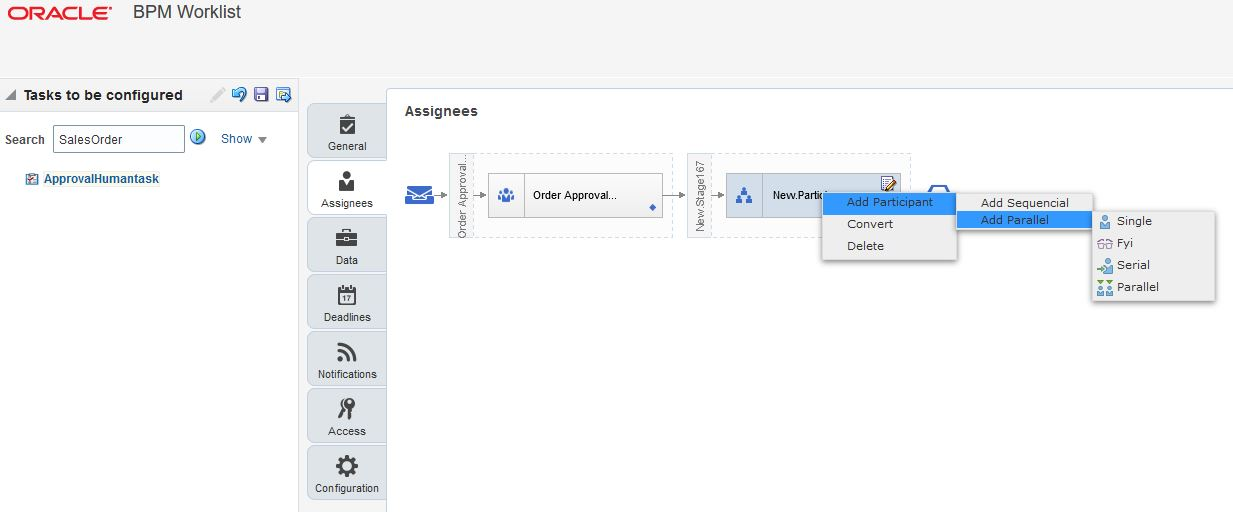
Adding a New Participant
- Every new participant has to be rule-based and if it is a parallel participant, you have to specify the voting percentage to determine the outcome.
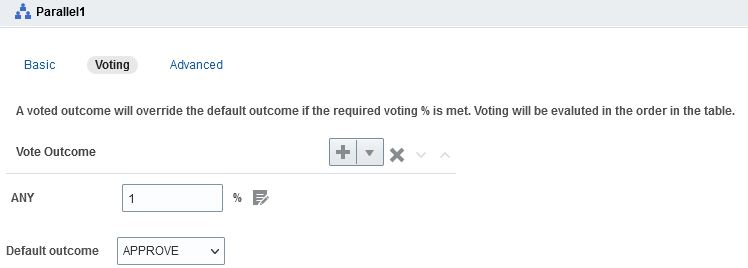
Voting Percentage for Parallel Participant
Watch a Setup Demo.
Tips And Considerations
- This feature doesn't affect approval rules that you create before release 22B. You can continue using your existing rules.
- You can use any attribute that you use in a sequential approval rule in a parallel rule.
Key Resources
- Watch Send Parallel Approval Requests for Sales Orders Readiness Training
- Overview of Setting Up Approval
- Get Approvals for Sales Orders
Role Information
- Order Manager
- Order Entry Specialist
Selected Order Management Bug Fixes in This Update
This update includes some bug fixes that can change the way Oracle Fusion Cloud Order Management works. This isn't a full list of all the bug fixes in this update. This list includes the bug fixes that can cause a noticeable change in application behavior.
Enable Your Items for Customer Orders
Starting in update 22B, when you import a sales order using any method except a REST API, Oracle Fusion Cloud Order Management validates that the Customer Ordered attribute and the Customer Orders Enabled attribute are set to Yes for the item. It does this for each item on each order line in your sales order. (Prior to update 22B, Order Management already does this validation when you import orders using a REST API.)
- If either attribute is set to No, then Order Management doesn't submit the sales order and instead displays an error message.
- If you search for items using the catalog line on the Create Order page or the Revise Order page, then Order Management displays only those items that pass validation. This validation also exists prior to update 22B.
- If you use the Order Management work area to add an item to an order line, save the order in Draft status and the item passes validation, but then change the Customer Ordered attribute or the Customer Orders Enabled attribute to No, then you can't submit the order.
- If you import an order line through an order import web service, and if the line fails the validation, then Order Management imports the order but sets the order to Draft status and doesn't submit it to order fulfillment.
Action required:
Make sure all items on open order lines that you created before update 22B will pass validation.
- Look at the Item Validation Organization parameter and identify the organization you use in your business unit. For details, see Manage Order Management Parameters.
- Someone who’s assigned a role to manage items in the Product Information Management work area must follow these steps to check the attributes on your items.
- In the Product Information Management work area, use the Manage Items task to search for and select your item in the organization you identified in step 1.
- Click Sales and Order Management, then set the Customer Ordered attribute and the Customer Orders Enabled attribute to Yes.
You need to do this only for items that Order Management validates, including any new order you create or any order you revise. You don't need to do this for any order line that Order Management doesn't validate. This includes lines that:
- Already shipped
- Were sent to Account Receivables
- Were cancelled or closed
- Were added through a product transformation rule
- Are part of a return
- Are a child of a configured item
- Are part of an internal material transfer
You can use a SQL query to identify the items you need to update. For details, see note 2853944.1 on My Oracle Support.
Oracle reference: 33197947
Steps to Enable
You don't need to do anything to enable this feature.
Specify a Value Set for the Domain Type in Your Matrix Class
Get values for an attribute on a pricing matrix according to a value set. Use the Domain Type attribute in a pricing matrix or matrix class to specify the value set. You can set the Validation Type attribute on the value set to Independent, Dependent, Subset, or Table.
Before this release, if you create a matrix rule that prices according to an attribute, you had to use values from a lookup, view object query, your own list, or an item extensible attribute. This feature allows you to:
- Use values from a value set in a matrix rule to adjust pricing according to an attribute on a price list or discount list.
- Use values from a value set to determine the pricing segment or pricing strategy assignment.
- Use the new Value Set domain type in the condition column of a pricing matrix or for a matrix class so you can use values from a value set as part of the condition.

Realize these benefits.
- Model business conditions in pricing rules that depend on attribute values derived from a value set.
- Choose from a wider range of attributes when you set up your matrix rule.
- Avoid having to do similar, redundant setups now that you can maintain values directly in the value set.
Steps to Enable
You don't need to do anything to enable this feature.
Tips And Considerations
- Use this new feature in the Pricing Administration work area.
- You can also use it when you manage your pricing rules through the following channels:
- REST API. Manage price lists, discount lists, pricing segments, or pricing strategy assignments.
- File-based data import. Import and update a batch of price lists or a discount list.
- ADF Desktop Integration. Manage a price list or discount list in a spreadsheet.
- Use the Manage Value Sets task in the Setup and Maintenance work area to specify the value set before you do your pricing set up or before you import. Set the Validation Type attribute on the value set to Independent, Dependent, Subset, or Table.
- Use a table based value set to validate the values for user defined item attributes that you specify in your pricing rules.
Key Resources
- Oracle SCM Cloud: Administering Pricing, available on the Oracle Help Center.
Role Information
- Job Roles:
- Pricing Administrator
- Pricing Manager
- Pricing Analyst
Use the Legal Entity Time Zone in Channel Revenue Management
Use the legal entity time zone when creating programs, accruals, adjustments, claims, and posting transactions. If the setting on the legal entity profile indicates that the legal entity time zone should be used, then all channel programs, claims, and other transactions will be displayed and processed for this time zone.
For Deductions and Settlement:
- These dates exist in user interfaces, REST services, and processing of claims.
- These processes include inbound AR integrations, claim creation, and settlement.

Claim UI - Dates in Legal Entity Time Zone
For Supplier Channel Management:
- These dates exist in user interfaces, REST services, and processing of programs, inbound supplier invoices, channel batches, and claims.
- These processes include program creation, eligibility, CSV upload, direct inbound integrations, batch creation, accrual creation, claim creation, and settlement.
- It is important to clarify that posting to GL has always been processed in legal entity time zone, so no change there.
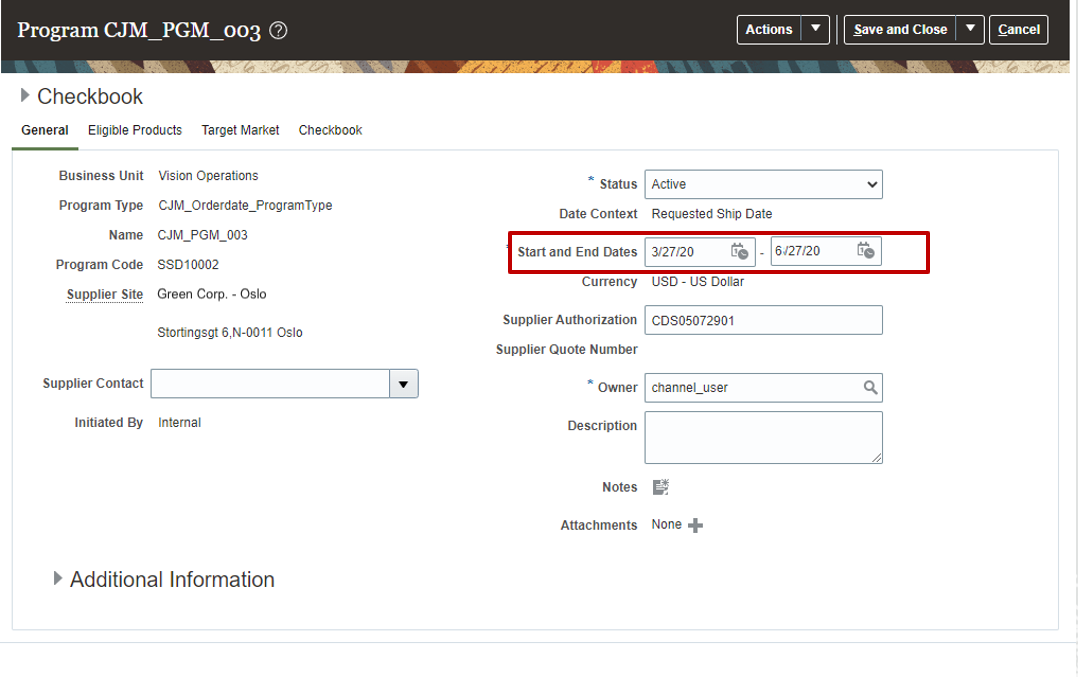
Program: General UI - Dates in Legal Entity Time Zone
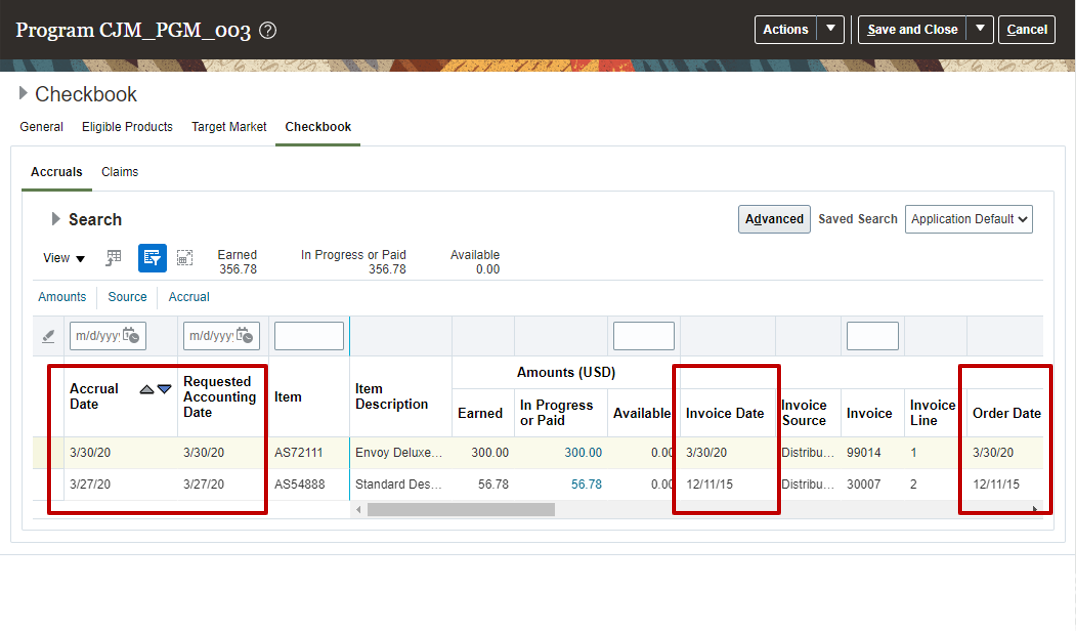
Program: Checkbook UI - Dates in Legal Entity Time Zone
Business Benefits:
- For Deductions and Settlement:
- Claims are processed in the same time zone as Financials.
- For Supplier Channel Management:
- Dates of supplier programs, adjustments and claims are processed in the same time zone as Financials.
Steps to Enable
- In the Financials offering, go to the task Manage Legal Entity Configurator Profile Options. Set the profile Enable Legal Entity Time Zone at the Site level.
- In the Order Management offering, enable the Channel Revenue Management functional area. Then opt in to the Supplier Channel Management and Use the Legal Entity Time Zone in Channel Revenue Management features.
- Alternatively, in the Procurement offering, enable the Purchasing > Supplier Incentives functional area. Then opt in to the Supplier Channel Management and Use the Legal Entity Time Zone in Channel Revenue Management features.
- For Deductions and Settlement only:
- In the Order Management offering, enable the Channel Revenue Management functional area. Then opt in to the Deductions and Settlement and Use the Legal Entity Time Zone in Channel Revenue Management features.
- Under the Financials offering and the Receivables functional area, navigate to the Manage Receivables System Options task. Search for and select your business unit. Click the Cash Processing tab. Select the Enable channel revenue management integration check box, and click Save.
Tips And Considerations
Before commencing enablement for the legal entity time zone feature, there are implementation considerations that need to be taken into account. Prior to this feature dates were treated in the server time zone. Consider if your server time zone is different than your legal entity time zone.
For Deductions and Settlement:
- Existing dates stamped in server time zone by Channel in existing claims and set ups will be treated as in the legal entity time zone.
- New claims and their processing are treated in the legal entity time zone.
For Supplier Channel Management:
- Existing dates stamped in server time zone by Channel in existing programs, accruals, adjustments and claims will be treated as in the legal entity time zone.
- New inbound transactions and new processing are treated in the legal entity time zone, including CSV uploads. So consider the business processes around the preparation of inbound transactions, as imported dates will be treated in the legal entity time zone.
- There are 2 exceptions for purchase order related dates: Requested Delivery Date and Requested Ship Date. They are displayed in Channel, as they were entered in the PO. Purchase Order does not capture a time zone for these dates. Channel will process these dates as is without any conversions.
- Another exception: The processing of the dates within the eligibility service REST will be in the legal entity time zone. However, all dates returned by the eligibility service REST are in Coordinated Universal Time (UTC).
Key Resources
- Watch Dates in Legal Entity Time Zone Readiness Training.
- Watch Supplier Channel Management Continuous Improvement Update 22A Readiness Training.
- Watch Deductions & Settlement Continuous Improvement Update 22A Readiness Training.
- For more information on Channel Revenue Management, refer to the Oracle Cloud Readiness content for Order Management.
- For more information on the Channel Revenue Management Integration with Receivables, refer to the Oracle Cloud Readiness content for Financials.
- Oracle SCM Cloud: Using Oracle Channel Revenue Management Cloud, available on the Oracle Help Center.
- Oracle SCM Cloud: Implementing Oracle Channel Revenue Management Cloud, available on the Oracle Help Center.
- Oracle SCM Cloud: REST API for Oracle SCM Cloud, available on the Oracle Help Center.
Role Information
- Users who are assigned this predefined job role are automatically able to access this feature:
- Supplier Channel Manager (ORA_CJM_SUPPLIER_CHANNEL_MANAGER_JOB)
Creates and administers supplier trade programs, optimizing the execution and impact of programs and promotions across the demand chain.
Import Additional Information from a Supplier Invoice Line Descriptive Flexfield Via a CSV File
Import additional information on a supplier invoice line in CSV upload. Additional information can be configured as a descriptive flexfield of a supplier invoice line in Supplier Channel Management. Use these details in eligibility rules to further qualify a supplier invoice for a rebate.
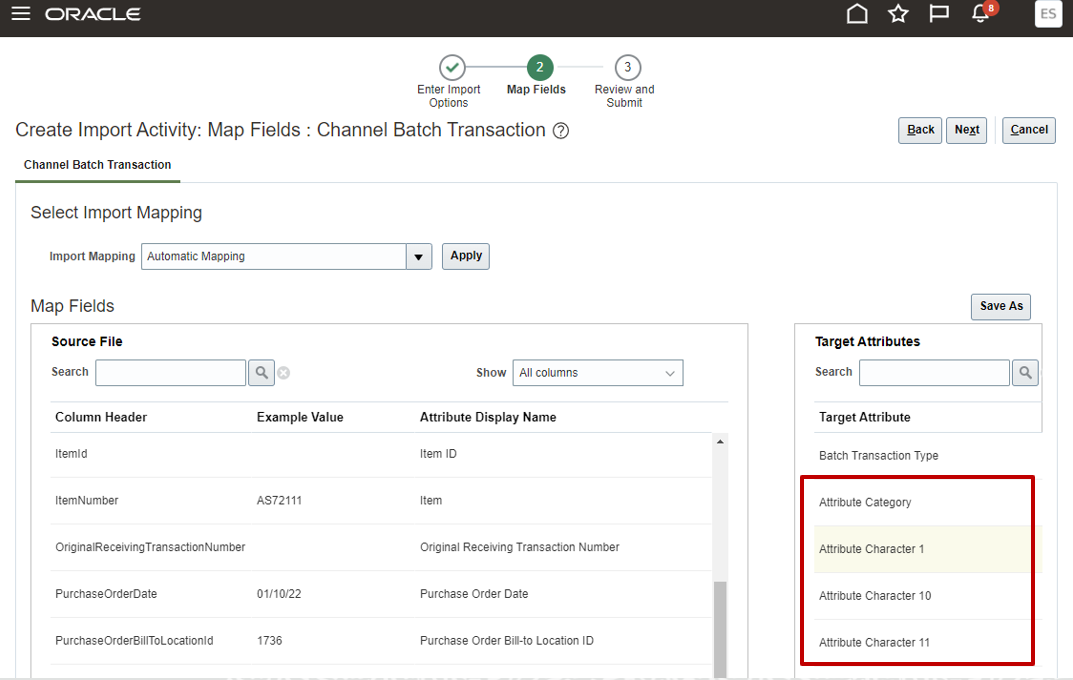
Import Supplier Invoices
Improve the configurability in qualifying supplier invoice lines for a rebate.
Steps to Enable
- In the Order Management offering, enable the Channel Revenue Management functional area. Then opt in to the Supplier Channel Management feature.
- Alternatively, in the Procurement offering, enable the Purchasing > Supplier Incentives functional area. Then opt in to the feature Supplier Channel Management feature.
- Plan and configure descriptive flexfields in Channel Revenue Management for the supplier invoice using the task Manage Channel Descriptive Flexfields, flexfield Channel Document Header DFF.
- Plan and configure descriptive flexfields in Channel Revenue Management for the supplier invoice line using the task Manage Channel Descriptive Flexfields, flexfield Channel Document Line DFF.
- Configure the global context descriptive flexfield as a qualifier if used to qualify supplier invoice lines for a rebate.
- Update Get Eligible Programs algorithm in Pricing.
- Add the lookup code for the qualifier to channel lookup ORA_CJM_SUP_REBATE_QUAL in Supplier Channel Management.
- Update Channel Program Eligibility matrix class in Pricing.
- Configure the program type and program to use the qualifier in Supplier Channel Management.
Tips And Considerations
Consider where and how to use these descriptive flexfields. Only global segment descriptive flexfields are supported as program qualifiers, not context-based segments. However, your implementation can import context-based segments if it doesn't use them as qualifiers.
Key Resources
- Watch Supplier Channel Management Enhancements Readiness Training.
- Oracle SCM Cloud: Using Oracle Channel Revenue Management Cloud, available on the Oracle Help Center.
- Oracle SCM Cloud: Implementing Oracle Channel Revenue Management Cloud, available on the Oracle Help Center.
- Oracle SCM Cloud: REST API for Oracle SCM Cloud, available on the Oracle Help Center.
Role Information
- Users who are assigned this predefined job role can access this feature:
- Supply Chain Integration Specialist (ORA_RCS_SUPPLY_CHAIN_INTEGRATION_SPECIALIST_JOB)
Use a Different Catalog for Alternate Supplier Sites in Supplier Annual Programs
Eligibility already supports a supplier catalog for the supplier of a supplier annual program.
This feature provides the additional capability to ensure that eligibility will qualify annual rebates from manufacturers based on purchases from distributors.
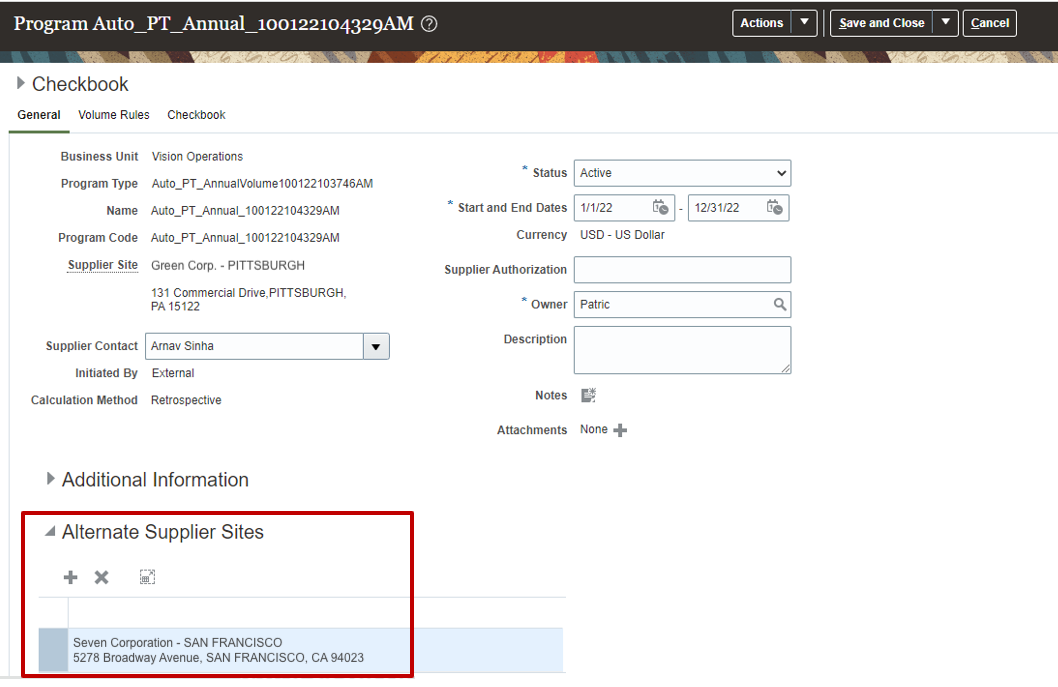
Create Annual Program
It is common in certain industries to have rebate relationships directly with a manufacturer but to buy from a distributor.
In this case, the supplier annual rebate program is from the manufacturer. The product rules are based on the manufacturer’s catalog for easier rule administration. But supplier invoices are from an alternate supplier site, or the distributor, and not the manufacturer.
This reduces the administration of supplier annual programs with alternate distributors through catalog-based product rules.
Steps to Enable
- In the Order Management offering, enable the Channel Revenue Management functional area. Then opt in to the Supplier Channel Management feature.
- Alternatively, in the Procurement offering, enable the Purchasing > Supplier Incentives functional area. Then opt in to the feature Supplier Channel Management feature.
- Create a catalog for the manufacturer.
- Create a supplier annual program for the manufacturer with an alternate supplier site and catalog-based product rules.
Key Resources
- Watch Supplier Channel Management Continuous Improvement Readiness Training.
- Oracle SCM Cloud: Using Oracle Channel Revenue Management Cloud, available on the Oracle Help Center.
- Oracle SCM Cloud: Implementing Oracle Channel Revenue Management Cloud, available on the Oracle Help Center.
- Oracle SCM Cloud: REST API for Oracle SCM Cloud, available on the Oracle Help Center.
Role Information
You have a couple of options for giving people access to this feature, depending on whether you're assigning them predefined job roles or your own configured job roles.
- Users who are assigned this predefined job role can access this feature:
- Supplier Channel Manager (ORA_CJM_SUPPLIER_CHANNEL_MANAGER_JOB)
- Users who are assigned a configured job role that contains this privilege can access this feature:
- Manage Supplier Claims (CJM_MANAGE_SUPPLIER_PROGRAMS_PRIV)
Extend Supplier Rebate Program Eligibility
Programmatically extend the eligibility algorithm to qualify receiving transactions or supplier invoices. For example, an extension could be the ability to support precedence when multiple rebates apply. Thus, a supplier rebate at the ship-to level takes precedence over a rebate at the account level.
Improves the extensibility and flexibility of eligibility to qualify supplier invoices lines for supplier rebates, thus reducing the cost of ownership.
Steps to Enable
- In the Order Management offering, enable the Channel Revenue Management functional area. Then opt in to the Supplier Channel Management feature.
- Alternatively, in the Procurement offering, enable the Purchasing > Supplier Incentives functional area. Then opt in to the feature Supplier Channel Management feature.
- Plan and configure the Get Eligible Programs algorithm in Pricing.
Tips And Considerations
Consider additional communications to your program manager community regarding how eligibility works, because there is no user indication in any program that eligibility has been programmatically extended.
Key Resources
- Watch Supplier Channel Management Enhancements Readiness Training.
- Oracle SCM Cloud: Using Oracle Channel Revenue Management Cloud, available on the Oracle Help Center.
- Oracle SCM Cloud: Implementing Oracle Channel Revenue Management Cloud, available on the Oracle Help Center.
- Oracle SCM Cloud: Administer Pricing, available on the Oracle Help Center.
- Oracle SCM Cloud: REST API for Oracle SCM Cloud, available on the Oracle Help Center.
Role Information
You have a couple of options for giving people access to this feature, depending on whether you're assigning them predefined job roles or your own configured job roles.
- Users who are assigned any of these predefined job roles can access this feature:
- Pricing Manager (ORA_QP_PRICING_MANAGER_JOB)
- Pricing Administrator (ORA_QP_PRICING_ADMINISTRATOR_JOB)
- Users who are assigned a configured job role that contains this privilege can access this feature:
- Manage Pricing Algorithms (QP_MANAGE_PRICING_ALGORITHMS_PRIV)
Specify Exchange Rate Date for Manual Adjustments to Supplier Programs
Optionally override an exchange rate date when the adjustment currency is not the same as the ledger currency. If an exchange rate date is not provided, then the adjustment approval date is used.
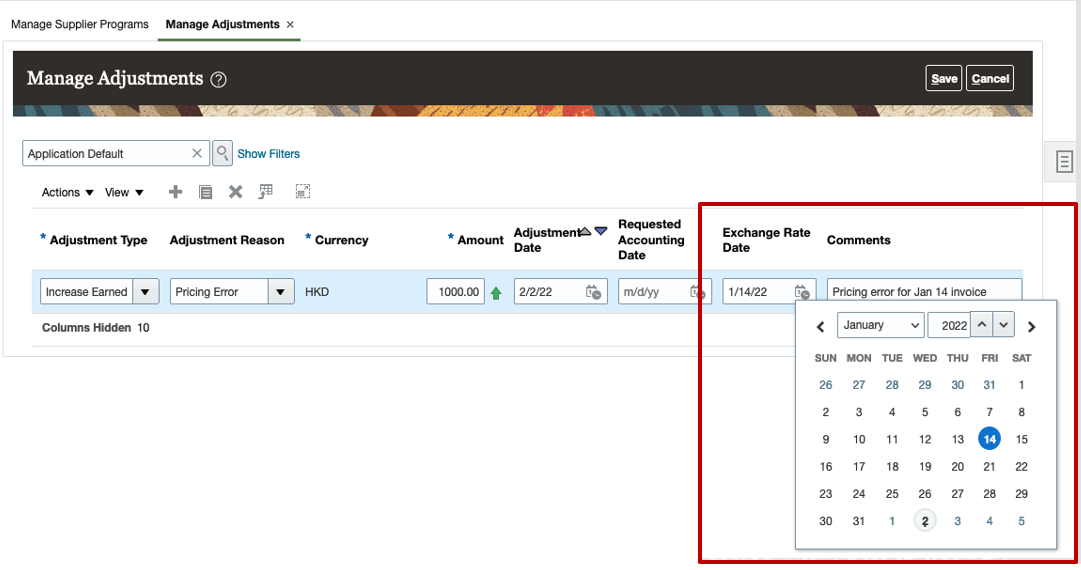
Create Adjustment UI
Adjustments can reverse an available accrual at the exchange rate of the original accrual, or at the exchange rate of the original invoice.
Steps to Enable
- In the Order Management offering, enable the Channel Revenue Management functional area. Then opt in to the Supplier Channel Management feature.
- Alternatively, in the Procurement offering, enable the Purchasing > Supplier Incentives functional area. Then opt in to the feature Supplier Channel Management feature.
- Configure exchange rates in Financials.
Tips And Considerations
In use, this feature is applicable only for adjustments in a currency different than the ledger currency; otherwise there is no need for a currency conversion. For instance use this, if your adjustment is in Canadian dollars for a Canadian dollar program in a US dollar ledger.
Key Resources
- Watch Supplier Channel Management Continuous Improvement Readiness Training.
- Oracle SCM Cloud: Using Oracle Channel Revenue Management Cloud, available on the Oracle Help Center.
- Oracle SCM Cloud: Implementing Oracle Channel Revenue Management Cloud, available on the Oracle Help Center.
- Oracle SCM Cloud: REST API for Oracle SCM Cloud, available on the Oracle Help Center.
Role Information
You have a couple of options for giving people access to this feature, depending on whether you're assigning them predefined job roles or your own configured job roles.
- Users who are assigned this predefined job role can access this feature:
- Supplier Channel Manager (ORA_CJM_SUPPLIER_CHANNEL_MANAGER_JOB)
- Users who are assigned a configured job role that contains this privilege can access this feature:
- Manage Supplier Manual Adjustments (CJM_MANAGE_SUPPLIER_MANUAL_ADJUSTMENT_PRIV)
Provides research, administration, analysis, and settlement functionalities to quickly resolve deductions and settle claims, improving customer relationships and overall financial performance.
Capture Descriptive Flexfields from Receipt on the Deduction Claim
Capture additional information from descriptive flexfields on the Receivables receipt application line on the customer claim. You can view these details on the claim and use this to help with claim investigation.
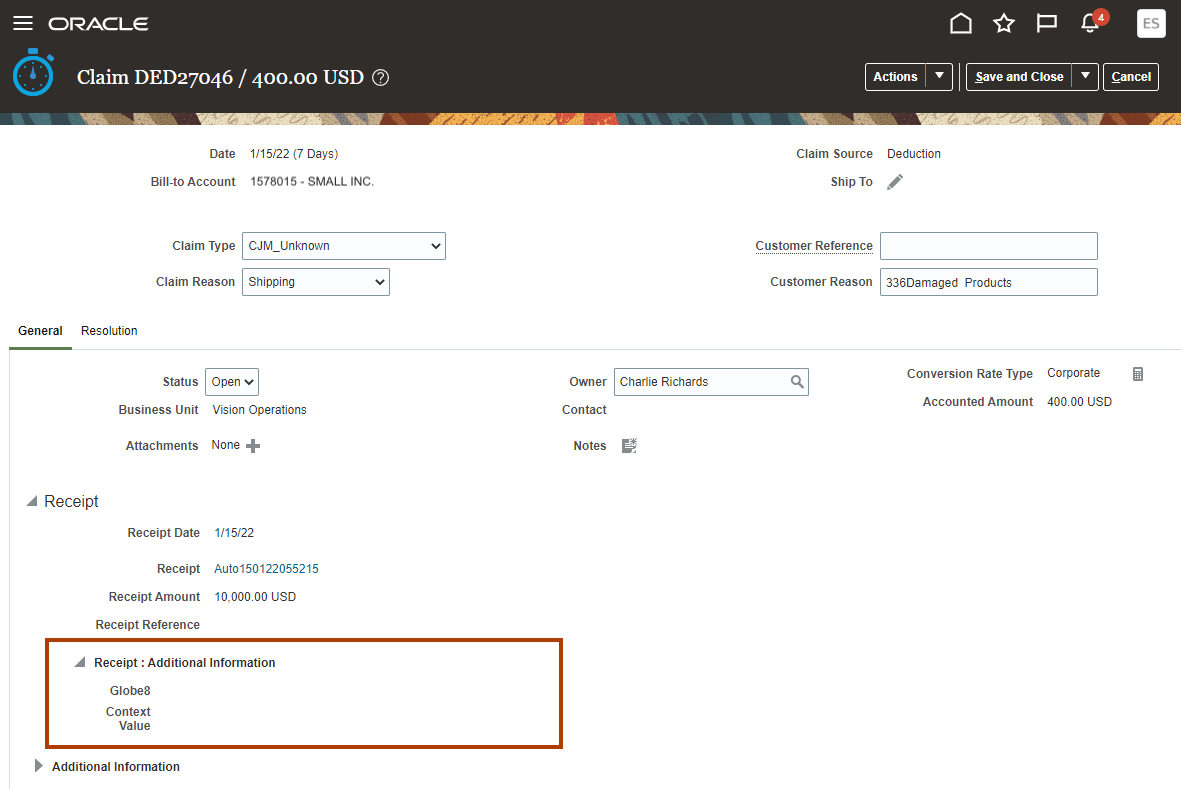
Update Claim UI - Receipt Descriptive Flexfield
Improves the productivity of claim investigation because analysts can see pertinent additional details of a receipt application line without having to drill down to the Receivables receipt.
Steps to Enable
- In the Order Management offering, enable the Channel Revenue Management functional area. Then opt in to the feature Deductions and Settlement.
- Under the offering Financials and functional area Receivables, navigate to the task Manage Receivables System Options. Search for and select your business unit. Click the Cash Processing tab. Select the Enable channel revenue management integration check box, and click Save.
Key Resources
- Watch Deductions & Settlement Continuous Improvement Readiness Training.
- For more information on Channel Revenue Management, refer to the Oracle Cloud Readiness content for Order Management.
- For more information on the Channel Revenue Management Integration with Receivables, refer to the Oracle Cloud Readiness content for Financials.
- Oracle SCM Cloud: Using Oracle Channel Revenue Management Cloud, available on the Oracle Help Center.
- Oracle SCM Cloud: Implementing Oracle Channel Revenue Management Cloud, available on the Oracle Help Center.
- Oracle SCM Cloud: REST API for Oracle SCM Cloud, available on the Oracle Help Center.
Role Information
You have a couple of options for giving people access to this feature, depending on whether you're assigning these predefined job roles or your own configured job roles.
- Users who are assigned this predefined job role are automatically able to access this feature:
- Channel Claims Manager (ORA_CJM_CLAIMS_MANAGER_JOB)
- Users who are assigned configured job roles that contain these privileges are able to access this feature:
- Manage Customer Claims (CJM_MANAGE_CUSTOMER_CLAIMS_PRIV)
Use REST API to Update Project Attributes on Transfer Orders
Use this feature to update the project attributes on a transfer order that you import through the Supply Requests REST API resource. By doing so, you can:
- Maximize how you use excess supply for transfer orders that do or don't include project details.
- Minimize the cost of carrying excess inventory.
Here's how it works.
- You use the Supply Requests REST API to update a transfer order request. The request can include only the project and task, or the complete set of project attributes.
- If the request includes only the project and task, then Supply Chain Orchestration gets default values for the project attributes that the request doesn't have.
- Supply Chain Orchestration does a Project Accounting Transaction Control validation to validate values for all of the project attributes in the request.
- Supply Chain Orchestration sends the full set of validated project attributes to Inventory Management in the update request for the transfer order.
- Inventory Management updates the transfer order with the new set of project attributes.
- If the update fails, then Inventory Management returns an error, and the Supply Chain Orchestration work area displays it.
Steps to Enable
Review the REST service definition in the REST API guides, available from the Oracle Help Center > your apps service area of interest > REST API. If you're new to Oracle's REST services you may want to begin with the Quick Start section.
Tips And Considerations
Note that you can already create transfer orders with project attributes through the Supply Requests REST resource.
Key Resources
- See Using Supply Chain Orchestration and Supply Chain Orchestration on Oracle Help Center.
Role Information
Users who are assigned any of these predefined job roles can use this feature:
- Project Administrator (ORA_PJF_PROJECT_ADMINISTRATOR_JOB)
- Supply Chain Application Administrator (ORA_RCS_SUPPLY_CHAIN_APPLICATION_ADMINISTRATOR_JOB)
- Supply Chain Operations Manager (ORA_DOS_SUPPLY_CHAIN_OPERATIONS_MANAGER_JOB)
- Warehouse Operator (ORA_INV_WAREHOUSE_OPERATOR_JOB)
- Warehouse Manager (ORA_INV_WAREHOUSE_MANAGER_JOB)
- Inventory Manager (ORA_INV_WAREHOUSE_MANAGER_JOB)
- Project Accountant (ORA_PJF_PROJECT_ACCOUNTANT_JOB)
- Project Manager (ORA_PJF_PROJECT_MANAGER_JOB)
- Project Billing Specialist (ORA_PJF_PROJECT_BILLING_SPECIALIST_JOB)
No new privileges were delivered to support this feature.
Use File-Based Data Import to Update Project Attributes on Transfer Orders
Use this feature to update the project attributes on a transfer order that you import through file-based data import. When you do so, you can:
- Maximize how you use excess supply for transfer orders that do or don't include project details.
- Minimize the cost of carrying excess inventory.
Here's how it works.
-
You use the Supply Order template in file-based data import to update a transfer order request. The request can include only the project and task, or the complete set of project attributes.
-
If the request includes only the project and task, then Supply Chain Orchestration gets default values for the project attributes that the request doesn't have.
-
Supply Chain Orchestration does a Project Accounting Transaction Control (PATC) validation to validate values for all of the project attributes in the request.
-
Supply Chain Orchestration sends the full set of validated project attributes to Inventory Management in the update request for the transfer order.
-
Inventory Management updates the transfer order with the new set of project attributes.
-
If the update fails, then Inventory Management returns an error, and the Supply Chain Orchestration work area displays it.
Steps to Enable
You don't need to do anything to enable this feature.
Tips And Considerations
Note that you can already create transfer orders with project attributes through file-based data import.
Key Resources
- See Using Supply Chain Orchestration and Supply Chain Orchestration on Oracle Help Center.
Role Information
Use these predefined job roles:
- Project Administrator (ORA_PJF_PROJECT_ADMINISTRATOR_JOB)
- Supply Chain Application Administrator (ORA_RCS_SUPPLY_CHAIN_APPLICATION_ADMINISTRATOR_JOB)
- Supply Chain Operations Manager (ORA_DOS_SUPPLY_CHAIN_OPERATIONS_MANAGER_JOB)
- Warehouse Operator (ORA_INV_WAREHOUSE_OPERATOR_JOB)
- Warehouse Manager (ORA_INV_WAREHOUSE_MANAGER_JOB)
- Inventory Manager (ORA_INV_WAREHOUSE_MANAGER_JOB)
- Project Accountant (ORA_PJF_PROJECT_ACCOUNTANT_JOB)
- Project Manager (ORA_PJF_PROJECT_MANAGER_JOB)
- Project Billing Specialist (ORA_PJF_PROJECT_BILLING_SPECIALIST_JOB)
No new privileges were delivered to support this feature.
Release Recommendations for Purchase Orders That Don't Originate from Oracle Supply Planning
Your enterprise may allow your users or other systems to generate purchase orders in Oracle Fusion Cloud Procurement outside the planning process that Oracle Fusion Cloud Supply Planning enables. Previously, these purchase orders were collected and accounted for in the planning process, but the reschedule or cancel recommendations released from the planning work area weren't processed in Oracle Fusion Cloud Purchasing. With this update, if you or Oracle Supply Planning determine that a purchase order needs to be rescheduled or canceled, including the purchase orders generated outside the regular planning process, then you or Oracle Supply Planning can do so.
Example of how you can release reschedule recommendations for purchase orders that didn’t originate from Oracle Supply Planning to Oracle Procurement:
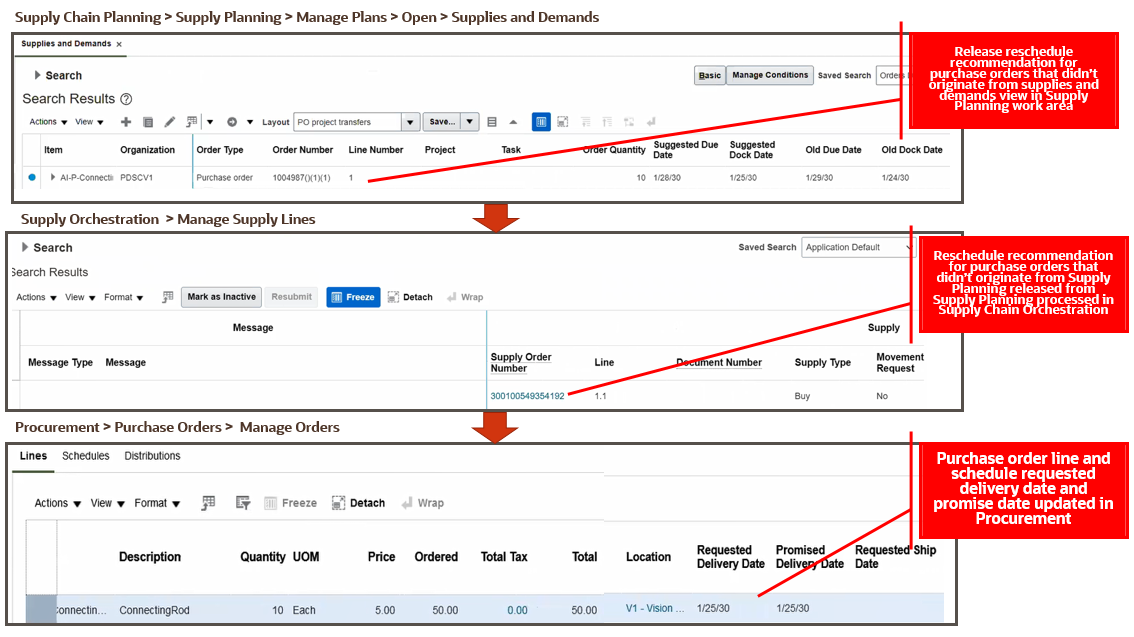
Improve control on purchase orders that didn’t originate from Oracle Fusion Cloud Supply Planning.
Watch a Demo.
Steps to Enable
You don't need to do anything to enable this feature.
Tips And Considerations
Oracle Supply Planning will release recommendations to update the Requested Delivery Date or Requested Ship Date attributes for a purchase order that didn't originate from Oracle Supply Planning depending on whether a purchase order is enabled for buyer managing transportation or not.
Key Resources
Role Information
- Users who are assigned any of these predefined job roles or configured job roles that contain these privileges in Supply Chain Planning are automatically able to access this feature and release recommendations
- Job Roles
- Supply Chain Planner (ORA_MSC_SUPPLY_CHAIN_PLANNER_JOB)
- Materials Planner (ORA_MSC_MATERIALS_PLANNER_JOB)
- Privileges
- Monitor Supply Planning Work Area (MSC_MONITOR_SUPPLY_PLANNING_WORK_AREA_PRIV)
- Monitor Demand and Supply Planning Work Area (MSC_MONITOR_DEMAND_AND_SUPPLY_PLANNING_WORK_AREA_PRIV)
- Job Roles
- Users who are assigned any of these predefined job roles or configured job roles that contain these privileges in Supply Chain Orchestration are automatically able to access this feature and release recommendations
- Job Role
- Supply Chain Operations Manager (ORA_DOS_SUPPLY_CHAIN_OPERATIONS_MANAGER_JOB)
- Privileges
- Edit Supply Orders (DOS_EDIT_SUPPLY_ORDERS_PRIV)
- Manage Supply Request Exceptions (DOS_MANAGE_SUPPLY_REQUEST_EXCEPTIONS_PRIV)
- Process Supply Order Interface (DOS_PROCESS_SUPPLY_ORDER_INTERFACE_PRIV)
- Purge Supply Order Interface Data (DOS_PURGE_SUPPLY_ORDER_INTERFACE_PRIV)
- View Supply Order Exceptions and Status (DOS_VIEW_SUPPLY_ORDER_EXCEPTIONS_AND_STATUS_PRIV)
- View Supply Orders (DOS_VIEW_SUPPLY_ORDERS_PRIV)
- View Purchase Order (PO_VIEW_PURCHASE_ORDER_PRIV)
- Job Role
- Users who are assigned any of these predefined job roles or configured job roles that contain these privileges in Purchasing are automatically able to access this feature and release recommendations
- Job Role
- Buyer (ORA_PO_BUYER_JOB)
- Privilege
- View Purchase Order (PO_VIEW_PURCHASE_ORDER_PRIV)
- Job Role
Control Shipment Cut-Off Times by Carrier and Destination
The last carrier pickup time for a transit mode and route may take place before an order is received making it infeasible to ship on the current date. Oracle Fusion Cloud Global Order Promising compares the current time with the cutoff time specified for the carrier and destination within the shipping organization. If the current time is later than the cutoff time, then Oracle Global Order Promising sets the shipment date to the next open day in the organization’s shipment calendar for the selected carrier to the customer’s location.

Order Shipment Cutoff Time column on the Interlocation Shipping Networks tab (Navigation: Plan Inputs work area > Manage Supply Network Model task > Interlocation Shipping Networks tab)
Generate more accurate promise dates for orders scheduled to ship the current day by moving them to the next open day in the calendar if they are too late to be picked up.
Watch a Demo.
Steps to Enable
Steps you must take for Oracle Global Order Promising to promise items using this feature:
- Navigate to the Maintain Supply Network Model page in the Plan Inputs work area
- On the Maintain Supply Network Model page, navigate to the Interlocation Shipping Networks tab to provide a cutoff time for a source, destination, and carrier combination, or to the Carriers tab to provide a cutoff time for a shipping method, or to the Organization tab to provide a cutoff time for an organization
- Enter the cutoff time in hh:mm format by making the appropriate selection
- Save the settings
Tips And Considerations
- Oracle Fusion Global Order Promising Cloud will use the following hierarchy to prioritize cutoff times, if they're defined in multiple tabs:
- Use the cutoff time defined for the source-destination-carrier combination, if applicable
- Use the cutoff time defined for the carrier, if applicable
- Use the cutoff time defined for the organization
- Cutoff times are applied only in cases where the scheduled ship date is calculated to be on the system date at the shipping organization, after considering all factors like lead time offsets, calendars and other constraints
- Cutoff times aren't supported for drop ship cases
Key Resources
Role Information
- Users who are assigned this predefined job role are automatically able to access this feature:
- Order Promising Manager (ORA_MSC_ORDER_PROMISING_MANAGER_JOB)
Create New Supplies Based on Earliest Date Constraint
In some industries, such as healthcare, there may be situations, such as a temporary product recall, where no new orders can be placed on a supply location until a specified date. With this update, Oracle Fusion Cloud Supply Planning honors the business requirement of creating new supply order recommendation only after the date.
You can configure each product's earliest supply creation date using the new Create Supply After attribute.
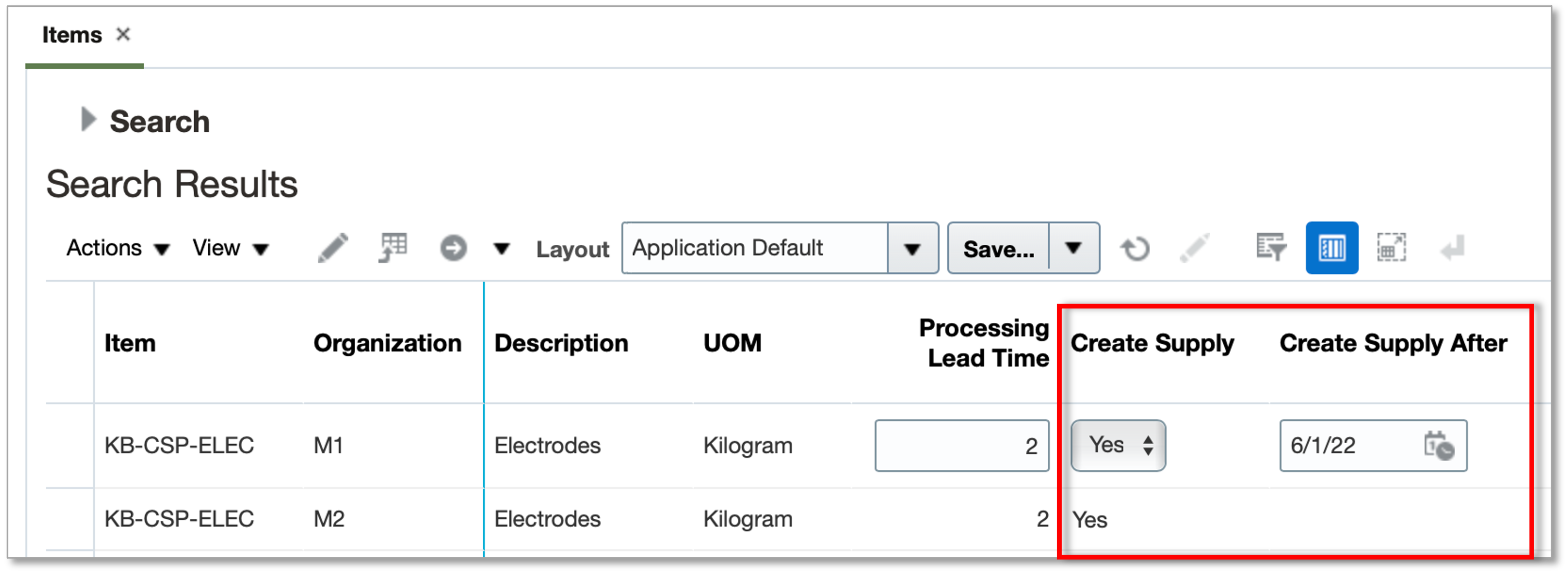
- The Create Supply attribute, a previously existing attribute, determines whether the plan can create a new supply for the item
- The Create Supply After attribute, a new attribute with this update, determines the earliest date a new supply can be created on.
Prior to this update, the Create Supply attribute was respected only in constrained supply plans. With this update, this attribute will also be respected in unconstrained supply plans.
With this update, both unconstrained and constrained supply plans use the new Create Supply After attribute to determine when to create the new supply.
These attributes control only creation of new make and buy planned orders. They don't control the creation of new transfer planned orders or reschedules of existing orders because the intent is to limit new orders while utilizing all possible existing inventory in the supply chain.
Honor date constraints for ordering new supplies of an item.
Steps to Enable
Use the Opt In UI to enable this feature. For instructions, refer to the Optional Uptake of New Features section of this document.
Offering: Supply Chain Planning No Longer Optional From: Update 22D
After opt in is enabled, perform these steps to begin using the earliest date constraint for new supplies:
- In the source system, edit the required items to specify the create supply after date, and then run data collections
- Create a supply plan or demand and supply plan
- Run the plan
Tips And Considerations
- Plans ensure that the the Suggested Due Date of any new make or buy supply is after the Create Supply After date. However, the other dates, such as Suggested Dock Date, can be prior to the Create Supply After date based on lead times.
- In aggregate planning buckets, the due dates are always at the end of the bucket while the dates released to the source system are at the beginning of the bucket. So in such cases the released date could fall prior to the Create Supply After date.
- If a demand is satisfied late due to the Create Supply After date constraint, then the Late Supply Pegged to Sales Order (or Forecast) exception is generated.
- The template for upload of items through file-based data import (FBDI) (the ScpItemImportTemplate.xlsm FBDI template) now includes the Create Supply After attribute.
- The REST services for Items (in Plan Inputs and Simulation Sets) now include the Create Supply After attribute.
Key Resources
- Watch Create New Supplies Based on Earliest Date Constraint Readiness Training.
- The Leverage New Item Attribute for Controlling the Supply Creation Date feature description on Oracle Cloud Readiness for Product Hub (release 21D)
Role Information
You have a couple of options for giving people access to this feature, depending on whether you're assigning them predefined job roles or your own configured job roles.
- Users who are assigned the following job roles are automatically able to access this feature:
- Supply Chain Planner (ORA_MSC_SUPPLY_CHAIN_PLANNER_JOB)
- Materials Planner (ORA_MSC_MATERIALS_PLANNER_JOB)
- Users who are assigned configured job roles that contain the following privileges are able to access this feature:
- Monitor Supply Planning Work Area (MSC_MONITOR_SUPPLY_PLANNING_WORK_AREA_PRIV)
- View Items (MSC_VIEW_ITEMS_PRIV)
Respect Organization-Specific Item Substitution Rules
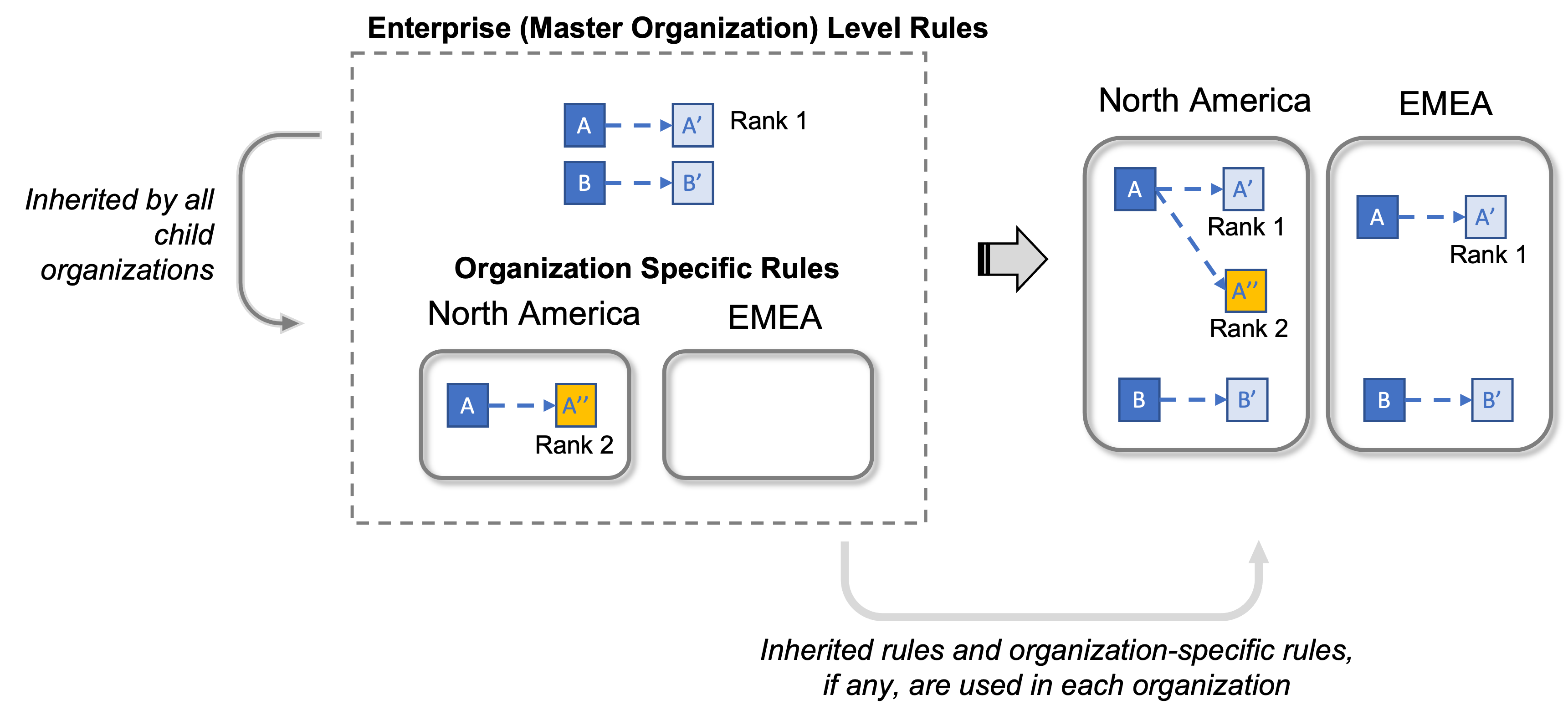
In a variety of industries, it’s desirable to substitute an ordered item with an equivalent item when there’s a shortage. Previously, you could set up end-item substitution rules globally only in the master inventory organization. With this update, you can set up more granular substitution rules for individual inventory organizations.
For example, you can set up one set of substitution rules for your organizations supporting North American sales and another set of substitution rules for your organizations supporting sales in another organization. However, you can also manage a set of rules globally that are applicable across the enterprise by specifying them centrally in the master organization which are then inherited by all organizations.
With this update, you can also use ranks assigned to these substitution rules to optimize selection of substitutes in a preferred order by the constrained supply plan. The rank isn't required, but if specified must be unique for that from item and organization where the rule is used.
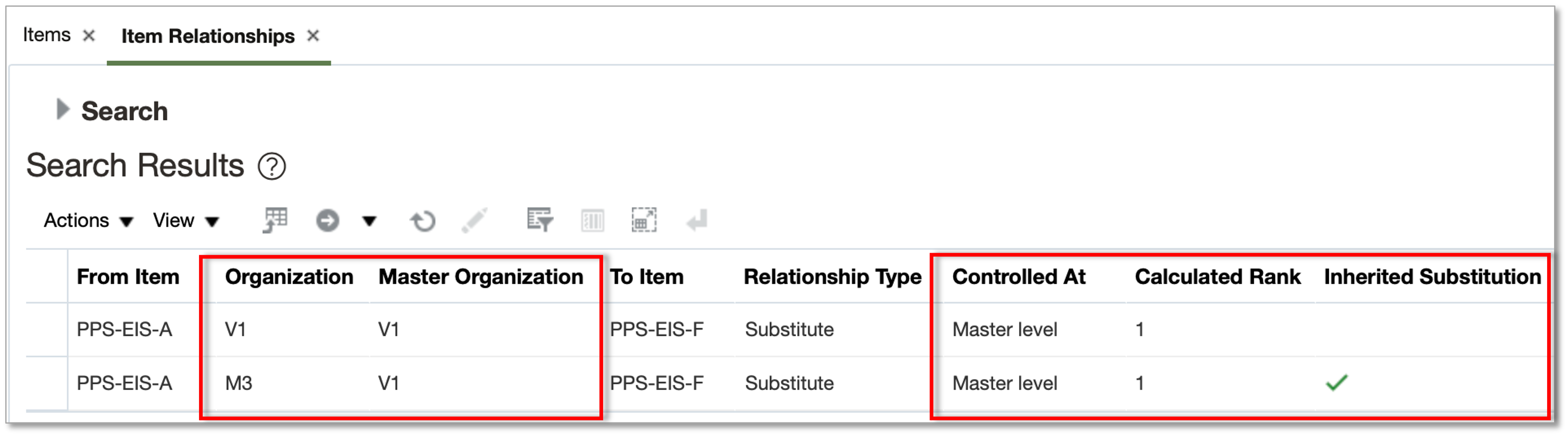
In this update, the Item Relationships table is enhanced to display the attributes of Organization, Master Organization,and Rank. The table also shows if the rule is controlled at the master organization or not. If the rule is controlled at the master organization, then the table shows both the rule specified at the master organization and the inherited rule in all the child organizations.
Set up and use granular control over end-item substitution.
Steps to Enable
Use the Opt In UI to enable this feature. For instructions, refer to the Optional Uptake of New Features section of this document.
Offering: Supply Chain Planning No Longer Optional From: Update 22D
Enable Respect Organization-Specific Item Substitution Rules feature as follows:
- In the Offerings work area, select the Supply Chain Planning offering. Click Opt In Features.
- On the Opt In: Supply Chain Planning page, click the Features icon for the Supply Chain Planning offering.
- Enable the Respect Organization-Specific Item Substitution Rules feature.
After opt in is enabled, perform these steps to begin using the user-defined attributes. Without this step, the feature will not be enabled.
- Collect Planning Data from the Oracle Fusion Source System (This feature is currently supported only for Oracle Fusion Source Systems)
Tips And Considerations
This feature is supported for only Oracle Fusion source systems. Therefore, for file-based data import (FBDI) used for external source systems, the file formats don't support upload of organization-specific substitution rules. However, if the feature is opted in to, then any rule uploaded using FBDI will be interpreted as global, and will be applicable to all organizations in that source system.
Key Resources
- Watch Respect Organization-Specific Item Substitution Rules Readiness Training.
- The Manage Related Items at the Organization Level readiness training available on Oracle Cloud Readiness for Product Hub in release 22A.
Role Information
You have a couple of options for giving people access to this feature, depending on whether you're assigning them predefined job roles or your own configured job roles.
- Users who are assigned the following job roles are automatically able to access this feature:
- Supply Chain Planner (ORA_MSC_SUPPLY_CHAIN_PLANNER_JOB)
- Materials Planner (ORA_MSC_MATERIALS_PLANNER_JOB)
- Users who are assigned configured job roles that contain the following privileges are able to access this feature:
- Monitor Supply Planning Work Area (MSC_MONITOR_SUPPLY_PLANNING_WORK_AREA_PRIV)
- View Items (MSC_VIEW_ITEMS_PRIV)
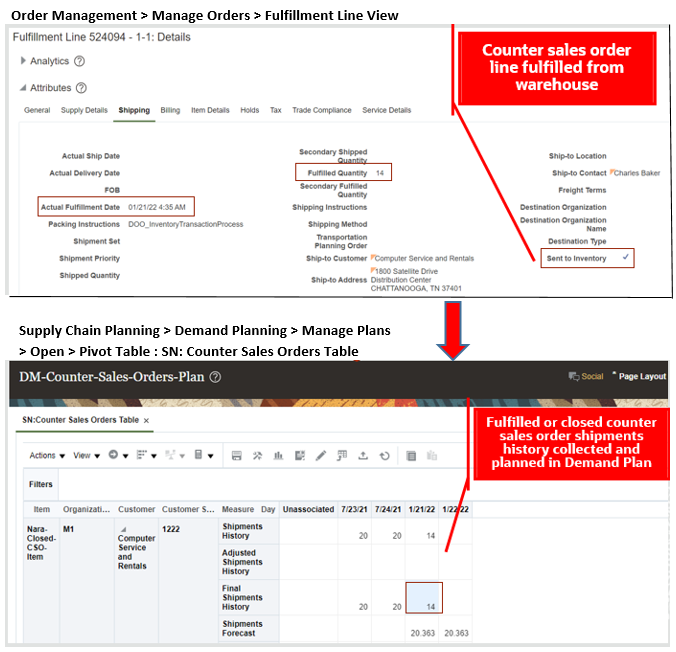
In industries such as wholesale distribution, some orders are fulfilled immediately from stock on hand, also known as counter sales. To improve the overall user experience associated with capturing transactions related to this fulfillment mode, Oracle Fusion Order Management Cloud now provides the ability to fulfill these orders without requiring picking and shipping transactions.
Oracle Fusion Cloud Demand Management and Oracle Fusion Cloud Supply Planning now support this fulfillment mode by collecting counter sales orders. Oracle Demand Management uses the history of all sales orders, including counter sales orders, to generate a forecast. Oracle Supply Planning not only ensures that there’s enough stock on hand to fulfill forecasted counter sales orders, but also ensures that the net demand calculations for the current time period account for this fulfillment mode.
Example of how you can consume forecast with fulfilled or closed counter sales orders in a Supply Plan which starts in order management and then is planned according in supply planning:

Example of how you can generate forecast from fulfilled or closed counter sales orders collected as shipments history in a Demand Plan:
Plan accurately by also considering sales orders fulfilled over the counter.
Watch a Demo.
Steps to Enable
Use the Opt In UI to enable this feature. For instructions, refer to the Optional Uptake of New Features section of this document.
Offering: Supply Chain Planning No Longer Optional From: Update 22D
In addition to opting in to this feature for the Supply Chain Planning offering, your site must opt in to the Reduce Inventory When a Sales Order Doesn't Require Picking or Shipping feature in the Order Management offering.
- If your site has already opted in to the Reduce Inventory When a Sales Order Doesn't Require Picking or Shipping feature in the Order Management offering, then you don't need to opt in to that feature again, but you do still need to opt in to the Plan Counter Sales Orders feature in the Supply Chain Planning offering
- If your site hasn't already opted in to the Reduce Inventory When a Sales Order Doesn't Require Picking or Shipping feature in the Order Management offering, then you need to opt in to that feature as well as the Plan Counter Sales Orders feature in the Supply Chain Planning offering
Tips And Considerations
- The Collections processes refer to the value set in Oracle Fusion Cloud Order Management for the Inventory Transaction Date for Order Lines Order Management parameter to derive the schedule ship date or demand date for the open counter sales orders for Oracle Fusion Cloud Supply Chain Planning.
- Counter sales orders that are interfaced to inventory are collected as closed sales orders or as part of bookings and shipments history to Oracle Fusion Cloud Supply Chain Planning.
- The Plan Counter Sales Orders feature isn't applicable to external source systems.
Key Resources
Role Information
You have a couple options for giving people access to this feature, depending on whether you're assigning them predefined job roles or your own configured job roles.
- Users who are assigned any of these predefined job roles are automatically able to access this feature:
- Supply Chain Planner (ORA_MSC_SUPPLY_CHAIN_PLANNER_JOB)
- Materials Planner (ORA_MSC_MATERIALS_PLANNER_JOB)
- Demand Planner (ORA_MSC_DEMAND_PLANNER_JOB)
- Demand and Supply Planner(ORA_MSC_DEMAND_AND_SUPPLY_PLANNER_JOB)
- Order Promising Manager (ORA_MSC_ORDER_PROMISING_MANAGER_JOB)
- Backlog Manager (ORA_MSC_BACKLOG_MANAGER_JOB)
- Replenishment Planner (ORA_MSC_REPLENISHMENT_PLANNER_JOB)
- Users who are assigned configured job roles that contain these privileges are able to access this feature:
- Monitor Supply Planning Work Area (MSC_MONITOR_SUPPLY_PLANNING_WORK_AREA_PRIV)
- Monitor Demand and Supply Planning Work Area (MSC_MONITOR_DEMAND_AND_SUPPLY_PLANNING_WORK_AREA_PRIV)
- Monitor Demand Management Work Area (MSC_MONITOR_DEMAND_MANAGEMENT_WORK_AREA_PRIV)
- Monitor Order Promising Work Area (MSC_MONITOR_ORDER_PROMISING_WORK_AREA_PRIV)
- Monitor Backlog Management Work Area (MSC_MONITOR_BACKLOG_MANAGEMENT_WORK_AREA_PRIV)
- Monitor Replenishment Planning Work Area (MSC_MONITOR_REPLENISHMENT_PLANNING_WORK_AREA_PRIV)
Order promising is a critical business process that must scale with demand and continue to operate even if hardware failures occur. Recent changes to Oracle Fusion Cloud Global Order Promising provide a scale-out architecture for availability checking and scheduling requests across a horizontal grid, enhancing capacity and resilience. The new architecture also reduces operational overhead, making supply and reference data updates immediately available, and eliminating the need to refresh/restart the order promising server.
Migration to the new architecture is continuing over several updates. In the interim, Oracle Global Order Promising will automatically route some special case requests to the prior memory-resident C++-based solution.
After you opt in to the feature named High-Volume Order Promising, you can use the feature described in this section.
Support Alternate Resources and Substitute Components in Primary Work Definitions
Some plants may have multiple resources that can perform the same job. If the primary resource isn’t available, the manufacturing work definition may identify one or more alternates. Capable-to-promise requests based on bills of resources will check availability and schedule production using these alternates when needed.
A work definition may also specify an alternate component or material to be used to produce an end item. If the primary component doesn’t meet demand on time, capable-to-promise requests based on bills of resources will now check the availability of alternates and schedule the alternative that reduces delay the most.
Provide earlier, more accurate promise dates by scheduling alternate resources and components when needed to reduce delays.
Steps to Enable
Use the Opt In UI to enable this feature. For instructions, refer to the Optional Uptake of New Features section of this document.
Offering: Supply Chain Planning
Tips And Considerations
When you opt in to use this feature, you must opt in to the feature named: High-Volume Order Promising. Opting in to the High-Volume Order Promising feature also enables the feature described here. If you previously opted in to the High-Volume Order Promising feature, then this feature is automatically enabled.
Key Resources
- The Support Capable-to-Promise for Manufactured Items (update 22A) readiness training available on Oracle Cloud Readiness for Order Management
Role Information
- Users who are assigned this predefined job role are automatically able to access this feature:
- Order Promising Manager (ORA_MSC_ORDER_PROMISING_MANAGER_JOB)
IMPORTANT Actions and Considerations
From time to time, Oracle replaces existing Cloud service features with new features, or removes existing features. Replaced features may be put on a path to removal. As a best practice, you should use the newer version of a replaced feature as soon as the newer version is available.
This section identifies the features in this Cloud service that have been replaced or will be removed.
| Product | Removed Feature | Target Removal | Replacement Feature | Replaced In | Additional Information |
|---|---|---|---|---|---|
| Pricing | Price Request SOAP Service | 22D | Document Prices REST API | 19A | No additional enhancements have been made to the Price Request SOAP service since update 19A. Until the SOAP service is removed in 22D, it will continue to work, but you should migrate to the Document Prices REST API at your earliest convenience. For details about the Document Prices REST API, refer to the REST API for Oracle Supply Chain Management Cloud documentation, available on the Oracle Help Center. |