
- Revision History
- Overview
- Pre-Update and Post-Update Tasks
- Optional Uptake of New Features (Opt In)
- Feature Summary
- Order Management
- IMPORTANT Actions and Considerations
This document will continue to evolve as existing sections change and new information is added. All updates appear in the following table:
| Date | Module | Feature | Notes |
|---|---|---|---|
| 13 FEB 2023 | Pricing | Selected Pricing Bug Fixes in This Update | Updated document. Added a new entry. |
| 10 JAN 2023 | Order Management | Selected Order Management Bug Fixes in This Update | Updated document. Added a new entry. |
| 06 OCT 2022 | Order Management | Specify When to Set Default Values for Tax Determinants | Updated document. Revised feature description. |
| 06 OCT 2022 | Global Order Promising | High-Volume Order Promising | Updated document. Revised description. |
| 21 SEP 2022 | Global Order Promising | Respect Supply Allocation Rules in the Quick Availability Check REST Service | Updated document. Revised feature description. |
| 16 SEP 2022 | Created initial document. |
 HAVE AN IDEA?
We’re here and we’re listening. If you have a suggestion on how to make our cloud services even better then go ahead and tell us. There are several ways to submit your ideas, for example, through the Ideas Lab on Oracle Customer Connect. Wherever you see this icon after the feature name it means we delivered one of your ideas.
GIVE US FEEDBACK
We welcome your comments and suggestions to improve the content. Please send us your feedback at oracle_fusion_applications_help_ww_grp@oracle.com.
DISCLAIMER
The information contained in this document may include statements about Oracle’s product development plans. Many factors can materially affect Oracle’s product development plans and the nature and timing of future product releases. Accordingly, this Information is provided to you solely for information only, is not a commitment to deliver any material, code, or functionality, and should not be relied upon in making purchasing decisions. The development, release, and timing of any features or functionality described remains at the sole discretion of Oracle.
This information may not be incorporated into any contractual agreement with Oracle or its subsidiaries or affiliates. Oracle specifically disclaims any liability with respect to this information. Refer to the Legal Notices and Terms of Use for further information.
Pre-Update and Post-Update Tasks
Depending on the features you're using in your Cloud applications, you may be required to perform certain steps immediately before or after your quarterly update. For details of these pre-update and post-update steps and the product areas that are affected, refer to Oracle SCM Cloud: Performing Your Quarterly Update (doc ID 2337485.1) on My Oracle Support.
Optional Uptake of New Features (Opt In)
Oracle Cloud Applications delivers new updates every quarter. This means every three months you'll receive new functionality to help you efficiently and effectively manage your business. Some features are delivered Enabled meaning they are immediately available to end users. Other features are delivered Disabled meaning you have to take action to make available. Features delivered Disabled can be activated for end users by stepping through the following instructions using the following privileges:
- Review Applications Offering (ASM_REVIEW_APPLICATIONS_OFFERINGS_PRIV)
- Configure Oracle Fusion Applications Offering (ASM_CONFIGURE_OFFERING_PRIV)
Here’s how you opt in to new features:
- Click Navigator > My Enterprise > New Features.
- On the Features Overview page, select your offering to review new features specific to it. Or, you can leave the default selection All Enabled Offerings to review new features for all offerings.
- On the New Features tab, review the new features and check the opt-in status of the feature in the Enabled column. If a feature has already been enabled, you will see a check mark. Otherwise, you will see an icon to enable the feature.
- Click the icon in the Enabled column and complete the steps to enable the feature.
In some cases, you might want to opt in to a feature that's not listed in the New Features work area. Here's how to opt in:
- Click Navigator > My Enterprise > Offerings.
- On the Offerings page, select your offering, and then click Opt In Features.
- On the Opt In page, click the Edit Features (pencil) icon for the offering, or for the functional area that includes your feature.
- On the Edit Features page, complete the steps to enable the feature.
For more information and detailed instructions on opting in to new features for your offering, see Offering Configuration.
Opt In Expiration
Occasionally, features delivered Disabled via Opt In may be enabled automatically in a future update. This is known as an Opt In Expiration. If your cloud service has any Opt In Expirations you will see a related tab in this document. Click on that tab to see when the feature was originally delivered Disabled, and when the Opt In will expire, potentially automatically enabling the feature. You can also click here to see features with Opt In Expirations across all Oracle Cloud Applications.
Column Definitions:
Report = New or modified, Oracle-delivered, ready to run reports.
UI or Process-Based: Small Scale = These UI or process-based features are typically comprised of minor field, validation, or program changes. Therefore, the potential impact to users is minimal.
UI or Process-Based: Larger Scale* = These UI or process-based features have more complex designs. Therefore, the potential impact to users is higher.
Features Delivered Disabled = Action is needed BEFORE these features can be used by END USERS. These features are delivered disabled and you choose if and when to enable them. For example, a) new or expanded BI subject areas need to first be incorporated into reports, b) Integration is required to utilize new web services, or c) features must be assigned to user roles before they can be accessed.
Use Order Management Extensions to Create, Read, Update, or Cancel Order Lines
Create a new line that isn't already related to an existing one. Before update 22D, you could only add a line that's related to a line on that order. Now you can create, read, update, or cancel an order line that has a standard item or service item and you don't have to reference an existing line. You can use this feature only if you price the sales order in Oracle Order Management.
Here's an example code snippet that uses the createNewLine method to create a new order line:
header.createNewLine
You can use the CreateLineParams() parameter with the createNewLine method.
Here's an example that creates a new line for an order where the CustomerPONumber attribute contains the value CreateStandaloneLine.
//---
import oracle.apps.scm.doo.common.extensions.CreateLineParams;
def poNumber = header.getAttribute("CustomerPONumber");
if(poNumber != "CreateStandaloneLine") return;
def createLineParams = new CreateLineParams(); // Initialize the new variable so we can send the required attributes.
createLineParams.setProductNumber("AS54888"); // Add the AS54888 item to the new line.
createLineParams.setOrderedUOM("Each"); // Set the unit of measure to Each.
createLineParams.setOrderedQuantity(10); // Set the ordered quantity to 10.
header.createNewLine(createLineParams); // Use the attribute values from the above lines to create the line. The extension will cascade the other ship to and bill to attribute values from the order header.
--//
You can configure the Order Management user interface to indicate whether Order Management automatically added an item. Assume you want to display the text Automatically added by system in the description of the item on the order line.
Use the Page Composer to update the Item.

Click Add in the Text Row


Add Condition for Attribute (AddedByExtensionFlag)

Add Text Which Should Be Displayed

Add Text Which Should Be Displayed Step 2 (select Font)

Run Time Display of the Added Text
Assume you have an icon name coverageinclude_ena.png, and you want to display it as part of item. You can use Page Composer to add it:

Add Icon File to the Item Using Page Composer
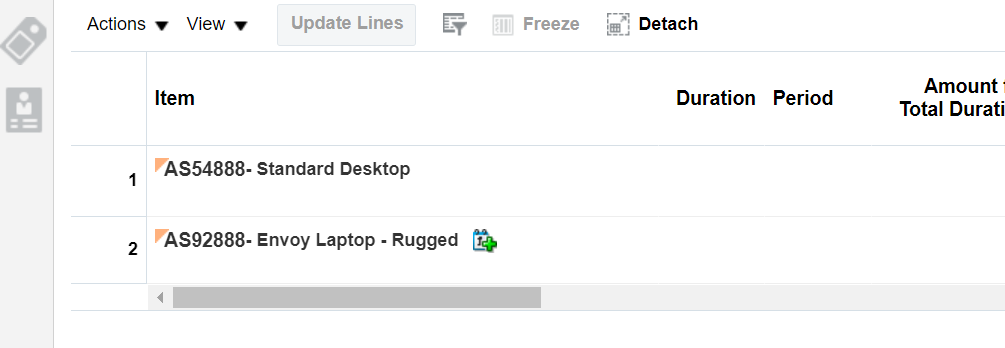
Run Time Display of Icon
Steps to Enable
You don't need to do anything to enable this feature.
Tips And Considerations
Use this feature to add an order line when you create a sales order or when you update an order line.
- As an option, you can specify a condition according to the values of an existing line to determine whether to add a new line.
- Use Oracle Pricing to price the item.
- If you use an order management extension to add a line, then the extension sets the AddedByExtensionFlag attribute to Y, and you can use it to determine whether an extension added the line.
- Use the createNewLine method on the order header.
- Use the setAttribute method on the order line to set values for order line attributes when you create the line. If you don't do this, then the order management extension will cascade values from the order header to the order line.
- If the AddedByExtensionFlag attribute contains Y, then it means you used an order management extension to add the line. Use this attribute when you want to update a line instead of creating a new one.
Use the createNewLine method only:
- With lines that you price in Oracle Pricing. If you use createNewLine with a line that you price in a source system, you will encounter an error.
- With the On Save event. If you use createNewLine with any other event, you will encounter an error.
- To create a line that contains a standard item. If you use createNewLine to create a line that contains a subscription or coverage, you will encounter an error.
You can't use the createNewLine method with a sales order that includes an internal material transfer because the pricing for an internal material transfer is frozen. Use this condition in your extension to skip adding a line when the order includes an internal material transfer:
If (header.getAttribute("TransactionDocumentTypeCode") == "TO") return;
For details, see Overview of Creating Order Management Extensions and Administering Pricing.
Key Resources
Specify When to Set Default Values for Tax Determinants
Order Management Parameter: Specify When to Set Default Values for Tax Attributes
Use this feature to specify when to apply default values for tax determinants. You can turn off the default behavior and instead set default values when you save or submit the sales order. You can also have Oracle Order Management set default values when you update attributes on the order header or the order.
Set the parameter to Set Defaults When You Modify Attributes and Order Management will set default values when you modify an attribute that affects tax on the order header or order line.

Order Management Parameter
Set the parameter to Set Default Values When Saving the Order and Order Management will set default values only when you save the sales order.

OM Parameter Value: Set Default Values When Saving the Order
Set the parameter to Set Default Values When Submitting the Sales Order and Order Management will set default values only when you submit the sales order. Order Management won't set default tax values while the order is in draft status. Order Management uses this behavior for orders that you create in the Order Management work area and for orders that you import.

Parameter Value: Set Default Value When Submitting the Sales Order
Set the parameter to Do Not Set Default Values and Order Management won't set the default value for any tax determinants. Use this setting when you want to calculate tax completely outside of Oracle Applications or when you import tax values into Order Management and you want to use those imported values. You might also consider using this setting if you have really big sales orders and you need to maintain a high level of performance. Calculating tax on very large orders might impact performance.

Parameter Value: Do Not Set Default Values
Here are the results.

Tax Determinants Values Are Not Set
Don't set the parameter to On Demand. The On Demand value is for a future release.
This feature gives you a lot flexibility for the values that you use to calculate tax. Use default values when you create the sales order or submit it in the Order Management work area, or only use values that you import. You can also improve performance when you have really big sales orders and you don't want to calculate tax for them.
You can also use an order management extension or transformation rule to automatically set default values.
Steps to Enable
- Go to the Setup and Maintenance work area, select the Order Management offering, then search for and open the Manage Order Management Parameters task.
- Use the new Specify Default Values for Tax Determines Order Management parameter to specify how you want to set the default values.
Tips And Considerations
If you use an order management extension to automatically create order lines when you import sales orders through ADFi, then the extension will set the default values even if you set the parameter to Set Defaults When You Modify Attributes. Order management extensions didn't automatically set these values in earlier updates.

Tax Determinants Values Are Set for Automatic Lines
Key Resources
Role And Privileges
- Order Entry Specialist
- Order Manager
Selected Order Management Bug Fixes in This Update
This update includes some bug fixes that can change the way Oracle Order Management works. This isn't a full list of all the bug fixes in this update. This list includes the bug fixes that can cause a noticeable change in application behavior.
Get Old Versions of Your Sales Orders Using REST API
Before update 22D, to get the latest version of a sales order using a REST API, you used the format /salesOrdersForOrderHub/{OrderKey}, where {OrderKey} is sourceOrderSystem:sourceOrderId.
If you had a draft order, then that draft became the latest version of the order. If you had a draft revision, then you couldn't use the order's URL to get the sales order that you submitted. Instead, you had to use the q parameter or one of the finders to return all versions of the order, and even then you couldn't use a GET request on the order header or order line to get extensible flexfields. Instead, you had to do a GET on the additionalInformation child resource, and you had to use that resource's URL with an expand=all parameter to expand the flexfield contexts.
After you update to 22D, as an alternative, you can use /salesOrdersForOrderHub/headerId to get to a specific version of the order. For example, use salesOrdersForOrderHub/57684 to get sales order with headerId 57684. Also, before update 22D, you used the q parameter or query finder to GET different versions of a sales order. When the REST API returned these versions, the URLs in the links section had the older OrderKey in the URL. For example, all versions of an order and its child resources would have salesOrdersForOrderHub/sourceOrderSystem:sourceOrderId in their URL. You could use the URL from the links section to get only the latest version of the sales order instead of an older version. After you update to 22D, the URL in the links section references the same version of the order that the resource's URL references.
Oracle reference: 34125301
Steps to Enable
You don't need to do anything to enable this feature.
Selected Pricing Bug Fixes in This Update
This update includes some bug fixes that can change the way Oracle Pricing works. This isn't a full list of all the bug fixes in this update. This list includes the bug fixes that can cause a noticeable change in application behavior.
Use Consistent Precision Across Entities
Before update 22D, Oracle Pricing applied precision differently across entities. For example, if you entered an amount in a price list in the Pricing Administration work area, then Pricing didn't limit your amount's precision, but if you entered an amount in a matrix rule, then it limited your amount's precision to 3 decimal places. Starting with update 22D, Pricing applies the same precision to all values that you enter in all entities.
Oracle reference: 25382636
Steps to Enable
You don't need to do anything to enable this feature.
Provides research, administration, analysis, and settlement functionalities to quickly resolve deductions and settle claims, improving customer relationships and overall financial performance.
Use a REST API to Write-Off a Deduction or Settle an Invalid Invoice Deduction Claim with a Chargeback
The Channel Customer Claims REST API is enhanced to write-off an invoice or non-invoice deduction claim, and to settle an invalid invoice deduction claim with a chargeback.
Resolve and settle customer claims with a REST service for improved productivity and effectiveness in taking control of customer deductions.
Steps to Enable
Use the Opt In UI to enable this feature. For instructions, refer to the Optional Uptake of New Features section of this document.
Offering: Order Management
- You must opt in to the functional area: Channel Revenue Management functional area. Then opt in to the feature: Deductions and Settlement.
- For Deductions and Settlement only:
- Under the offering: Financials and functional area: Receivables, navigate to the task: Manage Receivables System Options. Search for and select your business unit. Click the Cash Processing tab. Select the Enable channel revenue management integration check box and click Save.
Key Resources
- Watch Enhancements to Claim REST Services in Deductions & Settlement Readiness Training.
- Watch Deductions & Settlement Continuous Improvement Readiness Training.
- For more information on Channel Revenue Management, refer to the Oracle Cloud Readiness content for Order Management.
- For more information on the Channel Revenue Management Integration with Receivables, refer to the Oracle Cloud Readiness content for Financials.
- Oracle SCM Cloud: Using Oracle Channel Revenue Management Cloud, available on the Oracle Help Center.
- Oracle SCM Cloud: Implementing Oracle Channel Revenue Management Cloud, available on the Oracle Help Center.
- Oracle SCM Cloud: REST API for Oracle SCM Cloud, available on the Oracle Help Center.
Role And Privileges
To use a REST API to settle an invalid invoice deduction claim with a chargeback:
You have a couple of options for giving people access to this feature, depending on whether you're assigning these predefined job roles or your own configured job roles.
- Users who are assigned this predefined job role are automatically able to access this feature:
- Channel Claims Manager (ORA_CJM_CLAIMS_MANAGER_JOB)
- Users who are assigned configured job roles that contain these privileges are able to access this feature:
- Manage Customer Claims using REST Service (CJM_MANAGE_CHANNEL_CUSTOMER_CLAIM_REST_SERVICE_PRIV)
To use a REST API to write-off an invoice or non-invoice deduction claim:
You have a couple of options for giving people access to this feature, depending on whether you're assigning these predefined job roles or your own configured job roles.
- Users who are assigned this predefined job role are automatically able to access this feature:
- Channel Claims Manager (ORA_CJM_CLAIMS_MANAGER_JOB)
- Users who are assigned configured job roles that contain these privileges are able to access this feature:
- Manage Customer Claims using REST Service (CJM_MANAGE_CHANNEL_CUSTOMER_CLAIM_REST_SERVICE_PRIV)
- Allow Claim Write-Offs (CJM_ALLOW_CLAIM_WRITE_OFFS_PRIV)
- Review Claim Write-Offs (CJM_REVIEW_CLAIM_WRITE_OFFS_PRIV)
Use the Supply Request REST API to Set the Shipment Priority for a Transfer Order
Use the Supply Requests REST API to set the shipment priority on a transfer order line, which helps you improve how you prioritize shipments.
Here's how it works.
- Oracle Applications come predefined to use values in the WSH_SHIPPING_PRIORITY lookup type for the shipping priority, such as Low, Medium, and High. To see the values that you can use, go to the Setup and Maintenance work area, select the Manufacturing and Supply Chain Materials Management offering, then search for and open the Manage Shipping Lookups task. On the Manage Shipping Lookups page, examine the lookup codes. You can reference them in your payload. If you don't see what you need, click Actions > New in the Lookup Codes area, then add new ones.
- You use the Supply Request REST API to create or update the transfer order. Make sure you reference the value in the Lookup Code attribute from the Manage Shipping Lookups page in your REST API payload for the Shipment Priority.
- Supply Chain Orchestration sends the shipment priority that you specify in REST API to Oracle Inventory Management, and Inventory Management sets the shipment priority on the transfer order line. Your warehouse manager can use the priority to prioritize shipping for the transfer order.
Sample Payload:
{
"InterfaceSourceCode": "EXT",
"InterfaceBatchNumber": "ss_rest_211215011",
"SupplyRequestStatus": "NEW",
"SupplyRequestDate": "2021-12-22T11:00:03.503-08:00",
"SupplyOrderSource": "EXT",
"SupplyOrderReferenceNumber": "211215011",
"SupplyOrderReferenceId": 1,
"ProcessRequestFlag": "Y",
"supplyRequestLines": [
{
"InterfaceBatchNumber": "ss_rest_211215011",
"InterfaceSourceCode": "EXT",
"SupplyOrderSource": "EXT",
"SupplyOrderReferenceLineNumber": "1",
"SupplyOrderReferenceLineId": 12112150511,
"SupplyType":"TRANSFER",
"DestinationOrganizationCode": "M1",
"SourceOrganizationCode": "M2",
"DestinationSubinventoryCode": "Stores",
"SourceSubinventoryCode": "Stores",
"ItemNumber": "DOS-IMT-Trfr-MM2",
"BackToBackFlag": "N",
"NeedByDate": "2021-12-22T01:01:12.123-08:00",
"Quantity": 15,
"UOMCode": "Ea",
"PreparerEmail": sendmail-test-discard@oracle.com,
"DeliverToRequesterEmail": sendmail-test-discard@oracle.com,
"RequestedShipDate": "2021-12-22T01:01:12.123-08:00",
"DestinationTypeCode": "INVENTORY",
"ShipmentPriorityCode":"HIGH"
}
]
}
Steps to Enable
Review the REST service definition in the REST API guides, available from the Oracle Help Center > your apps service area of interest > REST API. If you're new to Oracle's REST services you may want to begin with the Quick Start section.
You can find details of the Supply Requests REST API in the Inventory Management section of the REST API for Oracle Fusion Cloud SCM documentation.
Key Resources
- Using Supply Chain Orchestration and Supply Chain Orchestration on the Oracle Help Center
- REST API for Oracle Fusion Cloud SCM on the Oracle Help Center
Role And Privileges
You have a couple of options for giving people access to this feature, depending on whether you're assigning them predefined job roles or your own configured job roles.
- Users who are assigned any of these predefined job roles can access this feature:
- Supply Chain Application Administrator (ORA_RCS_SUPPLY_CHAIN_APPLICATION_ADMINISTRATOR_JOB)
- Supply Chain Operations Manager (ORA_DOS_SUPPLY_CHAIN_OPERATIONS_MANAGER_JOB)
- Users who are assigned a configured job role that contains these privileges can access this feature:
- Process Supply Order Interface (DOS_PROCESS_SUPPLY_ORDER_INTERFACE_PRIV)
- View Supply Orders (DOS_VIEW_SUPPLY_ORDERS_PRIV)
- Manage Supply Request Exceptions (DOS_MANAGE_SUPPLY_REQUEST_EXCEPTIONS_PRIV)
- View Supply Order Exceptions and Status (DOS_VIEW_SUPPLY_ORDER_EXCEPTIONS_AND_STATUS_PRIV)
- Manage Inventory Transfer Order (INV_MANAGE_INVENTORY_TRANSFER_ORDER_PRIV)
If you're maintaining your own job roles, no new privileges were introduced to support this feature.
Configure Preferred Date Format for the Planning Table Data REST Service
When loading data using the Planning Table Data REST service, you may want to use your own date format to ease the transformation burden and use a consistent format. With this update, the user preference configured for date formats is honored by the REST service.
The Planning Table Data REST service is a child service of the Planning Tables service, which is part of the Supply Chain Plans parent service.

Example of Date Formats in User Settings
The preceding example shows the different date formats available in a user's general preferences settings. With this feature planning honors all of these formats.
Steps to Enable
Use the Opt In UI to enable this feature. For instructions, refer to the Optional Uptake of New Features section of this document.
Offering: Supply Chain Planning No Longer Optional From: Update 23B
Key Resources
Role And Privileges
- No new privileges are needed for this feature.
- Users who are assigned any of these predefined job roles are automatically able to access this feature:
- Supply Chain Planner (ORA_MSC_SUPPLY_CHAIN_PLANNER_JOB)
- Materials Planner (ORA_MSC_MATERIALS_PLANNER_JOB)
- Replenishment Planner (ORA_MSC_REPLENISHMENT_PLANNER_JOB)
Review Sales Order Line Number
As a planner, it’s desirable to view sales order demand in a planning UI that enables easy comparison with what is in the execution system. Previously, sales order demand was displayed using the fulfillment line number from Oracle Order Management. This display approach required additional navigation to correlate the data to the actual sales order line in Order Management. With this update, you can now directly view the sales order line number in planning UIs and seamlessly correlate the sales order demand in Oracle Fusion Cloud Supply Chain Planning with the sales order line numbers in Order Management.

Screenshot of Line Numbers as They Appear in Supply Planning
For example, the preceding example shows the order line number in the same format as it would appear in the order management application, thereby making it easy to reference when working between the two applications.
Steps to Enable
Use the Opt In UI to enable this feature. For instructions, refer to the Optional Uptake of New Features section of this document.
Offering: Supply Chain Planning No Longer Optional From: Update 23B
Key Resources
Role And Privileges
You have a couple options for giving people access to this feature, depending on whether you're assigning them predefined job roles or your own configured job roles.
- Users who are assigned any of these predefined job roles are automatically able to access this feature:
- Supply Chain Planner (ORA_MSC_SUPPLY_CHAIN_PLANNER_JOB)
- Materials Planner (ORA_MSC_MATERIALS_PLANNER_JOB)
- Replenishment Planner (ORA_MSC_REPLENISHMENT_PLANNER_JOB)
- Users will need one of the following privileges in planning to access this feature:
- MSC_EDIT_DEMANDS_AND_SUPPLIES_PRIV
- MSC_VIEW_DEMANDS_AND_SUPPLIES_PRIV
Extract and Upload Data from External Systems with Improved Performance
A large volume of data resident in your supply chain execution systems may be required in Oracle Fusion Cloud Supply Chain Planning for effective planning. It’s imperative that this data is loaded in the most efficient manner so that the data is available for running the planning processes with the minimum of delay. With this update, the process to load data from external systems using the Load Interface File for Import scheduled process has been streamlined with an optional setup to sequentially load data into the interface tables based on predefined logical grouping of entities expected to have large volumes of data. If you have a large volume of data for entities, such as shipment history, this feature enables a more optimized usage of computing resources during the load process and can lead to improved performance.
If you're extracting data from Oracle E-Business Suite (EBS), the extraction process has additional parameters to split the extracted data into multiple files when the data file exceeds a certain size for better overall performance as well.
Steps to Enable
Steps you must take to enable sequential processing of Supply Chain Planning Cloud file-based data import (FBDI) files with predefined grouping for improved performance while using the Load Interface File for Import scheduled process:
- Navigate to Setup and Maintenance and open task Manage Standard Lookups
- Create a standard lookup with lookup type as FUN_FBDI_LOOKUP and select Financials Common Module for the Module field
- Add the lookup code as ALLOW_ORDERED_PARALLEL with meaning as 135
Example of how you can set up the standard lookup type and lookup code in Manage Standard Lookups for enabling sequential processing of Oracle Supply Chain Planning Cloud FBDI large files with a predefined logical grouping for improved performance while using Load Interface File for Import scheduled process:

Steps to enable splitting of extracted files for an entity from E-Business Suite:
- Navigate to System Administrator responsibility in E-Business Suite
- Navigate to task Profile and subtask System
- Set value for profile MSC: Threshold Size (MB) for SCP Cloud CSV Files
- Save
Tips And Considerations
- If you haven't configured the lookup type FUN_FBDI_LOOKUP and lookup code ALLOW_ORDERED_PARALLEL, then the Load Interface File for Import scheduled process loads data for Supply Chain Planning Cloud with existing parallel processing logic.
- You must set a minimum value of 20MB for the profile MSC: Threshold Size (MB) for SCP Cloud CSV Files in E-Business suite to split extracted files for an entity into multiple files
Key Resources
Role And Privileges
You have a couple of options for giving people access to this feature, depending on whether you're assigning them predefined job roles or your own configured job roles.
- Users who are assigned any of these predefined job roles are automatically able to access this feature:
- Materials Planner (ORA_MSC_MATERIALS_PLANNER_JOB)
- Supply Chain Planner (ORA_MSC_SUPPLY_CHAIN_PLANNER_JOB)
- Demand and Supply Planner(ORA_MSC_DEMAND_AND_SUPPLY_PLANNER_JOB)
- Demand Planner (ORA_MSC_DEMAND_PLANNER_JOB)
- Sales and Operations Planner (ORA_MSC_SALES_AND_OPERATIONS_PLANNER_JOB)
- Replenishment Planner (ORA_MSC_REPLENISHMENT_PLANNER_JOB)
- Order Promising Manager (ORA_MSC_ORDER_PROMISING_MANAGER_JOB)
- Backlog Manager (ORA_MSC_BACKLOG_MANAGER_JOB)
- Users who are assigned configured job roles that contain these privileges are able to access this feature:
- Monitor Supply Planning Work Area (MSC_MONITOR_SUPPLY_PLANNING_WORK_AREA_PRIV)
- Monitor Demand and Supply Planning Work Area (MSC_MONITOR_DEMAND_AND_SUPPLY_PLANNING_WORK_AREA_PRIV)
- Monitor Demand Management Work Area (MSC_MONITOR_DEMAND_MANAGEMENT_WORK_AREA_PRIV)
- Monitor Sales and Operations Planning Work Area (MSC_MONITOR_SALES_AND_OPERATIONS_PLANNING_WORK_AREA_PRIV)
- Monitor Replenishment Planning Work Area (MSC_MONITOR_REPLENISHMENT_PLANNING_WORK_AREA_PRIV)
- Monitor Order Promising Work Area (MSC_MONITOR_ORDER_PROMISING_WORK_AREA_PRIV)
- Monitor Backlog Management Work Area (MSC_MONITOR_BACKLOG_MANAGEMENT_WORK_AREA_PRIV)
Order promising is a critical business process that must scale with demand and continue to operate even if hardware failures occur. Recent changes to Oracle Fusion Cloud Global Order Promising provide a scale-out architecture for availability checking and scheduling requests across a horizontal grid, enhancing capacity and resilience. The new architecture also reduces operational overhead, making supply and reference data updates immediately available, and eliminating the need to refresh/restart the order promising server.
Migration to the new architecture is continuing over several updates. In the interim, Oracle Global Order Promising will automatically route some special case requests to the prior memory-resident C++-based solution. Starting in update 24A, the C++-based order promising solution will be retired, and all order promising in Oracle Fusion Cloud will be performed using the high-volume order promising solution. You can transition to the new solution at any time by opting in to the High-Volume Order Promising feature. If you use capable to promise or allocated order promising, you must complete some setups before you make this transition. For details, see the Oracle Cloud Customer Connect Event SCM – Prepare for the Next Generation of Global Order Promising.
After you opt in to the feature named High-Volume Order Promising, you can use the feature described in this section.
Include Future-Dated Receipts in Real-Time Available-to-Promise Calculations
Update 22C introduced a new order promising mode that leverages real-time updates to on-hand and receipt balances to schedule orders, rather than using collected data. This real-time promising mode now considers future-dated receipts in addition to receipts for the current day. If you’re using this mode, you can offer your customers accurate future availability dates for items that don’t have current stock, rather than putting them on backorder.
The source-based promising flavor of Oracle Global Order Promising now supports future-dated supplies, such as purchase orders, transfer orders, and work orders, in addition to supplies previously considered. This drives order promising in distribution-based businesses more accurately in real time, without needing to collect these supply documents.

Steps to Enable
Use the Opt In UI to enable this feature. For instructions, refer to the Optional Uptake of New Features section of this document.
Offering: Supply Chain Planning
If you want to use the Include Future-Dated Receipts in Real-Time Available-to-Promise Calculations feature, then you must opt in to its parent feature: High-Volume Order Promising. If you’ve already opted in to this parent feature, then you don’t have to opt in again.
Set the MSP_ENABLE_GOP_WITH_NEW_ARCH profile option to: Yes, with source-based promising.
Set the Check ATP item attribute to: Source Based Promising.
Key Resources
-
Watch Global Order Promising Cloud Enhancements Readiness Training
-
The Enhancements for Real-Time Promising and Assemble to Order update 22C readiness training available on Oracle Cloud Readiness for Order Management.
Role And Privileges
- Users who are assigned the following predefined job role are automatically able to access this feature:
- Order Promising Manager (ORA_MSC_ORDER_PROMISING_MANAGER_JOB)
Include Resources Needed to Produce Assemble-to-Order Options in Capable-to-Promise Calculations
Update 22A introduced capable-to-promise calculations based on a bill of resources. These calculations included resources for only the mandatory components of assemble-to-order (ATO) items. With this update, availability checking and scheduling for configured items will also consider the resources specified on the order line that are needed to produce the configure-to-order options. This change reduces overly optimistic scheduling of ATO items that require resources with restricted availability.
Oracle Global Order Promising will consider resource availability specific to the option items selected on the order, which represents the configured item of the ATO model. Critical resources used in option-dependent operations will now be included in the bills of resource. The bills of resource for option-dependent resources will also display additional information, such as component usage quantity, operation sequence number, and resource quantity.

Steps to Enable
Use the Opt In UI to enable this feature. For instructions, refer to the Optional Uptake of New Features section of this document.
Offering: Supply Chain Planning
If you want to use the Include Resources Needed to Produce Assemble-to-Order Options in Capable-to-Promise Calculations feature, then you must opt in to its parent feature: High-Volume Order Promising. If you’ve already opted in to this parent feature, then you don’t have to opt in again.
Steps you must take for Oracle Global Order Promising to promise items using this feature:
- Apply appropriate setups in Oracle Global Order Promising, such as creating a supply chain availability search ATP rule with the Search Components and Resources option enabled, and a Make at sourcing rule.
- Mark the option-dependent resources in the applicable work definition.
- Collect manufacturing-related entities, such as the Items, Resources, Item Structure, and Work Definition entities.
- Generate the bill of resources using the Create Bills of Resources scheduled process.
- Select the simulation set that Oracle Global Order Promising should consider while promising. Do this step in the Order Promising Options page.
Tips And Considerations
This feature is currently supported when the first-level component of the ATO model is attached to the option dependent operation.
Key Resources
-
Watch Global Order Promising Cloud Enhancements Readiness Training
- The Support Capable to Promise for Manufactured Items update 22A readiness training available on Oracle Cloud Readiness for Order Management.
Role And Privileges
- Users who are assigned the following predefined job role are automatically able to access this feature:
- Order Promising Manager (ORA_MSC_ORDER_PROMISING_MANAGER_JOB)
Multilevel Allocation In Order Promising
Allocation rules help you honor commitments and distribute high-demand items more fairly by ensuring that a specified quantity or percentage of supply is available to meet demand. When you’re opted in to this feature, enhanced supply allocation rules that use a hierarchy of attribute-based nodes to balance the allocation of supply across your network are enabled. Child allocations share supply allocated to the parent node when needed.
After you opt in to the feature named High-Volume Order Promising, opt in to the feature named Multilevel Order Promising. Then you can use the features described in this section.
Define and Adjust Hierarchical Quantity-Based Supply Allocations
When a Global Order Promising hierarchical allocation rule is defined in terms of specific item quantities, rather than a percentage of demand, users can now adjust the allocation quantities using Oracle Backlog Management. Global Order Promising will use the adjusted allocation values for availability checking and scheduling of future orders. You can use this new capability to respond quickly to changes in demand or supply by adjusting quantity-based allocation values.
Use quantity-based allocations in Oracle Global Order Promising Cloud for multilevel supply allocation. The REST service already available for Order Backlog Management to define allocation quantities for the multilevel allocation hierarchy will also be considered for order promising. Global Order Promising will respect the allocated constraints and promise orders on the basis of factors such as inheritance of supply from parent nodes and redeployment of supply from peer nodes having lower priority.
Steps to Enable
Use the Opt In UI to enable this feature. For instructions, refer to the Optional Uptake of New Features section of this document.
Offering: Supply Chain Planning
You must opt in to 2 features in the Supply Chain Planning offering to use the Define and Adjust Hierarchical Quantity-Based Supply Allocations feature:
- High-Volume Order Promising: You must opt in to the High-Volume Order Promising feature before you can opt in to the Multilevel Allocation in Order Promising. If you’ve already opted in to this feature, then you don’t have to opt in again.
- Multilevel Allocation in Order Promising: If you want to use the Define and Adjust Hierarchical Quantity-Based Supply Allocations feature, then you must opt in to its parent feature: Multilevel Allocation in Order Promising. If you’ve already opted in to this parent feature, then you don’t have to opt in again.
Tips And Considerations
To define a quantity based allocation rule, use the file-based data import process or UI to define an allocation rule, and include details such as the nodes, ranks, and stealing protection percentage. To update the quantities for allocation nodes within an allocation rule, use REST services available in Oracle Backlog Management.
Key Resources
- Watch Global Order Promising Cloud Enhancements Readiness Training
- The Multilevel Allocation in Order Promising for update 22C readiness training available on Oracle Cloud Readiness for Order Management.
Role And Privileges
- Users who are assigned the following predefined job role are automatically able to access this feature:
- Order Promising Manager (ORA_MSC_ORDER_PROMISING_MANAGER_JOB)
Respect Supply Allocation Rules in the Quick Availability Check REST Service
The Quick Availability Check operation in the Global Order Promises REST service provides current supply information for eCommerce and order capture applications. Instead of calculating an availability date for a requested quantity, it provides the quantity that’s available to be ordered today (or by some future date). A front-end application can use this information to filter out-of-stock items, provide low-stock notifications, or feature items with high stock.
With this update, Oracle Global Order Promising applies allocation rules to distribute the available quantity based on the allocation attribute values provided with the request. This change lets you offer higher levels of availability to some customers than others based on region, channel, loyalty status, or other attributes. It also helps ensure that once an order is placed, an item that’s on allocation will still be available to the customer.
The Quick Availability Check operation can now accept up to 3 levels of allocation nodes as input, and return the allocated supply corresponding to the lowest level node in the hierarchy. The results are inclusive of inherited supply available to the lower level allocation node, from its parent nodes, as well as supply available through re-deployment from peer nodes having lower priority.
Oracle Global Order Promising will return quick availability results for any given requested date, regardless of whether it's a working day or holiday.
Steps to Enable
Review the REST service definition in the REST API guides, available from the Oracle Help Center > your apps service area of interest > REST API. If you're new to Oracle's REST services you may want to begin with the Quick Start section.
This REST operation is delivered to support the Multilevel Allocation in Order Promising feature, which requires opt in.
In the Supply Chain Planning offering, you must opt in to these 2 features if you haven't already opted in to them:
- High-Volume Order Promising
- Multilevel Allocation in Order Promising
Tips And Considerations
https://download.oracle.com/ocomdocs/global/apps_22D/scm/GOP_Enhancements/index.htmlProvide all applicable allocation nodes in the input request. For a 3-level allocation tier, all 3 levels from the top level, leading up to the lowest level allocation node should be provided in the input request.
- For items that aren't under allocations, or in cases where allocation nodes aren't provided in the input request, Global Order Promising reverts to the existing quick availability behavior and returns results without considering the item to have allocated supply.
Key Resources
-
Watch Global Order Promising Cloud Enhancements Readiness Training
-
The Multilevel Allocation in Order Promising 22C update readiness training available on Oracle Cloud Readiness for Order Management.
Role And Privileges
- Users who are assigned the following predefined job role are automatically able to access this feature:
- Order Promising Manager (ORA_MSC_ORDER_PROMISING_MANAGER_JOB)
IMPORTANT Actions and Considerations
From time to time, Oracle replaces existing Cloud service features with new features, or removes existing features. Replaced features may be put on a path to removal. As a best practice, you should use the newer version of a replaced feature as soon as the newer version is available.
This section identifies the features in this Cloud service that have been replaced or will be removed.
| Module | Removed Feature | Target Removal | Replacement Feature | Replaced In | Additional Information |
|---|---|---|---|---|---|
| Pricing | Price Request SOAP Service | 23D | Document Prices REST API | 19A | No additional enhancements have been made to the Price Request SOAP service since update 19A. Until the SOAP service is removed in 23D, it will continue to work, but you should migrate to the Document Prices REST API at your earliest convenience. For details about the Document Prices REST API, refer to the REST API for Oracle Supply Chain Management Cloud documentation, available on the Oracle Help Center. |
| Order Management | Add a parallel step or a subprocess step in your orchestration process definition |
23A | None | NA | Starting in update 23A, you can no longer add a parallel step or a subprocess step in an orchestration process definition. |
| Order Management | Override the predefined Shipped status or the predefined Invoiced status on an order line |
23A | None | NA | Starting in update 23A, you can no longer override the predefined Shipped status or the predefined Invoiced status on an order line. |