
This document will continue to evolve as existing sections change and new information is added. All updates appear in the following table:
| Date | Module | Feature | Notes |
|---|---|---|---|
| 02 DEC 2022 | Created initial document. |
 HAVE AN IDEA?
We’re here and we’re listening. If you have a suggestion on how to make our cloud services even better then go ahead and tell us. There are several ways to submit your ideas, for example, through the Ideas Lab on Oracle Customer Connect. Wherever you see this icon after the feature name it means we delivered one of your ideas.
GIVE US FEEDBACK
We welcome your comments and suggestions to improve the content. Please send us your feedback at oracle_fusion_applications_help_ww_grp@oracle.com.
DISCLAIMER
The information contained in this document may include statements about Oracle’s product development plans. Many factors can materially affect Oracle’s product development plans and the nature and timing of future product releases. Accordingly, this Information is provided to you solely for information only, is not a commitment to deliver any material, code, or functionality, and should not be relied upon in making purchasing decisions. The development, release, and timing of any features or functionality described remains at the sole discretion of Oracle.
This information may not be incorporated into any contractual agreement with Oracle or its subsidiaries or affiliates. Oracle specifically disclaims any liability with respect to this information. Refer to the Legal Notices and Terms of Use for further information.
Pre-Update and Post-Update Tasks
Depending on the features you're using in your Cloud applications, you may be required to perform certain steps immediately before or after your quarterly update. For details of these pre-update and post-update steps and the product areas that are affected, refer to Oracle Fusion Cloud SCM: Performing Your Quarterly Update (doc ID 2337485.1) on My Oracle Support.
Optional Uptake of New Features (Opt In)
Oracle Cloud Applications delivers new updates every quarter. This means every three months you'll receive new functionality to help you efficiently and effectively manage your business. Some features are delivered Enabled meaning they are immediately available to end users. Other features are delivered Disabled meaning you have to take action to make available. Features delivered Disabled can be activated for end users by stepping through the following instructions using the following privileges:
- Review Applications Offering (ASM_REVIEW_APPLICATIONS_OFFERINGS_PRIV)
- Configure Oracle Fusion Applications Offering (ASM_CONFIGURE_OFFERING_PRIV)
Here’s how you opt in to new features:
- Click Navigator > My Enterprise > New Features.
- On the Features Overview page, select your offering to review new features specific to it. Or, you can leave the default selection All Enabled Offerings to review new features for all offerings.
- On the New Features tab, review the new features and check the opt-in status of the feature in the Enabled column. If a feature has already been enabled, you will see a check mark. Otherwise, you will see an icon to enable the feature.
- Click the icon in the Enabled column and complete the steps to enable the feature.
In some cases, you might want to opt in to a feature that's not listed in the New Features work area. Here's how to opt in:
- Click Navigator > My Enterprise > Offerings.
- On the Offerings page, select your offering, and then click Opt In Features.
- On the Opt In page, click the Edit Features (pencil) icon for the offering, or for the functional area that includes your feature.
- On the Edit Features page, complete the steps to enable the feature.
For more information and detailed instructions on opting in to new features for your offering, see Offering Configuration.
Opt In Expiration
Occasionally, features delivered Disabled via Opt In may be enabled automatically in a future update. This is known as an Opt In Expiration. If your cloud service has any Opt In Expirations you will see a related tab in this document. Click on that tab to see when the feature was originally delivered Disabled, and when the Opt In will expire, potentially automatically enabling the feature. You can also click here to see features with Opt In Expirations across all Oracle Cloud Applications.
Column Definitions:
Report = New or modified, Oracle-delivered, ready to run reports.
UI or Process-Based: Small Scale = These UI or process-based features are typically comprised of minor field, validation, or program changes. Therefore, the potential impact to users is minimal.
UI or Process-Based: Larger Scale* = These UI or process-based features have more complex designs. Therefore, the potential impact to users is higher.
Features Delivered Disabled = Action is needed BEFORE these features can be used by END USERS. These features are delivered disabled and you choose if and when to enable them. For example, a) new or expanded BI subject areas need to first be incorporated into reports, b) Integration is required to utilize new web services, or c) features must be assigned to user roles before they can be accessed.
| Ready for Use by End Users Reports plus Small Scale UI or Process-Based new features will have minimal user impact after an update. Therefore, customer acceptance testing should focus on the Larger Scale UI or Process-Based* new features. |
Customer Must Take Action before Use by End Users Not disruptive as action is required to make these features ready to use. As you selectively choose to leverage, you set your test and roll out timing. |
|||||
|---|---|---|---|---|---|---|
| Feature |
Report |
UI or |
UI or |
|
||
Improve Supply Tracking for Sales Orders in Your Back-to-Back Flows |
||||||
Selected Supply Chain Orchestration Bug Fixes in This Update |
||||||
Update Attributes on Split Order Lines for Partial Shipments |
||||||
Define Ship and Debit Program Eligibility based on Warehouse and Ship-to Address |
||||||
Use the Default Receivables Activity when Writing off Customer Claims |
||||||
Use a REST Service to Override an Allocation Percentage with a Specific Quantity |
||||||
Improve Supply Tracking for Sales Orders in Your Back-to-Back Flows
Keep up-to-date with the latest changes in supply and manage supply requests in your back-to-back flow even when you ship only part of the order line.
Assume only some of the quantity for your order line is available to ship, so Order Management splits the order line into two fulfillment lines, fulfillment line x and fulfillment line y. Line x has the quantity that is available to ship. Line y has the quantity that isn't yet available to ship.
If you enable this feature, then Supply Chain Orchestration doesn't close the supply order when Oracle Shipping ships line x. Instead, Orchestration keeps the supply order open until Shipping also ships line y, or until Oracle Order Management cancels the request. Orchestration continues to orchestrate changes in demand and supply for line y as long as the supply order remains open.
Realize these benefits:
- Save time and work more efficiently. You don't have to manually create a new line for supply that isn't yet available. Supply Chain Orchestration will automatically create new supply for you.
- Track how much supply you have used even when Shipping has shipped only line x.
- Get timely updates so you can accurately track the progress that Orchestration is making to create supply for line y.
- Reduce or eliminate supply disruptions for line y. Orchestration will automatically update supply so it has the latest details for your line.
- Modify line y, and Orchestration will manage that change in your purchasing, inventory, or manufacturing organization.
- Manage an interruption to supply on line y in the same way that you do when you haven't partially shipped the line.
- Manage supply recommendations even when you have partially shipped one or more of them.
- Manage any number of shipments.
- Track each partial or full cancellation.
Watch a Demo.
Steps to Enable
Use the Opt In UI to enable this feature. For instructions, refer to the Optional Uptake of New Features section of this document.
Offering: Order Management No Longer Optional From: Update 23C
Tips And Considerations
Consider these guidelines:
- If you need to take action on line y, then you must first use the Unschedule action on line y, and then use the Schedule action on line y. Orchestration will then create a new a supply order for the quantity on line y. For details, see Schedule Fulfillment Lines Manually.
- If you modify the warehouse or the item on line y, then Orchestration will cancel the supply order and make that supply available to other demand. It will also cancel any new supply that it's currently creating for line y. Orchestration will do this even if you enable the Defer Online Processing of Inventory Updates shipping parameter for the warehouse.
- If you enable the Defer Online Processing of Inventory Updates shipping parameter for the warehouse, then Supply Chain Orchestration won't use the Improve Supply Tracking for Sales Orders in Your Back-to-Back Flows feature for that warehouse.
- The split behavior in Order Management doesn't affect your purchase orders, work orders, or transfer orders.
Use This Feature with Other Features
You can enable only the Improve Supply Tracking for Sales Orders in Your Back-to-Back Flows feature, or you can also enable the Order Management's Update Attributes On Split Order Lines For Partial Shipments feature.
| Features That You Enable | Description |
|---|---|
| Enable only the Improve Supply Tracking for Sales Orders in Your Back-to-Back Flows feature. |
Orchestration keeps the supply order open, and it will track supply for line y until Shipping ships line y. You can modify the scheduled ship date or warehouse on line y, and Orchestration will automatically update supply so it has the latest details for line y. You can't modify the quantity on line y after Shipping ships line x. |
| Enable both features. | You can modify the quantity, scheduled ship date, or warehouse on line y even after Shipping ships line x. Order Management will use your revised values to fulfill the line and Orchestration will automatically update supply so it has the latest details for the line. If you enable the Update Attributes on Split Order Lines for Partial Shipments feature, then you also automatically enable the Improve Supply Tracking for Sales Orders in Your Back-to-Back Flows feature. For details, see Update Attributes on Split Order Lines for Partial Shipments. |
| Don't enable either feature. |
Orchestration will close the supply order as soon as Shipping ships any part of the order line, and Orchestration won't track any other modifications that you make on the line. You can't modify the quantity on line y after Shipping ships line x. |
Key Resources
- Watch Improve Supply Tracking for Sales Orders in your Back-to-Back Flows Readiness Training
- Implementing Order Management
- Using Supply Chain Orchestration
Role And Privileges
- Supply Chain Operations Manager (ORA_DOS_SUPPLY_CHAIN_OPERATIONS_MANAGER_JOB)
Selected Supply Chain Orchestration Bug Fixes in This Update
This update includes some bug fixes that can change the way Oracle Supply Chain Orchestration works. This isn't a full list of all the bug fixes in this update. This list includes the bug fixes that can cause a noticeable change in application behavior.
Display Your Own Work Order Status
The Supply Chain Orchestration work area displayed only predefined statuses prior to update 23A. For example, assume you created your own status named MyStatus. The work area displayed one of the predefined statuses even if the work order's run time status was MyStatus. With this update, the work area will display MyStatus.
Oracle reference: 34543645
Steps to Enable
You don't need to do anything to enable this feature.
Collaboration Messaging Framework
Collaboration Messaging Framework
Receive a Brazil Electronic Freight Other Services Invoice
Use the new secretaria de fazenda (SEFAZ) Brazil Electronic Freight Other Services Invoice V3.00 message (BR_CTEOS_3.00_IN) to receive electronic freight invoices for other transportation-related services.
This predefined message definition is available as an inbound message (ORA_SZ_BR_CTEOS_3.0_IN) for the SEFAZ service provider on the Manage Collaboration Messaging Service Providers page. This message is processed with other Brazilian messages when using the Import Brazil Electronic Documents scheduled process.

ORA_SZ_BR_CTEOS_3.00_IN
This new predefined message allows you to implement conhecimento de transporte eletrônico (CT-e) electronic bill of lading for other services by taking advantage of the information that can be extracted from XML, reducing user manual intervention.
Steps to Enable
You don't need to do anything to enable this feature.
Key Resources
- Configuring and Managing B2B Messaging for Oracle Applications Cloud guide available on the Oracle Help Center.
Role And Privileges
You have a couple of options for giving people access to this feature, depending on whether you're assigning them predefined job roles or your own configured job roles.
- Users who are assigned this predefined job role can access this feature:
- Supply Chain Application Administrator (ORA_RCS_SUPPLY_CHAIN_APPLICATION_ADMINISTRATOR_JOB)
- Users who are assigned a configured job role that contains this privileges can access this feature:
- Manage Service Provider (CMK_MANAGE_SERVICE_PROVIDER_PRIV)
Send and Receive UBL PEPPOL Electronic Invoices
Use the new predefined message definitions UBL-2.1-PEPPOL-Invoice-Out and UBL-2.1-PEPPOL-Invoice-In to send and receive universal business language (UBL) pan-European public procurement online (PEPPOL) invoice messages to and from PEPPOL access points.

UBL-2.1-PEPPOL-Invoice-Out Message

UBL-2.1-PEPPOL-Invoice-In Message
Set up these message definitions as outbound and inbound collaboration messages for a trading partner. Associate the trading partner and the invoice outbound document with a customer by using the Manage Customer Account Collaboration Configuration task. Associate the trading partner and invoice inbound document with a supplier by using the Manage Supplier B2B Configuration task in the Collaboration Messaging work area.
These new messages enrich the e-invoicing process by providing additional data elements to meet PEPPOL standards and some country-specific requirements.
Steps to Enable
You don't need to do anything to enable this feature.
Tips And Considerations
You must create the following list of domain value maps before you can exchange UBL PEPPOL messages. Populate each domain value map with the values from the code lists.
| Domain Value Maps | Code Lists |
|---|---|
| CURRENCY_CODE |
|
| INVOICE_TYPE_CODE |
https://docs.peppol.eu/poacc/billing/3.0/codelist/UNCL1001-inv/ |
| INVOICE_TRX_TYPE_CODE |
https://docs.peppol.eu/poacc/billing/3.0/codelist/UNCL1001-inv/ |
| EAS_CODE |
|
| ICD_CODE |
|
| CHARGE_REASON_CODE |
|
| UOM_CODE |
https://docs.peppol.eu/poacc/billing/3.0/codelist/UNECERec20/ |
| COUNTRY_CODE |
|
| PAYMENT_METHOD |
|
| TAX_CATEGORY_CODE |
Key Resources
- Configuring and Managing B2B Messaging for Oracle Applications Cloud guide available on the Oracle Help Center.
Role And Privileges
You have a couple of options for giving people access to this feature, depending on whether you're assigning them predefined job roles or your own configured job roles.
- Users who are assigned this predefined job role can access this feature:
- Supply Chain Application Administrator (ORA_RCS_SUPPLY_CHAIN_APPLICATION_ADMINISTRATOR_JOB)
- Users who are assigned a configured job role that contains these privileges can access this feature:
- Manage B2B Supplier Trading Partners (CMK_B2B_SUPPLIER_TRADING_PARTNERS_PRIV)
- Manage B2B Trading Partners (CMK_B2B_TRADING_PARTNERS_PRIV)
- Manage Customer Account Collaboration Configuration (CMK_B2B_CUSTOMER_ACCOUNT_TRADING_PARTNERS_PRIV)
Update Attributes on Split Order Lines for Partial Shipments
Shipping can ship part of a fulfillment line to help meet customer demand. If only some of the quantity on an order line is currently available on the requested date, then Shipping ships the quantity that it can ship, and Order Management creates a split order line for the remaining quantity. We now have a new fulfillment line in Order Management that has the remaining quantity that Shipping still needs to ship.
You might need to update attributes on the split line in Order Management after Shipping ships part of the order line. For example, you know the Denver warehouse has enough supply to fulfill the line that hasn't shipped, so you update the warehouse attribute on that line to Denver, submit your change, and Order Management will send these details to your downstream fulfillment systems so they can fulfill the request.
Use this feature so you can:
- Update attributes on a split order line that Order Management creates when Shipping ships part of an order line in a standard or a back-to-back flow.
- Update attributes on a split line in the Order Management work area, through REST API, or through some other application, such as Oracle Backlog Management, Oracle Global Order Promising, Oracle Supply Planning, or an update to a supply document in a back-to-back flow.
- Orchestrate and send changes on the split line to your downstream fulfillment systems. For example, to Oracle Global Order Promising to reschedule the line, to Oracle Inventory Management to update reservation and shipment details, to Oracle Global Trade Management to screen for trade compliance, to Oracle Transportation Management to plan transportation, and so on.
- Examine reservation and shipment details for the split lines in Inventory Management after you update an attribute on the line in Order Management.
- Send the fulfillment line for the split line in a shipping service to some other application, such as Transportation Management, Global Trade Management, and so on.
Update the value of an attribute on a split line in Order Management, and then use that value to:
- Reprice and recalculate tax.
- Reauthorize the credit card transaction if your customer uses a credit card to pay for the item, and if you update the ordered quantity, price, credit card, and so on.
- Fulfill, recognize revenue, and bill the split lines.
- Cost the transaction and recognize the cost of goods sold for the split lines in Oracle Cost Management.
- Orchestrate financial details and process the transaction in Oracle Supply Chain Financial Orchestration for the split lines.
ORDER MANAGEMENT
Revise a Sales Order
You can now update one or more attributes on a split line. You can update line attributes just like you do when you update attributes on a line that isn't split and that's awaiting shipping.
As an option, you can use the Update Lines action to update attributes on all the lines that you select at the same time. If you opt into this feature, then you can use this action for the split lines and for the order lines that you backorder in Shipping.
You can also use an order management extension or posttransformation rule to update an attribute on a split line.

Update Attributes on the Create Order Revision Page
You can update an attribute on the order header, and Order Management will cascade your update to all the split lines that you haven't overridden. You can also use the Override Order Line action to update an attribute on the split line.
If you ship lines in a shipment set, and if you partially ship or don't ship at least one of these lines, then Order Management removes the lines that you haven't shipped from the set. You can now update attributes on the removed lines just like you do on a line that isn't in a shipment set.

Update Shipping Attributes on the Create Order Revision Page
You can’t update an attribute on a split line if:
- It’s a line that Order Management created while partially fulfilling a drop shipment.
- It’s a remnant line of a configured item.
- It’s a line that Order Management created when Oracle Receiving partially received a return line.
- It’s on a sales order that you submitted before you opted into the Update Attributes on Split Order Lines for Partial Shipments feature. You can update attributes on a split line only on a sales order that you submit after you opt into the feature.
If you update an attribute on a split line through REST API, or through some other application, such as Backlog Management, Global Order Promising and so on, but it’s a split line that Order Management doesn't allow you to update, then you will receive an error. However, if it’s an update from the supply order in a back-to-back flow, then Order Management will ignore the update.

Attribute Update Not Allowed on the Create Order Revision Page
You can use actions in the fulfillment views to update split lines just like you do when you use actions on a line that isn't split and that's awaiting shipping.
If you use an unschedule or an unreserve action for one or more split lines, and if the fulfillment tolerance on at least one of the lines that you select isn’t 0, then Order Management will ask you to confirm the action.
If you use an action in a fulfillment view to update the split lines, and if your selection includes:
- Only the split lines that Order Management can’t update, then Order Management will display the same error it displays when you don't use this feature.
- Split lines that Order Management can update, then Order Management updates them, and doesn't update the split lines that it can't update.

Update Attributes on the Split Order Lines from Fulfillment Line View
How Order Management Processes Change on Split Lines
Order Management processes change on a split line similar to how it processes change on a line that isn't split and that's awaiting shipping. You can use different compensation patterns according to the attributes that you update or according to the fulfillment task that Order Management is compensating.
- If you update an attribute on a split line, and if the orchestration process uses that attribute to identify change for a fulfillment task, then the orchestration process sends the updated attribute value on the split line to that fulfillment system. For example, if you update attributes such as the ordered quantity, shipping method, requested date, scheduled ship date and so on a split line, then Order Management compensates the shipping task and sends the updated attribute value to Shipping. If this is the first update on the split line, then:
- The orchestration process compensates all of its fulfillment tasks, then sends the split line to the fulfillment systems. This helps to make sure that the split line is available in all the fulfillment systems after the first update.
- If your orchestration process uses a trade compliance task, transportation planning task, template task, or fulfillment task to integrate with an application that isn't an Oracle Fusion application, then the orchestration process also sends the parent fulfillment line of the split line to that application, such as Oracle Global Trade Management, Oracle Transportation Management, and so on. That application then updates the quantity of the parent fulfillment line so it’s the same as the ordered quantity in Order Management. This logic helps to make sure the fulfillment application has the same ordered quantity that Order Management has for the parent fulfillment line of the split order line.
- If you substitute an item or update the warehouse on a split line, then Order Management sends a request to cancel the current request to the fulfillment system, creates a new request for the updated line, then sends the new request to the fulfillment system. For example, if your orchestration process has schedule, supply, and shipping tasks, then:
- Global Order Promising will cancel the old demand and create a new one.
- Supply Chain Orchestration will cancel the old supply order and create a new one.
- Inventory Management will cancel the old reservation and shipment line and create a new reservation and shipment line.
- Order Management applies this same logic if you unschedule or unreserve a split line, and then schedule or reserve the split line.
- If you enable the Use Flexfield Attributes option on your orchestration process, and if you update an extensible flexfield on a split line, then the orchestration process compensates it's fulfillment tasks. If you use a service mapping to send the extensible flexfield to Shipping, then Order Management sends the updated values in the extensible flexfield to Shipping.
- You can cancel a split line or fulfill it without updating any attribute just like you did before you could use this feature. However, if you cancel now, then your cancellation request cancels the current request in all the fulfillment systems that your orchestration process references.
- Order Management no longer compensates the parent line of a split line when you cancel that split line for a partial shipment.
INVENTORY MANAGEMENT
If you update an attribute on a split line, then the reservation displays a reference to the fulfillment line for the split line. The attribute that you update must be an attribute that identifies change for the reservation task in Order Management.
Here are some examples of how Inventory Management handles updates that you make.
| What You Do on the Split Line in Order Management |
What Inventory Management Does |
|---|---|
| Reduce the ordered quantity. |
Reduces the reserved quantity on the reservation to the ordered quantity. |
| Increase the ordered quantity. |
Increases the reserved quantity on the reservation to the ordered quantity. If Inventory Management already staged a shipment line for the split line, then Inventory Management creates a new reservation for the quantity that exceeds the original quantity. |
| Update the ordered quantity with no existing reservation. |
If there is no reservation on the split line, Inventory Management creates a new reservation. This might happen when Shipping backorders the remaining quantity of a fulfillment line that it partially ships. |
| Update the warehouse. |
Deletes the existing reservation for the split line in the original warehouse, and then creates a new reservation in the new warehouse. |
| Substitute the item. |
Deletes the reservation for the original item, and then creates a new reservation for the new item. |
| Do an unschedule action or an unreserve action. |
Deletes the existing reservation for the split line. If you then do schedule or reserve action, then Inventory Management creates a new reservation. If you also update the scheduled ship date when you do this action, then Inventory Management updates the Due Date attribute on the Manage Reservations and Picks page. |
Here's how it looks on the reservation.

Manage Reservations and Picks for the Split Order Lines
SHIPPING
Here are some examples of how Oracle Shipping handles updates that you make on an attribute that identifies change for the shipping task in Order Management.
| What You Do on the Split Line in Order Management | What Shipping Does |
|---|---|
| Update an attribute. |
If the attribute that you update identifies change for the shipping task, then Shipping also updates the shipment line. For example, if you update the requested date in Order Management, then Shipping updates the requested date on the shipment line. The same logic applies for other attributes that identify change, such as the scheduled ship date, shipping method, FOB, and so on. |
| Increase the ordered quantity. |
Creates a new shipment line for the quantity that exceeds the original quantity and sets the line's status to Ready to Release. |
| Reduce the ordered quantity. |
Reduces the quantity on the shipment line that's in the Staged, Released to Warehouse, or Backordered status. Shipping doesn't reduce the picked quantity for shipment lines that are in the Released to Warehouse status. |
| Update the warehouse, substitute an item, or do an unschedule or unreserve action. |
Cancels the existing shipment line for the split line, creates a new shipment line, and sets the shipment line's status to Ready to Release. If you:
|
If you update an attribute on a split line, then Order Management populates the Original Source Order Fulfillment Line attribute on the shipment lines of the split order line. It populates the attribute with a reference to the fulfillment line of the original order line. The attribute that you update must be an attribute that identifies change for any of the tasks in the orchestration process.
Shipping doesn't populate the Original Source Order Fulfillment Line attribute on the new shipment line that it creates. Instead, Source Order Fulfillment Line contains a reference to fulfillment line that fulfils the split order line. Here's how that looks.

Original Source Order Fulfillment Line attribute added on Manage Shipment Lines
Here's what that looks like on the Manage Shipment Lines Page.

Attributes on the Manage Shipment Lines Page
COST MANAGEMENT
Oracle Cost Management uses the changes that it receives from Order Management and Shipping to cost the transactions.
If you update the warehouse on a split line in Order Management, and if that warehouse is in a different business unit than the original warehouse, then Cost Management changes the transaction flow to an Internal Drop Shipment.
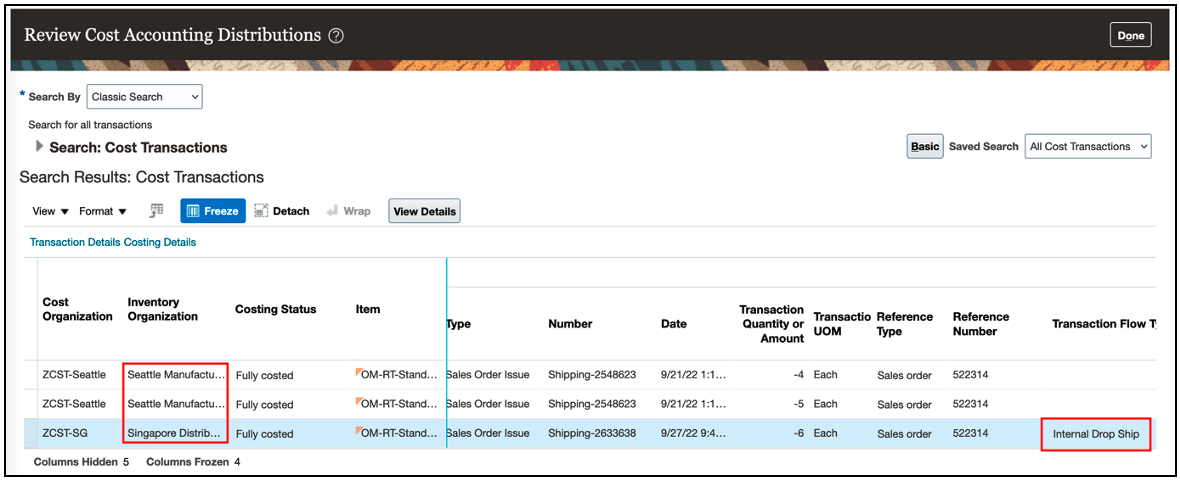
Attributes on the Review Cost Accounting Distributions Page
SUPPLY CHAIN FINANCIAL ORCHESTRATION
Supply Chain Financial Orchestration uses the attribute updates from the split line that Order Management creates to process the intercompany transaction.
In this example, shipment 2548623 is for the original order line that Shipping partially shipped. The shipping organization and the selling organization are in the same business unit, so Financial Orchestration doesn't process this shipment. You update the shipping warehouse on the split line in Order Management, and Financial Orchestration does process shipment 2633638 because the shipping organization and the selling organization for 2633638 are in different business units.
The Monitor Financial Orchestration Execution page displays the quantity shipped for a split line in the ordered quantity attribute.

Financial Orchestration to Consider Sales Order Line Attribute Updates
Supply Chain Orchestration
You can track supply for a split line in a back-to-back flow and continue to modify supply until Shipping ships the entire quantity for the line.
- If you ship part of a split line in a back-to-back flow, then Supply Chain Orchestration makes sure that the reservation remains the same for quantity that hasn't shipped.
- If you modify the quantity or the scheduled ship date on a split line, then Supply Chain Orchestration updates your incoming reserved supply and the reservation for that supply.
- If the supply for your remaining, unshipped quantity gets disrupted, then Supply Chain Orchestration updates the scheduled ship date on the split line, and then searches for another source of supply.
- If the original supply gets canceled, then Supply Chain Orchestration creates more supply. If Supply Chain Orchestration can't find more supply, then it sends a notification to Order Management that the Order Entry Specialist must manually take action, such as modifying an expected ship date.
- If you backorder your unshipped quantity, then Supply Chain Orchestration will make sure that the previous supply is no longer reserved for your backordered line. If you reschedule your backordered line, Supply Chain Orchestration will create new supply.
Realize these benefits:
- Update attributes on an order line after you ship part of that line.
- Avoid having to cancel split lines and manually recreate new ones when all you want to do is update attributes on the split line.
- Reduce the number of steps and the time you need to process change on an order line after you ship part of that line.
- Improve efficiency and accuracy of change processing on the line after you ship part of the line.
- Improve tracking and reporting for lines that you fulfill in more than one shipment.
- Increase customer satisfaction.
Steps to Enable
Use the Opt In UI to enable this feature. For instructions, refer to the Optional Uptake of New Features section of this document.
Offering: Order Management
Tips And Considerations
General
- You can't opt out of the Update Attributes on Split Order Lines for Partial Shipments feature after you opt in and submit a sales order. At this point, you're committed to using the feature.
- You can’t use a web service from Application Development Framework to update an attribute on a split line.
- You can update attributes on a split line that has configured item or a kit just like you do when you update attributes on a line that isn’t split and that’s awaiting shipping, but you can’t modify the configuration of a configured item on a split line.
- If you update an attribute on a split line, then pricing reprices the line just like it does when you update an attribute on a line that isn't split and that's awaiting shipping. Note that a tier adjustment, manual price adjustment, sales agreement, or incentive might affect pricing. The tier adjustment on the original line might not apply on the split line. Make sure you apply the same manual price adjustment on the split line that you applied on the original line. Make sure you set up incentives correctly in Channel Revenue Management.
- You can use the Order Management Created Split Line for Partial Shipment validation rule set to constrain some updates on a split line that Order Management creates when Shipping ships part of the order line. You can also use these validation rule sets to constrain updates on a split line or on a line that isn't split according to the line's status in Inventory Management:
- Fulfillment Line is Backordered
- Fulfillment Line is Released to Warehouse
- Fulfillment Line is Picked or Staged
Drop Shipments and Transfers
- If you need to dropship a split line in a standard or in a back-to-back flow, then you must unschedule the split line, and then schedule it. As an option you can set the supplier and the supplier site before you schedule the split line. You can set the supplier or the supplier site on a split line only after you unschedule it.
- If a line is part of an internal material transfer in Order Management, and if Shipping already shipped part of that line, then you can’t change the transfer order in Inventory Management. You can only cancel it. However, you can update a fulfillment attribute on the split line, such as the schedule date, shipping method, and so on. You can update it in a fulfillment view in Order Management or from some other application, such as Backlog Management, Global Order Promising, and so on.
Back-to-Back
- If you enable the Defer Online Processing of Inventory Updates shipping parameter for a warehouse, and if you partially ship an order line from this warehouse in a back-to-back flow, then Supply Chain Orchestration will close the supply order after Shipping ships the first partial shipment. So, you can’t update an attribute on the split line. However, you can unschedule, and then schedule the split line, and Supply Chain Orchestration will create a new supply order.
- If you modify the warehouse on a split line or on a line that isn't split in a back-to-back flow, then Supply Chain Orchestration will cancel the previous supply and create the optimal supply for the new warehouse. Global Order Promising uses your sourcing rules to determine the optimal new supply.
For more details about how you can process a split order line in a back-to-back flow, see the Improve Supply Tracking for Sales Orders in Your Back-to-Back Flows feature in the Supply Chain Orchestration functional area.
Fulfillment Tolerances and Substitutions
- If you substitute the item on a split line, or unschedule or unreserve it, and if the fulfillment tolerance on the line isn’t 0, then shipping will apply the fulfillment tolerance on the split order line, but it won't consider the cumulative quantity that you already shipped across all of the order line's fulfillment lines. Instead, shipping will consider only the quantity on the fulfillment line that Shipping is shipping.
- If you need to substitute the item on a split line or split the split line again according to a recommendation from Global Order Promising, then you must unschedule the split line, and then schedule it.
Warehouse Updates
- You can update the selling profit center attribute on a split line only if you also update the warehouse attribute on that line.
- If the new warehouse on a split line and the old warehouse on the original order line each use a different primary unit of measure for the item, and if the fulfillment tolerance on the split line isn’t 0, then you can’t update the warehouse on the split line. Order Management will reject this change even if Global Order Promising recommends it. In this situation, you must use the old warehouse on the split line, or your new warehouse must use the primary unit of measure for the item that original warehouse uses.
Key Resources
See these books on Oracle Help Center.
- Implementing Order Management
- Implementing Manufacturing and Supply Chain Materials Management
- Implementing Cost Accounting
- Using Cost Accounting and Receipt Accounting
- Using Supply Chain Orchestration
- Administering Pricing
- Using Functional Setup Manager
Role And Privileges
You have a couple of options for giving people access to this feature, depending on whether you're assigning them predefined job roles or your own configured job roles.
- Users who are assigned any of these predefined job roles are automatically able to access this feature:
- Order Entry Specialist (ORA_FOM_ORDER_ENTRY_SPECIALIST_JOB)
- Order Manager (ORA_DOO_ORDER_MANAGER_JOB)
- Inventory Manager (ORA_INV_INVENTORY_MANAGER_JOB)
- Warehouse Manager (ORA_INV_WAREHOUSE_MANAGER_JOB)
- Shipping Manager (ORA_WSH_SHIPPING_MANAGER_JOB)
- Cost Accountant (ORA_CST_COST_ACCOUNTANT)
- Supply Chain Application Administrator (ORA_RCS_SUPPLY_CHAIN_APPLICATION_ADMINISTRATOR_JOB)
- Supply Chain Operations Manager (ORA_DOS_SUPPLY_CHAIN_OPERATIONS_MANAGER_JOB)
- Materials Planner (ORA_MSC_MATERIALS_PLANNER_JOB)
- Supply Chain Planner (ORA_MSC_SUPPLY_CHAIN_PLANNER_JOB)
- Demand and Supply Planner (ORA_MSC_DEMAND_AND_SUPPLY_PLANNER_JOB)
- Order Promising Manager (ORA_MSC_ORDER_PROMISING_MANAGER_JOB)
- Backlog Manager (ORA_MSC_BACKLOG_MANAGER_JOB)
- Users who are assigned configured job roles that contain these privileges are able to access this feature:
- Initiate Order (FOM_CREATE_ORDER_PRIV)
- Revise Order (FOM_REVISE_ORDER_PRIV)
- View Orders (FOM_VIEW_ORDERS_PRIV)
- Review Pending Inventory Transaction (INV_REVIEW_PENDING_INVENTORY_TRANSACTION_PRIV)
- Review Completed Inventory Transaction (INV_REVIEW_COMPLETED_INVENTORY_TRANSACTION_PRIV)
- Manage Inventory Reservation and Picks (INV_MANAGE_INVENTORY_RESERVATION_AND_PICKS_PRIV)
- Manage Shipments and Shipment Lines (WSH_MANAGE_SHIPMENT_AND_SHIPMENT_LINE_PRIV)
- Create Cost Distributions (CST_CREATE_COST_DISTRIBUTIONS)
- Review Cost Distributions (CST_REVIEW_COST_DISTRIBUTIONS)
- Maintain Supply Chain Financial Orchestration Flow (FOS_MAINTAIN_SUPPLY_CHAIN_FINANCIAL_TRADE_AGREEMENT_PRIV)
- Process Supply Order Interface (DOS_PROCESS_SUPPLY_ORDER_INTERFACE_PRIV)
- View Supply Orders (DOS_VIEW_SUPPLY_ORDERS_PRIV)
- Manage Supply Request Exceptions (DOS_MANAGE_SUPPLY_REQUEST_EXCEPTIONS_PRIV)
- View Supply Order Exceptions and Status (DOS_VIEW_SUPPLY_ORDER_EXCEPTIONS_AND_STATUS_PRIV)
- Monitor Supply Planning Work Area (MSC_MONITOR_SUPPLY_PLANNING_WORK_AREA_PRIV)
- Monitor Demand and Supply Planning Work Area (MSC_MONITOR_DEMAND_AND_SUPPLY_PLANNING_WORK_AREA_PRIV)
- Monitor Order Promising Work Area (MSC_MONITOR_ORDER_PROMISING_WORK_AREA_PRIV)
- Monitor Backlog Management Work Area (MSC_MONITOR_BACKLOG_MANAGEMENT_WORK_AREA_PRIV)
If you're maintaining your own job roles, no new privileges were introduced to support this feature.
Populate Values on New Split Line
If the user splits a line in the Split Fulfillment Line dialog, then order management populates values on the new split line with values from the original line.

Improve your user experience. Order management populates values from the original line so your user doesn't have to manually enter them.
Steps to Enable
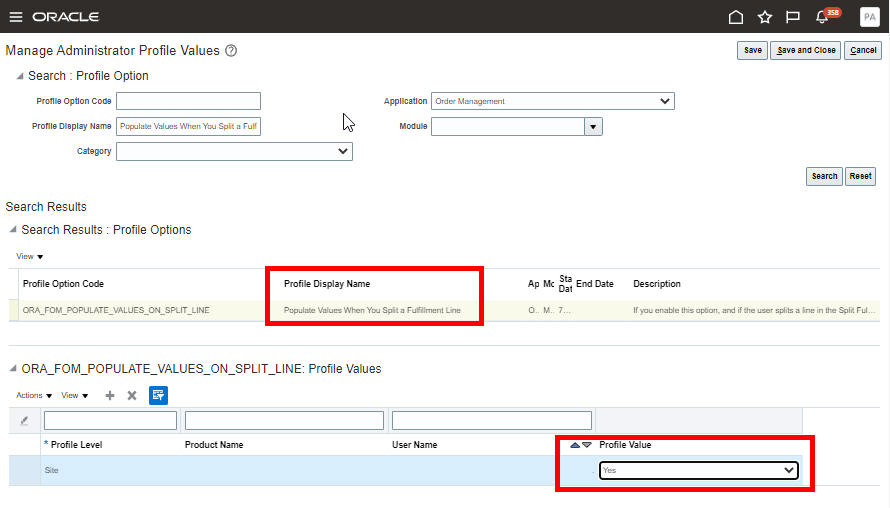
- Go to the Setup and Maintenance work area, click Tasks > Search, then search for and open the Manage Administrator Profile Values task.
- On the Manage Administrator Profile Values page, search for the Populate Values When You Split a Fulfillment Line profile option. You can specify the value at the site or the user level. Select the value Yes to enable this feature.
Key Resources
- Oracle Supply Chain Management Cloud: Implementing Order Management Guide, available on Oracle Help Center.
Role And Privileges
- Order Entry Specialist
- Order Manager
Creates and administers supplier trade programs, optimizing the execution and impact of programs and promotions across the demand chain.
Define Ship and Debit Program Eligibility based on Warehouse and Ship-to Address
Create ship and debit program qualifier rules based on ship-from warehouse and ship-to customer. For example, create a ship and debit program for a warehouse to move excess inventory, or manage freight costs specific to that location. Use a ship-to customer qualifier to restrict program eligibility to a specific customer location.
Supplier Ship and Debit programs can now include qualifier rules based on ship-from warehouses or ship-to customers.
Steps to Enable
Use the Opt In UI to enable this feature. For instructions, refer to the Optional Uptake of New Features section of this document.
Offering: Order Management
- In the Order Management offering, enable the Channel Revenue Management functional area. Then opt in to the Supplier Channel Management feature.
Key Resources
- Watch Additional Qualifiers for the Ship and Debit Readiness Training
- Watch Supplier Channel Management Continuous Improvement Readiness Training.
- Oracle SCM Cloud: Using Oracle Channel Revenue Management Cloud, available on the Oracle Help Center.
- Oracle SCM Cloud: Implementing Oracle Channel Revenue Management Cloud, available on the Oracle Help Center.
- Oracle SCM Cloud: REST API for Oracle SCM Cloud, available on the Oracle Help Center.
Role And Privileges
You have a couple of options for giving people access to this feature, depending on whether you're assigning these predefined job roles or your own configured job roles.
- Users who are assigned this predefined job role are automatically able to access this feature:
- Supplier Channel Manager (ORA_CJM_SUPPLIER_CHANNEL_MANAGER_JOB)
- Supplier Sales Representative (ORA_POS_SUPPLIER_SALES_REPRESENTATIVE_JOB)
- Users who are assigned configured job roles that contain these privileges are able to access this feature:
- Manage Supplier Claims (CJM_MANAGE_SUPPLIER_PROGRAMS_PRIV)
- Manage Supplier Programs in Supplier Portal (CJM_MANAGE_SUPPLIER_PROGRAMS_IN_PORTAL_PRIV)
Provides research, administration, analysis, and settlement functionalities to quickly resolve deductions and settle claims, improving customer relationships and overall financial performance.
Use the Default Receivables Activity when Writing off Customer Claims
Specify a default receivables activity for a claim type when writing off customer claims. The receivables activity is defaulted when you write-off a customer claim. If the receivables activity isn't specified for the claim type, then the value is defaulted from the business unit.
Standardize write-off accounting for a set of claim types.
Steps to Enable
Use the Opt In UI to enable this feature. For instructions, refer to the Optional Uptake of New Features section of this document.
Offering: Order Management
- You must opt in to the functional area: Channel Revenue Management functional area. Then opt in to the feature: Deductions and Settlement.
- For Deductions and Settlement only:
- Under the offering: Financials and functional area: Receivables, navigate to the task: Manage Receivables System Options. Search for and select your business unit. Click the Cash Processing tab. Select the Enable channel revenue management integration check box and click Save.
Key Resources
- Watch Standardized Write-off Accounting for a Set of Claim Types Readiness Training
- Watch Deductions & Settlement Continuous Improvement Readiness Training.
- For more information on Channel Revenue Management, refer to the Oracle Cloud Readiness content for Order Management.
- For more information on the Channel Revenue Management Integration with Receivables, refer to the Oracle Cloud Readiness content for Financials.
- Oracle SCM Cloud: Using Oracle Channel Revenue Management Cloud, available on the Oracle Help Center.
- Oracle SCM Cloud: Implementing Oracle Channel Revenue Management Cloud, available on the Oracle Help Center.
- Oracle SCM Cloud: REST API for Oracle SCM Cloud, available on the Oracle Help Center.
Role And Privileges
You have a couple of options for giving people access to this feature, depending on whether you're assigning these predefined job roles or your own configured job roles.
- Users who are assigned this predefined job role are automatically able to access this feature:
- Channel Claims Manager (ORA_CJM_CLAIMS_MANAGER_JOB)
- Users who are assigned configured job roles that contain these privileges are able to access this feature:
- Allow Claim Write-Offs (CJM_ALLOW_CLAIM_WRITE_OFFS_PRIV)
- Manage Customer Claims (CJM_MANAGE_CUSTOMER_CLAIMS_PRIV)
Use Supplier Sites Codes That Are Up to 240 Characters
Supplier site codes are typically a short alphanumeric character set. However, in some business situations, it may be useful to have a longer site code to improve readability. In this update, the maximum length of the supplier site code has been increased to 240 characters in conjunction with the same capability in Oracle Fusion Cloud Procurement. This change is applicable for both Oracle Fusion source systems and external source systems for which you can collect supplier site codes up to the new maximum using the Oracle file-based data import (FBDI) template for Supply Chain Planning Suppliers (ScpSupplierImportTemplate.xlsm.)
Here's an example of the Supply Network Model page showing supplier sites for Big Computers. Two of the sites have a supplier site code longer than 30 characters, which was the maximum supported by planning in previous updates.

Depending on the width of the column, the data may be truncated, in which case the ellipses are displayed. If you hover over the field, the full supplier site code is displayed in the hover text.
Steps to Enable
You don't need to do anything to enable this feature.
Tips And Considerations
-
Whether a longer supplier site code can be entered in Oracle Fusion Cloud Procurement is controlled through an opt in feature named Create Supplier Sites with Longer Names.
-
Planning collects the full supplier site codes (up to 240 characters) that have been saved to the Oracle Fusion database regardless of whether the opt-in feature noted in the preceding bullet is enabled or not.
Role And Privileges
You have a couple options for giving people access to this feature, depending on whether you're assigning them predefined job roles or your own configured job roles.
- Users who are assigned any of these predefined job roles are automatically able to access this feature:
- Supply Chain Planner (ORA_MSC_SUPPLY_CHAIN_PLANNER_JOB)
- Materials Planner (ORA_MSC_MATERIALS_PLANNER_JOB)
- Demand Planner (ORA_MSC_DEMAND_PLANNER_JOB)
- Replenishment Planner (ORA_MSC_REPLENISHMENT_PLANNER_JOB)
- Sales and Operations Planner (ORA_MSC_SALES_AND_OPERATIONS_PLANNER_JOB)
- Backlog Manager (ORA_MSC_BACKLOG_MANAGER_JOB)
- Order Promising Manager (ORA_MSC_ORDER_PROMISING_MANAGER_JOB)
- There's no change to existing privileges needed to take advantage of this feature. If a user has access to a page that displays supplier site code, then the user will see the longer value for a supplier site code after it's collected into planning.
Multilevel Allocation in Order Promising
Allocation rules help you honor commitments and distribute high-demand items more fairly by ensuring that a specified quantity or percentage of supply is available to meet demand. When you’re opted in to this feature, enhanced supply allocation rules that use a hierarchy of attribute-based nodes to balance the allocation of supply across your network are enabled. Child allocations share supply allocated to the parent node when needed.
After you opt in to the feature named High-Volume Order Promising, opt in to the feature named Multilevel Order Promising. Then you can use the features described in this section.
Use a REST Service to Override an Allocation Percentage with a Specific Quantity
Use the Allocations REST resource to set the supply that's available for one or more allocation nodes to a specific quantity during a promotion, holiday, or some other time when the regular percentage allocation doesn't apply. Oracle Global Order Promising will adjust the quantity on each of the remaining nodes in your allocation hierarchy to preserve the total amount of supply that promising already allocated for the week.
Improve promising accuracy. Use this feature to account for the variability that happens in your supply chain during a promotion, a holiday, seasonal changes during the year, and so on.
Steps to Enable
Review the REST service definition in the REST API guides, available from the Oracle Help Center > your apps service area of interest > REST API. If you're new to Oracle's REST services you may want to begin with the Quick Start section.
Opt into these features:
- High-Volume Order Promising
- Multilevel Allocation in Order Promising
If you already opted into these features, then you don’t have to opt in again.
Tips And Considerations
- Consider the total weekly supply that's available for the item across all nodes in your allocation hierarchy when you adjust the supply for a node.
- To examine the results of your override, go to the Order Promising work area, then view the Manual Allocation attribute in the Supply Allocation Report.
Key Resources
- Watch Profitable-to-Promise and Allocation Enhancements Readiness Training
- The Define and Adjust Hierarchical Quantity-Based Supply Allocations Respect Supply Allocation Rules for update 22D readiness training available on Oracle Cloud Readiness for Order Management.
- The Multilevel Allocation in Order Promising for update 22C readiness training available on Oracle Cloud Readiness for Order Management.
Role And Privileges
- Users who are assigned the following predefined job role are automatically able to access this feature:
- Order Promising Manager (ORA_MSC_ORDER_PROMISING_MANAGER_JOB)
Order promising is a critical business process that must scale with demand and continue to operate even if hardware failures occur. Recent changes to Oracle Fusion Cloud Global Order Promising provide a scale-out architecture for availability checking and scheduling requests across a horizontal grid, enhancing capacity and resilience. The new architecture also reduces operational overhead, making supply and reference data updates immediately available, and eliminating the need to refresh/restart the order promising server.
Migration to the new architecture is continuing over several updates. Starting in update 24A, the C++-based order promising solution will be retired, and all order promising in Oracle Fusion Cloud will be performed using the high-volume order promising solution. You can transition to the new solution at any time by opting in to the High-Volume Order Promising feature. If you use capable to promise or allocated order promising, you must complete some setups before you make this transition. For details, see this Oracle Cloud Customer Connect Event: SCM – Prepare for the Next Generation of Global Order Promising.
After you opt in to the feature named High-Volume Order Promising, you can use the feature described in this section.
You can use profitable to promise to override the source that you would normally use to fulfill the item with a source that's more cost effective. Promising considers the cost for the item in your organization, the cost to transfer the item between organizations within your enterprise, and the inbound transit cost from a supplier. If you enable the High-Volume Order Promising feature, then you can include the cost of shipping the item from the ship from location to your customer's site when you schedule the arrival date. You can also include the manufactured item’s resource cost and component cost from a bill of resources.
Maximize your profit margin. Use the option that costs the least in your profitable to promise flow.
Steps to Enable
Use the Opt In UI to enable this feature. For instructions, refer to the Optional Uptake of New Features section of this document.
Offering: Supply Chain Planning
Tips And Considerations
- You must opt into the High-Volume Order Promising feature. If you’ve already opted into this feature, then you don’t have to opt in again.
- The bill of resources doesn't include cost for a manufactured item. Instead, promising calculates that cost when it promises the item according to the item cost, transfer cost, and so on.
- Promising considers transfer cost for a manufactured item according to your sourcing rule. If you want promising to apply a transfer cost, then you must specify that the item is critical at the source and at the destination.
- If you use profitable to promise, then make sure you set up costs correctly.in your Oracle Applications, such as your transfer cost, standard item cost, supplier cost, resource cost, and so on.
- If you use drop ship, then you must enable the Profitable to Promise option on the available to promise rule that you use to assign the Drop Ship Validation Organization.
- If you opt into this feature for any organization that you use to source the item in your supply network, then promising will use the feature for all organizations in the supply network.
- Promising's primary objective is to fulfill the sales order on time or with minimum delay. If promising finds that there's more than one way to fulfill the order within the requested date, then it considers the cost for each source to help decide which source to use. For example, it considers inventory cost, transfer cost, and delivery cost. If you have to manufacture the item, then it also looks at the rolled up cost.
Key Resources
Role And Privileges
- Users who are assigned the following predefined job role are automatically able to access this feature:
- Order Promising Manager (ORA_MSC_ORDER_PROMISING_MANAGER_JOB)
View Demand Summaries in Supply Allocation Reports
The Supply Allocation report now includes details about how promising meets demand. You can use that data to get insights into the overall performance of your allocation. For example, see the total demand quantity for each weekly bucket, the demand quantity that promising has scheduled to ship or deliver on time, and the fill rate percentage for allocated items. You can also examine the total and delayed revenue for each node to help you determine the financial impact of allocating supply.
Use the demand summary in your report to help make more informed decisions about how to allocate a limited amount of supply that's available in your supply chain.
Steps to Enable
Use the Opt In UI to enable this feature. For instructions, refer to the Optional Uptake of New Features section of this document.
Offering: Supply Chain Planning
Tips And Considerations
Opt into these features:
- High-Volume Order Promising
- Multilevel Allocation in Order Promising
If you already opted into these features, then you don’t have to opt in again.
Key Resources
- Watch Profitable-to-Promise and Allocation Enhancements Readiness Training
- The Multilevel Allocation in Order Promising for update 22C readiness training available on Oracle Cloud Readiness for Order Management.
Role And Privileges
- Users who are assigned the following predefined job role are automatically able to access this feature:
- Order Promising Manager (ORA_MSC_ORDER_PROMISING_MANAGER_JOB)
IMPORTANT Actions and Considerations
From time to time, Oracle replaces existing Cloud service features with new features, or removes existing features. Replaced features may be put on a path to removal. As a best practice, you should use the newer version of a replaced feature as soon as the newer version is available.
This section identifies the features in this Cloud service that have been replaced or will be removed.
| Module | Removed Feature | Target Removal | Replacement Feature | Replaced In | Additional Information |
|---|---|---|---|---|---|
| Pricing | Price Request SOAP Service | 23D | Document Prices REST API | 19A | No additional enhancements have been made to the Price Request SOAP service since update 19A. Until the SOAP service is removed in 23D, it will continue to work, but you should migrate to the Document Prices REST API at your earliest convenience. For details about the Document Prices REST API, refer to the REST API for Oracle Fusion Cloud SCM documentation, available on the Oracle Help Center. |
| Order Management | Add a parallel step or a subprocess step in your orchestration process definition |
23A | None | NA | Starting in update 23A, you can no longer add a parallel step or a subprocess step in an orchestration process definition. |
| Order Management | Override the predefined Shipped status or the predefined Invoiced status on an order line |
23A | None | NA | Starting in update 23A, you can no longer override the predefined Shipped status or the predefined Invoiced status on an order line. |
| Global Order Promising | Memory resident, C++-based order promising |
24A | High-volume order promising |
23A | Starting in update 24A, the C++-based order promising solution will be retired, and all order promising in Oracle Fusion Cloud will be performed using the high-volume order promising solution. You can transition to the new solution at any time by opting in to the High-Volume Order Promising feature. If you use capable to promise or allocated order promising, you must complete some setups before you make this transition. For details, see this Oracle Cloud Customer Connect Event: SCM – Prepare for the Next Generation of Global Order Promising. |