Update 24A
Revision History
This document will continue to evolve as existing sections change and new information is added. All updates appear in the following table:
| Date | Module | Feature | Notes |
|---|---|---|---|
| 15 APR 2024 | SAIG | Updated document. Revised Steps to Enable. |
|
| 26 MAR 2024 | Packaging/Awarding | Updated document. Removed updates to Summer_EFC_Need_Calc column. | |
| 26 MAR 2024 | CommonLine | Updated document. Removed updates to CommonLine field name updates on UI. |
|
| 13 MAR 2024 | Security |
Updated document. Added reference to IRS Publication 1075. | |
| 06 MAR 2024 | ISIR | New 24/25 ISIR Support | Updated document. Added Readiness Training to Key Resources. |
| 06 MAR 2024 | ISIR | Optimized ISIR Configuration | Updated document. Added Readiness Training to Key Resources. |
| 06 MAR 2024 | Security | Security Requirements for FTI Data | Updated document. Added Readiness Training to Key Resources. |
| 06 MAR 2024 | Student/Parent Self-Service (Portal) |
Support of 24/25 Verification Worksheets | Updated document. Added Readiness Training to Key Resources. |
| 06 MAR 2024 | Packaging/Awarding | Support of New Pell Calculation | Updated document. Added Readiness Training to Key Resources. |
| 06 MAR 2024 |
SAIG | Updated document. Revised Steps to Enable and added Readiness Training to Key Resources. |
|
| 26 JAN 2024 | Created initial document. |
Overview
 HAVE AN IDEA?
We’re here and we’re listening. If you have a suggestion on how to make our cloud services even better then go ahead and tell us. There are several ways to submit your ideas, for example, through the Ideas Lab on Oracle Customer Connect. Wherever you see this icon after the feature name it means we delivered one of your ideas.
GIVE US FEEDBACK
We welcome your comments and suggestions to improve the content. Please send us your feedback at oracle_fusion_applications_help_ww_grp@oracle.com.
DISCLAIMER
The information contained in this document may include statements about Oracle’s product development plans. Many factors can materially affect Oracle’s product development plans and the nature and timing of future product releases. Accordingly, this Information is provided to you solely for information only, is not a commitment to deliver any material, code, or functionality, and should not be relied upon in making purchasing decisions. The development, release, and timing of any features or functionality described remains at the sole discretion of Oracle.
This information may not be incorporated into any contractual agreement with Oracle or its subsidiaries or affiliates. Oracle specifically disclaims any liability with respect to this information. Refer to the Legal Notices and Terms of Use for further information.
Optional Uptake of New Features (Opt In)
When new functionality is delivered, we strive to ensure our customers are successful when implementing them. Some features are delivered Enabled meaning they are immediately available to end users. Other features are delivered Disabled meaning you must take action to leverage the new feature.
Features delivered Disabled can be activated for end users by following the Steps to Enable in the What’s New to update configuration, integrations, and/or system settings within the application. For features that require configuration updates, we encourage you to review the delivered baseline configuration, which is based on industry standards, to ease the burden of up-taking new features.
Feature Summary
Column Definitions:
Report = New or modified, Oracle-delivered, ready to run reports.
UI or Process-Based: Small Scale = These UI or process-based features are typically comprised of minor field, validation, or program changes. Therefore, the potential impact to users is minimal.
UI or Process-Based: Larger Scale* = These UI or process-based features have more complex designs. Therefore, the potential impact to users is higher.
Features Delivered Disabled = Action is needed BEFORE these features can be used by END USERS. These features are delivered disabled and you choose if and when to enable them. For example, a) new or expanded BI subject areas need to first be incorporated into reports, b) Integration is required to utilize new web services, or c) features must be assigned to user roles before they can be accessed.
| Ready for Use by End Users Reports plus Small Scale UI or Process-Based new features will have minimal user impact after an update. Therefore, customer acceptance testing should focus on the Larger Scale UI or Process-Based* new features. |
Customer Must Take Action before Use by End Users Not disruptive as action is required to make these features ready to use. As you selectively choose to leverage, you set your test and roll out timing. |
|||||
|---|---|---|---|---|---|---|
| Feature |
Report |
UI or |
UI or |
|
||
Updates to Reports and Letters to Support the New 24/25 ISIR |
||||||
Student Financial Planning
You can download additional documents and attachments to update and maintain your Student Financial Aid implementation. To view and download these documents, see Oracle Fusion Cloud Student Financial Planning: Release Notes 24A (Doc ID 3000063.1) on My Oracle Support.
ISIR
New 24/25 ISIR Support
Due to the Consolidated Appropriations Act, the 24/25 ISIR has been completely re-written for FAFSA Simplification. This includes the almost doubling in size of the ISIR from 23/24 and a massive number of changes to how ISIR processing will work in Student Financial Aid. This feature provides the ability to load 24/25 ISIRs, view those files in a user friendly format, and allow for financial aid professionals to complete ISIR processing successfully for the new award year.
New ISIR Format
- 24/25 ISIR format layout has been updated to accommodate the FAFSA Simplification changes which include new sections outlined below and fields being both added and removed (with a delta of 275 more fields).
- Transaction Identification: FAFSA Identification UUID, Transaction UUID, Application and Transaction Data Sources, Model, Transaction Dates, etc.
- Student Demographic, Identity, and Contact Information: Student First Name, Date of Birth, Social Security Number, etc.
- Student Non-Financial Information: Student Marital Status, State of Legal Residence, etc.
- Student Manually Entered Financial: Student Filed 1040 or 1040NR, Tax Return Filing Status, Adjusted Gross Income, etc.
- Student School Choices, Consent, and Signature: College #1 - #20, Consent to Retrieve and Disclose FTI, Signature, etc.
- Student Spouse Demographic, Identity, and Contact Information: Student Spouse First Name, Date of Birth, Social Security Number, etc.
- Student Spouse Manually Entered Financial Information, Consent, and Signature: Student Spouse Tax Return Filing Status, Adjusted Gross Income, Consent to Retrieve and Disclose FTI, Signature, etc.
- Parent Demographic, Identity, and Contact Information: Parent First Name, Date of Birth, Social Security Number, etc.
- Parent Non-Financial Information: Parent Marital Status, State of Legal Residence, etc.
- Parent Manually Entered Financial Information, Consent, and Signature: Parent Tax Return Filing Status, Adjusted Gross Income, Consent to Retrieve and Disclose FTI, Signature, etc.
- Parent Spouse or Partner Demographic, Identity, and Contact Information: Parent Spouse or Partner First Name, Date of Birth, Social Security Number, etc.
- Parent Spouse or Partner Manually Entered Financial Information, Consent, and Signature: Parent Spouse or Partner Tax Return Filing Status, Adjusted Gross Income, Consent to Retrieve and Disclose FTI, Signature, etc.
- Preparer Information: Preparer First Name, Social Security Number, EIN, etc.
- FPS Processing Information: FAA Federal School Code, Verification Tracking Flag, Incarcerated Applicant Flag, etc.
- Correction, Highlight, and Verify Flags: Student First Name Correction, Highlight, and Verify flags, Parent Adjusted Gross Income Correction, Highlight, and Verify Flags, Parent Spouse or Partner Income Earned from Work, etc.
- Matches and Other Processing Information: DHS Primary Match Status, NSLDS Match Status, Comment Codes, etc.
- NSLDS Information: NSLDS Discharged Loan Flag, NSLDS Undergraduate Subsidized Loan Limit Flag, NSLDS SAI, etc.
- Student FTIM Information: Student Filing status code, Adjusted Gross Income, Number of dependents , etc.
- Student Spouse FTIM Information: Student Spouse Filing status code, Adjusted Gross Income, Number of dependents , etc.
- Parent FTIM Information: Parent Filing status code, Adjusted Gross Income, Number of dependents , etc.
- Parent Spouse or Partner FTIM Information: Parent Spouse or Partner Filing status code, Adjusted Gross Income, Number of dependents , etc.
- Total Income Information: Student total income, Parent total income, FISAP total income, etc.
- Refer to the 24/25 ISIR Mapping Analysis that was completed by our Product Management team and reviewed by customers on Cloud Customer Connect to identify which ISIR fields should be used for the new aid year when the prior field no longer exists or was renamed
Processing the 24/25 ISIR
- Once the ISIR is loaded in to the system leveraging a new FTI SAIG Mailbox (Refer to Integration with the New FTI SAIG Mailbox Feature for more details), the system will match the ISIR to the student.
| Existing Enums | New Enums | 23/24 ISIR Field | 24/25 ISIR Field | Logic |
|---|---|---|---|---|
| DOB | Student’s Date of Birth | Date of Birth | Enum will be used for both 23/24 and 24/25 | |
| SSN | Social Security Number | Student’s Current Social Security Number | Enum will be used for both 23/24 and 24/25 | |
| LAST_NAME |
Student’s Last Name | Last Name | Enum will be used for both 23/24 and 24/25 | |
| FIRST_NAME |
Student’s First Name | First Name | Enum will be used for both 23/24 and 24/25 | |
| MIDDLE_INITIAL |
Student’s Middle Initial |
N/A |
If being evaluated for 24/25, any expression using this enum will be ignored |
|
| N/A |
MIDDLE_NAME |
N/A |
Middle Name |
If being evaluated for 23/24, any expression using this enum will be ignored If being evaluated for 24/25, it will compare to the Middle Name received in the Student Initiation Event or Student Update Event |
| EMAIL_ADDRESS |
Student’s E-mail Address | Email Address | Enum will be used for both 23/24 and 24/25 | |
| GENDER |
N/A |
N/A |
Enum will be ignored for both 23/24 and 24/25 |
|
| ZIP |
Student’s Permanent Zip Code |
Zip Code |
Enum will be used for both 23/24 and 24/25. For 24/25 ISIR allowable characters is now 10 (example: 12345-7890) Within the Student Initiation Event, we allow for a 5 digit zip code so we will case match to the first 5 characters of the Zip Code provided on the ISIR |
|
| PHONE_NUMBER |
Student’s Permanent Phone Number | Phone Number | Enum will be used for both 23/24 and 24/25 | |
| SSN_MATCH_FLAG_1 |
SSN Match Flag = 1 | Student SSA Match Status = 1 | Enum will be used for both 23/24 and 24/25 | |
| SSN_MATCH_FLAG_2 | SSN Match Flag = 2 | Student SSA Match Status = 2 | Enum will be used for both 23/24 and 24/25 | |
| SSN_MATCH_FLAG_3 | SSN Match Flag = 3 | Student SSA Match Status = 3 | Enum will be used for both 23/24 and 24/25 | |
| SSN_MATCH_FLAG_4 | SSN Match Flag = 4 | Student SSA Match Status = 4 | Enum will be used for both 23/24 and 24/25 | |
| SSN_MATCH_FLAG_5 | SSN Match Flag = 5 | Student SSA Match Status = 5 | Enum will be used for both 23/24 and 24/25 | |
| SSN_MATCH_FLAG_6 | SSN Match Flag = 6 | Student SSA Match Status = 6 | Enum will be used for both 23/24 and 24/25 | |
| SSN_MATCH_FLAG_7 | SSN Match Flag = 7 | Student SSA Match Status = 7 | Enum will be used for both 23/24 and 24/25 | |
| SSN_MATCH_FLAG_8 | SSN Match Flag = 8 | Student SSA Match Status = 8 | Enum will be used for both 23/24 and 24/25 | |
| N/A | FAFSA_UUID | N/A | FAFSA UUID | If being evaluated for 23/24, any expression using this enum will be ignored If being evaluated for 24/25, this criteria will be evaluated if a prior 24/25 ISIR has been matched and contains the same FAFSA_UUID value. |
| N/A | PERSON_UUID | N/A | Person UUID | If being evaluated for 23/24, any expression using this enum will be ignored If being evaluated for 24/25, this criteria will be evaluated if a prior 24/25 ISIR has been matched and contains the same PERSON_UUID value. |
- ISIR Matching Examples
- Example of ISIR Matching Expressions that will not work for the 23/24 ISIR award year:
- FIRST_NAME~LAST_NAME~PERSON_UUID
- The entire expression will be ignored if a 24/25 only value is included in an expression and no ISIRs will be matched using this expression
- Example of ISIR Matching Expressions that will not work for the 24/25 ISIR award year:
- FIRST_NAME~LAST_NAME~MIDDLE_INITIAL
- The entire expression will be ignored if a 23/24 only value is included in an expression and no ISIRs will be matched using this expression
- If all configured expression(s) contains enums that are only valid for one aid year no ISIRs will match automatically for the other aid year
- For example: MIDDLE_INITIAL~SSN_MATCH_FLAG_1| MIDDLE_INITIAL will only match 23/24 ISIRs. 24/25 ISIRs will never automatically match until the ISIR Matching criteria is updated
- The system will continue to leverage configuration to determine how the 24/25 ISIR should be matched to a student for the new aid year.
- Example of ISIR Matching Expressions that will not work for the 23/24 ISIR award year:
- Once matched, the system will process the ISIR determining discrepancies, requesting documents, evaluating comment codes, verification worksheets, etc based on configuration
- Refer to Optimized ISIR Configuration Feature and Support of 24/25 Verification Worksheets Feature for more details
- Assumptions will no longer be supported with the 24/25 Award Year as they will not be received in the ISIR
- If a student requires a Professional Judgment due to their Provisional Independent Dependency Model, we have included in baseline configuration a new document called "PJ Provisional ISIR Status" which is now configured to be the initiating document to start the PJ process in SFA to initiate a Dependency Override.
- Any resulting corrections will be sent via the existing SAIG Mailbox.
Displaying the 24/25 ISIR Data
- The following places on the UI have been updated to account for the new ISIR format and new fields
- Updated ISIR sections within the ISIR Information page have been created to group the ISIR data based on the new ISIR format.
- The updated sections within the 24/25 ISIR provide a level of granularity that gives financial aid administrators easy access into the data provided.
- ISIR Info
- Student Info
- Student Financial Info
- Student Spouse Info
- Student Spouse Financial Info
- Parent and Parent Spouse Info
- Parent and Parent Spouse Financial Info
- FPS Info
- Correction, Highlight, Verify Flags
- NSLDS Info
- School Choice Info
- Signature and Preparer Info
- Within the first section, ISIR information, we have included important fields for making financial aid decisions such as SAI, Comment Codes, and Reject Codes.
- Within each Financial Information section we have included both the FTI fields and the manually entered fields so a financial aid administrator can quickly review all the information in one page. We have also clearly sectioned these fields out in financial info so you know what is FTI and what is manually entered.
- Finally, we combined all the signature responses in the Signature info section so you can quickly see which users provided their consent to get data from the IRS.
- The 23/24 ISIR will still display all the current available sections
- The updated sections within the 24/25 ISIR provide a level of granularity that gives financial aid administrators easy access into the data provided.
- ISIR related tasks (ISIR Review, ISIR Verification, and PJ) to support the 24/25 ISIR
- Within each of the tasks the ISIR data has been updated to display what is shown in the ISIR Information page.
- Updated ISIR CPS Tx # to ISIR FPS Tx# for 24/25 tasks
- Updated Original Name ID to Person ID
- Updated Assumptions and Highlight Tab to just Highlights for 24/25 tasks
- As with the ISIR Information tab, any 23/24 ISIR tasks will still show the current user interface values as they are still relevant
- ISIR Corrections within the ISIR Information UI or within ISIR related tasks
- Updated ISIR correctable fields and valid field content for 24/25
- In Supervisor View, within the Complete ISIR Review and Complete ISIR Verification task queues
- Updated CPS to FPS
- ISIR Information and Student Summary pages,
- Updated Primary EFC Amount value per ISIR transaction to SAI
- Updated Original Name ID to Person ID
- Updated CPS Transaction # to FPS Transaction #
- When ISIR fields are displayed on any UI, the system will display the appropriate field names and values based on the award year of the ISIR.
- Any place that 24/25 ISIR FTI fields are displayed in the UI, the required 'CUI//SP-Tax' labeling will be presented prior to the value received on the ISIR.
- Refer to the Security Requirements for FTI Data feature for more information on how FTI data in handled in the system.
- Any place that 24/25 ISIR FTI fields are displayed in the UI, the required 'CUI//SP-Tax' labeling will be presented prior to the value received on the ISIR.
- Updated ISIR sections within the ISIR Information page have been created to group the ISIR data based on the new ISIR format.
Steps to Enable
Use the Opt In UI to enable this feature. For instructions, refer to the Optional Uptake of New Features section of this document.
Offering: Student Financial Aid
- You will need to configure your environment to process ISIR for the new award year
- Configuration will need to be added to the following workbooks
- DOCMETADATA.csv
- DOCUMENTS.csv
- ISIR_C_CODES_TO_FIELDS.csv
- ISIR_C_CODES.csv
- ISIR_DISCREP.csv
- ISIR_HIGHLIGHT.csv
- ISIR_MGMT.csv
- ISIR_REJECT_CODES_TO_FIELDS.csv
- ISIR_REJECT_CODES.csv
- ISIR_REJECT_TO_C_CODES.csv
- ISIR_VERIFICATION_CODES.csv
- PJ.csv
- REGULATORY_DEADLINES.csv
- Student Financial Aid baseline configuration updates for 24/25 can be used as a guide for the necessary award year configuration changes.
- Refer to Release 24A Release Notes on My Oracle Support (Doc ID 3000063.1) outlining the baseline configuration updates that were made for the 24/25 Award Year
- Configuration will need to be added to the following workbooks
- Next, you will need to enable each Department of Education file format that can be received from FAFSA Processing System (FPS) that you want SFA to process.
- Ensure the DOE File Management General Permission is enabled
- Navigate to the DOE File Management User Interface
- Choose Award Year 2024-2025
- Select the file names that you want SFA to process
- Add the date and time you wish to enable these files
- Due to the Department of Education communicating that they will be sending schools 24/25 ISIR files prior to allowing ISIR corrections the following process should be done in SFA:
- Within your Regulatory Deadlines Configuration workbook, ensure your ISIR Correction Start date aligns with your ISIR Award Year Start Date
- Within the DOE File Management user interface enable your ISIR files for 2025 but do NOT enable the CORE25OP or CORR25IN files
- Doing this will allow ISIRs to load and process correctly in SFA
- If an ISIR Correction is required, you will be able to trigger the Correction through SFA
- Once the ISIR progresses to a Corrected state, the CORR25IN file will generate and be held in a queue until you are able to enable to the Correction file formats
- Once enable and the ISIR Correction batch job runs, all the queued up Correction files should be sent to FPS
NOTE: It is not recommended to send multiple ISIR Correction files for the same student as they will be batched together and could process incorrectly at FPS
- Lastly, you will want to ensure that your new SAIG Mailbox is set up. Refer to Integration with the New FTI SAIG Mailbox feature for more details.
Tips And Considerations
- Due to the substantial changes from the 23/24 to the 24/25 ISIR, most ISIR configuration values have changed. Schools will need to take additional time to review all of their ISIR configuration to ensure it meets their policies.
- Refer to Optimized ISIR Configuration Feature and the Supplemental Documents and Attachments for Release 24A Release Notes (Doc ID 2613016.1) outlining the baseline configuration updates related to ISIR Processing for 24/25 Award Year
- Refer to the 24/25 ISIR Mapping Analysis on Cloud Customer Connect that can assist in identifying how the new ISIR fields should be used for the new aid year when the prior field no longer exists or was renamed.
- Refer to Optimized ISIR Configuration Feature and the Supplemental Documents and Attachments for Release 24A Release Notes (Doc ID 2613016.1) outlining the baseline configuration updates related to ISIR Processing for 24/25 Award Year
-
Before going live with 24/25 ISIRs in your Production environment it is important to not only update your configuration correctly, but to use your testing environment(s) to make sure you are ready to receive the newly updated ISIR files.
Key Resources
- Review the following resources published by the Department of Education
- 2024-25 FASFA Specification Guide
- 2024–2025 Award Year: FAFSA Information to be Verified and Acceptable Documentation
- 2024–25 Test ISIR Data File Available
- FAFSA Simplification Webinars and Training Videos
- Update on the Simplified, Streamlined, Redesigned 2024-25 FAFSA
- 24/25 Provisional Independent Status
Optimized ISIR Configuration
Due to the significant changes to the ISIR in the 24/25 award year, Student Financial Aid is providing a more optimal approach for accessing ISIR fields within configuration. This new approach can be utilized when accessing ISIR values anywhere ISIR configuration is used for 24/25 and future award years.
The new approach provides a new methods which will return a key value pair when accessing 24/25 ISIR fields. Instead of requiring a string, a type safe enum will be defined for each field. You will get the benefit of autocomplete functionality, delivered with JavaDoc, and the ability to leverage defined data types. For example, if a value is a date instead of a string being returned that needs to be parsed, it will return as a date.
- Refer to Release 24A Release Notes on My Oracle Support (Doc ID 3000063.1) for the configuration scripting API with full details of the new methods, enums, and data types.
Below we provide some examples of how the new configuration will work for 24/25 going forward.
| Method | Usage | Example |
|---|---|---|
| get() |
Returns type-safe value or fails if no value is available |
isirRecord.getField(IsirField.STUDENTFTIM_ADJUSTEDGROSSINCOME_FTI).get() returns [integer] 495 |
| getAwardYear() |
Returns an award year |
isirRecord.getField(IsirField.TXID_YEARINDICATOR).getAwardYear() returns [string] "2025" |
| getOr() |
Returns a type-safe value or you can define a default value if no value is available on the ISIR |
isirRecord.getField(IsirField.TXID_RENEWALDATAUSED).getOr("No") returns [string] "No” |
| getOrNull() |
Returns type-safe value or null if no value is defined |
isirRecord.getField(IsirField.FLAGS_STUDENTACTIVEDUTY).getOrNull() returns [null] |
| getRaw() |
Returns exact characters as they appear in the ISIR file |
isirRecord.getField(IsirField.STUDENTFTIM_ADJUSTEDGROSSINCOME_FTI).getRaw() returns [string] "495” |
| isFti() |
Indicates if the field is flagged as FTI (requires CUI labeling) |
isirRecord.getField(IsirField.STUDENTFTIM_ADJUSTEDGROSSINCOME_FTI).isFti() returns [boolean] true |
| toString() |
Returns stringified representation of the value Note for FTI fields the value will be returned with CUI labeling |
isirRecord.getField(IsirField.STUDENTFTIM_ADJUSTEDGROSSINCOME_FTI).toString() returns [string] "CUI//SP-TAX 495 CUI//SP-TAX" |
| getCorrection() |
Returns the correction flag for "Correction, Highlight, and Verify Flags" ISIR field | isirRecord.getField(IsirField.FLAGS_PARENTADJUSTEDGROSSINCOME).getOrNull().getCorrection() returns [integer] 0 |
| getHighlight() |
Returns the highlight flag for "Correction, Highlight, and Verify Flags" ISIR field | isirRecord.getField(IsirField.FLAGS_PARENTADJUSTEDGROSSINCOME).getOrNull().getHighlight() returns [integer] 1 |
| getVerify() |
Returns the verify flag for "Correction, Highlight, and Verify Flags" ISIR field |
isirRecord.getField(IsirField.FLAGS_PARENTADJUSTEDGROSSINCOME).getOrNull().getVerify() returns [integer] 1 |
| getAllFields() |
Retrieves all ISIR field values |
isirRecord.getAllFields(TXID_DEPENDENCYMODEL, TXID_SAI) |
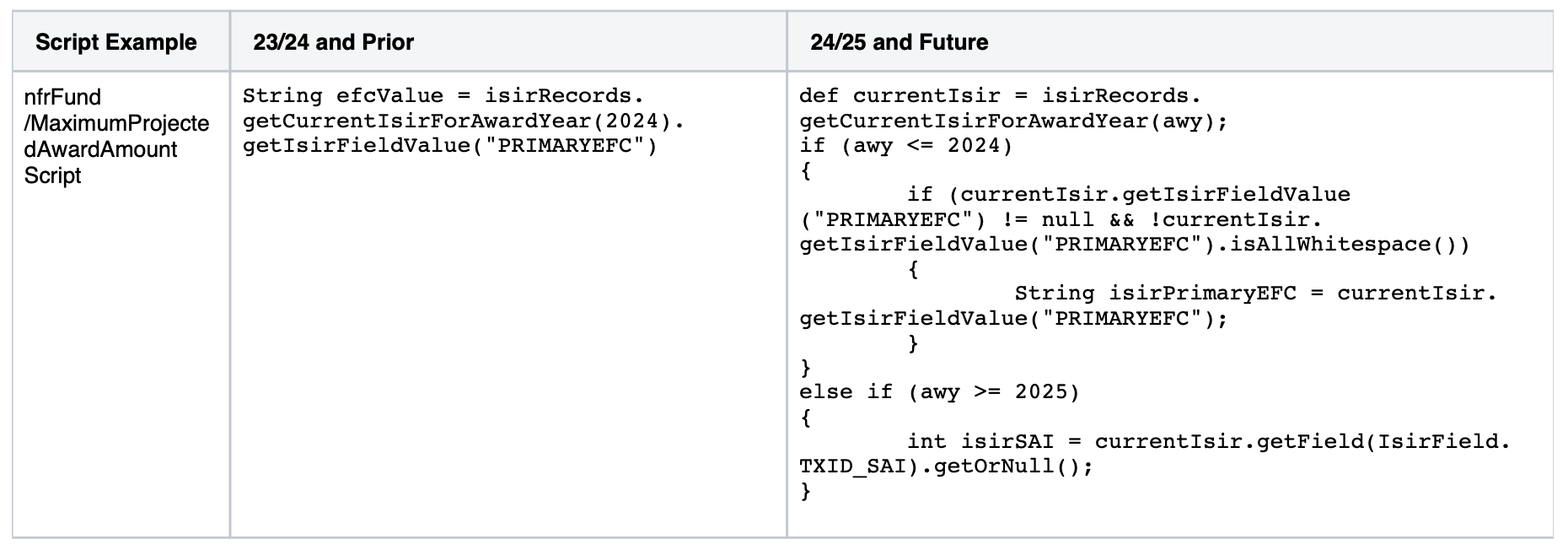
Configuration that has direct access to the ISIR record:

When a script is being used and the ISIR award year is unknown (ie a 24/25 COA or NFF fund is being projected but the student may only have 23/24 ISIR):
24/25 ISIR Baseline Configuration Workbook Updates:
- The following areas have been updated in Student Financial Aid baseline configuration to support the 24/25 ISIR
- ISIR Regulatory Deadlines have been added to Regulatory Deadlines Configuration for 24/25
- ISIR Verification Rules and Tracking Groups added for the 24/25 award year
- ISIR Comment Codes Configuration added for 24/25 award year
- ISIR Reject Code Configuration added for 24/25 award year
- ISIR 24/25 Highlight Configuration added for 24/25 award year
- ISIR 24/25 Assumptions Configuration is no longer required
- To ensure you do not incorrectly configure assumptions for the 24/25 award year, we have added a validation error that will be thrown when a configuration is loaded with 24/25 Assumptions
- ISIR Discrepancy Configuration added for the 24/25 award year
- ISIR MGMT Configuration added for the 24/25 award year
- DocMetaData Configuration added for the 24/25 award year
- Documents Configuration added for the 24/25 award year
- PJ Configuration added for the 24/25 award year
- Refer to Release 24A Release Notes on My Oracle Support (Doc ID 3000063.1) for the specific baseline configuration updates that were made for each of the areas above.
Steps to Enable
Use the Opt In UI to enable this feature. For instructions, refer to the Optional Uptake of New Features section of this document.
Offering: Student Financial Aid
- Download provided Student Financial Aid Baseline configuration from Release 24A Release Notes on My Oracle Support (Doc ID 3000063.1)
- Download your current Production environments baseline configuration
- Determine what configuration changes are required to meet your business requirements
- Refer to Release 24A Release Notes on My Oracle Support (Doc ID 3000063.1) outlining the updates that were made to our baseline configuration to process the new 24/25 ISIR
- Refer to the 24/25 ISIR Mapping Analysis that was completed by our Product Management team and reviewed by customers on Cloud Customer Connect to identify which ISIR fields should be used for the new aid year when the prior field no longer exists or was renamed
- Update your configuration using the new methods described in this feature to access 24/25 ISIR fields within groovy script
- Refer to Release 24A Release Notes on My Oracle Support (Doc ID 3000063.1) for the configuration scripting API with further details of the new methods and new enums defined for each ISIR field
- To access the defined enums and methods for the 24/25 ISIR fields, navigate to the Javadoc for SFP Scripting API, select com.oracle.sfp.scripting.api, and select IsirField<T> to view all of the ISIR fields
- Refer to Release 24A Release Notes on My Oracle Support (Doc ID 3000063.1) for the configuration scripting API with further details of the new methods and new enums defined for each ISIR field
- Apply 24/25 configuration updates to your test environment and confirm they are working as expected before promoting the configuration update to your production environment
Tips And Considerations
- You will need to review every configuration that accesses ISIR fields to ensure that they are using the new methods to access the data for 24/25 Award Years and future
- If you are attempting to access ISIR data using a method that is not supported for the award year, an application event error will be logged when the script executes.
- When defining configuration that uses FTI values, you need to ensure to use one of the methods that outputs the FTI value without the CUI labelling
- Example: using isirRecord.getField(IsirField.STUDENTFTIM_ADJUSTEDGROSSINCOME_FTI).getOrNull() will return the value as an integer without CUI labelling
- In groovy scripts that need to access both 23/24 and 24/25 ISIR fields such as those used within packaging, you will need to identify the ISIR award year you are accessing within the script and conditionally use different methods to access the desired data.
Key Resources
- Review the following resources published by the Department of Education
Reports and Letters
Updates to Reports and Letters to Support the New 24/25 ISIR
As a result of the changes to the 24/25 ISIR format, Student Financial Aid has created views containing ISIR information for 24/25 ISIR and forward while maintaining current ISIR views for 23/24 and prior. 24/25 ISIRs contain significantly more fields, previous fields have been renamed and allowable values have been updated. Creating these new views enables all prior product and custom reports to function while giving the flexibility to enhance or create new reporting for the new ISIR structure.
Reporting Updates
- New Reporting views will be created to include ISIR data for 24/25 ISIRs and forward
- Reporting views will be designated as V2 in order to differentiate the new from existing views
- Existing views will contain 23/24 ISIR data and older
- For example:
- 23/24 ISIR information - ISIR_ONLY_VW
- 24/25 ISIR information - ISIR_ONLY_V2_VW
- Reporting views will be designated as V2 in order to differentiate the new from existing views
- Custom reports may need to be duplicated depending on the ISIR data being returned. Certain reports can be rewritten to include ISIR data from old and new views however you should be cautious of the amount of ISIR fields being used.
Letter Updates
- Any custom letters utilizing ISIR fields may need to be duplicated or re-written in order to ensure the correct ISIR data is being displayed
- Since ISIR data will now be split into multiple views depending on the Award Year, you'll need to ensure custom data models using any of the existing V1 views be updated to also include the V2 views or should be duplicated to incorporate only 24/25 ISIRs and forward.
- In order to support the new reporting views and letters, the Letter trigger parameters for the FasStudentAwardInformationV2Event have been updated to include an Award Year. The Award Year sent in the parameters will correlate to the latest Award Year of any fund in the Award Message. Award year has been added so Award Year specific letters, ie the Aid Offer Letter and the Provisional Aid Offer Letter, incorporates the correct ISIR values.
- For Example, the following Package version would have an Award Year of 2025 as the award year in the letter parameters:
- Package Version 2
- Academic Year 1
- Awards
- 24/25 Pell
- 23/24 Sub
- 23/24 Unsub
- For Example, the following Package version would have an Award Year of 2025 as the award year in the letter parameters:
Steps to Enable
Use the Opt In UI to enable this feature. For instructions, refer to the Optional Uptake of New Features section of this document.
Offering: Student Financial Aid
Letters
- Review any custom letters that utilize ISIR values. Letter data models may need to be updated to use the new ISIR reporting V2 views, or if significant changes were made you may need to duplicate the letter in OAS and configuration to allow for Aid Year specific letters
- If FTI data is present, the format FTI function may need to be used to include the CUI//SP-TAX label in the output of the letter. For details please review the Security Requirements for FTI Data Feature.
Reports
- Custom reports may also need to be duplicated depending on the ISIR data being returned. Certain reports can be rewritten to include ISIR data from old and new views however you should be cautious of the amount of ISIR fields being used.
- If your custom reports contain FTI data in the output, you should include an optional run parameter that will allow you to display or mask FTI data in the output. For details please review the Security Requirements for FTI Data Feature.
Tips And Considerations
For a full list of the reporting view updates and details about the new and updated product report and letters, see Release 24A Release Notes on My Oracle Support (Doc ID 3000063.1)
Key Resources
- Please review the following resources published by the Department of Education
SAIG
Integrating with New FTI SAIG Mailbox
Beginning with the 2024-25 FAFSA award year, as a result of the changes to the 24/25 ISIR format, every institution enrolled to receive ISIRs will be required to utilize a new FTI SAIG mailbox that aligns with updated security requirements for receiving and sending FTI data within the ISIR.
- The system will utilize the new FTI-SAIG software in order to begin receiving and sending 24/25 ISIR data and forward
- The enhanced SAIG software is used for all award years as it will offer connectivity options to both the SAIG and FTI-SAIG mailboxes
- The upgraded SAIG software includes increased security in the authentication process to identify FTI-SAIG authorized users
- The system will be upgraded to a new TD Client version
- The new TD Client version will be utilized for all file types and all award years going forward (includes all ISIR files, all COD files, and all NSLDS files for all award years)
- The system will receive the 24/25 award year ISIR files and forward via the new FTI-SAIG mailbox including:
- IDAPXXOP (XX is the award year) - Daily Electronic Application ISIRs
- IDSAXXOP (XX is the award year) - Daily ISIRs
- IGCOXXOP (XX is the award year) - CPS Daily ISIRs - ISIRs generated by institutional corrections
- IGSGXXOP (XX is the award year) - CPS Pushed ISIRs - System-Generated
- IGSAXXOP (XX is the award year) - CPS Pushed ISIRs
- COREXXOP (XX is the award year): Electronic Correction Errors
- EAPRXXOP (XX is the award year): Electronic Application Rejects
- SIGAXXOP (XX is the award year): Signature Record Errors
- The system will send 24/25 award year ISIR files and forward via the existing SAIG mailbox including:
- CORRXXIN (XX is the award year): ISIR Corrections
- The existing TD Client Management UI can be used to enable or disable the new TD Client that is associated with the existing SAIG and new FTI-SAIG mailbox and include a TD Client health check for the new mailbox
- Existing screen and toggle switch will be used for the TD Client module associated to existing SAIG mailbox
- A new toggle switch will be used for the new TD Client module associated to the new FTI-SAIG mailbox
- The existing check TD Client health verbiage / button section will provide a response for each TG Mail Mailbox indicating the health of each mailbox separately
- The system will allow a user to update / sync up the new TG Number and Password information associated with the new FTI-SAIG mailbox to match the password set with the DOE via the existing SAIG Administration UI
- A new section for the new TG Number and Password associated with the new FTI-SAIG mailbox will be duplicated on existing SAIG Administration UI
- The existing rest API for pushing and pulling files from VUG will remain in its current form (files will be stored in the same folder for other files)
Steps to Enable
Use the Opt In UI to enable this feature. For instructions, refer to the Optional Uptake of New Features section of this document.
Offering: Student Financial Aid
- Visit Department of Education SAIG Enrollment Site to sign the updated SAIG enrollment agreement and enroll for a new FTI-SAIG mailbox for your institution
- Once enrolled, log into Federal Tax Information Transaction Delivery Community Manager (FTI-TDCM) portal using your credentials and export the provided INI and RTM Certificate files. You will also need to retrieve the Approval Code
- You can export the INI file from the Security subtab under the main Participants tab by clicking the Export INI button
- You can export the RTM Certificate file from the Security subtab under the main Participants tab by clicking the Export Runtime button
- You can retrieve the Approval Code value from the Approval Code text box in the same Participants section
- You should then open an SFP SR and title it "INI File for FTI SAIG Mailbox Setup" and attach the exported INI file, the Runtime Certificate file, and the Approval Code (via word doc or text snippet). This will allow SFP support to complete the mailbox setup for your institution once the release is live.
- Upon receipt of your exported INI and Runtime file in addition to the Approval Code via service request, Oracle’s SFP support team will begin the backend setup activities for your FTI SAIG mailbox
- You must ensure the FTI TD Client mailbox is in a status of Suspended on the SFP TD Client Management UI. The mailbox will not be connected if in a status of Active prior to the next steps.
- SFP support will require a screenshot of the UI in a Suspended status for the FTI TD Client Mailbox prior to loading any INI file to an environment
- Once the mailbox setup is complete and the FTI TD Client mailbox is Suspended, you must set the FT Number and new Password information associated with the new FTI-SAIG mailbox on the existing SAIG Administration UI in order to use the new FTI mailbox. User will require the "SAIG Management" permission to do so.
- You can refer to the SAIG Administration section of the User Guide for guidance on how to update an SAIG password.
- Similar to the existing SAIG mailbox, the Department of Education requires the password update process to be completed every 90 days subsequently.
- You should then enable the new FTI TD Client for the new FTI SAIG mailbox using the TD Client Management UI. You can use the toggle to move the status from “Suspended” to “Active”. User will require the "TD Client and VUG" permission to do so.
Tips And Considerations
The new FTI-SAIG mailbox will only be used for 24/25 ISIRs and forward, and will not be used ISIRs files prior to 24/25 or other file types such as NSLDS and COD.
Key Resources
- Review the following resources published by the Department of Education
- (GENERAL-23-34) Access and Use of Federal Tax Information (FTI) for Federal Student Aid Programs Beginning with the 2024-25 FAFSA Processing Cycle
- (GENERAL-23-40) SAIG Software Upgrade for FTI Data Transmission Preliminary Information for SAIG Software Users
- (GENERAL-23-79) Updated SAIG Enrollment Agreement Available Oct. 23, 2023 ¿ Required Steps to Receive 2024-25 ISIRs
- (GENERAL-23-82) SAIG Software Upgrade for FTI Data Transmission - Additional Information for SAIG Software Users
- Federal Tax Information - Student Aid Internet Gateway (FTI-SAIG) TDClient Host Communication Guide
- 2024–25 Test ISIR Data File Available
- FAFSA Simplification Webinars and Training Videos
Security
Security Requirements for FTI Data
With the Consolidated Appropriations Act and 24/25 New Aid Year updates, Financial Aid applicants and their contributors can now consent to the use of Federal Tax Information, or FTI, to be transferred to schools via the Institutional Student Information Record (ISIR). Oracle Student Financial Aid ensures compliance with IRS Publication 1075 and strict FTI data requirements for storing, displaying, reporting, and how it is used in the calculation of Financial Aid. This includes incorporating required Controlled Unclassified Information (CUI) labeling for FTI whenever it appears in the user interface, logs, or reports. Additionally, the ISIR is stored in its original raw format within the system, complete with the necessary CUI labeling as transmitted by the Education Department (ED).
User Interface Updates
- Any FTI Field displayed in the UI will be designated with a CUI label prior to the field value. Example for Adjusted Gross Income - 'CUI//SP-TAX 50000'
New Security Permission
- A new Security Permission named 'FTI Viewer' has been created to allow certain users and roles the ability to view highly restricted FTI data
- If permission is given, user will be able to view all FTI fields labeled 'CUI//SP-TAX' within the ISIR and anywhere these values appear in the system
- If permission is removed, any 'CUI//SP-TAX' values will only display the CUI label (CUI//SP-TAX) followed by Xs and will not display the actual FTI values
Configuration Updates
- With the significant changes to the ISIR, SFA has created optimizations to configuration. Instead of requiring a string, a type safe enum and data type will be defined for each field ensuring that the data being retrieved is provided in the expected format. These formats will also include methods for retrieving FTI data. Values are returned as a string in logs and will include the CUI labeling for all FTI Data. For more information see the Optimized ISIR Configuration Feature.
Reporting Updates
- New reporting views will be created to include ISIR data for 24/25 ISIRs and forward
- Column names where the column contains FTI data will end with _FTI to denote the values in the column are FTI values and should be treated as restricted data
- FTI Values within the column will not contain the CUI labeling, this was done in order to preserve the data types
- Report writers should use a format function FASRPT.fasrpt_mv_util_pkg.format_fti in order to label FTI data outputs with CUI//SP-TAX prior to the value in any output.
- Generic Example
- select FASRPT.fasrpt_mv_util_pkg.format_fti('FIELD1_FTI', FIELD1_FTI) as FIELD1, FASRPT.fasrpt_mv_util_pkg.format_fti('FIELD2_FTI', FIELD2_FTI) as FIELD2, FASRPT.fasrpt_mv_util_pkg.format_fti('FIELD3_FTI', FIELD3_FTI) as FIELD3, FASRPT.fasrpt_mv_util_pkg.format_fti('FIELD100_FTI', FIELD100_FTI) as FIELD100 from FASRPT.<view_name>;
- Example using Reporting Views
- select FASRPT.fasrpt_mv_util_pkg.format_fti('STUDENTFTIM_ADJUSTEDGROSSINCOME_FTI', a.STUDENTFTIM_ADJUSTEDGROSSINCOME_FTI) as AGI, from FASRPT.isir_fields_all_v2_vw a;
- Value output on Report would = CUI//SP-TAX 9500
- Generic Example
- Column names where the column contains FTI data will end with _FTI to denote the values in the column are FTI values and should be treated as restricted data
- Product reports containing FTI data in the output will include an optional run parameter that will allow you to display or mask FTI data in the output
- If the report is run using the masked option, all FTI fields will display the CUI//SP-TAX label but will not contain the actual FTI field value
- If the report is run without masking, the CUI//SP-TAX label will be present prior to the actual FTI value
- Our product report data models for masking can be utilized if you would like the masking option present on any custom reports.
Letter Updates
- If you want to display any FTI data on a custom letter, you will need to utilize the same FASRPT.fasrpt_mv_util_pkg.format_fti described in the reporting update to display the CUI//SP-TAX label in the field value. If this function is not used in the letter query the CUI label will not be rendered on the letter.
Integration Updates
- The FasValidIsirProcessStatusInformationEvent and FasIsirInformationRequest Webservice Integration messages will now display they CUI//SP-TAX label in the field value for each FTI field being returned in the message.
- Example from the FasValidIsirProcessStatusInformationEvent
- <IsirField>
- <Number>863</Number>
- <Name>Returned Tax Year</Name>
- <Value>CUI//SP-TAX 2022</Value>
- </IsirField>
- Example from the FasValidIsirProcessStatusInformationEvent
Steps to Enable
Use the Opt In UI to enable this feature. For instructions, refer to the Optional Uptake of New Features section of this document.
Offering: Student Financial Aid
- In order to view FTI data within the User Interface, an admin must assign the permission of FTI Viewer to any role where a user should be able to view this restricted data.
- Report writers must use the FORMATFTI() in report and letter queries in order to correctly label FTI data in any outputs
Tips And Considerations
- Our product reports containing FTI will have the ability run the report with either FTI data masked or unmasked. If only certain members of your school should see the data unmasked, please copy our product reports to a separate folder and update the Data Model. You can control access to individual reports and folders via permissions to control which users have the ability to see unmasked data. For example, our Individual ISIR Report will contain the ability to run the report with a filter to mask the data. This data model can be updated to only display masked fields and can be utilized to restrict users from access to FTI data.
- For a full list of the reporting view updates and details about the new and updated product report and letters, see Release 24A Release Notes on My Oracle Support (Doc ID 3000063.1)
Key Resources
- Review the following resources published by the Department of Education
Documents
Updates to Document Owners
Within the 24/25 ISIR, the required contributors for a FAFSA were updated to Student, Student Spouse, Parent, and Parent Spouse. Due to this change the document owners within SFA were updated to reflect the new naming conventions to support the 24/25 award year.
- Possible Document Owner Enums inAPI were updated to add the following values - Student Spouse, Parent, Parent Spouse. Below is the full list that of enums that will be supported.
- Student
- Mother
- Father
- Spouse
- Parent1
- Parent2
- Student Spouse
- Parent
- Parent Spouse
- Within the Admin and Self-Service when requesting documents or uploading unsolicited documents, the following values will be available in the dropdowns to select
- If selecting a document with an award year of 23/24 or prior
- Student
- Spouse
- Parent 1
- Parent 2
- If selecting a document with an award year of 24/25 of future or a lifetime document
- Student
- Student Spouse
- Parent
- Parent Spouse
- If selecting a document with an award year of 23/24 or prior
- The following mapping will occur to allow for existing document owners to map to new document owners to ensure that when any configuration script or system process that is trying to request or locate a document, it understands that they are the same.
- Student
- Spouse, Student Spouse
- Mother, Parent1, Parent
- Father, Parent2, Parent Spouse
Steps to Enable
You don't need to do anything to enable this feature.
Tips And Considerations
Mapping will ensure that prior lifetime and award year documents will work with this change as well. For example, in your configuration if you are using "Parent1", it will map it to "Parent" and request a document for "Parent" if that lifetime document associated to Mother, Parent1, or Parent does not already exist. However, for new configuration we would recommend that you reflect the new naming conventions.
Key Resources
- Please review the following resources published by the Department of Education
Student/Parent Self Service (Portal)
Support of 24/25 Verification Worksheets
The Dependent and Independent Verification Worksheet Smartforms have been updated to support 24/25 Verification Requirements. Due to most contributors being required to get their financial information from the IRS, the Smartforms have been simplified for the 24/25 award year.
Dependent Verification Worksheet Updates
- Updated the header language to support the 24/25 award year
- Renamed Section Household Information to Family Size Information
- Updated the Family Size Information section to the following language:
- Below is your parent's marital status and number of family members from the FAFSA. Please verify the correct information by listing ALL of the members in your parent's household in the table below. Include:
- Yourself
- Your parents, even if you are not living with them.
- Exclude a parent who has died or is not living in the household because of separation or divorce.
- Include a parent who is on active duty in the U.S. Armed Forces apart from the family.
- Your siblings if all the following are true:
- They live with your parents (or live apart because of college enrollment)
- They receive more than half of their support from your parents
- They will continue to receive more than half their support from the student¿s parents between July 1, 2024 and June 30, 2025
- Other persons if all the following are true:
- They live with your parents
- They receive more than half of their support from your parents
- They will continue to receive more than half their support from the students parents between July 1, 2024 and June 30, 2025
- Updated the Please note text to the following:
- The provided criteria for dependent children or other persons align with the requirement that family size align with whom your parent could claim as a dependent on a U.S. tax return if your parent were to file a U.S tax return at the time of completing the 2024-2025 FAFSA. As a result, your parent should not include any unborn children in the family size.
- Below is your parent's marital status and number of family members from the FAFSA. Please verify the correct information by listing ALL of the members in your parent's household in the table below. Include:
- Updated Family Member Smart Table to look at the following:
- For Parent's Number of Family members use the following ISIR fields in order:
- If Parent Updated Family Size (PARENT_UPDATEDFAMILYSIZE) is NOT blank display that value to the user and populate the number of rows in the table for this value
- If Parent Updated Family Size is blank display Assumed Parent Family Size (FPS_ASSUMEDPARENTFAMILYSIZE) value if not blank to the user and populate the number of rows in the table for this value
- If Parent Updated Family Size (PARENT_UPDATEDFAMILYSIZE) and Assumed Parent Family Size (FPS_ASSUMEDPARENTFAMILYSIZE) are both blank, populate the Assumed Parent Family Size (FPS_ASSUMEDPARENTFAMILYSIZE) as 0 and populate 1 row on the table
- Removed the Number in college question
- From the fillable content section, removed the column College as it is no longer required
- Removed the student and parent tax information questions as they are no longer required
- For Parent's Number of Family members use the following ISIR fields in order:
Independent Verification Worksheet Updates
- Updated the header language to support the 24/25 award year
- Renamed Section Household Information to Family Size Information
- Updated the Family Size Information section to the following language for Independent Verification Worksheet:
- Below is your marital status and number of family members from the FAFSA. Please verify the correct information by listing ALL of the members in your household in the table below. Include:
- Yourself
- Your spouse, if applicable
- Your dependent children if all the following are true:
- They live with you (or live apart because of college enrollment)
- They receive more than half of their support from you
- They will continue to receive more than half their support from you between July 1, 2024 and June 30, 2025
- Other persons if all the following are true:
- They live with you
- They receive more than half of their support from you
- They will continue to receive more than half their support from you between July 1, 2024 and June 30, 2025
- Updated the Please note text to the following:
- The provided criteria for dependent children or other persons align with the requirement that family size align with whom you could claim as a dependent on a U.S. tax return if the you were to file a U.S tax return at the time of completing the 2024-2025 FAFSA. As a result, you should not include any unborn children in the family size.
- Updated Family Member Smart Table to look at the following:
- If Student Updated Family Size (STUDENT_UPDATEDFAMILYSIZE) is NOT blank display that value to the user and populate the number of rows in the table for this value
- If Student Updated Family Size is blank display Assumed Student Family Size (FPS_ASSUMEDSTUDENTFAMILYSIZE) value if not blank to the user and populate the number of rows in the table for this value
- If Student Updated Family Size (STUDENT_UPDATEDFAMILYSIZE) and Assumed Student Family Size (FPS_ASSUMEDSTUDENTFAMILYSIZE) are both blank populate the Assumed Student Family Size (FPS_ASSUMEDSTUDENTFAMILYSIZE) as 0 and populate 1 row on the table
- Removed the Number in college question
- From the fillable content section removed the column College as it is no longer required
- Removed the student tax information questions as they are no longer required
- Below is your marital status and number of family members from the FAFSA. Please verify the correct information by listing ALL of the members in your household in the table below. Include:
Steps to Enable
Use the Opt In UI to enable this feature. For instructions, refer to the Optional Uptake of New Features section of this document.
Offering: Student Financial Aid
- Add configuration to support 24/25 Verification Worksheets, see Release 24A Release Notes on My Oracle Support (Doc ID 3000063.1) for further details of how this is delivered with our baseline configuration
- Add 24/25 Dependent and Independent Verification Worksheets to Documents Configuration Workbook
- Add 24/25 DocMetaData fields for the Independent and Dependent Verification Worksheets
- Configure 24/25 ISIR Verification Rules for V1 (Standard) and V5 (Aggregate) Verification Groups to request the Verification Smartforms
- Load 24/25 ISIRs selected for Verification that request the Dependent and Independent Verification Worksheets in your test environment to ensure they are working as expected
- Apply Verification updates to your Production environment
Tips And Considerations
To ensure the Verification Worksheet Smartforms work correctly, make sure to configure your DocMetaData fields correctly by only including the required fields for 24/25. The fields have changed from 23/24.
Key Resources
- Review the following resources published by the Department of Education
Packaging/Awarding
Package Title IV Funds with New 24/25 ISIR
Allowing you to package and award Title IV funding for the 24/25 Award Year leveraging the new ISIR.
| Title IV Fund | 23/24 ISIR Field or Comment Code | 24/25 ISIR Field or Comment Code | Valid Content Changed with 24/25 Award Year |
|---|---|---|---|
| General Title IV Eligibility | HS Diploma or Equivalent |
High School Completion Status |
No |
| General Title IV Eligibility | Student’s Citizenship Status | Citizenship Status | No |
| General Title IV Eligibility | Comment Code 124 |
Comment Code 162 |
Yes
|
| General Title IV Eligibility | Comment Code 132 |
Comment Code 163 (used to be 162) |
No |
| General Title IV Eligibility | Comment Code 133 |
Comment Code 164 |
No |
| General Title IV Eligibility | Comment Code 134 |
Comment Code 165 |
No |
| General Title IV Eligibility | Comment Code 68 | Comment Code 17 | No |
| General Title IV Eligibility | Comment Code 141 | Comment Code 19 | No |
| General Title IV Eligibility | Comment Code 142 | Comment Code 20 | No |
| General Title IV Eligibility | Comment Code 144 | Comment Code 155 | No |
| General Title IV Eligibility | Comment Code 46 | Comment Code 293 | No |
| General Title IV Eligibility | Comment Code 105 | Comment Code 294 | No |
| General Title IV Eligibility | Comment Code 109 | N/A | N/A
|
| General Title IV Eligibility | N/A | Comment Code 326 | Yes
|
| General Title IV Eligibility | Comment Code 146 | Comment Code 18 | No |
| Pell FSEOG Direct Subsidized Loan |
EFC | SAI | Yes
|
| Pell TEACH |
First Bachelor's Degree Before 2024-25 School Year | N/A | N/A
|
| Pell | Grade Level in College | N/A |
No
|
| Pell | Primary EFC | SAI |
Yes
|
| Pell | Comment Code 359 | Comment Code 276 |
No |
| Pell | Comment Code 360 | Comment Code 277 |
No |
| FSEOG | Degree/Certificate | Pursuing Teacher Certification? |
Yes
|
| TEACH |
Degree/Certificate |
N/A |
N/A
|
| Direct Subsidized Loan Direct Unsubsidized Loan FSEOG |
Dependency Status |
Dependency Model |
Yes
|
| Direct Subsidized Loan Direct Unsubsidized Loan Grad PLUS Loan FSEOG TEACH |
Student’s State of Legal Residence | State of Legal Residence |
No |
| Direct Subsidized Direct Unsubsidized Loan Grad PLUS Loan FSEOG TEACH |
Student’s Alien Registration Number | A-Number |
No |
| Direct Subsidized Direct Unsubsidized Loan PLUS/Grad PLUS Loan |
Comment Code 137 | Comment Code 218 |
No |
| Direct Subsidized Direct Unsubsidized Loan PLUS/Grad PLUS Loan |
Comment Code 254 | Comment Code 259 |
No |
Since the Expected Family Contribution (EFC) has been replaced by the Student Aid Index (SAI) in the new 24/25 ISIR, the following updates were made:
- The EFC limit for FSEOG, which institutions configure to ensure only students that have a EFC (for award years prior to 24/25) less than the set amount will be eligible for FSEOG, was updated to compare this configured limit to the SAI for 24/25 and future award years.
- Within the FAS_FUND_CONFIG.csv workbook, the FSEOG_EFC_Limit column has been renamed to FSEOG_EFC_SAI_Limit to reference applicability in 24/25 and will support negative values within rows, effective from the 24/25 aid year.
- The column will be updated in any export of configuration subsequent to the release.
- If configuration is upload with a negative value for award years prior to the 24/25 aid year, a validation will be thrown.
- Within the FAS_FUND_CONFIG.csv workbook, the FSEOG_EFC_Limit column has been renamed to FSEOG_EFC_SAI_Limit to reference applicability in 24/25 and will support negative values within rows, effective from the 24/25 aid year.
- The FasFinancialPlanOutboundV2, generated as a result of each repackage, contains the EFC received in the ISIRs being used in the student's package, and was updated to include the SAI for 24/25 ISIRs. Additionally since the Department of Education renamed their processing systems to be called FAFSA Processing System (FPS) instead of CPS, "CPS" was removed from the transaction number field name.
- Within the <AwardYear> Element, for 24/25 and future award years,
- Within the <Isir> Element, <TransactionNumber> will be included replacing CPSTransactionNumber
- The <Efc> Element will be replaced with a <Sai> Element which will include the <SaiAmount>
- The <Status> will also be displayed within the SAI element for 24/25 ISIRs and forward. If the SAI being used to calculate the Award is from the Current ISIR, the status will be "Actual" and if the Award was generated using a prior Award Year ISIR the Status will be "Estimated"
- Within the <AwardYear> Element, for 24/25 and future award years,
Steps to Enable
Use the Opt In UI to enable this feature. For instructions, refer to the Optional Uptake of New Features section of this document.
Offering: Student Financial Aid
- In order to package and award 24/25 Title IV funds the following configuration needs to be set and the student needs to have a valid 24/25 ISIR.
- FAS_FUND_CONFIG
- For all Title IV Funds that you want to package and award for 24/25, duplicate the funds from the prior year with the exception of the following columns
- Effective_Start_Date (for all fund types) should be set to the date in 2024 that you would like begin awarding the fund
- Aid_Year (for all fund types) should be set to 2024-2025
- Fund_Close_Out_Date (for all fund types) should be set to the prior year date incremented by one year
- Awarding_Close_Out_Date (for all fund types) should be set to the prior year date incremented by one year
- FSEOG_EFC_SAI_Limit (for FSEOG) should be set based on your school's updated policy based on the new SAI value that can now be as low as -1500
- Enrollment_Status_Override_Census_Dates (for PELL) should no longer be set (Refer to new Pell Enrollment Intensity configuration within the Support of New Pell Calculation feature)
- For all Title IV Funds that you want to package and award for 24/25, duplicate the funds from the prior year with the exception of the following columns
- T4_CRIT
- For all Title IV Funds that you want to award for 24/25, duplicate the funds from the prior year with the exception of the following columns,
- Aid_Year should be set to 2024-2025
- Effective_Start_Date should be set to the date in 2024 that you would like begin awarding the fund
- For all Title IV Funds that you want to award for 24/25, duplicate the funds from the prior year with the exception of the following columns,
- Refer to Release 24A Release Notes on My Oracle Support (Doc ID 3000063.1) for further details of how this is delivered with our baseline configuration
- FAS_FUND_CONFIG
- Loading a valid 24/25 ISIR and SAFI for the student is also required to package Title IV funds
Tips And Considerations
For existing students with 23/24 ISIRs, the system will continue to project Title IV funding for 24/25 and future award years leveraging the 23/24 ISIR data until a 24/25 ISIR is packaged on.
Key Resources
- Please review the following resources published by the Department of Education
Support of New Pell Calculation
The FAFSA Simplification Act extends the Federal Pell Grant to more students and links eligibility to family size and the federal poverty level. This builds on changes implemented in the 23/24 award year including incarcerated students regaining the ability to receive a Federal Pell Grant and restoration of Federal Pell Grant lifetime eligibility to students whose school closed while they were enrolled or if the school is found to have misled the student.
In order to achieve this for the 24/25 Award Year, the department will no longer publish the Pell Payment and Disbursement Schedule and instead will determine whether a student is eligible for maximum Pell or minimum Pell and send the applicable data in the ISIR to use when calculating the student's scheduled award.
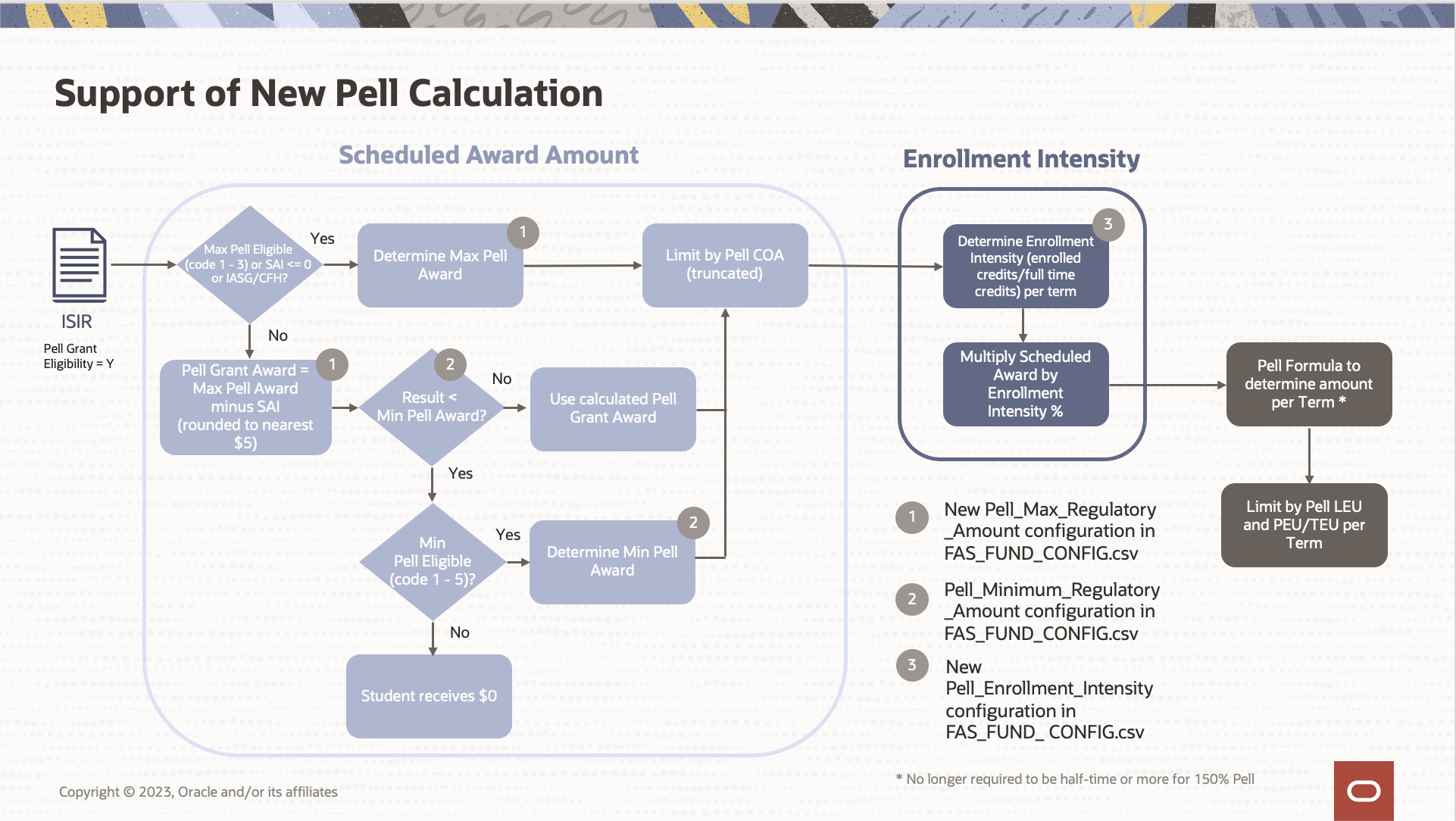
The following flowchart represents how the Student Financial Aid will use the ISIR data to determine the eligible Pell scheduled award amount limited Pell COA, then calculate their enrollment intensity in order to prorate the amount used in the pell formulas setting the amounts the student can receive each term or payment period.
Determining the Scheduled Award Amount:
- Leveraging the ISIR, the system will first determine if the student is eligible to receive a Maximum Pell Scheduled Award (limited by COA)
- The system will determine a student eligible for a Maximum Pell Scheduled Award if the ISIR Pell Grant Eligibility value = Y and one of the following values in the ISIR is true,
- Max Pell Indicator = 1, 2, or 3 OR
- SAI <= 0 OR
- IASG Indicator = 1 or 2 OR
- Children of Fallen Heroes (CFH) Indicator = 1 or 2
- A new configuration for the yearly Maximum Pell Scheduled Award Amount will be set in a new column entitled Pell_Max_Regulatory_Amount within the FAS_FUND_CONFIG.csv
- If the student meets all criteria for a Maximum Pell Scheduled Award but the Pell COA < the Maximum Pell amount then the Scheduled Award will be set to the Pell COA
- If the Scheduled Award = the Pell COA and contains cents, the Scheduled Award value is truncated (not rounded)
- The system will determine a student eligible for a Maximum Pell Scheduled Award if the ISIR Pell Grant Eligibility value = Y and one of the following values in the ISIR is true,
- If the student is not eligible for Maximum Pell Scheduled Award. the system will calculate the scheduled award
- If the ISIR Pell Grant Eligibility value = Y, and the SAI is less than annual maximum Pell Grant Scheduled Award, the Calculated Scheduled Award for the Pell Grant will be determined
- Calculated Scheduled Award (CSA) = Pell_Max_Regulatory_Amount - SAI (where a negative SAI will default to = $0)
- If the CSA ends in 0 or 5, then no rounding is needed
- If the CSA ends in 3, 4. 8 or 9, then round CSA up to nearest $5
- If the CSA ends in 1, 2, 6, or 7 then round CSA down to nearest $5
- The system when then compare the Calculated Scheduled Award (CSA) to the configured Minimum Pell Scheduled Award Amount, which is configured yearly within Pell_Min_Regulatory_Amount within the FAS_FUND_CONFIG.csv
- If the Calculated Scheduled Award (CSA) >= Pell_Minimum_Regulatory_Amount, the system will compare the rounded CSA to the Pell COA,
- If the CSA <= Pell COA, the Scheduled Award = the Calculated Scheduled Award
- If the CSA > Pell COA, the Scheduled Award = the Pell COA
- If the Scheduled Award = the Pell COA and contains cents, the Scheduled Award value is truncated (not rounded)
- If the Calculated Scheduled Award (CSA) < Pell_Minimum_Regulatory_Amount, the system will determine if the student is Minimum Pell eligible
- If the Minimum Pell Indicator = 1-5, the Scheduled Award will be set to the configured Minimum Pell Scheduled Award Amount
- If the Pell COA < the Pell_Minimum_Regulatory_Amount, then the Scheduled Award = the Pell COA
- If the Scheduled Award = the Pell COA and contains cents, the Scheduled Award value will be truncated (not rounded)
- If the Pell COA < the Pell_Minimum_Regulatory_Amount, then the Scheduled Award = the Pell COA
- Else, the student is not eligible for Pell
- If the Minimum Pell Indicator = 1-5, the Scheduled Award will be set to the configured Minimum Pell Scheduled Award Amount
Determining Enrollment Intensity:
- Since the Pell Payment and Disbursement Schedule will no longer be used, schools are required to prorate the scheduled award amount when a student is attending less than full time.
- A new configuration will determine an Enrollment Intensity value used for each term/payment period.
- This will be set in a new column entitled Pell_Enrollment_Intensity within the FAS_FUND_CONFIG.csv
- The Enrollment Intensity output will be a percentage
- The Enrollment_Intensity configuration can be used to freeze the enrollment intensity for Pell census dates and program withdrawals similar to the existing Enrollment_Status_Override_Census configuration
- If the Enrollment Intensity percentage contains more than two decimals, the percent will be rounded to the nearest whole percent using standard rounding rules within the Pell fund calculator (i.e., 7÷12 = 0.58333 = 58%, If value is .585, what is it rounded ip to .59)
- If no configuration value is returned, a default of 100% Enrollment Intensity will be utilized by the system
- The Enrollment Intensity output will be a percentage
- This will be set in a new column entitled Pell_Enrollment_Intensity within the FAS_FUND_CONFIG.csv
- For non term programs, Pell Formula 4 is used for the Pell calculation and will always have an Enrollment Intensity of 100% regardless of the configured value
- The Enrollment Intensity value will display on the "View Fund Eligibility" UI as a percent under the Fund Information, per payment period section
Determining Amount Per Term/Payment Period using Pell Formulas:
- The system will then use the Scheduled Award Amount and the Enrollment Intensity within the Pell Formulas to determine the amount the student will be able to receive per term/payment period
- Standard Terms using Pell Formula 1:
- The system will continue to use Pell Formula 1 to determine the amount per term for standard term schools
- The Pell Payment Disbursement Amount (per term) = (Scheduled Award Amount x Enrollment Intensity) ÷ SAFI.TermType (Number of terms)
- Non-Standard Terms using Pell Formula 4:
- The system will continue to use Pell Formula 4 to determine the amount per payment period for non-standard term schools
- The Pell Payment Disbursement Amount (per payment period) = (Lesser of Credits/Weeks Equation 1 or 2 for Pell Formula 4) x Scheduled Award Amount
- The Credits/Weeks Equation remains the same for Pell Formula 4
- Since Pell Formula 4 always has an enrollment intensity of 100%, it is no multiplied by the Scheduled Award Amount
Steps to Enable
Use the Opt In UI to enable this feature. For instructions, refer to the Optional Uptake of New Features section of this document.
Offering: Student Financial Aid
- See the "Steps to Enable" section within the Package Title IV Funds with the New 24/25 ISIR Feature to enable the Pell Title IV fund for 24/25.
- Set the following additional config:
- Pell_Max_Regulatory_Amount within the FAS_FUND_CONFIG.csv to the amount published by the Department
- Pell_Minimum_Regulatory_Amount within the FAS_FUND_CONFIG.csv to the amount published by the Department
- Enrollment_Intensity within the FAS_FUND_CONFIG.csv based on your institution's policy considering the number of credits that are required for full time enrollment and your census date.
- Refer to Release 24A Release Notes on My Oracle Support (Doc ID 3000063.1) for further details of how this is delivered with our baseline configuration
- Load a valid 24/25 ISIR and SAFI in order to package Title IV funds
Tips And Considerations
- The system is able to project 24/25 award year Pell funds when only a 23/24 ISIR is received
- System uses the old ISIR values and the old 23/24 Pell logic (ie using pell tables)
- The system will throw an error message on the Configuration Administration UI if a school tries to load the Pell tables for 24/25 onward in config
- Error verbiage: In an attempt to import the CSV file, an error occurred when loading the new configuration. You have specified an Aid_Year of 2024-2025. PELL_SCHEDULE records are only allowable for Aid_Year prior to 2024-2025. It is recommended that you remove all records that correspond to Aid_Year of 2024-2025 or greater and then reload the changed CSV file.
- A student is no longer required to be half-time or more to received 150% Pell (Year-Round Pell)
- The system will throw a validation errors if:
- The Pell_Minimum_Regulatory_Amount is greater than the Pell_Maximum_Regulatory_Amount
- Either the Pell_Minimum_Regulatory_Amount or the Pell_Maximum_Regulatory_Amount is set to be negative value
- Existing Pell eligibility requirements will now leverage the new 24/25 ISIR fields (Refer to Package Title IV Funds with the New 24/25 ISIR Feature for further details)
- The following calculations used within the Pell calculation remains the same
- Pell COA Proration
- Remaining Eligibility Based on Pell LEU Report Aggregate Year Limits
- Remaining Eligibility Based on NSLDS Award Year Limits
Key Resources
- Review the following resources published by the Department of Education
Calculate Need in Package with SAI
Provides the ability to package need-based Title IV funds in 24/25, leveraging the Student Aid Index (SAI) received in the student's ISIR in the current needs analysis calculations.
For FSEOG and Subsidized loans packaged in all academic models (term or non-term), the needs analysis will pull the SAI value when the 24/25 ISIR has been received and the fund is being packaged for the 24/25 and future award years.
- The formula for determining a student’s need remains the same, except that EFC has been replaced by SAI and EFA has been replaced by OFA.
- When determining a student’s need, the system will continue to use the following formula: Cost of Attendance (COA) minus Student Aid Index (SAI) minus Other Financial Assistance (OFA) equals need (COA – SAI – OFA = Need).
- Congress removed the provisions that allowed schools to use alternate EFCs when packaging students for periods other than 9 months.
- Therefore, when packaging for any period that is not 9 months, the system will use the calculated SAI (9-month) in the awarding formula for need-based aid.
- A student may receive a negative SAI as low as -1,500, thus the system will support the use of a negative SAI value and treat it as zero for the purposes of the calculation.
Steps to Enable
Use the Opt In UI to enable this feature. For instructions, refer to the Optional Uptake of New Features section of this document.
Offering: Student Financial Aid
- Complete "Steps to Enable" under Package Title IV Funds with New 24/25 ISIR feature to configure actions required to award need-based title IV funds
- Load a valid 24/25 ISIR and SAFI in order to package Title IV funds
Tips And Considerations
- For existing students with 23/24 ISIRs, the system will continue to project Title IV funding for 24/25 and future award years leveraging the 23/24 ISIR data and needs analysis using the EFC until a 24/25 ISIR is received and valid.
- When the Enhanced Calculation for Summer EFC/SAI feature is enabled, the summer need calculation will use the SAI and COA/OFA from the Summer period within the needs analysis. In a follow-up release, the summer need calculation will be updated to use the COA/OFA for all terms within the loan period including the summer term; the intention being to reduce the needs analysis burden for students' summer term packages.
- Prior to the follow-up release, any summer need results or need for periods less than 9 months can be adjusted manually.
Key Resources
- Please review the following resources published by the Department of Education
Title IV Funds
Deprecating IASG for 24/25 and Future Award Years
With the FAFSA Simplification Act, the Iraq and Service Grant (IASG) has been removed as a Title IV Fund for the 24/25 award year and forward
- The system will no longer auto-package IASG as a Title IV Fund from the 24/25 award year and forward
- If IASG is auto-packaged prior to the release, a repackage will remove any IASG funds that were auto-packaged and cancel the associated disbursements
- UI Impacts:
- The UI dropdown for selecting IASG as a Title IV fund when add/editing a fund will continue to have IASG viewable
- The system will display a warning if a user attempts to manually package IASG as a Title IV fund from the 24/25 award year and forward
- Users will be allowed to set an IASG value of $0 if manually packaged prior to release
- The system will have a back-end validation that prevents a user from setting the fund to a value other than $0
- IASG will be removed from the Fund Eligibility UI for 24/25 and forward
- The UI dropdown for selecting IASG as a Title IV fund when add/editing a fund will continue to have IASG viewable
- R2T4 Impacts:
- IASG will no longer be displayed or included as part of the R2T4, PWD or Grant Overpayment calculations when the payment period is within the 24/25 award year and forward
- If the IASG fund is packaged for 24/25 (prior to the release) and included in the R2T4 calculation, an application event error will be logged to notify a user why the R2T4 calculation failed
- College Financing Plan Impacts:
- The College Financing Plan will no longer consider IASG and IASG has been removed from College Financing Plan configuration (the FUND_CFP.csv)
Steps to Enable
You don't need to do anything to enable this feature.
Tips And Considerations
- If IASG is auto-packaged for 24/25 prior to the release, a repackage will remove any IASG funds that were auto-packaged causing the disbursements to be canceled
- If IASG is manually packaged for 24/25 prior to the 24A release, a user can use the add/edit functionality to set the any IASG funds to $0
- The system will continue to auto-package or allow a user to manually package IASG as Title IV fund for award years 23/24 and prior (based on Title IV fund config)
- The system will output a validation error if the IASG Title IV fund code is loaded into 24/25 away year config and forward
- Impacted Workbooks where the IASG fund code has been removed include:
- FUND_CFP.csv
- FAS_FUND_CONFIG.csv
- If a user attempts to include IASG as a Title IV fund for the the 24/25 award year and forward, a Validation Error Message will read, "In an attempt to import the CSV file, an error occurred when loading the new configuration. The IASG Title IV fund is no longer available for award year 2024-2025 and forward. It is recommended that you update and reload the changed CSV file.
- Impacted Workbooks where the IASG fund code has been removed include:
- To support requesting documentation for students that are self identifying for IASG/CFH eligibility for PELL, you can make the following configuration updates.
- Configure a lifetime document to allow the student to certify that the student is still eligible under the new criteria in DOCUMENTS.csv
- If you would like to use metadata on the documentation to drive correction, you will need to configure that within DOCMETADATA.csv
- Within the ISIR_DISCREP.csv, configure ISIR discrepancy logic for FPS_IASGINDICATOR and FPS_CHILDRENOFFALLENHEROESINDICATOR
- For each of the 2 rows add the following
- Discrepancy_Evaluation_Script:
- If STUDENT_PARENTKILLEDINTHELINEOFDUTYis 1 (meaning the student self identified), check to see if either FPS_IASGINDICATOR or FPS_CHILDRENOFFALLENHEROESINDICATOR contains code 1 or 2 showing that they are already eligible. If neither of the indicators are already eligible, request that the student send applicable documenation by setting that there is a discrepancy triggering the addtional doc request script. If the document already exists, you can either use the metadata in the document to set the correct values triggering a correction, or require that a user manually review to make the correction.
- Additional_Doc_Req_Script:
- Add the document request for the new student document configured
- Configure a lifetime document to allow the student to certify that the student is still eligible under the new criteria in DOCUMENTS.csv
Key Resources
- Please review the following resources published by the Department of Education
Support of NSLDS for 24/25 Award Year
Student Financial Aid supports the latest NSLDS file formats, including the latest NSLDS Guarantor/Servicers List, and error/warning codes.
- System is able to send the Transfer Student Monitoring/ Financial Aid History file (TRNINFIN)
- System can accept and match the latest Transfer Student Monitoring/ Financial Aid History Batch File Layouts to a student (FAHEXTOP)
- Possible Discharged Loan Codes values have been updated to only send the following values within TSM Alert/FAH Detail Record Type 1 - Aggregate, Perkins, Flags Record:
- D = Death
- P = Permanent
- N = None
- Possible Discharged Loan Codes values have been updated to only send the following values within TSM Alert/FAH Detail Record Type 1 - Aggregate, Perkins, Flags Record:
- NSLDS Guarantor/Servicer list aligns with the latest published version
- NSLDS Field Grouping on NSLDS UI Page is viewable
- System is able to accept the Batch Inform Error/Acknowledgment File Layout (TRNINFOP)
- 24/25 NSLDS Error / Warning Codes aligns with the latest published version
Steps to Enable
You don't need to do anything to enable this feature.
Key Resources
- Please review the following resources published by the Department of Education
CommonLine
Transmit SAI in CommonLine Files
Allows you to send the required data from the new 24/25 ISIR when processing Commonline Loans.
The Application Send and Change Transaction files contain an Expected Family Contribution Amount field to communicate to the Alt-loan lender how much the student's family is expected to contribute towards the cost of education for the requested loan period. Previously the Expected Family Contribution Amount field within the Application Send file and Change Transactions was used to communicate the Primary EFC value from the student's ISIR. Since the updated 24/25 Award Year ISIRs will now have a calculated Student Aid Index (SAI) replacing the Primary EFC, this value will now be sent.
- The SAI value will populate outbound CommonLine files from the 2025 ISIR when the highest Award Year COA associated to the academic year and loan is 24/25.
- The Application Send file will be able to populate field field 52 (Field Name: Expected Family Contribution Amount, Start Position: 387) using the SAI value
- The application send file will populate a negative SAI value, when received within the students' ISIR
- The Change Transaction @24 record will be able to populate field 26 (Field Name: Expected Family Contribution Amount, Start Position: 156) using the SAI value
- The file will populate a negative SAI value, when received within the students' ISIR
- The Application Send file will be able to populate field field 52 (Field Name: Expected Family Contribution Amount, Start Position: 387) using the SAI value
- The Response @1 record will be able to receive and store a negative value in field 52 (Field Name: Expected Family Contribution Amount, Start Position: 389).
Steps to Enable
You don't need to do anything to enable this feature.
Tips And Considerations
You will need to package the student with a valid 24/25 ISIR in order to send the SAI value in the Application Send and Change Transaction files.
Key Resources
- Please review the following resources published by the Department of Education
Disbursing
Disbursing Title IV Funds Using New 24/25 ISIR
The ability to disburse Title IV funds for the new 24/25 Award Year leveraging updated fields received in the ISIR.
When evaluating late disbursement criteria, the system will utilize the SAI field from the updated 24/25 ISIR for the 24/25 award year and forward in lieu of previously used 23/24 ISIR Primary EFC field.
- Late Disbursement Criteria Impacted by these updates include:
- Student has ISIR containing an EFC processed on or prior to Award Year End Date
- Student has ISIR containing an EFC processed on or prior to Loan Period End Date
- Student has ISIR containing an EFC processed on or prior to OLDA
- Late Disbursement Criteria description within configuration and verbiage displayed on the UI have been updated to read:
- "Student has ISIR containing an EFC/SAI processed on or prior to Award Year End Date"
- Replacing "Student has ISIR containing an EFC processed on or prior to Award Year End Date"
- "Student has ISIR containing an EFC/SAI processed on or prior to Loan Period End Date"
- Replacing "Student has ISIR containing an EFC processed on or prior to Loan Period End Date"
- "Student has ISIR containing an EFC/SAI processed on or prior to OLDA"
- Replacing "Student has ISIR containing an EFC processed on or prior to OLDA"
- "Student has ISIR containing an EFC/SAI processed on or prior to Award Year End Date"
Steps to Enable
You don't need to do anything to enable this feature.
Tips And Considerations
- If you have configured any of the impacted late disbursement criteria in the LATE_DISBURSEMENT_PWD_CRITERIA workbook, when the release is received and your configuration is exported, the updated verbiage will be applied.
- For any existing students where the late disbursement criteria has already been evaluated, it will continue to display as the original description without "SAI" included.
- You will need to load a valid 24/25 ISIR and SAFI for the student in order to package and award Title IV funds for the 24/25 Award Year prior to evaluating the updated disbursement criteria.
Key Resources
- Please review the following resources published by the Department of Education
Exit Processing/R2T4
Updates to R2T4 Calculation Using New 24/25 ISIR
Provides you the ability to automate the Return to Title IV process leveraging the new 24/25 ISIR fields.
| R2T4 Process |
23/24 ISIR Field | 24/25 ISIR Field | Valid Content Changed with 24/25 |
|---|---|---|---|
| Determining time frame after withdrawal to trigger the R2T4 | Student’s State of Legal Residence | State of Legal Residence | No |
| CHBD Criteria Evaluation | Primary EFC | SAI | Yes, value can now be a negative value up to -1500 |