
- Revision History
- Overview
- Feature Summary
- Time and Labor
-
- Time and Labor
-
- Change Audit Support for Enhanced Time Cards
- Enhanced Time Card Editing for In Error or Incomplete Statuses
- Work Day Definition Support for Enhanced Time Cards
- Time Card Processing Enhancement for Deleted Time Entries
- Layout Components Setup Enhancement
- Time Card Enhancement to Support Optional Project Role Time Attribute
- Enhanced Time Card Support for Defaulting Specific Values
- Employee Calendar
-
- Time and Labor
- IMPORTANT Actions and Considerations for Time and Labor
November Maintenance Pack for 23D
This document will continue to evolve as existing sections change and new information is added. All updates appear in the following table:
| Date | Module | Feature | Notes |
|---|---|---|---|
| 27 OCT 2023 | Created initial document. |
HCM Cloud applications have two types of patches you can receive that are documented in this What’s New:
- Release Updates (23A, 23B, 23C, and 23D)
- Optional Monthly Maintenance Packs to each update
It is important for you to know what Release Update your environment is on. You can find this in your Cloud Portal.
____________________
 HAVE AN IDEA?
We’re here and we’re listening. If you have a suggestion on how to make our products better, please let us know. To enter an idea go to the Ideas Lab on Oracle Customer Connect. In this document wherever you see the light bulb icon after the feature name it means we delivered one of your ideas.
____________________
Suggested Reading for all HCM Products:
- HCM Common What's New - In this What's New you will find feature that are used across applications.
- Human Resources What’s New – In the Global Human Resources section you will find features on the base application in which other application are built upon.
NOTE: Not all Global Human Resource features are available for Talent and Compensation products.
- Oracle Human Capital Management Cloud Functional Known Issues and Maintenance Packs (Document ID 1554838.1). These documents identify bug fixes and possible known issues. You will also need to review these documents based in the release update version you are currently on or will be moving to.
- Oracle Help Center – Here you will find guides, videos and searchable help.
- Release Readiness – New Feature Summary, What’s New, Feature Listing Spreadsheet, Spotlights and Release Training
GIVE US FEEDBACK
We welcome your comments and suggestions to improve the content. Please send us your feedback at oracle_fusion_applications_help_ww_grp@oracle.com. Indicate you are inquiring or providing feedback regarding the HCM Cloud What’s New in the body or title of the email.
We’re here and we’re listening. If you have a suggestion on how to make our products better, please let us know. To enter an idea go to the Ideas Lab on Oracle Customer Connect. In this document wherever you see the light bulb icon after the feature name it means we delivered one of your ideas.
Column Definitions:
Report = New or modified, Oracle-delivered, ready to run reports.
UI or Process-Based: Small Scale = These UI or process-based features are typically comprised of minor field, validation, or program changes. Therefore, the potential impact to users is minimal.
UI or Process-Based: Larger Scale* = These UI or process-based features have more complex designs. Therefore, the potential impact to users is higher.
Features Delivered Disabled = Action is needed BEFORE these features can be used by END USERS. These features are delivered disabled and you choose if and when to enable them. For example, a) new or expanded BI subject areas need to first be incorporated into reports, b) Integration is required to utilize new web services, or c) features must be assigned to user roles before they can be accessed.
| Ready for Use by End Users Reports plus Small Scale UI or Process-Based new features will have minimal user impact after an update. Therefore, customer acceptance testing should focus on the Larger Scale UI or Process-Based* new features. |
Customer Must Take Action before Use by End Users Not disruptive as action is required to make these features ready to use. As you selectively choose to leverage, you set your test and roll out timing. |
|||||
|---|---|---|---|---|---|---|
| Feature |
Report |
UI or |
UI or |
|
||
Oracle Time and Labor is a comprehensive, easy to use, rule-based time recording and management application. The calendar-based time entry interface and fully configurable time card layout easily address simple and complex time recording needs. Rule templates and the real-time rules engine provide an extensible and robust method to validate time entries and automatically apply pay rules, such as overtime calculations. Time and Labor now integrates completely with the following Oracle Cloud Human Capital Management applications: Global Human Resources, Absence Management, Global Payroll, and Project Costing. This integration insures accurate and consistent data for payroll processing and costing as well as project management billing.
Geography Tree Nodes for Public Holidays
Streamline the creation and loading of public holiday calendar events by leveraging the geography tree nodes–states, provinces, and equivalent administrative divisions–that were delivered for 15 countries.
Previously Oracle delivered public holiday geography trees and tree versions for these countries: Australia, Brazil, Canada, France, India, Indonesia, Malaysia, Mexico, Philippines, Qatar, Romania, Saudi Arabia, United Arab Emirates, United Kingdom, and United States of America. If you wanted to leverage these trees and tree versions for the HSDL Template for Loading Public Holiday Calendar Events feature that was announced with release 23A, you had to complete the geography tree setup by creating the tree nodes for these countries. With this feature, we deliver the tree nodes for these countries, so you don't need to create them.
Speed up the creation and loading of public holiday calendar events by leveraging the delivered tree nodes for the specified countries.
Steps to Enable
You don't need to do anything to enable this feature.
Tips And Considerations
You can verify the Oracle-delivered tree node values using the Manage Trees and Tree Versions task.
- Query for Tree Code values that start with ORA_HRX.
- Select the geography tree and tree version for the country you want to verify.
This document will continue to evolve as existing sections change and new information is added. All updates appear in the following table:
| Date | Module | Feature | Notes |
|---|---|---|---|
| 22 NOV 2023 | Time & Labor | Employee Calendar | Updated document. Feature delivered in update 23D. |
| 27 OCT 2023 | Time & Labor |
Team Schedule Navigation Change and Schedules Quick Action Group Renamed | Updated document. Feature delivered in update 23D. |
| 29 SEP 2023 | Time & Labor | Time Card Processing Enhancement for Deleted Time Entries | Updated document. Revised feature information. |
| 01 SEP 2023 | Created initial document. |
HCM Cloud applications have two types of patches you can receive that are documented in this What’s New:
- Release Updates (23A, 23B, 23C, and 23D)
- Optional Monthly Maintenance Packs to each update
It is important for you to know what Release Update your environment is on. You can find this in your Cloud Portal.
____________________
HAVE AN IDEA?
We’re here and we’re listening. If you have a suggestion on how to make our products better, please let us know. To enter an idea go to the Ideas Lab on Oracle Customer Connect. In this document wherever you see the light bulb icon after the feature name it means we delivered one of your ideas.
____________________
Suggested Reading for all HCM Products:
- HCM Common What's New - In this What's New you will find feature that are used across applications.
- Human Resources What’s New – In the Global Human Resources section you will find features on the base application in which other application are built upon.
NOTE: Not all Global Human Resource features are available for Talent and Compensation products.
- Oracle Human Capital Management Cloud Functional Known Issues and Maintenance Packs (Document ID 1554838.1). These documents identify bug fixes and possible known issues. You will also need to review these documents based in the release update version you are currently on or will be moving to.
- Oracle Help Center – Here you will find guides, videos and searchable help.
- Release Readiness – New Feature Summary, What’s New, Feature Listing Spreadsheet, Spotlights and Release Training.
GIVE US FEEDBACK
We welcome your comments and suggestions to improve the content. Please send us your feedback at oracle_fusion_applications_help_ww_grp@oracle.com. Indicate you are inquiring or providing feedback regarding the HCM Cloud What’s New in the body or title of the email.
Column Definitions:
Report = New or modified, Oracle-delivered, ready to run reports.
UI or Process-Based: Small Scale = These UI or process-based features are typically comprised of minor field, validation, or program changes. Therefore, the potential impact to users is minimal.
UI or Process-Based: Larger Scale* = These UI or process-based features have more complex designs. Therefore, the potential impact to users is higher.
Features Delivered Disabled = Action is needed BEFORE these features can be used by END USERS. These features are delivered disabled and you choose if and when to enable them. For example, a) new or expanded BI subject areas need to first be incorporated into reports, b) Integration is required to utilize new web services, or c) features must be assigned to user roles before they can be accessed.
| Ready for Use by End Users Reports plus Small Scale UI or Process-Based new features will have minimal user impact after an update. Therefore, customer acceptance testing should focus on the Larger Scale UI or Process-Based* new features. |
Customer Must Take Action before Use by End Users Not disruptive as action is required to make these features ready to use. As you selectively choose to leverage, you set your test and roll out timing. |
|||||
|---|---|---|---|---|---|---|
| Feature |
Report |
UI or |
UI or |
|
||
Enhanced Time Card Editing for In Error or Incomplete Statuses |
||||||
Time Card Enhancement to Support Optional Project Role Time Attribute |
||||||
Oracle Time and Labor is a comprehensive, easy to use, rule-based time recording and management application. The calendar-based time entry interface and fully configurable time card layout easily address simple and complex time recording needs. Rule templates and the real-time rules engine provide an extensible and robust method to validate time entries and automatically apply pay rules, such as overtime calculations. Time and Labor now integrates completely with the following Oracle Cloud Human Capital Management applications: Global Human Resources, Absence Management, Global Payroll, and Project Costing. This integration insures accurate and consistent data for payroll processing and costing as well as project management billing.
Change Audit Support for Enhanced Time Cards
You can now audit changes to enhanced time card entries and statuses. After the person makes changes and clicks Save, Save and Close, or Submit, they get a dialog box asking them to specify the reason for their changes. They can select a single reason to apply to all of their changes. Or they can select a specific reason for each change. If they want to select a reason per change, when they click Continue on the dialog box, they open a drawer with all of their changes. There they use the Edit action to select the change reason.
The person must select required change reasons before they can save the time card or submit it for approval.

Reason for Audited Change Dialog box with the Apply the Reason to All Changes Option Selected

Reason for Audited Change Dialog box with the Select a Reason Per Change Option Selected

Audited Changes Drawer Where the Person Selects a Reason for Each Change Using the Edit Action
Individuals and Managers can see read-only audit information about all of the enhanced time card changes using the More Actions > Change History option. This option is available on editable and read-only enhanced time cards.
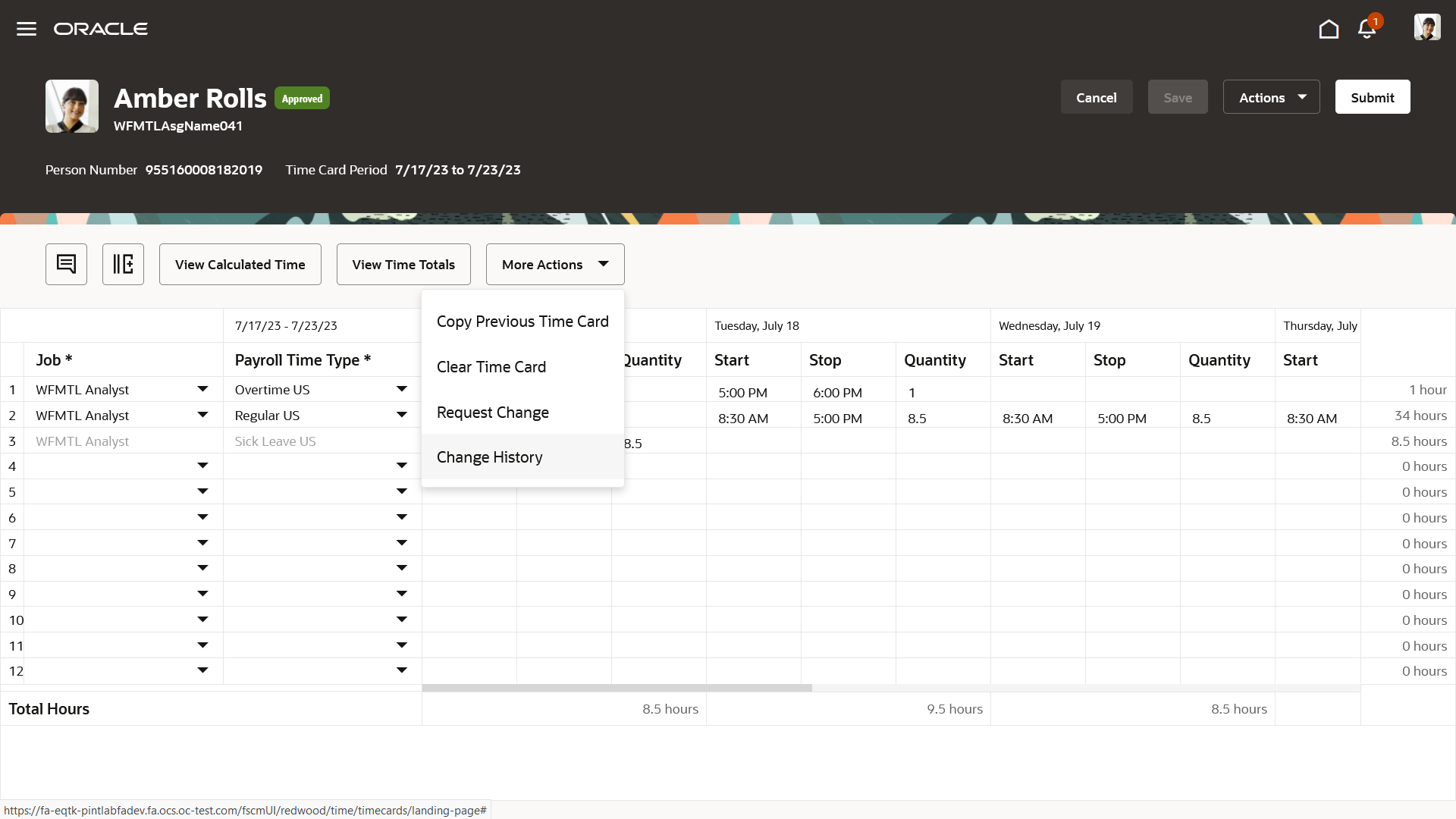
Enhanced Time Card Showing the More Actions > Change History Option

Change History Drawer of an Audited Enhanced Time Card
People can sort on all columns except the previous and current value columns. By default, the changes display in chronological order.
This enhancement adds functionality already present for classic and responsive time cards to enhanced time cards.
Steps to Enable
The setup is the same as the classic and responsive time cards setup.
- Search for and click the Worker Time Processing Profiles task in the Setup and Maintenance work area. The task is part of the Workforce Deployment offering, Time and Labor functional area.
- Search for and select your profile, or create one as appropriate.
- In the Change Audit Options section, enable the change audit.
- Select the related option, to specify whether auditing should apply on all manual changes, after the first time card submission for approval, or after the first time card approval.
- Specify if change audit reasons are required.

- Add the change audit reasons that support your time policies to the ORA_HWM_CA_REASONS lookup type using the Workforce Management Lookups task.
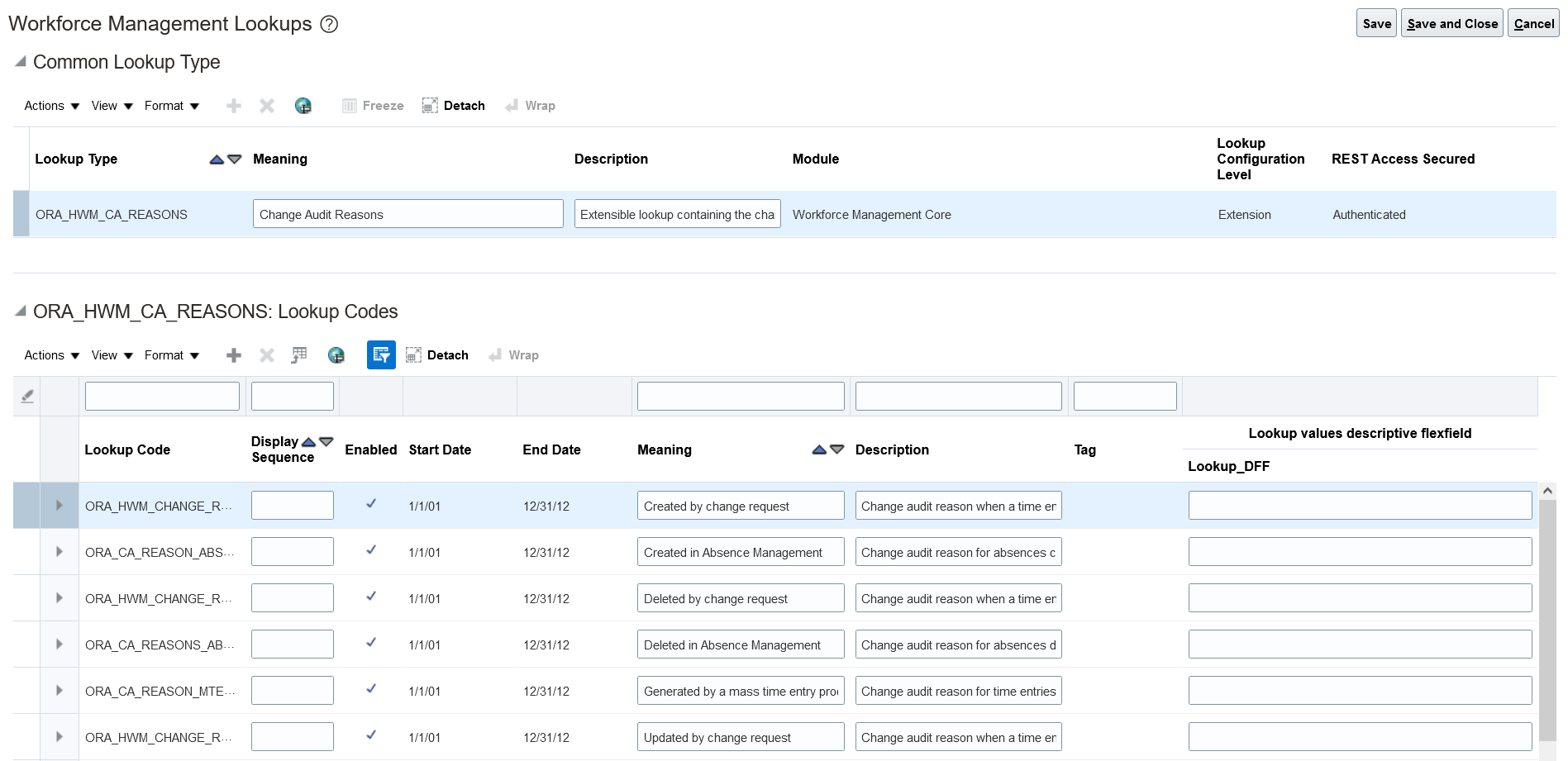
Enhanced Time Card Editing for In Error or Incomplete Statuses
Workers can now edit Incomplete and In Error enhanced time cards, based on their time entry profile. They can edit incomplete entries, and they can also do any edit or add entries, if allowed. For classic and responsive time cards, workers can edit only incomplete entries, if allowed.
On Incomplete and In Error enhanced time cards, workers will see a related quantity of 0 for any incomplete entry. If they can access the calculated time view, in case of In Error time cards having only incomplete entries, they also won't see a related calculated time entry.

In Error Enhanced Time Card, Reported Time View

In Error Enhanced Time Card, Reported Time Totals
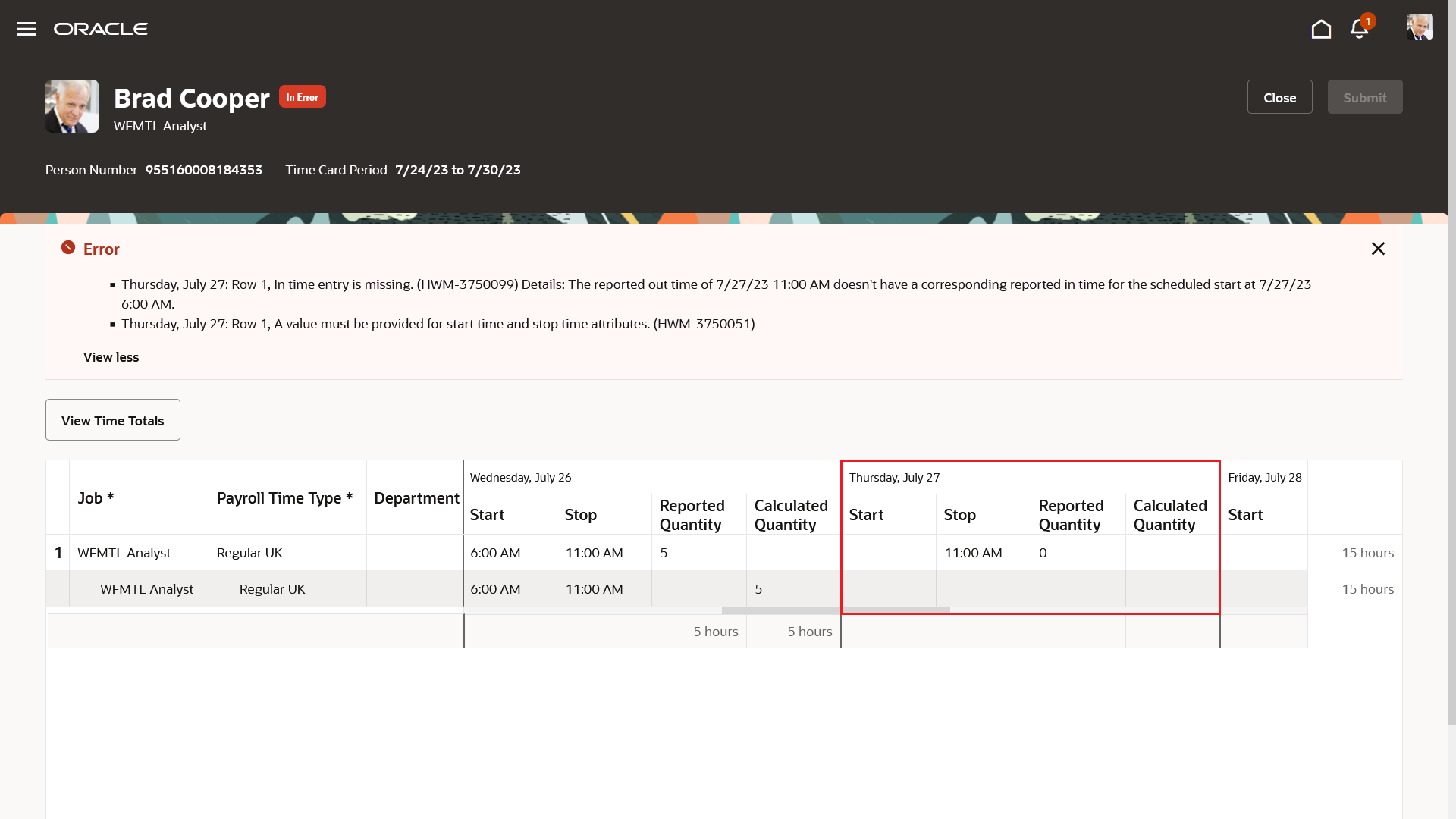
In Error Enhanced Time Card, Calculated Time View
This enhancement adds functionality already present for classic and responsive time cards to enhanced time cards.
Steps to Enable
- Search for and click the Worker Time Entry Profiles task in the Setup and Maintenance work area. The task is part of the Workforce Deployment offering, Time and Labor functional area.
- Search for and select your profile, or create a profile as appropriate.
- In the Time Entry Actions Allowed section, on the Worker tab, under the Edit action, enable the Incomplete and In error options, as appropriate.
Tips And Considerations
An incomplete entry is identified with this related error message: A value must be provided for start time and stop time attributes.
- In case it’s a start time missing between 2 stop times, this error message also appears: In time entry is missing.
- In case it’s a stop time missing between 2 start times, this error message also appears: Out time entry is missing.
Key Resources
For more information about allowable time entry actions, see the How You Set Allowable Actions for Time Entry topic in these Implementing Time and Labor guide.
Work Day Definition Support for Enhanced Time Cards
For people with work day definitions also have a rule for handling time entries that span days. Here are the available rules and how they behave with enhanced time cards.
Start Day Rule
With this rule, the earned and reference dates for the entry are the start date of the entry. For grouped time entries, it's the start date of the oldest time entry in the group. For example, a person's start day rule groups all entries that have less than 2 nonworked hours between them.
This rule includes an escape day at the end of the time card period in case a grouping threshold is defined. This escape day shows any entries reported on the first day of the next time card period with an earned date that's the last day of the current period. You can also see the escape day entries and totals in the calculated time view.

Enhanced Time Card Escape Day on the Reported Time View
Calculated entries are grouped to accommodate any threshold defined in the work day definition. A left arrow icon appears next to the appropriate calculated entries to indicate that they're earned on the previous day.
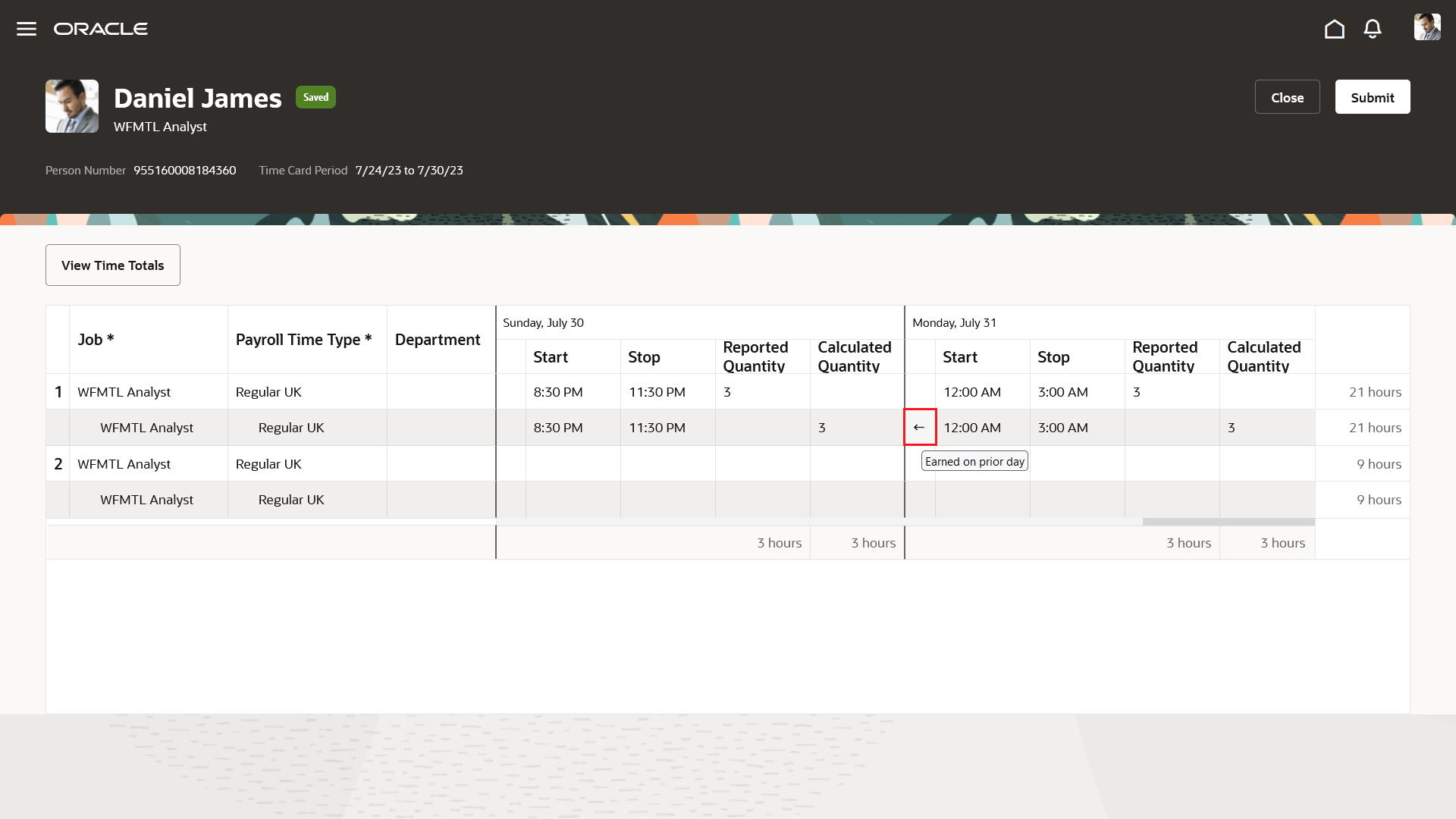
Enhanced Time Card Calculated Time Entries Based on Earned Days

Enhanced Time Card Calculated Time Totals Based on Earned Days
Even after the threshold on the escape day, the entries reported on this escape day are grouped with the entries of the previous day. Unlike classic and responsive time cards, there aren't any warning messages.
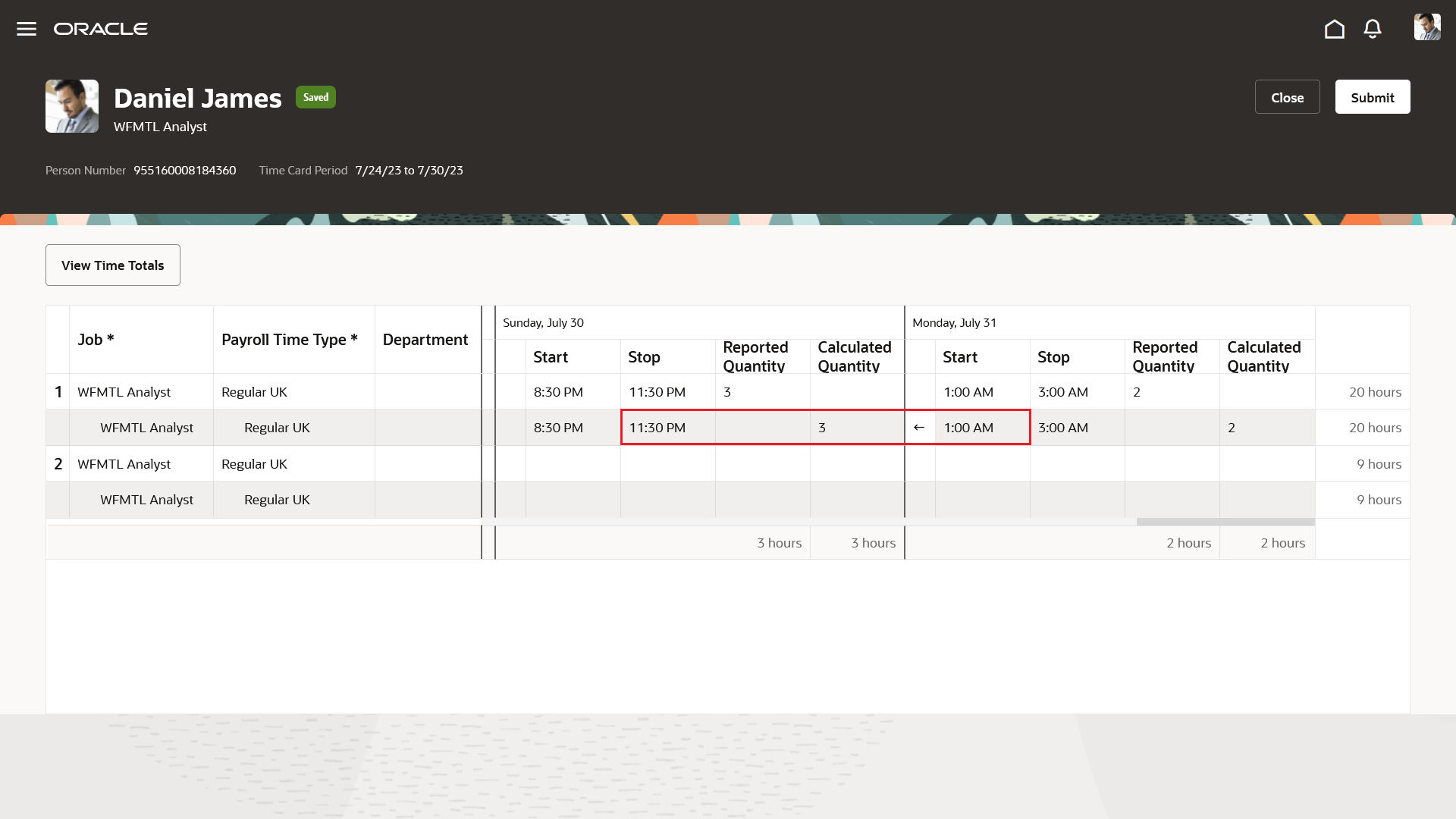
Enhanced Time Card Entry on the Escape day after the Threshold of 30 Minutes and Grouped with the Previous Entry
Stop Day Rule
With this rule, the earned and reference dates for the calculated entry are the stop date of the entry. For grouped time entries, it's the stop date of the newest time entry in the group. For example, a person's start day rule groups all entries that have less than 2 nonworked hours between them.
Calculated entries are grouped to accommodate any threshold defined in the work day definition. A right arrow icon appears next to the appropriate calculated entries to indicate that they're earned on the next day.
This rule doesn't include an escape day, meaning that all reported entries need to start in the time card period. But note that an entry overlapping midnight on the last day and previous entries grouped with it are earned on the first day of the next time card period.
Split at Day Start Time Rule
This rule splits the reported entry into two calculated entries, an entry that stops at midnight and an entry that starts at midnight. The earned and reference dates for each of the two calculated entries match the entry start dates.
Like the Stop Day rule, this rule doesn't include an escape day.
In the calculated time view, a right arrow icon appears next to the second calculated entry, for a reported entry that overlaps midnight. The arrow indicates that the calculated entry is earned on the next day.
If time card validation detects a calculated earned day that falls in the next time card period, it generates an error. The error needs to be corrected before the time card can be saved or submitted.
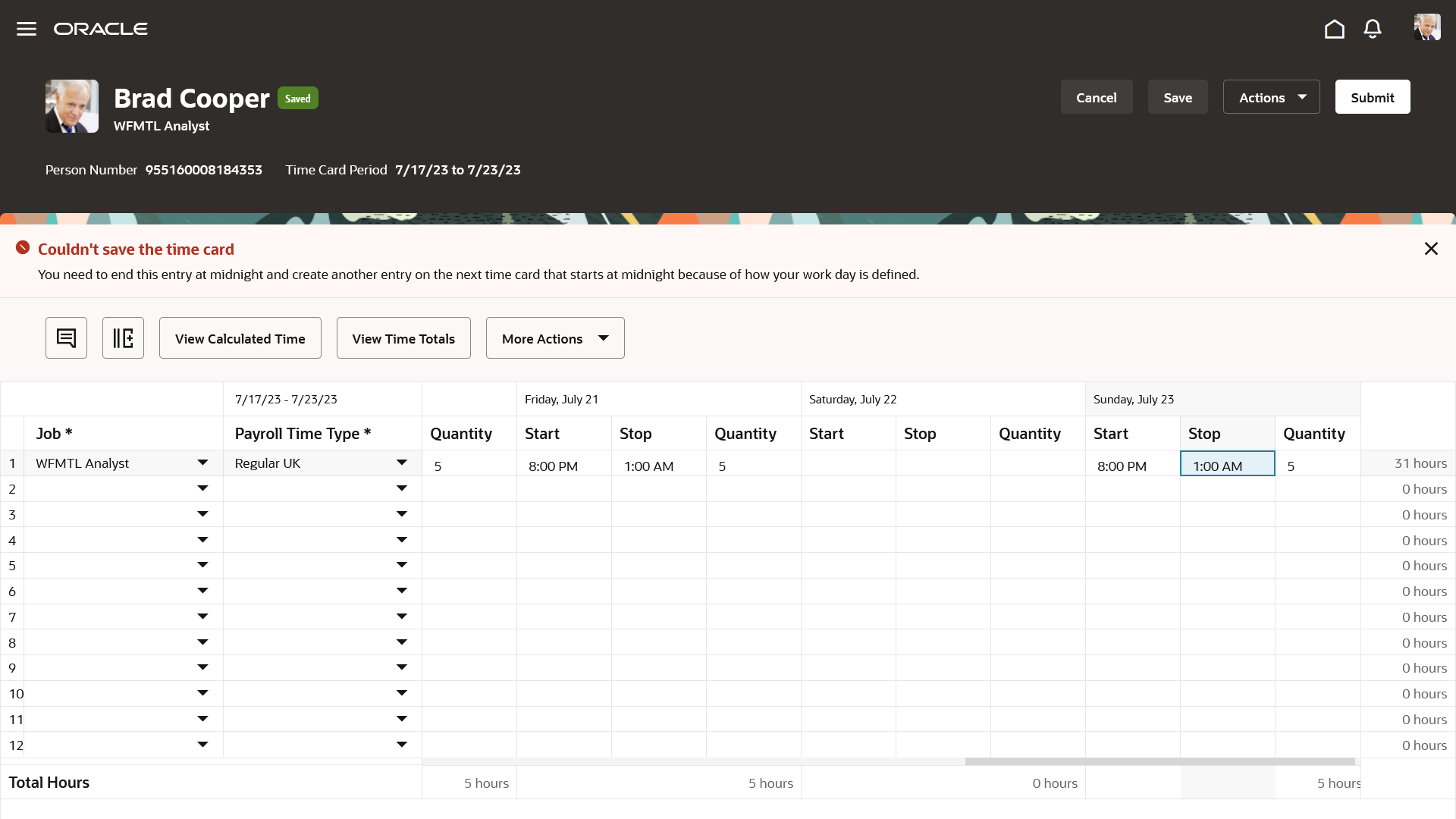
Enhanced Time Card with Validation Error Because an Earned Day Falls in the Next Time Card Period
This enhancement adds functionality already present for classic and responsive time cards to enhanced time cards.
Steps to Enable
- Configure work day definitions that support your policies for earned and overtime days. Use the Work Day Definitions task in the Setup and Maintenance work area. It's part of the Workforce Deployment offering, Time and Labor functional area.
- Assign a work day definition to each person whose time entries can span midnight or be earned on a different day. On the Employment Info page for your team or client groups, use the Assignment Hours Details icon. The icon is next to the Working Hours field.
Key Resources
For more information about work day definitions and handling of reported time entries that span midnight, see the Time Entries That Span Midnight and Overtime Start topic in the Implementing Time and Labor guide.
Time Card Processing Enhancement for Deleted Time Entries
When a transaction is saved, submitted, or acknowledged in a dialog box, current functionality sets deleted entries and time cards to Ready to Transfer. The entries then transfer to the time consumer when the next transfer process runs.
Enhanced functionality regarding deleted entries lets you delay the transfer status update for deleted entries until the time card is approved for the time consumer. This delay keeps deleted entries more closely associated with the time card when transferring time data to the time consumer. Enhanced functionality continues to set deleted time cards to Ready to Transfer when the transaction completes.
This enhancement lets you more closely transfer deleted entries with the associated time card so that all time card entries are processed together.
Steps to Enable
Given the far reaching nature of this enhancement, we urge you to thoroughly test how time card validation and processing behaves with this profile option enabled. Enable the experience in your production environment only after the results support your time reporting and processing policies. Don't disable this feature in your production environment unless directed to by Oracle Support.
- In the Setup and Maintenance work area, search for and click the Manage Administrator Profile Values task.
- Search for and select the ORA_HWM_INTERNAL_TEST_FLAGS profile option code.
- In the Site row, append this value to the end of the existing value:
<space> WFM_XFR_DEL_ENTRY_ON_APPR_ENABLED

- Click Save and Close.
Layout Components Setup Enhancement
You can now use layout-level maximums for time card field data types, including multiattribute fields, instead of site-level when you enable the unified time entry experience. With this enhancement, in the nonunified experience you can use up to 20 multiattribute time card fields across all our your layout sets.

Error When Exceeding the Site-Level Maximum for Adding the Time Card Field
This enhancement gives you more flexibility to create the appropriate time entry layouts for your time reporting groups.
Steps to Enable
Enable the unified time experience to use the layout-level maximums. Given the far reaching nature of this enhancement, we urge you to thoroughly test how your current layout components and layout sets would behave with the unified experience enabled. Enable the experience in your production environment only after the results support your time reporting and processing policies.
You enable the unified time experience by adding the WFM_UNIFIED_LAYOUT_ENABLED lookup code to the ANC_PROC_CONFIGS lookup type.
- In the Setup and Maintenance work area, on the Tasks panel, click Search.
- On the Search page, search for and click Manage Common Lookups
- On the Manage Common Lookups page, search for and select ANC_PROC_CONFIGS.
- In the ANC_PROC_CONFIGS: Lookup Codes section, click the Add icon.
- In the Lookup Code field, enter WFM_UNIFIED_LAYOUT_ENABLED.
- Select Enabled.
- Enter a start date, such as 01-01-20.
- Enter an end date, such as 01-01-50.
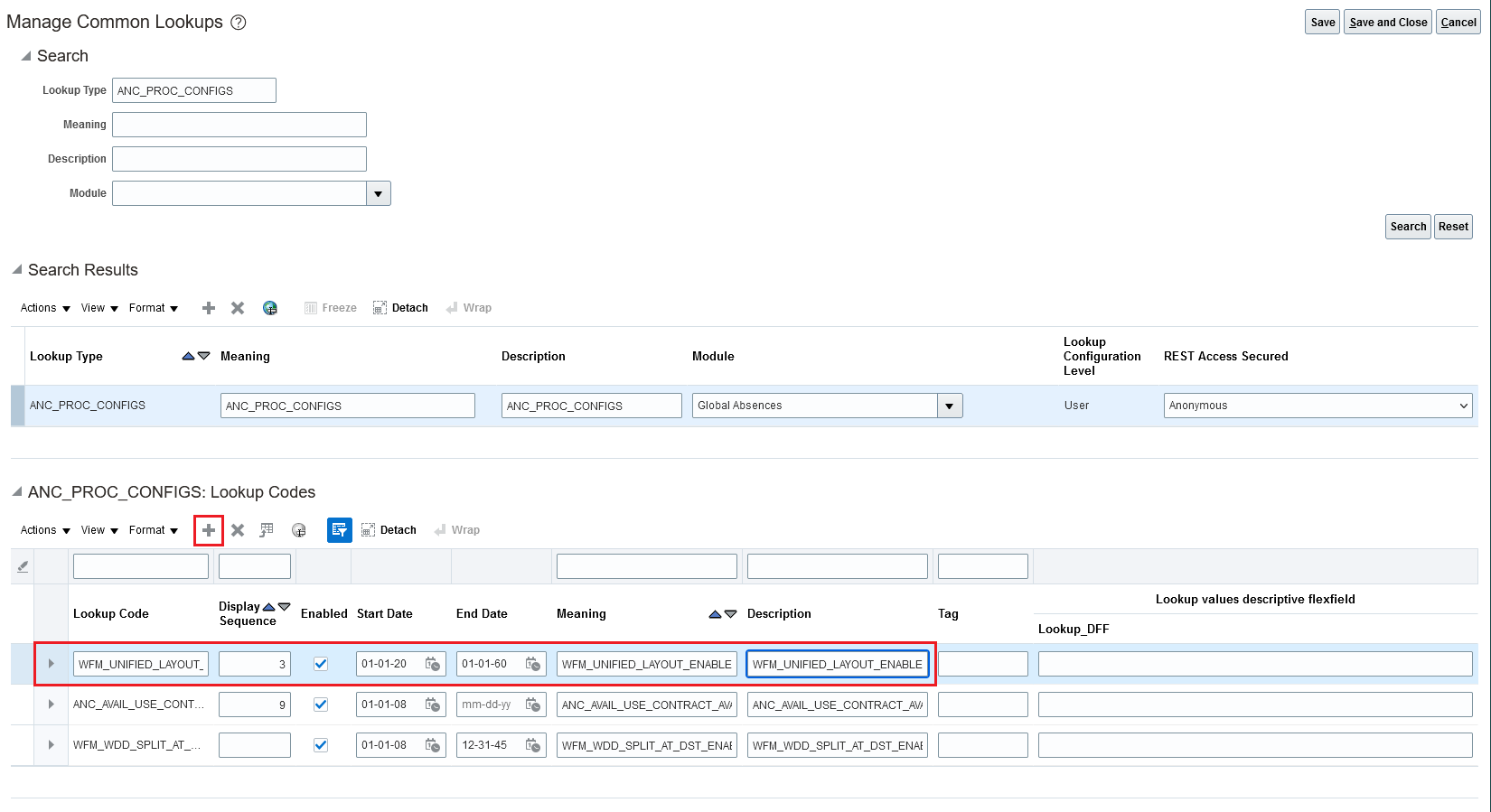
To disable the unified experience, you remove the lookup code.
Time Card Enhancement to Support Optional Project Role Time Attribute
When you configure a project costing layout set, you can now add the new Project Role time card field for people to report project role information. The added Project Role time attribute lets you track the role the worker is reporting worked time for.

Edit Layout Dialog Box with Project Role Added in the Time Card Fields Section
This enhancement lets you better track important project details.
Steps to Enable
Complete these steps in the Time Management work area:
- On the Tasks panel tab, click Time Layout Sets.
- On the Manage Layout sets page, edit an existing set or create a set.
- On the Generate Layout Set page, make sure that the Project Costing time consumer is selected.
- Edit the existing layout set or generate a new set.
- Complete these steps to enable the new time card fields:
- On the Define Layout Set page, click the Configure Layout icon for the layout that you want to add the new fields to.
- Click Edit Layout.
- Add the Project Role field, as appropriate.
- Save your changes to the layout.
- Save your changes to the layout set.
Enhanced Time Card Support for Defaulting Specific Values
When you configure a layout component, you can set a specific value that defaults on the time card. With this enhancement, the specific value defined for a layout component used on a Redwood Time Card now defaults the specified value, just like it already defaults on responsive and classic time card.
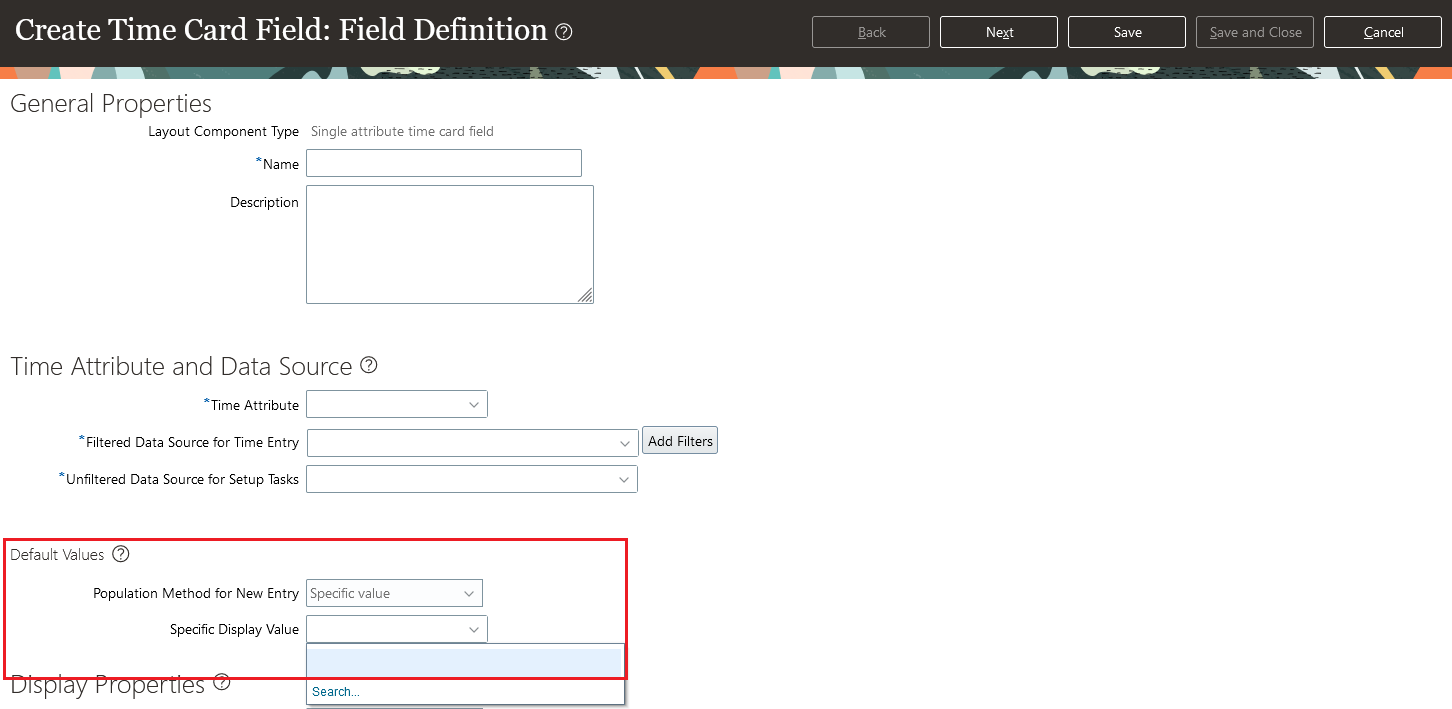
Create Time Card Field Page Showing How to Default a Specific Display Value
This enhancement adds functionality already present for classic and responsive time cards to enhanced time cards.
Steps to Enable
You don't need to do anything to enable this feature.
You can now let workers use the employee calendar page re-created with the Redwood tool set Visual Builder Studio when you enable it along with the Redwood experience. The calendar gives them a complete overview of their schedules, including work hours, time off, and holidays. Or they can use the Calendars button to show only the calendars that they want. They can also view events for a day, week, or month, and in list views for convenience.

Employee Calendar with Their Work Schedule, Absences, and Holidays
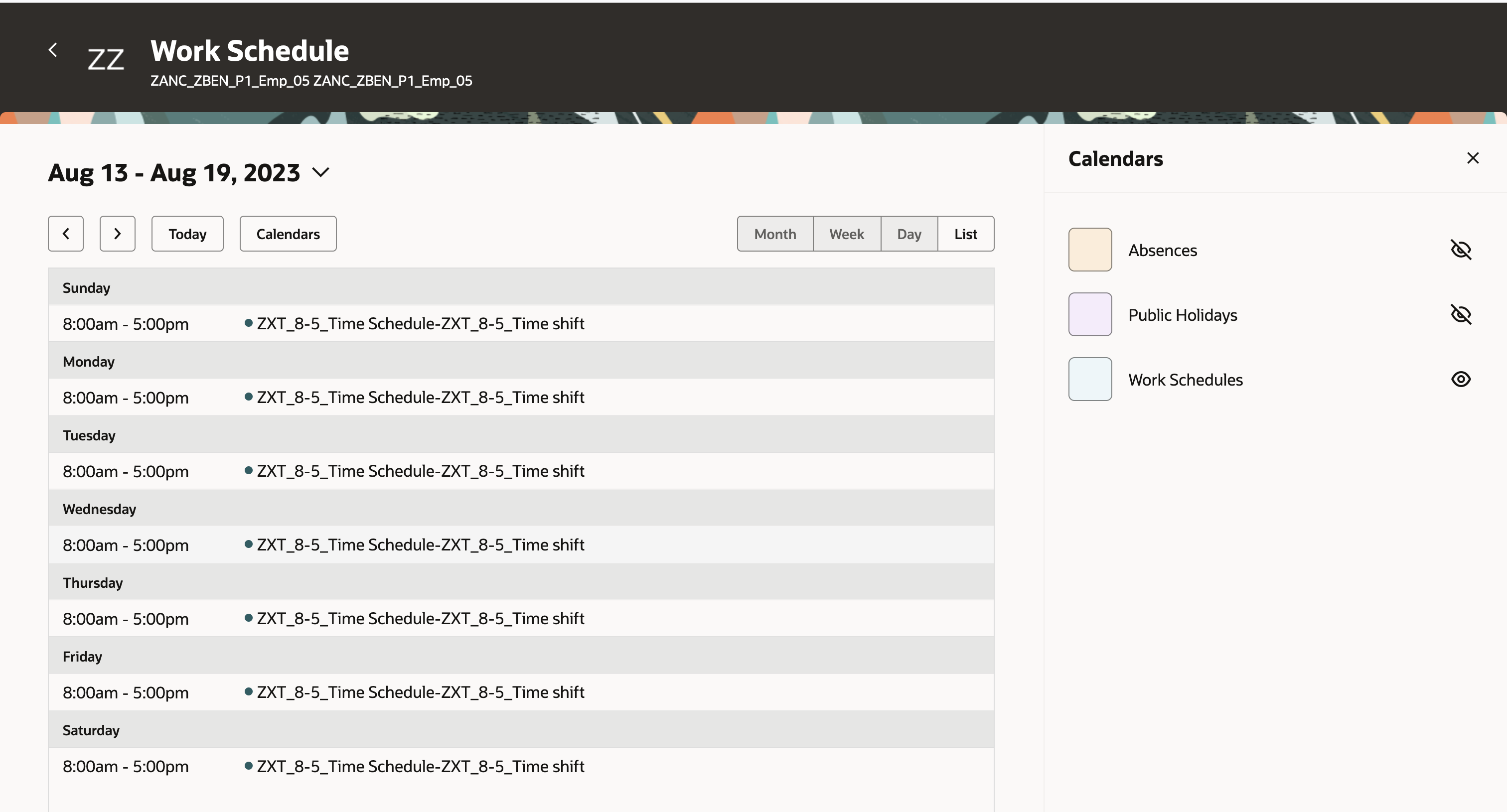
Employee Calendar Showing the Calendars Drawer
Workers can click a shift or absence to open the drawer with the corresponding details.
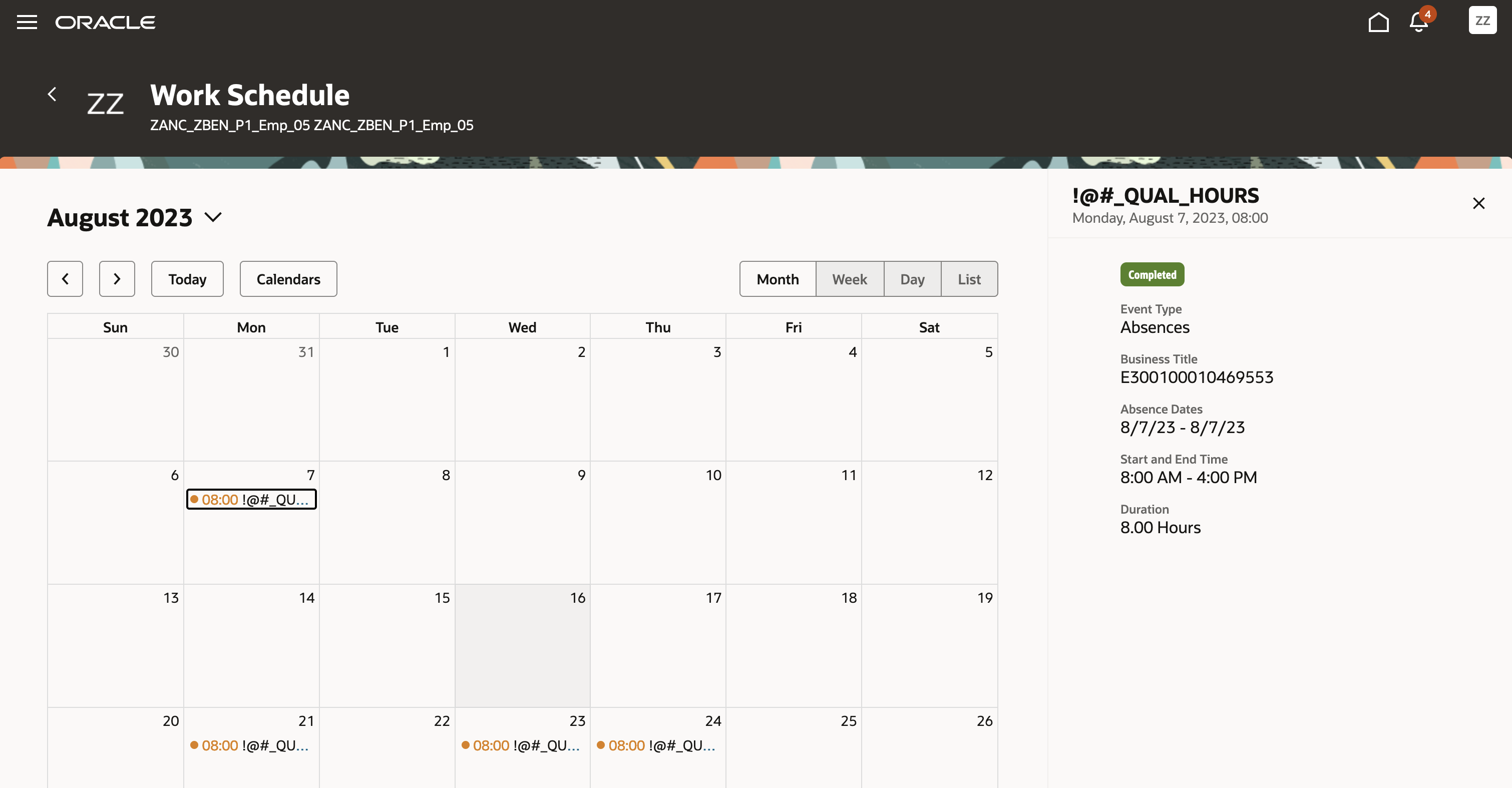
Employee Calendar Showing Details for the Selected Absence
The Redwood Employee Calendar gives workers an improved user experience, empowering them with better schedule visibility. It also lets them more effectively manage their work-life balance.
Steps to Enable
- Search for and click the Manage Administrator Profile Values task.
- Search for and select the ORA_HTS_ENABLE_RESP_AVAIL_CALENDAR profile option.
- Set the Level to Site.
- In the Site level row, Profile Value field, change the value to REDWOOD.

- Click Save and Close.
Tips And Considerations
Workers can't view, create, or edit their time cards from the Redwood calendar. They also can't create or edit absences from there.
IMPORTANT Actions and Considerations for Time and Labor
REPLACED OR REMOVED FEATURES
From time to time, Oracle replaces existing Cloud service features with new features or removes existing features. When a feature is replaced the older version may be removed immediately or at a future time. As a best practice, you should use the newer version of a replaced feature as soon as the newer version is available.
| Product |
Removed Feature |
Target Removal |
Replacement Feature |
Replaced In |
Additional Information |
|---|---|---|---|---|---|
| Time and Labor | Removal of Generate Time Card Field Setup Task | 23D | Time Entry Layout Components task |
_________________________
KNOWN ISSUES / MAINTENANCE PACK SPREADSHEETS
Oracle publishes a Known Issues document for every Update to make customers are aware of potential problems they could run into and the document provides workarounds if they are available.
Oracle also publishes Maintenance Pack and Statutory Maintenance Pack documentation of bugs that are fixed in the monthly or statutory patching.
To review these documents you must have access to My Oracle Support:
Oracle Human Capital Management Cloud Functional Known Issues and Maintenance Packs (Document ID 1554838.1)