Gauge
dvtm:dialGauge, dvtm:ledGauge, dvtm:statusMeterGuage, dvtm:ratingGauge
There are four variations of Gauge components
- Dial Gauge: Has an indicator needle points to the selected value (i.e. similar to a speedometer). Dial gauge is used to measure small linear distances.
- LED Gauge: An LED (light emitting diode) gauge shows state information using a circle. LED gauge indicates its value mainly by its color. It changes its color to match the threshold range into which the metric value falls.
- Status Meter: A Status Meter gauge looks like a thermometer. The outer rectangle forms its axis, and the length of the indicator (the bar inside) is proportional to its value (i.e. similar to a thermometer). Status meter gauge indicates its value by its color and area. It changes its color and area to match the threshold range into which the metric value falls.
- Rating Gauge: A rating gauge consists of a number of hollow shapes that fill in order to show rating/value.
This component is commonly used on tablets and phones.
Appearance
Appearance characteristics for this component.
Dial
- Elements: It consists of a dial gauge container, indicator needle, selected value label and set of values on the dial.
- Shape: The container shape can be a circle, dome or rectangle with different styles.
- Needle: The needle indicator currently has different styles to match the container style.
- Value: The selected value is an optional element that displays inside the dial to show where the needle indicator is pointing.
- Range: The dial has a minimum and maximum value that is set.
LED
- Elements: It consists of an LED gauge container, selected value label and set of values.
- Shape: The container shape is a circle.
- Range: The LED has a minimum and maximum value that is set.
Status Meter
- Elements: It consists of a meter container, progress bar, selected value label and set of values.
- Shape: The container shape is a horizontal rectangle bar or circular path.
- Container: The progress bar will display within the container.
- Range: The meter has a minimum and maximum value that is set.
Rating Gauge
- Elements: It consists of shapes and progress bar.
- Shapes: Circle, Diamond, Rectangle, and Star.
- Selection: Progress bar fills the shape.
Behavior
Common behaviors for this component.
Dial
- Animation: The indicator needle will animate clockwise to increase in value and counter clockwise to decrease in value.
- Value: As the indicator needle updates the selected value will update.
LED
- Brightness: There are low, medium and high 'brightnesses' to represent different states of the LED.
- Value: The selected value will update.
Status Meter
- Animation: The bar in the meter will animate to the right to increase in value and left to decrease in value.
- Value: As the bar updates the selected value will update.
Rating Gauge
- Fill: Shapes fill to show rating/value.
- Selection: Users tap or drag over shapes to set the rating.
Usage
Usage guidelines for this component.
Dial
- Consider a Dial Gauge when displaying an important data value, such as a key performance indicator (KPI).
- It is not recommended to display more than a few Dial gauges on a single page. Dial gauges are large relative to the amount of information they convey.
- If there are more than a few important data values to display on a page, consider using a Graph or a group of Status Meter or LED gauges instead.
LED
- It is highly recommended to define states for LED gauges. If states are not defined, the gauge will be difficult to interpret.
- Consider an LED gauge when it is sufficient to show users only the current state, rather than a precise value or the set of possible states.
- LED gauges are legible even when very small, so consider them when space is limited.
Status Meter
- Status meter gauges work best in groups. Displaying a Status Meter gauge by itself is not an effective use of space.
- It is recommended to use the same axis for all Status Meter gauges displayed in a group.
- Consider a Status Meter gauge when space is limited and there are many related data values to show.
Rating Gauge
- Used to display rating of apps, songs, etc.
- It is recommended to use same shapes for both selected and unselected shapes.
- Set minValue to set the min rating. Set maxValue to set max rating (number of shapes).
Sample
DVTM sample code for this component.
Dial DVTM Sample
 <dvtm:dialGauge id="dialGauge1"
    background="#{pageFlowScope.background}"
    indicator="#{pageFlowScope.indicator}"
    value="#{pageFlowScope.value}"
    minValue="#{pageFlowScope.minValue}"
    maxValue="#{pageFlowScope.maxValue}"
    animationDuration="#{pageFlowScope.animationDuration}"
    animationOnDataChange="#{pageFlowScope.animationOnDataChange}"
    animationOnDisplay="#{pageFlowScope.animationOnDisplay}"
    shortDesc="#{pageFlowScope.shortDesc}"
    labelDisplay="#{pageFlowScope.labelDisplay}"
    inlineStyle="#{pageFlowScope.inlineStyle}"
    styleClass="#{pageFlowScope.styleClass}"
    readOnly="#{pageFlowScope.readOnly}">

    <dvtm:gaugeLabelFormat scaling="#{pageFlowScope.scaling}" />

    </dvtm:dialGauge>
LED DVTM Sample
 <dvtm:ledGauge id="ledGaugeArrow"
    borderColor="#{pageFlowScope.borderDisplay ? pageFlowScope.borderColor : ''}"
    value="#{pageFlowScope.value}"
    minValue="#{pageFlowScope.minValue}"
    maxValue="#{pageFlowScope.maxValue}"
    type="arrow"
    labelDisplay="#{pageFlowScope.labelDisplay ? 'on' : 'off'}"
    rotation="#{pageFlowScope.rotation}"
    animationOnDisplay="#{pageFlowScope.animationOnDisplay}"
    animationOnDataChange="#{pageFlowScope.animationOnDataChange}"
    animationDuration="#{pageFlowScope.animationDuration}"
    shortDesc="#{pageFlowScope.shortDesc}">

    <dvtm:threshold text="#{pageFlowScope.threshold1text}"
    color="#{pageFlowScope.threshold1color}"
    maxValue="#{pageFlowScope.threshold1maxValue}" />

    <dvtm:threshold text="#{pageFlowScope.threshold2text}"
    color="#{pageFlowScope.threshold2color}"
    maxValue="#{pageFlowScope.threshold2maxValue}" />

    <dvtm:threshold text="#{pageFlowScope.threshold3text}"
    color="#{pageFlowScope.threshold3color}"
    maxValue="#{pageFlowScope.threshold3maxValue}" />

    </dvtm:ledGauge>
Rating DVTM Sample
 <dvtm:ratingGauge id="ratingGauge1"
    value="#{pageFlowScope.value}"
    minValue="#{pageFlowScope.minValue}"
    maxValue="#{pageFlowScope.maxValue}"
    inputIncrement="#{pageFlowScope.inputIncrement}"
    shortDesc="#{pageFlowScope.shortDesc}"
    inlineStyle="#{pageFlowScope.inlineStyle}"
    readOnly="#{pageFlowScope.readOnly}"
    shape="#{pageFlowScope.shape}"
    unselectedShape="#{pageFlowScope.unselectedShape}">

    </dvtm:ratingGauge>
Status Meter DVTM Sample
 <dvtm:statusMeterGauge id="statusMeterGauge1"
    value="#{pageFlowScope.value}"
    minValue="#{pageFlowScope.minValue}"
    maxValue="#{pageFlowScope.maxValue}"
    animationOnDisplay="auto"
    animationOnDataChange="auto"
    animationDuration="1000"
    labelDisplay="on"
    inlineStyle="#{pageFlowScope.inlineStyle}">

    <dvtm:threshold text="#{pageFlowScope.threshold1text}"
    color="#{pageFlowScope.threshold1color}"
    maxValue="#{pageFlowScope.threshold1maxValue}" />

    <dvtm:threshold text="#{pageFlowScope.threshold2text}"
    color="#{pageFlowScope.threshold2color}"
    maxValue="#{pageFlowScope.threshold2maxValue}" />

    <dvtm:threshold text="#{pageFlowScope.threshold3text}"
    color="#{pageFlowScope.threshold3color}"
    maxValue="#{pageFlowScope.threshold3maxValue}" />

    </dvtm:statusMeterGauge>
Related
- Used On: Phone, Tablet
- Also Called: Dial, LED, Meter, Rating
- Related Components: Chart
- Resources: None
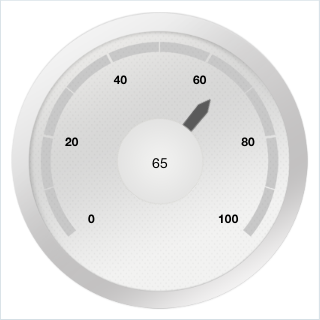
Fig 1. iOS and Android - Dial
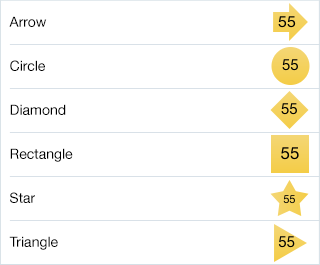
Fig 2. iOS and Android - LED

Fig 3. iOS and Android - Status Meter

Fig 4. iOS and Android - Rating Gauge