How to Determine Memory Requirements for ZFS Deduplication
by Dominic Kay (updated by Cindy Swearingen)
Published November 2011 (updated February 2014)
by Dominic Kay (updated by Cindy Swearingen)
Published November 2011 (updated February 2014)
How to determine whether enabling ZFS deduplication, which removes redundant data from ZFS file systems, will save you disk space without reducing performance.
In Oracle Solaris 11, you can use the deduplication (dedup) property to remove redundant data from your ZFS file systems. If a file system has the dedup property enabled, duplicate data blocks are removed as they are written to disk. The result is that only unique data is stored on disk and common components are shared between files, as shown in Figure 1.
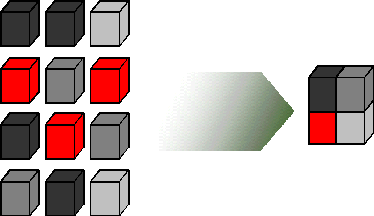
Figure 1. Only Unique Data Is Stored on Disk
In some cases, deduplication can result in savings in disk space usage and cost. However, you must consider the memory requirements before enabling the dedup property. Also, consider whether enabling compression on your file systems would provide an excellent way to reduce disk space consumption.
Use the following steps to enable deduplication. Note that it is important to perform the first two steps before attempting to use deduplication.
Determine if your data would benefit from deduplication space savings by using the ZFS debugging tool, zdb. If your data is not "dedup-able," there is no point in enabling dedup.
Deduplication is performed using checksums. If a block has the same checksum as a block that is already written to the pool, it is considered to be a duplicate and, thus, just a pointer to the already-stored block is written to disk.
Therefore, the process of trying to deduplicate data that cannot be deduplicated simply wastes CPU resources. ZFS deduplication is in-band. This means that deduplication occurs when you write data to disk and impacts both CPU and memory resources.
For example, if the estimated deduplication ratio is greater than 2, you might see deduplication space savings. In the example shown in Listing 1, the deduplication ratio is less than 2, so enabling dedup is not recommended.
#zdb -S tank

Simulated DDT histogram:

bucket              allocated                       referenced
______   ______________________________   ______________________________
refcnt   blocks   LSIZE   PSIZE   DSIZE   blocks   LSIZE   PSIZE   DSIZE
------   ------   -----   -----   -----   ------   -----   -----   -----
     1    1.00M    126G    126G    126G    1.00M    126G    126G    126G
     2    11.8K    573M    573M    573M    23.9K   1.12G   1.12G   1.12G
     4      370    418K    418K    418K    1.79K   1.93M   1.93M   1.93M
     8      127    194K    194K    194K    1.25K   2.39M   2.39M   2.39M
    16       43   22.5K   22.5K   22.5K      879    456K    456K    456K
    32       12      6K      6K      6K      515    258K    258K    258K
    64        4      2K      2K      2K      318    159K    159K    159K
   128        1     512     512     512      200    100K    100K    100K
 Total    1.02M    127G    127G    127G    1.03M    127G    127G    127G

dedup = 1.00, compress = 1.00, copies = 1.00, dedup * compress / copies = 1.0
Listing 1: Determining the Deduplication Ratio
This step is critical because deduplication tables consume memory and eventually spill over and consume disk space. At that point, ZFS has to perform extra read and write operations for every block of data on which deduplication is attempted, which causes a reduction in performance.
Furthermore, the cause of the performance reduction is difficult to determine if you are unaware that deduplication is active and can have adverse effects. A system that has large pools with small memory areas does not perform deduplication well. Some operations, such as removing a large file system with dedup enabled, severely decrease system performance if the system doesn't meet the memory requirements.
Calculate memory requirement as follows:
Here's an example using the data from the zdb output in Listing 1:
In-core DDT size (1.02M) x 320 = 326.4 MB of memory is required.
dedup PropertyBe sure that you enable dedup only for file systems that have dedup-able data, and ensure your systems have enough memory to support dedup operations.
Deduplication is easily enabled on a file system, for example:
#zfs set dedup=on mypool/myfs
After you evaluate the two constraints on deduplication, the deduplication ratio and the memory requirements, you can make a decision about whether to implement deduplication and what the likely savings will be.
This article was originally written by Dominic Kay and was updated by Cindy Swearingen, Oracle Solaris Product Manager