The Role of Oracle Solaris Zones and Linux Containers in a Virtualization Strategy
by Detlef Drewanz and Lenz Grimmer
Published December 2012 (updated January 2013; reprinted from eStep blog)
Overview of Oracle Solaris Zones and Linux Containers and the role they play in a virtualization strategy.
Part 6 - Oracle VM VirtualBox - Personal Desktop Virtualization
Part 4 - Resource Management as an Enabling Technology for Virtualization
Part 3 - The Role of Oracle Solaris Zones and Linux Containers in a Virtualization Strategy
Part 2 - The Role of Oracle VM Server for x86 in a Virtualization Strategy
In the previous two articles of this series, we covered Oracle VM Server for x86, which provide hypervisor-based hardware virtualization. Now, we will cover the operating system level of virtualization, which is one type of software virtualization, by looking at Oracle Solaris Zones and Linux Containers.
Background
Oracle Solaris Zones and Linux Containers are not standalone products; they are features of an operating system. In principle, both technologies are similar. They are virtualization technologies at the application level, so they are "above" the OS kernel. So unlike hypervisor-based virtualization, they do not add an additional software layer. With Oracle Solaris Zones and Linux Containers, there is one OS kernel that is shared by many zones or containers.
To put this into perspective, let's reuse the image from the first article in this series, where we showed the position of Oracle Solaris Zones (see Figure 1). In Figure 1, the position of Linux Container can roughly be compared to that of Oracle Solaris Zones. The difference between the two technologies is mainly at the implementation level and in the way they are integrated into the OS.

Figure 1. Oracle Virtualization Technologies and Products
Now, let's dive into more detail.
Oracle Solaris Zones
Oracle Solaris Zones technology is an Oracle Solaris feature that first showed up in Solaris Express and Oracle Solaris 10 3/05 and was called Oracle Solaris Containers. With Oracle Solaris 11, we now officially call the technology Oracle Solaris Zones.
Oracle Solaris Zones technology creates a virtualization layer for applications. We could say a zone is a "sandbox" that provides a playground for an application. The global zone holds the Oracle Solaris kernel, the device drivers and devices, the memory management system, the file system and, in many cases, the network stack. The other zones are called non-global zones and are isolated from each other, but they all share one global zone.
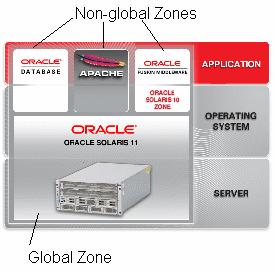
Figure 2. Oracle Solaris Zones
The global zone sees all physical resources and provides common access to these resources to the non-global zones. The non-global zones appear to applications like separate Oracle Solaris installations.
Non-global zones have their own file systems, process namespace, security boundaries, and network addresses. Based on requirements, non-global zones can also have their own network stack with separate network properties. And, yes, there also is a separate administrative login (root) for every non-global zone, but even as a privileged user, there is no way to break into one non-global zone from a neighboring non-global zone. In contrast, looking from the global zone, a non-global zone is just a bunch of processes grouped together by a tag called a zone ID.
This type of virtualization is often called lightweight virtualization, because there is nearly no overhead for the virtualization layer and the applications running in the non-global zones. Therefore, we get native I/O performance from the OS. Thus, zones are a perfect choice if many applications need to be virtualized and high performance is a requirement.
Due to the fact that all non-global zones share one global zone, all zones run the same level of OS software—with one exception. Branded zones run non-native application environments. For example, with Oracle Solaris 10, we have the ability to create legacy branded zones such as Oracle Solaris 8 Containers (solaris8) and Oracle Solaris 9 Containers (solaris9), which provide Oracle Solaris 8 and Oracle Solaris 9 runtime environments but still share the Oracle Solaris 10 kernel in the global zone. With Oracle Solaris 11, it is possible to create Oracle Solaris 10 branded zones (solaris10).
Compared to zones in Oracle Solaris 10, zones in Oracle Solaris 11 have been much more integrated with the OS. Oracle Solaris Zones technology is no longer just an additional feature of the OS. Zones are well integrated into the whole lifecycle management process of the OS when it comes to automatic installation or updates of zones. Also, the better integration of zones with kernel security features enables more delegated administration of zones. Better integration into ZFS, consistent use of boot environments, network virtualization features, and Oracle Solaris resource management are additional improvements to zones in Oracle Solaris 11. Zones have always been very easy to set up on the command line and easy to use. If you want to use a graphical tool to configure zones, you can use Oracle Enterprise Manager Ops Center (which we will cover later in this series).
Linux Containers (LXC)
Now that we have discussed Oracle Solaris Zones, what are Linux Containers? Is this the same technology as Oracle Solaris Zones and, if not, how do the two technologies differ?
Linux Containers take a completely different approach than system virtualization technologies such as KVM and Xen, which started by booting separate virtual systems on emulated hardware and then attempted to lower their overhead via paravirtualization and related mechanisms. Instead of retrofitting efficiency onto full isolation, LXC started out with an efficient mechanism (existing Linux process management) and added isolation, resulting in a system virtualization mechanism as scalable and portable as chroot, capable of simultaneously supporting thousands of emulated systems on a single server while also providing lightweight virtualization options to routers and smart phones.
The Linux Containers project started around 2006 as an external set of patches to the Linux kernel. It was integrated into mainline Linux starting with kernel 2.6.29 (March 2009). LXC provides resource management through the Linux kernel's control groups ("Cgroups") subsystem, and it provides resource isolation through process namespaces. LXC uses these kernel features to allow the creation of userspace container objects, which provide full resource isolation and resource control for an individual application, an entire operating system, or both.
Linux Containers offer essentially native performance, and you can efficiently manage resource allocation in real time. A binary running inside a Linux Container is actually running as a normal process directly on the host's kernel, just like any other process. In particular, this means that CPU and I/O scheduling are much more fair and tunable, and you get native disk I/O performance, which you cannot have with real virtualization (even with Xen when using paravirt mode). This means you can even run applications that have heavy disk I/O, such as databases, inside a Linux Container.
Unlike full virtualization solutions and similar to Oracle Solaris Zones, LXC will not let you run any other non-Linux operating systems (such as proprietary operating systems or other types of UNIX). However, you are able to run different Linux distributions on the same host kernel in different containers. For example, you could run an instance of Oracle Linux 5 inside a container hosted on an Oracle Linux 6 system running the Unbreakable Enterprise Kernel release 2.
So in essence, Linux Containers could be described as chroot environments "on steroids" that can be created at various isolation levels but also shared as an isolated group of processes for the Linux kernel.
Conclusion
Oracle Solaris Zones and Linux Containers offer a lightweight virtualized runtime environment for applications. Oracle Solaris Zones technology has existed since Oracle Solaris 10 and is now highly integrated into Oracle Solaris 11.
Linux Containers technology is available as a technology preview for Oracle Linux with the Unbreakable Enterprise Kernel for testing and evaluation purposes.
See Also
Solaris Containers:
- Wikipedia article on Solaris Containers
- Oracle Solaris 11 Virtualization Technology home page
- Oracle Solaris Administration: Oracle Solaris Zones, Oracle Solaris 10 Zones, and Resource Management
- Wikipedia article on Linux Containers
- Linux Containers documentation in the Oracle Linux Administrator's Solutions Guide
Linux Containers:
About the Authors
Detlef is a Principal Sales Consultant and is located in Potsdam, Germany. He acts as server and Oracle Solaris specialist on Oracle's Northern Europe Server Architects team. He joined Sun Microsystems in 1998 and is now part of Oracle. Prior to that, Detlef worked at Hitachi Internetworking Frankfurt in network support and as member of scientific staff in the Department of Computer Science of the University of Rostock. Detlef holds a master in Computer Science.
Lenz Grimmer is a member of the Oracle Linux product management team. He has been involved in Linux and open source software since 1995.