Howto create Resource Access Descriptors for Oracle9i Forms single sign-on with PLSQL
This tutorial covers the following topics:
Introduction
All Oracle9i Forms applications that run in Oracle9i Application Server Enterprise Edition can take advantage of single sign-on. It doesn't matter if a Forms application originally was developed in Oracle9i or if it was upgraded from earlier Forms versions; single sign-on can be used out-of-the-box, with no extra coding required.
Oracle9i Forms that are running in single sign-on mode connect to the database using SQL*Net. The database connect information is read by the Forms Servlet from specific entries called Resource Access Descriptors (RAD) in Oracle9i Internet Directory (OID). A RAD is a named entry that contains the username, password, and the tnsnames string that is used to connect a Forms and/or Reports application to the database. For single sign-on to work, the name of the RAD entry must be the same as the name specified for the Oracle9i Forms application.
The name of a Forms application is specified in the named configuration section in the formsweb.cfg configuration file located in the forms90/server directory of the Oracle9iAS installation. When requesting a Forms application on the Web, the application name is passed as the value of the configURL parameter.
http://<host>:<port>/forms90/f90servlet?config= myApp1..
Reports, though not the focus of this Whitepaper, uses the ssoconn URL parameter to define the RAD name for reports that should run in single sign-on mode. The ssoconn parameter works similar to the configURL parameter in Forms.
Administrators and application users can create a RAD using the Delegated Administration Service (DAS), which is a Web application in Oracle9iAS, or dynamically through Oracle9i Forms at application startup. You can also create a RAD in OID and manage it programmatically using the Java or PL/SQL APIs. When using the PL/SQL approach, you use the DBMS_LDAP database package to integrate OID in your Forms or PL/SQL applications, while in Java you use JNDI with the "oracle.ldap.util" package.
A Forms example using a Java class to access Oracle Internet Directory is available as a Oracle9i Forms demo at /products/forms.
This whitepaper shows you a programming example of how to use the DBMS_LDAP database package to access OID for RAD creation and manipulation. This example is meant to be a starting point and does not cover all that is possible in PL/SQL using the DBMS_LDAP package. Please refer to the Oracle9i Internet Directory documentation for more information about the DBMS_LDAP package.
New to Oracle9i Forms single sign-on? Please read the single sign-on section of the Oracle9i Forms Services deployment documentation that comes with Oracle9iAS, and is also available online at /products/forms.
About Oracle9i Internet Directory (OID)
Oracle9i Internet Directory (OID) provides a scalable, reliable and secure LDAP v3 directory service which combines the flexibility of the Internet's LDAP standard with the robustness of the Oracle9i platform.. Oracle9i Internet Directory is the common place for J2EE applications to store information about users, groups and their privileges. In OID, authentication and authorization support is maintained in one single place instead of individually for each application.
Like with all other LDAP servers, entries in OID are stored in a hierarchical tree structure, where the root entry in OID is defined by the default subscriber path.
If you don't know the default subscriber path that was created when installing Oracle Internet Directory, at a command line, navigate to the bin directory of the Oracle9iAS infrastructure installation and issue the following command as one line:, ldapsearch -h <oid host> -p <oid port> -b "cn=common,cn=products,cn=oraclecontext" -s base "cn=*" orcldefaultsubscriber
The default subscriber path name is returned as dc=<subdomain>,dc=<name>,dc=<domain>, where the subdomain is not always set. The default subscriber path is the starting point to user, group and RAD entries stored in OID.
To access a User entry in OID, issue the following command:
cn=<user name>,cn=users,<default subscriber path>
To access a Group entry in OID, issue the following command:
cn=<Group Name>,cn=Groups,<default subscriber path>
To access a RAD entry in OID, isue the following command:
orclresourcename=<name>+orclresourcetypename=oracleDB, cn=Resource Access Descriptor, orclownerguid=<GUID>,cn=Extended Properties,cn=OracleContext,<default subscriber path>
To create and access Resource Access Descriptors in OID you first need to obtain the user's GUID, which is the global user ID of a single sign-on user in OID. All RAD operations start with the user for whom the RAD needs to be created.
About the Resource Access Descriptor (RAD)
A RAD is a named entry in the Oracle Internet Directory that can be searched and read by all programs that have access to OID. RAD entries are defined individually for each user in OID where each user is identified by a unique ID, the orclownerguid (GUID). Figure 1 is a RAD that is displayed in Oracle9i Directory Manager:
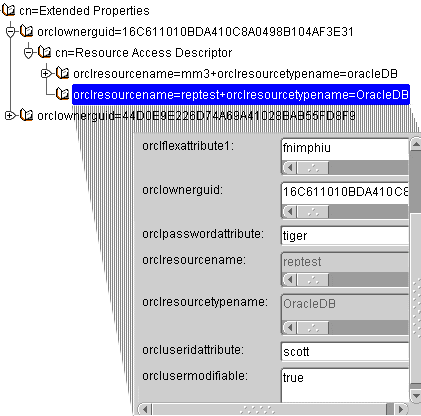
Figure 1: Resource Access Descriptor as shown in Oracle9i Directory Manager
The RAD name that is used with Oracle9i Forms is based on the application name and the datasource type OracleDB. The following attributes need to be defined in OID to use a RAD entry with Oracle9i Forms in single sign-on mode:
- The database username, stored in the OID orcluseridattribute attribute
- The database password, stored in the OID orclpasswordattribute attribute
- The database TNS names entry, stored in the OID orclflexattribute1 attribute
- The OID orclresourcetypename attribute, which needs to be defined for each RAD entry. Forms only uses OracleDB as a datasource type, while Reports can have other datasource types. For Reports,when a RAD component is required to support two different data types, then this RAD entry needs to be created twice, once for each datasource type.
- The OID orclusermodifiable attribute that determines if the user, for whom this RAD entry was created, can add changes to the definition. Those entries can be done by using the DAS Web page.
Programming RAD with PL/SQL
The DBMS_LDAP package allows PL/SQL applications, like stored procedures in the database or program units in Forms, to manage user entries in the Oracle Internet Directory. To use DBMS_LDAP in Forms, you need to connect the Forms application to a database account that has execute privileges on the DBMS_LDAP package stored in the SYS schema.
The following example uses the OID administrator account "orcladmin" to connect to OID which is not required. Any distinguished username with just enough privileges to create RAD entries in OID can be used instead. Using the orcladmin in a production environment is not recommended for security reasons. So instead of using "cn=orcladmin" you can use "cn=<username>,cn=users,<subscriber path>"
The following code creates a connection to an OID instance, returning a session handle to be used with subsequent calls.
	   DECLARE
   ldap_session DBMS_LDAP.session :=null;
   ldap_user varchar2(100) :=’cn=orcladmin’;
   ldap_password varchar2(100) :=’welcome2OID’;
   ldap_host varchar2(200) :=’ldapserver.us.oracle.com’
   ldap_port number(4) :=4032 /* default is 389 */
   ret_val PLS_INTEGER :=-1;
BEGIN
   ldap_session:= DBMS_LDAP.init(ldap_host,ldap_port);
   ret_val:= DBMS_LDAP.simple_bind_s(ldap_session,ldap_user,ldap_password);
   < … do some OID work here …>
END;
The return value stored in the ret_val variable can be used to determine the success of the LDAP connection when compared to DBMS_LDAP.SUCCESS. When a successful connection is made, the ldap_session variable points to the OID instance that can be queried to obtain user entries, like the user’s global userid (GUID) that is necessary for creating new RAD entries.
The FORMS_RAD Example PL/SQL Package
The FORMS_RAD package, created as an example for this Whitepaper, contains PLSQL functions to work with Resource Access Descriptors in OID. You can use this package as is, or as a start when creating your own routines to use from Forms or another PLSQL environment.
The following functionality is provided in the FORMS_RAD package:
- Establish an OID connect
- Define Resource Access descriptors
- Create Resource Access Descriptors for single sign-on users
- Delete Resource Access Descriptors of a single sign-on user
- Release the OID session
FORMS_RAD package
The FORMS_RAD package contains sample code that accesses OID to create and manage RAD entries. The PL/SQL code in this package is commented to get you started with the DBMS_LDAP packages to integrate OID with your Forms applications.
The only requirement for accessing the DBMS_LDAP packages from Forms is that the database schema that Forms is connected to must have execute privileges on the DBMS_LDAP packages.
The Oracle9iAS documentation contains a description of the DBMS_LDAP package in the Oracle9i Internet Directory books. This documentation is also available online at .
	function createOidSession (ldap_user     IN varchar2,
							   ldap_password IN varchar2,
							   ldap_host     IN varchar2,
							   ldap_port     IN int,
							   defaultSubscriberPath IN varchar2) return boolean;
This package connects to OID and stores a handle in an internal package variable. ldap_user holds the OID user under which privileges the operations are performed. To use the OID administrator account, specify ‘cn=orcladmin’ ldap_password stores the OID password of the ldap_user account ldap_host expects the full qualified host that runs the OID instance. This can be the DNS name or IP address of the server machine
- ldap_port represents the port that OID listens to. The default port of LDAP servers is 389.
- DefaultSubscriberPath expects the path name of the root entry, e.g.‘dc=us,dc=oracle,dc=com’.
The function returns true if the connect was established successfully. When you execute this function from SQL*PLUS, you can use the ‘set serverout on’ command to see verbose debug messages that are sent to the standard output.
	function newRADdefinition( radName    IN  varchar2,
							   dbUsername IN  varchar2,
							   dbPassword IN  varchar2,
							   dbTNSnames IN  varchar2,
							   ErrorMsg   OUT varchar2) return boolean
- radName is the name of the RAD in OID. This name must match the Forms applications named application configuration in the form90/ server/f
- dbUsername is the name of the database account that the application connect to using SQL*Net
- dbPassword is the password of the dbUsername account.
- dbTNSnames is the TNS name alias defined on the Forms Services machine for the target database. The TNS names entry must not be known on the LDAP server machine as long as it does not run Oracle9iAS Forms Services itself.
- ErrorMesg contains the error message to properly handle error situations in your PL/SQL code. The boolean value false is returned if the provided RAD information is not valid, i.e. one of the database connect arguments is set to null
The function returns true or false depending on whether all the provided parameters are valid or not.
This function applies the RAD definition that was specified using the newRADdefinition function to the specified single sign-on username. Run this function as many times as RAD definitions need to be created for user accounts
	function createRADforCN(ldap_user_Cn   IN  varchar2,
							userCanEditRAD IN  varchar2,
							ErrorMsg       OUT varchar2) return boolean
- ldap_user_Cn is the common name of the single sign-on user in OID without the ‘cn=’ prefix. For example the user cn=fnimphiu,cn=users,dc=us,dc=oracle, dc=com’ is refrenced by ‘fnimphiu’ only.
- userCanEditRad, set this to a string value of ‘true’ or ‘false’ indicating whether or not the sso user is allowed to update the RAD definition using the Delegated Administration Interface.
- ErrorMsg contains the error message returned from OID for this operation. A returned boolean value of false indicates that this function has failed. Failures can have many reasons; one is that the specified user account does not exist.
Use this function to delete a RAD entry for the specified SSO user. Use this function in combination with the previous functions to modify existing RAD entries.
	function deleteRADforCN (ldap_user_Cn IN varchar2,
							 radName      IN varchar2,
							 ErrorMsg     OUT varchar2) return boolean
- ldap_user_Cn is the common name of the single sign-on user in OID without the ‘cn=’ prefix. For example, the user cn=fnimphiu,cn=users,dc=us,dc=oracle, dc=com’ is refrenced by ‘fnimphiu’ only.
- RadName is the name of the RAD entry as specified in the " newRADdefinition" function.
- ErrorMsg contains the error message returned from OID for this operation.
A return value of false indicates that this function has failed.
Disconnects the session from OID.
procedure releaseOidSession
Example
The following example procedure RAD_MANAGER uses the FORMS_RAD demo package to either create or delete RAD entries for existing OID users. To run this example procedure against your OID instance you need to apply changes as explained in the installation section.
	CREATE OR REPLACE PROCEDURE "RAD_MANAGER"
	   -- Sample program that creates or deletes RAD entries
	   -- If running in SQL*PLUS, use "set serverout on" to
	   -- see verbose debug messages.
	   ( userCN     IN varchar2,
		 radname    IN varchar2,
		 dbUsername IN varchar2,
		 dbPassword IN varchar2,
		 dbTnsNames IN varchar2,
		 performDelete IN boolean default false
	   )
	AS
	   sessionEstablished boolean:=false;
	   isValidRAD boolean:=false;
	   RADdeleted boolean:=false;
	   RADcreated boolean:=false;
	   errorMessage Varchar2(2000) :='';

	BEGIN
	   -- create OidSession
	   sessionEstablished:= forms_rad.createOidSession('cn=orcladmin','welcome2OID',
													   'fnimphiu-pc.us.oracle.com',
														4032,'dc=us,dc=oracle,dc=com');
	   if sessionEstablished then
	   -- operate on RAD entries
		  if not performDelete then
			 isValidRAD:=forms_rad.newRadDefinition(radname,dbUsername,dbPassword,dbTnsNames,errorMessage);
			 if isValidRAD then
				-- create RAD for user.
				RADcreated := forms_rad.createRADForCN(userCN,'true',errorMessage);
			 else
				null;
				-- < print error messages here >
			 end if;
		  else /* perform delete operation */
			 RADdeleted:= forms_rad.deleteRADForCN(userCN,radname,errorMessage);
			 -- < print error messages here >
		  end if;
		  -- release OID session
		  forms_rad.releaseOidSession;
	   else  -- no session established
		  null;
		  -- < print error message here >
	   enf if;
	END;
	/
This is an example, so it does not hurt to have OID access information hard-coded in a procedure. For security reasons in production systems, don't expose sensitive information in PL/SQL source code.
To create a RAD for the name ‘myApp’ for the SSO user ‘fnimphiu’ and the database connect information 'scott/tiger@orcl', enter the following commands in SQL*PLUS
Execute RAD_MANAGER(‘fnimphiu’,’myApp’,’scott’,’tiger’,’orcl’,’false’);
The RAD_MANGER procedure can also be used to renew an existing RAD defition for a user. Just call it twice to first delete the existing RAD entry and then to create it again.
Updating RAD entries in Forms
The FORMS_RAD package can be accessed from a trigger in Forms if the Forms database account has execute privileges on DBMS_LDAP and the FORMS_RAD package is installed.
In Oracle9i Forms 9.0.2 the example procedure and the FORMS_RAD package can be used to update a RAD entry after the user has renewed the database password. In Oracle9i Internet Directory, the RAD name is the same as the name of the Forms application specified as the value of the configURL parameter.
http://<host>:<port>/forms90/f90servlet?config=myApp... looks for 'myApp' as the RAD name in OID. To access the Forms application config name from PL/SQL in Forms, do the following:
- Create a user parameter in Forms and set the datatype to char(100)
- Edit the formsweb.cfg file in the forms90/server directory and add otherparams=<name of user parameter>=%config% to the named configuration section of the application
- In Oracle9i Forms 9.0.4 password expiry is handled by Forms natively
				[myApp]
				form= myFmx
				...
				otherparams=my_param1=%config%
				...
Installation
- The FORMS_RAD package is installed by running CREATE_FORMS_RADPACKAGE.SQL in SQL*Plus. It can be installed to any database schema that has execute privileges on the DBMS_LDAP database packages.
- Before running the example procedure, edit the "CREATE_SAMPLE_PROCEDURE.SQL" script and substitute the following variables with your OID entries (Line 26)
- Install the example Procedure "RAD_MANAGER" by running the modified "CREATE_ SAMPLE_PROCEDURE.SQL" in the same schema that stores the FORMS_RAD package.
- In SQL*PLUS type the following lines and hit the return key after each
- set serverout on
- Execute RAD_MANAGER(‘<An existing SSO user>’,’<RAD Name> ’,’<Database Username>’,’<Database Password> ’,’<Database TNS Names>’,’<true for create, false for delete>’);
Process Information
<password> |
The administrator password for OID |
<oid host> |
The host and domain name of the OID host |
<oid port> |
The port that OID listens to (e.g. 389) |
<default subscriber path> |
The default subscriber path name of OID, the tree path up to the OracleContext entry |
Summary
Oracle9iAS Forms Services uses a RAD in OID to connect each user to the database when running their Forms application in SSO mode. Besides the various OID administration interfaces that can be used to create and maintain RAD entries, it is also possible to use Java or PLSQL for accessing OID.
- Authors: Frank Nimphius, John Franklin
- Date: July 2003
- Oracle Corporation
- World Headquarters
- 500 Oracle Parkway
- Redwood Shores, CA 94065
- U.S.A.
- Worldwide Inquiries:
- Phone: +1.650.506.7000
- Fax: +1.650.506.7200
- www.oracle.com
Oracle Corporation provides the software that powers the internet.
Oracle is a registered trademark of Oracle Corporation. Various product and service names referenced herein may be trademarks of Oracle Corporation. All other product and service names mentioned may be trademarks of their respective owners.
Copyright © 2003 Oracle All rights reserved.