Oracle JDeveloper and Oracle ADF 11g Release 2 (11.1.2.x): New Features
Updated: October 4, 2013
Introduction
JDeveloper 11g Release 2 (11.1.2.4.0)
The 11g Release 2 (11.1.2.4.0) version of JDeveloper and ADF is a minor update release. It contains many bug fixes as well as a few new ADF Mobile features to enjoy.
JDeveloper 11g Release 2 (11.1.2.3.0)
The 11g Release 2 (11.1.2.3.0) version of JDeveloper and ADF is a minor update release. It contains many bug fixes as well as a few new features to enjoy.- ADF Mobile: ADF Mobile extends ADF applications to mobile devices as native applications. ADF Mobile is now production and available from the JDeveloper Update Center (Help > Check for Updates)
- ADF Essentials: ADF Essentials is a brand new offering of Oracle ADF. It makes the core aspects of ADF available for developers to use and deploy for free!
JDeveloper 11g Release 2 (11.1.2.2.0)
The 11g Release 2 (11.1.2.2.0) version of JDeveloper and ADF is a minor update release. It contains many bug fixes as well as a few new features to enjoy.
JDeveloper 11g Release 2 (11.1.2.1.0)
The 11g Release 2 (11.1.2.1.0) version of JDeveloper is a bug-fix update to 11.1.2.0.0.JDeveloper 11g Release 2 (11.1.2.0.0)
The 11g Release 2 (11.1.2.0.0) version of JDeveloper and ADF is a major, feature-bearing release. While there are many new goodies to enjoy here, the primary themes of the release are:
- Upgraded JDeveloper Extension Framework: The extension (plug-in) framework has been upgraded to use OSGi. This allows for lazy-loading of extensions as needed. The result is faster start-up time, and much improved overall performance.
- Improved JDeveloper Performance: In addition to upgrading to use OSGI, work was done throughout JDeveloper to improve design time performance.
- Integrated Maven: Maven 2 support is now integrated with JDeveloper.
- ADF Skin Editor: New ADF Skin editor for visually creating and modifying the appearance of ADF Faces applications.
- JSF 2.0: JSF 2.0 support in the IDE and for ADF applications
Of course, there were also lots of bug fixes implemented in this release (about 700 customer bugs). Read on for more details of the new features!
- JDeveloper IDE
- Java Coding and Agile Development
- Database Development
- Team Development
- Java EE Development and Deployment
- XML Development
- UML Development
- Web Services Development
- Web and Ajax Development
- Oracle Toplink Development
- ADF Framework
- ADF Faces and Data Visualization (DVT) Design-time
- ADF Faces and Data Visualization (DVT) Runtime
- ADF Business Components
- ADF Databinding
- ADF Controller (Task Flow)
- ADF Desktop Integration
- ADF Mobile
- Oracle Team Productivity Center
- Oracle Help
As always, we welcome your feedback on the OTN forum.
Previous Version? If you are looking for the new feature list for a prior 11g release, please refer to the release documentation page.
New In This Release (11.1.2.4.0)
ADF Mobile
Device-Native Push Notification
- Push notification to mobile users - for example notify user of a new approval request in the task list
-
Leverage proven native push notification mechanisms
- iOS: Apple Push Notification
- Androd: Google Cloud Messaging Service
- Integrated tightly into ADF Mobile
Badging APIs
- Provide visual cue to mobile users of new application events
- Frequently used with push notifications
- Supported on iOS only
File Content Display on Android
- Enables seamless integration with file viewers on Android
Application Archive Support
- Enables enterprise distribution of ADF Mobile applications that are created by System Integrators or ISVs
- Useful for SI and ISV partners
Infrastructure Updates
- Performance enhancements
- iPhone5 and iPad Mini Form Factors Support
- Migration of PhoneGap 1.0 to Cordova 2.2
- Updated Xcode and Android SDK support
URL Scheme support (added in ADF Mobile 11.1.2.4.39.64.51 release)
- Allows ADF Mobile Applications to be launched from other applications using URL scheme
- Supports listener to process the context parameters passed via URL scheme
Custom SOAP Header Support (added in ADF Mobile 11.1.2.4.39.64.51 update release)
- Allows custom SOAP Headers to be included in the Web Service Data Control SOAP Requests
xCode 5 Support (added in ADF Mobile 11.1.2.4.39.64.62 update release)
- Starting with patch 5, XCode 5 and iOS 7 SDK are required to build ADF Mobile applications for iOS. Application developers are required to download and install XCode 5 and update the Tools > Preferences, ADF Mobile iOS Platform settings to XCode 5 build directory and iOS 7 SDK.
New Skin with Native iOS7 and Android Look and Feel (added in ADF Mobile 11.1.2.4.39.64.62 update release)
- Patch 5 is shipped with a new skin - AltaMobile. This skin provides iOS 7 look and feel when running on iOS devices and native Android look and feel when running on Android devices. AltaMobile skin is an opt-in so Application developers have to change the skin configuration in adfmf-config.xml to uptake the new skin. adfmf-config.xml needs to be changed as follows:
<skin-family>mobileFusionFx</skin-family> With:
<skin-family>mobileAlta</skin-family> New In This Release (11.1.2.3.0)
Java EE Development and Deployment
JDeveloper provides support for deployment to GlassFish Server 3.1.
ADF Mobile
ADF Mobile extends ADF applications to mobile devices as native applications. ADF Mobile is now production and available from the JDeveloper Update Center (Help > Check for Updates). For more information on specific features, demonstrations, and more product details, please see the ADF Mobile corner on OTN.
ADF Essentials
This release introduces a brand new option for introducing ADF to the larger Java Web development community. ADF Essentials is free to develop, free to deploy, free to distribute offering. It includes the core ADF building blocks of ADF Faces, ADF Data Visualization Tools (DVT), ADF Controller, ADF Model, ADF Share, and ADF Business Components. Furthermore, Oracle is excited to announce that ADF Essentials comes with certification for deployment on GlassFish. For more information, refer to the new ADF Essentials corner on OTN.
ADF Faces and Data Visualization Tools (DVT)
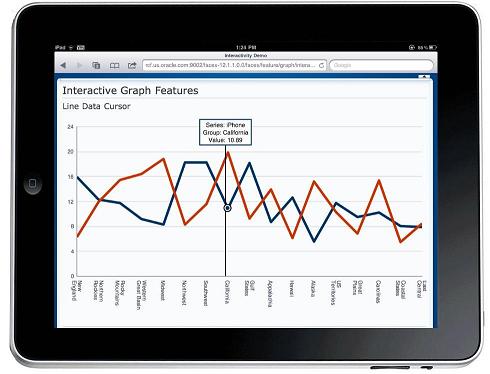
All ADF Faces and Data Visualization components now support touch gestures for interactivity on the touch-enabled devices, such as touch support for drag and drop, tooltips, data tips, and context menus. This support is enabled through the new v1.2 version of the FusionFx and FusionFx-simple families of skins. ADF Faces and DVT components are now certified on iPad. Additionally, ADF DVT Graph and Gauge components now support rendering in HTML5.
-
Override default dimensions - By default, certain components default to getting their dimensions from the parent. This makes these components harder to work with in flowing containers, where the desire is usually to get the dimensions from the preferred size of the children components. In order to support this, but still maintain backwards compatibility, we have introduced a new web.xml context parameter. This parameter, when set, will allow the default values of certain attributes to assume a value that fits their current container. For the dimensionsFrom attribute, this means that the default value will be "auto" instead of "parent". This has the affect that the component will determine from its parent component what dimensions to use by default. This affects the dimensionsFrom attribute on af:decorativeBox, af:panelAccordion, af:panelDashboard, af:panelStretchLayout, af:panelSplitter and af:panelTabbed.For the table family of components, af:table, af:tree and af:treeTable, setting the new context parameter to auto will result in the default value of autoHeightRows to be switched from -1 to 0. Also, the these components will renderer the AFStretchWidth style class when autoHeightRows is 0 (and the context parameter has been set to auto).
In order to set this new parameter, you must add this to the web.xml of your application:<context-param> <description> This parameter controls the default value for component geometry on the page. Supported values are: legacy - component attributes use the default values as specified for the attributes in the tag documentation (default value) auto - component attributes use the correct default value given the value of their parent component. For example, with this setting, the panelStretchLayout will use "auto" as the default value for its "dimensionsFrom" attribute instead of "parent". </description> <param-name>oracle.adf.view.rich.geometry.DEFAULT_DIMENSIONS</param-name> <param-value>auto</param-value> </context-param>
Table
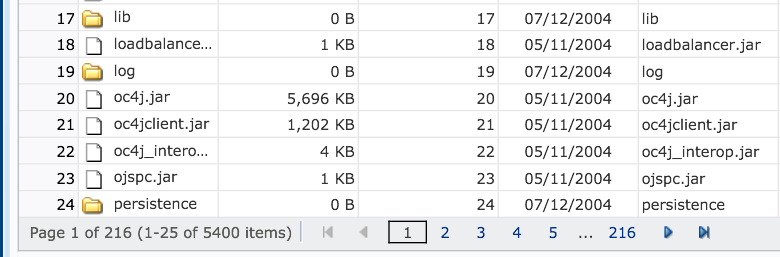
On tablet devices, ADF table now automatically renders as a paginated table, rather than infinite scroll. Instead of scroll bars, the table component is paginated, and displays a footer that allows the user to jump to specific pages of rows, as shown below. The number of rows on a page is determined by the fetchSize attribute.
New In This Release (11.1.2.2.0)
ADF Faces and Data Visualization Tools (DVT)
-
Improved Page Loading Performance: A number of features have been added in this release to improve the overall experience of loading ADF Faces applications.
- Reduce size of minimum required JavaScript -- The Triinidad JavaScript has been partitioned to minimize the core set of JavaScript needed for ADF Faces, and separating that from services that can be downloaded on demand.
- Reduce size of images -- Images used in ADF Faces are now optimally compressed.
- Add Closure compiler -- A new method is being used to produce better compressed (and obfuscated) JavaScript.
- Support for Content Delivery Networks (cdn) -- New settings in adf-config.xml allow users to take advantage of Content Delivery Networks (CDN) to cache and serve the static parts of the application (images, javascript, style sheets, etc).
- Pretty URLs: By default, the parameter values for maintaining ADF Faces session state will no longer be passed using dynamic URL parameters. This results in much cleaner URLs that are visible to end users. For browsers that support it, the HTML 5 History Management API is used to remove the parameters, otherwise the information will be sent via session cookies. Alternatively, developers can choose a specific method or turn the feature off completely in web.xml.
ADF Faces
- af:panelGridLayout: This release introduces a new layout component. Panel Grid Layout, in conjunction with the related af:gridRow and af:gridCell tags, allows users to layout elements of a page in a simple (or sophisticated) collection of rows and columns. Note, there is no support for the new layout component in the JSF Visual editor in this release.
ADF Databinding
- Ability to define key attribute: A WSDL which references an ID type attribute will now result in a Web Service Data Control structure that marks that attribute as a "Primary Key". Otherwise, the generated Web Service Data Control will add a hidden RowIndex attribute for the key value. As a result, the Web Service Data Control is also now able to support the setCurrentRowKey and setCurrentRowKeyWithValue iterator operations.
- HTTP header customization: When creating a Web Service Data Control definition, there is a new option to "Include HTTP Header Parameter". Selecting this option will result in a "HTTP Header" parameter under the data control operations in the Data Controls accordion panel. You can provide the value for the HTTP Header parameter from a backing bean, and the value will be passed via the request then the method is executed.
- *Multiple methods:*A single URL data control can now be used to expose all the operations of a REST service. Multiple methods can be created within a single data control definition.
- XSD no longer required: For GET operations, you no longer need to specify an XSD for the return type. If the XSD is not specified when creating the data control, the return type will be generated by making a request to the service.
- HTTP header customization: When creating a URL data control, there is a new option to "Include HTTP Header Parameter". Selecting this option will result in a "HTTP Header" parameter under the data control operations in the Data Controls accordion panel. You can provide the value for the HTTP Header parameter from a backing bean, and the value will be passed via the request then the method is executed.
New In This Release (11.1.2.0.0)
JDeveloper IDE
- Asynchronous editor support
This will allow clients of the editor manager framework to open editors without blocking the event thread
- IDE extensions using trigger hooks
Allow extensions to define when and how they should be loaded - IDE extensions supporting lazy initialization
Extensions are loaded when they're needed. Not all at the same time at startup. - IDE extensions as OSGi bundles
Extension classes are now loaded in separate classloaders thanks to OSGi classloading policy
- Improve L&F of many common components
Java Coding and Agile Development
- Show values of ant macro attributes in debugger
- Serialization Audit Support
- Limit Audit File Size
- Unserializable Field Audit Support
- Removing JavaCompiler.jar from SQLDev distribution
- Fast JOT Parser
- toString() in Data Window
- Data Window Array Navigation
- Debugger Find Source Dialog
- Unsurround Code
- Incremental Search
- Replace command can now preserve case when run
- Call Tree Browser
- Goto Class / File Navigator
- Externalize strings
- Invert Boolean
- Internationalize
Replace a Java string literal with an internationalized version from a resource bundle - Introduce Parameter Object
- Extract Class
- Extract Method Object
- Class Locator
- Application Cache
- Copy of Class Locator
- File Change Support
- Exposing String Searching Capability
- Assuming External Files Are Not Changed By Default
- Application Level Persistent Storage
- Active Root Manager
- 64bit support for Windows
- Create new applications and projects with Maven POM
- Create Maven POM from existing JDeveloper applications and projects
- Import Maven POM
- Configure Maven settings for any application
- Maven POM editing with code insight
- Run Maven goals

- Integrated Maven output display
- Manage locale and remote repositories with indexing and querying
- Manage Maven dependencies with synchronization with JDeveloper project libraries
- Automatic publishing of JDeveloper project libraries to local repository

- Color New vs Old Refs in Snapshots
- 64bit agent support
- Partial Tree Expansion
- Linear Chain Reduction
Database Development
- Persist files or generate as Oracle 11gR2 SXML

- Bind variables as report parameters
- Filter application navigator by offline database object
- Persist PL/SQL as flat files such as .sql or .pls
- Improved dependency analysis when references (usages) made from PL/SQL to tables, views etc, or other PL/SQL objects
- "Go To Declaration" command for PL/SQL Editor

- Database Profile in the UML class model increases flexibility of the transform from logical to physical database model

- Reverse transform from a physical database model to a logical model (UML class model)
- Steamline use of "Delete" and "Remove from Diagram"
- Graphical distinction between online and offline database objects through icons and connection information in the object tooltip
- Display join objects in iconic mode
- Allow "Show Related Elements" for views and relation usages
- Hide constraint name option added to preferences

- SQL Code Insight
- UNION set operator and bind variables support for query building
- Group By expressions and function calls
- Declarative support for inline and hierarchical query creation
- Added DEFFERABLE and INITIALLY clauses to constraint model
- Explicitly model indexes implementing primary/unique keys
- Support for Oracle 11gR2 XE (Express Edition)
- Use of third party database dictionary and JDBC drivers
Team Development
- Enhanced compare algorithm for large files
- Version Tree thumbnail view and structure pane usage
- Compare panels use accordion layout
- Repository revision browser
- Support for tree conflict and Subversion property conflicts
- Add to svn:ignore via context menu on file
- Repository URL shown on commit and update dialogs
- Compare subversion properties in main compare view
- Perforce annotation support
- Connection dropdown list converted to a browse button and dialog
- Support Dimensions requests (lifecycle) in version operations
- Import wizard
Java EE Development and Deployment
Application Server Integration
- Deploy Plan customization framework
- Flat Editor for Weblogic-policy-ref.xml
- Project/Application auditing for deployment rules
- Generate *-jdbc.xml files
- Deployment Cancel Support
- OJDeploy as a background Service
- Prompt user for initial admin password when creating default domain
- Preferences for Default Entity mapping
- Entity Field/Column synchronization
- Dynamic discovery of associated JPA entities in Entities from Tables wizard
- Generate implementations for toString(), hashCode(), Comparable.compareTo() methods onto entities
- EJB refactoring
- Entities From Tables Wizard user interface redesign
- Add support for Java 5 Generic types in Bean DC
- Leverage web-app for jndi lookup for remote lookup
- Bean data control metadata management improvements now only generate xml if needed (sparse xml)
- Bean data control and Query - Subquery and join support
- Bean data control pagination performance improvements
- Bean data control user interface improvements
- Bean data control transaction support
- Create Data Control from EJB Modeler
- Class and metadata refresh support (hot swapping)
- Action to access run URL (if any)
- SSL Support
- Delete and recreate domain support
- Terminate run during deployment support
- Local Debugging Protocol support
- Support OPSS resource catalog
- Custom policy and codebase grant support
XML Development
- Resolving of reference shall happen in a background thread
- New context menu added to allow easier access to "Generate XML from XSD" feature.
- Facet values are now validated with regard to their base type.
- Added design editor support for List and Union elements in schemas.
- Added support to collapse and expand all attributes for elements and complextypes in the schema design editor.
- Added support for setting the attributeGroup references using a drop down list
- Schema Auditing: More Validations in Schema editing
- Property Inspector now shows value for type attributes when applicable.
- Added the ability to make an element, attribute/implicit type, global via context menu in Visual Editor
- xsl variables are now shown in the smart data window
- Structure pane improvements
- Component palette improvements
UML Development
- Primitive type support
- Additional association end information
- Constraints on attributes
- Pre-Loading facility for element references
- Upgrading to JViews 8.6
- Diagram Rename and Save As
- Diagram content set
- Enable nesting of Sequence diagrams as per UML 2.0 Combined Fragments
- Interaction shape
- Sequence layout
- Enable user defined stereotypes on diagrams
- Enable user defined stereotypes in Property Inspector
- Enable user defined stereotypes in dialogs
- Profile Support - Base
- Profile Support - Final
Web Services Development
- Integrate credential wizard with the proxy client wizard
- Change name of proxy wizard option in new gallery
- 'Go To WSDL' context menu option from proxy node
- 'Go To Client Class' context menu option from proxy node
- Support for async service monitoring
- Default certificate acceptance
- Policy validation
- Make title and hint text of client policy page customizable
- Edit server connection from policy preferences page
- HTTP Analyzer sign/encrypt support
- User interface improvement for MTOM and Addressing annotations in PI
- Property Inspector support for @Action and @SOAPBinding annotations
- Property Inspector support for @WssConfiguration annotation
- Support relative links from Hypermedia as the Engine of Application State (HATEOAS)
- Support atomic (href) links
- TopLink database web services support
- Support for editing a top-down generated web service
- Add validation for SOAPBinding.ParameterStyle.BARE
- Add context menu option to add a wsdl to a annotated web service
- Add @WebServiceRef in one-step
- After top-down generation open implementation class rather than WSDL
- Add test web service option
- Add directory in WSDL create dialog
Web and Ajax Development
- Improve faces-config flat editor
- Icons for managed beans will show up in the navigator and a new Managed Bean finger has been added to the Application Overview
- Gallery reorganization
- Support faces-config annotations
- Web application migrator
- Option to create managed bean using annotation
- Support for functions in EL insight
- Support for Facelets tag libraries in project properties and Tools > Manage Libraries
- Visual editor support
- Custom tag library editing
- Show functions in EL builder
- Composite component support
- Support for new .jsf extension
- Support overflow scrolling in visual editor
Oracle Toplink Development
- Enhanced support for Oracle TopLink's advanced JPA (EclipseLink) mapping and persistence unit capabilities
ADF Framework
- The adf-settings.xml file is created automatically for new ViewController projects; you no longer have to create it manually.
- You can now set breakpoints for contextual events and for tree and table bindings.
Database-Portable Applications
- An application's SQL properties, including the type of database used, are now exposed in the application's adf-config.xml editor and can be modified when packaging the application, making it easier to make a database-portable application.
ADF Faces and Data Visualization (DVT) Design-time
A new JDeveloper editor is available starting in 11.1.2.0.0 for creating and editing ADF skin files. The core features include:
- ability to extend from one of the ADF skins as a starting point
- selector tree listing all the possible skin selectors for ADF Faces and DVT including style classes, global aliases, and pseudo-elements
- preview pane that renders components and reflects changes made to their skin selectors in real-time
- inheritance information showing where existing, default properties values are coming from in the skin hierarchy
- support for seeing which set of components and selectors are utilizing a particular global alias
- support for editing skin selectors for a particular theme
- image generation capabilities based on color aliases when extending a fusionFx-simple skin
Available as a standalone product
- Download standalone ADF Skin Editor from the JDeveloper/ADF page on OTN.
- Standalone version allows creation of skins for earlier versions of ADF web applications (ie. 11.1.1.4 or 11.1.1.5). Simply set the target version on the project creation dialog.


Component Palette Reorganization
The ADF Faces components in the component palette were reorganized into new accordions and display groups. This was done to assist users in locating and identifying components more efficiently and effectively by making the organization more predictable and usable. The reorganization will also accommodate the addition of new components in the future.
Support for Building Nested Templates
Previously, one was only able to utilize a single page template in their page (chosen during the creation of the page). Also, one was not able to include another page template while creating a page template definition. That restriction has been removed and a new Template item is now available
in the component palette which can be DnD'ed onto either a page template definition or a regular page. A dialog will appear prompting the user to choose a page template to point to. With this new feature, the ability to nest page templates is now possible.
Conversion Support for ADF Faces Layout Components
The ability to convert between various ADF Faces layout components was reintroduced in 11.1.2.0.0 (specifically, decorativeBox, group, panelAccordion, panelBorderLayout, panelBox, panelFormLayout, panelGroupLayout, panelHeader, panelList, panelSplitter, panelStretchLayout, panelTabbed, showDetailHeader, and toolbox). For cases that cannot be resolved algorithmically, a new Convert dialog will be shown to prompt the user for direction. Here the user is able to drag and drop child components into other facets. In addition, if they want more than one child in a facet they can choose what component they would like to group these children.

Enhanced Hierarchy Navigation in Structure Pane
Previously, navigating the structure pane was tedius and one often lost his/her place as they navigated deeper in their hierarchy. Today, users can choose to make their current node the top of the heirarchy by using the Show As Top icon. They can then navigate deeper in their heirachy without losing their place. Finally, the user is able to return to showing the root by clicking on the show root icon or using context menu option.


Now users can quickly navigate to a component in the structure pane tree using the new Find Control. The find progresses depth-first from whatever node is currently designated as the root. To avoid clutter, this was introduced as a toggle option so it renders as a sub toolbar when the toolbar icon is selected.

Reduce Visual Clutter in Structure Pane
- Instead of the fully qualified binding for nodes in the Structure Pane, we now use simplified syntax which makes it easier for users to identify the key databinding information.

- Eliminate Freeze & New View (also in PI). These options were confusing users and for those who understood them found them not very useful
- Fix undesirable auto adjusting

Improved Error and Warning indicators
- Remove "empty facet" warnings // applies to JSF in general
- Added an error gutter to the Visual Editor so users can easily find and fix errors and warnings in the design view.

ADF Data Visualizations Design Time
- Design time user interface for the new Thematic Map component
- Sparkcharts data-first design time and binding UI
- Improvements to the Hierarchy Viewer design time user experience
- Support for circular layout in the Hierarchy Viewer component gallery
- Integration of DVT components in the ADF Skinning Editor
- CSS Code Insight support for DVT component selectors
- Design time support to add a Pivot Filter Bar to an existing data-bound Pivot Table
- Improvements to the PivotTable design time UI to generate a default stamping pattern based on control hints
- ResourceBundle integration with DVT components design time UI
- Property Inspector data entry improvements
ADF Faces and Data Visualization (DVT) Runtime
- This release offers JSF 2 support, which includes Facelets as the official view technology
- Java 5 annotation support is included, such as @ManagedBean, @ViewScoped, which eliminates configuration in faces-config.xml
- Navigation is simplified, removing the need for faces-config.xml for navigation cases
-
Applications are automatically migrated to JSF 2 when opened:
- Project library references are migrated to use the 2.0 libraries
- Configuration files are upgraded: web.xml to version 2.5, faces-config.xml to version 2.0
- References to facelets libraries are removed
- Certification with JAWS 11.0.729
- New API method in AdfPage.js, announceToAssistiveTechnology(), which is used to add messages to the WAI-ARIA status live region in screen reader mode.
- Public API provided so custom view components can participate in heading level negotiations (<H1>, <H2>, ...<H6>)
- Active Data supports displaying data from multiple bindings
- A new attribute "smartList" is available to autoSuggest tag, which takes a method expression. The smart list is cached on the client, which provides fast results for common search terms. If the user doesn't respond within 2 seconds, the entire suggestedItems list will be fetched from the server and shown.
- A new attribute "maxSuggestedItems" is available; if suggested item list is longer than this, a 'more' link is added to the bottom which will launch the search and select dialog
- Separator added between smart suggested item list and full suggested item list
- Autosuggest shows "no results found" when there is no match
- Spacing in vertical breadcrumbs is reduced, and a new skinning property is added to control it.
- The All Day Activities container now consumes no more than 40% of the page, and if more space is needed a scroll bar is provided
- New presentation modes in carousel ("circular", "oneByOne"), and a new "controlArea" attribute provided for additional display options
- Change persistence now available to Facelets
- Customization support available to Declarative component
- Export data now supports table columns with commandLink/goLink and selectOne/selectMany components
- File download supported when ADF Faces content rendered in a portlet
- AdfFacesContext.getOutputMode() now indicates whether page is being rendered in email/printable mode
- Deliver a WindowCloseEvent when the window being closed is a dialog
- Users are proactively alerted with a popup when their session is about to expire
- The af:region component implements a Facelets-specific optimization whereby the region's children are not created until the region is rendered. Deferring the cost of child creation for non-rendered regions can be a significant optimization, especially in cases where regions are hidden inside of af:showDetail, af:showDetailHeader or af:showDetailItem ancestors. This optimization is enabled by default but can be disabled by setting the "oracle.adf.view.rich.region.CHILD_CREATION" context parameter to "immediate".
- Added a new "inlineFrameLoad" event that is queued each time the document defined by the source property is loaded; this event can be used with the af:clientListener tag
- Added "labelStyle" attribute to all input components with labels to allow explicit control styling of labels, such as labelStyle="white-space:nowrap;"
- Added "autoComplete" attribute to inputColor, inputComboboxListOfValues, inputDate, inputListOfValues, and inputText, which can be used to suppress browser autocompletion if required
- Added "editable" attribute to several input components to offer click-to-edit capabilities

- A new utility class oracle.adf.view.rich.util.ResetUtils has been added to reset to initial state; it has a method public static void reset(UIComponent startComponent)

- Flowing alternatives for decorativeBox, panelAccordion, panelDashboard, panelSplitter, and panelStretchLayout: these components have a new "dimensionsFrom" attribute that can enable height to be determined by their children components as an alternative to parent stretched or fixed height
- Added "dimensionsFrom" attribute to panelTabbed to specify how the component will handle geometry management in the disclosed tab
- For custom component builders, a new API getVisualRootStretchingStyles has been added to allow the component to participate in parent stretching
- A new facet "searchContent" is available to provide custom content by the application developers
- A new facet "context" is available to inputListOfValues that supports the af:contextInfo component
- Menu model support added to af:menuBar tag, which enables af:commandNavigationItems to be stamped out for each itemNode in the menuModel
- The menu model implementation has "hover to open and click to navigate" behavior built in
- Components af:goButton, af:goLink, af:goImageLink, af:goMenuItem, and af:commandNavigationItem have been enhanced to support PPR navigation for GET requests
- It is now possible to suppress browser context menus for action links by setting "oracle.adf.view.rich.ACTION_LINK_BROWSER_CONTEXT_SUPPRESSION" to "no"; explanation: many of the action links, such as those from af:commandLink, af:commandMenuItem, af:commandNavigationItem with no "destination" attribute set, expose native browser context menus such as "Bookmark Link", "Copy Link", etc. where the link offered has no relationship to the navigation target if the link is clicked on, and this can be used to suppress this behavior.
- Components af:commandLink and af:commandButton now render in print/email output when af:showPrintablePageBehavior is used
- The "featuresOff" attribute has been enhanced to support turning off a more extensive set of features
- Added "autoCancel" property to af:popup tag to control auto-dismissal of popups
- Added "childCreation" property to af:popup tag to make it possible to defer construction of the popup's children until needed
- Added "resetEditableValues" property to af:popup tag to reset values of input components within the popup content when the popup is canceled
- New "showPopupActionListener(ActionEvent event)" method in RichPopup component that compliments the client-side API to show, hide, and cancel a popup
- Added "ScrollComponentIntoView" server side API to allow listeners to bring a desired component into the viewable area if it is scrolled out of view
- Can now save changes to existing saved search, and delete a saved search
- New "design" value for attribute "displayMode", which puts the query into design mode
- New attribute values for "criterionFeatures": "matchCaseDisplayed" allows the user to set match case for a String criterion, and "requiredDisplayed" allows user to set whether a criterion is required.
- Double click will now shuttle items back and forth
- The Skin Framework now supports versioning. If you create skins, then you can add skin versions to your skins, so you can keep the skin-family name the same between versions.
- We introduced a new skin family called 'fusion-simple' which is targeted to meet the needs of those who want to quickly and easily re-brand their application's look and feel. In this skin, we approximated and reduced hundreds of colors used in our fusion skins into about 18 pairs of background / foreground color aliases. We introduced new aliases that apply in common to few component groups like 'commandLink / goLink', 'panelHeader / showDetailHeader / query' and 'region / panelBox'. We also added a few new global aliases as a result of this exercise.
- New Style Class - AFBrandingBarItemBackground. It can be used to style the background of a container (e.g. an af:panelGroupLayout) for items inside of the branding bar container. This typically defines the background color of the items inside of the bar.
- Warning in SkinFactory#addSkin API - If you add a duplicate skin using the SkinFactory#addSkin API, you will see a warning logged since this is unsafe to do. The behavior remains unchanged. (Bug 09533892)
- New and deprecated APIs in RichRenderer - In oracle.adf.view.rich.render.RichRenderer there is a new API getRootStateStyleClasses that takes a UIComponent as a parameter. The method getRootStateStyleClasses that does not take a UIComponent as a parameter is deprecated.
- New icon selector features - Icon selectors (those that end in -icon or Icon:alias) now behave like CSS selectors. Icon styles merge together from base skins, you can use -tr-inhibit, -tr-rule-ref, and -tr-property-ref.
- @import is now supported in Skin css files (Bug 10066954)
- -tr-rule-ref and -tr-property-ref now work for server-side skin properties (Bug 10094274, Bug 10094451)
- You can now configure how many skins to cache with web.xml context-param org.apache.myfaces.trinidad.skin.MAX_SKINS_CACHED The default is 20 unique skins.
- Click-to-edit support for tables with a detail stamp facet
- Detail Stamp can be selectively displayed for rows in the table by EL binding the "rendered" attribute of the "detailStamp" facet to "true" or "false"
- If a row header column is present in the filterable table, an icon will be displayed on the column header that will allow the user to clear filter fields
- Improved row interaction using a keyboard; e.g., single click to edit, escape key reverts cell edits and exits edit mode, pressing the arrow key allows the user to navigate from cell to ell in the same row or between rows, tab and enter keys navigate in edit mode in a row-wise fashion that is repeated in adjacent rows
- New attribute "activeRowKey" which can be set to make the selected row editable in click-to-edit mode; if there is no activeRowKey set, the first visible row will be editable
- New ColumnSelectionEvent and associated ColumnSelectionListener
- New "getSelectedColumns()" API that returns client IDs for all selected child columns
- Export data now supports table columns with commandLink/goLink and selectOne/selectMany components
- Table 'autoHeightRows' attribute is now supported for contentDelivery=lazy/immediate/whenAvailable
- New attribute "autoHeightRows" which can be used to control how many rows are displayed when the component is inside a af:panelCollection
- Attribute contentDelivery="whenavailable" queries the model for data availability, and will deliver data immediately to the client if the model indicates the data is available
- Improved row interaction using a keyboard; e.g., single click to edit, escape key reverts edits and exits edit mode, pressing Enter or Shift+Enter navigates to adjacent cell when possible, tab and enter keys navigate in edit mode in a row-wise fashion that is repeated in adjacent rows
- New attribute "activeRowKey" which can be set to make the selected row editable in click-to-edit mode; if there is no activeRowKey set, the first visible row will be editable
- New ColumnSelectionEvent and associated ColumnSelectionListener
- New "getSelectedColumns()" API that returns client IDs for all selected child columns
- New attribute "autoHeightRows" which can be used to control how many rows are displayed when the component is inside a af:panelCollection
ADF Data Visualizations: Common Features
- Support for standard Trinidad converters for numerical and categorical attribute formatting
- Improvements to configuring Flash player usage, including a new context Parameter to allow customers to disable Flash
- Skinning support
- Support for contentDelivery="whenAvailable"
- JSF 2.0 Support
- Support for auto partial page rendering (autoppr)
ADF Data Visualizations: Data Binding
- Common Data Services support for JBO data types and median agg type
- Support active data services against multiple GeoMap themes
- Support for making PPR the default for all DVT bindings
ADF Data Visualizations: Gantt Chart
- Ability to export to xls format
- Number and date formatting improvements
- Ability to set timezone for the whole chart
- Support for hiding and showing dependency lines
- Ability to get a list of selected tasks/resources for the scheduling Gantt
- Ability to show tooltip when zooming the gantt using the mouse scroll wheel
ADF Data Visualizations: Gauge
- Performance improvement: ability to send small PNG images inline
- Improved skinning support
ADF Data Visualizations: Geographic Map
- Support for number formatting using standard Trinidad converters
- Accessibility: screen reader support
ADF Data Visualizations: Graph
- New animated transition effects for Graph
- Drag and drop between graphs
- Drag from a graph into another ADF component
- Support for custom marker shapes defined in SVG
- Improved support for marker selection
- Support for context-sensitive right click popup menu
- Improved popup support, including support for af:showPopupBehavior
- Improved skinning support
- BiDi support
- Support for standard Trinidad converters for numerical and categorical attribute formatting
- Ability to automatically display a PivotTable instead of Graph for accessibility purposes
- Support for legend marker that reflects both the dataline and the marker color
- Zoom-and-scroll functionality for y2 axis
- Support for Positional/conditional formatting for bubble graph
- Improved appearance of no data graph
- Sparkcharts: Option to not include zero


ADF Data Visualizations: Hierarchy Viewer
- Accessibility support: ability to automatically render Hierarchy Viewer as a TreeTable in screen reader mode
- BiDi support for HV node content, search panel and results
- New HTML Hierarchy Viewer provides support for Printing and rendering without a Flash player
- Improved skinning support
- Ability to customize the hover window
- Ability to customize the control panel
ADF Data Visualizations: Pivot Table
Several editing and navigation improvements have been introduced to support click-to-edit functionality analogous to the ADF Table:
- Support for single click model for editable cells
- Support for tab/enter navigation model for all cell types
- Support for ESC key to dismiss edits and revert
- Support for arrow key navigation while editing
- Support for Excel-like pattern recognition while editing
- Ability to stay in Edit mode when a readonly cell is focused
- Support for active cell key concept
- An opt-in mechanism for some of the click-to-edit features
- Improved Pivot Table editing performance
Other new features include:
- Skinning editor integration
- Performance improvements
ADF Data Visualizations: Pivot Filter Bar
- Support for accessibility and screen reader mode
- Improved design time rendering
- Improved skinning support
ADF Data Visualizations: Thematic Map
Thematic Map is a new geographic visualization that focuses on presentation of the data within geographical context and does not require a connection to a mapping server.
Features include:
- Built-in base maps for continents, countries, and states
- Built-in data for major cities
- Ability to color code the regions on the map based on data
- Drag and drop support for markers and regions
- Ability to specify custom regions
- Animation effects on initial display and on data change
- Zooming and panning
- Selection
- Drilling
- Support for patterns and gradients
- Customizable control panel
- Custom marker shapes with support for SVG
- Customizable tooltips and popup windows
- Legend with collapsible sections and titles
- Printing support
- Keyboard support
- Accessibility and screen reader support


ADF Business Components
Hot Reload of Changes When Running in the Integrated Server
- When you're running an application in the integrated application server, refreshing the page in your browser now picks up changes to the ADF BC XML. Previously only client changes were picked up, and to run ADF BC changes you had to restart the integrated server. This greatly speeds up the development process: you no longer have to restart the integrated server to see changes you have made to your business components.
- When you create a new ADF BC application, it now uses a datasource and optimistic locking by default. These are recommended best practices.
- The editors have a Diagram tab, containing a relationship diagram for every business component. This makes it easy to see the structure of the current objects and its relationships to other business components; you can also click on each related object and open its editor, making it easy to explore the relationships between your business components:

- The entity attributes table allows you to sort and reorder columns, and you can choose which columns should be included. For example, you may choose to include the Label and Mandatory columns in the table:


- Attribute editing has been moved from a modal dialog into the overview editor, making it easier to check other settings while you're editing attributes:


- Your view object Groovy expressions are all included in one place:

- When working in an application module's data model panel, you can remove a subtree of objects at a time:

- You can group view attributes into categories and set their relative order within those categories:


- When running against a SQL Server database, BLOB and CLOB data types are supported.
- For a service-enabled view object you can group a numeric property with a string property so they appear as a complex type in the SDO interface. Currently two complex types are supported: AmountType, for use with any property that defines a currency code, and MeasureType, for use with any property that defines a unit of measure.
ADF Databinding
Sparse Bean Data Controls and Data Control Enhancements
- When working with data controls, creating an XML file for each accessor in your data control is now optional. For example, your EJB data control may contain accessors for the Department and Employee entity beans, but you do not have to create XML files for these beans until you start modifying data control properties (for example, control hints).


- If you do choose to create a bean XML file, you can use many of the ADF BC features in your data control. For example, you can choose which columns to display in the list of attributes. You can also add groovy expressions and a search form to your data control.


- Binding editors now include the ability to search, sort and view variables.
- URL data controls have been extended to support the REST architecture. As well as the GET operation, they now support the PUT, POST and DELETE operations.
ADF Controller (Task Flow)
- A region model can be transitioned from active to inactive. This is useful for regions that are used within popups; when the region is dismissed it is now possible to deactivate the region model and release the resources it is using.
ADF task flows work automatically with JSF 2.0 applications, including the following new features:
- A facelets page can be created from an ADF task flow diagram
- The JSF 2.0 ConfigurableNavigationHandler is supported.
- JSF 2.0 conditional control flow cases are supported.
ADF Desktop Integration
- Workbook Configuration Validation Framework. Easy way to detect possible errors or warnings on your worksheet before executing.


ADF Mobile
- Merge device browser specific CSS files into one single CSS
- Generate mobile optimized CSS automatically when a JSF page is created in an ADF Mobile Browser project
Oracle Team Productivity Center
- Build Dashboard for Hudson/Cruise Control CI servers

- Build failures - assign to team members and raise bugs
- Test results integrated into work item SCM changes tab

- User notified of new build results

- OSLC Change Management Connector
- Work item repository name and ID added to checkin comments
- Dynamic Upgrade
- Glassfish Application Server support
- Hudson and Cruise Control plugin installation
Oracle Help
- Centralize control of the TOC in a master XML file
- Improve search functionality
Oracle Help for the Web (Rich Client)
- Icons on the TOC pane (OHW only)
- Provide hints while editing ohwconfig.xml in JDeveloper
Bugs Fixed in 11.1.2.4.0
| Bug Num | Component | Subject |
|---|---|---|
| Bug Num | Component | Subject |
| 16345765 | ADFMOBILE | edit action bindings ui shows param value binding which doesn't exist in pagedef |
| 15846102 | ADFMOBILE | unable to display amx page due to network_err error on api level 16 |
| 15950577 | ADFMOBILE | adf mobile: using other skin id/family than mobilefusionfx does not work |
| 14099254 | ADFMOBILE | log integration |
| 16004650 | ADFMOBILE | pass ebs security context parameters and configured cookies to acs |
| 14473582 | ADFMOBILE | when in read only mode, the filled portion of the slider should be gray |
| 14456905 | ADFMOBILE | button embeded in verbatim tag not display at rt |
| 14774382 | ADFMOBILE | update adf mobile gauge icons in the dt |
| 16193697 | ADFMOBILE | listview display deleted listitem, but deleted the next listitem |
| 16104606 | ADFMOBILE | no springboard in android emulator |
| 16098690 | ADFMOBILE | backport - xmltreeeditor: delete (x) icon should be disabled when no node is ava |
| 16238420 | ADFMOBILE | backport 16237925 to 11.1.2.4.0: updates to js gauge label apis |
| 16170548 | ADFMOBILE | in adf mobile listview really a layout container? |
| 16101222 | ADFMOBILE | authentication error on android after first login |
| 16102762 | ADFMOBILE | cannot specify led gauge rotation via el expression |
| 16179601 | ADFMOBILE | geomap does not refresh when the model changes |
| 16077029 | ADFMOBILE | jsonbeanserializerhelper with json object having field name in titlecase. |
| 14326610 | ADFMOBILE | issues with invoking/passing parameter to nested web services |
| 16273629 | ADFMOBILE | javadoc - devicemanager.startupdatingposition() return value not documented |
| 15930650 | ADFMOBILE | cannot serialize - invoke ws operation with complex input param |
| 16275275 | ADFMOBILE | adf mobile: missing down arrow in selectonechoice component |
| 16303549 | ADFMOBILE | adf mobile: inputdate day is not working properly |
| 16412441 | ADFMOBILE | inconsistent inline style behavior for charts |
| 16224643 | ADFMOBILE | amx page designer - entering preview mode freezes jdev on win 8 |
| 16371894 | ADFMOBILE | exception thrown in the popup deactivates the screen and the app hangs |
| 15867959 | ADFMOBILE | geomap initially draws the map centered on the us, then maps to the point |
| 16340137 | ADFMOBILE | failed to open projects in public samples |
| 16294546 | ADFMOBILE | multiple fireproviderevents / iterators in pgl fails to update |
| 16239839 | ADFMOBILE | android application crashes after authentication |
| 16365358 | ADFMOBILE | rendering image requiring authentication |
| 16271402 | ADFMOBILE | address cordova code review comments |
| 13629557 | ADFMOBILE | us780 : general error handling and logging: no error handling support |
| 16458519 | ADFMOBILE | android: feature icons not shown on navigation bar |
| 16368967 | ADFMOBILE | adf mobile: geographic map does not rotate properly on ios |
| 16485958 | ADFMOBILE | internal error when using restserviceadapter's send() in android device |
| 16270669 | ADFMOBILE | last used good config service credentials cleared when no connectivity exists |
| 16357732 | ADFMOBILE | certificate invalid error when invoking java cloud service |
| 16659793 | ADFMOBILE | whitelist rejection:spring board and use of spring board around secured feature |
| 14106750 | ADFMOBILE | hosted compdemo: popup does not have disabled property |
| 14104702 | ADFMOBILE | hosted compdemo: listview does not have disabled property |
| 14093372 | ADFMOBILE | render property of panelsplitter does not have any effect at rt |
| 14108629 | ADFMOBILE | hsted compdemo: disabled is not legit property of image component |
| 14109907 | ADFMOBILE | hosted compdemo: pgl does not have disabled property |
| 14094588 | ADFMOBILE | method binding return value not saved to changed return name el |
| 14850275 | ADFMOBILE | support images for ios 6.0 devices |
| 14810427 | ADFMOBILE | perf: clean up a mis-match start/stop in adf.mf.el.setvariable |
| 14801574 | ADFMOBILE | default button size is larger than standard button size on iphone |
| 14823547 | ADFMOBILE | iterator refresh=always is *not* respected |
| 14764619 | ADFMOBILE | revise springboard default far inclusion |
| 13743811 | ADFMOBILE | deleting feature and re-creating results in duplicate feature ids |
| 16019936 | ADFMOBILE | geographicmap (address) does not display in android tablet |
| 14368103 | ADFMOBILE | running feature not highlighted in navigation bar post re-arrange navigation bar |
| 14485912 | ADFMOBILE | gotodefaultfeature, hidenavigationbar and shownavigationbar do not function |
| 14390506 | ADFMOBILE | add audit rule to detect dependency that has adfmf-feature.xml |
| 16046388 | ADFMOBILE | dvt:combograph series shows area graph instead of line |
| 16318791 | ADFMOBILE | when try to open attached wav/m2v file on android. error "not valid of pdf" |
| 16178501 | ADFMOBILE | cordova: jdev specified whitelist is not being respected |
| 16547419 | ADFMOBILE | click navigation button on remote url page cause mobile app crash |
| 16076939 | ADFMOBILE | feature.icon and .image from appfeaturedc do not eval resource el reference |
| 16509640 | ADFMOBILE | failed to go to springboad 2nd time and thereafter on android device |
| 14631322 | ADFMOBILE | when simple=true, selectxx component outside form display shrunk horizontally |
| 14740936 | ADFMOBILE | time picker for inputdate does not change am to pm or vise versa in this case |
| 14739774 | ADFMOBILE | click back button from preference screen throw npe, cause app hang in this case |
| 14631572 | ADFMOBILE | compact control area does not display control area on android |
| 16363724 | ADFMOBILE | push notification message not displayed when optional attrs are missing |
| 16357732 | ADFMOBILE | certificate invalid error when invoking java cloud service |
| 14781930 | ADFMOBILE | build refactor: replace binaries in ade w/ derived objects |
| 14390110 | ADFMOBILE | backport - contextualattributevalueitemprovider list not get refreshed in flat e |
| 16219392 | ADFMOBILE | customized app does not run on ipad3 |
| 16180330 | ADFMOBILE | tablelayout: table border : only top border and left border display |
| 16411332 | ADFMOBILE | provide a java listener for load-more-rows in the listview |
| 16180503 | ADFMOBILE | carousel with auxilary= hover, you click listitem long, the popup listitem stick |
| 1632505 | ADFMOBILE | sec user cant terminate person with default payroll |
| 16397594 | ADFMOBILE | graph layout gets messed up after switching to a different panelitem |
| 16318755 | ADFMOBILE | bmp file as attachment does not display on ipad3 |
| 16502020 | ADFMOBILE | adf mobile: memory usage |
| 16447586 | ADFMOBILE | backport: customized feature name appears as el expression |
| 12999874 | ADFMOBILE | depprofile bundle id field should validate application name: no spaces |
| 16032670 | ADFMOBILE | deploy mobile app from window7 to android tablet faile w/jdk1.7 |
| 16411881 | ADFMOBILE | inputdate : day and minute does not increment correctly on android devices |
| 16318519 | ADFMOBILE | failed to display pptx file on ipad3 as attachment |
| 14758056 | ADFMOBILE | upgrade adf mf to apache cordova |
| 15982079 | ADFMOBILE | improve loading indicator icon quality |
| 14758056 | ADFMOBILE | upgrade adf mf to apache cordova |
| 16547536 | ADFMOBILE | switching between ios and android css |
| 14782027 | ADFMOBILE | test infra: improve automated unit tests / verify with code coverage |
| 14782275 | ADFMOBILE | batch processing dce's |
| 14631409 | ADFSHARE | oracle.jrf.unknownplatformexception: jrf is unable to determine the current appl |
| 12780583 | ADF_FACES | safe guarding column width calculation (table-11.1.1.5.1-1159.js ) |
| 8989726 | ADF_FACES | idm:oaam faces messages seem to be cached |
| 13699927 | ADF_FACES | weird focus issues on ie when closing non-modal popup |
| 13863292 | ADF_FACES | printable behavior in ie 9 causes infinite js redirect loop |
| 12362070 | ADF_FACES | ie 8 and 9: file explorer demo shows assertion error on refresh |
| 12992595 | ADF_FACES | failed to replicate non-serializable object |
| 14297616 | ADF_FACES | offsets in the names of russian timezones are outdated |
| 15845693 | ADF_FACES | acc: oghag link error close link has no tex |
| 15915644 | ADF_FACES | new:invalid multiple selection message for tables in screenreader mode |
| 14676053 | ADF_FACES | composer:player:ie8:popup does not go away though instance moves none->initiator |
| 16008655 | ADF_FACES | missing focus on click of next button on error dialog box after correcting the e |
| 14847952 | ADF_FACES | browser hung when af:table columnstretching multiple with af:column width in per |
| 15932780 | ADF_FACES | js error when dragging header of column group(using the fix of 14352109) |
| 13435987 | ADF_FACES | application table: view/columns menu - incorrect behavior |
| 13092560 | ADF_FACES | scrollbar in tables and tree-tables having a footer does not work in pure ie8/9 |
| 15922018 | ADF_FACES | for attribute of outputlabel doesn't work correctly in a region |
| 15887637 | ADF_FACES | getting blue screen error in alcoa crp2 fusion instance |
| 14641611 | ADF_FACES | jscript file in afr space named table-11.1.1.5.0-1095.js causes issue |
| 12534314 | ADF_FACES | allow resizing of the lov dialog |
| 12416589 | ADF_FACES | flattenedtreecollectionmodel does not correctly scroll through underlying model |
| 14780273 | ADF_FACES | acc: afbrandingbarlogo background-image is not acc compliant |
| 14612784 | ADF_FACES | af:inputfile uploads are slow |
| 15845457 | ADF_FACES | enabling compress_view_state cause classcastexception in simpleinputfilerenderer |
| 16243156 | ADF_FACES | integrate fix for weld-1022 into 12.1.1.x |
| 12558807 | ADF_FACES | psr:perf: piggyback window-unloaded requests on postbacks when possible |
| 14608330 | ADF_FACES | af:table row and column are not aligned properly after auto ppr |
| 14722379 | ADF_FACES | create an 11.1.2.4.0 (sherman update 4) branch |
| 14400317 | ADF_FACES | support for bypassing compatibility mode in ie browers |
| 12904684 | ADF_FACES | inline document type of popup causes loopback when clicking close icon (ie9) |
| 14352109 | ADF_FACES | javascript error occurs on ie when trying to drag the header of column group |
| 14604498 | ADF_FACES | menu scrolls through items till the end on ie9 |
| 16397455 | ADS | in ads long-polling, push service hits race condition when event rate is high |
| 14822946 | DATABIND | perfomance issue with iteratorbinding.getdefinition |
| 16692510 | DATABIND | recreating web services data control does not update cached wsdl |
| 14556486 | DATABIND | comment in accessors of pagedef and edit tree binding editor fails with npe |
| 16171868 | DVT | js chart: bubbles are rendered at wrong locations |
| 16101842 | DVT | default axis label format does not handle fraction digits |
| 14685878 | DVT | dvt-trinidad: bi-trinidad.tld conflicts on jboss deployment |
| 13709697 | DVT | em: flash stacked correlation graph leaks memory in ps5,ps6,main |
| 15972368 | DVT | add wai-aria tags to js chart/gauge/tmap/spark for amx 1.1 |
| 15959448 | DVT | timeaxis: increments are not calculated properly |
| 16523979 | DVT | js chart: add interactivity for pie "other" slice |
| 16224489 | DVT | dvt information box is not cleared |
| 12608282 | JBO | npe in o.jbo.dt.jdevx.ui.editors.common.jeobaseeditor:157 |
| 16312467 | JDEV | stackoverflowerror in o.javatools.parser.plsql.syntax.plsqllayer1:145 |
| 16245462 | JDEV | jdev with spaces in path:exception in console when creating coherence project |
| 16243906 | JDEV | deadlock opening tag file in ve |
| 14272121 | JDEV | protected jsp cannot be debugged after upgrade to jdeveloper 11g |
| 16282665 | JDEV | oracle lite: generate to sql script is not generating any sql |
Bug Fixed in 11.1.2.3.0
| Bug Num | Component | Category | Subject |
|---|---|---|---|
| 13892684 | ADF_FACES | DT | js errors when running a adf page |
| 14382222 | ADF_FACES | RT | change adfieagent.js to fix error "object doesn't support..." occuring in ie7+ |
| 14066003 | ADF_FACES | RT | after new window is launched, warning popup window is showed repeatedly on ie. |
| 14058850 | ADF_FACES | RT | nullpointerexception in trinidad's formrenderer when using unknown agent |
| 14022162 | ADF_FACES | RT | after new window is launched, warning popup window is showed repeatedly on ie. |
| 13553978 | ADF_FACES | RT | script failed at adfsync point due to java script error |
| 14268404 | ADF_FACES | RT_DIALOG | scroll down arrow does not work in dialog |
| 13744742 | ADF_FACES | RT_DIALOG | background is accessible when using inline-popup with the task flows for firefox |
| 14005407 | ADF_FACES | RT_INPUTOUTPUT | adf_faces-30098:rich text parse error at position: -1, unclosed element: table |
| 13880437 | ADF_FACES | RT_INPUTOUTPUT | cannot add empty desktop file attachment to task form |
| 13833570 | ADF_FACES | RT_INPUTOUTPUT | tag produces unexpected results when inline is set to |
| 14394159 | ADF_FACES | RT_LOV | 2d inputcomboboxlistofvalues with autossuggest returns the list from first list |
| 14167762 | ADF_FACES | RT_LOV | af:inputlistofvalues in af:table only shows 25 rows |
| 14133331 | ADF_FACES | RT_LOV | valuechangelistener does not work properly with autosuggest in input component |
| 14560489 | ADF_FACES | RT_NAVIGATION | vertical af:train join links are very thick in ie8 |
| 14492754 | ADF_FACES | RT_POPUP | inputdate popup does not display after 'save and add another' |
| 14347183 | ADF_FACES | RT_TREE_TABLE | a wide adf table does not render row properly after data edited in a autosubmit |
| 14329284 | ADF_FACES | RT_TREE_TABLE | 'clear all' feature on table doesn't work if there is no result in the table |
| 14305049 | ADF_FACES | RT_TREE_TABLE | data exported by exportcollectionactionlistener is empty for image columns |
| 14259344 | ADF_FACES | RT_TREE_TABLE | culumn header heigh goes higher on ie8 if frozen attribute is set true |
| 14213495 | ADF_FACES | RT_TREE_TABLE | support table wrapping behavior in gmail for emailable mode |
| 14174660 | ADF_FACES | RT_TREE_TABLE | ie9: af:table vertical scrollbar reset at the top position |
| 14126744 | ADF_FACES | RT_TREE_TABLE | clear all filter button in table does not clear filter fields |
| 14498514 | ADFSHARE | ADF_CONFIG_RT | typos in adf share javadoc (package oracle.adf.share.config) |
| 14520686 | ADFSHARE | ADF_CONTEXT_RT | mds cache issue : unable to find document stored in mds store |
| 14092650 | ADFSHARE | ADF_CONTEXT_RT | psr:perf:adf heavy locking from adfcontext:ishighperformanceenvenabled |
| 14340831 | ADFSHARE | RES_BUNDLE_DT | entering resource value gives -violation of swing's single threaded policy excep |
| 14343535 | ADS | EVENT_MANAGER | collapse control does not appear when first child is inserted |
| 14474897 | CONTROLLER | ADFC_DT | adf-config.xml overview editor ignoring controller option changes |
| 14255762 | CONTROLLER | LIFE_CYCLE | webcenter wsrp2 appls initialization error-oracle.adf.controller.controllerexcep |
| 14261109 | DATABIND | SQL_DC | active connections are not getting released |
| 14384394 | DATABIND | URL_DT | xsl in url service data control wizard |
| 14094074 | DATABIND | URL_DT | urldc definition generated twice while creating an dc |
| 14092679 | DATABIND | URL_DT | the input parameter value refreshes while creating an url dc. |
| 13146869 | DATABIND | WEB_SERVICE_RT | move mdds' wsdl cached metadata out of connections.xml |
| 14362561 | DVT | BINDING_DT | classnotfoundexception in o.i.osgi.extension.internal.classloaderproxy$bundlecl |
| 14499606 | DVT | BINDING_RT | dvt-databindings.jpr uses incorrect std_runtime in jpr file |
| 14002538 | DVT | GRAPH | em:html5: regrn: reference object hover behavior is not working |
| 14002195 | DVT | GRAPH | regrn: em: border of fetching data message does not hide after graph render |
| 13945540 | DVT | GRAPH | dvt:alert component stretches when scroll is enabled in dvt:linegraph |
| 14571127 | DVT | JDEVDT_CP | exportpivottabledata not available for facelets |
| 14546608 | DVT | THEMATICMAP | turn on html5 imageformat for tmap for adf on ios/android |
| 14484733 | JBO | TRANS_MGMT | optimistic locking not honoured when used in a taskflow |
| 14126526 | JBO | TRANS_MGMT | jbo.locking.mode=optimistic ignored for task flow transactions |
| 14179457 | JBO | VIEW_CRIT_DT | case insensitive view criteria does not generate correct query |
| 14581689 | JBO | XSQL_DT | component pallete for xsql generates attributes for vos with the wrong names |
| 14309197 | JDEV | DB_SQLJ | error upon compiling sqlj file after upgrade to 11gr2. |
| 14260425 | JDEV | IDE | wsdl editor issue with refactoring |
| 14099513 | JDEV | IDE | arrayindexoutofboundsexception:remove policy attached |
| 14562519 | JDEV | SCM_SVN | java package cannot be renamed after application has been checked into svn |
| 14401978 | JDEV | VISUAL_EDITOR | ide doesn't render the visual editor |
| 14249979 | JDEV | WEB_SERVICES | create client from web service annotations fails with classnotfoundexception |
| 14512092 | SECURITY | CRED_STORE_DT | adfserverplatformsupportfactory.getsupportinstance() throws in j2se |
| 14060376 | TOPLINK | (null) | fail to run toplink datacontrol app inside cloud env |
| 14139414 | XMLEF | XDF | unable to delete web service connection |
Bugs Fixed in 11.1.2.2.0
| Bug Num | Component | Category | Subject |
|---|---|---|---|
| 13365854 | ADFSHARE | ADF_CONTEXT_RT | java.lang.classcastexception: oracle.adf.share.el.adfcontextelresolver cannot be |
| 13068909 | ADF_FACES | DT | facet reference is labeled facet in component palette |
| 13453397 | ADF_FACES | DT | facelets declarative components do not expose the id and rendered property |
| 13649205 | ADF_FACES | DT | no f1 access to rcf javadoc in javasource editor |
| 13376842 | ADF_FACES | DT_SKINNING | image path issue with adf library jar when involving adf skins |
| 12848871 | ADF_FACES | JSF_BINDING_RT | inputdate date picker not displaying selected date |
| 12953790 | ADF_FACES | RT | activating from save-for-later on eo-less vo causes deadviewrowexception |
| 13254213 | ADF_FACES | RT | incorrect window lifecycle events due to server-side redirect |
| 13492032 | ADF_FACES | RT | faces should warn when ie 7 doesn't have enabled native xmlhttp support |
| 13516674 | ADF_FACES | RT | exception while evaluating an expression from task flow's route component |
| 13581724 | ADF_FACES | RT | exception while evaluating an expression from task flow's route component |
| 13731477 | ADF_FACES | RT | remove queued events/partialtargets after applyrichresponse completes |
| 13521287 | ADF_FACES | RT_INPUTOUTPUT | cannot display time as "hour in day" using af:inputdate and af:convertdatetime |
| 13816996 | ADF_FACES | RT_LAYOUT | resizing the panelsplitter breaks all actions on a page |
| 13626059 | ADF_FACES | RT_SKINNING | need skinning ability to distinguish webkit versions (e.g. ipad vs. others) |
| 12661808 | ADF_FACES | RT_TOOLS | formatting corrupted in two tagdoc files of external-adf-faces-rt-tagdoc.jar |
| 13321557 | BUSMOD | CLASS_MODEL | unknowndomainexception adding database objects to diagram group component |
| 13495771 | DATABIND | BINDING_EDITOR | wrong navigation arrow in page def overview |
| 13508184 | DATABIND | CRITERIA | unsupported model type error thrown for multi select view criteria |
| 13496132 | DATABIND | DT | rows still exist after being deleted from adf table |
| 13701867 | DVT | GEOMAP | this._themeinfotable is undefined in adfdhtmlgeomap-11.1.1.5.0-2010.js after rel |
| 13826237 | DVT | GEOMAP | backport html5 support for graph/gauge ios support for graph/gauge/hv/geomap |
| 12963580 | DVT | GRAPH | stacked bar graph with a line should not reserve space for the line |
| 13530109 | DVT | JDEVDT_PI | graph title chg in pi applied to wrong graph |
| 13482603 | DVT | PIVOTFILTERBAR | dvt-2016 layer n exceeds boundary n' for adf pivot table in page fragment |
| 13508179 | JBO | EO_RT | domain properties ignored if entity attribute extended |
| 12982502 | JBO | SHARED_AM_RT | increase max limit for qc inactive age |
| 13057187 | JBO | VO_DT | marking attribute as transient does not remove it from query |
| 13057228 | JBO | VO_DT | adding sql derived vo attribute does not update query |
| 13556733 | JBO | VO_DT | create a jdev audit rule for bug 12912338 |
| 13800475 | JBO | VO_DT | severe error - deleting a vo attribute |
| 12813096 | JBO | VO_RT | rows in programatic view object cannot be sorted when am pooling disabled |
| 13027255 | JBO | VO_RT | nullpointerexception in viewrowsetiteratorimpl.scrollrange after ora-00040 |
| 13508185 | JBO | VO_RT | arrayindexoutofboundsexception thrown from viewrowstorage class |
| 12703387 | JDEV | AUDIT | reflect.invocationtargetexception in o.ji.audit.core.defaulttransformer:428 |
| 13770005 | JDEV | CSS | jdev1112:nls:t13y:file names under o.ide are translated |
| 13696850 | JDEV | DB_OFFLINE | foreign key constraints sometimes generate invalid ddl |
| 12934730 | JDEV | DB_SQLDEV | classcastexception in o.dbtools.raptor.navigator.connectionstoresfilter$storeco |
| 13260789 | JDEV | DB_USERPROPS | udp not cleared on commit if changed to default value |
| 13769388 | JDEV | EJB | exception deploying ejb 2.1 bean with complex pk |
| 13016614 | JDEV | INSIGHT | code insight completion does not work on *.sqlj files in jdev 11g r2 |
| 13842233 | JDEV | JSP_DT | java.lang.illegalargumentexception when open jsf page in ve |
| 13508186 | JDEV | SCM_SVN | missing named change set menu items from the pending changes window |
| 13898592 | JDEV | WEB_SERVICES | forwardport fix for audit failure when running with any @webservice classes |
| 13494220 | RCS | BI | dashboard drill in failed in wc ingegration env when username is non_english |
| 13738032 | TOPLINK | JAXB_PI | jaxb pi throws npe while editing a java file |
| 13592613 | TRINIDAD | RT | clicking next or previous twice on trinidad table may cause data to copy to next |
Bugs Fixed in 11.1.2.1.0
| Bug Num | Component | Category | Subject |
|---|---|---|---|
| 12791598 | ADF_FACES | DT | backport 12732652 - .jsff is not a source file |
| 12732305 | ADF_FACES | RT | backport 12730529 SELECTMANYCHOICE THROWS ARRAYINDEXOUTOFBOUNDSEXCEPTION |
| 12834563 | ADF_FACES | RT | backport 12830375 - window detection fails for session timeout with client state |
| 12791499 | ADF_FACES | RT_CALENDAR | backport bug 12751458 NULLPOINTEREXCEPTION IN AF:CALENDAR WHEN MULTI-USERS NAVIGATING IN WEEK ENTRIES |
| 12810372 | ADF_FACES | RT_CALENDAR | backport 12742964-JAVASCRIPT ERROR IN IE WHEN EVENTS ARE LONGER THAN A DAY IN A CALENDAR |
| 12873886 | ADF_FACES | (null) | document search engine support for oracle jdeveloper 11.1.2 and ps5 |
| 12709045 | DATABIND | BINDING_EDITOR | backport: metadatanotfoundexception: create iterator binding in cust role |
| 12681444 | DATABIND | DT | backport 11895703 - OUTOFMEMORYERROR WHEN MIGRATING AN ADF 10G APPLICATION TO 11G |
| 12806542 | DVT | PIVOTTABLE | backport 12800471: enter does not submit edited value on last row of pivottable |
| 12676941 | EWT | (null) | apps6: illegalargumentexception: in java console |
| 12727928 | JBO | DATA_TYPE_DT | backport: default java extended typemap has bigint error |
| 12772283 | JBO | RT | backport 12723194 - stackoverflow with jboexceptionhandler |
| 12931885 | JDEV | AUDIT | audit profile files are not being read by the ui or ojaudit tool |
| 12710605 | JDEV | DB_API | backport: 12682987 null not recognised as a sql expression |
| 12702317 | JDEV | DB_OFFLINE | new gallery -all offline db obj enabled irrespective of database type |
| 12590039 | JDEV | DB_PLSQL | illegalaccesserror in o.javatools.db.plsql.triggerderivedpropertybuilder:152 |
| 12682199 | JDEV | EJB | ejb audit preferences disabled by default. should be enabled by default |
| 12884349 | JDEV | IDE_MENUS | severe: menumanager.createmenuitem 'copy' was called off edt |
| 12657879 | JDEV | MAVEN | exception thrown when maven repository |
| 12784070 | JDEV | MAVEN | maven fails to resolve the dependencies |
| 12951822 | JDEV | MAVEN | artifact id not correctly used while deploying into local repository |
| 9929351 | JDEV | RES_BUNDLE | labels dont appear in a simple adf app |
| 12690556 | JDEV | SCM_SVN | backport 12669780: subversion "connection" failing for protocol svn+ssh in jdev |
| 12699889 | JDEV | SCM_SVN | backport 12653484 - svn incoming pending changes not shown for single projects versioned |
| 12751582 | JDEV | SCM_SVN | backport 12741161 - npe in o.ji.vcs.svn.nav.svnrepositorynavigatorapi$2:177 |
| 12871343 | TRINIDAD | RT | backport 12676015 - announcement portlet renders blank page when invoke crea |
| 12796262 | XMLEF | GRAMMAR_META | backport 12559038 - provide customers the option to load remo |
| 12713306 | XMLEF | SP | backport 12657794 - MEMORY LEAK IN JDEVELOPER test |