Open topic with navigation
You are here: Getting Started > Running a Prepared Export
Running a Prepared Export
There are two ways of running a prepared
export of a Staged Data table or of a Results Book:
1. Manually run the export
2. Run the export as part of a job
Manually running an export
- Right-click on the named Export configuration
in the Project Browser, and select Run:
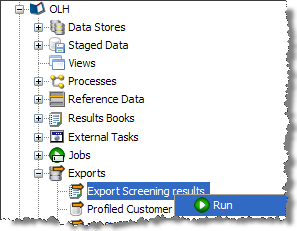
The export process will run immediately and you can monitor its progress
in the Project Browser.
Note that if you are exporting to a Client-side
Data Store, the Export must be run manually.
Running an export as part
of a job
If you are exporting to a server-side Data Store, you can run the export
as part of a larger job, and schedule that job for execution at some point
in the future:
- Right Click on the Job Configuration in the Project
Browser, and select New Job.
- This brings up the Job Configuration dialog. Change
the default name of the job to a descriptive name.
Note that the Tool Palette now changes to show a list of tasks that
may be run in jobs.
- Drag-and-drop the Export Task from the Tool Palette
to add it to the job.
- The job may also include other tasks, for example, to
re-run snapshots, run processes, and external jobs. See Jobs
for further details.
- For each export task selected, define how the
export should be performed. A further option allows you to disable the
export.
- Click Run
to run the job straight away, or click on the Schedule
button to schedule the job to run at a later date or time.
Oracle ® Enterprise Data Quality Help version 9.0
Copyright ©
2006,2011 Oracle and/or its affiliates. All rights reserved.