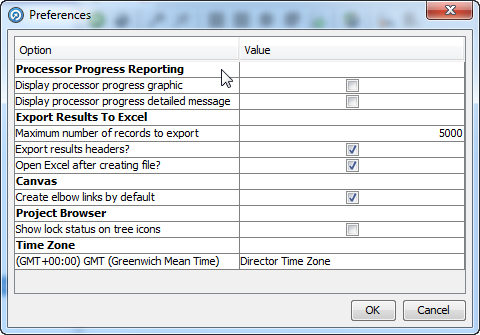
Under the Edit Menu, you can set user-specific preferences for how the OEDQ Director client looks and behaves.
A graphic can be overlaid on each processor in the canvas to indicate progress. This option allows the user to set whether or not to display the graphic on the canvas.
The progress level will depend on the position in the canvas. For example, processors dependent on the completion of prior processors will progress later than other processors.
In the example below, the Reader, Phrase Profiler and Match processor have completed and no longer show the progress graphic. The two processors after the Match Processor (Deduplicate) are currently 49% complete:
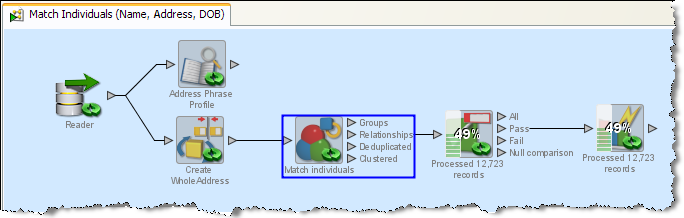
This setting enables the display of more detailed messages for each processor. For most processors this will indicate the number of records which have been processed. For Match Processors this will indicate which stage of matching is currently in progress, which is useful for long-running matching processes. The detailed message appears in the place of the processor name as in the example above for the two processors that are still running.
The ad-hoc export to Excel is subject to user-definable preferences to define:
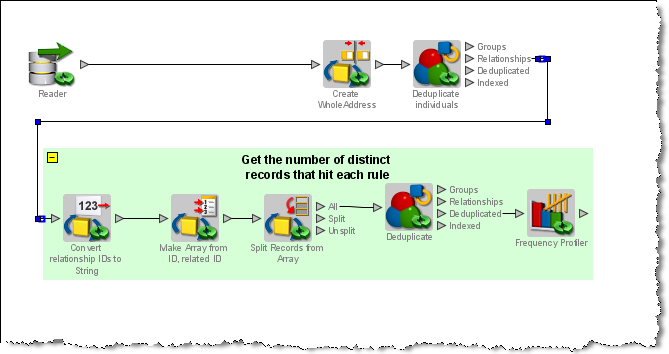
This setting allows for the default use of elbows on the Canvas. Elbows are corners on links between processors. This can help make the canvas appear more organized.
In the example below, the top row of processors is linked to the bottom row by an elbow link. This ensures that the link does not cut across the lower set of processors.
This option sets whether or not to display overlay icons on Project Browser objects to indicate when objects are locked. See Project Browser Object States.
This setting changes the default time zone that is used when adding processors which are sensitive to a time zone setting. By default, this is set to the Director Time Zone, a server-level setting which is normally set to the time zone of the server on which OEDQ is installed. However, you may change this setting if you repeatedly want to use a specific time zone when configuring processors.
Oracle ® Enterprise Data Quality Help version 9.0
Copyright ©
2006,2011 Oracle and/or its affiliates. All rights reserved.