Phrase Profiler |
The Phrase Profiler analyzes a number of attributes and searches for common words and phrases.
The returned words and phrases are returned in order of their frequency within all the input attributes.
The Phrase Profiler is a quick way of discovering the most frequent and significant words and phrases in the data, and where they occur. You can then use the results of phrase profiling to drive the configuration of the Parse processor. For example, you can add the words and phrases that were found to Reference Data lists used to classify data, and, by seeing which words and phrases occur in which attributes, work out which token checks to apply to which attributes.
The Phrase Profiler is therefore an important tool to use when understanding the content of text fields, especially when you may need to improve or otherwise change the structure of the data (for example, for a data migration).
Any String attributes that you wish to analyze for common words or phrases.
|
Option |
Type |
Purpose |
Default Value |
|
Number |
Allows you not to return words or phrases that only occur a small number of times in the data set, expressed in parts per million to represent a small percentage of the records analyzed. For example, values that occur less frequently than 100 times in each million records (that is, in 0.0001% of records). (See note below) |
5000 parts per million |
|
|
Allowable variation (parts per million) |
Number |
Allows you to cut off further insignificant phrases (that are contained within others), and mark top-level phrases as more significant, by expressing the allowable variation in frequency between two phrases that contain each other. (See note below) |
5000 parts per million |
|
Maximum words in a phrase |
Number |
Sets a maximum length of phrases to return, in number of words. |
10 Note: The maximum value for this option is 20, for performance reasons. |
|
Additional word delimiter |
Selection of common delimiter characters |
Allows the definition of an additional separator character (as well as the normal space character) that will be used to separate words and phrases. |
None |
|
Word delimiter regular expression |
Regular expression |
Allows the definition of a regular expression to be used to separate words and phrases. |
None |
|
Ignore case? |
Yes/No |
Sets whether or not to distinguish between words or phrases that are the same except for case differences. (See note below) |
No |
 Note on Ignore case option (Click
to expand)
Note on Ignore case option (Click
to expand)
Note on Cutoff frequency and Allowable variation
options (Click to expand)
None
None
|
Execution Mode |
Supported |
|
Batch |
Yes |
|
Real time Monitoring |
Yes |
|
Real time Response |
No |
The Phrase Profiler produces a summary view of its results, showing the words and phrases that were found in the input attributes in order of their frequency of occurrence.
|
Statistic |
Meaning |
|
Size |
The size of the phrase, in number of words. |
|
Indicates whether or not the phrase is a top-level phrase. See the note above explaining the Allowable variation setting. |
|
|
Phrase |
The word or phrase that was found in the data. |
|
Frequency |
The number of occurrences of the phrase or word. Note that when drilling down to the data, you may see fewer records than this frequency, because the same phrase or word may occur more than once in some records. |
|
[Attribute].freq |
The number of occurrences of the phrase or word within each input attribute. |
None
In this example, Customer Name and Address data is analyzed with a view to parsing it to resolve any structural issues.
The Phrase Profiler is run in order to find the most common words and phrases in the name and address attributes. Note that in this case, the options were configured as follows:
Cutoff frequency: 5000
Allowable variation: 5000
Maximum words in a phrase: 10
Additional word delimiter: comma (,)
Word delimiter regular expression: not used
Ignore case: No
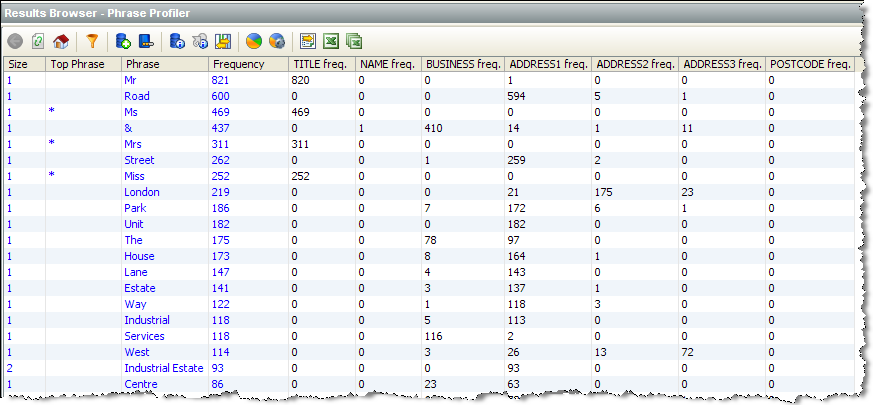
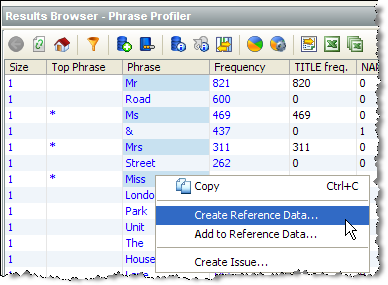
From the above information, we can quickly see that the words 'Mr', 'Ms', 'Mrs' and 'Miss' are frequently occurring, and valid, Titles, so we might create a Reference Data list for classifying them in parsing:
We can then sort the results by the Title attribute to find further values that occur here:
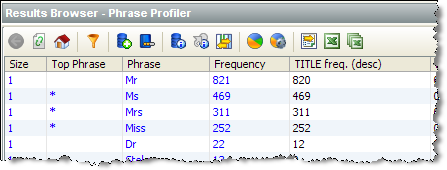
We might then add 'Dr' to the list of valid Titles.
Looking further down the list of phrases and words, we can quickly find phrases and words with an ambiguous meaning in the data, that depends on context. For example:
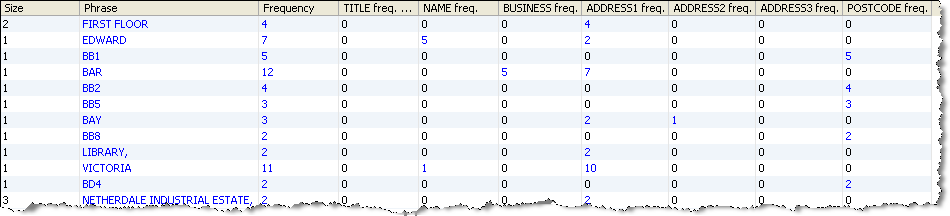
In the above list, we can see that 'VICTORIA' and 'EDWARD' do not only occur in the NAME attribute, but also in the ADDRESS1 attribute. Drilling down on one of them reveals why:
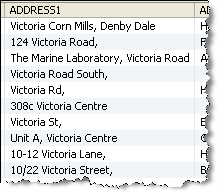
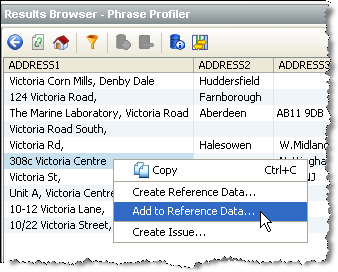
So, when parsing the data, we may wish to classify 'VICTORIA' as a Valid Forename when it appears in the NAME attribute, but when it appears in the ADDRESS1 attribute, we might not classify the word at all, but we might choose to classify 'Victoria Centre' as a Valid Building, in three quick steps, as follows:
1. Right-click on the data containing 'Victoria Centre', and select Add to Reference Data...:
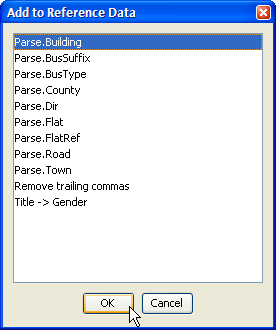
2. Select the Reference Data list that you want to add the value to:
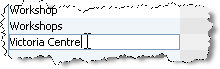
3. Edit the list entry in the Reference Data Editor to the required value ('Victoria Centre'):
Once the most significant words and phrases have been added to the required classification lists, we might begin parsing the data, knowing that we can come back to the Phrase Profiler's results at any time.
Oracle ® Enterprise Data Quality Help version 9.0
Copyright ©
2006,2011 Oracle and/or its affiliates. All rights reserved.
