Tokenize |
Tokenize is a sub-processor of Parse. The Tokenize sub-processor performs the first step of parsing by breaking up the data syntactically into an initial set of Base Tokens, by analyzing the characters, and sequences of characters, in the data.
Note that in the context of parsing, a Token is any 'unit' of data, as understood by the Parse processor. The Tokenize step forms the first set of Tokens - termed Base Tokens. Base Tokens are typically sequences of the same type of character (such as letters or numbers) separated by other types of character (such as punctuation or whitespace). For example, if the following data is input...
|
Address1 |
|
10 Harwood Road |
|
3Lewis Drive |
...then the Tokenize step would break up the data into the following Base Tokens, using its default rules:
|
Address1 |
Base Tokens |
Pattern of Base Tokens |
|
10 Harwood Road |
"10" - tagged 'N' to indicate a number " " - tagged '_' to indicate whitespace "Harwood" - tagged 'A' to indicate a word " " - tagged '_' to indicate whitespace "Road" - tagged 'A' to indicate a word |
N_A_A |
|
3Lewis Drive |
"3" - tagged 'N' to indicate a number "Lewis" - tagged 'A' to indicate a word " " - tagged '_' to indicate whitespace "Drive" - tagged 'A' to indicate a word |
NA_A |
However, you may wish to ignore certain Base Tokens in further analysis of the data. For example, you may not wish to classify the whitespace characters above, and may wish to ignore them when matching resolution rules. It is possible to do this by specifying the characters you want to ignore as of a WHITESPACE or DELIMITER type in the Base Tokenization Reference Data. See Configuration below.
Use Tokenize to gain an initial understanding of the contents of the data attributes that you wish to Parse, and to drive the way the data is understood. Normally, you can use the default set of tokenization rules to gain this understanding, and then refine them if needed - for example because a specific character has a specific meaning in your data and you wish to tag it differently from other characters. Often, the default tokenization rules will not need to be changed.
The tokenization rules consist of the following Options:
|
Option |
Type |
Purpose |
Default Value |
|
Character Map |
Character Token Map |
Maps characters (by Unicode reference) to a character tag, a grouped character tag, and a character type. See Note below. |
*Base Tokenization Map |
|
Yes/No |
Splits sequences of letters where there is a change from lower case to upper case into separate tokens (for example, to split "HarwoodRoad" into two base tokens - "Harwood" and "Road"). |
Yes |
|
|
Split upper case to lower case |
Yes/No |
Splits sequences of letters where there is a change from upper case to lower case into separate tokens (for example, to split "SMITHjohn" into two base tokens - "SMITH" and "john"). |
No |
Note on the Character Map Reference Data
The Reference Data used to tokenize data is of a specific format, and is important to the way Tokenize works.
The following screenshot of the default Reference Data explains the purpose of each column. Click on each column for an explanation of its function:
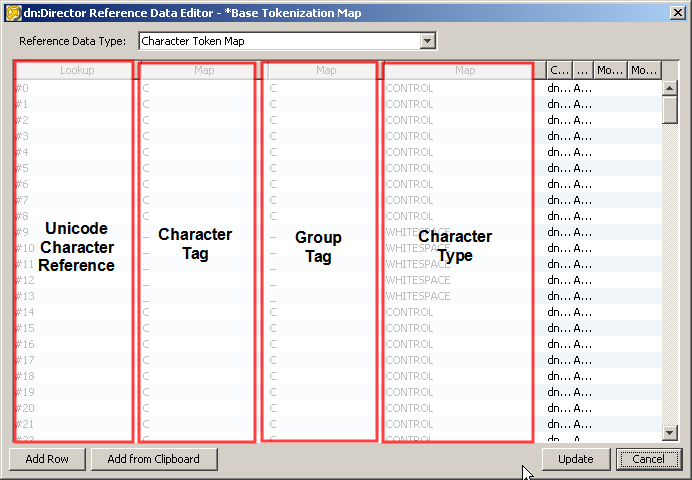
Note also that the Comment column in the Reference Data explains the actual character to which the Unicode Character Reference refers - for example to tell you that #32 is the Space character etc.
By default, the same tokenization rules are applied to all the attributes input to the Parse processor. Normally, attribute-specific tokenization rules will not be required. However, you can change this by selecting an attribute on the left-hand side of the pane, and selecting the option to Enable attribute-specific settings. This may be required if you are analyzing many attributes with different characters as significant separators.
When specifying attribute-specific rules, it is possible to copy the settings for one attribute to another, or to reapply the default 'Global' settings using the Copy From option.
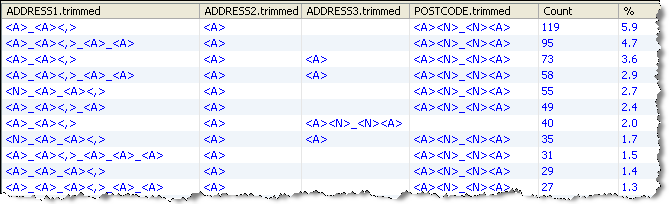
In this example, the default rules are used to tokenize some address data, with the following results:
(Note that in this case leading and trailing whitespace was trimmed from each attribute before parsing using the Trim Whitespace processor.)
Base Tokenization Summary
This shows a summary of each distinct pattern of Base Tokens across all input attributes.
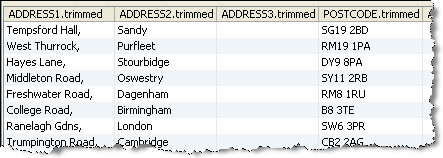
Drilldown on the top Base Token pattern
The next step in configuring a Parse processor is to Classify data.
Oracle ® Enterprise Data Quality Help version 9.0
Copyright ©
2006,2011 Oracle and/or its affiliates. All rights reserved.
