Why, Where, and How JavaFX Makes Sense
by Björn Müller
Published March 2013
CaptainCasa moves from Swing to JavaFX for front-end infrastructure.
Downloads:
CaptainCasa is an open community of midrange business application software vendors using and developing one common front-end infrastructure, the CaptainCasa Enterprise Client, for our business applications.
Business applications tend to be:
- Big—They have many screens.
- Complex—A lot of rules drive the application processing.
- Used by employees—The main users of the applications are employees who interact with the applications as part of their daily work. Of course, there always are other users (occasional ones, anonymous ones) as well, but they are not the core users.
- Long-term-oriented—The lifecycle of an application is long. The application may be developed today, sold within the next 7 years, and used at the customer site for more than 10 years. We have to take into consideration such a representative lifecycle of 17 years.
Companies using CaptainCasa Enterprise Client provide software solutions in the areas of finance, resource management, logistics, manufacturing, human resources, and administration, among others.
The CaptainCasa community was founded in 2007, at which point we decided to use a Swing-based implementation for our client. We are just moving over to JavaFX—and that is what this article is about.
Everything in HTML5! Or Is a Window Still Open for Native Front Ends?
Should You Succumb to Fads?
In 2007 everyone told us, "You are stupid not to use Adobe Flex!" At developer conferences, the Adobe sessions were overcrowded. It took some time and one e-mail from Steve Jobs to end this fad.
One year ago, Google Web Toolkit was the craze. Now Google has told the world that it will concentrate on Dart as the new language for the dynamic Web. So the next fad is on its way...
Be careful with fads in the area of front ends: they just change too often.
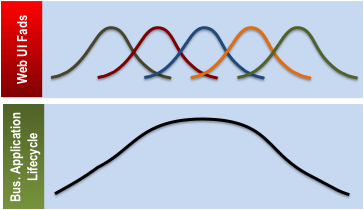
Figure 1. Comparative lifecycles of Web UI fads and of large business applications.
Of course, managers always want to be on the fad side of life! "Everything must be HTML5!" How many times we've heard this clear and simple pronouncement, knowing that the person asserting it does not even know what HTML5 really is!
You should not avoid fads at all cost—on the contrary! You should embrace trends when and where it makes sense: you need HTML screens for a lot of scenarios, but you need native apps for other scenarios. So your architecture must be open enough to include any of these technologies in an efficient way.
But you must not decide on core aspects of your application architecture just by following today's latest craze. The lifecycle of your business application will definitely be longer than the lifecycle of today's hype. You won't have the budget to adapt the core screens of your application every five years, and you won't have enough customers left to be amazed about your business if you update core parts of your application frequently.
Once Again There Are Technical Problems
JavaScript, HTML, and CSS: this is what HTML5 pages are made of. And any developer can picture the inherent problems while lying awake in the middle of the night:
- Browser incompatibilities
- Performance issues
- Ugly scripting language
The situation is getting even worse today:
- The number of browsers is increasing: Internet Explorer, Firefox, Chrome, and Safari on desktop systems and their "equivalents" on tablets and smartphones—decoupled implementations with their own features.
- JavaScript is getting more and more complex: it's no longer a language used to tie some UI processes; it now aims to be a language for general client-development purposes, such as having access to the local file system.
There should be a way out, with a framework that hides all the complexity or at least helps you manage it. To handle this complexity, these frameworks need to be complex in their own right.
There are many frameworks. Some are today's fad, some were yesterday's craze, and some will be tomorrow's hype—and many of them will disappear or stop being developed and supported.
What do you do if something does not work in your application's front end—for example, there is a bug that occurs only with Firefox but not with Internet Explorer, or vice versa? You'll have to be in very close contact with the framework guys. Your customer expects a solution, so you'd better deliver!
Is "Zero Installation" the Only Efficient Type of Installation?
There are two options when it comes to implementing front ends:
- You go the HTML5 way—either submitting yourself to certain front-end complexity or avoiding that complexity—with or without a framework to support you. Then you have to manage the problems and complexity such a development model implies and allocate development and maintenance resources. What typically does not work at all is for you to dictate what type of browser must be used with your solution ("We run only on Firefox"). Companies tend to have their own browser preferences that you must embrace to win their business.
- Alternatively, you deliver sophisticated application front ends as easily installable programs (now called apps) that run natively in the client operating system.
Both approaches have proven to work and be efficient:
- There is enough HTML5 content available to prove that HTML5 is a viable solution.
- We've never installed as many native applications as we do today. On mobile and tablet devices, downloading and installing apps is the default—beyond all the "old-fashioned" installations taking place on desktop computers.
Be skeptical if you are told that using HTML5 is the only way to offer new functionality to end users. It's just not true: thousands of apps and millions of installations per day prove that there is an alternative!
Luckily, Java(FX) is moving in the right direction here, providing the possibility of deploying Java-based programs as self-contained bundles (let's call them Java apps). These Java apps run directly on the user's desktop, do not require separate installation of the Java runtime environment (JRE), and do not require that administrator privileges be set.
Conclusion from a Business Application Point of View
When it comes to the CaptainCasa community, then, the conclusion is this:
The typical screens for employees are complex: there is a lot of information that must be conveyed, many means of interaction (keyboard, mouse, right mouse button, shortcuts), close integration with the desktop environment (file system, third-party applications such as MS Office), and sometimes direct integration with peripherals (scanners, card readers, printers). These screens typically form the core of the application and are expected to have the same lifecycle as the whole application. The screens must run reliably in the customer's environment—with minimal dependence on the user's client system. For these screens, local installation of native client apps is optimal.
Then there are the screens for anonymous users, where zero installation is a must. Most of these screens are quite simple (but styled in a nice way, of course!). The lifecycle of these screens is usually much shorter than that of the core screens, because they are often designed for a certain usage scenario. Here it makes more sense to use HTML5. As you increase the complexity of the screens, you know what additional effort will be required to ensure browser compatibility and the like.
We believe that choosing the right framework for the right user interface category—instead of standardizing on one framework for all the application's screens—is essential. Standardizing on one framework for everything remains the ideal solution, but so far, such a solution has remained elusive. Therefore, a reasonable solution is to leverage the combined strength of the two frameworks.
Everything Is Possible! But at What Cost?
Here is a typical question people ask about HTML5: "Are there any functional restrictions on using HTML5 as a front-end environment?" The answer that managers hope for is, "No, of course not," because using HTML5 for all screens would make things so much easier. But a more accurate answer would be, "(Nearly) everything can be done with HTML5." It's just a question of cost and efficiency.
Typical business application development groups are not very large. Many midsize companies have limited development resources and crave a simple, efficient approach to software development. This situation translates into the following requirements:
- Homogeneous development tools and development languages
- Long-term reliability of frameworks
- The ability to limit the number of runtime scenarios on the client site to keep complexity under control
- The ability to debug, log, and profile
- Last but not least, a modern and flexible UI environment that accommodates innovation
End users have increasing expectations: they want to see animations, transitions, and interactive graphics when and where it makes sense. Developers, on the other hand, are looking for development environments that hide the complexity of certain tasks such as creating UI controls or assembling them from existing ones.
Somehow all of this is possible with HTML5, but at what cost? Small development groups should think twice about whether using HTML5 is the most efficient strategy for managing large, multiyear projects or whether it makes sense to rely on a single framework that is very unlikely to encompass the lifecycle of an application. Couldn't going the "app way" be a more efficient approach to making your front ends work on a client site?
JavaFX for Employee Screens
Reasons for Choosing JavaFX
Our experience proves that implementing an employee desktop front end with native technology is a valid approach and that JavaFX is a good fit.
- JavaFX is available on the leading desktop operating systems (Windows, Linux, and Mac OS X).
- Although it has gone through some painful changes, its evolution proves its vendor's level of commitment.
- As the successor to Swing, it is being used by an increasing number of Java developers. Regardless of its future, it will benefit from a strong developer community.
- Compared to Swing, it provides a clear and clean architecture and features many enhancements: styling, event management, transitions, scene graph—to name a few.
- It provides the possibility of developing up-to-date user interfaces with animations, multitouch, and the like.
- It is based on a clear and clean language: Java.
- It provides all the professional Java tooling required to debug, analyze, profile, and log a client application.
- It enables a simple app-like installation on the client side, without any prerequisites.
In short, we believe that JavaFX is the only native UI environment that provides all these features today.
Experiences with JavaFX
We have been developing with JavaFX since mid-2012. Here is what we've found out:
- Stability—We haven't stumbled over any severe issues. We believe that the way we assemble our controls is quite sophisticated, with the expectation that JavaFX will handle much more than some trivial screens. Our overall message is, "It's stable." Note that we are currently focusing on Windows as the client platform and haven't evaluated JavaFX on Mac OS X or Linux yet.
- Standard control library—What is provided with JavaFX satisfies our needs. The biggest win over Swing is the browser component (WebView) and the HTML editor component. The only important feature currently missing is rich text support for all standard controls, but that has been announced for JavaFX 8.
- Extensibility—We are used to implementing complex controls of our own, so the extensibility of the existing controls is very important for us. This has proven to be no problem at all.
- Third-party libraries—Several third-party components, such as PDF Renderer and Open Street Map Viewer from the former SwingLabs, plus SVG Viewer from the Apache-Batik project, are readily available in Swing. Such components are not yet available for JavaFX, which means that we've had to find workarounds for JavaFX.
- Development process—We use Eclipse, which, like other Java IDEs, provides professional tools such as a debugger and a memory and performance profiler and can be used to develop JavaFX applications. We do not use visual tools for building screens, so we haven't evaluated any.
- Performance—Our overall impression is that JavaFX provides the same high level of performance as Swing when it comes to assembling and rendering screens with many components. And JavaFX provides much better performance in the area of transitions and animations (Swing provides very limited functionality in this area). Overall, performance is not an issue.
- Support—You ask a question on the Oracle Technology Network JavaFX forum, and you receive an answer, often after only a few hours. You post a bug in JIRA, and the bug is processed.
The Architecture Around JavaFX
Now that you know why we chose JavaFX as the UI technology environment for our employee screens, let's revisit the architectural context in which the JavaFX UI is used in the CaptainCasa enterprise client framework.
The essential question is this: How fat or thin is your client application?
To clear up any confusion about the terms fat client and thin client, read on.
Thick Client Architecture
A thick client is responsible for more than the UI; it also holds a significant amount of application logic. In technical terms, events and data input from the user interface are directly (pre)processed in application functions on the client side. From time to time, the client may communicate to a server, calling certain APIs, for instance, to pass data that was entered.
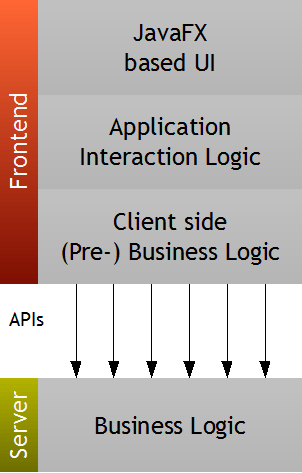
Figure 2. A thick client handles some application logic in addition to UI interaction.
Use cases in which a thick client makes sense are when
- You want the user to operate locally on the desktop with a minimum of communication to the server. You may even want the user not to be connected to a network at all.
- You are handling use cases in which you expect so many users that you need to define your server as stateless: the entire interaction and the processing state are to be kept on the client side.
JavaFX is a perfect environment for developing thick desktop clients: all the control processing is done through the JavaFX APIs, and all the application processing through the Java APIs. Compare this with HTML5, where you have HTML, CSS, and JavaScript for doing the same task.
But a thick client also has some limitations:
- There is application logic in the front end, which may translate into quite a big front end if you have a big application, and it will be updated quite frequently to fix any bugs within its logic.
- Many server APIs, such as Web services, need to be defined to meet front-end needs. And calling these server APIs in an efficient way—to avoid accessing master data over and over—involves a high degree of complexity.
- Typically some client application logic and corresponding server application logic map to the same server APIs, and both types of logic need to fit together, so sometimes the same logic is implemented twice on both the client side and the server side.
Typically the thick client approach is valid for simple scenarios. For example, if you want to implement an e-mail client as a JavaFX application, there are only a few interfaces for reading and sending e-mails and the corresponding logic is quite clear.
The thick client approach is too complex when it comes to business applications with hundreds of screens. Just imagine the client of an SAP business application being implemented as a thick client.
Thin Client Architecture
An alternative is the thin client. In this type of architecture, the client is a pure rendering engine—receiving an abstract form, such as an XML description, from the server; rendering this form (via JavaFX components); and passing user input back to the server for processing at the correct time.
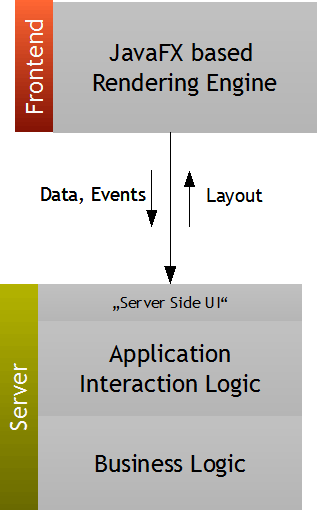
Figure 3. In a thin client architecture, abstract forms go from the server to the rendering engine and back to the server for processing.
In this scenario, the server is what builds the form (in XML) and processes user input. In terms of the interaction logic of an application, this means that the business processing of the form takes place on the server side. The client does not know any business semantics behind the form it renders: whether a form represents a purchase order or a vacation request, the client will know nothing about that.
The thin client architecture means that you need some infrastructure:
- The rendering client on the client side
- The server infrastructure to send the form/layout and process the user input sent from the client
- Some protocol in between that is smart—that doesn't always send the whole layout as with HTML but sends only changes
But if you have this infrastructure, the advantages are that:
- The client is independent from the application processing: application bugs need to be fixed on the server side only. There is no constant redistribution of the client.
- The client size is small—and independent from the size of the application.
- There is only one interface—the layout channel—between the client and the server. There is no need to publish numerous detailed server APIs to be accessed by client-side logic.
- The interaction processing (now on the server side) is very close to the server-side application.
- There is only one single place of development: the server side, where all the coding is done. There is no separation of the development team into "the front end guys" and the "server guys."
Preliminary Conclusions
The choice of the correct architecture is essential.
The thick approach enables you to finish the fastest: you just take JavaFX and get started. But it has limitations when it comes to more-complex scenarios.
The thin approach is suitable for business applications, which generally tend to be larger and more complex. For such applications, it both significantly increases the efficiency of development and decreases the cost of operation at runtime.
JavaFX in Front of JavaServer Faces: CaptainCasa
When you're going the thin way, you have the option of either developing a client framework on your own or using an existing infrastructure.
CaptainCasa is an existing thin client infrastructure that provides a Java-based client app on the client side and JSF-based processing on the server side.
JSF Being Used for a JavaFX Client
"JavaFX with JSF": this may sound a bit strange at first, because JSF is known as an HTML infrastructure. But it is a Java EE server standard that, from its inception, was abstracted from the concrete HTML browser client—to support other rendering infrastructures as well. So it's a perfect fit!
JSF is a server-side interaction framework. Its basic processing is as follows:
- On the server side, a layout is kept as an object tree of components. The tree is typically built up by some declarative XML code but can be manipulated in any way at runtime.
- The server sends the layout to the client by recursively walking through the tree. Each component of the tree renders its content into a string with a certain format. In the case of HTML, each component renders its corresponding HTML representation. The result of walking through the tree is concatenated to form one layout description, which is sent to the client side. In the case of the CaptainCasa Enterprise Client, each component renders itself into a specific XML statement. During rendering, a delta process specifies that the XML page at the end will hold just the part of the component tree that really has changed.
- The JavaFX client now receives the XML and renders it. And again, the delta management ensures that only the parts that have changed are updated.
- The user now enters some data. The client registers changes—that is, input entered into a field—and waits for significant events to send all changes to the server. An event could be the clicking of a button, the selection of a menu item, or a change a user makes in a certain field.
- The server receives the request and passes all the changes to the corresponding components of the JSF component tree, where they are transferred into the application processing.
You see, JSF is used just as usual, but now it is serving a JavaFX rendering client—rather than the browser, as in a default scenario. From a network perspective, there is no structural difference between a CaptainCasa JavaFX client and a normal browser, except that instead of HTML, now a certain XML is sent over the line.
XML Layout Is (and Must Be!) Abstracted from the Client Rendering Infrastructure
We started developing the CaptainCasa Rich Enterprise client in 2007, using Swing, and we currently provide about 100 controls that can be added into forms. Today we're re-implementing our client in JavaFX.
Both implementations leverage an XML layout definition that was originally abstracted from Swing. As a consequence, the JavaFX client is using the same layout description as the Swing client and the clients are compatible with each other.
We view this as a key concept of the architecture:
- On the server side, your interaction leverages a stable set of server-side controls (JSF components) that is independent from any client-side rendering technology.
- Therefore, existing users of CaptainCasa can switch very quickly from their current Swing client to the JavaFX client.
In summary, the switch to a different rendering technology on the client side should not translate into any serious issues or require any reimplementation effort on the server side.
Figure 4 and Figure 5 illustrate the difference between rendering with a Swing-based client and a JavaFX-based client.

Figure 4. Rendering with a Swing-based client.
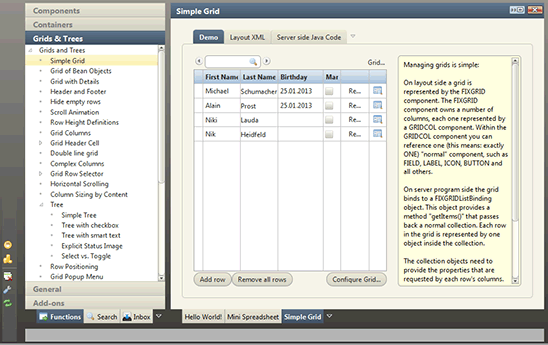
Figure 5. Rendering with a JavaFX-based client.
Figure 4 shows a specific page rendered with our Swing-based client, and the Figure 5 shows the result of rendering with the JavaFX-based client. Yes, there are differences in colors, edges, and the like, but they are due to the application of different screen styling. The behavior in both cases is actually the same.
Conclusion
- JavaFX or HTML5? Our clear response is this: use JavaFX for employee desktop screens and HTML5 for simple use cases and anonymous use cases.
- JavaFX experience? We haven't found too many problems and are really satisfied.
- Architecture around JavaFX? For simple use cases, start implementing your JavaFX directly. For business application use cases, use or define a thin client architecture.
- JavaFX and JSF? A great fit! A thin client based on JavaFX, plus a server component leveraging Java EE standards.
- CaptainCasa? This "JavaFX on JSF" framework can be used for the employee front ends of business applications.
See Also
About the Author
Björn Müller—one of Europe's pioneers in the area of Rich Internet Clients—is the founder and CEO of CaptainCasa Gmbh, a community of German software companies focused on client frameworks for large, long-lived application systems.
Join the Conversation
Join the Java community conversation on Facebook, Twitter, and the Oracle Java Blog!