Technical Article
Part 1: Introduction to Jersey—a Standard, Open Source REST Implementation
By Julien Dubois, June 2010
Introduction
This article is part 1 of a four-part series. It briefly introduces basic Representational State Transfer (REST) principles, and then quickly leaves theory in order to build a real-life sample application. We will use the new Java Platform, Enterprise Edition (Java EE) 6 standard to create a classical JavaServer Faces application, and we will study why this application does not follow the REST principles. Using NetBeans, we will then add a second, Jersey-based view on top of our application, which will run in parallel with the JavaServer Faces front end. We will then compare both approaches to determine their pros and cons.
In part 2 of this series, we will look at JQuery, a popular JavaScript framework. In parts 3 and 4, we will then plug our JQuery code on top of our REST-based application to create a modern, state-of-the-art, dynamic Website.
Note: This article was written and tested using NetBeans IDE 6.8.
REST and Jersey
REST is an architectural style defined by Roy T. Fielding in his doctoral dissertation, which has been widely used and discussed during the last decade.
It is beyond the scope of this article to describe REST in detail, but to summarize, the idea is that clients and servers communicate by sending and receiving representations of resources. REST is closely tied to HTTP. (Fielding was one of the main authors of the HTTP protocol and of the Apache Web server.) As an example, you could use the following:
- An HTTP GET request to receive a resource
- An HTTP POST request to create a new resource
This might look fairly low-level to a Java developer. In fact, most Java EE applications, especially JavaServer Faces applications, do not follow this architectural style, and that's why a large part of this article is dedicated to comparing JavaServer Faces and REST applications.
REST is just an architectural style, not a technology. That's why there is a Java specification (JSR 311) to describe how REST should be implemented in Java.
There have been several implementations of this standard. Jersey is its official reference implementation and the one that is most widely used in development and production. Jersey is also open source software, and it is backed by Oracle.
Building the Sample Application Quickly with NetBeans and JavaServer Faces
We are going to build the sample application step by step, but if you want to take a look at the final application, you can download its source code here.
Our sample application is an application to vote for articles. An article has an author, and there can be several votes per article. As such, an article has three entities (or resources, to use REST terms): Article, Author, and Vote.
Let's code this application in five minutes using NetBeans and JavaServer Faces.
- Launch NetBeans and create a new project.
- Choose a Java Web > Web Application project type, and name this project ArticleEvaluator.
- Keep the default settings: The server is Glassfish v3 Domain and the Java EE version is Java EE 6 Web.
- In the Frameworks tab, choose only JavaServer Faces, and keep using the default library that comes with the server.
Your project should now be created.
- Right-click your project and select New > Entity class.
- Select Create Persistence Unit, keep the default options (especially the Use Java Transaction APIs option), and select a data source.
This data source is linked to a database,which could be the Java DB instance provided by Glassfish or an external database, such as Oracle or MySQL.
- Now select Insert code > Add property, and add two properties, text and title, which are both of type String.
- Add another entity called Author, which has three properties of type String: firstName, lastName, and url.
- In the Article entity, add a property author of type Author.
- Using the light bulb, create a bidirectional ManyToOne relationship between the Article and the Author entities. (An Article has one author, and an Author can write many Articles.)
The light bulb generates an articles list in the Author entity, but not in its accessors.
- Open the Author entity, select Insert code > Getter and Setter, and generate the getter and setter for the articles list.
- Create the last entity, Vote, which has a property stars of type int (that's the number of stars an article receives in one vote), a property ip of type String (that's the IP address of the user who votes, but it could instead be the user's login name), and a property article of type Article (that's another bidirectional ManyToOne relationship, because an Article can have many votes, whereas a Vote can be cast on only one Article).
- As before, generate the getter and setter for the votes list that was generated in the Article entity.
- In the Web Pages menu node, create a new folder called jsf by right-clicking the Web pages folder and selecting New > Other > Folder.
- Right-click your project and select New > JSF Pages from Entity Classes.
- On the second screen of the wizard, choose the jsf folder as the JSF pages folder.
NetBeans generates all the necessary files and configuration, and your application should be up and running.
This first entity is called Article and is in the package fr.responcia.otn.articleevaluator. You should see a warning indicating that you do not have a configured persistence unit yet.
A Closer Look at the Sample Application
We just generated create, read, update, and delete (CRUD) pages on top of three entities. Our application is fairly basic, but it's working correctly.
Let's start by creating two authors and then clicking the "list all authors" link. Here is the resulting page:
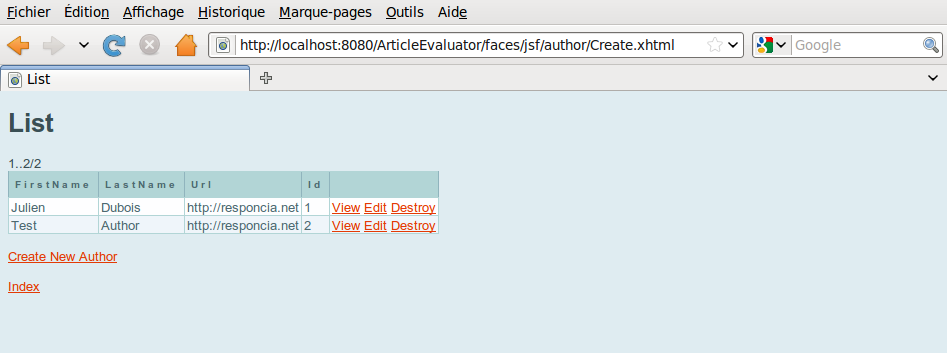
Note that the URL is http://localhost:8080/ArticleEvaluator/faces/jsf/author/Create.xhtml.
You can also see the same page if you click the "list all authors" link from the first page:
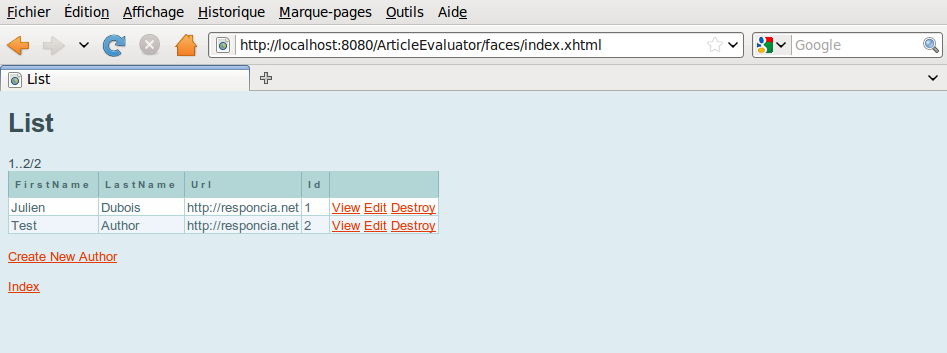
The problem is that the URL on this page is http://localhost:8080/ArticleEvaluator/faces/index.xhtml.
As you can see, while our application is perfectly correct from an end-user point of view, its URLs do not represent the entities that are being worked on. Indeed, for finding all authors in a REST way, we would have issued a GET request on the http://localhost:8080/ArticleEvaluator/resources/authors URL.
There's also a second problem with our application: It can work only with JavaServer Faces views. A true REST application can have several representations of the same resource, for example, in XML, HTML, PDF, JavaScript Object Notation (JSON), and so on.
Building a Second, REST-Based Front End
Let's add a second, REST-based front end to our application. NetBeans can create all this automatically:
- Right-click your project, and select New > RESTful Web Services from Entity Classes.
- Select the three entities for our application.
- Select fr.responcia.otn.articleevaluator.rest.converter for the converter package and select fr.responcia.otn.articleevaluator.rest.resource for the resource package.
- Select the last option, Create default REST servlet adaptor in web.xml.
This option is just to make our application work on a non-Java EE 6 container.
NetBeans generates two sets of classes:
- Converters, which are used to map entities to an XML format using Java Architecture for XML Binding (JAXB), which is the standard Java library for binding a Java class to an XML format. Those classes have JAXB annotations (such as @XmlRootElement, @XmlElement, @XmlTransient) as well as a number of utility methods.
- Resources, which are the real REST front end to our application. For each entity, there is a resource that lists all the entity's instances (ArticlesResource) and a resource that that works only on a single instance (ArticleResource).
The three resources Author, Article, and Vote are now available through a REST interface. If you look at the classes in the resources package, you can see how the URLs are constructed as well as the type of representations that are available for those resources: application/xml and application/json.
Because we already created two authors in the previous section, test the URL http://localhost:8080/ArticleEvaluator/resources/authors. A Web browser asks for an XML or HTML representation of a resource; that's why the application sends back the application/xml representation of the AuthorsResource:
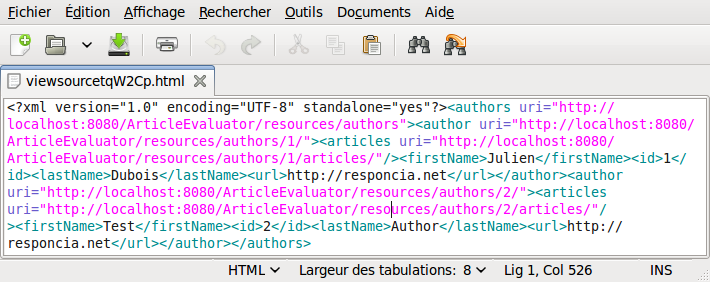
As you can see from this XML code, it is possible to browse through the different AuthorResource instances by using the URLs that are provided. For example, using the http://localhost:8080/ArticleEvaluator/resources/authors/1/ URL, you can find the first author as well as the list of articles he has written.
Testing the REST Application
Testing our application using only a Web browser is not enough, especially because we would like to use the JSON representation of our resources.
JSON is widely used in REST-based applications, because this format is more compact than XML and because it can easily be used with most common programming languages, including JavaScript. This is the format we will use in the next articles of this series, when we use our REST resources with JQuery.
We have two options for testing our application:
- Use the test framework provided with Jersey. This framework makes it easy to do integration testing by launching, configuring, and stopping a server automatically.
- Use a low-level library such as Apache Commons HttpClient to do the HTTP requests manually.
For a normal project, the first approach is recommended, but to get a better view of the internals of a REST application, we will use the second approach. We will use Apache Commons HttpClient, which is a widely used, open source, Java HTTP client from the Apache Software Foundation. To use this library, you must download it from http://hc.apache.org/httpclient-3.x/ and add it to your project's classpath.
In the Test Packages menu node in NetBeans, create a new package called fr.responcia.otn.articleevaluator.rest.resource, and create in this package a new class called ArticleTest. Here is the code for this class:
package fr.responcia.otn.articleevaluator.rest.resource;

import org.apache.commons.httpclient.HttpClient;
import org.apache.commons.httpclient.HttpMethod;
import org.apache.commons.httpclient.methods.GetMethod;
import org.apache.commons.httpclient.methods.PostMethod;
import org.apache.commons.httpclient.methods.RequestEntity;
import org.apache.commons.httpclient.methods.StringRequestEntity;
import org.junit.Test;
import static org.junit.Assert.*;

/**
 * Test class for the Article REST front-end.
 * @author Julien Dubois
 */
public class ArticleTest {

    private static final String url = "http://localhost:8080/ArticleEvaluator/resources/";

    @Test
    public void createArticle() throws Exception {
        HttpClient client = new HttpClient();
        client.getHttpConnectionManager().getParams().setConnectionTimeout(5000);
        PostMethod method = new PostMethod(url + "articles");
        String xml = "<article><title>Jersey Article</title><text>text</text></article>";
        RequestEntity requestEntity = new StringRequestEntity(xml, "application/xml", "UTF-8");
        method.setRequestEntity(requestEntity);
        client.executeMethod(method);
        String responseBody = method.getResponseBodyAsString();
        method.releaseConnection();
        assertEquals("", responseBody);
    }

    @Test
    public void testResourceAsXml() throws Exception {
        HttpClient client = new HttpClient();
        client.getHttpConnectionManager().getParams().setConnectionTimeout(5000);
        HttpMethod method = new GetMethod(url + "articles");
        client.executeMethod(method);
        String responseBody = method.getResponseBodyAsString();
        System.out.println(responseBody);
        method.releaseConnection();
        assertTrue(responseBody.contains("<title>Jersey Article</title>"));
    }

    @Test
    public void testResourceAsJson() throws Exception {
        HttpClient client = new HttpClient();
        client.getHttpConnectionManager().getParams().setConnectionTimeout(5000);
        HttpMethod method = new GetMethod(url + "articles");
        method.addRequestHeader("Accept", "application/json");
        client.executeMethod(method);
        String responseBody = method.getResponseBodyAsString();
        System.out.println(responseBody);
        method.releaseConnection();
        assertTrue(responseBody.contains("\"title\":\"Jersey Article\""));
    }
}
This class has three methods:
- createArticle() creates a new Article by using an HTTP POST method.
- testResourceAsXml() tests that this article has been created by using a normal GET request.
- testResourceAsJson() tests this article again with another GET request, but this time is asks for a JSON representation of the article.
Because the last two methods output their results in the console, you can see there are two very different representations of the article, one in XML and one in JSON. As previously stated, the JSON version is smaller (493 characters) than the XML one (587 characters).
A Comparison of Both Approaches
We created a JavaServer Faces and a REST front end for our application. We have seen a number of common aspects:
- Both front ends can be generated by NetBeans. Of course, this generation always needs to be tuned, but both approaches are very close in terms of development tooling.
- Both front ends heavily use the entities that we created at the beginning. That's why it's extremely important to define and test those entities correctly at the beginning of the development phase.
- The two front ends can be used at the same time. It's not a matter of choosing one or the other; it's a matter of using the best front end for a particular need.
Now let's see the differences between the two approaches:
- The JavaServer Faces front end stores the application state on the server side. Components manipulated by a user are stored in the user's HttpSession. The REST front end, on the other hand, stores its state on the client side. The Web pages use the REST URLs to interact with the application's resources. That's why the REST application might scale better, but it is also why the JavaServer Faces application is probably easier to code.
- The JavaServer Faces front end provides a rich set of graphical components. That's a second reason why the JavaServer Faces application is easier to develop, especially if you develop a business application that needs many forms and data tables. For the REST front end, it's up to you to create your own front end. One very good solution is to use JQuery, which will be the subject of the other articles in this series.
- The REST front end has some better-looking URLs, which are easier for end users to bookmark and which work better on public Websites that are indexed by search engines.
- The REST front end provides different representations of the same data, namely, XML and JSON by default, and more can be added (including HTML). This makes it easier to open up an application by providing a REST API for other applications to use.
Conclusion
We have seen that NetBeans helps us develop very quickly JavaServer Faces and REST-based applications. Both front ends can be used together. However, the JavaServer Faces application can be developed more quickly, especially if it is a business application used inside a company, while the REST front end works better for an open, scalable, publicly available Web application.
In the next article of this series, we will look at JQuery, a widely popular JavaScript framework. In articles 3 and 4, we will then plug our JQuery code on top of our REST-based application in order to create a modern, state-of-the-art, dynamic Website.
References
- Roy T. Fielding's personal Website: http://roy.gbiv.com/
- Roy T. Fielding's dissertation defining the REST architectural style: http://www.ics.uci.edu/~fielding/pubs/dissertation/top.htm