Technical Article
Update: An Introduction to the Java EE 5 Platform
By John Stearns, Roberto Chinnici, and Sahoo ,May 2006
This white paper is based on the article "Introduction to the Java EE 5 Platform," which originally appeared on the Java Sun site in February 2006. This version includes data from two studies that compared development on Java 2 Platform, Enterprise Edition (J2EE) 1.4 with Java Platform, Enterprise Edition (Java EE) 5 and a new section on packaging Java EE 5 platform applications. The sections on web service support and JavaServer Faces technology have been greatly expanded, with two new JAXB 2.0 examples and an extensive JavaServer Faces example.
With version 5 of the Java Platform, Enterprise Edition (Java EE, formerly referred to as J2EE), development of Java enterprise applications has never been easier or faster. J2EE 1.4, the predecessor to the Java EE 5 platform, has many powerful features. The aim of the Java EE 5 platform design has been to streamline these features and add convenience, improve performance, reduce development time, and help developers get products to market that much sooner. Here are a few of the significant changes:
- Most boilerplate requirements have been eliminated, and XML descriptors are now optional. For example, the
ejb-jar.xmldescriptor is no longer necessary in most cases. - More defaults are available, with a special emphasis on making them meaningful. Developers now have fewer details to remember.
- Web service support is simpler, and the number of supported standards has increased.
- The EJB software programming model is significantly simpler.
- The new Java Persistence API is available to all Java platform applications, including those based on EJB technology.
- JavaServer Faces technology has been added to make web application design more convenient.
Contents
Enterprise Application Development Made Easy
The Java EE 5 platform introduces a simplified programming model and eliminates much of the boilerplate that earlier releases required. With Java EE 5 technology, XML deployment descriptors -- that is, side files for defining components and specifying deployment instructions -- are now optional. Instead, you enter the information as an annotation directly into a plain old Java object (POJO) without leaving your source editor. Annotations are a new feature, originally introduced in Java 2 Platform, Standard Edition (J2SE) 5.0. They are a form of metadata with a very simple syntax and recognizable because they begin with a leading at sign ( @).
Annotations are generally used to embed in a program data that would otherwise be furnished in a side file. With annotations, you put the specification information right in your code next to the program element that it affects. This is a more intuitive and convenient approach.
The Java EE 5 platform provides annotations for the following tasks, among others:
- Defining and using web services
- Developing EJB software applications
- Mapping Java technology classes to XML
- Mapping Java technology classes to databases
- Mapping methods to operations
- Specifying external dependencies
- Specifying deployment information, including security attributes
Annotations typically contain several optional elements to allow detailed customization of an application. Also, the annotation framework is completely extensible, so future versions of the Java EE platform can expand the existing annotations and define new ones.
One immediate benefit of annotations for web services is that many formerly required markers, such as the extends java.rmi.Remote and throws java.rmi.RemoteException that were borrowed from remote method invocation (RMI), are no longer necessary.
Additionally, application packaging has been simplified in ways that go beyond what annotations allow. For instance, a Java EE 5 platform application is no longer required to contain an application.xml descriptor. If the descriptor is missing, the server automatically determines the type of each contained module through inspection and use of sensible defaults based on the file extension and contents.
Another example is the common task of bundling a number of library JAR files with an application. By default, the lib directory under the application root is reserved for library files. Previously, you had to add a manifest entry to the application module, which could be a tedious task.
Recently, engineers from the Oracle Corporation undertook two studies to measure the efficiency gain from using the Java EE 5 platform. Debu Panda, a product manager at Oracle, migrated a well-known application, AdventureBuilder from the Java BluePrints program, from the J2EE 1.4 to the Java EE 5 platform. See "An Adventure with J2EE 1.4 Blueprints" on TheServerSide.com. Raghu Kodali, consulting product manager and Service-Oriented Architecture (SOA) evangelist for Oracle, took a publicly available demo application called RosterApp that is included with the J2EE 1.4 tutorial and migrated the application to EJB 3.0 software. See the article " The Simplicity of EJB 3.0" published in JDJ. Table 1 summarizes the studies' results.
Table 1: Summary of Findings
| Application Name | Item Measured | J2EE 1.4 Platform | Java EE 5 Platform | Improvement |
|---|---|---|---|---|
| AdventureBuilder | Number of classes | 67 | 43 | 36% fewer classes |
| Lines of code | 3,284 | 2,777 | 15% fewer lines of code | |
| RosterApp | Number of classes | 17 | 7 | 59% fewer classes |
| Lines of code | 987 | 716 | 27% fewer lines of code | |
| Number of XML files |
9 |
2 |
78% fewer XML files |
|
| Lines of XML code |
792 |
26 |
97% fewer lines of XML code |
Packaging Java EE 5 Platform Applications
The rules and conventions for packaging enterprise applications have been made much simpler in the Java EE 5 platform:
- Web applications use
.warfiles. - Resource adapters use
.rarfiles. - The
libdirectory contains shared.jarfiles. - A
.jarfile withMain-Classis considered to be an application client. - A
.jarfile with the@Statelessannotation is considered to be an EJB application.
Many simple applications, such as the following application types, no longer require deployment descriptors:
- EJB applications (
.jarfiles) - Web applications that use JavaServer Pages (JSP) technology only
- Application clients
- Enterprise applications (
.earfiles)
For example, a simple web application that provides a web service and an index page that describes the web service might contain only the following files:
index.jspimage/logo.gifWEB-INF/classes/MyWebService.class
No web.xml, webservices.xml, or Java API for XML-based RPC (JAX-RPC) files are required.
In similar fashion, an enterprise application example might contain only the following files:
lib/shared.jarui/web.warui/client.jarbiz/ejb.jar
And no META-INF/application.xml file is required.
Streamlined EJB Software Development
The EJB 3.0 API has been dramatically simplified. Effectively, the container does more work, so there is less work for the developer. The new version of the EJB API provides these benefits:
- Fewer required classes and interfaces. For example, EJB home and object interfaces are no longer required. Instead of a home interface, you now can supply a business interface only. There is no longer a requirement to implement the
javax.ejb.SessionBeaninterface. Business methods need not declare that they throw checked exceptions any longer, which results in cleaner code. - Optional deploymentdescriptors. Component definition and dependency injection are now possible through the use of annotations, removing the need for deployment descriptors.
- Simple lookups. Java Naming and Directory Interface (JNDI) APIs are no longer necessary on either the server or the client. Instead, a simple look-up method has been added to the
EJBContextinterface, enabling you to look up an object dynamically within the JNDI name space. - Simplified, lightweight persistence for object-relational mapping. The new Java Persistence API has greatly simplified entity bean persistence. The new entity objects are POJOs that provide an object-oriented view of the data stored in a relational database. The specification also standardizes how such object-relational mapping information is provided.
- Interceptors. Interceptors are objects that can intercept a call to a business method. If you are familiar with aspect-oriented programming, you will recognize that the implementation of interceptors is a limited form of that concept.
In earlier versions of EJB software, callbacks from the container into the bean were supported through javax.ejb.SessionBean and javax.ejb.MessageDrivenBean implementations. Unfortunately, this approach adds clutter to the code when callbacks are not needed. With EJB 3.0 software, you can annotate methods to behave as callbacks. This removes the need for skeletal implementations of the life-cycle methods: ejbRemove, setMessage, setSessionContext, ejbActivate, and ejbPassivate.
Here are just a few of the annotations that can be used in EJB 3.0 software:
-
@Stateless,@Stateful. Used to annotate a class as being either a stateless session bean component or a stateful session bean component. -
@PostConstruct,@PreDestroy,@PostActivate,@PrePassivate. Used to annotate a method as a life-cycle event callback. -
@EJB. Used on the client to reference the business interfaces of other beans and the home interfaces, for EJB 2.1 or older beans. -
@PersistenceUnit. Used to express a dependency on an EntityManagerFactory. -
@PersistenceContext. Used to express a dependency on an EntityManager. -
@WebServiceRef. Used on the client to reference web services. -
@Resource. Used for all other resources not covered by@EJBor@WebServiceRefannotations. -
@Timeout. Specifies atimeoutmethod on a component that uses container-managed timer services. -
@MessageDriven. Specifies a message-driven bean. A message-driven bean is a message consumer that can be called by its container. -
@TransactionAttribute. Applies a transaction attribute to all methods of a business interface or to individual business methods on a bean class. -
@TransactionManagement. Declares whether a bean will have container-managed or bean-managed transactions. -
@RolesAllowed,@PermitAll, and@DenyAll. Declare method permissions. -
@RolesReferenced. Declares security roles referenced in the bean's code. -
@RunAs. Uses the caller principal assigned to the specified security role to execute a method.
Examples From EJB 3.0 and EJB 2.1 Software
To show the benefits of the new programming model in EJB 3.0 software, let's compare how to implement the same code under both models. Example 1A shows the Java technology code for a hypothetical session bean using EJB 2.1 software.
Example 1A: Session Bean in EJB 2.1 Software -- Java Source Code
public class PayrollBean
implements javax.ejb.SessionBean {

     SessionContext ctx;
     DataSource empDB;

     public void setSessionContext(SessionContext ctx) {
        this.ctx = ctx;
     }

     public void ejbCreate() {
          empDB = (DataSource)ctx.lookup(
                          "jdbc/empDB");

     }
     public void ejbActivate() { }
     public void ejbPassivate() { }
     public void ejbRemove() { }

     public void setBenefitsDeduction(int empId,
                                      double deduction) {
       ...
       Connection conn = empDB.getConnection();
       ...
     }
  ...
}
The same session bean can now be programmed using EJB 3.0 software as shown in Example 1B, with new features shown in bold.
Example 1B: Session Bean in EJB 3.0 Technology -- Java Source Code
    @Stateless
public class PayrollBean
 implements Payroll
{

 @Resource private DataSource empDB;

     public void setBenefitsDeduction(int empId,
                                      double deduction) {
       ...
       Connection conn = empDB.getConnection();
       ...
     }
  ...
}
Notice how the unused life-cycle methods can be eliminated from the code in the software's 3.0 version. Also observe how the @Stateless annotation is used to declare the class as a stateless bean component.
The implements javax.ejb.SessionBean statement is no longer needed. Instead, the bean class, PayrollBean in this case, implements the business interface, that is, Payroll. The @Resource annotation allows dependencies to be injected directly into the component when the container instantiates it, removing the need for the JNDI lookups, for example, in the ejbCreate method. Also, the @Resource annotation can be applied to a field with type SessionContext to replace the following EJB 2.1 software code:
     public void setSessionContext(SessionContext ctx) {
        this.ctx = ctx;
     }
The code is only half of the story. With EJB 2.1 software, our hypothetical session bean would require a deployment descriptor file, as in Example 1C.
Example 1C: Session Bean in EJB 2.1 Software -- Deployment Descriptor File
<session>
  <ejb-name>PayrollBean</ejb-name>
  <local-home>PayrollHome</local-home>
  <local>Payroll</local>
  <ejb-class>com.example.PayrollBean</ejb-class>
  <session-type>Stateless</session-type>
  <transaction-type>Container</transaction-type>
  <resource-ref>
    <res-ref-name>jdbc/empDB</res-ref-name>
    <res-ref-type>javax.sql.DataSource</res-ref-type>
    <res-auth>Container</res-auth>
  </resource-ref>
</session>
...
<assembly-descriptor>...</assembly-descriptor>
But EJB 3.0 software requires no deployment descriptor file. The information previously contained in the descriptor is now inferred by the container, which looks at the annotations present on the component class. In many cases, the container will use meaningful defaults for the information, a resource authorization type of "container," thus making the descriptor redundant.
Some applications will still need to look up resources dynamically in JNDI. Such lookups can now be accomplished with a simple look-up method added to SessionContext, as in Example 2.
Example 2: Dynamic Lookup
 @Resource(name="myDB", type=javax.sql.DataSource)
 @Stateful public class ShoppingCartBean
                       implements ShoppingCart {

 @Resource SessionContext ctx;

    public Collection startToShop (String productName) {
        ...
        DataSource productDB =
           (DataSource)ctx.lookup("myDB");
        Connection conn = myDB.getConnection():
        ...
    }
    ...
}
In this example, the resource named myDB is looked up at runtime. This approach allows an application to decide which resources to access, based on their availability or on some other parameter such as quality of service.
In similar fashion, annotations can be used to replace entire sections from the existing deployment descriptors. With EJB 3.0 software, the <container-transaction> deployment descriptor elements can be replaced by a @TransactionAttribute annotation placed directly on the method it affects, as shown in Example 3.
Example 3: EJB 3.0 Software -- Deployment-Descriptor Transaction Attributes
@TransactionAttribute(MANDATORY)
public void setBenefitsDeduction(int empId,
                                 double deduction)     { ... }
Easier Access to Resources Through Dependency Injection
Dependency injection is a pattern in which an object's dependencies are supplied automatically by an entity external to that object. The object is not required to request these resources explicitly, for example, by looking them up in a naming service. In the Java EE 5 platform, dependency injection can be applied to all resources that a component needs, effectively hiding the creation and lookup of resources from application code. Dependency injection can be applied throughout Java EE 5 technology -- in EJB software containers, web containers, and clients.
To request injection of a resource, a component uses the @Resource annotation or, in the case of some specialized resources, the @EJB and @WebServiceRef annotations. Following are some of the many resources that can be injected:
SessionContextobjectDataSourcesobjectUserTransactionEntityManagerinterfaceTimerServiceinterface- Other enterprise beans
- Web services
- Message queues and topics
- Connection factories for resource adapters
- Environment entries (for example, strings, integers, and so on)
Resource injection can be requested by any component class, that is, any class whose life cycle is managed by the container. In the EJB software container, components that support injection include the following:
- EJB technology components
- Interceptors
- Message handlers for Java API for XML Web Services (JAX-WS) and Java API for XML-based RPC (JAX-RPC)
In web containers, components that support injection are the following:
- Servlets, servlet filters, event listeners
- Tag handlers, tag library event listeners
- Managed beans
In the client container, the main class and the login callback handler components support injection.
Lightweight Java Persistence API Model
The Java EE 5 platform introduces the new Java Persistence API, which was developed as part of JSR-220. Although this API was developed by the EJB 3.0 software expert group, its use is not limited to EJB software components. The Java Persistence API can be used directly by web applications and application clients as well. In fact, this API can also be used outside the Java EE platform in plain Java technology programs, for example, a Java Foundation Classes/Swing (JFC/Swing) application that talks to a database using the Java Persistence API.
The Java Persistence API has the following key features:
- Entities are POJOs. Unlike EJB components that use container-managed persistence (CMP), entity objects using the new APIs are no longer components. This approach leads to a simpler and more lightweight programming model.
- Standardized object-relational mapping. Object-relational mapping is an age-old problem in the enterprise application world. CMP 2.x had standardized the object-modeling part of the problem but left undefined the mapping of the object model to the relational database. Application programmers were forced to learn each vendor's way of specifying that mapping. The new specification standardizes the mapping. Either annotations or XML descriptors can be used to specify object-relational mapping information. In addition, the specification defines default values for them.
- Support for inheritance and polymorphism. Because entities are POJOs, an entity class can extend another entity class or a nonentity class. A nonentity class can extend entity classes as well. Entities support polymorphic associations. Queries are, by default, polymorphic.
- Native query support. In addition to the Java Persistence Query Language, based on EJB Query Language, you can now express queries using the native query language of the underlying database.
- Named queries. A named query is now a static query expressed in metadata. The query can be either a Java Persistence API query or a native query, which improves the reuse of the query.
- Simple packaging rules. Because entity beans are simple Java technology classes, they can be packaged virtually anywhere in a Java EE application. For example, entity beans can be part of an EJB
JAR, application-clientJAR,WEB-INF/lib,WEB-INF/classes, or even part of a utilityJARin an enterprise application archive (EAR) file. With these simple packaging rules, you no longer have to make an EAR file to use entity beans from a web application or application client. - Support for optimistic locking. The persistence specification supports optimistic locking -- that is, the technique that avoids a lock for the sake of performance with the recognition that the transaction may fail due to collision with another user. The spec standardizes how to code an entity object for use in an optimistic-locking protocol irrespective of the underlying persistence provider. This feature is definitely good news for applications that have a higher transactional throughput requirement.
- Detached entities. Because entity beans are POJOs, they can be serialized and sent across the network to a different address space and used in a persistence-unaware environment. As a result, you no longer need to use data transfer objects (DTOs).
- EntityManager API. Application programmers now use a standard EntityManager API to perform
Create Read Update Delete(CRUD) operations that involve entities. - Pluggability of third-party persistence providers. The specification defines a Service Provider Interface (SPI) between a Java EE container and a persistence provider. The SPI allows users to combine their favorite Java EE containers with their favorite persistence providers without sacrificing the portability of their applications.
Example 4 is a simple example of entities used from a stateless EJB component.
Example 4: Creating Entities That Use the New Persistence Model
package demo;

import javax.persistence.*;
import java.util.*;
import java.io.Serializable;

 @Entity
public class Employee implements Serializable {

    private String id;
    private String name;
    private Department department;

    // Every entity must have a no-arg public/protected constructor.
    public Employee(){ }
    public Employee(String name, Department dept) {
        this.name = name;
        this.department = dept;
    }

 @Id // Every entity must have an identity.
    public String getId() {
        return id;
    }
    public void setId(String id) {
        this.id = id;
    }

    public String getName() {
        return name;
    }

    public void setName(String name) {
        this.name = name;
    }

 @ManyToOne
    public Department getDepartment() { return department; }
    public void setDepartment(Department department) {
        this.department = department;
    }

}

 @Entity
public class Department implements Serializable {
    private String name;
    private Set<Employee> employees = new HashSet<Employee>();
    public Department() { }

 @Id
    public String getName() {
        return name;
    }

    public void setName(String name) {
        this.name = name;
    }

 @OneToMany(mappedBy="department")
    public Set<Employee> getEmployees() {
        return employees;
    }

    public void setEmployees(Set<Employee> employees) {
        this.employees = employees;
    }
}
The stateless bean that follows demonstrates how the above entities can be used. Note the use of the @Remote annotation, which enables the bean to be used in remote interfaces and requires that the Serializable interface be implemented.
 @Stateless
public class HRMSBean implements HRMS {

 @PersistenceContext private EntityManager em;

    public Employee createEmployee(String empName, String departmentName) {
         Department dept = em.find(Department.class, empName);
         Employee emp = new Employee(empName, dept);

         // User is responsible for managing bidirectional relationships
         dept.getEmployees().add(emp);
         em.persist(emp);
         return emp;
    }
}

 @Remote
public interface HRMS {
    Employee createEmployee(String empName, String departmentName);
}
Simpler, Broader Web Service Support
In the Java EE 5 platform, web services support has been greatly improved and simplified by the use of annotations. The following specifications contributed to this area:
- JSR 224, Java API for XML-Based Web Services (JAX-WS) 2.0
- JSR 222, Java Architecture for XML Binding (JAXB) 2.0
- JSR 181, Web Services Metadata for the Java Platform 2.0
- SOAP with Attachments API for Java (SAAJ) 1.3
JAX-WS 2.0
JAX-WS 2.0 is the new API for web services in the Java EE 5 platform. As a successor to JAX-RPC 1.1, JAX-WS 2.0 retains the natural RPC programming model while improving on several fronts: data binding, protocol and transport independence, support for the REST style of web services, and ease of development.
JAX-WS 2.0 has the following key features:
- Simpler programming model. Before JAX-WS 2.0 and the Java EE 5 platform, defining a web service required long, unwieldy descriptors. Now it's as easy as placing the
@WebServiceannotation on a Java technology class. All the public methods on the class are automatically published as web service operations, and all their arguments are mapped to XML Schema data types using JAXB 2.0. - Integration with JAXB 2.0. In JAX-WS 2.0, all data binding has been delegated to JAXB 2.0. This allows web services based on JAX-WS to use 100 percent of XML Schema, which results in improved interoperability and ease of use. The two technologies are well integrated, so users no longer have to juggle two sets of tools. When starting from Java technology classes, JAXB 2.0 can generate XML Schema documents that are automatically embedded inside a Web Services Description Language (WSDL) document, saving users from performing this error-prone integration manually.
- Protocol and transport extensibility. Extensibility has been a goal from the very beginning, and JAX-WS 2.0 allows vendors to support additional protocols, transports, and encodings, such as the FAST Infoset (Binary XML) for better performance or specialized applications.
- Extensive support for web services standards. Out of the box, JAX-WS 2.0 supports the SOAP 1.1, SOAP 1.2, and XML/HTTP protocols. Web services that use attachments to optimize the sending and receiving of large binary data can also take advantage of the W3C's SOAP Message Transmission Optimization Mechanism/XML-binary Optimized Packaging (MTOM/XOP) standard without any adverse effect on the programming model.
- Asynchronous client support. JAX-WS 2.0 supports nonblocking web service invocations without requiring the application to create and manage its own pool of threads.
- Messaging layer. Advanced applications can use the low-level, messaging-based JAX-WS 2.0 API to process messages directly, all without having to duplicate any of the protocol- and transport-level support built into the runtime.
- Support for REST-style applications. Using the messaging API, it becomes possible to write REST clients and servers using JAX-WS 2.0.
Example 5A shows a JAX-RPC 1.1 web service that is implemented using an EJB 2.1 component, and Example 5B shows the same web services written using the new JAX-WS 2.0 annotations.
Example 5A: JAX-RPC 1.1 Web Service
public interface HelloService extends Remote {
   public String sayHello(String name) throws RemoteException;
}

public class HelloServiceBean implements SessionBean {
   public String sayHello(String name) {
      return "Hello "+ name + " from HelloServiceBean";
   }
}
Example 5B: JAX-WS 2.0 Web Service
 @WebService
public class HelloServiceBean {
   public String sayHello(String name) {
      return "Hello "+ name + " from HelloServiceBean";
   }
}
Thanks to the use of annotations to convey deployment and mapping information, no descriptors are needed for this example.
Example 6 shows how the mapping of Java technology classes and methods to web services and the corresponding operations can be customized by using additional annotations, such as @WebMethod, and annotation elements, for example, name, targetNamespace, operationName, and many others.
Example 6: Customizing the Mapping to Web Services in JAX-WS 2.0
 @WebService(name="CreditRatingService",
            targetNamespace="http://example.org")
 @Stateless
public class CreditRating {

 @WebMethod(operationName="getCreditScore")
   public Score getCredit(@WebParam(name="customer")
                          Customer c) { ... }
}
Additionally, when packaging a web service, the WSDL description has become optional. If a WSDL description is missing at deployment time, the WSDL code is generated automatically following the rules in the JAX-WS 2.0 and JAXB 2.0 specifications.
Writing web service clients is now simpler too. Example 7A is an example of a JAX-RPC 1.1 client using a web service.
Example 7A: JAX-RPC 1.1 Client
try {
    Context ic = new InitialContext();
    MyHelloService myHelloService = (MyHelloService)
       ic.lookup("java:comp/env/service/MyJAXRPCHello");
    HelloIF helloPort = myHelloService.getHelloIFPort();

    // ... Use the service. ...

} catch (NamingException ex) {
    // ...
} catch (RemoteException ex) {
    // ...
}
With JAX-WS 2.0, instead of looking up a web service in the Java Naming and Directory Interface (JNDI), you can now avoid the need to deal with the service interface and inject the port reference directly, resulting in a shorter, more readable alternative. Example 7B shows how to request injection of a port reference.
Example 7B: JAX-WS 2.0 Client With Direct Port Reference
public class MyComponent {

 @WebServiceRef(MyHelloService.class)
   HelloIF helloPort;

   public void myMethod() {
     // Use helloPort directly.
     helloPort.sayHello();  // Invoke an operation.
   }
}
Asynchronous Web Services
Because web service invocations take place over a network, such calls can take unpredictable lengths of time. Many clients, especially interactive ones such as desktop applications based on Java Foundation Classes/Swing (JFC/Swing), experience serious performance degradation from having to wait for a server's response. To avoid such performance degradation, JAX-WS 2.0 provides a new asynchronous client API. With this API, application programmers no longer have to create threads on their own. Instead, they can rely on the JAX-WS runtime to manage long-running remote invocations for them.
Asynchronous methods can be used in conjunction with any WSDL-generated interfaces as well as with the more dynamic Dispatch API. For your convenience, when importing a WSDL document, you can require asynchronous methods to be generated for any of the operations defined by the web service.
There are two usage models:
- In the polling model, you make a call. When you're ready, you request the results.
- In the callback model, you register a handler. As soon as the response arrives, you are notified.
Note that asynchronous invocation support is entirely implemented on the client side, so no changes are required to the target web service.
Example 8 shows a web service client that invokes the getCreditScore operation asynchronously and then proceeds to do other work while the server processes the request. When the server is ready to deal with the response, it calls the blocking Response.get method to get the actual result.
Example 8: Polling Web Service Client
 // We assume that the application has a reference called "svc"

 // to a CreditRatingService proxy.

   Response<CreditScore> response = svc.getCreditScoreAsync(customer);

   ... do other work while waiting ...

   Score score = response.get();

   ... process the returned score ...
You can also set up a polling loop by calling a slightly different Response.get method that uses timeout. In that case, the client waits for a response for the specified amount of time and then goes back to other work such as updating a user interface (UI).
Messaging API
The regular interface-based JAX-WS programming model is very powerful, but sometimes applications need more control over the messages that are sent over the wire. The Dispatch and Provider API classes can be used to send and receive messages directly. Dispatch is used in client applications, and Provider is used in server applications.
On the server side, a typical use of these APIs is to write a single class that supports multiple endpoints, for example, for a family of services that offers similar contracts or even for differing versions of the same contract. You can use this API to write a gateway service that accepts incoming messages and routes them to the most appropriate destination based on their contents.
Similarly, clients can use Dispatch to invoke any service at runtime without having to generate any code at development time. Typical uses include management consoles, testing tools, and all those applications that need to adapt to a changing environment.
The big advantage of using these APIs over a low-level API such as sockets is that the JAX-WS runtime takes care of all the details of sending and receiving messages, which lets the application code focus on dealing with the contents of the messages. Additionally, all existing JAX-WS message handlers can be used in conjunction with the dynamic API, so complex tasks like handling digital signatures can be delegated to specialized code.
A particularly interesting use case for the messaging API is given by REST-style web services. In this style, services expose a set of resources that clients can manipulate using the HTTP protocol. The Dispatch and Provider API can be used in conjunction with the XML/HTTP binding to implement REST clients and services, with full access to the underlying HTTP functionality.
JAXB 2.0
As the standard API used to bind XML documents to Java technology objects, JAXB 2.0 significantly reduces the complexity of processing XML documents in Java platform applications. JAXB 2.0 offers many enhancements over its predecessor, JAXB 1.0:
- Full support for XML Schema. JAXB 2.0 supports all of XML Schema, including all of the predefined data types. This makes it possible to use JAXB to process Schema documents ranging from simple configuration files to large, industry-standard document formats, such as the OASIS Universal Business Language (UBL).
- Ability to bind existing Java technology classes to generated XML Schema. In JAXB 2.0, you can start with some existing classes and generate a high-quality Schema document from them, with the ability to customize the mapping using Java technology annotations.
- Smaller footprint and faster marshalling. The number and size of the Java technology classes generated from a given Schema has been greatly reduced. Furthermore, annotation-driven marshalling makes it possible for an application to take advantage of the latest performance improvements in an implementation without compromising portability.
- Flexible unmarshalling. JAXB 2.0 makes it possible for applications to handle documents that are not Schema-valid by allowing recovery from errors such as out-of-order elements, missing required elements and attributes, and unexpected elements and attributes.
- Partial binding of XML documents to JAXB objects. You can now bind portions of an XML document to Java objects using JAXB 2.0. An application can then make changes to the bound objects without incurring the cost of unmarshalling the entire document, which could be significant in the presence of large, complex XML documents.
Example 9 shows a Java technology class annotated for use with JAXB 2.0. Using the tools included in every JAXB implementation, you can generate an XML Schema document.
Example 9: PurchaseOrder Class With JAXB 2.0 Annotations
@XmlRootElement(name="purchaseOrder")
   @XmlType(name="PurchaseOrderType")
   public class PurchaseOrder {

      public USAddress shipTo;
      public USAddress billTo;
      public CreditCardVendor creditCardVendor;
   }
The @XmlRootElement annotation marks the annotated class as being a potential root element in XML instance documents. Consequently, the generated Schema will contain a global element declaration for it.
A common issue in developing some Java technology classes first and defining their mapping to Schema later is that some common Java technology types do not have a standard representation in XML Schema. A typical example is the Map data type. Code sample 10 shows how a field of type Map can be marshalled to a list type by using a @XmlJavaTypeAdapter annotation.
Example 10: Marshalling a Map Object
  @XmlRootElement
  @XmlType(name="ShoppingCartType")
  public class ShoppingCart {
     @XmlJavaTypeAdapter(AdapterPurchaseListToHashMap.class)
     Map basket = new HashMap();
     // ... The rest of the code goes here. ...
  }
There are two requirements on an adapter class, such as AdapterPurchaseListToHashMap:
- The adapter class must extend the
XmlAdaptertype. In the case ofAdapterPurchaseListToHashMap, it isXmlAdapter<PurchaseList, Map>that must be extended, becausePurchaseListandMapare the two types that the adapter maps into each other. - The adapter class must implement the appropriate
marshalandunmarshalmethods.
SOAP with Attachments API for Java (SAAJ) 1.3
Applications that need to manipulate SOAP messages directly use SOAP with Attachments API for Java (SAAJ). In version 1.3, SAAJ added support for the SOAP 1.2 standard from W3C. The new version also includes some new convenience classes and methods that make it easier to integrate SAAJ with Java API for XML Processing (JAXP) transformations or Java Architecture for XML Binding (JAXB) marshalling.
Streaming API for XML (StAX)
The Streaming API for XML (StAX) defines an event-based parsing API for XML using a different paradigm than the Simple API for XML (SAX) model. StAX uses a pull approach so that the developer requests events rather than having event information from the XML parser pushed onto the client. This results in more natural, readable code without sacrificing performance in any way.
Convenient Web Application Design With JavaServer Faces Technology
The JavaServer Faces technology is a server-side framework that provides UI components for building web applications. It is designed to facilitate the writing and maintenance of applications that render a UI to a target client from a Java application server. JavaServer Faces technology provides the following benefits:
- Lets you put together a set of reusable UI components from which you can easily construct new UIs
- Enables ready construction of custom components
- Simplifies moving application data to and from the UI
- Helps manage the UI state across server requests
- Makes it easy to connect user-generated events to application code on the server
The JavaServer Faces technology establishes standards for component design and as a result has created a new market for third-party JavaServer Faces technology components. These standards benefit the range of programmers who design components and also enable tools that generate components automatically. For example, the Sun Java Studio Creator IDE enables visual design by providing a palette of JavaServer Faces components.
Elements of a JavaServer Faces Application
For the most part, JavaServer Faces applications are just like any other web application written on the Java platform. A typical JavaServer Faces application might use the following elements:
- One or more JSP technology pages
- A backing bean, which is a POJO that stores component model data with bean properties and can provide various methods for component functions such as converters, validators, and event listeners
- An application configuration resource file (
faces-config.xml) - A Java EE platform web application deployment descriptor file (
web.xml)
A JavaServer Faces Technology Example
A good example of a JavaServer Faces application is provided in Chapter 9, "Java Server Faces Technology," of the Java EE 5 Tutorial. The sample application called guessnumber is a guessing game in which the user tries to guess the number from zero to 10 that the system -- in the person of Duke, the Java technology mascot -- has selected. Figure 1 shows how the application displays.
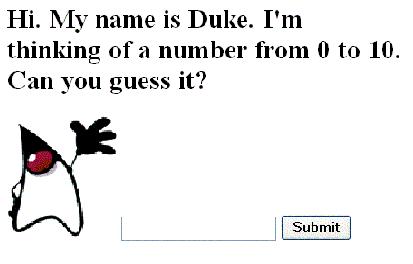
Figure 1: Display From the Guessnumber Application
The sample application has a default index.jsp file that the user accesses first. The index.jsp file displays the greeting.jsp page, which displays the initial image. The greeting.jsp file uses expressions to reference properties of UserNumberBean for displaying the maximum and minimum values and for capturing user input. For example, the value attribute of the following tag in the greeting.jsp page references the userNumber property of UserNumberBean:
      <h:inputText id="userNo" label="User Number"
     value="#{UserNumberBean.userNumber}">
     </h:inputText>
When a user enters a number in the text field that this tag represents and clicks the button, the value that the user entered is stored in the userNumber variable of UserNumberBean.
After a successful submission, the response.jsp page is displayed. The faces-config.xml file configures the navigation rule that specifies that the response.jsp page should be displayed when the user clicks the button on the greeting.jsp page. This file is the central resource for configuring the application's JavaServer Faces elements.
Excerpts of the code for these files are listed in the following subsections. See the tutorial example description for a detailed explanation of this example.
The greeting.jsp File
The greeting.jsp file provides the first page to be displayed when the user runs the application. The application asks the user to guess a number on this page.
<HTML xmlns="http://www.w3.org/1999/xhtml" xml:lang="en">
    <HEAD> <title>Hello</title> </HEAD>
    <%@ page contentType="application/xhtml+xml" %>
    <%@ taglib uri="#" prefix="h" %>
    <%@ taglib uri="#" prefix="f" %>

    <body bgcolor="white">
    <f:view>
    <h:form id="helloForm" >
      <h2>Hi. My name is Duke. I'm thinking of a number from
      <h:outputText lang="en_US" value="#{UserNumberBean.minimum}"/> to
      <h:outputText value="#{UserNumberBean.maximum}"/>.
      Can you guess it?</h2>
      <h:inputText id="userNo" label="User Number"
      value="#{UserNumberBean.userNumber}">
       </h:inputText>
      <h:commandButton id="submit" action="success" value="Submit"/>
    </h:form>
    </f:view>
    </body>
</HTML>
This file renders a simple UI containing the template text Hi. My name is Duke..., the minimum and maximum values allowable as a guess, a text field for the user to enter a number, and a button to submit the form.
The response.jsp File
The response.jsp file is the second page displayed after the user guesses a number that has been successfully validated and converted.
<HTML>
    <HEAD> <title>Guess the Number</title> </HEAD>
    <%@ taglib uri="#" prefix="h" %>
    <%@ taglib uri="#" prefix="f" %>
    <body bgcolor="white">
    <f:view>
    <h:form id="responseForm" >
    <h2><h:outputText id="result"
                  value="#{UserNumberBean.response}"/></h2>
    <h:commandButton id="back" value="Back" action="success"/><p>
    </h:form>
    </f:view>
</HTML>
This page simply displays a managed bean property called response, which will be set to a message describing the correctness of the user's guess.
The usernumberbean.java File
The usernumberbean.java file contains the managed bean for this application.
package guessNumber;
import javax.faces.component.UIComponent;
import javax.faces.context.FacesContext;
import java.util.Random;

public class UserNumberBean {
    Integer userNumber = null;
    Integer randomInt = null;
    String response = null;
    private long maximum = 0;
    private boolean maximumSet = false;
    private long minimum = 0;
    private boolean minimumSet = false;
    public UserNumberBean() {
        Random randomGR = new Random();
        randomInt = new Integer(randomGR.nextInt(10));
        System.out.println("Duke's number: " + randomInt);
    }
    public void setUserNumber(Integer user_number) {
        userNumber = user_number;
    }
    public Integer getUserNumber() {
        return userNumber;
    }
    public String getResponse() {
        if ((userNumber != null) &&
            (userNumber.compareTo(randomInt) == 0)) {
            return "Yay! You got it!";
        } else {
            return "Sorry, " + userNumber + " is incorrect.";
        }
    }
    public long getMaximum() {
        return (this.maximum);
    }
    public void setMaximum(long maximum) {
        this.maximum = maximum;
        this.maximumSet = true;
    }
    public long getMinimum() {
        return (this.minimum);
    }
    public void setMinimum(long minimum) {
        this.minimum = minimum;
        this.minimumSet = true;
    }
}
The faces-config.XML File
The faces-config.XML file contains application-specific information for guessnumber, including configuration information, navigation rules, and managed-bean declarations.
<faces-config xmlns="
        http://www.oracle.com/webfolder/technetwork/jsc/xml/ns/javaee/index.html"
   xmlns:xsi="http://www.w3.org/2001/XMLSchema-instance"
   xsi:schemaLocation="http://www.oracle.com/webfolder/technetwork/jsc/xml/ns/javaee/index.html
       https://bitly.com/10veJ9z"
   version="1.2">
<navigation-rule>
   <description>
       This is the decision rule that the NavigationHandler
       uses to determine which view must be displayed after
       the current view, greeting.jsp, is processed.
   </description>
   <from-view-id>/greeting.jsp</from-view-id>
   <navigation-case>
       <description>
           This indicates to the NavigationHandler that the
           response.jsp view must be displayed if the Action
           referenced by a UICommand component on the greeting.jsp
           view returns the outcome "success."
        </description>
   <from-outcome>success</from-outcome>
   <to-view-id>/response.jsp</to-view-id>
   </navigation-case>
</navigation-rule>
<navigation-rule>
   <description>
       These are the decision rules that the NavigationHandler
       uses to determine which view must be displayed after the
       current view, response.jsp, is processed.
   </description>
   <from-view-id>/response.jsp</from-view-id>
   <navigation-case>
       <description>
           This indicates to the NavigationHandler that the
           greeting.jsp view must be displayed if the Action
           referenced by a UICommand component on the response.jsp
           view returns the outcome "success."
       </description>
       <from-outcome>success</from-outcome>
   <to-view-id>/greeting.jsp</to-view-id>
   </navigation-case>
</navigation-rule>
<managed-bean>
   <description>
    This is the backing bean that backs up the guessNumber
    web application.
   </description>
   <managed-bean-name>UserNumberBean</managed-bean-name>
   <managed-bean-class>guessNumber.UserNumberBean</managed-bean-class>
   <managed-bean-scope>session</managed-bean-scope>
   <managed-property>
     <property-name>minimum</property-name>
     <property-class>long</property-class>
     <value>0</value>
   </managed-property>
   <managed-property>
     <property-name>maximum</property-name>
     <property-class>long</property-class>
     <value>10</value>
   </managed-property>
</managed-bean>
</faces-config>
JavaServer Pages Standard Tag Library (JSTL)
JavaServer Pages Standard Tag Library (JSTL) is now a part of the Java EE 5 platform. Before JSTL was available, a page author was faced with using the Java programming language or a complicated scripting language to manipulate the dynamic data within a JSP technology page. JSTL provides an easy-to-use expression language that supplies the following features:
- Expression-language support actions
- Control flow actions
- Tag library validators
- Access to URL-based resources
- Internationalization and associated text formatting
- Relational database access through SQL
- XML processing
For more information on JSTL, read the article " Web Tier to Go With Java EE 5: Summary of New Features in Java Standard Tag Library (JSTL) 1.2."
Trying Out the Java EE 5 Platform
Now that you have read this article, we hope you're inspired to experience the ease of use and speed of the new Java EE 5 platform firsthand. You can try the beta version of the Java EE 5 platform by downloading the Java EE 5 SDK. To learn more about the new SDK, see the article "Java EE 5 SDK Preview and Sun Java System Application Server Platform Edition 9 Beta: A Feature Summary." To get an in-depth understanding of the Java EE 5 software, read the Java EE 5 Tutorial.
For a really convenient way to experiment with the Java EE 5 software, use the preview NetBeans IDE 5.5 with NetBeans Enterprise Pack 5.5 package, which supports the following features:
- Development of Java EE 5 platform applications, including web modules and EJB 3.0 modules
- Java Persistence in web, EJB, and stand-alone J2SE applications
- Deployment to the bundled Sun Java System Application Server 9
- Generation of Entity classes from an existing database structure
- Generation of database tables based on handwritten Entity classes
- Wizards for creating Entity and Persistence units
- Wizards for creating complete JavaServer Faces applications or application fragments based on Entity classes
- Code completion
- Documentation for all Java EE 5 platform APIs
If you're interested in exploring the source code as well, you should check out Project GlassFish, an open-source implementation of the Java EE 5 platform, which forms the basis for the Sun Java System Application Server 9. GlassFish is available through a Common Development and Distribution License (CDDL) compliant with the Open Source Initiative (OSI). With GlassFish, you can download the latest weekly builds of the binaries and will have Concurrent Versions System (CVS) access to the source code as well. Read more about joining the GlassFish community, and find out the latest buzz on GlassFish at The Aquarium.
For More Information
- Java Platform, Enterprise Edition (Java EE) 5
- Java EE 5 SDK
- NetBeans 5.5 IDE with NetBeans Enterprise Pack 5.5
- JSR 220: Enterprise JavaBeans 3.0
- The Java EE 5 Tutorial
Join the GlassFish community The Aquarium: Learn more about Project GlassFish
About the Authors
John Stearns is a former developer and technical writer working as a senior documentation engineer for the Sun Developer Network (SDN). He has written numerous articles and manuals for Sun Microsystems software products.
Roberto Chinnici is a senior staff engineer at Sun focusing on web services and ease of development in the Java EE platform. He is the specification lead for the JAX-RPC 1.1 and the JAX-WS 2.0 technologies.
Sahoo is an engineer at Sun Microsystems, working in the Java EE application server development engineering group, where he contributes to Project GlassFish. Previously, he worked in C++ language binding for an object database management system, developing enterprise applications using CORBA and messaging middleware.