Technical Article
Blu-ray Disc Application Development with Java ME, Part 1: Creating Your First Application
By Bruce Hopkins, September 2008
Java technology is a critical part of the new high-definition video standard, the Blu-ray Disc standard. In this two-part series, we're going to cover several aspects of using the Java language to create applications for your Blu-ray disc player, which includes the very popular PlayStation 3 gaming console.
This is a great time to be Java developer. According to the latest statistics provided at the JavaOne 2008 conference, there are over 6 billion Java-enabled devices deployed worldwide. These devices can range from large-scale enterprise class servers down to a tiny smart card that fits in your wallet. Java technology is embedded into billions of phones, as well as countless other devices including the traditional desktop computer: Figure 1 shows the various Java platforms that exist today).
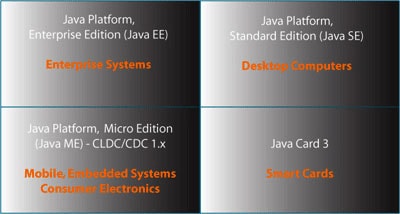
Figure 1: The Various Java Platforms Available Today
The Java platform for Blue-ray disc players is called BD-J. In the first part of this series, I'm going to cover the following topics:
- Basic Requirements for BD-J Development
- What the BD-J Platform Can Do
- BD-J Specification and APIs
- Understanding the Blu-ray Profiles
- Xlets and Xlet Lifecycles
- Creating Your First BD-J Application
I'm going to assume that you have absolutely no Java ME or video-content creation experience whatsoever. Having that said, let's get started.
Basic Requirements for BD-J Development
Now you might be surprised to learn that although the BD-J standard is a part of the Java ME platform, you're going to need a somewhat more powerful machine in order to play BD-J applications on your PC. Here's a list of the physical requirements that you're going to need to create, burn, and play BD-J applications on your PC:
- A desktop or laptop computer that runs Windows Vista or XP. Sadly, at the time of this writing, there haven't been many tools and hardware for the Mac OS or Linux for BD-J development. If you're a Mac user, then you are better off using Bootcamp with Windows compared to using some virtualization software, due to the intense requirements on the video driver and display.
- A graphics card with at least 256MB of memory. This is an important requirement since a lot of the heavy lifting needed to render the HD video will be done by the GPU on your graphics card instead of the CPU on your motherboard.
- A video display capable of rendering HD video. Full HD video resolution is at 1920x1080 pixels.
- A Blu-ray burning drive, obviously. Fortunately, some drives come with a rewritable Blue-ray disc (also known as BD-RE) so that you can use the disc over and over to create your applications or movies.
In other words, a typical $500 desktop PC or a $1000 laptop may be able to create BD-J applications and burn Blu-ray discs, but neither would be able to play Blu-ray discs due to the intense video requirements that are necessitated by high definition (HD) video. Fortunately, CyberLink Corporation makes a handy diagnosis tool to determine if your machine is capable of Blu-ray playback. Figure 2 below shows a screenshot of the tool running on one of my laptops.
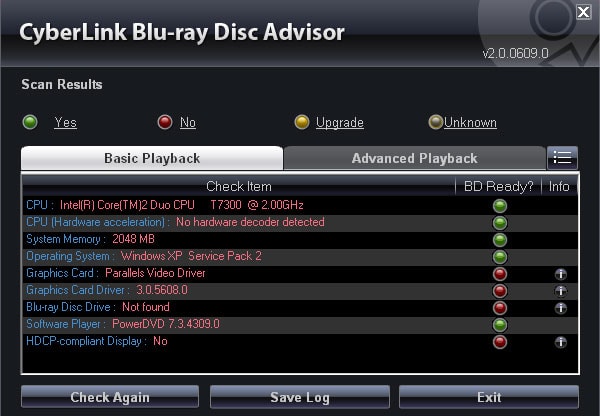
Figure 2: The CyberLink Advisor Tool Indicates that this Laptop Cannot Play Blu-ray Movies
What the BD-J Platform Can Do
So, what exactly can you do with the BD-J platform? I'm glad that you've asked. However, before we cover the capabilities of the BD-J platform, it would be prudent to cover the terminology that is frequently used when creating BD-J applications:
- Disc: A disc is the physical media that contains the HD video content and the BD-J jar files.
- Title: A disc can have one or more titles. In layman's terms, a title is a movie. However, if you want to create a Blu-ray disc that has 10 episodes of a cooking show, you really can't call each episode a movie. Therefore, an organized unit of video content on a disc is called a title.
- Menu: The menu is the interactive portion of the BD-J application that responds to input from the handheld remote control. By interacting with the menu, you are able to select a title, initiate playback of a title, as well activate or deactivate advanced options on the disc.
Now that we've covered the terminology used when creating BD-J applications and authoring content, let's examine the capabilities of the BD-J platform. Using the BD-J APIs, you have the ability to draw any text, images, or animation on the display. This enables you to create applications that can do the following:
- Draw simple text on the screen that's triggered by the current frame being displayed. As you can imagine, this would be useful for rendering subtitles.
- Draw shapes or images on the display on top of the video content that's currently displayed.
- Draw and animate images on the display for an interactive game.
- Create animated buttons with effects like fades and transitions.
- Create highly interactive menus that allow the user to select a title, a chapter, or any other advanced options like bonus content. In fact. Figure 3 shows the menu rendered from the example code provided in the HDcookbook project (an excellent resource for BD-J developers).
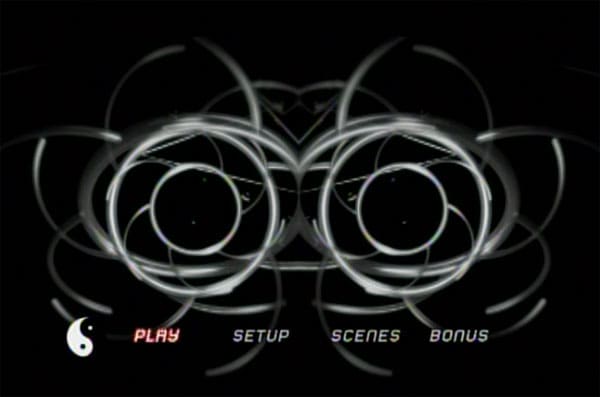
Figure 3: An Interactive Menu Rendered Using the BD-J APIs
Additionally, the BD-J APIs allow you to initiate playback of any video content on the disc, which means that you can create applications that do any of the following:
- Initiate the playback of a title based upon a menu selection. This is one of the most common scenarios for video playback.
- Initiate a "first playback", which enables the playback of video content when the disc is inserted in the player.
- Initiate the playback of two video streams simultaneously using the APIs for Picture in Picture (PiP) rendering.
Furthermore, using the BD-J APIs, you can respond to user input from the remote control, access data over network, or store data on the local persistent storage of the Blu-ray player -- wait, a Blu-ray player has local storage? Yes, the current players on the market are required to have 64 kB of memory for persistent storage. Blu-ray players also can persist data to a "virtual file system", but we'll cover that later on in this article. So, having that said, these capabilities of the BD-J APIs will also enable you to create applications that:
- Change operation due to input from the remote control.
- Download bonus content and play special features when the disc is present in the Blu-ray disc player.
- Allow disc owners to securely purchase items such as clothing, souvenirs, books, and so on from an ecommerce site.
- Allow the Blu-ray disc player to "remember" items such as high score in games, or to be aware that you've already unlocked certain special features on a disc.
- Allow the Blu-ray disc player to keep your application running after the disc is ejected. This comes in very handy when you have a boxed-set of discs, and you want your application to continue running and maintain state across all the discs in the set'a very powerful feature!
So now that you've gotten a pretty good grasp of the capabilities of the BD-J platform, let's dive a little deeper and take a look at the classes of the API in a little more detail.
The BD-J Specification APIs
As you can imagine, the BD-J specification wasn't invented overnight, and it definitely leveraged many other Java specifications that operated in the home platform / consumer electronics arena. If you remember from Figure 1, the Java platform for consumer electronics is the CDC (Connected Device Configuration). In Figure 4, we're going to look at the stack of APIs that constitute the BD-J specification.
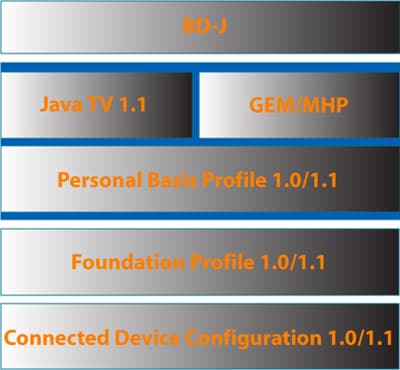
Figure 4: The BD-J API Stack Comprises Several Pre-existing APIs
Now that you're somewhat familiar with the specifications, let's take a package-by-package overview of the BD-J specific classes.
The Blu-ray Java (BD-J) APIs
org.bluray.application
|
This package contains a single class that extends a class from the GEM/MHP layer. It contains several features including an event notification framework for disc insertion and ejection. |
org.bluray.media
|
This package contains media-specific classes that pertain to Blu-ray media players, and they extend the functionality found in the GEM/MHP specifications. These classes include mechanism to control the Picture-in-Picture (PiP), subtitles, and audio. |
org.bluray.net
|
At first guess, you'd assume that this package contains all the classes needed to make TCP/IP network connections from your Blu-ray player. Actually, all that dirty work is handled by the java.net package provided by the Personal Basis Profile. Instead, this package contains a single class that extends the functionality of the Java TV API in order to define a Locator for Blu-ray Devices. What's a Locator? It's simply a text string that's formatted like a URL. In the Blu-ray context, a Locator is used select titles on a disc.
|
org.bluray.storage
|
This package contains 3 classes that allow you to determine the amount of free storage on the Blu-ray player. Please note that the persistent storage area is required to be present in all Blu-ray players, but the virtual file system (which allows you to store large amounts of data, such as video content) is not mandatory in all players. |
org.bluray.system
|
This package contains a single class that allows you to get access the system registers on the Blu-ray player. |
org.bluray.ti
|
This package contains a slew of classes that give you title information and metadata on the titles on the disc. |
org.bluray.ui
|
This package contains classes that add user interface functionality that is not already provided by the java.awt package in the Personal Basis Profile. These classes allow you to get fancy and perform animations that are synchronized with video frames.
|
org.bluray.vfs
|
The classes in this package allow you to store data in the virtual file system. The virtual file system is not mandatory to present in all Blu-ray players, but it will be present in those that support network connections. |
The GEM and MHP APIs
The BD-J specification is definitely not the first specification that uses Java for consumer electronic devices. The specifications for the Multimedia Home Platform (MHP) and the Globally Executable Multimedia Home Platform (GEM) define APIs that were originally intended for cable boxes and other multimedia devices for the home. Since the GEM specification is a worldwide standard, it has been leveraged by other consumer electronic device standards, namely:
- Blu-ray Disc Java (BD-J)
- OpenCable Applications Platform (OCAP), now called, Tru2way
- Advanced Common Application Platform (ACAP)
For the purposes of this article, I won't go in depth on the entire GEM/MHP platform. The following list shows the Java packages that make up the GEM/MHP API, which is included in the BD-J standard.
org.davic.media
|
dvb.event
|
dvb.test
|
org.davic.net
|
dvb.io
|
dvb.ui
|
org.davic.resources
|
dvb.lang
|
dvb.user
|
dvb.application
|
dvb.media
|
havi.ui
|
dvb.dsmcc
|
dvb.net
|
The Java TV 1.1 APIs
As you may recall from Figure 4, the overall BD-J standard also uses functionality that comes from the Java TV APIs. The Java TV APIs provide essential capabilities or BD-J applications such as the Xlet framework (which I'll go into detail later in this article), as well as the class definition for javax.tv.service.Service. For java-enabled TVs and set-top boxes (which includes cable receivers and DVRs), a service is a channel. So, for instance, if you wanted to write a simple application that programmed your Java-enabled DVR to tune to channel 203 everyday at 4:00pm, then you would use the classes in the javax.tv.service package to accomplish that task. Now, for Blu-ray devices, a javax.tv.service.Service is disc title. Following is a complete list of the packages in the Java TV API:
javax.tv.graphics
|
javafx.tv.service
|
javax.tv.locator
|
javafx.tv.util
|
javax.tv.media
|
javafx.tv.xlet
|
javax.tv.net
|
The Personal Basis Profile, Foundation Profile, and Connected Device Configuration APIs
Together, the Personal Basis Profile (PBP), Foundation Profile (FP), and Connected Device configuration (CDC) combine to form the foundation that the other higher-level APIs leverage for embedded and consumer electronic devices. These classes provide the familiar Java SE classes that desktop Java programmers are already familiar with. These classes are not equivalent to the full JDK 1.6 standard (Java SE 6), but they are very similar to the Java SE 1.3 standard with a few exceptions. These are the omission of JDBC, Swing, and high-level AWT widgets that assume that the user input includes a pointing device (that is, a mouse). Now, you should also be aware that since this platform is Java ME (and not Java SE), then you'll also have access to the same javax.microedition.io classes that are also available on Java-enabled mobile phones. Following is a list of classes in the PBP, FP, and CDC APIs:
java.awt
|
java.math
|
java.text
|
java.beans
|
java.net
|
java.util
|
java.io
|
java.rmi
|
javax.microedition.io
|
java.lang
|
java.security
|
javax.microedition.xlet
|
Understanding the Blu-ray Profiles
Let's go over the different versions of the Blu-ray disc specification that's implemented on the players that exist on the market.
The first version of the Blu-ray disc specification was released as profile 1.0.
The next release was Blu-ray Disc Profile 1.1, which is also called "Bonus View." In Blu-ray Profile 1.1, the specification required support for Picture-in-Picture (PiP) as well as the presence of the virtual file system, which must possess the capability to store at least 256 MB of data.
The most current profile is 2.0, also called "BD-Live." This profile requires all the features from Profile 1.1 and adds the requirement that an internet connection be present. Profile 2.0 also mandates that the virtual file system store at least 1 GB of data. Now, since a single-layer Blu-ray disc holds 25 GB of data, you can see that virtual file system in Profie 2.0 devices couldn't hold a full movie. However, it is large enough for your applications to utilize the internet connection and to store some HD video content for later playback.
Xlets and Xlet Lifecycles
If you've used Java for a while, then you should be familiar with the *let naming convention, which is applied to Applets, Servlets, and MIDlets. Thankfully, applications on the CDC platform are not called CDClets, but they are called Xlets since no one could find a better name.
To create a BD-J application, at least one of your classes must implement the javax.tv.xlet.Xlet interface, which comes from the Java TV API. If you're familiar with the classes from the Personal Basis Profile, then you'd know that Xlets are also defined in the javax.microedition.xlet package. Therefore, to minimize frustration when you're building your BD-J applications, be sure that you're importing the Xlet classes from Java TV package.
Now, understanding the lifecycle of BD-J Xlets is pretty simple. Once the constructor has been called, your Xlet goes into the Loaded state. In addition to having a constructor, the initXlet() method will also be called, which will place your Xlet into the Paused state until the startXlet() method is called. As you can see from Figure 5 below, your application can possibly go between the Paused and Active states multiple times before it's destroyed. Therefore, the startXlet() method is good place to put code that allows you check on network connections and other important resources before you start (or resume) doing the real work.
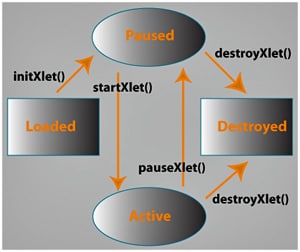
Figure 5: The Xlet State Diagram
So now that we've got all the preliminaries out of the way, let's dive right into creating our first application.
Creating Your First BD-J Application
In the example code shown below, I have a simple application that implements all the Xlet lifecycle methods, and performs a very simple operation: writing text on the screen.
Listing 1: FirstBDJApp.java
package test;


import javax.tv.xlet.Xlet;
import javax.tv.xlet.XletContext;

import java.awt.BorderLayout;
import java.awt.Color;
import java.awt.Container;
import java.awt.Font;
import java.awt.Graphics;

import org.havi.ui.HScene;
import org.havi.ui.HSceneFactory;

public class FirstBDJApp implements Xlet {

    private static Font font;
    private HScene scene;
    private Container gui;
    private String text = "My first BD-J app running on the PS3!";
    //private String text = "My first BD-J app running on " + System.getProperty("os.name");

        public FirstBDJApp() {
    }

    public void initXlet(XletContext context) {

        font = new Font(null, Font.PLAIN, 48);

        scene = HSceneFactory.getInstance().getDefaultHScene();
        gui = new Container() {

            public void paint(Graphics g) {
                g.setFont(font);
                g.setColor(new Color(10, 10, 10));
                g.fillRect(20, 20, getWidth() - 40, getHeight() - 40);
                g.setColor(new Color(245, 245, 245));
                int message_width = g.getFontMetrics().stringWidth(text);
                g.drawString(text, (getWidth() - message_width) / 2, 500);
            }
        };

        gui.setSize(1920, 1080);
        scene.add(gui, BorderLayout.CENTER);
        scene.validate();
    }

    public void startXlet() {
        gui.setVisible(true);
        scene.setVisible(true);
    }

    public void pauseXlet() {
        gui.setVisible(false);
    }

    public void destroyXlet(boolean unconditional) {
        scene.remove(gui);
        scene = null;
    }
}
As you can see, we're not using any high-level widgets to draw the text on the screen. We're just calculating the size that the text would occupy and using the Graphics object to draw that text on the display. Figure 6 depicts what our application looks like on the PS3 gaming console:
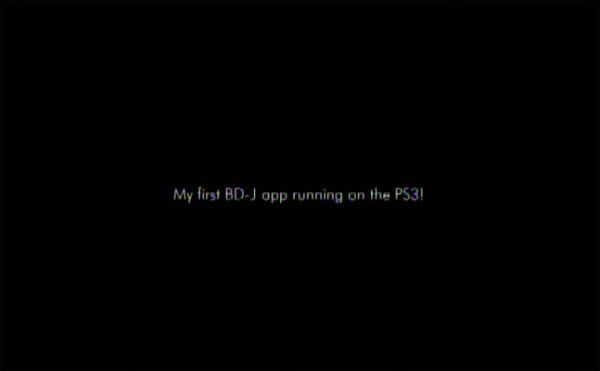
Figure 6: The Reuslts of FirstBDJApp.java on the PS3 Game Console
Conclusion
So, there you have it's a complete working example from start to finish on how to a create BD-J application that works on any Blu-ray disc player. As you can see from the BD-J APIs, we've only scratched the surface of the tip of the iceberg. In Part 2, we're going into more detailed instructions on how to get your development environment to build BD-J applications. We'll also provide concrete example code on how to respond to user input from a remote control.
Acknowledgements
I'd like to thank Bill Foote, Chihiro Saito, and the HD Cookbook team for assistance, feedback, and all their help to improve this article. The example code shown in the article was largely inspired by the demo application created by Chihiro's Netbeans Plugin.