Technical Article
Using the Java APIs for Bluetooth Wireless Technology, Part 1 - API Overview
By C. Enrique Ortiz, December 2004
Bluetooth is a low-cost, short-range wireless technology that has become popular among those who want to create personal area networks (PANs). Each PAN is a dynamically created network built around an individual, that enables devices such as cellular phones and personal digital assistants (PDAs) to connect automatically and share data immediately. To support development of Bluetooth-enabled software on the Java platform, the Java Community Process (JCP) has defined JSR 82, the Java APIs for Bluetooth Wireless Technology (JABWT).
In this article I'll present some background about Bluetooth, give you an overview of the typical elements of a Bluetooth-enabled MIDlet application, and introduce you to the core Java Bluetooth APIs. Finally we'll look at some code that shows how to use these APIs.
JSR 82 actually specifies two independent optional packages: the core Bluetooth APIs and the Object Exchange (OBEX) APIs. This article will cover in detail only the more prevalent of the two, the core Bluetooth package javax.bluetooth, leaving the OBEX API, javax.obex, for later discussion.
Background
Developed by the Bluetooth Interest Group, Bluetooth technology consists of:
- Radio technology
- A protocol stack
- Interoperability profiles
Bluetooth radio technology is based on the 2.45 GHz Industrial, Scientific, and Medical (ISM) frequency band, which is unlicensed and globally available. When Bluetooth devices connect to each other, they form a piconet, a dynamically created network that comprises a master device and up to seven slave devices. Bluetooth also supports connections between piconets: When a master on one piconet becomes a slave on another, it provides a bridge between them.
The Bluetooth protocol stack provides a number of higher-level protocols and APIs for service discovery and serial I/O emulation, and a lower-level protocol for packet segmentation and reassembly, protocol multiplexing, and quality of service.
Bluetooth interoperability profiles – not to be confused with J2ME profiles – describe cross-platform interoperability and consistency requirements. They include the Generic Access Profile that defines device-management functionality, the Service Discover Application Profile that defines the aspects of service discovery, and the Serial Port Profile that defines the interoperability requirements and capabilities for serial cable emulation.
The Bluetooth stack comprises a software stack that interfaces with a firmware stack, as Figure 1 illustrates:
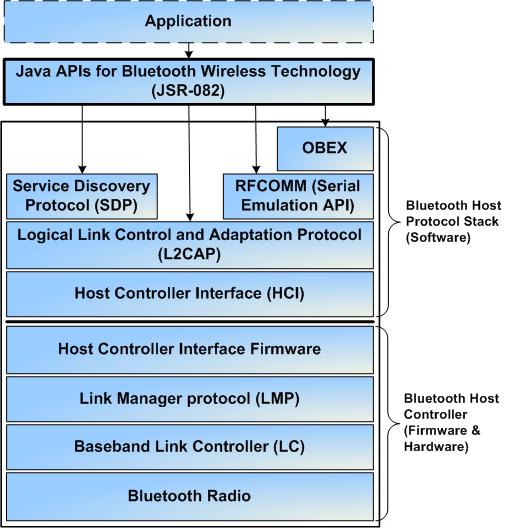
Figure 1: The Bluetooth Protocol Stack
JSR 82 exposes the Bluetooth software stack to developers working on the Java platform. Of special interest are the Service Discovery Protocol (SDP), the Serial Port Profile RFCOMM for serial emulation, and the Logical Link Control and Adaptation Profile (L2CAP), which provides connection-oriented data services to upper-layer protocols such as segmentation and reassembly operation, and protocol multiplexing. Note that JABWT doesn't support connectionless L2CAP.
JABWT also includes the Object Exchange APIs. OBEX is a high-level API and protocol for exchanging objects such as electronic business cards and calendar items transmitted in the vCard and vCalendar formats. On Bluetooth, object exchange occurs over RFCOMM. OBEX was originally introduced by the Infrared Data Association (IrDA), and it can be implemented on top of the IrDA protocol, TCP/IP, and others.
Typical Use Cases of a Bluetooth-Enabled Application
A Bluetooth-enabled application can be either a server or a client – a producer of services or a consumer – or it can behave as a true peer-to-peer endpoint by exposing both server and client behavior. Figure 2 illustrates an application's Bluetooth-specific use cases:
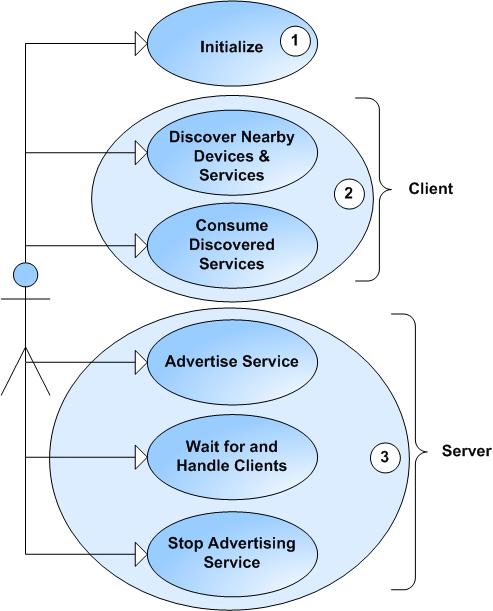
Figure 2: Typical Use Cases of a Bluetooth-Enabled Application
These use cases can be summarized thus:
- Initialization – All Bluetooth-enabled applications must first initialize the Bluetooth stack.
- Client – A client consumes remote services. It first discovers any nearby devices,then for each discovered device it searches for services of interest.
- Server – A server makes services available to clients. It registers them in the Service Discovery Database (SDDB), in effect advertising them. It then waits for incoming connections, accepts them as they come in, and serves the clients that make them. Finally, when the service is no longer needed the application removes it from the SDDB.
Figure 3 diagrams the activity involved in these use cases:
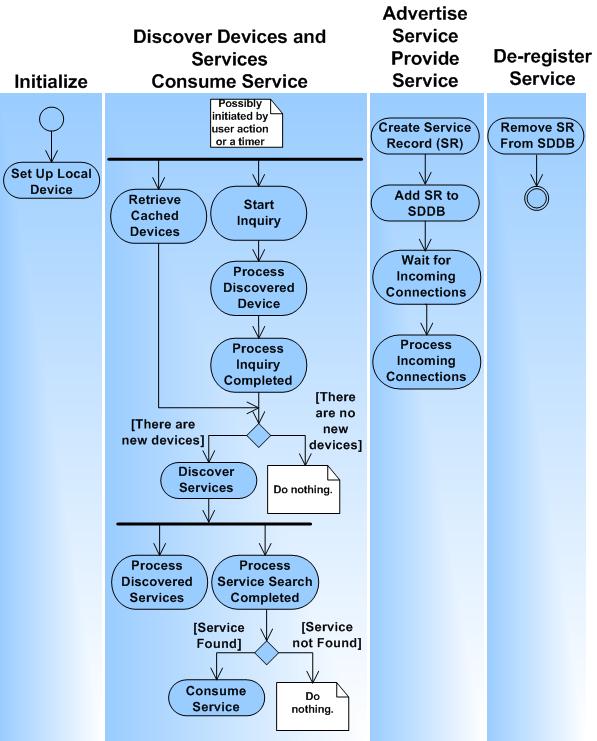
Figure 3: Bluetooth-Specific Application Activities
Elements of a Bluetooth-Enabled Application
Figure 4 illustrates the elements of a typical Bluetooth-enabled application, in our case a MIDlet:
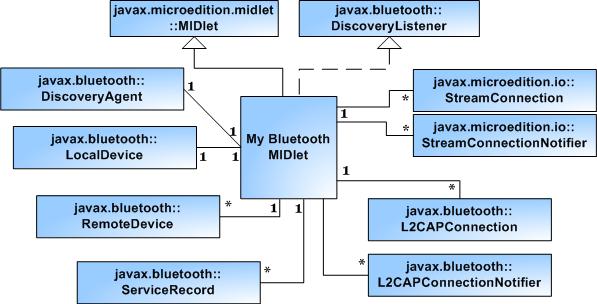
Figure 4: A Bluetooth-Enabled MIDlet (High-Level Organization)
At the center is My Bluetooth MIDlet, the core application that extends javax.microedition.midlet.MIDlet. Not illustrated is that the MIDlet would also implement javax.microedition.lcdui.CommandListener to listen for command input from the user interface. The rest of the classes or interfaces the application uses are included for Bluetooth-specific uses, such as discovering devices and services, connecting and consuming services, and advertising and providing services.
It's a good practice to use a design pattern like Model-View-Controller, which decomposes the application into the user interface (views), application behavior and navigation (controller), and data (models), plus in our case supporting classes and interfaces such as the Bluetooth APIs. It's also good design to isolate client and server behavior in separate classes so you can reuse components later.
Overview of the Core Java APIs for Bluetooth
JSR 82 requires the Connected Limited Device Configuration (CLDC) as its lowest common denominator, and the Connected Device Configuration (CDC) is a superset of CLDC, so JABWT can be implemented on top of both CLDC- and CDC-based profiles. Simply put, you can use JABWT with any J2ME profile.
We can break down the core Java Bluetooth APIs, found in javax.bluetooth, into the three categories we'll discuss next: discovery , device management , and communication .
Bluetooth Discovery APIs
Client applications use the JABWT discovery APIs to seek out nearby devices and services. The DiscoveryAgent class supports discovery of both devices and services. Client applications wanting to be notified when devices and services are discovered must implement and register the interface DiscoveryListener, which defines callbacks for device- and service-discovery notification.
The relationship between a Bluetooth client application and the DiscoveryAgent is typically one-to-one:
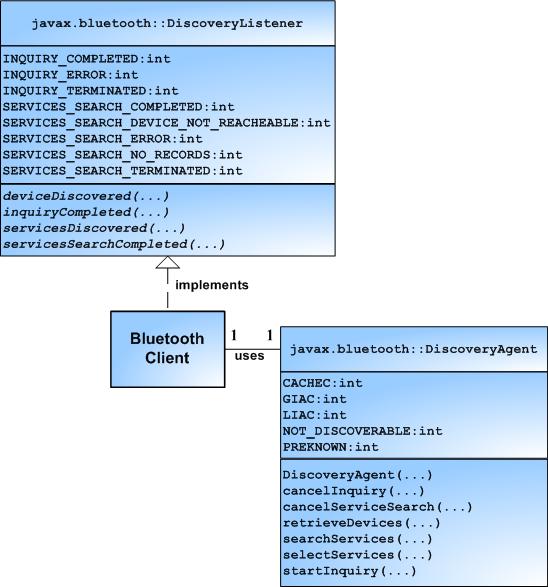
Figure 5: The DiscoveryAgent Class and DiscoveryListener Interface
APIs for Device Discovery
You use the DiscoveryAgent's device – discovery methods to initiate and cancel device discovery:
retrieveDevices()retrieves already discovered or known devices that are nearby.startInquiry()initiates discovery of nearby devices, also called inquiry.cancelInquiry()cancels any inquiry presently in progress.
The Bluetooth Discovery Agent invokes the DiscoveryListener's device – discovery callback methods at different points in the inquiry phase:
deviceDiscovered()indicates whether a device has been discovered.inquiryCompleted()indicates whether the inquiry has succeeded, triggered an error, orbeen canceled.
The state diagram in Figure 6 illustrates the device-discovery states reached as a result of DiscoveryListener callbacks:

Figure 6: Device-Discovery State Diagram
Device discovery begins with a call to startInquiry(). As the inquiry progresses, the Bluetooth Discovery Agent invokes the callback methods deviceDiscovered() and inquiryCompleted() as appropriate.
APIs for Service Discovery
You use the DiscoveryAgent's service-discovery methods to initiate and cancel service discovery:
selectService()initiates service discovery.searchServices()initiates service discovery.cancelServiceSearch()cancels any service discovery operation presently in progress.
The Bluetooth Discovery Agent invokes DiscoveryListener service-discovery callback methods at different points in the service-discovery phase:
servicesDiscovered()indicates whether services have been discovered.serviceSearchCompleted()indicates that service discovery has completed.
Figure 7 illustrates the service discovery states reached as a result of DiscoveryListener callbacks:
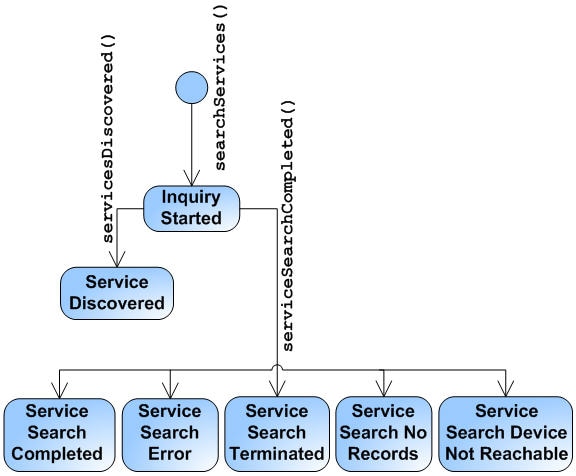
Figure 7: Service-Discovery State Diagram
Service discovery begins with a call to searchServices(). As the service search progresses, the Bluetooth Discovery Agent calls back servicesDiscovered() and serviceSearchCompleted() as appropriate.
In addition to DiscoveryAgent and DiscoveryListener, you also use the classes UUID, ServiceRecord, and DataElement when discovering services.
The UUID Class
In Bluetooth, each service and service attribute is uniquely identified by a Universally Unique Identifier (UUID). As its name suggests, each such identifier is guaranteed to be unique across all time and space. The UUID class can represent short (16- or 32-bit) and long (128-bit) UUIDs. It provides constructors to create a UUID from a String or from a 16- or 32-bit value, a method to compare two UUIDs (if both are 128-bit), and a method to covert a UUID into a String. UUID instances are immutable, and only services identified by UUIDs are discoverable.
You can generate a UUID value with a command: uuidgen -t if you're running Linux, uuidgen if you're running Windows. The UUID will look something like this: 2d266186-01fb-47c2-8d9f-10b8ec891363. When using the generated UUID to build a UUID object, you remove the hyphens.
The SDDB and the ServiceRecord Interface
At the center of service discovery are the Service Discovery Database (SDDB) and the Service Discovery Protocol (SDP). The SDDB is a database maintained by the Bluetooth implementation that contains service records, which represent services that are available to clients. The SDP is transparent to applications based on JABWT; it suffices to say that the SDP is used for service discovery. To retrieve service records an SDP client on the local device makes requests to an SDP server on a remote device.

Figure 8: The SDDB
Each service record is represented by an instance of ServiceRecord. This record contains attributes that describe the service in detail. The class provides several useful methods:
getAttributeIDs()andgetAttributeValue()retrieve the service record's attributes.getConnectionURL()gets the connection URL for the server hosting the service record.getHostDevice()gets theRemoteDevicethat hosts the service.populateRecord()andsetAttributeValue()set the service record's attributes.setDeviceServiceClasses()sets the service’s classes.
Figure 9 shows you the relationships between Bluetooth local and remote devices, the SDDB, and service records:
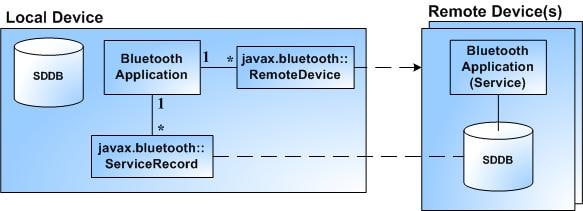
Figure 9: Discovering Services Using RemoteDevice SDDB, and ServiceRecord
To make a service available to clients, a server application creates a service record by creating a connection notifier, then inserts the record into its SDDB by invoking the connection notifier's acceptAndWait() method. Server applications can retrieve the service record and update it as appropriate, and client applications querying the remote SDDB for available services will find the service record there.
The DataElement Class
A service can have many attributes, some mandatory, others optional. A service attribute is represented by a DataElement object, which provides methods to set and get attribute values.
Mandatory attributes are set automatically when a service is registered. These include ServiceRecordHandle, ServiceClassIDList, ServiceRecordState, ServiceID, and ProtocolDescriptorList.
You can set optional attributes if you like. There are many, but three are of special interest: ServiceName, ServiceDescription, and ProviderName.
For more information about these attributes, please see the JABWT documentation or the Bluetooth specification.
APIs for Device Management
Three main classes support device management:
LocalDeviceRemoteDeviceDeviceClass
The LocalDevice Class
The class LocalDevice represents the local Bluetooth device. The relationship between the Bluetooth application and LocalDevice is typically one-to-one:
Figure 10: The LocalDevice Class
LocalDevice provides methods to retrieve information about the local device, and to get access to the Bluetooth manager:
getBluetoothAddress()returns the Bluetooth address.getDeviceClass()returns the device's class.getFriendlyName()returns the device's friendly name, the Bluetooth device name that the user typically assigns through the Bluetooth Control Center, which we'll look at later.getRecord()returns one of the service records for the specified Bluetooth connection.updateRecord()updates the SDDB service record for the specifiedServiceRecord.getDiscoverable()returns the device's discoverable status.setDiscoverable()sets the device's discoverable status.getDiscoveryAgent()returns a reference to the discovery agent.getProperty()returns one of the device's Bluetooth properties.
Properties you can retrieve by calling getProperty() include, among others:
bluetooth.api.version,the Bluetooth API versionbluetooth.sd.attr.retrievable.max,the maximum number of service-record attributes that can beretrieved at a timebluetooth.connected.devices.max, the maximum number of connected devices supportedbluetooth.sd.trans.max, the maximum number of concurrent service-discovery transactionsbluetooth.l2cap.receiveMTU.max, the L2CAP maximum transmission unit
You can learn more about Bluetooth properties in the Javadoc or the specification.
The RemoteDevice Class
An instance of RemoteDevice represents a remote Bluetooth device. Before a Bluetooth client application can consume services, it must discover remote devices by initiating a device inquiry. Typically the relationship between the Bluetooth application and RemoteDevice is one-to-many:
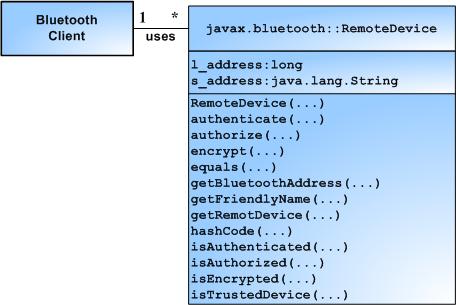
Figure 11: The RemoteDevice Class
Of the methods RemoteDevice provides, some are similar to the ones provided by LocalDevice:
getBluetoothAddress()returns the Bluetooth address.getFriendlyName()returns the Bluetooth device name.getRemoteDevice()returns theRemoteDevicethat corresponds to the specified BluetoothConnection.authenticate()attempts to authenticate the remote device.authorize()attempts to authorize the remote device’s access to the local service for the specified BluetoothConnection.encrypt()attempts to turn encryption on or off for the specified BluetoothConnection.isAuthenticated()tests whether the remote device is authenticated.isAuthorized()tests whether the remote device has been authorized by the Bluetooth Control Center to access the local service for the specifiedBluetoothConnection.isEncrypted()tests whether communication between the local device and the remotedevice is encrypted.isTrustedDevice()tests whether the remote device is trusted, as specified by theBluetooth Control Center.
The DeviceClass Class
A DeviceClass object represents a device's class of device (CoD), for example a printer or a phone. A CoD consists of a major class, a minor class, and service types or classes. DeviceClass provides these methods:
getMajorDeviceClass()retrieves the device's major class.getMinorDeviceClass()retrieves the device's minor class.getServiceClasses()retrieves the device's service classes.
When a device is discovered, its class is discovered as well; when the Discovery Agent invokes deviceDiscovered(), one of the arguments is the DeviceClass. You can find the local device's CoD by calling its getDeviceClass() method.
Bluetooth Communication
JABWT connections are based on the Logical Link Control and Adaptation Layer Protocol. L2CAP is a low-level protocol for managing data packets up to 64 kilobytes long. L2CAP handles details such as message segmentation and reassembly (SAR), and connection multiplexing. In addition, the Serial Port Profile (SPP) provides RFCOMM, a serial emulation protocol over L2CAP.
L2CAP and RFCOMM connections are based on the Generic Connection Framework (GCF), a straightforward hierarchy of interfaces and classes to create connections and perform I/O. JABWT extends GCF by adding L2CAP and RFCOMM support through the L2CAPConnection and StreamConnection types respectively. While L2CAPConnection was introduced with JSR 82, StreamConnection was defined as part of the original javax.microedition.io GCF that was developed to rely on CLDC. Note that JABWT L2CAPConnection supports only connection-oriented L2CAP connections. Figure 12 illustrates the interfaces used in GCF-based communications over Bluetooth networks:
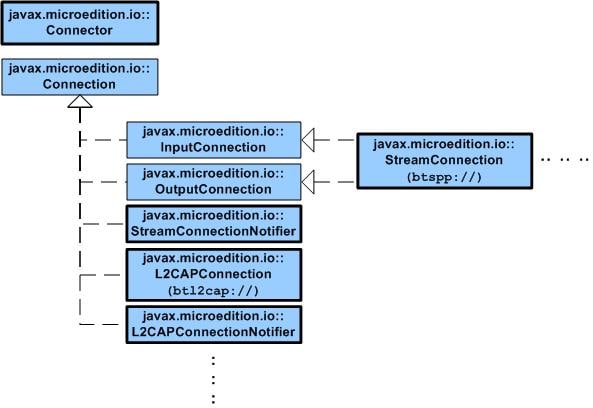
Figure 12: The Generic Connection Framework and Bluetooth Connection Types
The hierarchy defines L2CAP and Stream connections and connection notifiers. A connection defines a connection endpoint, while a connection notifier implements server behavior; it waits for and accepts incoming client connections.
Handling L2CAP connections is more involved than handling stream connections. With L2CAP, developers must deal with maximum message sizes (maximum transmission unit, or MTU), and with breaking up and reassembling long messages. These complexities are hidden from the developer when using stream connections, making them preferable for Bluetooth connectivity.
As with all GCF connection types, you create Bluetooth connections by calling the GCF connection factory javax.microedition.io.Connector. The connection URL scheme passed to Connector() determines the connection type to create:
- The URL format for an
L2CAPConnection:
btl2cap://

                   hostname:[
                   PSM |
                   UUID];
                   parameters
-
The URL format for an RFCOMM
StreamConnection:
btspp://

                   hostname:[
                   CN |
                   UUID];
                   parameters
Where:
btl2capis the URL scheme for anL2CAPConnection.btsppis the URL scheme for an RFCOMM StreamConnection.hostnameis eitherlocalhostto set up a server connection, or the Bluetooth address to create a client connection.PSMis the Protocol/Service Multiplexer value, used by a clientconnecting to a server. This is similar in concept to a TCP/IP port.CNis the Channel Number value, used by a client connecting to a server – also similar in concept to a TCP/IP port.UUIDis the UUID value used when setting up a service on a server.parametersincludenameto describe the service name, and the security parametersauthenticate,authorize, andencrypt.
Server Connections and Client Connections
The host name in the connection URL tells the connection factory whether it should create a client or server connection. Using the word localhost as a host name specifies a server connection. A client wishing to connect to a given service can retrieve the service's connection URL by calling ServiceRecord.getConnectionURL().
Exceptions
The javax.bluetooth core API defines three exception classes:
BluetoothConnectionExceptionis thrown when a Bluetooth L2CAP, RFCOMM, or OBEX-over-RFCOMM connection cannot be established successfully.BluetoothStateExceptionis thrown when a Bluetooth operation is attempted while in the wrong state.ServiceRegistrationExceptionis thrown when there is a failure adding or changing a service record in the local Service Discovery Database.
Bluetooth Security
A secure Bluetooth connection is one that is authenticated, and optionally authorized and encrypted. A Bluetooth connection can be rendered secure when it's established, or later.
Note: Not all Bluetooth implementations provide secure connections.
To make a Bluetooth connection secure while establishing it, provide the javax.microedition.io.Connector connection URL string with the appropriate security parameters:
Note: Not all Bluetooth implementations provide secure connections.
To make a Bluetooth connection secure while establishing it, provide the javax.microedition.io.Connector connection URL string with the appropriate security parameters:
btspp://

                   hostname:[
                   CN |
                   UUID];
                 authenticate=true;
                   authorize=true;
                   encrypt=true
Where:
authenticateverifies the identity of a connecting device.authorizeverifies whether access is granted by a connecting (identified) device.encryptspecifies that the connection must be encrypted.
You've already seen that a client wishing to connect to a service can retrieve the service's connection URL by calling the method ServiceRecord.getConnectionURL(). One of this method's arguments, requiredSecurity, specifies whether the returned connection URL should include the optional authenticate and encrypt security parameters. The valid values for requiredSecurity are:
ServiceRecord.NOAUTHENTICATE_NOENCRYPTindicatesauthenticate=false;encrypt=false.ServiceRecord.AUTHENTICATE_NOENCRYPTindicatesauthenticate=true;encrypt=false.ServiceRecord.AUTHENTICATE_ENCRYPTindicatesauthenticate=true;encrypt=true.
For example:
...


ServiceRecord sr = ...;

...

String connURL = sr.getConnectionURL(ServiceRecord.AUTHENTICATE_ENCRYPT, false);

...
If you don't use this approach to render a connection secure when you set it up, you can make it secure later, using a given RemoteDevice's security methods: authenticate(), authorize(), and encrypt(). If you do, note that authentication must precede authorization and encryption.
The Bluetooth Control Center
The Bluetooth Control Center (BCC) is management software on the device that serves as the central authority for changing local Bluetooth settings: turning the Bluetooth radio on or off, setting the friendly name to advertise during device discovery, enabling or disabling the device's discovery mode, setting PIN numbers, setting the default security attributes, and so on. How the BCC looks and feels depends on the implementation.
Bluetooth Support in the Sun Wireless Toolkit
The Sun J2ME Wireless Toolkit 2.2 supports JABWT. The toolkit's Preferences Utility features the new Bluetooth/OBEX tab for setting Bluetooth preferences. Under this tab are the OBEX settings and three Bluetooth sub-tabs: The Internal Properties tab allows you to set the device discovery timeout, the System Properties tab allows you to define some of the Bluetooth properties that are accessible by invoking LocalDevice.getProperty(). The BCC Properties tab allows you to set the device's friendly name, discoverable mode, and security attributes. Figure 13 shows you each of the three sub-tabs in a separate screen shot:


Figure 13: Setting Bluetooth Preferences
Summary
This article introduced the Java APIs for Bluetooth Wireless Technology. Bluetooth is an exciting wireless technology for personal networks that allows personal devices to connect automatically, share data, and perform services for each other. This article covered a lot of ground, including some background information on Bluetooth, an overview of the typical elements of a Bluetooth-enabled MIDlet application, and an introduction to the core Java APIs for Bluetooth. Part 2 of this article will cover how to use these core JABWT APIs.
Acknowledgments
Thanks to Jim Trudeau and Sony Ericsson for loaning me the devices that I used to run and test the code sample for this article. Thanks to Roger Riggs, Kirill Kounik, and Brian Christeson for their feedback and helping improve this article.
About the Author
C. Enrique Ortiz is a software architect and developer, and a wireless technologist and writer. He has been author or co-author of many publications, a co-designer of Sun Microsystems' the Mobile Java Developer Certification Exam, and an active participant in the wireless Java community and in various J2ME expert groups. Enrique holds a B.S. in Computer Science from the University of Puerto Rico and has more than 15 years of software engineering, product development, and management experience.