Technical Article
Exploring Security Warning Functionality
By Anthony Petrov and Alla Redko, March 2009
This article explains the security warning functionality in the Java Development Kit (JDK) and discusses new capabilities available in the JDK 6 Update 12 release.
Contents
Security Warning Functionality in the JDK 6 Update 10 Release
In previous Java releases, Java Development Kit (JDK) provided windows created by untrusted applications with the standard Applet Warning banner intended to distinguish between a Java Applet Window and windows created by other applications. The banner was a gray strip at the bottom of the window for Windows applications and at the top of the window for X11 applications. The strip was labeled Java Applet Window.
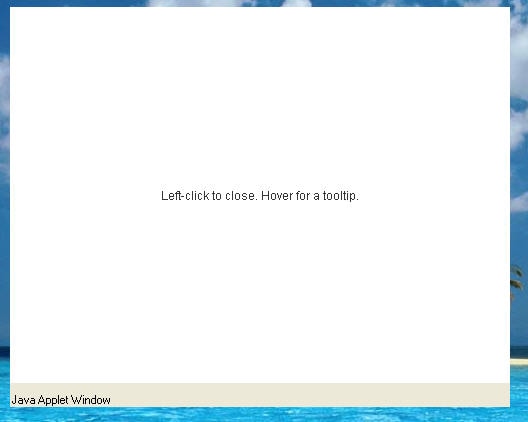
Figure 1: Old Version of the Applet Warning
This approach worked well until new functionality for the top-level windows was introduced in the latest versions of the JDK. The new functionality enables the use of shaped and translucent windows. Refer to How to Create Translucent and Shaped Windows for more information about enhancements in window functionality. Keeping the previous warning banner would present a security threat for untrusted applications and impede the visual perception of an applet because a nonrectangular top-level window might truncate the banner borders.
Two options were considered to eliminate this inconvenience. The first and dismissed option was to prohibit the use of visual effects for untrusted applications. The second and applied option was to introduce a new style of applet warning. To satisfy the requirements of the new window functionality, the gray strip was removed. A special security warning icon and a contrasting yellow window border replaced it.
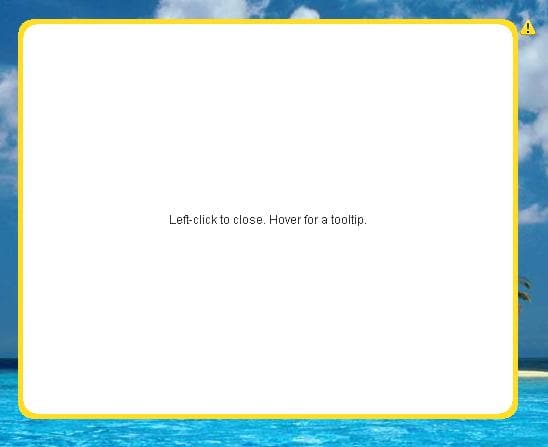
Figure 2: Applet Warning Style Introduced in the JDK 6 Update 10 Release
The contrasting yellow border blinks once when the applet window opens, thus attracting the user's attention.The yellow triangle icon with the exclamation mark inside remains at the upper right corner of the window. This initial design appeared in the JDK 6 Update 10 release on the Windows platform. X11 was prohibited from applying such effects to untrusted applets because this release did not include an implementation of the enhanced security warning functionality on X11.
Enhancements to the Security Warning Functionality in the JDK 6 Update 12 Release
Not surprisingly, the style introduced in the JDK 6 Update 10 release was much debated by the developer community. A majority opposed the yellow border and requested the capability to set an arbitrary location for the security warning icon. Consequently, the applet warning style was modified as shown in the following figure.
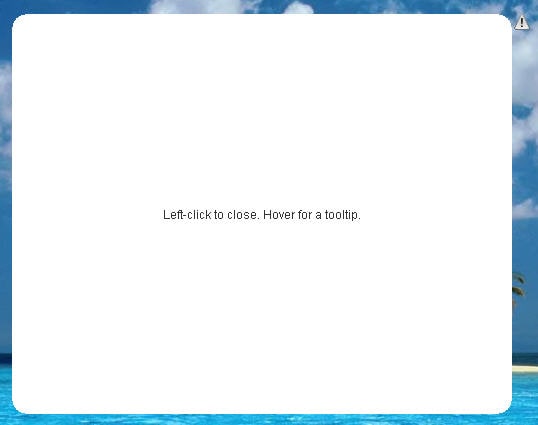
Figure 3: Modified Applet Warning Style in the JDK 6 Update 12 Release
In the latest implementation of the security warning functionality introduced in the JDK 6 Update 12 release, the yellow border was eliminated, while the warning icon remains. However, now, the icon is displayed in black and white until clicked. When clicked, the icon is tinted yellow before it reverts to black and white. When the icon is hovered over with the cursor, the tooltip appears. Another enhancement in the JDK 6 Update 12 release is that the security warning icon is shown only for the window with any input focus, unlike the previous practice of showing icons for all windows. The input focus implies one of the following window states:
- The window is active, meaning that it has the keyboard input focus.
- The window is inactive, but the mouse pointer is in the window. In other words, the window has the mouse input focus.
The modified security warning functionality was simultaneously offered on the X11 and Windows platforms.
API Overview
In addition to visual enhancements, the new API was introduced to set up arbitrary coordinates for the security warning icon. This functionality is available through the com.sun.awt.SecurityWarning class. This class provides the following static methods to relocate the security warning icon to an appropriate position relative to the current window size.
| Method | Purpose |
|---|---|
Dimension getSize(Window window)
|
Obtains the size of the security warning icon for the specified window. The Window.pack() or Window.isVisible() method must be invoked before retrieving the security warning size for the window.
|
void setPosition(Window window, Point2D point, float alignmentX, float alignmentY)
|
Sets the position of the security warning icon. |
The alignmentX and alignmentY arguments of the second method specify the origin of the coordinate system to calculate the position of the security warning icon. The arguments' values must be in the range [0.0f...1.0f]. The 0.0f value represents the left (top) edge of the rectangular boundaries of the window. The 1.0f value represents the right (bottom) edge of the boundaries. Whenever the size of the window changes, the origin of the coordinate system is recalculated accordingly. The point argument specifies the location of the security warning icon in the coordinate system.
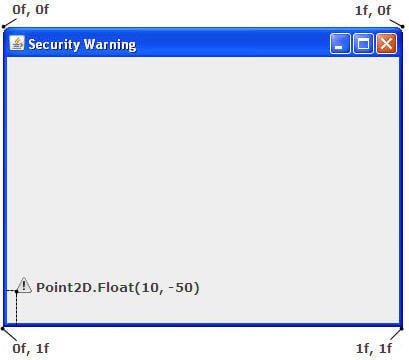
Figure 4: Positions of the Warning Icon
If both the x and y coordinates of the point are equal to 0, the security warning icon is located right in the origin of the coordinate system. If both alignmentX and alignmentY are equal to 0 (the origin of the coordinate system is placed at the top left corner of the window), the point argument represents the absolute location of the security warning icon relative to the location of the window. Specifying the absolute location prevents the position of the icon from being affected by window resizing. For convenience, you can use the following constants to pass predefined values for the alignmentX and alignmentY arguments:
Component.BOTTOM_ALIGNMENTComponent.CENTER_ALIGNMENTComponent.LEFT_ALIGNMENTComponent.RIGHT_ALIGNMENTCOMPONENT.TOP_ALIGNMENT
The default position of the security warning icon is in the upper right corner of the window, two pixels to the right from the right edge. This position corresponds to the following arguments:
alignmentX = Component.RIGHT_ALIGNMENToralignmentX = 1falignmentY = COMPONENT.TOP_ALIGNMENToralignmentY = 0fpoint = (2, 0)
Note: The security warning icon cannot be located farther than two pixels from the rectangular bounds of the window, and it must be always visible on screen. If either of these conditions is violated, the calculated position of the icon is forcibly adjusted by the system.
Setting the Position of the Security Warning Icon
You can explore the security warning functionality by testing the SecurityWarningApplet applet.
- Open the Java Control Panel
- Click the Advanced tab
- Select the Security -> Show sandbox warning banner option, if it is not already selected.
If this option is not selected, the windows created by the applet will not display the security warning.
- If you just checked the option, reload the web page to enable the change.
- Try the following applet.
- Select either the decorated or undecorated untrusted window and click Show Untrusted Window to explore the security warning feature.
After the undecorated window is selected, the following shaped untrusted window appears. In this window, the security warning icon is set to the following position:
alignmentX = 1f,alignmentY = 0f,point = (-150, 50).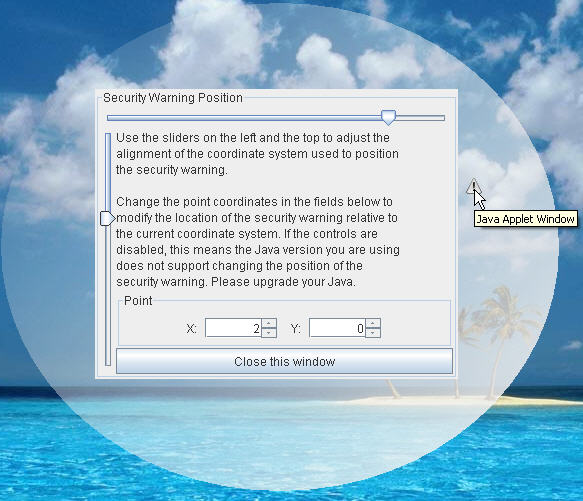
Figure 5: Untrusted Window
- Use the horizontal slider to change the
alignmentXvalue, and use the vertical slider to change thealignmentYvalue. - Type new numbers in the
XandYfields to modify thepointvalue. Set the excessive values for the point argument to position the icon far from the window's borders.Notice that icon is not moved farther than two pixels from the rectangular bounds of the window.
- Click the security warning icon to ensure that it is momentarily tinted yellow before it reverts to black and white.
- Hover the cursor over the icon to observe the security warning tooltip.
- Examine the code that controls the icon's position.
import java.awt.Window;
import java.awt.geom.Point2D;
import java.lang.reflect.InvocationTargetException;
import java.lang.reflect.Method;

public class SecurityWarningWrapper {
    private static Class<?> securityWarningClass;
    private static Method mSetPosition;

    static void init() {
        try {
            securityWarningClass = Class.forName("com.sun.awt.SecurityWarning");
            mSetPosition = securityWarningClass.getMethod("setPosition", Window.class, Point2D.class, float.class, float.class);
        }
                  catch (NoSuchMethodException ex) { ... }
                  catch (SecurityException ex) { ... }
                  catch (ClassNotFoundException ex) { ... }
    }

    static {
        init();
    }

    public static boolean isSupported() {
        return securityWarningClass != null && mSetPosition != null;
    }

    public static void setPosition(Window window, Point2D point,
            float alignmentX, float alignmentY)
    {
        if (!isSupported()) {
            return;
        }
        try {
            mSetPosition.invoke(null, window, point, alignmentX, alignmentY);
        }
                catch (IllegalAccessException ex) { ... }
                catch (IllegalArgumentException ex) { ... }
                catch (InvocationTargetException ex) { ... }
    }
}
Note: The
com.sun.awt.SecurityWarningclass is not part of an officially supported API and appears as an implementation detail. The API is meant only for limited use outside of the core platform. This class might change drastically between update releases, and it might even be removed or moved to some other package or classe. That's why theSecurityWarningclass is used through the Java Reflection mechanism.The following
mSetPositionvariable defines the method within the application that is identical to thesetPositionmethod of theSecurityWarningclass:mSetPosition = securityWarningClass.getMethod("setPosition", Window.class, Point2D.class, float.class, float.class);The following line invokes the method if the
SecurityWarningclass is supported:mSetPosition.invoke(null, window, point, alignmentX, alignmentY);If either the target window is trusted or the
alignmentXoralignmentYarguments are not within the range[0.0f ... 1.0f], the application throws thellegalArgumentExceptionexception.
The complete code of this application is available in the
SecurityWarningApplet project.