Servlets and JSP Pages Best Practices
by Qusay H. Mahmoud
March 2003
Java Servlet technology and JavaServer Pages (JSP pages) are server-side technologies that have dominated the server-side Java technology market; they've become the standard way to develop commercial web applications. Java developers love these technologies for myriad reasons, including: the technologies are fairly easy to learn, and they bring the Write Once, Run Anywhere paradigm to web applications. More importantly, if used effectively by following best practices, servlets and JSP pages help separate presentation from content. Best practices are proven approaches for developing quality, reusable, and easily maintainable servlet- and JSP-based web applications. For instance, embedded Java code (scriptlets) in sections of HTML documents can result in complex applications that are not efficient, and difficult to reuse, enhance, and maintain. Best practices can change all that.
In this article, I'll present important best practices for servlets and JSP pages; I assume that you have basic working knowledge of both technologies. This article:
- Presents an overview of Java servlets and JavaServer pages (JSP pages)
- Provides hints, tips, and guidelines for working with servlets and JSP pages
- Provides best practices for servlets and JSP pages
Overview of Servlets and JSP Pages
Similar to Common Gateway Interface (CGI) scripts, servlets support a request and response programming model. When a client sends a request to the server, the server sends the request to the servlet. The servlet then constructs a response that the server sends back to the client. Unlike CGI scripts, however, servlets run within the same process as the HTTP server.
When a client request is made, the service method is called and passed a request and response object. The servlet first determines whether the request is a GET or POST operation. It then calls one of the following methods: doGet or doPost. The doGet method is called if the request is GET, and doPost is called if the request is POST. Both doGet and doPost take request ( HttpServletRequest) and response ( HttpServletResponse).
In the simplest terms, then, servlets are Java classes that can generate dynamic HTML content using print statements. What is important to note about servlets, however, is that they run in a container, and the APIs provide session and object life-cycle management. Consequently, when you use servlets, you gain all the benefits from the Java platform, which include the sandbox (security), database access API via JDBC, and cross-platform portability of servlets.
JavaServer Pages (JSP)
The JSP technology--which abstracts servlets to a higher level--is an open, freely available specification developed by Sun Microsystems as an alternative to Microsoft's Active Server Pages (ASP) technology, and a key component of the Java 2 Enterprise Edition (J2EE) specification. Many of the commercially available application servers (such as BEA WebLogic, IBM WebSphere, Live JRun, Orion, and so on) support JSP technology.
How Do JSP Pages Work?
A JSP page is basically a web page with traditional HTML and bits of Java code. The file extension of a JSP page is .jsp rather than .html or .htm, which tells the server that this page requires special handling that will be accomplished by a server extension or a plug-in.
When a JSP page is called, it will be compiled (by the JSP engine) into a Java servlet. At this point the servlet is handled by the servlet engine, just like any other servlet. The servlet engine then loads the servlet class (using a class loader) and executes it to create dynamic HTML to be sent to the browser, as shown in Figure 1. The servlet creates any necessary object, and writes any object as a string to an output stream to the browser.
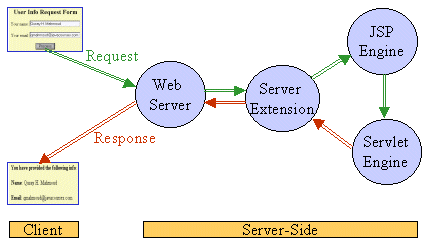
Figure 1: Request/Response flow calling a JSP page
The next time the page is requested, the JSP engine executes the already-loaded servlet unless the JSP page has changed, in which case it is automatically recompiled into a servlet and executed.
Best Practices
In this section, I present best practices for servlets and particularly JSP pages. The emphasis on JSP best practices is simply because JSP pages seem to be more widely used (probably because JSP technology promotes the separation of presentation from content). One best practice that combines and integrates the use of servlets and JSP pages is the Model View Controller (MVC) design pattern, discussed later in this article.
- Don't overuse Java code in HTML pages: Putting all Java code directly in the JSP page is OK for very simple applications. But overusing this feature leads to spaghetti code that is not easy to read and understand. One way to minimize Java code in HTML pages is to write separate Java classes that perform the computations. Once these classes are tested, instances can be created.
- Choose the right include mechanism: Static data such as headers, footers, and navigation bar content is best kept in separate files and not regenerated dynamically. Once such content is in separate files, they can be included in all pages using one of the following include mechanisms:
- Include directive:
<%@ include file="filename" %> - Include action:
<jsp:include page="page.jsp" flush="true" />
- Include directive:
- Don't mix business logic with presentation: For advanced applications, and when more code is involved, it's important not to mix business logic with front-end presentation in the same file. Separating business logic from presentation permits changes to either side without affecting the other. However, production JSP code should be limited to front-end presentation. So, how do you implement the business logic part? That is where JavaBeans technology comes into play. This technology is a portable, platform-independent component model that lets developers write components and reuse them everywhere. In the context of JSP pages, JavaBeans components contain business logic that returns data to a script on a JSP page, which in turn formats the data returned from the JavaBeans component for display by the browser. A JSP page uses a JavaBeans component by setting and getting the properties that it provides. The benefits of using JavaBeans components to augment JSP pages are:
- Reusable components: Different applications will be able to reuse the components.
- Separation of business logic and presentation logic: You can change the way data is displayed without affecting business logic. In other words, web page designers can focus on presentation and Java developers can focus on business logic.
- Protects your intellectual property by keeping source code secure.
- Use custom tags: Embedding bits of Java code (or scriptlets) in HTML documents may not be suitable for all HTML content developers, perhaps because they do not know the Java language and don't care to learn its syntax. While JavaBeans components can be used to encapsulate much of the Java code, using them in JSP pages still requires content developers to have some knowledge of Java syntax.
JSP technology allows you to introduce new custom tags through the tag library facility. As a Java developer, you can extend JSP pages by introducing custom tags that can be deployed and used in an HTML-like syntax. Custom tags also allow you to provide better packaging by improving the separation between business logic and presentation logic. In addition, they provide a means of customizing presentation where this cannot be done easily with JSTL.
Some of the benefits of custom tags are:
- They can eliminate scriptlets in your JSP applications. Any necessary parameters to the tag can be passed as attributes or body content, and therefore no Java code is needed to initialize or set component properties.
- They have simpler syntax. Scriptlets are written in Java code, but custom tags can be used in an HTML-like syntax.
- They can improve the productivity of nonprogrammer content developers, by allowing them to perform tasks that cannot be done with HTML.
- They are reusable. They save development and testing time. Scriptlets are not reusable, unless you call cut-and-paste "reuse."
In short, you can use custom tags to accomplish complex tasks the same way you use HTML to create a presentation.
The following programming guidelines are handy when writing custom tag libraries:
- Keep it simple: If a tag requires several attributes, try to break it up into several tags.
- Make it usable: Consult the users of the tags (HTML developers) to achieve a high degree of usability.
- Do not invent a programming language in JSP pages: Do not develop custom tags that allow users to write explicit programs.
- Try not to re-invent the wheel: There are several JSP tag libraries available, such as the Jakarta Taglibs Project. Check to see if what you want is already available.
- Do not reinvent the wheel: While custom tags provide a way to reuse valuable components, they still need to be created, tested, and debugged. In addition, developers often have to reinvent the wheel over and over again and the solutions may not be the most efficient. This is the problem that the JavaServer Pages Standard Tag Library (JSTL) solves, by providing a set of reusable standard tags. JSTL defines a standard tag library that works the same everywhere, so you no longer have to iterate over collections using a scriptlet (or iteration tags from numerous vendors). The JSTL includes tags for looping, reading attributes without Java syntax, iterating over various data structures, evaluating expressions conditionally, setting attributes and scripting variables in a concise manner, and parsing XML documents.
- Use the JSTL Expression Language: Information to be passed to JSP pages is communicated using JSP scoped attributes and request parameters. An expression language (EL), which is designed specifically for page authors, promotes JSP scoped attributes as the standard way to communicate information from business logic to JSP pages. Note, however, that while the EL is a key aspect of JSP technology, it is not a general purpose programming language. Rather, it is simply a data access language, which makes it possible to easily access (and manipulate) application data without having to use scriptlets or request-time expression values.
- Use filters if necessary: One of the new features of JSP technology is filters. If you ever come across a situation where you have several servlets or JSP pages that need to compress their content, you can write a single compression filter and apply it to all resources. In Java BluePrints, for example, filters are used to provide the SignOn.
- Use a portable security model: Most application servers provide server- or vendor-specific security features that lock developers to a particular server. To maximize the portability of your enterprise application, use a portable web application security model. In the end, however, it's all about tradeoffs. For example, if you have a predefined set of users, you can manage them using form-based login or basic authentication. But if you need to create users dynamically, you need to use container-specific APIs to create and manage users. While container-specific APIs are not portable, you can overcome this with the Adapter design pattern.
- Use a database for persistent information: You can implement sessions with an
HttpSessionobject, which provides a simple and convenient mechanism to store information about users, and uses cookies to identify users. Use sessions for storing temporary information--so even if it gets lost, you'll be able to sleep at night. (Session data is lost when the session expires or when the client changes browsers.) If you want to store persistent information, use a database, which is much safer and portable across browsers. - Cache content: You should never dynamically regenerate content that doesn't change between requests. You can cache content on the client-side, proxy-side, or server-side.
- Use connection pooling: I'd recommend using the JSTL for database access. But if you wish to write your own custom actions for database access, I'd recommend you use a connection pool to efficiently share database connections between all requests. However, note that J2EE servers provide this under the covers.
- Cache results of database queries: If you want to cache database results, do not use the JDBC's
ResultSetobject as the cache object. This is tightly linked to a connection that conflicts with the connection pooling. Copy the data from aResultSetinto an application-specific bean such asVector, or JDBC'sRowSets. - Adopt the new JSP XML syntax if necessary. This really depends on how XML-compliant you want your applications to be. There is a tradeoff here, however, because this makes the JSP more tool-friendly, but less friendly to the developer.
- Read and apply the Enterprise BluePrints: Sun's Enterprise BluePrints provide developers with guidelines, patterns, and sample applications, such as the Adventure Builder and Pet Store. Overall, the J2EE BluePrints provide best practices and a set of design patterns, which are proven solutions to recurring problems in building portable, robust, and scalable enterprise Java applications.
The first include mechanism includes the content of the specified file while the JSP page is being converted to a servlet (translation phase), and the second include includes the response generated after the specified page is executed. I'd recommend using the include directive, which is fast in terms of performance, if the file doesn't change often; and use the include action for content that changes often or if the page to be included cannot be decided until the main page is executed.
Another include mechanism is the <c:import> action tag provided by the JavaServer pages Standard Tag Library (JSTL). You can use this tag to bring in, or import, content from local and remote sources. Here are some examples:
<c:import url="./copyright.html"/>

<c:import url="http://www.somewhere.com/hello.xml"/>
If you use Enterprise JavaBeans (EJBs) components with your application, the business logic should remain in the EJB components which provide life-cycle management, transaction support, and multi-client access to domain objects (Entity Beans).
In JSP 1.x, a page author must use an expression <%= aName %> to access the value of a system, as in the following example:
        <someTags:aTag attribute="<%=
            pageContext.getAttribute("aName") %>">
or the value of a custom JavaBeans component:
<%= aCustomer.getAddress().getCountry() %>
An expression language allows a page author to access an object using a simplified syntax. For example, to access a simple variable, you can use something like:
<someTags:aTag attribute="${aName}">
And to access a nested JavaBeans property, you would use something like:
        <someTags.aTag attribute="${
            aCustomer.address.country}">
If you've worked with JavaScript, you will feel right at home, because the EL borrows the JavaScript syntax for accessing structured data.
Integrating Servlets and JSP Pages
The JSP specification presents two approaches for building web applications using JSP pages: JSP Model 1 and Model 2 architectures. These two models differ in the location where the processing takes place. In Model 1 architecture, as shown in Figure 2, the JSP page is responsible for processing requests and sending back replies to clients.
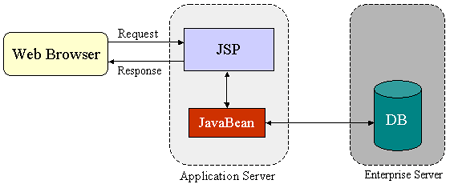
Figure 2: JSP Model 1 Architecture
The Model 2 architecture, as shown in Figure 3, integrates the use of both servlets and JSP pages. In this mode, JSP pages are used for the presentation layer, and servlets for processing tasks. The servlet acts as a controller responsible for processing requests and creating any beans needed by the JSP page. The controller is also responsible for deciding to which JSP page to forward the request. The JSP page retrieves objects created by the servlet and extracts dynamic content for insertion within a template.
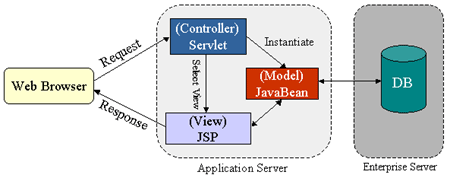
Figure 3: JSP Model 2 Architecture
This model promotes the use of the Model View Controller (MVC) architectural style design pattern. Note that several frameworks already exist that implement this useful design pattern, and that truly separate presentation from content. The Apache Struts is a formalized framework for MVC. This framework is best used for complex applications where a single request or form submission can result in substantially different-looking results.
Conclusion
Best practices -- which are proven solutions to recurring problems -- lead to higher quality applications. This article presented several guidelines and best practices to follow when developing servlet- and JSP-based web applications.
Keep an eye on servlets and JSP technologies, because several exciting things are in the works. JavaServer Faces (JFC), for example, a Java Community Process effort that aims to define a standard web application framework, will integrate nicely with Apache Struts.
For more information
- Tomcat
- Servlets
- JavaServer Pages
- Enterprise BluePrints
- Apache Struts
- Code Conventions for the JavaServer Pages Technology Version 1.x Language
- Java Server Faces (JSF)
Acknowledgments
Special thanks to Gregory Murray of Sun Microsystems, whose feedback helped me improve this article.
About the author
Qusay H. Mahmoud provides Java consulting and training services. He has published dozens of articles on Java, and is the author of Distributed Programming with Java (Manning Publications, 1999) and Learning Wireless Java (O'Reilly, 2002).