How To: Set Up a Data Source within Tomcat 6.0 using Oracle Universal Connection Pool
by Pas Apicella
Published April 2011
The following how-to shows how to set up a Data Source within Tomcat 6.0 using Oracle Universal Connection Pool (UCP) as the Data Source Implementation. This demo assumes the following are installed:
Required Setup
The following assumes you already have Tomcat 6.0 installed on your machine.
1. Copy ojdbc6.jar and ucp.jar into $TOMCAT_HOME/lib directory. You can download those JAR files from here.
2. Add your Data Source setup in $TOMCAT_HOME/conf/server.xml as follows.
  &Resource
       name="jdbc/UCPPool"
       auth="Container"
       factory="oracle.ucp.jdbc.PoolDataSourceImpl"
       type="oracle.ucp.jdbc.PoolDataSource"
       description="Pas testing UCP Pool in Tomcat"
       connectionFactoryClassName="oracle.jdbc.pool.OracleDataSource"
       minPoolSize="2"
       maxPoolSize="5"
       inactiveConnectionTimeout="20"
       user="scott"
       password="tiger"
       url="jdbc:oracle:thin:@(DESCRIPTION=(ADDRESS=(PROTOCOL=TCP)
            (HOST=beast.au.oracle.com)(PORT=1523))(CONNECT_DATA=
            (SERVICE_NAME=linux11gr2)))"
       connectionPoolName="UCPPool"
       validateConnectionOnBorrow="true"
       sqlForValidateConnection="select 1 from DUAL" />
3 In your Web projects you deploy to Tomcat, add the following to the web.xml.
  jdbc/UCPPool
  javax.sql.DataSource
  <Container
4. Your code to lookup the data source would be as follows.
private DataSource getDataSource (String dataSourceLocation) throws NamingException
  {
    // Get a context for the JNDI look up
    Context ctx = new InitialContext();
    Context envContext = (Context) ctx.lookup("java:/comp/env");

    // Look up a data source
    javax.sql.DataSource ds
      = (javax.sql.DataSource) envContext.lookup (dataSourceLocation);

    return ds;
  }

  private Connection getConnection (DataSource ds) throws SQLException
  {
    Connection conn = null;
    // Get a connection object
    conn = ds.getConnection();

    return conn;
  }
Note: The dataSouceLocation would be "jdbc/UCPPool".
Test Setup
works as documented. We do not guarantee that it will work for you, so be sure to test it in your environment before relying on it.
Proofread this sample code before using it! Due to the differences in the way text editors, e-mail packages, and operating systems handle text formatting (spaces, tabs and carriage returns), this sample code may not be in an executable state when you first receive it. Check over the sample code to ensure that errors of this type are corrected.
1. Start your Tomcat server.
8/06/2010 11:09:54 org.apache.catalina.core.AprLifecycleListener init
INFO: Loaded APR based Apache Tomcat Native library 1.1.20.
8/06/2010 11:09:55 org.apache.catalina.core.AprLifecycleListener init
INFO: APR capabilities: IPv6 [true], sendfile [true], accept filters [false], ra
ndom [true].
8/06/2010 11:09:56 org.apache.coyote.http11.Http11AprProtocol init
INFO: Initializing Coyote HTTP/1.1 on http-8080
8/06/2010 11:09:56 org.apache.coyote.ajp.AjpAprProtocol init
INFO: Initializing Coyote AJP/1.3 on ajp-8009
8/06/2010 11:09:56 org.apache.catalina.startup.Catalina load
INFO: Initialization processed in 2183 ms
8/06/2010 11:09:56 org.apache.catalina.core.StandardService start
INFO: Starting service Catalina
8/06/2010 11:09:56 org.apache.catalina.core.StandardEngine start
INFO: Starting Servlet Engine: Apache Tomcat/6.0.26
8/06/2010 11:09:57 org.apache.catalina.startup.HostConfig deployDescriptor
INFO: Deploying configuration descriptor host-manager.xml
8/06/2010 11:09:57 org.apache.catalina.startup.HostConfig deployDescriptor
INFO: Deploying configuration descriptor manager.xml
8/06/2010 11:09:57 org.apache.catalina.startup.HostConfig deployDirectory
INFO: Deploying web application directory docs
8/06/2010 11:09:57 org.apache.catalina.startup.HostConfig deployDirectory
INFO: Deploying web application directory examples
8/06/2010 11:09:57 org.apache.catalina.startup.HostConfig deployDirectory
INFO: Deploying web application directory ROOT
8/06/2010 11:09:58 org.apache.coyote.http11.Http11AprProtocol start
INFO: Starting Coyote HTTP/1.1 on http-8080
8/06/2010 11:09:58 org.apache.coyote.ajp.AjpAprProtocol start
INFO: Starting Coyote AJP/1.3 on ajp-8009
8/06/2010 11:09:58 org.apache.catalina.startup.Catalina start
INFO: Server startup in 1756 ms
2. Download the sample WAR file.
3. Place WAR file into your $TOMCAT_HOME/webapps directory which by default automatically deploys the WAR file for you.
4. Once deployed access as follows.
http://:/demods
5. Enter details as shown below to obtain a few connections.

6. Click the Test Data Source button and verify output as shown below.
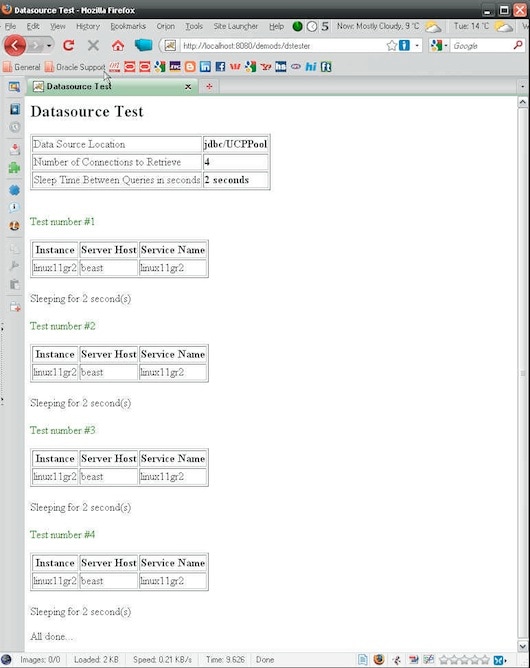
7. From where the Tomcat server is running, start up "jconsole" from your JDK 1.6 as shown below.
jconsole
8. Connect to "org.apache.catalina.startup.Bootstrap start 3772".
9. Select the MBeans tab.
10. Drill into the "oracle.ucp.admin.UniversalConnectionPoolMBean" as shown below.

More Information
Oracle Universal Connection Pool for JDBC Developer's Guide 11g Release 2 (11.2)