 文章
服务器与存储管理
文章
服务器与存储管理
如何使用 SR-IOV/IB 接口为双节点集群安装和配置 Oracle Solaris Cluster 4.1
作者:Venkat Chennuru
如何快速、轻松地为两个节点安装和配置 Oracle Solaris Cluster 4.1 软件,包括配置仲裁设备。
2014 年 9 月发布
目录
简介
SR-IOV 概述
先决条件、假设和默认设置
执行安装前检查
配置 Oracle Solaris Cluster 发布者
安装 Oracle Solaris Cluster 软件包
配置 Oracle Solaris Cluster 软件
验证高可用性(可选)
另请参见
关于作者
|
简介
本文旨在帮助新老 Oracle Solaris 用户快速、轻松地在两个节点上安装和配置 Oracle Solaris Cluster 软件,包括创建单根 I/O 虚拟化/InfiniBand (SR-IOV/IB) 设备。本文提供了分步过程来简化此流程。
本文不包括高可用性服务的配置。有关如何安装和配置其他 Oracle Solaris Cluster 软件配置的更多详细信息,请参见 Oracle Solaris Cluster 软件安装指南。
本文使用交互式 scinstall 实用程序轻松、快速地配置集群中的所有节点。交互式 scinstall 实用程序是菜单驱动的。菜单使用默认值、提示您提供特定于您集群的信息,有助于降低出错的可能性并促进最佳实践。该实用程序还能识别无效条目,有助于防止出错。最后,scinstall 实用程序可以为新集群自动配置仲裁设备,无需手动配置仲裁设备。
注:本文适用于 Oracle Solaris Cluster 4.1 版。有关 Oracle Solaris Cluster 版本的更多信息,请参见 Oracle Solaris Cluster 4.1 版本说明。
SR-IOV 概述
SR-IOV 是基于 PCI-SIG 标准的 I/O 虚拟化规范。SR-IOV 允许一种被称为物理功能 (PF) 的 PCIe 功能创建多个称为虚拟功能 (VF) 的轻型 PCIe 功能。VF 看上去类似普通 PCIe 功能,其运行也类似普通 PCIe 功能。VF 地址空间得到了很好的控制,因此可以借助虚拟机管理程序将 VF 分配给虚拟机(逻辑域,即 LDom)。与 LDom 技术中提供的其他形式的直接硬件访问方法(即 PCIe 总线分配和直接 I/O)相比,SR-IOV 提供了高度共享。
先决条件、假设和默认设置
本节讨论适用于双节点集群的一些先决条件、假设和默认设置。
配置假设
本文假设使用以下配置:
- 您在 Oracle Solaris 11.1 上安装双节点集群并且具备基本系统管理技能。
- 您要安装 Oracle Solaris Cluster 4.1 软件。
- 集群硬件配置支持 Oracle Solaris Cluster 4.1 软件。
- 这是一个 Oracle SPARC T4-4 服务器双节点集群。SR-IOV 仅在基于 Oracle SPARC T4(及更高版本)处理器的服务器上受支持。
- 每个集群节点是一个 I/O 域。
- 每个节点有两个用作专用互连(也称为传输)的空闲网络接口,以及至少一个连接到公共网络的网络接口。
- iSCSI 共享存储连接到这两个节点。
- 您的配置与图 1 类似。您可能具有更少或更多的设备,具体取决于您的系统或网络配置。
此外,建议但不要求在集群安装期间通过控制台访问节点。
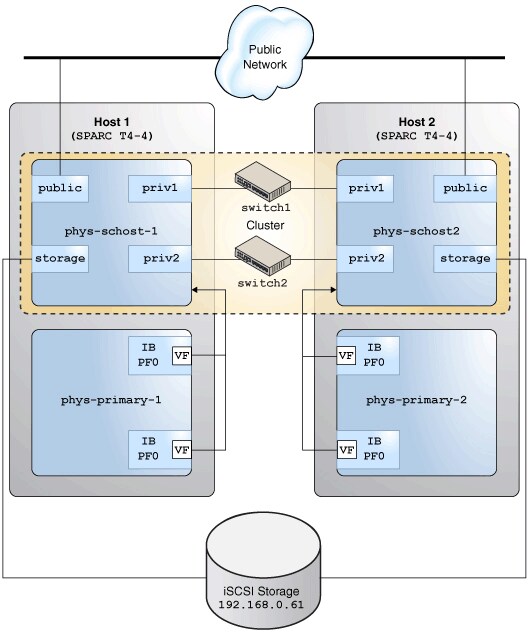
图 1. Oracle Solaris Cluster 硬件配置
先决条件
执行以下先决任务:
- 确保两个 SPARC T4-4 系统上都安装了 Oracle Solaris 11.1 SRU13。
- 执行公共 IP 地址和逻辑主机名的初始准备。
您必须具有将配置集群的节点的逻辑名称(主机名称)和 IP 地址。将这些条目添加到每个节点的
/etc/inet/hosts文件,或添加到命名服务(如果使用 DNS、NIS 或 NIS+ 映射等命名服务)。本文中的示例使用 NIS 服务。表 1 列出此示例中使用的配置。
表 1. 配置组件 名称 接口 IP 地址 集群 phys-schost— — 节点 1 phys-schost-1igbvf01.2.3.4 节点 2 phys-schost-2igbvf01.2.3.5 - 为公共网络、专用网络和存储网络创建 SR-IOV VF 设备。
您必须在相应的适配器上为主域中的公共网络、专用网络和存储网络创建 VF 设备,并将这些 VF 设备分配给将配置为集群节点的逻辑域。
在控制域
phys-primary-1上键入清单 1 中所示命令:root@phys-primary-1# ldm ls-io|grep IB /SYS/PCI-EM0/IOVIB.PF0 PF pci_0 primary /SYS/PCI-EM1/IOVIB.PF0 PF pci_0 primary /SYS/PCI-EM0/IOVIB.PF0.VF0 VF pci_0 primary root@phys-primary-1# ldm start-reconf primary root@phys-primary-1# ldm create-vf /SYS/MB/NET2/IOVNET.PF0 root@phys-primary1# ldm create-vf /SYS/PCI-EM0/IOVIB.PF0 root@phys-primary-1# ldm create-vf /SYS/PCI-EM1/IOVIB.PF0 root@phys-primary-1# ldm add-domain domain1 root@phys-primary-1# ldm add-vcpu 128 domain1 root@phys-primary-1# ldm add-mem 128g domain1 root@phys-primary-1# ldm add-io /SYS/MB/NET2/IOVNET.PF0.VF1 domain1 root@phys-primary-1# ldm add-io /SYS/PCI-EM0/IOVIB.PF0.VF1 domain1 root@phys-primary-1# ldm add-io /SYS/PCI-EM1/IOVIB.PF0.VF1 domain1 root@phys-primary-1# ldm ls-io | grep domain1 /SYS/MB/NET2/IOVNET.PF0.VF1 VF pci_0 domain1 /SYS/PCI-EM0/IOVIB.PF0.VF1 VF pci_0 domain1 /SYS/PCI-EM0/IOVIB.PF0.VF2 VF pci_0 domain1
清单 1
VF
IOVNET.PF0.VF1用于公共网络。IB VF 设备有一些分区同时托管专用网络和存储网络设备。在
phys-primary-2上重复清单 1 中所示命令。安装集群软件之前,两个节点上的 I/O 域domain1都必须安装 Oracle Solaris 11.1 SRU13。
注:要了解有关 SR-IOV 技术的更多信息,请参见 Oracle VM Server for SPARC 3.1 文档。有关 InfiniBand VF 的信息,请参见“使用 InfiniBand SR-IOV 虚拟功能”。
默认设置
scinstall 交互式实用程序以 Typical 模式安装 Oracle Solaris Cluster 软件,并使用以下默认设置:
- 专用网络地址 172.16.0.0
- 专用网络掩码 255.255.248.0
- 集群传输交换机
switch1和switch2
执行安装前检查
- 针对集群节点上的
root临时启用rsh或ssh访问。 - 登录到要安装 Oracle Solaris Cluster 软件的集群节点并成为超级用户。
- 在每个节点上,验证
/etc/inet/hosts文件条目。如果未提供任何其他名称解析服务,则将另一个节点的名称和 IP 地址添加到此文件。
节点 1 上的
/etc/inet/hosts文件包含以下信息。# Internet host table # ::1 phys-schost-1 localhost 127.0.0.1 phys-schost-1 localhost loghost
节点 2 上的
/etc/inet/hosts文件包含以下信息。# Internet host table # ::1 phys-schost-2 localhost 127.0.0.1 phys-schost-2 localhost loghost
- 在每个节点上,验证至少有一个共享存储磁盘。
在本例中,两个节点之间共享以下磁盘:
c0t600A0B800026FD7C000019B149CCCFAEd0和c0t600A0B800026FD7C000019D549D0A500d0。# format Searching for disks...done AVAILABLE DISK SELECTIONS: 0. c4t0d0 <FUJITSU-MBB2073RCSUN72G-0505 cyl 8921 alt 2 hd 255 sec 63> /pci@7b,0/pci1022,7458@11/pci1000,3060@2/sd@0,0 /dev/chassis/SYS/HD0/disk 1. c4t1d0 <SUN72G cyl 14084 alt 2 hd 24 sec 424> /pci@7b,0/pci1022,7458@11/pci1000,3060@2/sd@1,0 /dev/chassis/SYS/HD1/disk 2. c0t600144F0CD152C9E000051F2AFE20007d0 <SUN-ZFS Storage 7420-1.0 cyl 648 alt 2 hd 254 sec 254> /scsi_vhci/ssd@g600144f0cd152c9e000051f2afe20007 3. c0t600144F0CD152C9E000051F2AFF00008d0 <SUN-ZFS Storage 7420-1.0 cyl 648 alt 2 hd 254 sec 254> /scsi_vhci/ssd@g600144f0cd152c9e000051f2aff00008 - 在每个节点上,确保安装了正确的操作系统版本。
# more /etc/release Oracle Solaris 11.1 SPARC Copyright (c) 1983, 2013, Oracle and/or its affiliates. All rights reserved. Assembled 06 November 2013 - 确保网络接口配置为静态 IP 地址(而不是 DHCP 或
addrconf类型,如命令ipadm show-addr -o all所显示的)。
如果网络接口未 配置为静态 IP 地址,则在每个节点上运行清单 2 所示的命令,取消所有网络接口和服务配置。
如果节点已 配置为静态,则继续到“配置 Oracle Solaris Cluster 发布者”一节。
# netadm enable -p ncp defaultfixed
Enabling ncp 'DefaultFixed'
phys-schost-1: Sep 27 08:19:19 phys-schost-1 in.ndpd[1038]: Interface net0 has been removed from
 kernel. in.ndpd will no longer use it
Sep 27 08:19:19 phys-schost-1 in.ndpd[1038]: Interface net1 has been removed from kernel
. in.ndpd will no longer use it
Sep 27 08:19:19 phys-schost-1 in.ndpd[1038]: Interface net2 has been removed from kernel
. in.ndpd will no longer use it
Sep 27 08:19:20 phys-schost-1 in.ndpd[1038]: Interface net3 has been removed from kernel
. in.ndpd will no longer use it
Sep 27 08:19:20 phys-schost-1 in.ndpd[1038]: Interface net4 has been removed from kernel
. in.ndpd will no longer use it
Sep 27 08:19:20 phys-schost-1 in.ndpd[1038]: Interface net5 has been removed from kernel
. in.ndpd will no longer use it
清单 2
- 在每个节点上,键入以下命令,配置命名服务并更新名称服务交换机配置:
# svccfg -s svc:/network/nis/domain setprop config/domainname = hostname: nisdomain.example.com
# svccfg -s svc:/network/nis/domain:default refresh
# svcadm enable svc:/network/nis/domain:default
# svcadm enable svc:/network/nis/client:default
# /usr/sbin/svccfg -s svc:/system/name-service/switch setprop config/host = astring: \"files nis\"
# /usr/sbin/svccfg -s svc:/system/name-service/switch setprop config/netmask = astring: \"files nis\"
# /usr/sbin/svccfg -s svc:/system/name-service/switch setprop config/automount = astring: \"files nis\"
# /usr/sbin/svcadm refresh svc:/system/name-service/switch
- 将每个节点绑定到 NIS 服务器。
# ypinit -c
- 重新启动每个节点以确保新的网络配置运行正常。
配置 Oracle Solaris Cluster 发布者
可通过两种主要方法访问 Oracle Solaris Cluster 软件包信息库,具体取决于集群节点是否可直接(或通过 Web 代理)访问互联网:使用 pkg.oracle.com 上托管的信息库或使用该信息库的本地副本。
使用 pkg.oracle.com 上托管的信息库
要访问 Oracle Cluster Solaris 版本信息库或支持信息库,需获得 SSL 公钥和私钥。
- 转到 http://pkg-register.oracle.com。
- 选择 Oracle Solaris Cluster 版本或支持信息库。
- 接受许可。
- 选择 Oracle Solaris Cluster 软件并提交请求,请求新证书。这将显示一个认证页面,其中包含下载密钥和证书文件的下载按钮。
- 下载密钥和证书文件并进行安装,如返回的认证页面所述。
- 通过已下载的 SSL 密钥配置
ha-cluster发布者,使其指向pkg.oracle.com上选定的信息库 URL。
本示例使用了版本信息库:
# pkg set-publisher \
-k /var/pkg/ssl/Oracle_Solaris_Cluster_4.key.pem \
-c /var/pkg/ssl/Oracle_Solaris_Cluster_4.certificate.pem \
-g https://pkg.oracle.com/ha-cluster/release/ ha-cluster
使用信息库的本地副本
要访问 Oracle Solaris Cluster 版本信息库或支持信息库的本地副本,请下载信息库映像。
- 从 Oracle 技术网或 Oracle 软件交付云下载信息库映像。
要从 Oracle 软件交付云下载信息库映像,在 Media Pack Search 页面中选择 Oracle Solaris 作为 Product Pack。
- 挂载信息库映像并将数据复制到所有集群节点均可访问的共享文件系统。
# mount -F hsfs <path-to-iso-file> /mnt
# rsync -aP /mnt/repo /export
# share /export/repo
- 配置
ha-cluster发布者。
本示例使用节点 1 作为共享信息库本地副本的系统:
# pkg set-publisher -g file:///net/phys-schost-1/export/repo ha-cluster
安装 Oracle Solaris Cluster 软件包
- 在每个节点上,确保发布了正确的 Oracle Solaris 软件包信息库。
如果不正确,则取消不正确发布者的设置,并设置正确的发布者。如果
ha-cluster软件包无法访问solaris发布者,则此软件包的安装很可能失败。# pkg publisher PUBLISHER TYPE STATUS URI solaris origin online <solaris repository> ha-cluster origin online <ha-cluster repository>
- 在每个集群节点上,安装
ha-cluster-full软件包组。
# pkg install ha-cluster-full

           Packages to install:  68
       Create boot environment:  No
Create backup boot environment: Yes
            Services to change:   1

DOWNLOAD                                  PKGS       FILES    XFER (MB)
Completed                                68/68   6456/6456    48.5/48.5$<3>

PHASE                                        ACTIONS
Install Phase                              8928/8928

PHASE                                          ITEMS
Package State Update Phase                     68/68
Image State Update Phase                         2/2
Loading smf(5) service descriptions: 9/9
Loading smf(5) service descriptions: 57/57
配置 Oracle Solaris Cluster 软件
- 在每个集群节点上,识别将用于专用互连的网络接口。
在本例中,用于传输的专用 IB 分区的 PKEY 为 8513 和 8514。用于从具有 IB 连接的 Oracle ZFS 存储设备配置 iSCSI 存储的专用存储网络的 PKEY 为 8503。
InfiniBand 网络上为 Oracle ZFS 存储设备配置的 IP 地址为 192.168.0.61。
priv1和priv2IB 分区用作专用网络的专用互连。storage1和storage2分区用于存储网络。在节点 1 上键入以下命令:
phys-schost-1# dladm show-ib |grep net
net6      21290001EF8BA2 14050000000001 1    up      localhost    0a-eth-1 8031,8501,8511,8513,8521,FFFF
net7      21290001EF8BA2 14050000000008 2    up      localhost    0a-eth-1 8503,8514,FFFF
phys-schost-1# dladm create-part -l net6 -P 8513 priv1
phys-schost-1# dladm create-part -l net7 -P 8514 priv2
phys-schost-1# dladm create-part -l net6 -P 8503 storage1
phys-schost-1# dladm create-part -l net7 -P 8503 storage2
phys-schost-1# dladm show-part
LINK         PKEY   OVER         STATE    FLAGS
priv1        8513   net6         up       ----
priv2        8514   net7         up       ----
storage1     8503   net6         up       ----
storage2     8503   net7         up       ----
phys-schost-1# ipadm create-ip storage1
phys-schost-1# ipadm create-ip storage2
phys-schost-1# ipadm create-ipmp -i storage1 -i storage2 storage_ipmp0
phys-schost-1# ipadm create-addr -T static -a 192.168.0.41/24 storage_ipmp0/address1
phys-schost-1# iscsiadm add static-config iqn.1986-03.com.sun:02:a87851cb-4bad-c0e5-8d27-dd76834e6985,192.168.10.61
在节点 2 上键入以下命令:
phys-schost-2# dladm show-ib |grep net
net9      21290001EF8FFE 1405000000002B 2    up      localhost    0a-eth-1 8032,8502,8512,8516,8522,FFFF
net6      21290001EF4E36 14050000000016 1    up      localhost    0a-eth-1 8031,8501,8511,8513,8521,FFFF
net7      21290001EF4E36 1405000000000F 2    up      localhost    0a-eth-1 8503,8514,FFFF
net8      21290001EF8FFE 14050000000032 1    up      localhost    0a-eth-1 8503,8515,FFFF
phys-schost-2# dladm create-part -l net6 -P 8513 priv1
phys-schost-2# dladm create-part -l net7 -P 8514 priv2
phys-schost-2# dladm create-part -l net6 -P 8503 storage1
phys-schost-2# dladm create-part -l net7 -P 8503 storage2
phys-schost-2# dladm show-part
LINK         PKEY   OVER         STATE    FLAGS
priv1        8513   net6         up       ----
priv2        8514   net7         up       ----
storage1     8503   net6         up       ----
storage2     8503   net7         up       ----
phys-schost-2# ipadm create-ip storage1
phys-schost-2# ipadm create-ip storage2
phys-schost-2# ipadm create-ipmp -i storage1 -i storage2 storage_ipmp0
phys-schost-2# ipadm create-addr -T static -a 192.168.0.42/24 storage_ipmp0/address1
phys-schost-2# iscsiadm add static-config iqn.1986-03.com.sun:02:a87851cb-4bad-c0e5-8d27-dd76834e6985,192.168.10.61
- 在每个节点上,确保 Oracle Solaris 服务管理工具服务未处于维护状态。
# svcs -x
- 在每个节点上,确保服务
network/rpc/bind:default将local_only配置设置为false。
# svcprop network/rpc/bind:default | grep local_only
config/local_only boolean false
如果不是,将
local_only配置设置为false。# svccfg svc:> select network/rpc/bind svc:/network/rpc/bind> setprop config/local_only=false svc:/network/rpc/bind> quit # svcadm refresh network/rpc/bind:default # svcprop network/rpc/bind:default | grep local_only config/local_only boolean false
- 在其中一个节点上,启动 Oracle Solaris Cluster 配置。这将同时配置另一个节点上的软件。
在本例中,在节点 2
phys-schost-2上运行以下命令。# /usr/cluster/bin/scinstall *** Main Menu *** Please select from one of the following (*) options: * 1) Create a new cluster or add a cluster node * 2) Print release information for this cluster node * ?) Help with menu options * q) Quit Option: 1
在主菜单中,键入
1选择第一个菜单项,可用于创建新集群或添加集群节点。*** Create a New Cluster *** This option creates and configures a new cluster. Press Control-D at any time to return to the Main Menu. Do you want to continue (yes/no) [yes]? Checking the value of property "local_only" of service svc:/network/rpc/bind ... Property "local_only" of service svc:/network/rpc/bind is already correctly set to "false" on this node. Press Enter to continue:
回答
yes,然后按 Enter 转到安装模式选择。然后选择默认模式:Typical。>>> Typical or Custom Mode <<< This tool supports two modes of operation, Typical mode and Custom mode. For most clusters, you can use Typical mode. However, you might need to select the Custom mode option if not all of the Typical mode defaults can be applied to your cluster. For more information about the differences between Typical and Custom modes, select the Help option from the menu. Please select from one of the following options: 1) Typical 2) Custom ?) Help q) Return to the Main Menu Option [1]: 1
提供集群的名称。在本例中,键入集群名称
phys-schost。>>> Cluster Name <<< Each cluster has a name assigned to it. The name can be made up of any characters other than whitespace. Each cluster name should be unique within the namespace of your enterprise. What is the name of the cluster you want to establish? phys-schost
提供另一节点的名称。在本例中,另一节点的名称为
phys-schost-1。按 ^D 完成列表。回答yes确认节点列表。>>> Cluster Nodes <<< This Oracle Solaris Cluster release supports a total of up to 16 nodes. List the names of the other nodes planned for the initial cluster configuration. List one node name per line. When finished, type Control-D: Node name (Control-D to finish): phys-schost-1 Node name (Control-D to finish): ^D This is the complete list of nodes: phys-schost-2 phys-schost-1 Is it correct (yes/no) [yes]?
下两个屏幕将配置集群的专用互连,也称为传输适配器。选择
priv1和priv2IB 分区。>>> Cluster Transport Adapters and Cables <<< Transport adapters are the adapters that attach to the private cluster interconnect. Select the first cluster transport adapter: 1) net1 2) net2 3) net3 4) net4 5) net5 6) priv1 7) priv2 8) Other Option: 6 Adapter "priv1" is an Infiniband adapter. Searching for any unexpected network traffic on "priv1" ... done Verification completed. No traffic was detected over a 10 second sample period. The "dlpi" transport type will be set for this cluster. For node "phys-schost-2", Name of the switch to which "priv1" is connected [switch1]? Each adapter is cabled to a particular port on a switch. And, each port is assigned a name. You can explicitly assign a name to each port. Or, for Ethernet and Infiniband switches, you can choose to allow scinstall to assign a default name for you. The default port name assignment sets the name to the node number of the node hosting the transport adapter at the other end of the cable. For node "phys-schost-2", Use the default port name for the "priv1" connection (yes/no) [yes]? Select the second cluster transport adapter: 1) net1 2) net2 3) net3 4) net4 5) net5 6) priv1 7) priv2 8) Other Option: 7 Adapter "priv2" is an Infiniband adapter. Searching for any unexpected network traffic on "priv2" ... done Verification completed. No traffic was detected over a 10 second sample period. The "dlpi" transport type will be set for this cluster. For node "phys-schost-2", Name of the switch to which "priv2" is connected [switch2]? For node "phys-schost-2", Use the default port name for the "priv2" connection (yes/no) [yes]?
下一个屏幕配置仲裁设备。对于 Quorum Configuration 屏幕中提出的问题,选择默认答案。
>>> Quorum Configuration <<<

    Every two-node cluster requires at least one quorum device. By
    default, scinstall selects and configures a shared disk quorum device
    for you.

    This screen allows you to disable the automatic selection and
    configuration of a quorum device.

    You have chosen to turn on the global fencing. If your shared storage
    devices do not support SCSI, such as Serial Advanced Technology
    Attachment (SATA) disks, or if your shared disks do not support
    SCSI-2, you must disable this feature.

    If you disable automatic quorum device selection now, or if you intend
    to use a quorum device that is not a shared disk, you must instead use
    clsetup(1M) to manually configure quorum once both nodes have joined
    the cluster for the first time.

    Do you want to disable automatic quorum device selection (yes/no) [no]?

  Is it okay to create the new cluster (yes/no) [yes]?
 During the cluster creation process, cluster check is run on each of the new
 cluster nodes. If cluster check detects problems, you can
    either interrupt the process or check the log files after the cluster
    has been established.

    Interrupt cluster creation for cluster check errors (yes/no) [no]?
最后几个屏幕打印有关节点配置的详细信息以及安装日志的文件名。然后,实用程序以集群模式重新启动每个节点。
Cluster Creation

    Log file - /var/cluster/logs/install/scinstall.log.3386

    Configuring global device using lofi on phys-schost-1: done

    Starting discovery of the cluster transport configuration.

    The following connections were discovered:

        phys-schost-2:priv1  switch1  phys-schost-1:priv1
        phys-schost-2:priv2  switch2  phys-schost-1:priv2

    Completed discovery of the cluster transport configuration.

    Started cluster check on "phys-schost-2".
    Started cluster check on "phys-schost-1".

...
...
...

Refer to the log file for details.
The name of the log file is /var/cluster/logs/install/scinstall.log.3386.


    Configuring "phys-schost-1" ... done
    Rebooting "phys-schost-1" ...
    Configuring "phys-schost-2" ...
    Rebooting "phys-schost-2" ...

Log file - /var/cluster/logs/install/scinstall.log.3386
scinstall实用程序完成时,基本 Oracle Solaris Cluster 软件的安装和配置便会完成。现在,集群已就绪,您可以配置将用于支持高度可用的应用的组件。这些集群组件可以包括设备组、集群文件系统、高度可用的本地文件系统以及各个数据服务和区域集群。要配置这些组件,请参见 Oracle Solaris Cluster 4.1 文档库。 - 在每个节点上,验证 Oracle Solaris 服务管理工具 (SMF) 的多用户服务已联机。确保 Oracle Solaris Cluster 添加的新服务全部已联机。
# svcs -x
# svcs multi-user-server
STATE          STIME    FMRI
online          9:58:44 svc:/milestone/multi-user-server:default
- 在其中一个节点上,验证两个节点均已加入集群。
# cluster status
=== Cluster Nodes ===
--- Node Status ---

Node Name                                 Status
---------                                 ------
phys-schost-1                             Online
phys-schost-2                             Online


=== Cluster Transport Paths ===
Endpoint1                        Endpoint2                       Status
---------                        ---------                       ------
phys-schost-1:priv1              phys-schost-2:priv1             Path online
phys-schost-1:priv2              phys-schost-2:priv2             Path online

=== Cluster Quorum ===
--- Quorum Votes Summary from (latest node reconfiguration) ---
           Needed   Present   Possible
           ------   -------   --------
           2        3         3

--- Quorum Votes by Node (current status) ---

Node Name         Present     Possible   Status
---------         -------     --------   ------
phys-schost-1     1           1          Online
phys-schost-2     1           1          Online


--- Quorum Votes by Device (current status) ---

Device Name       Present     Possible    Status
-----------       -----       -------     -----
d1                1           1           Online


=== Cluster Device Groups ===

--- Device Group Status ---

Device Group Name     Primary     Secondary     Status
-----------------     -------     -------       ------


--- Spare, Inactive, and In Transition Nodes ---
Device Group Name   Spare Nodes   Inactive Nodes   In Transition Nodes
-----------------   ---------     --------------   --------------------

--- Multi-owner Device Group Status ---
Device Group Name        Node Name           Status
-----------------        -------             ------


=== Cluster Resource Groups ===
Group Name    Node Name       Suspended     State
----------    ---------       ---------     -----

=== Cluster Resources ===

Resource Name       Node Name       State       Status Message
-------------       ---------       -----       --------------

=== Cluster DID Devices ===
Device Instance               Node                           Status
---------------               ---                            ------
/dev/did/rdsk/d1              phys-schost-1                    Ok
                              phys-schost-2                    Ok
/dev/did/rdsk/d2              phys-schost-1                    Ok
                              phys-schost-2                    Ok
/dev/did/rdsk/d3              phys-schost-1                    Ok
/dev/did/rdsk/d4              phys-schost-1                    Ok
/dev/did/rdsk/d5              phys-schost-2                    Ok
/dev/did/rdsk/d6              phys-schost-2                    Ok

=== Zone Clusters ===

--- Zone Cluster Status ---

Name    Node Name    Zone HostName    Status    Zone Status
----    ---------    -------------    ------    ----------
验证高可用性(可选)
本节介绍如何创建一个故障切换资源组,其中包含高度可用的网络资源的 LogicalHostname 资源以及 zpool 资源中高度可用的 ZFS 文件系统的 HAStoragePlus 资源。
- 识别将用于此目的的网络地址并将其添加到节点上的
/etc/inet/hosts文件。在本例中,主机名为schost-lh。
节点 1 上的
/etc/inet/hosts文件包含以下信息:# Internet host table # ::1 localhost 127.0.0.1 localhost loghost 1.2.3.4 phys-schost-1 # Cluster Node 1.2.3.5 phys-schost-2 # Cluster Node 1.2.3.6 schost-lh
节点 2 上的
/etc/inet/hosts文件包含以下信息:# Internet host table # ::1 localhost 127.0.0.1 localhost loghost 1.2.3.4 phys-schost-1 # Cluster Node 1.2.3.5 phys-schost-2 # Cluster Node 1.2.3.6 schost-lh
在本示例中,将使用
schost-lh作为资源组的逻辑主机名。此资源的类型为SUNW.LogicalHostname,这是一种预先注册的资源类型。 - 在其中一个节点上,使用
/dev/did/rdsk/d1s0和/dev/did/rdsk/d2s0这两个共享存储磁盘创建一个 zpool。在本示例中,使用format实用程序将整个磁盘分配给磁盘的分片 0。
# zpool create -m /zfs1 pool1 mirror /dev/did/dsk/d1s0 /dev/did/dsk/d2s0
# df -k /zfs1
Filesystem           1024-blocks        Used   Available Capacity  Mounted on
pool1                20514816            31    20514722        1%      /zfs1
现在,创建的 zpool 将放在高度可用的资源组中,作为
SUNW.HAStoragePlus类型的资源。此资源类型必须先注册,然后才能进行首次使用。 - 要创建一个高度可用的资源组来存储资源,可在一个节点上键入以下命令:
# /usr/cluster/bin/clrg create test-rg
- 将网络资源添加到
test-rg组。
# /usr/cluster/bin/clrslh create -g test-rg -h schost-lh schost-lhres
- 注册存储资源类型。
# /usr/cluster/bin/clrt register SUNW.HAStoragePlus
- 将 zpool 添加到组。
# /usr/cluster/bin/clrs create -g test-rg -t SUNW.HAStoragePlus -p zpools=pool1 hasp-res
- 使组联机:
# /usr/cluster/bin/clrg online -eM test-rg
- 检查组和资源的状态:
# /usr/cluster/bin/clrg status

=== Cluster Resource Groups ===

Group Name       Node Name         Suspended      Status
----------       ---------         ---------      ------
test-rg          phys-schost-1     No             Online
                 phys-schost-2     No             Offline


# /usr/cluster/bin/clrs status

=== Cluster Resources ===

Resource Name       Node Name             State      Status Message
-------------       -------               -----      --------------
hasp-res             phys-schost-1        Online     Online
                     phys-schost-2        Offline    Offline

schost-lhres         phys-schost-1        Online     Online - LogicalHostname online.
                     phys-schost-2        Offline    Offline
命令输出显示节点 1 上的资源和组处于
online状态。 - 要验证可用性,将资源组切换到节点 2 并检查资源和组的状态。
# /usr/cluster/bin/clrg switch -n phys-schost-2 test-rg
# /usr/cluster/bin/clrg status

=== Cluster Resource Groups ===

Group Name       Node Name              Suspended     Status
----------       ---------              ---------     ------
test-rg          phys-schost-1          No            Offline
                 phys-schost-2          No            Online

# /usr/cluster/bin/clrs status

=== Cluster Resources ===

Resource Name       Node Name              State        Status Message
-------------       ---------              -----         --------------
hasp-res            phys-schost-1          Offline      Offline
                    phys-schost-2          Online       Online

schost-lhres        phys-schost-1          Offline      Offline - LogicalHostname offline.
                    phys-schost-2          Online       Online - LogicalHostname online.
另请参见
有关如何配置 Oracle Solaris Cluster 组件的更多信息,请参见以下资源。
- Oracle Solaris Cluster 4.1 文档库
- Oracle Solaris Cluster 软件安装指南
- Oracle Solaris Cluster 数据服务规划和管理指南
- Oracle Solaris Cluster 4.1 文档库中的各数据服务手册
- Oracle Solaris Cluster 管理培训
- Oracle Solaris Cluster 高级管理培训
- Oracle Solaris Cluster 4.1 版本说明
关于作者
在过去 14 年里,Venkat Chennuru 一直是 Oracle Solaris Cluster 组的质量带头人。
| 修订版 1.0,2014 年 9 月 16 日 |

 Printer View