 文章
服务器与存储管理
文章
服务器与存储管理
如何在 Solaris 区域集群上部署 Oracle RAC
作者:Vinh Tran
如何创建 Oracle Solaris 区域集群、在区域集群中安装和配置 Oracle Grid Infrastructure 11.2.0.2 和 Oracle Real Application Clusters 11.2.0.2,以及为 Oracle RAC 创建 Oracle Solaris Cluster 资源。
2012 年 5 月发布
下载 Oracle 软件补丁前提条件
使用
cfg 文件创建区域集群为区域集群创建 Oracle RAC 框架
在本地区域集群
z11gr2A 中设置根环境为 Oracle 软件创建用户和组
在 Oracle Solaris 区域集群节点中安装 Oracle Grid Infrastructure 11.2.0.2
将 OPatch 版本 11.2.0.1.1 替换为版本 11.2.0.1.6
使用 OPatch 将 Oracle Grid Infrastructure 11.2.0.2 补丁包 3 (GIB3) 应用于
GRID_HOME使用 OPatch 将补丁 10055663 应用于
GRID_HOME配置 Oracle Grid Infrastructure
安装和修补 Oracle 数据库
使用 OPatch 将 Oracle Grid Infrastructure 11.2.0.2 补丁包 3 (GIB3) 应用于 Oracle 数据库
创建数据库
创建 Oracle Solaris Cluster 资源
另请参见
关于作者
|
本文介绍如何使用 Oracle Solaris Cluster 3.3 5/11 为 Oracle Real Application Cluster (Oracle RAC) 11.2.0.2 提供虚拟的多层架构。
Oracle Solaris Cluster 3.3 可用于创建高可用性区域集群。一个区域集群包含多个 Oracle Solaris 区域,每个区域都分别驻留在其各自独立的服务器上;组成集群的各个区域链接到单个虚拟集群。因为区域集群之间是相互隔离开的,所以各区域集群的安全性获得到加强。因为区域是聚集在一起的,所以各区域所承载应用程序的可用性得到提高。
通过在区域集群内安装 Oracle RAC,即可同时运行同一 Oracle 数据库的多个实例。这样您便可以为同一数据库创建不同的数据库版本或进行不同的部署(例如,一个用于生产,一个用于开发)。使用此架构,您还可以将多层解决方案的不同部分部署到不同的虚拟区域集群中。例如,您可以将 Oracle RAC 和应用程序服务器部署在同一集群的不同区域中。使用该方法可以在充分利用 Oracle Solaris Cluster 简化管理的同时将层和管理域相互隔离开来。
注:本文档并非 一本指导如何获得最佳性能的操作指南,本文档不涉及下列主题:
- Oracle Solaris 操作系统安装
- 存储配置
- 网络配置
- Oracle Solaris Cluster 安装
下载 Oracle 软件补丁
要下载 Oracle 补丁,请登录 My Oracle Support 后执行以下操作:
- 单击 Patches & Updates 选项卡。
- 在 Patch Name or Number 域中,键入 <
补丁 ID>。 - 在 Platform 域中,选择相关平台。
- 单击 Search 按钮。
- 选择与您系统上安装的 Oracle 版本相对应的补丁。
以下是您需要下载的 Oracle 软件补丁:
- 适用于 Oracle 数据库服务器的补丁集 11.2.0.2,补丁 ID 10098816
- 11.2.0.2 补丁包 3 (GIB 3),补丁 ID 12419353
- 适用于 OPatch 的补丁 ID 6880880
- 适用于
CONFIGURATION WIZARD FAILS TO PROCEED AFTER NODES ARE SPECIFIED错误的补丁 ID 10055663
前提条件
请确保满足以下前提条件。
- 安装并配置了 Oracle Solaris 10 9/10 和 Oracle Solaris Cluster 3.3 5/11。
- 在全局区域内的
/etc/system文件中配置了 Oracle Solaris 10 内核参数。下面是推荐的值的示例:
noexec_user_stack 1
semsys:seminfo_semmni 100
semsys:seminfo_semmns 1024
semsys:seminfo_semmsl  256
semsys:seminfo_semvmx 32767
shmsys:shminfo_shmmax 4294967295
shmsys:shminfo_shmmni 100
- 已知共享磁盘(也称作
/dev/did/rdsk设备)。清单 1 是如何从任意集群节点的全局区域中识别共享磁盘的示例。
phyhost1# cldev status

=== Cluster DID Devices ===

Device Instance	Node		Status

/dev/did/rdsk/d1	phyhost1	Ok

/dev/did/rdsk/d10	phyhost1	Ok
			phyhost2	Ok
			phyhost3	Ok
			phyhost4	Ok

/dev/did/rdsk/d14	phyhost		Ok
			phyhost2	Ok
			phyhost3	Ok
			phyhost4	Ok

/dev/did/rdsk/d15	phyhost1	Ok
			phyhost2	Ok
			phyhost3	Ok
			phyhost4	Ok

/dev/did/rdsk/d16	phyhost1	Ok
			phyhost2	Ok
			phyhost3	Ok
			phyhost4	Ok

/dev/did/rdsk/d17	phyhost1	Ok
			phyhost2	Ok
			phyhost3	Ok
			phyhost3	Ok

/dev/did/rdsk/d18	phyhost1	Ok
			phyhost2	Ok
			phyhost3	Ok
			phyhost4	Ok

/dev/did/rdsk/d19	phyhost2	Ok

/dev/did/rdsk/d2	phyhost1	Ok

/dev/did/rdsk/d20	phyhost2	Ok

/dev/did/rdsk/d21	phyhost3	Ok

/dev/did/rdsk/d22	phyhost3	Ok

/dev/did/rdsk/d23	phyhost4	Ok

/dev/did/rdsk/d24	phyhost4	Ok

/dev/did/rdsk/d6	phyhost1	Ok
			phyhost2	Ok
			phyhost3	Ok
			phyhost4	Ok

/dev/did/rdsk/d7	phyhost1	Ok
			phyhost2	Ok
			phyhost3	Ok
			phyhost4	Ok

/dev/did/rdsk/d8	phyhost1	Ok
			phyhost2	Ok
			phyhost3	Ok
			phyhost4	Ok

/dev/did/rdsk/d9	phyhost1	Ok
			phyhost2	Ok
			phyhost3	Ok
			phyhost4	Ok
清单 1. 识别共享磁盘
输出显示
phyhost1、phyhost2、phyhost3和phyhost4共享的磁盘为设备d10。同样,d14、d15、d16、d17、d18、d6、d7、d8和d9也是共享设备。 - Oracle 自动存储管理磁盘组将使用下列共享磁盘来存储 Oracle 集群注册表和表决文件:
/dev/did/rdsk/d6s6
/dev/did/rdsk/d7s6
ev/did/rdsk/d8s6
在本示例中,分片 6 为 6 GB。有关对磁盘大小的要求,请查看 Oracle Grid Infrastructure 安装指南。
- Oracle 自动存储管理磁盘组将使用下列共享磁盘来存储数据文件:
/dev/did/rdsk/d9s6
/dev/did/rdsk/d10s6
/dev/did/rdsk/d14s6
/dev/did/rdsk/d15s6
在本示例中,分片 6 为 102 GB。
- 已设置 Oracle 虚拟 IP (VIP) 和单客户端访问名称 (SCAN) IP 的要求,例如:
vzhost1d,IP 地址 10.134.35.99,用于 SCAN IP。vzhost1e,IP 地址 10.134.35.100,用作vzhost1c的 VIP。vzhost2e,IP 地址 10.134.35.101,用作vzhost2c的 VIP。vzhost3e,IP 地址 10.134.35.102,用作vzhost3c的 VIP。vzhost4e,IP 地址 10.134.35.103,用作vzhost4c的VIP。
- 公共网络拥有一个 IPMP 组,它有一个活动接口和一个备用接口。下面是为全局区域内名为
SC_ipmp0的 IPMP 组设置/etc/hostname.e1000g0和/etc/hostname.e1000g1的示例:
cat /etc/hostname.e1000g0
phyhost1 netmask + broadcast + group sc_ipmp0 up
cat /etc/hostname.e1000g1
group sc_ipmp0 standby up
使用 cfg 文件创建区域集群
要创建 Oracle Solaris 区域集群,请执行以下步骤:
- 按照清单 2 中所示创建
cfg文件。
cat /var/tmp/zone.cfg

create
set zonepath=/export/zones/z11gR2A
add node
set physical-host=phyhost1
set hostname=vzhost1c
add net
set address=10.134.35.56
set physical=e1000g0
end
end
add sysid
set name_service="NIS{domain_name=solaris.us.oracle.com}"
set root_password=passwd
end
add node
set physical-host=phyhost2
set hostname=vzhost2c
add net
set address=10.134.35.59
set physical=e1000g0
end
end
add node
set physical-host=phyhost3
set hostname=vzhost3c
add net
set address=10.134.35.62
set physical=e1000g0
end
end
add node
set physical-host=phyhost4
set hostname=vzhost4c
add net
set address=10.134.35.65
set physical=e1000g0
end
end
add net
set address=vzhost1d
end
add net
set address=vzhost2d
end
add net
set address=vzhost3d
end
add net
set address=vzhost4d
end
add net
set address=vzhost1e
end
add net
set address=vzhost2e
end
add net
set address=vzhost3e
end
add net
set address=vzhost4e
end
set limitpriv ="default,proc_priocntl,proc_clock_highres,sys_time"
add dedicated-cpu
set ncpus=16
end
add capped-memory
set physical=12g
set swap=12g
set locked=12g
end
add device
set match="/dev/did/rdsk/d6s6"
end
add device
set match="/dev/did/rdsk/d7s6"
end
add device
set match="/dev/did/rdsk/d8s6"
end
add device
set match="/dev/did/rdsk/d9s6"
end
add device
set match="/dev/did/rdsk/d10s6"
end
add device
set match="/dev/did/rdsk/d14s6"
end
add device
set match="/dev/did/rdsk/d15s6"
end
清单 2. 创建cfg文件 - 从一个节点运行清单 3 中所示的命令:
# clzonecluster configure -f /var/tmp/zone.cfg z11gr2A
# clzonecluster install z11gr2A

# clzonecluster status

=== Zone Clusters ===

--- Zone Cluster Status ---

Name      Node Name    Zone HostName   Status   Zone Status
----      ---------    -------------   ------   -----------
z11gr2A   phyhost1     vzhost1c       Offline   Installed
          phyhost2     vzhost2c       Offline   Installed
          phyhost3     vzhost3c       Offline   Installed
          phyhost4     vzhost4c       Offline   Installed

# clzc boot z11gr2A

# clzc status

=== Zone Clusters ===

--- Zone Cluster Status ---

Name      Node Name     Zone HostName   Status   Zone Status
----      ---------     -------------   ------   -----------
z11gr2A   phyhost1      vzhost1c        Online   Running
          phyhost2      vzhost2c        Online   Running
          phyhost3      vzhost3c        Online   Running
          phyhost4      vzhost4c        Online   Running
清单 3. 创建 Oracle Solaris 区域集群
为区域集群创建 Oracle RAC 框架
要创建 Oracle RAC 框架,请执行以下步骤:
- 以
root身份从一个全局区域集群节点执行clsetup,如清单 4 所示。
# /usr/cluster/bin/clsetup
  *** Main Menu ***

    Please select from one of the following options:

        1) Quorum
        2) Resource groups
        3) Data Services
        4) Cluster interconnect
        5) Device groups and volumes
        6) Private hostnames
        7) New nodes
        8) Other cluster tasks

        ?) Help with menu options
        q) Quit

    Option:  3

  *** Data Services Menu ***

    Please select from one of the following options:

      * 1) Apache Web Server
      * 2) Oracle
      * 3) NFS
      * 4) Oracle Real Application Clusters
      * 5) SAP Web Application Server
      * 6) Highly Available Storage
      * 7) Logical Hostname
      * 8) Shared Address

      * ?) Help
      * q) Return to the Main Menu

    Option:  4

  *** Oracle Solaris Cluster Support for Oracle RAC ***

    Oracle Solaris Cluster provides a support layer for running Oracle
    Real Application Clusters (RAC) database instances. This option allows
    you to create the Oracle RAC framework resource group, storage resources,
    database resources and administer them, for managing the Oracle
    Solaris Cluster support for Oracle RAC.

    After the Oracle RAC framework resource group has been created, you can use
    the Oracle Solaris Cluster system administration tools to administer a
    Oracle RAC framework resource group that is configured on a global cluster.
    To administer a Oracle RAC framework resource group that is configured on a
    zone cluster, instead use the appropriate Oracle Solaris Cluster command.
清单 4. 执行clsetup - 输入
yes(默认设置)继续,然后回答后续问题,如清单 5 所示。
    Is it okay to continue (yes/no) [yes]?
    Please select from one of the following options:

        1)  Oracle RAC Create Configuration
        2)  Oracle RAC Ongoing Administration

        q)  Return to the Data Services Menu

    Option:  1

   >>> Select Oracle Real Application Clusters Location <<<

    Oracle Real Application Clusters Location:

        1) Global Cluster
        2) Zone Cluster

    Option [2]:  2

   >>> Select Zone Cluster <<<

    From the list of zone clusters, select the zone cluster where you would like to
    configure Oracle Real Application Clusters.

        1) z11gr2A

        ?) Help
        d) Done

    Selected:  [z11gr2A]

   >>> Select Oracle Real Application Clusters Components to Configure <<<

    Select the component of Oracle Real Application Clusters that you are configuring:

        1) RAC Framework Resource Group
        2) Storage Resources for Oracle Files
        3) Oracle Clusterware Framework Resource
        4) Oracle Automatic Storage Management (ASM)
        5) Resources for Oracle Real Application Clusters Database Instances

    Option [1]: 1

   >>> Verify Prerequisites <<<


    This wizard guides you through the creation and configuration of the Real Application
    Clusters (RAC) framework resource group.

    Before you use this wizard, ensure that the following prerequisites are met:


    * All pre-installation tasks for Oracle Real Application Clusters are completed.

    * The Oracle Solaris Cluster nodes are prepared.

    * The data services packages are installed.

    * All storage management software that you intend to use is installed and configured
    on all nodes where Oracle Real Application Clusters is to run.


    Press RETURN to continue

   >>> Select Nodes <<<

    Specify, in order of preference, a list of names of nodes where Oracle Real
    Application Clusters is to run. If you do not explicitly specify a list, the list
    defaults to all nodes in an arbitrary order.


    The following nodes are available on the zone cluster z11skgxn:

        1) vzhost1c
        2) vzhost2c
        3) vzhost3c
        4) vzhost4c

        r) Refresh and Clear All
        a) All
        ?) Help
        d) Done

    Selected:  [vzhost1c, vzhost2c, vzhost3c, vzhost4c]
    Options:  d

   >>> Select Clusterware Support <<<


    Select the vendor clusterware support that you would like to use.

        1) Native
        2) UDLM based

    Option [1]: 1

   >>> Review Oracle Solaris Cluster Objects <<<


    The following Oracle Solaris Cluster objects will be created.

    Select the value you are changing:

          Property Name               Current Setting
          =============               ===============
        1) Resource Group Name        rac-framework-rg
        2) RAC Framework Resource N...rac-framework-rs

        d) Done
        ?) Help

    Option:  d

   >>> Review Configuration of RAC Framework Resource Group <<<


    The following Oracle Solaris Cluster configuration will be created.

    To view the details for an option, select the option.

          Name                         Value
          ====                         =====
        1) Resource Group Name        rac-framework-rg
        2) RAC Framework Resource N...rac-framework-rs

        c) Create Configuration
        ?) Help

    Option:  c
清单 5. 回答后续问题 - 从一个全局区域集群节点,验证 Oracle RAC 框架资源,如清单 6 所示。
# clrs status -Z z11gr2A

=== Cluster Resources ===

Resource Name         Node Name      State      Status Message
-------------         ---------      -----      --------------
rac-framework-rs      vzhost1c       Online     Online
                      vzhost2c       Online     Online
                      vzhost3c       Online     Online
                      vzhost4c       Online     Online
清单 6. 验证资源
在本地区域集群 z11gr2A 中设置根环境
从每个全局区域集群节点(phyhost1、phyhost2、phyhost3 和 phyhost4)执行以下操作。
- 以
root身份登录本地区域节点并执行以下命令:
# /usr/sbin/zlogin z11gr2A
[Connected to zone 'z11gr2A' pts/2]
Last login: Thu Aug 25 17:30:14 on pts/2
Oracle Corporation      SunOS 5.10      Generic Patch   January 2005
- (可选)将 root shell 更改为 bash:
# passwd -e
Old shell: /sbin/sh
New shell: bash
passwd: password information changed for root
- 将以下路径包含到
.bash_profile中:
/u01/grid/product/11.2.0.2/bin
/usr/cluster/bin
为 Oracle 软件创建用户和组
要为 Oracle 软件创建用户和组,请从每个节点 执行以下操作。
- 以
root身份执行以下命令:
# groupadd -g 300 oinstall
# groupadd -g 301 dba
# useradd -g 300 -G 301 -u 302 -d /u01/ora_home -s /usr/bin/bash ouser

# mkdir -p /u01/ora_home
# chown ouser:oinstall /u01/ora_home
# mkdir /u01/oracle
# chown ouser:oinstall /u01/oracle
# mkdir /u01/grid
# chown ouser:oinstall /u01/grid
# mkdir /u01/oraInventory
# chown ouser:oinstall /u01/oraInventory
- 为软件所有者
ouser创建口令:
# passwd ouser
New Password:
Re-enter new Password:
passwd: password successfully changed for ouser
bash-3.00#
- 对于 Oracle 软件所有者环境,以软件所有者
ouser的身份,从每个节点设置 SSH:
$ mkdir .ssh
$ chmod 700 .ssh
$ cd .ssh
$ ssh-keygen -t rsa
Generating public/private rsa key pair.
Enter file in which to save the key (/u01/ora_home/.ssh/id_rsa):
Enter passphrase (empty for no passphrase):
Enter same passphrase again:
Your identification has been saved in /u01/ora_home/.ssh/id_rsa.
Your public key has been saved in /u01/ora_home/.ssh/id_rsa.pub.
The key fingerprint is:
e6:63:c9:71:fe:d1:8f:71:77:70:97:25:2a:ee:a9:33 local1@vzhost1c
$
$ pwd
/u01/ora_home/.ssh
- 从第一个节点
vzhost1c,执行以下操作:
$ cat id_rsa.pub >> authorized_keys
$ chmod 600 authorized_keys
$ scp authorized_keys vzhost2c:/u01/ora_home/.ssh
- 从第二个节点
vzhost2c,执行以下操作:
$ cd /u01/ora_home/.ssh
$ cat id_rsa.pub >> authorized_keys
$ scp authorized_keys vzhost3c:/u01/ora_home/.ssh
- 从第三个节点
vzhost3c,执行以下操作:
$ cd /u01/ora_home/.ssh
$ cat id_rsa.pub >> authorized_keys
$ scp authorized_keys vzhost4c:/u01/ora_home/.ssh
- 从第四个节点
vzhost4c,执行以下操作:
$ cd /u01/ora_home/.ssh
$ cat id_rsa.pub >> authorized_keys
$ scp authorized_keys vzhost1c:/u01/ora_home/.ssh
- 从第一个节点
vzhost1c,执行以下操作:
$ cd /u01/ora_home/.ssh
$ scp authorized_keys vzhost2c:/u01/ora_home/.ssh
$ scp authorized_keys vzhost3c:/u01/ora_home/.ssh
- 从各个节点,测试
ssh设置:
$ ssh vzhost1c date
$ ssh vzhost2c date
$ ssh vzhost3c date
$ ssh vzhost4c date
- 在每个本地区域集群节点中,以
root身份设置 Oracle 自动存储管理候选磁盘:
# for i in 6 7 8 9 10 14 15 > do > chown ouser:oinstall /dev/did/rdsk/d${i}s6 > chmod 660 /dev/did/rdsk/d${i}s6 > done - 在本地区域集群中,以软件所有者身份,从一个节点执行以下操作:
$ for i in 6 7 8 9 10 14 15
> do
> dd if=/dev/zero of=/dev/did/rdsk/d${i}s6 bs=1024k count=200
> done
在 Oracle Solaris 区域集群节点中安装 Oracle Grid Infrastructure 11.2.0.2
在每个节点 上,执行以下步骤。
- 以软件所有者身份,执行以下操作:
$ bash
$ export DISPLAY=<hostname>:<n>
$ cd <PATH to 11.2.0.2 based software image>/grid/
$ ./runInstaller
- 向 Oracle Universal Installer 提供以下输入:
- 在 Select Installation Option 页上,选择 Install Oracle Grid Infrastructure Software Only。
- 在 Select Product Languages 页上,选择相应语言。
- 在 Privileged Operating System Groups 页上,按照图 1 所示进行如下选择:
- 为 Oracle ASM DBA (OSDBA for ASM) 选择 oinstall。
- 为 Oracle ASM Operator (OSOPER for ASM) Group (Optional) 选择一个组。
- 为 Oracle ASM Administrator (OSASM) Group 选择 oinstall。

图 1. Privileged Operating System Groups 页
- 在 Specify Installation Location 页上,执行以下操作:
- 为 Oracle Base 选择 /u01/oracle。
- 为 Software Location 选择 /u01/grid/product/11.2.0.2。
- 在 Create Inventory 页上,为 Inventory Directory 选择 /u01/oraInventory。oraInventory Group Name 应为
oinstall。 - 在 Perform Prerequisite Checks 页上,选择 Ignore All。
- 在 Summary 页上,核对您所选择的所有设置,确认无误后单击 Install 安装该产品。
Execute Configuration Scripts 对话框要求您以
root身份执行/u01/oraInventory/orainstRoot.sh和/u01/grid/product/11.2.0.2/root.sh脚本,如图 2 所示。
图 2. Execute Configuration Scripts 对话框
- 打开一个终端窗口并执行相关脚本,如清单 7 所示。
# /u01/oraInventory/orainstRoot.sh
Changing permissions of /u01/oraInventory.
Adding read,write permissions for group.
Removing read,write,execute permissions for world.

Changing groupname of /u01/oraInventory to oinstall.
The execution of the script is complete.

# /u01/grid/product/11.2.0.2/root.sh
Running Oracle 11g root script...

The following environment variables are set as:
    ORACLE_OWNER= ouser
    ORACLE_HOME=  /u01/grid/product/11.2.0.2

Enter the full pathname of the local bin directory: [/usr/local/bin]: /opt/local/bin
   Copying dbhome to /opt/local/bin ...
   Copying oraenv to /opt/local/bin ...
   Copying coraenv to /opt/local/bin ...


Creating /var/opt/oracle/oratab file...
Entries will be added to the /var/opt/oracle/oratab file as needed by
Database Configuration Assistant when a database is created
Finished running generic part of root script.
Now product-specific root actions will be performed.

To configure Grid Infrastructure for a Stand-Alone Server run the following command as the root user:
/u01/grid/product/11.2.0.2/perl/bin/perl
-I/u01/grid/product/11.2.0.2/perl/lib
-I/u01/grid/product/11.2.0.2/crs/install
/u01/grid/product/11.2.0.2/crs/install/roothas.pl


To configure Grid Infrastructure for a Cluster execute the following command:
/u01/grid/product/11.2.0.2/crs/config/config.sh
This command launches the Grid Infrastructure Configuration Wizard. The wizard also supports silent
operation, and the parameters can be passed through the response file that is
available in the installation media.
清单 7. 执行脚本
将 OPatch 版本 11.2.0.1.1 替换为版本 11.2.0.1.6
在每个节点 上执行以下步骤,将 OPatch 更新为最新版本。
- 以软件所有者身份,备份
GRID_Home中的 OPatch 版本,例如:
$ cd /u01/grid/product/11.2.0.2/
$ mv OPatch OPatch.bak
- 以软件所有者身份,将
p6880880_112000_SOLARIS64.zip复制到GRID_HOME:
$ cd /u01/grid/product/11.2.0.2
$ unzip p6880880_112000_SOLARIS64.zip
- 验证 OPatch 版本:
$ export ORACLE_HOME=/u01/grid/product/11.2.0.2
$ /u01/grid/product/11.2.0.2/OPatch/opatch -version

Invoking OPatch 11.2.0.1.6

Oracle Interim Patch Installer version 11.2.0.1.6
Copyright (c) 2011, Oracle Corporation.  All rights reserved.
使用 OPatch 将 Oracle Grid Infrastructure 11.2.0.2 补丁包 3 (GIB3) 应用于 GRID_HOME
通过执行以下步骤,将补丁 11.2.0.2 GIB3 应用于每个节点。
- 以软件所有者身份,将补丁复制到节点,例如:
$ cd /var/tmp
$ mkdir gib3
$ cp p12419353_112020_SOLARIS64.zip /var/tmp/gib3
$ cd /var/tmp/gib3
$ unzip p12419353_112020_SOLARIS64.zip
- 以软件所有者身份应用补丁,如清单 8 所示:
$ /u01/grid/product/11.2.0.2/OPatch/opatch napply -oh /u01/grid/product/11.2.0.2 -local /var/tmp/gib3

Invoking OPatch 11.2.0.1.6

Oracle Interim Patch Installer version 11.2.0.1.6
Copyright (c) 2011, Oracle Corporation.  All rights reserved.

UTIL session

Oracle Home       : /u01/grid/product/11.2.0.2
Central Inventory : /u01/oraInventory
   from           : /var/opt/oracle/oraInst.loc
OPatch version    : 11.2.0.1.6
OUI version       : 11.2.0.2.0
Log file location : /u01/grid/product/11.2.0.2/cfgtoollogs/opatch/opatch2011-08-
12_17-50-22PM.log

Verifying environment and performing prerequisite checks...

Patch continues with these patches:   12419331  12419353

Do you want to proceed? [y|n]
清单 8. 应用补丁 - 输入 y 继续:
Provide your email address to be informed of security issues, install and
initiate Oracle Configuration Manager. Easier for you if you use your My
Oracle Support Email address/User Name.
Visit http://www.oracle.com/support/policies.html for details.
Email address/User Name:
- 输入用户的电子邮件地址。
Provide your My Oracle Support password to receive security updates via your My
Oracle Support account.
Password (optional):
- 无需口令,直接按 Enter。
Please shutdown Oracle instances running out of this ORACLE_HOME on the local system.
(Oracle Home = '/u01/grid/product/11.2.0.2')

Is the local system ready for patching? [y|n]
- 输入 y 继续,如清单 9 所示。
Backing up files...
Applying interim patch '12419331' to OH '/u01/grid/product/11.2.0.2'
ApplySession: Optional component(s) [ oracle.sysman.console.db, 11.2.0.2.0 ] ,
[ oracle.sysman.oms.core, 10.2.0.4.3 ] , [ oracle.rdbms.dv, 11.2.0.2.0 ] ,
[ oracle.sysman.plugin.db.main.repository, 11.2.0.2.0 ]  not present in the Oracle Home
or a higher version is found.

Patching component oracle.rdbms.rsf, 11.2.0.2.0...

Patching component oracle.rdbms, 11.2.0.2.0...
Copying file to "/u01/grid/product/11.2.0.2/psu/11.2.0.2.3/catpsu.sql"
Copying file to "/u01/grid/product/11.2.0.2/psu/11.2.0.2.3/catpsu_rollback.sql"
Copying file to "/u01/grid/product/11.2.0.2/cpu/scripts/patch_8837510.sql"
Copying file to "/u01/grid/product/11.2.0.2/cpu/scripts/emdb_recomp_invalids.sql"

Patching component oracle.ldap.rsf, 11.2.0.2.0...

Patching component oracle.rdbms.dbscripts, 11.2.0.2.0...

Patching component oracle.rdbms.rman, 11.2.0.2.0...
Applying interim patch '12419353' to OH '/u01/grid/product/11.2.0.2'

Patching component oracle.crs, 11.2.0.2.0...
Copying file to "/u01/grid/product/11.2.0.2/crs/install/crsconfig_lib.pm"
Copying file to "/u01/grid/product/11.2.0.2/crs/install/crspatch.pm"
Copying file to "/u01/grid/product/11.2.0.2/crs/install/s_crsconfig_lib.pm"

Patching component oracle.usm, 11.2.0.2.0...
Patches 12419331,12419353 successfully applied.
Log file location: /u01/grid/product/11.2.0.2/cfgtoollogs/opatch/opatch2011-08-1
2_17-50-22PM.log

OPatch succeeded.
清单 9. 完成应用补丁 - 以软件所有者身份,验证补丁是否已正确安装,如清单 10 所示。
$ /u01/grid/product/11.2.0.2/OPatch/opatch lsinventory -oh /u01/grid/product/11.2.0.2

Invoking OPatch 11.2.0.1.6

Oracle Interim Patch Installer version 11.2.0.1.6
Copyright (c) 2011, Oracle Corporation.  All rights reserved.


Oracle Home       : /u01/grid/product/11.2.0.2
Central Inventory : /u01/oraInventory
   from           : /var/opt/oracle/oraInst.loc
OPatch version    : 11.2.0.1.6
OUI version       : 11.2.0.2.0
Log file location : /u01/grid/product/11.2.0.2/cfgtoollogs/opatch/opatch2011-08-12_21-32-53PM.log

Lsinventory Output file location :
/u01/grid/product/11.2.0.2/cfgtoollogs/opatch/lsinv/lsinventory2011-08-12_21-32-53PM.txt

--------------------------------------------------------------------------------
Installed Top-level Products (1):

Oracle Grid Infrastructure                                           11.2.0.2.0
There are 1 products installed in this Oracle Home.


Interim patches (2) :

Patch  12419353     : applied on Fri Aug 12 18:11:35 PDT 2011
Unique Patch ID:  13850636
   Created on 18 Jul 2011, 05:19:12 hrs UTC
   Bugs fixed:
     12419353, 10157506, 10178670, 10425672, 12311357, 9959110, 10272615
	     10314123, 10014392, 10089120, 10057296, 9864003, 11775080, 9916145
     10044622, 12399977, 12421404, 12340700, 10056713, 10637741, 9939306
	     9902536, 10007185, 10376847, 10038791, 11741224, 11655840, 10048487
     10322157, 10260251, 10052721, 10028235, 10027079, 10357258, 10045436
	     10231906, 10622973, 9891341, 10072474, 10036834, 10029900, 9974223
     10016083, 9918485, 11781515, 10040647, 10069541, 10029119, 10233159
	     12332919, 9812956, 10036193, 10015210, 12340501, 10621175, 11877079
     8906163, 10111010, 10115514, 10104377, 10057680, 10280665, 10078086
	     9944948, 10146768, 10052529, 10011084, 10012319, 10073075, 10233811
     10299006, 10248739, 10236074, 10128191, 11071429, 10019726, 9975837
	     10253630, 9949676, 11936945, 10637483, 10157622, 11698552, 10385838
     10053985, 10425674, 9812970, 11828633, 11899801, 10083789, 9876201
	     10073372, 9963327, 11077756, 10375649, 9336825, 11682409, 10062301
     10018215, 10105195, 10419987, 10071992, 10634513, 9926027, 10103954
	     10028343, 11866171, 10065216, 9907089, 9897335, 10190153, 11744313
     10175855, 10284828, 10028637, 10361177, 9979706, 10324594, 10015460
	     9971646, 11782423, 11654726, 9978765, 10398810, 11904778, 10397652
     9915329, 10107380, 10110969, 10305361, 10331452, 10083009, 10631693
	     10008467, 10048027, 10040109, 9944978, 10033106, 9978195, 11840629
     10042143, 10284693, 10638381, 9679401, 11663339, 10075643, 10205290
	     10124517, 11069614, 9593552, 10168006, 12677816, 11807012, 11846686
     9867867, 10228079, 10015603, 10241696, 9942881, 10252497, 10283058
	     10157625, 10283167, 9906432, 10216878, 10045316, 10425675, 10061534
     11789566, 10283549, 10311856, 10150020, 12421420, 12378675, 10113899
	     10069698, 9861790, 10087118, 10056808, 10146744, 10326548, 10019796
     9975343, 9936659, 10244210, 10029794, 10266447, 10193581, 12318560
	     11804097, 10070563, 10268642, 10283596

Patch  12419331     : applied on Fri Aug 12 18:06:44 PDT 2011
Unique Patch ID:  13850636
   Created on 12 Jul 2011, 07:01:28 hrs PST8PDT
   Bugs fixed:
     10151017, 10158965, 11724916, 10190642, 12586486, 12586487, 10129643
	     12586488, 12586489, 10018789, 9744252, 10248523, 9956713, 10356513
     9715581, 9770451, 10378005, 10170431, 10425676, 10222719, 10126094
	     9591812, 10127360, 10132870, 10094201, 9443361, 10193846, 11664046
     11069199, 10324294, 10245086, 12586490, 10205230, 12586491, 10052141
	     12586492, 12586493, 12586494, 10142788, 11818335, 11830776, 12586495
     9905049, 11830777, 12586496, 11830778, 6892311, 10040921, 10077191
	     10358019, 12431716, 10219576, 10258337, 11707699, 10264680, 10209232
     11651810, 10102506, 11067567, 9881076, 10278372, 10040531, 10621169
	     10155605, 10082277, 10356782, 10218814, 9078442, 9788588, 10157249
     9735237, 10317487, 12326246, 11707302, 10310299, 10636231, 10230571
	     11065646, 12419321, 10368698, 10079168, 10013431, 10228151, 10233732
     10324526, 8223165, 10238786, 10217802, 10061015, 9953542, 9572787
	     10052956, 10080579, 11699057, 12620422, 10332111, 10227288, 10329146
     10332589, 10110863, 10073683, 9869401, 10019218, 10229719, 11664719
	     9539440, 10373381, 9735282, 9748749, 11724984, 10022980, 10411618
     11800854, 12419331, 11674485, 10187168, 6523037, 10648873, 9724970
	     10053725, 10084145, 10367188, 11800170, 11695285, 10157402, 9651350, 10299224


--------------------------------------------------------------------------------

OPatch succeeded.
清单 10. 验证补丁安装
使用 OPatch 将补丁 10055663 应用于 GRID_HOME
通过执行以下步骤,将补丁 10055663 应用于每个节点。
- 下载补丁并将其置于
/var/tmp中。
- 以软件所有者身份解压补丁,例如:
$ cd /var/tmp
$ unzip p10055663_112020_Generic.zip
- 使用 OPatch 应用补丁,如清单 11 所示。
$ export ORACLE_HOME=/u01/grid/product/11.2.0.2
$ cd /var/tmp/10055663
$ /u01/grid/product/11.2.0.2/OPatch/opatch apply

Invoking OPatch 11.2.0.1.6

Oracle Interim Patch Installer version 11.2.0.1.6
Copyright (c) 2011, Oracle Corporation.  All rights reserved.


Oracle Home       : /u01/grid/product/11.2.0.2
Central Inventory : /u01/oraInventory
   from           : /var/opt/oracle/oraInst.loc
OPatch version    : 11.2.0.1.6
OUI version       : 11.2.0.2.0
Log file location : /u01/grid/product/11.2.0.2/cfgtoollogs/opatch/opatch2011-08-10_10-46-04AM.log

Applying interim patch '10055663' to OH '/u01/grid/product/11.2.0.2'
Verifying environment and performing prerequisite checks...
Do you want to proceed? [y|n]
清单 11. 应用补丁 - 输入 Y 继续。
User Responded with: Y
.....
Patching component oracle.rdbms.install.plugins, 11.2.0.2.0...
Patch 10055663 successfully applied
Log file location: /u01/grid/product/11.2.0.2/cfgtoollogs/opatch/opatch2011-08-12_15-24-31PM.log

OPatch succeeded.
- 以软件所有者身份,验证补丁是否已正确安装,如清单 12 所示。
$ /u01/grid/product/11.2.0.2/OPatch/opatch lsinventory -oh /u01/grid/product/11.2.0.2

Invoking OPatch 11.2.0.1.6

Oracle Interim Patch Installer version 11.2.0.1.6
Copyright (c) 2011, Oracle Corporation.  All rights reserved.


Oracle Home       : /u01/grid/product/11.2.0.2
Central Inventory : /u01/oraInventory
   from           : /var/opt/oracle/oraInst.loc
OPatch version    : 11.2.0.1.6
OUI version       : 11.2.0.2.0
Log file location : /u01/grid/product/11.2.0.2/cfgtoollogs/opatch/opatch2011-08-10_10-48-42AM.log

Lsinventory Output file location :
/u01/grid/product/11.2.0.2/cfgtoollogs/opatch/lsinv/lsinventory2011-08-10_10-48-42AM.txt

--------------------------------------------------------------------------------
Installed Top-level Products (1):

Oracle Grid Infrastructure                                           11.2.0.2.0
There are 1 products installed in this Oracle Home.


Interim patches (3) :

Patch  10055663     : applied on Wed Aug 10 10:47:16 PDT 2011
Unique Patch ID:  13606606
   Created on 22 Mar 2011, 01:03:34 hrs PST8PDT
   Bugs fixed:
     10055663

Patch  12419353     : applied on Wed Aug 10 10:32:47 PDT 2011
Unique Patch ID:  13850636
   Created on 18 Jul 2011, 05:19:12 hrs UTC
   Bugs fixed:
     12419353, 10157506, 10178670, 10425672, 12311357, 9959110, 10272615
	     10314123, 10014392, 10089120, 10057296, 9864003, 11775080, 9916145
     10044622, 12399977, 12421404, 12340700, 10056713, 10637741, 9939306
	     9902536, 10007185, 10376847, 10038791, 11741224, 11655840, 10048487
     10322157, 10260251, 10052721, 10028235, 10027079, 10357258, 10045436
	     10231906, 10622973, 9891341, 10072474, 10036834, 10029900, 9974223
     10016083, 9918485, 11781515, 10040647, 10069541, 10029119, 10233159
	     12332919, 9812956, 10036193, 10015210, 12340501, 10621175, 11877079
     8906163, 10111010, 10115514, 10104377, 10057680, 10280665, 10078086
	     9944948, 10146768, 10052529, 10011084, 10012319, 10073075, 10233811
     10299006, 10248739, 10236074, 10128191, 11071429, 10019726, 9975837
	     10253630, 9949676, 11936945, 10637483, 10157622, 11698552, 10385838
     10053985, 10425674, 9812970, 11828633, 11899801, 10083789, 9876201
	     10073372, 9963327, 11077756, 10375649, 9336825, 11682409, 10062301
     10018215, 10105195, 10419987, 10071992, 10634513, 9926027, 10103954
	     10028343, 11866171, 10065216, 9907089, 9897335, 10190153, 11744313
     10175855, 10284828, 10028637, 10361177, 9979706, 10324594, 10015460
	     9971646, 11782423, 11654726, 9978765, 10398810, 11904778, 10397652
     9915329, 10107380, 10110969, 10305361, 10331452, 10083009, 10631693
	     10008467, 10048027, 10040109, 9944978, 10033106, 9978195, 11840629
     10042143, 10284693, 10638381, 9679401, 11663339, 10075643, 10205290
	     10124517, 11069614, 9593552, 10168006, 12677816, 11807012, 11846686
     9867867, 10228079, 10015603, 10241696, 9942881, 10252497, 10283058
	     10157625, 10283167, 9906432, 10216878, 10045316, 10425675, 10061534
     11789566, 10283549, 10311856, 10150020, 12421420, 12378675, 10113899
	     10069698, 9861790, 10087118, 10056808, 10146744, 10326548, 10019796
     9975343, 9936659, 10244210, 10029794, 10266447, 10193581, 12318560
	     11804097, 10070563, 10268642, 10283596

Patch  12419331     : applied on Wed Aug 10 10:27:15 PDT 2011
Unique Patch ID:  13850636
   Created on 12 Jul 2011, 07:01:28 hrs PST8PDT
   Bugs fixed:
     10151017, 10158965, 11724916, 10190642, 12586486, 12586487, 10129643
	     12586488, 12586489, 10018789, 9744252, 10248523, 9956713, 10356513
     9715581, 9770451, 10378005, 10170431, 10425676, 10222719, 10126094
	     9591812, 10127360, 10132870, 10094201, 9443361, 10193846, 11664046
     11069199, 10324294, 10245086, 12586490, 10205230, 12586491, 10052141
	     12586492, 12586493, 12586494, 10142788, 11818335, 11830776, 12586495
     9905049, 11830777, 12586496, 11830778, 6892311, 10040921, 10077191
	     10358019, 12431716, 10219576, 10258337, 11707699, 10264680, 10209232
     11651810, 10102506, 11067567, 9881076, 10278372, 10040531, 10621169
	     10155605, 10082277, 10356782, 10218814, 9078442, 9788588, 10157249
     9735237, 10317487, 12326246, 11707302, 10310299, 10636231, 10230571
	     11065646, 12419321, 10368698, 10079168, 10013431, 10228151, 10233732
     10324526, 8223165, 10238786, 10217802, 10061015, 9953542, 9572787
	     10052956, 10080579, 11699057, 12620422, 10332111, 10227288, 10329146
     10332589, 10110863, 10073683, 9869401, 10019218, 10229719, 11664719
	     9539440, 10373381, 9735282, 9748749, 11724984, 10022980, 10411618
     11800854, 12419331, 11674485, 10187168, 6523037, 10648873, 9724970
	     10053725, 10084145, 10367188, 11800170, 11695285, 10157402, 9651350, 10299224

--------------------------------------------------------------------------------


OPatch succeeded.
清单 12. 验证补丁安装
配置 Oracle Grid Infrastructure
要配置 Oracle Grid Infrastructure,从一个节点 执行以下操作。
- 运行以下命令,提供适合您环境的值:
$ export DISPLAY=<hostname>:<n>
$ /u01/grid/product/11.2.0.2/crs/config/config.sh
- 向 Oracle Universal Installer 提供以下输入:
- 在 Select Configuration Option 页上,选择 Configure Oracle Grid Infrastructure for a Cluster 选项。
- 在 Grid Plug and Play Information 页上执行以下操作,如图 3 所示:
- 为 Cluster Name 选择 vzhost-cluster。
- 为 SCAN Name 选择 vzhost1d。
- 为 SCAN Port 选择 1521。

图 3. Grid Plug and Play Information 页
- 在 Cluster Node Information 页上指定以下内容,如图 4 所示:
Hostname       Virtual IP Name
vzhost1c       vzhost1e
vzhost2c       vzhost2e
vzhost3c       vzhost3e
vzhost4c       vzhost4e
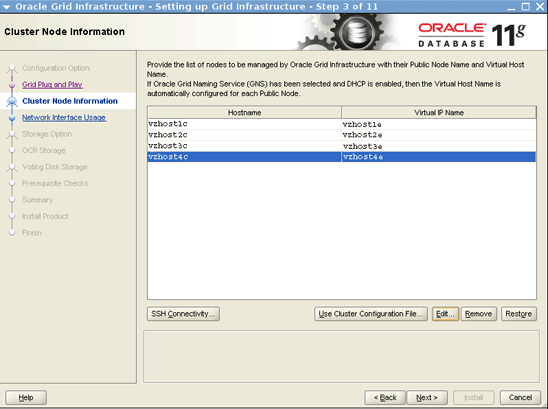
图 4. Cluster Node Information 页
- 在 Specify Network Interface Usage 页上指定以下内容,如图 5 所示:
Interface Name   Subnet         Interface Type
e1000g0          10.134.35.0    Public
clprivnet0       172.16.7.0     Private

图 5. Specify Network Interface Usage 页
- 在 Storage Option Information 页上,选择 Oracle Automatic Storage Management (Oracle ASM) 选项。
- 在 Create ASM Disk Group 页上,通过执行以下操作创建磁盘组,如图 6 至图 8 所示:
- 将 Disk Group Name 指定为 crsdg。
- 单击 Change Discovery Path。
- 在 Change Discovery Path 对话框中,将发现路径指定为 /dev/did/rdsk/d*s6,然后单击 OK,确保用户拥有正确权限。
- 为
crsdg磁盘组选择/dev/did/rdsk/d6s6、/dev/did/rdsk/d7s6和/dev/did/rdsk/d8s6。

图 6. 指定磁盘组名称

图 7. 指定发现路径

图 8. 创建的磁盘组
- 在 Specify ASM Password 页上,选择是否对 SYS 和 ASMSNMP 帐户使用相同口令,然后指定口令,如图 9 所示。如果需要,您可以选择为帐户设置不同口令。

图 9. Specify ASM Password 页
- 在 Perform Prerequisite Checks 页上,选择 Ignore All。
- 在 Summary 页上,核对您所选择的所有设置,确认无误后单击 Install。
Execute Configuration Scripts 对话框要求您以 root 身份在每个节点上执行
GRID_Home/root.sh脚本,如图 10 所示。
图 10. Execute Configuration Scripts 对话框
- 打开一个终端窗口并执行相关脚本,如清单 13 所示。
# /u01/grid/product/11.2.0.2/root.sh

Running Oracle 11g root script...

The following environment variables are set as:
    ORACLE_OWNER= oracle
    ORACLE_HOME=  /u01/grid/product/11.2.0.2

Enter the full pathname of the local bin directory: [/usr/local/bin]: /opt/local/bin
The contents of "dbhome" have not changed. No need to overwrite.
The contents of "oraenv" have not changed. No need to overwrite.
The contents of "coraenv" have not changed. No need to overwrite.

Entries will be added to the /var/opt/oracle/oratab file as needed by
Database Configuration Assistant when a database is created
Finished running generic part of root script.
Now product-specific root actions will be performed.
Relinking oracle with rac_on option
Using configuration parameter file: /u01/grid/product/11.2.0.2/crs/install/crsconfig_params
Creating trace directory
LOCAL ADD MODE
Creating OCR keys for user 'root', privgrp 'root'..
Operation successful.
OLR initialization - successful
  root wallet
  root wallet cert
  root cert export
  peer wallet
  profile reader wallet
  pa wallet
  peer wallet keys
  pa wallet keys
  peer cert request
  pa cert request
  peer cert
  pa cert
  peer root cert TP
  profile reader root cert TP
  pa root cert TP
  peer pa cert TP
  pa peer cert TP
  profile reader pa cert TP
  profile reader peer cert TP
  peer user cert
  pa user cert
Adding daemon to inittab
ACFS-9459: ADVM/ACFS is not supported on this OS version: 'Solaris Container: Solaris 10 update 9'
ACFS-9201: Not Supported
ACFS-9459: ADVM/ACFS is not supported on this OS version: 'Solaris Container: Solaris 10 update 9'
CRS-2672: Attempting to start 'ora.mdnsd' on 'vzhost1c'
CRS-2676: Start of 'ora.mdnsd' on 'vzhost1c' succeeded
CRS-2672: Attempting to start 'ora.gpnpd' on 'vzhost1c'
CRS-2676: Start of 'ora.gpnpd' on 'vzhost1c' succeeded
CRS-2672: Attempting to start 'ora.cssdmonitor' on 'vzhost1c'
CRS-2672: Attempting to start 'ora.gipcd' on 'vzhost1c'
CRS-2676: Start of 'ora.cssdmonitor' on 'vzhost1c' succeeded
CRS-2676: Start of 'ora.gipcd' on 'vzhost1c' succeeded
CRS-2672: Attempting to start 'ora.cssd' on 'vzhost1c'
CRS-2672: Attempting to start 'ora.diskmon' on 'vzhost1c'
CRS-2676: Start of 'ora.diskmon' on 'vzhost1c' succeeded
CRS-2676: Start of 'ora.cssd' on 'vzhost1c' succeeded

ASM created and started successfully.

Disk Group crsdg created successfully.

clscfg: -install mode specified
Successfully accumulated necessary OCR keys.
Creating OCR keys for user 'root', privgrp 'root'..
Operation successful.
CRS-4256: Updating the profile
Successful addition of voting disk 3e08bbbbc8e94fa4bf78bfe416d5f4c9.
Successful addition of voting disk 2a0642961e9c4f84bf0d8f87c47fc201.
Successful addition of voting disk 994f063bcf5b4fb9bf328f34eecc95d9.
Successfully replaced voting disk group with +crsdg.
CRS-4256: Updating the profile
CRS-4266: Voting file(s) successfully replaced
##  STATE    File Universal Id                File Name Disk group
--  -----    -----------------                --------- ---------
 1. ONLINE   3e08bbbbc8e94fa4bf78bfe416d5f4c9 (/dev/did/rdsk/d6s6) [CRSDG]
 2. ONLINE   2a0642961e9c4f84bf0d8f87c47fc201 (/dev/did/rdsk/d7s6) [CRSDG]
 3. ONLINE   994f063bcf5b4fb9bf328f34eecc95d9 (/dev/did/rdsk/d8s6) [CRSDG]
Located 3 voting disk(s).
CRS-2672: Attempting to start 'ora.asm' on 'vzhost1c'
CRS-2676: Start of 'ora.asm' on 'vzhost1c' succeeded
CRS-2672: Attempting to start 'ora.CRSDG.dg' on 'vzhost1c'
CRS-2676: Start of 'ora.CRSDG.dg' on 'vzhost1c' succeeded
ACFS-9459: ADVM/ACFS is not supported on this OS version: 'Solaris Container: Solaris 10 update 9'
ACFS-9201: Not Supported
ACFS-9459: ADVM/ACFS is not supported on this OS version: 'Solaris Container: Solaris 10 update 9'
ACFS-9201: Not Supported
Configure Oracle Grid Infrastructure for a Cluster ... succeeded
清单 13. 执行脚本 - 从其余节点运行
root.sh,如清单 14 所示。
# /u01/grid/product/11.2.0.2/root.sh
Running Oracle 11g root script...

The following environment variables are set as:
    ORACLE_OWNER= oracle
    ORACLE_HOME=  /u01/grid/product/11.2.0.2

Enter the full pathname of the local bin directory: [/usr/local/bin]: /opt/local/bin
The contents of "dbhome" have not changed. No need to overwrite.
The contents of "oraenv" have not changed. No need to overwrite.
The contents of "coraenv" have not changed. No need to overwrite.

Entries will be added to the /var/opt/oracle/oratab file as needed by
Database Configuration Assistant when a database is created
Finished running generic part of root script.
Now product-specific root actions will be performed.
Relinking oracle with rac_on option
Using configuration parameter file: /u01/grid/product/11.2.0.2/crs/install/crsconfig_params
Creating trace directory
LOCAL ADD MODE
Creating OCR keys for user 'root', privgrp 'root'..
Operation successful.
OLR initialization - successful
Adding daemon to inittab
ACFS-9459: ADVM/ACFS is not supported on this OS version: 'Solaris Container: Solaris 10 update 9'
ACFS-9201: Not Supported
ACFS-9459: ADVM/ACFS is not supported on this OS version: 'Solaris Container: Solaris 10 update 9'
CRS-4402: The CSS daemon was started in exclusive mode but found an active CSS daemon on node unknown,
number unknown, and is terminating
An active cluster was found during exclusive startup, restarting to join the cluster
Configure Oracle Grid Infrastructure for a Cluster ... succeeded
清单 14. 运行root.sh - 在最后一个节点上完成
root.sh脚本之后,继续 Oracle Universal Installer 的下一步。
注:此时,会出现一个错误:
[INS-20802] Oracle Verification Utility failed.您可以通过选择 OK、Skip、Next 来忽略此错误提示,尽管会出现[INS-32091]警告消息,您依然可以选择 Yes 继续,如图 11 至图 14 所示。
图 11. 错误消息

图 12. 单击 Skip 按钮

图 13. 单击 Yes 继续

图 14. 成功完成集群配置
- 从任意节点,检查 Cluster Ready Services,如清单 15 所示。
# /u01/grid/product/11.2.0.2/bin/crsctl check cluster -all
**************************************************************
vzhost1c:
CRS-4537: Cluster Ready Services is online
CRS-4529: Cluster Synchronization Services is online
CRS-4533: Event Manager is online
**************************************************************
vzhost2c:
CRS-4537: Cluster Ready Services is online
CRS-4529: Cluster Synchronization Services is online
CRS-4533: Event Manager is online
**************************************************************
vzhost3c:
CRS-4537: Cluster Ready Services is online
CRS-4529: Cluster Synchronization Services is online
CRS-4533: Event Manager is online
**************************************************************
vzhost4c:
CRS-4537: Cluster Ready Services is online
CRS-4529: Cluster Synchronization Services is online
CRS-4533: Event Manager is online
**************************************************************
清单 15. 检查 Cluster Ready Services - 检查资源的状态,如清单 16 所示。
# /u01/grid/product/11.2.0.2/bin/crsctl status res -t
--------------------------------------------------------------------------------
NAME           TARGET  STATE        SERVER                 STATE_DETAILS
--------------------------------------------------------------------------------
Local Resources
--------------------------------------------------------------------------------
ora.CRSDG.dg
               ONLINE  ONLINE       vzhost1c
               ONLINE  ONLINE       vzhost2c
               ONLINE  ONLINE       vzhost3c
               ONLINE  ONLINE       vzhost4c
ora.LISTENER.lsnr
               ONLINE  ONLINE       vzhost1c
               ONLINE  ONLINE       vzhost2c
               ONLINE  ONLINE       vzhost3c
               ONLINE  ONLINE       vzhost4c
ora.asm
               ONLINE  ONLINE       vzhost1c               Started
               ONLINE  ONLINE       vzhost2c
               ONLINE  ONLINE       vzhost3c
               ONLINE  ONLINE       vzhost4c
ora.gsd
               OFFLINE OFFLINE      vzhost1c
               OFFLINE OFFLINE      vzhost2c
               OFFLINE OFFLINE      vzhost3c
               OFFLINE OFFLINE      vzhost4c
ora.net1.network
               ONLINE  ONLINE       vzhost1c
               ONLINE  ONLINE       vzhost2c
               ONLINE  ONLINE       vzhost3c
               ONLINE  ONLINE       vzhost4c
ora.ons
               ONLINE  ONLINE       vzhost1c
               ONLINE  ONLINE       vzhost2c
               ONLINE  ONLINE       vzhost3c
               ONLINE  ONLINE       vzhost4c
--------------------------------------------------------------------------------
Cluster Resources
--------------------------------------------------------------------------------
ora.LISTENER_SCAN1.lsnr
      1        ONLINE  ONLINE       vzhost1c
ora.cvu
      1        ONLINE  ONLINE       vzhost1c
ora.oc4j
      1        ONLINE  ONLINE       vzhost1c
ora.scan1.vip
      1        ONLINE  ONLINE       vzhost1c
ora.vzhost1e.vip
      1        ONLINE  ONLINE       vzhost1c
ora.vzhost2e.vip
      1        ONLINE  ONLINE       vzhost2c
ora.vzhost3e.vip
      1        ONLINE  ONLINE       vzhost3c
ora.vzhost4e.vip
      1        ONLINE  ONLINE       vzhost4c
清单 16. 检查资源的状态
安装和修补 Oracle 数据库
注:在一个步骤中安装和创建数据库是可选的。如果此时您打算创建数据库,则为数据库文件创建 Oracle 自动存储管理磁盘组。
- 从一个节点,安装 Oracle Database 11.2.0.2,例如:
$ export DISPLAY=<hostname>:<n>
$ cd 10098816_112020_SOLARIS64/database
$ ./runInstaller
- 向 Oracle Universal Installer 提供以下输入:
- 在 Configure Security Updates 页和 Download Software Updates 页上提供所需信息。
- 在 Select Installation Option 页上,选择 Install database software only 选项。
- 在 Grid Installation Options 页上,选择 Oracle Real Application Clusters database installation 选项。
- 在 Select Product Languages 页上,选择相应语言。
- 在 Select Database Edition 页上,选择 Enterprise Edition 选项。
- 在 Specify Installation Location 页上,指定以下内容,如图 15 所示:
- 为 Oracle Base 选择 /u01/oracle。
- 为 Software Location 选择 /u01/oracle/product/11.2.0.2。

图 15. Specify Installation Location 页
- 在 Privileged Operating System Groups 页上,指定以下内容,如图 16 所示:
- 为 Database Administrator (OSDBA) Group 选择 dba。
- 为 Database Operator (OSOPER) Group (Optional) 选择 oinstall。

图 16. Privileged Operating System Groups 页
- 在 Perform Prerequisite Checks 页上,选择 Ignore All。
- 在 Summary 页上,核对您所选择的所有设置,确认无误后,单击 Install。
Execute Configuration Scripts 对话框要求您执行
root.sh,如图 17 所示。
图 17. Execute Configuration Scripts 对话框
- 要完成安装,打开一个终端窗口,并按照指示在所有区域集群节点上执行相关脚本,如清单 17 所示。
vzhost1c# /u01/oracle/product/11.2.0.2/root.sh
Running Oracle 11g root script...

The following environment variables are set as:
    ORACLE_OWNER= oracle
    ORACLE_HOME=  /u01/oracle/product/11.2.0.2

Enter the full pathname of the local bin directory: [/usr/local/bin]: /opt/local/bin
The contents of "dbhome" have not changed. No need to overwrite.
The contents of "oraenv" have not changed. No need to overwrite.
The contents of "coraenv" have not changed. No need to overwrite.

Entries will be added to the /var/opt/oracle/oratab file as needed by
Database Configuration Assistant when a database is created
Finished running generic part of root script.
Now product-specific root actions will be performed.
chmod: WARNING: can't change /u01/oracle/product/11.2.0.2/lib/libskgxn2.so
Finished product-specific root actions
清单 17. 执行脚本
使用 OPatch 将 Oracle Grid Infrastructure 11.2.0.2 补丁包 3 (GIB3) 应用于 Oracle 数据库
通过执行以下步骤,将补丁 11.2.0.2 GIB3 应用于每个区域集群节点。
- 将 OPatch 替换为最新版本 11.2.0.1.6。
- 备份
DB_HOME中的 OPatch 版本,例如:
$ cd /u01/oracle/product/11.2.0.2/
$ mv OPatch OPatch.bak
- 以软件所有者身份,将
p6880880_112000_SOLARIS64.zip复制到DB_HOME:
$ cp p6880880_112000_SOLARIS64.zip /u01/oracle/product/11.2.0.2
$ cd /u01/oracle/product/11.2.0.2
$ unzip p6880880_112000_SOLARIS64.zip
- 以软件所有者身份,在每个节点上创建 Oracle Configuration Manager 文件,例如:
$ cd /var/tmp
$ /u01/oracle/product/11.2.0.2/OPatch/ocm/bin/emocmrsp

OCM Installation Response Generator 10.3.4.0.0 - Production
Copyright (c) 2005, 2010, Oracle and/or its affiliates.  All rights reserved.

Provide your email address to be informed of security issues, install and
initiate Oracle Configuration Manager. Easier for you if you use your My
Oracle Support Email address/User Name.
Visit http://www.oracle.com/support/policies.html for details.
- 提供您的电子邮件地址,然后按 Enter 跳过提供口令这一步骤,例如:
Email address/User Name: <your email address>
Provide your My Oracle Support password to receive security updates via your
My Oracle Support account.
Password (optional):
The OCM configuration response file (ocm.rsp) was successfully created.
- 以
root身份执行以下操作:
# /u01/oracle/product/11.2.0.2/OPatch/opatch auto /var/tmp/gib3 -oh /u01/oracle/product/11.2.0.2

Executing /usr/bin/perl /u01/oracle/product/11.2.0.2/OPatch/crs/patch112.pl
-patchdir /var/tmp -patchn gib3 -oh /u01/oracle/product/11.2.0.2 -paramfile
/u01/grid/product/11.2.0.2/crs/install/crsconfig_params
opatch auto log file location is
/u01/oracle/product/11.2.0.2/OPatch/crs/../../cfgtoollogs/opatchauto2011-08-10_20-30-35.log
Detected Oracle Clusterware install
Using configuration parameter file: /u01/grid/product/11.2.0.2/crs/install/crsconfig_params
OPatch  is bundled with OCM, Enter the absolute OCM response file path:
- 提供之前创建的
ocm.rsp文件的完整路径,例如:
/var/tmp/ocm.rsp
- 以软件所有者身份,验证补丁安装,如清单 18 所示。
$ export ORACLE_HOME=/u01/oracle/product/11.2.0.2
$ /u01/oracle/product/11.2.0.2/OPatch/opatch lsinventory -oh $ORACLE_HOME

Invoking OPatch 11.2.0.1.6

Oracle Interim Patch Installer version 11.2.0.1.6
Copyright (c) 2011, Oracle Corporation.  All rights reserved.


Oracle Home       : /u01/oracle/product/11.2.0.2
Central Inventory : /u01/oraInventory
   from           : /var/opt/oracle/oraInst.loc
OPatch version    : 11.2.0.1.6
OUI version       : 11.2.0.2.0
Log file location : /u01/oracle/product/11.2.0.2/cfgtoollogs/opatch/opatch2011-08-11_10-38-51AM.log

Lsinventory Output file location :
/u01/oracle/product/11.2.0.2/cfgtoollogs/opatch/lsinv/lsinventory2011-08-11_10-38-51AM.txt

--------------------------------------------------------------------------------
Installed Top-level Products (1):

Oracle Database 11g                                                  11.2.0.2.0
There are 1 products installed in this Oracle Home.


Interim patches (2) :

Patch  12419331     : applied on Wed Aug 10 20:53:24 PDT 2011
Unique Patch ID:  13850636
   Created on 12 Jul 2011, 07:01:28 hrs PST8PDT
   Bugs fixed:
     10151017, 10158965, 11724916, 10190642, 12586486, 12586487, 10129643
     12586488, 12586489, 10018789, 9744252, 10248523, 9956713, 10356513
     9715581, 9770451, 10378005, 10170431, 10425676, 10222719, 10126094
     9591812, 10127360, 10132870, 10094201, 9443361, 10193846, 11664046
     11069199, 10324294, 10245086, 12586490, 10205230, 12586491, 10052141
     12586492, 12586493, 12586494, 10142788, 11818335, 11830776, 12586495
     9905049, 11830777, 12586496, 11830778, 6892311, 10040921, 10077191
     10358019, 12431716, 10219576, 10258337, 11707699, 10264680, 10209232
     11651810, 10102506, 11067567, 9881076, 10278372, 10040531, 10621169
     10155605, 10082277, 10356782, 10218814, 9078442, 9788588, 10157249
     9735237, 10317487, 12326246, 11707302, 10310299, 10636231, 10230571
     11065646, 12419321, 10368698, 10079168, 10013431, 10228151, 10233732
     10324526, 8223165, 10238786, 10217802, 10061015, 9953542, 9572787
     10052956, 10080579, 11699057, 12620422, 10332111, 10227288, 10329146
     10332589, 10110863, 10073683, 9869401, 10019218, 10229719, 11664719
     9539440, 10373381, 9735282, 9748749, 11724984, 10022980, 10411618
     11800854, 12419331, 11674485, 10187168, 6523037, 10648873, 9724970
     10053725, 10084145, 10367188, 11800170, 11695285, 10157402, 9651350, 10299224

Patch  12419353     : applied on Wed Aug 10 20:37:44 PDT 2011
 Patch ID:  13850636
   Created on 18 Jul 2011, 05:19:12 hrs UTC
   Bugs fixed:
     12419353, 10157506, 10178670, 10425672, 12311357, 9959110, 10272615
     10314123, 10014392, 10089120, 10057296, 9864003, 11775080, 9916145
     10044622, 12399977, 12421404, 12340700, 10056713, 10637741, 9939306
     9902536, 10007185, 10376847, 10038791, 11741224, 11655840, 10048487
     10322157, 10260251, 10052721, 10028235, 10027079, 10357258, 10045436
     10231906, 10622973, 9891341, 10072474, 10036834, 10029900, 9974223
     10016083, 9918485, 11781515, 10040647, 10069541, 10029119, 10233159
     12332919, 9812956, 10036193, 10015210, 12340501, 10621175, 11877079
     8906163, 10111010, 10115514, 10104377, 10057680, 10280665, 10078086
     9944948, 10146768, 10052529, 10011084, 10012319, 10073075, 10233811
     10299006, 10248739, 10236074, 10128191, 11071429, 10019726, 9975837
     10253630, 9949676, 11936945, 10637483, 10157622, 11698552, 10385838
     10053985, 10425674, 9812970, 11828633, 11899801, 10083789, 9876201
     10073372, 9963327, 11077756, 10375649, 9336825, 11682409, 10062301
     10018215, 10105195, 10419987, 10071992, 10634513, 9926027, 10103954
     10028343, 11866171, 10065216, 9907089, 9897335, 10190153, 11744313
     10175855, 10284828, 10028637, 10361177, 9979706, 10324594, 10015460
     9971646, 11782423, 11654726, 9978765, 10398810, 11904778, 10397652
     9915329, 10107380, 10110969, 10305361, 10331452, 10083009, 10631693
     10008467, 10048027, 10040109, 9944978, 10033106, 9978195, 11840629
     10042143, 10284693, 10638381, 9679401, 11663339, 10075643, 10205290
     10124517, 11069614, 9593552, 10168006, 12677816, 11807012


Rac system comprising of multiple nodes
  Local node = vzhost1c

  Remote node = vzhost2c
  Remote node = vzhost3c
  Remote node = vzhost4c
清单 18. 验证补丁安装
创建数据库
从一个区域集群节点,以 Oracle 软件所有者身份,为名为 swb 的测试数据库创建一个 Oracle ASM 磁盘组,如下所示。
- 执行以下命令以启动 ASM Configuration Assistant:
$ export DISPLAY=<hostname>:<n>
$ export ORACLE_HOME=/u01/oracle/product/11.2.0.2
$ /u01/grid/product/11.2.0.2/bin/asmca
- 在 ASM Configuration Assistant 中,执行以下操作:
- 在 Disk Groups 选项卡中,单击 Create。
- 在 Create Disk Group 页中执行以下操作,如图 18 所示。
- 将 Disk Group Name 指定为 swbdg。
- 选择 /dev/did/rdsk/d9s6、/dev/did/rdsk/d10s6、/dev/did/rdsk/d14s6 和 /dev/did/rdsk/d15s6。
- 在 Failure Group 中,将 /dev/did/rdsk/d9s6 和 /dev/did/rdsk/d10s6 指定为 fgr1。
- 在 Failure Group 中,将 /dev/did/rdsk/d14s6 和 /dev/did/rdsk/d15s6 指定为 fgr2。
- 单击 OK 创建磁盘组。
swbdg磁盘组创建完毕后,单击 Exit 关闭 ASM Configuration Assistant。

图 18. Create Disk Group 页
- 在 Disk Groups 选项卡中,单击 Create。
- 启动 Database Configuration Assistant,例如:
$ u01/oracle/product/11.2.0.2/bin/dbca
- 在 Database Configuration Assistant 中,执行以下操作:
- 选择 Oracle Real Application Clusters (RAC) database 选项。
- 在 Operations 页上,选择 Create a Database 选项。
- 在 Database Templates 页上,选择 Custom Database 选项。
- 在 Database Identification 页上,单击 Select All 并进行如下选择,如图 19 所示:
- 为 Configuration Type 选择 Admin-Managed。
- 将 Global Database Name 指定为 swb。
- 将 SID Prefix 指定为 swb。

图 19. Database Identification 页
- 在 Management Options 页上,确保未 选中 Configure Enterprise Manager 和 Enable automatic maintenance tasks,如图 20 和图 21 所示。

图 20. Enterprise Manager 选项卡

图 21. Automatic Maintenance Tasks 选项卡
- 在 Database Credentials 页上,选择 Use the Same Administrative Password for All Accounts 选项。
- 在 Database File Locations 页上,选择 Use Oracle-Managed Files 选项,并将 Database Area 指定为 +SWBDG。
- 在 Recovery Configuration 页上进行如下选择,如图 22 所示:
- 选中 Specify Fast Recovery Area 复选框。
- 为 Fast Recovery Area 选择 +SWBDG。
- 为 Fast Recovery Area Size 选择 7527 M Bytes。

图 22. Recovery Configuration 页
- 在 Database Content 页上,使用默认选项,如图 23 所示。

图 23. Database Content 页
- 在 Initialization Parameters 页上,使用默认值,如图 24 所示,然后单击 Finish 启动数据库创建。

图 24. Initialization Parameters 页
- 验证是否已创建且正在运行数据库:
$ /u01/grid/product/11.2.0.2/bin/srvctl status database -d swb
Instance swb1 is running on node vzhost1c
Instance swb2 is running on node vzhost2c
Instance swb3 is running on node vzhost3c
Instance swb4 is running on node vzhost4c
- 要将 IPMP 组中的第二个备用 NIC 添加到 Cluster Ready Services 中,请以
root身份从一个区域集群节点,运行以下命令:
$ GRID_HOME/bin/srvctl modify nodeapps -n <hostname> -A <VIP address>/<subnet>/NIC0\|NIC1
例如:
$ srvctl modify nodeapps -n vzhost1c -A 10.134.35.100/255.255.255.0/e1000g0\|e1000g1
- 使用
srvctl config显示e1000g1已添加:
$ /u01/grid/product/11.2.0.3/bin/srvctl config nodeapps
Network exists: 1/10.134.35.0/255.255.255.0/e1000g0:e1000g1, type static
VIP exists: /vzhost1e/10.134.35.100/10.134.35.0/255.255.255.0/e1000g0:e1000g1, hosting node vzhost1c
VIP exists: /vzhost2e/10.134.35.101/10.134.35.0/255.255.255.0/e1000g0:e1000g1, hosting node vzhost2c
VIP exists: /vzhost3e/10.134.35.102/10.134.35.0/255.255.255.0/e1000g0:e1000g1, hosting node vzhost3c
VIP exists: /vzhost4e/10.134.35.103/10.134.35.0/255.255.255.0/e1000g0:e1000g1, hosting node vzhost4c
创建 Oracle Solaris Cluster 资源
使用以下过程创建 Oracle Solaris Cluster 资源。或者,您也可以使用 clsetup。
- 从一个区域集群节点,执行如下命令在区域集群中注册
SUNW.crs_framework资源类型:
# clrt register SUNW.crs_framework
- 将
SUNW.crs_framework资源类型的一个实例添加到 Oracle RAC 框架资源组:
# clresource create -t SUNW.crs_framework \
  -g rac-framework-rg \
  -p resource_dependencies=rac-framework-rs \
  crs-framework-rs
- 注册可伸缩的 Oracle 自动存储管理实例代理资源类型:
# clresourcetype register SUNW.scalable_asm_instance_proxy
- 注册 Oracle 自动存储管理磁盘组资源类型:
# clresourcetype register SUNW.scalable_asm_diskgroup_proxy
- 创建资源组
asm-inst-rg和asm-dg-rg:
# clresourcegroup create -S asm-inst-rg asm-dg-rg
- 设置
asm-inst-rg对rac-fmwk-rg的强正相关性:
# clresourcegroup set -p rg_affinities=++rac-framework-rg asm-inst-rg
- 设置
asm-dg-rg对asm-inst-rg的强正相关性:
# clresourcegroup set -p rg_affinities=++asm-inst-rg asm-dg-rg
- 创建一个
SUNW.scalable_asm_instance_proxy资源并设置资源依赖性:
# clresource create asm-inst-rg \ -t SUNW.scalable_asm_instance_proxy \ -p ORACLE_HOME=/u01/grid/product/11.2.0.2 \ -p CRS_HOME=/u01/grid/product/11.2.0.2 \ -p "ORACLE_SID{vzhost1c}"=+ASM1 \ -p "ORACLE_SID{vzhost2c}"=+ASM2 \ -p "ORACLE_SID{vzhost3c}"=+ASM3 \ -p "ORACLE_SID{vzhost4c}"=+ASM4 \ -p resource_dependencies_offline_restart=crs-framework-rs \ -d asm-inst-rs - 将 Oracle 自动存储管理磁盘组资源类型添加到
asm-dg-rg资源组:
# clresource create -g asm-dg-rg -t SUNW.scalable_asm_diskgroup_proxy \
  -p asm_diskgroups=CRSDG,SWBDG \
  -p resource_dependencies_offline_restart=asm-inst-rs \
  -d asm-dg-rs
- 在集群节点上,使
asm-inst-rg资源组在托管状态下联机:
# clresourcegroup online -eM asm-inst-rg
- 在集群节点上,使
asm-dg-rg资源组在托管状态下联机:
# clresourcegroup online -eM asm-dg-rg
- 为 Oracle RAC 数据库服务器创建可伸缩的资源组以包含代理资源。
# clresourcegroup create -S \
  -p rg_affinities=++rac-framework-rg,++asm-dg-rg \
  rac-swbdb-rg
- 注册
SUNW.scalable_rac_server_proxy资源类型:
# clresourcetype register SUNW.scalable_rac_server_proxy
- 将数据库资源添加到资源组中:
# clresource create -g rac-swbdb-rg \ -t SUNW.scalable_rac_server_proxy \ -p resource_dependencies=rac-framework-rs \ -p resource_dependencies_offline_restart=crs-framework-rs,asm-dg-rs \ -p oracle_home=/u01/oracle/product/11.2.0.2 \ -p crs_home=/u01/grid/product/11.2.0.2 \ -p db_name=swb \ -p "oracle_sid{vzhost1c}"=swb1 \ -p "oracle_sid{vzhost2c}"=swb2 \ -p "oracle_sid{vzhost3c}"=swb3 \ -p "oracle_sid{vzhost4c}"=swb4 \ -d rac-swb-srvr-proxy-rs - 使资源组联机:
# clresourcegroup online -emM rac-swbdb-rg
- 检查集群资源的状态,如清单 19 所示:
# clrs status

=== Cluster Resources ===

Resource Name             Node Name         State      Status Message
-------------            ---------         -----       -------------------
crs_framework-rs          vzhost1c          Online     Online
                          vzhost2c          Online     Online
                          vzhost3c          Online     Online
                          vzhost4c          Online     Online

rac-framework-rs          vzhost1c          Online     Online
                          vzhost2c          Online     Online
                          vzhost3c          Online     Online
                          vzhost4c          Online     Online

asm-inst-rs               vzhost1c          Online     Online - +ASM1 is UP and ENABLED
                          vzhost2c          Online     Online - +ASM2 is UP and ENABLED
                          vzhost3c          Online     Online - +ASM3 is UP and ENABLED
                          vzhost4c          Online     Online - +ASM4 is UP and ENABLED

asm-dg-rs                 vzhost1c          Online     Online - Mounted: SWBDG
                          vzhost2c          Online     Online - Mounted: SWBDG
                          vzhost3c          Online     Online - Mounted: SWBDG
                          vzhost4c          Online     Online - Mounted: SWBDG

rac-swb-srvr-proxy-rs     vzhost1c          Online     Online - Oracle instance UP
                          vzhost2c          Online     Online - Oracle instance UP
                          vzhost3c          Online     Online - Oracle instance UP
                          vzhost4c          Online     Online - Oracle instance UP
清单 19. 检查集群资源的状态
另请参见
下面是其他一些资源:
- Oracle Solaris Cluster 3.3 文档库:http://www.oracle.com/technetwork/cn/server-storage/solaris-cluster/documentation/index.html
- 所有 Oracle Solaris Cluster 技术资源:http://www.oracle.com/technetwork/server-storage/solaris-cluster/documentation/cluster-how-to-1389544.html
- Oracle Solaris Cluster 3.3 版本说明:http://docs.oracle.com/cd/E18728_01/html/E22274/index.html
- Oracle Solaris 补丁和更新:http://www.oracle.com/technetwork/server-storage/solaris-cluster/downloads/cluster-archive-168201.html
- Oracle Solaris Cluster 下载:http://www.oracle.com/technetwork/cn/server-storage/solaris-cluster/downloads/index.html
- Oracle Solaris Cluster 培训:http://www.oracle.com/technetwork/cn/server-storage/solaris-cluster/training/index.html
关于作者
Vinh Tran 是 Oracle Solaris Cluster 小组的一名质量工程师。他的职责包括但不限于 Oracle Solaris Cluster 上的 Oracle RAC 认证和资格认定。
| 修订版 1.0,2012 年 5 月 9 日 |
要了解 Oracle 所有技术中与 sysadmin 有关的内容,请关注 Facebook 和 Twitter 上的 OTN Systems。

 Printer View