
Oracle Data Miner
Oracle Data Miner is an extension to Oracle SQL Developer that enables data scientists and business and data analysts to view data, rapidly build multiple machine learning models, compare and evaluate multiple models, apply them to new data, and accelerate model deployment.
Oracle Data Miner enables data scientists, “citizen data scientists,” and business and data analysts to work directly with data inside the database using a graphical “drag and drop” workflow editor. Oracle Data Miner (ODMr), an extension to Oracle SQL Developer, captures and documents in graphical analytical workflows the steps users take while exploring data and developing machine learning methodologies. ODMr workflows are useful for re-executing analytical methodologies and for sharing insights with team members. ODMr generates SQL and PL/SQL scripts and offers a workflow API for accelerating model deployment throughout the enterprise.
Features Overview
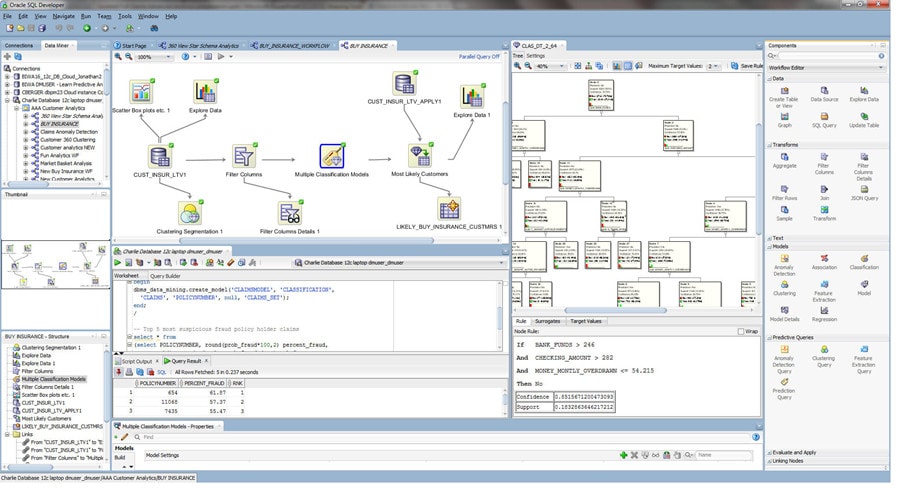
- Interactive workflow tool for creating, evaluating, modifying, sharing, and deploying machine learning methodologies
- Nodes from the ODMr tool palette
- Explore and Graph nodes for visualizing data - histograms, summary statistics, scatterplots, boxplots
- Transform node - supports popular and custom data transforms including binning and recoding variables, missing values treatment, and creating new “engineered features” based on user domain expertise to override Oracle Machine Learning automatic data preparation
- Column Filter node - uses an attribute importance / feature selection algorithm to identify the most influential attributes in supervised learning, and Kulback-Leibler divergence for unsupervised learning - identifying the strength of each attribute's correlation with other attributes
- Model Build node - automates common steps including creating a random sample for train and test datasets, automatic model testing and evaluation, computing a confusion matrix, lift chart, receiver operating characteristic (ROC) curve, and model statistics, with model visualizers including decision trees, cluster trees, and model attribute coefficients
- Ingest and process structured data in tables and views (numeric and varchar datatypes), unstructured data (CLOBs), transactional data, aggregations, and spatial and graph data
- Where multiple algorithms exist for given machine learning technique, the Model Build node automatically builds multiple machine learning models for comparison
- Integration with open source R for the execution of user-defined R functions at the database server, including data-parallel and task-parallel execution (see Oracle Machine Learning for R)
- Works with Big Data SQL to access data across the broad range of big data sources, including Oracle Database, Spark, Hadoop and other data sources
Key Business Benefits
- Eliminate data movement, achieve big data scalability, preserve security, and accelerate time from model development to model deployment
- Move easily between Oracle Database environments to support development staging and production deployment scenarios for Oracle Machine Learning models and associated data assembly, transformation, and preparation scripts
- Empower employees with a diverse skillset with in-database machine learning algorithms, enabling data-driven projects
- Easy to use "drag and drop" user face accelerates knowledge discovery and model building for "citizen data scientists"
- Workflows document the machine learning methodologies developed for sharing and automation
- Generates SQL and PL/SQL scripts from workflows to automate and accelerate model deployment throughout the enterprise
- Workflow API enables programmatic workflows invocation
For a complete list of features and enhancements, see the product release notes in the documentation.