Introducing Design Patterns in XML Schemas
By Ayub Khan and Marina Sum,
Updated: November 9, 2006
XML schemas contain numerous design patterns, the most common of which are Russian Doll, Salami Slice, Venetian Blind, and Garden of Eden. The patterns vary according to the number of their global elements or types. A global element or type, which is a child of the schema, contains a target namespace.
You can conveniently classify the four most common patterns according to two criteria, namely:
- Ease of use for instance developers
- Ease of reuse for schema developers
Choosing the appropriate pattern is a critical step in the design phase of schemas. Once you have made a choice, switching the pattern to another one without GUI tools is tedious and error-prone. By using the intuitive XML tools in NetBeans Enterprise 5.5 (henceforth, NetBeans Enterprise Pack), however, you can seamlessly transform one design pattern to another with only a few GUI steps.
This article defines the four most common pattern types and their characteristics for reuse. It also explains how NetBeans Enterprise Pack displays, detects, and maintains those patterns, which greatly simplifies the design phase of the schema development cycle.
Near the end of the article is a link to a Flash demo that illustrates the procedures described in this article.
Products by Category
Definitions, Rules, and Examples
This section describes the four most common pattern types and shows you how to define them in XML schemas. Most real-world schemas adopt Venetian Blind or Garden of Eden as their pattern of choice because they are the most reusable.
The following table summarizes the four patterns' characteristics and their advantages and disadvantages.
| Design Pattern | Characteristics | Advantages | Disadvantages |
|---|---|---|---|
| Russian Doll | Contains only one global element. All other elements are local. |
|
|
| Salami Slice | Contains all global elements, hence many potential root elements. |
|
|
| Venetian Blind | Is an extension of Russian Doll and contains only one global element. All other elements are local. |
|
Limits encapsulation by exposing types. |
| Garden of Eden | Is a combination of Venetian Blind and Salami Slice. All elements and types are global, hence many potential root elements. |
|
|
Russian Doll
The Russian Doll design contains only one single global element. All the other elements are local. You nest element declarations within a single global declaration, which you can use once only. You must define only the root element within the global namespace.
See the following example.
<xsd:schema xmlns:xsd="http://www.w3.org/2001/XMLSchema"
    targetNamespace="http://schemas.sun.com/point/russiandoll"
    xmlns:tns="http://schemas.sun.com/point/russiandoll"
    elementFormDefault="qualified">

    <xsd:element name="Line">
        <xsd:complexType>
            <xsd:sequence>
                <xsd:element name="PointA">
                    <xsd:complexType>
                        <xsd:attribute name="x" type="xsd:integer"/>
                        <xsd:attribute name="y" type="xsd:integer"/>
                    </xsd:complexType>
                </xsd:element>
                <xsd:element name="PointB">
                    <xsd:complexType>
                        <xsd:attribute name="x" type="xsd:integer"/>
                        <xsd:attribute name="y" type="xsd:integer"/>
                    </xsd:complexType>
                </xsd:element>
            </xsd:sequence>
        </xsd:complexType>
    </xsd:element>
</xsd:schema>
Since it contains only one single global element, Russian Doll is the simplest and easiest pattern to use by instance developers. However, if its elements or types are intended for reuse, Russian Doll is not suitable for schema developers.
Salami Slice
All the elements in the Salami Slice design are global. No nesting of element declarations is required and you can reuse the declarations throughout the schema. You must define all the elements within the global namespace.
See the following example.
<xsd:schema xmlns:xsd="http://www.w3.org/2001/XMLSchema"
    targetNamespace="http://schemas.sun.com/point/salami"
    xmlns:tns="http://schemas.sun.com/point/salami"
    xmlns="http://schemas.sun.com/point/salami"
    elementFormDefault="qualified">

    <xsd:element name="PointA">
        <xsd:complexType>
            <xsd:attribute name="x" type="xsd:integer"/>
            <xsd:attribute name="y" type="xsd:integer"/>
        </xsd:complexType>
    </xsd:element>

    <xsd:element name="PointB">
        <xsd:complexType>
            <xsd:attribute name="x" type="xsd:integer"/>
            <xsd:attribute name="y" type="xsd:integer"/>
        </xsd:complexType>
    </xsd:element>

    <xsd:element name="Line">
        <xsd:complexType>
            <xsd:sequence>
                <xsd:element ref="PointA"/>
                <xsd:element ref="PointB"/>
            </xsd:sequence>
        </xsd:complexType>
    </xsd:element>
</xsd:schema>
The fact that all the elements in Salami Slice are global means a greater degree of reusability than Russian Doll and Venetian Blind. However, this design pattern contains many potential root elements.
Venetian Blind
The Venetian Blind design contains only one global element. All the other elements are local. You nest element declarations within a single global declaration by means of named complex types and element groups. You can reuse those types and groups throughout the schema and must define only the root element within the global namespace.
See the following example.
<xsd:schema xmlns:xsd="http://www.w3.org/2001/XMLSchema"
    targetNamespace="http://schemas.sun.com/point/venetianblind"
    xmlns:tns="http://schemas.sun.com/point/venetianblind"
    xmlns="http://schemas.sun.com/point/venetianblind"
    elementFormDefault="qualified">

    <xsd:complexType name="PointType">
        <xsd:attribute name="x" type="xsd:integer"/>
        <xsd:attribute name="y" type="xsd:integer"/>
    </xsd:complexType>

    <xsd:element name="Line">
        <xsd:complexType>
            <xsd:sequence>
                <xsd:element name="PointA" type="PointType"/>
                <xsd:element name="PointB" type="PointType"/>
            </xsd:sequence>
        </xsd:complexType>
    </xsd:element>
</xsd:schema>
Venetian Blind is an extension of Russian Doll, in which all the types are defined globally. Because it has only one single root element and all its types are reusable, Venetian Blind is suitable for use by both instance developers and schema developers.
Garden of Eden
The Garden of Eden design is a combination of Venetian Blind and Salami Slice. You define all the elements and types in the global namespace and refer to the elements as required.
See the following example.
<xsd:schema xmlns:xsd="http://www.w3.org/2001/XMLSchema"
    targetNamespace="http://schemas.sun.com/point/gardenofeden"
    xmlns="http://schemas.sun.com/point/gardenofeden"
    elementFormDefault="qualified">

    <xsd:complexType name="PointType">
        <xsd:attribute name="x" type="xsd:integer"/>
        <xsd:attribute name="y" type="xsd:integer"/>
    </xsd:complexType>

    <xsd:complexType name="LineType">
        <xsd:sequence>
            <xsd:element ref="PointA"/>
            <xsd:element ref="PointB"/>
        </xsd:sequence>
    </xsd:complexType>

    <xsd:element name="PointA" type="PointType"/>

    <xsd:element name="PointB" type="PointType"/>

    <xsd:element name="Line" type="LineType"/>
</xsd:schema>
Because it exposes all its elements and types globally, Garden of Eden, like Salami Slice, is completely reusable. However, because Garden of Eden exposes multiple elements as global ones, there are many potential root elements.
Management of Design Patterns With NetBeans Enterprise Pack
As mentioned earlier, the XML tools in NetBeans Enterprise Pack smooth the way for switching from one design pattern to another and for maintaining design patterns. This section explains the details.
Figure 1 shows the XML tools in NetBeans Enterprise Pack.
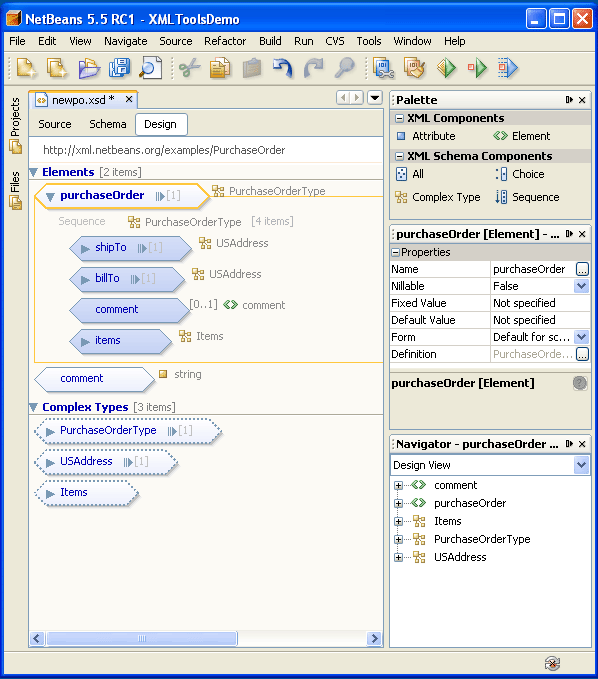
Figure 1: XML Tools in NetBeans Enterprise Pack
The UI works as follows:
- You can create or edit an XML schema in the center pane, which shows the Design view of a
po.xsdschema file. - You can create global elements and complex types along with their nested components by dragging and dropping the components from the Palette in the top half of the right pane.
- You can edit the properties of the components (element, attribute, compositor or complex type) from the property sheet in the lower half of the right pane.
Code Generation
The Design view of the XML tools follows the Russian Doll design pattern. Figure 2 is an example, in which a modified comment global element contains three child elements, author, date, and description. All those child elements were dragged and dropped into position from the Palette.
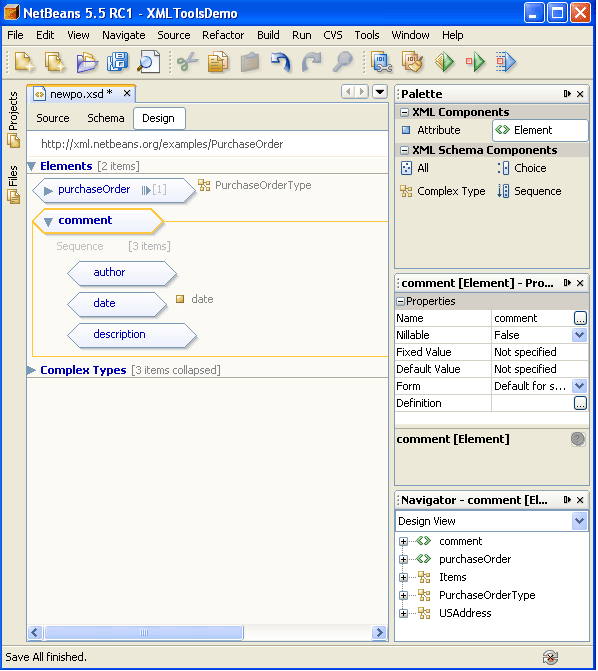
Figure 2: Instance View of the po.xsd Schema File
Now look at the Source view of the generated schema for the Design view of the po.xsd schema file. See Figure 3.
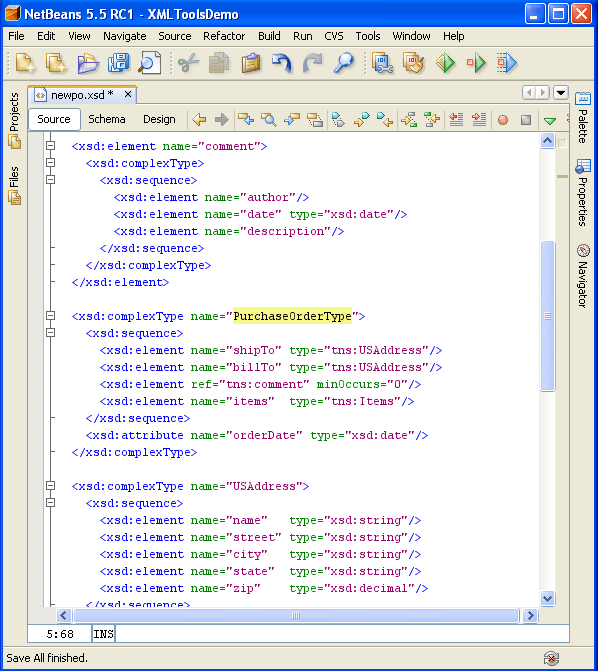
Figure 3: Source View of Generated Schema for Instance View of po.xsd
The generated code follows the Russian Doll design pattern. That is, an element dragged and dropped into the schema is created as a global element. All its child elements and attributes are local.
Note: Adding elements, attributes, and complex types from the Palette to Design view can result in a mixed schema. Such schemas do not follow any of the four design patterns described in this article.
Transformation
The XML tools in NetBeans Enterprise Pack can also transform one design pattern to another. Follow these steps:
- Right-click the name of the schema in the Files area in the upper left and choose Apply Design Pattern from the context menu. See Figure 4.
- Choose one of the four most common design patterns by selecting either of the two checkboxes, Create a Single Global Element or Create Reusable Types.
The wizard displays the selected and the existing design patterns along with a description and an example of each of the patterns.
- Click Finish.
Afterwards, you can switch to Source view to browse the source of the transformed schema. See Figure 6.
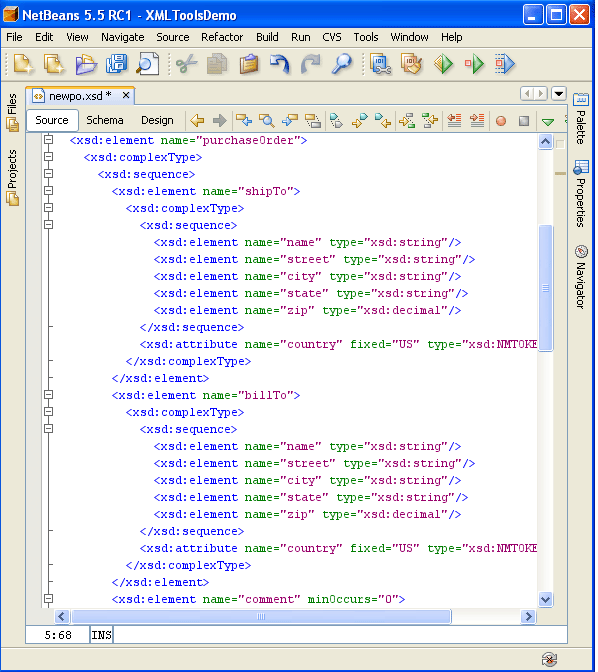
Figure 6: Source View of Transformed Schema
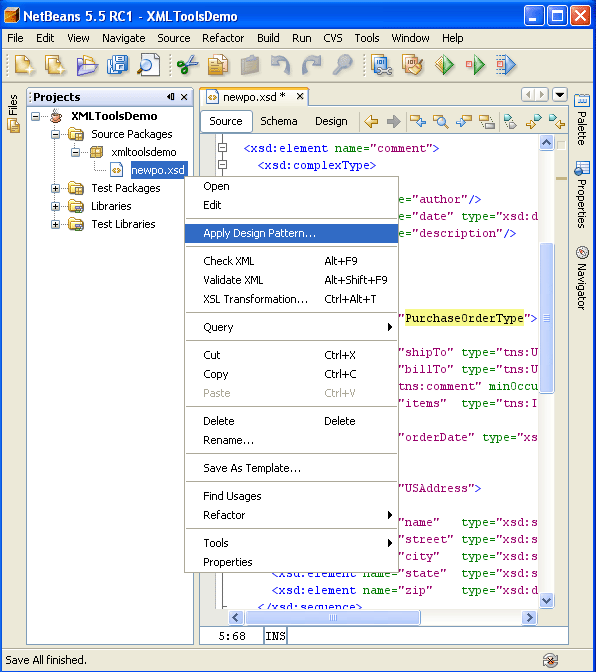
Figure 4: Application of a Design Pattern to an XML Schema
The Apply Design Pattern wizard is displayed. See Figure 5.
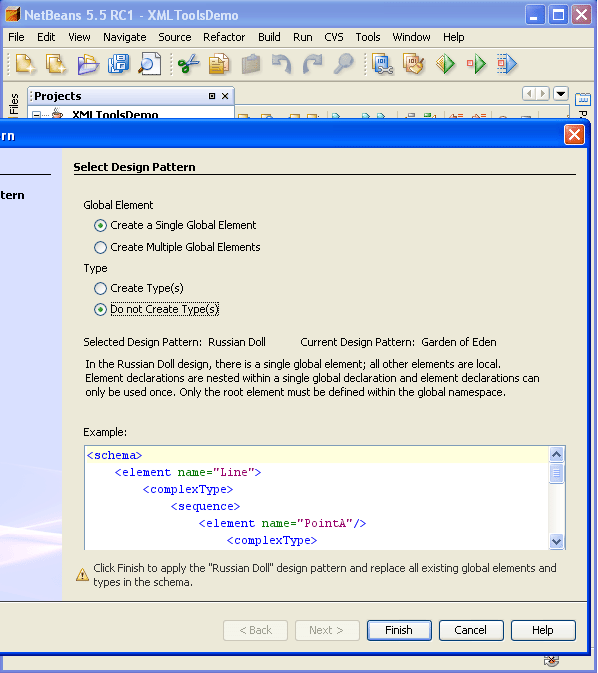
Figure 5: Apply Design Pattern Wizard
Summary
Choosing the appropriate pattern for your XML schema is crucial in the design phase. Be sure to take advantage of XML tools, such as those in NetBeans Enterprise Pack, to detect and maintain your patterns so that they are readily usable and reusable.
References
- XML Schema Part 0
- NetBeans IDE
- NetBeans Enterprise Pack