What Is Docker?
Alan Zeichick | Senior Writer | December 8, 2025

Software development has come a long way from the days of “but it works on my machine!” That’s largely thanks to containerization, which allows an application to run flawlessly on-premises and in multiple cloud servers, moving and scaling as needed via isolated, consistent environments.
Docker is an open source, standard software platform that helps developers build, test, and deploy containerized applications quickly. It’s no wonder, then, that Docker and its associated container services have seen widespread adoption over the last several years. From its roots as an almost unknown and rather technical open source technology in 2013, Docker has evolved into a standardized runtime environment that’s now officially supported for many enterprise products.
As we said, we’ve come a long way.
What Is Docker?
Docker is an open source platform that allows developers and systems administrators to package applications into containers. Those containers can then be pushed onto a deployment platform, such as on-premises servers or servers in the cloud, and then executed directly. You can run many Docker containers, each with its own application, on a single server—and those applications will be isolated from one another, thus providing data security and reliability.
The flexibility to run Docker containers on any compatible server is one of the technology’s greatest strengths. Docker was first introduced by visionary software engineer Solomon Hykes, who presented the concept at the PyCon 2013 conference. Hykes, along with a dedicated team, aimed to address challenges around deploying applications to servers, a job that often involved resource-intensive, cumbersome, and error-prone processes. Docker was conceived to simplify and optimize the entire application lifecycle.
Today, Docker containers are used for business-critical, large-scale deployments involving thousands of containers and hundreds of servers. Inspired by the fundamental concept of containerization, Docker brought a fresh and innovative approach to application deployment. It elevated containerization to new heights by introducing a set of powerful features.
Why Containers?
Linux containers have been in use since 2008, but it took the emergence of Docker containers in 2013 to make the technology widely adopted. A big benefit of containers is that they hold everything needed to run an application or a specific service, including all the libraries, graphics such as icons or user-interface components, system tools, and the runtime executable. A Docker container is designed to run on a specific operating system, such as Linux or Windows. Most of the time, Docker containers can be deployed onto any server—or laptop or desktop—running that operating system, with no configuration changes required.
Docker vs. Kubernetes
The Docker ecosystem is involved in creating containers, putting all the application parts into those containers, and packaging them up for deployment. That’s fine for a few containers, but what about hundreds or thousands? That’s where the Kubernetes automation platform comes in.
Like Docker, Kubernetes is an open source project widely supported across the tech industry. It’s the tool you use to automate the process of deploying Docker containers to servers, monitoring their performance, starting up new containers when needed, updating containers to the newest versions, and shutting them down when the time comes.
The main benefit of Kubernetes is that it helps manage the operational complexity of deploying many containers across multiple servers—as such, it’s essential for any large-scale deployment of container technology, be it in the cloud or on-premises. Kubernetes automatically orchestrates the container lifecycle, distributing application containers across the hosting infrastructure. Kubernetes can quickly scale resources up or down depending on demand.
Key Takeaways
- Containers package everything needed to run an application, including its binary executables, libraries, images, and other data, along with the application’s configuration details.
- Docker is one of the most common formats for creating containerized applications; it’s open source and broadly supported by all major cloud providers.
- With Docker, there’s no need to manually install and configure an app because that process is done when a container is constructed.
- With isolation, many containers can be installed onto a single server, maximizing the value of server hardware.
- Industry-standard tools such as Kubernetes can automate the deployment of hundreds or even thousands of containerized applications across a network.
Docker Explained
Docker is an open source application development framework that’s designed to benefit both developers and systems administrators. It enables a DevOps model, where developers are responsible for managing cloud-based applications, instead of the more traditional method where developers built the code and “threw it over the wall” to a separate administrative team that then deployed and managed the application.
Using Docker, developers can easily build, pack, ship, and run applications on almost any system as lightweight, portable, self-sufficient containers. Now, developers can focus on making sure their application meets the needs of the organization rather than worry about the underlying operating system or deployment system.
Additionally, developers can select from thousands of open source containerized applications made to run in a Docker environment. For DevOps teams, Docker lends itself to continuous integration and development toolchains and reduces system architecture constraints and complexity. With Docker and container orchestration cloud services such as Kubernetes, any developer can create containerized applications locally and then run them in production on cloud services.
Benefits of Using Docker
Docker containers democratize development: Individuals in the software industry often separate developers by specialization—front end, back end, or any concentration in between. With Docker, anyone familiar with the basic concepts can create, deploy, and manage containers. Docker’s containerization services offer many additional advantages over the traditional method of installing software directly onto a server.
These advantages include:
- Consistency: Encapsulating applications and their dependencies within containers can yield consistent runtime behavior and performance.
- Efficient resource management: Docker's shared kernel architecture lets multiple containers run on a single host with minimal overhead, maximizing hardware resource utilization.
- Enhanced scalability: When an application running inside a container becomes overloaded, the Kubernetes manager can create another instance of that container on another server. A load balancer can then divvy up work between the running instances.
- Isolation and security: Containers provide process isolation, which improves security for each application running on a server.
- Microservices architecture: Containerization technology is a key enabler of a microservices architecture, where applications are broken down into smaller, independent services that run in their own containers. This enhances modularity, scalability, and maintainability.
- Portability: Containers provide application portability across diverse environments, from development to production, which allows for easy movement between different infrastructure setups.
- Rapid deployment: With fast startup times and efficient resource utilization, containers are easily stopped and started, facilitating simple updates to runtime code and effective load balancing.
- Reliable and efficient resource utilization: A server can be dedicated to a single Docker container. However, if the container doesn’t need all the server’s resources, that server can also be used to run additional containers, thereby leveraging the hardware in full.
- Simplified management: Docker's intuitive interface and robust set of tools and commands help simplify container management, making it easier to monitor, update, and scale applications.
- Speedier deployment and CI/CD integration: The process of installing and configuring software on a server can take minutes or hours. Deploying a container? A few seconds. The Kubernetes automation platform is essential for the modern continuous integration/continuous deployment approach commonly used to run cloud native applications.
How Docker Works
The core concepts of Docker are images and containers. A Docker image contains everything that’s needed to run software: the executable code, drivers, tools, scripts, libraries, deployments, and more.
Docker container is a running instance of a Docker image. However, unlike in traditional virtual machines, a Docker container runs on the kernel of the host operating system, so the image contains no separate operating system. While that makes the container lightweight and portable, it also requires the container to be configured for a specific operating system. A Docker container holding an application written and compiled to target Linux can be run only on a Linux-based server; the same is true of an application written and compiled to target Windows.
Every Docker container has its own file system, its own network stack and therefore its own IP address, its own process space, and defined resource limitations for CPU and memory. Since a Docker container does not have to boot an operating system, it starts up almost instantly. Docker is about isolation, separating the resources of a host operating system from the application. That’s why it’s possible to run many containers on a single server, each securely separated from each other but sharing the base operating system and hardware.
Docker Architecture Explained
The architecture of a Docker production system requires a Docker daemon, a Docker client, container images and registries, and container orchestration and management. These pieces can be running in the cloud or on-premises.
- The Docker daemon is a background process that runs on each server, or desktop or workstation, that will host Docker containers. It manages all interactions with the containers, such as starting them, stopping them, and routing network communication to and from them.
- The Docker client is the tool that developers and administrators use to interact with the Docker daemon. Once sporting a command-line interface, the Docker client now offers a graphical interface.
- A container image is a read-only template used to provision a container. The Docker daemon reads the container image, which tells it how to launch and configure the container on the server and then start the application inside that container.
- Container registries are centralized resources that store Docker images, along with their descriptions. The Docker client or Kubernetes automation platform instructs the Docker daemon to access the container registry and retrieve and launch each container image as required.
- Container orchestration is the process of managing many containers—hundreds or thousands, perhaps on dozens or hundreds of servers in the cloud or in an on-premises data center. For relatively small deployments, organizations may use Docker Swarm, a capability built into the Docker platform. For bigger deployments across an enterprise, Kubernetes is the industry standard.
- Container management involves orchestration as well as scaling, load balancing, logging and log analysis, and security and access control.
Docker vs. Virtual Machines
The difference between traditional virtual machines (VMs) and containers is significant. A VM is a complete software simulation of a server (or of any computer) that includes the operating system, device drivers, applications, and data. In a VM setup, a hypervisor runs on the server and orchestrates the virtual machines, performing the same function that the Docker Engine performs with containers.
A container, by contrast, holds only applications and data; it uses a host computer operating system and device drivers.
VMs are used to run multiple operating systems and provide secure, isolated application environments on a single physical machine. But while VMs offer certain advantages, they also have limitations:
- Inefficient resource use: Each VM requires a full operating system, leading to substantially more memory, storage, and processing resource consumption than containers.
- Limited scalability: Because VMs are a simulation of an entire computer, a lot more resources are required just to manage the overhead. That limits the computer's capability to perform useful tasks.
- Slow startup times: Booting up a VM involves loading an entire operating system. That process takes time, hampering overall system performance.
Containers, on the other hand, provide an isolated environment for running applications while sharing the host operating system kernel, eliminating the need for a full OS installation within each container. This shared kernel architecture delivers several benefits:
- Efficient resource use: Containers share the host's kernel, resulting in reduced memory and storage requirements versus VMs.
- Enhanced scalability: Scaling containerized applications horizontally is a primary goal of Docker. Its design allows for the rapid deployment of multiple instances with minimal resource overhead.
- Rapid startup times: With no need to boot a full operating system, containers can start up in a matter of seconds, delivering faster application deployment and improved system performance.
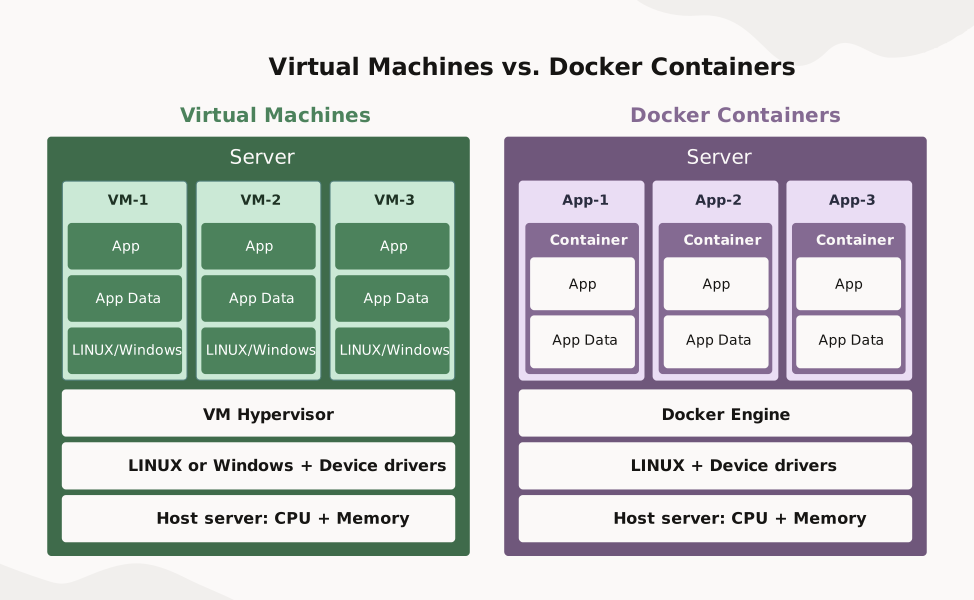
Containerization vs. Traditional Deployment
In traditional deployments, software is either loaded on a server or a virtual machine configured with an operating system, device drivers, applications, and data. This is a slow process best suited to large, monolithic applications that usually run on a dedicated server, either in the cloud or in a data center.
Conversely, containers offer a lightweight way of packaging an application and all its dependencies into an image. That image is then stored in a repository, where it can be extracted and run on a target server in a matter of seconds. The Docker container model is easier to scale with automation tools, plus it’s cost-effective and allows developers to maximize their servers’ capabilities.
Key Components of Docker
The core concepts of Docker are images and containers, described earlier. Here are additional components of a Docker container system:
- Docker Engine: The Docker Engine is the core runtime environment responsible for building, running, and managing containers. It provides an interface between the host operating system and the containers, enabling optimal resource allocation and performance.
- Docker Hub: Docker Hub is a cloud-based repository that provides a vast collection of public and private images and serves as a platform for sharing and collaborating on Docker-related projects.
- Docker Compose: Docker Compose is a tool that simplifies the definition and management of multicontainer applications. It allows developers to define and configure multiple containers and their dependencies within a single file, called a YAML file, thus making it easier to deploy and scale complex applications.
- Docker Swarm: Docker Swarm is a clustering and orchestration tool that creates groups of Docker Engines. It allows for the management of many containers across multiple hosts, providing features such as load balancing, service discovery, and scalable application deployment. Docker Swarm has largely been superseded by Kubernetes, an open source platform for container management and orchestration.
- Docker CLI and API: Docker's command-line interface (CLI) provides intuitive commands for developers and administrators and simple scripting tools to manage containers, including processes to start, stop, and monitor their status. The Docker API allows more sophisticated automation and orchestration tools, such as Kubernetes, to perform those same functions more easily than the CLI.
Common Docker Use Cases
The versatility and powerful features of Docker containerization have made it a preferred choice for organizations across various industries. Here are the most common uses of Docker, often in conjunction with Kubernetes:
- Big data and analytics: Efficient resource utilization and scalability make containers an ideal choice for big data and analytics applications. Companies in data-intensive sectors such as finance and healthcare have used containers to process and analyze large data sets, optimizing resource allocation and improving performance.
- Cloud native applications: With the rise of cloud computing, containers have become a key enabler for building cloud native applications. The ability to package and deploy applications as containers provides portability and flexibility across cloud providers, offering the benefits of cloud computing without vendor lock-in.
- DevOps and continuous integration: Organizations such as Spotify and Pinterest have leveraged containers to simplify their DevOps processes and enable continuous integration. Containers provide a consistent and reproducible environment, simplifying testing and deployment of code changes across the development pipeline.
- Microservices-based architectures: Leading consumer technology companies such as Netflix, Uber, and Airbnb have embraced containerization technology to build and manage their microservices-based architectures. Containers’ ability to handle complex application landscapes with multiple services running in parallel has been vital to their success.
- Web application deployment: Containers are widely used for deploying web applications, providing consistent and reliable performance. They offer a scalable and highly secure environment for simple blogs and complex ecommerce platforms alike.
Getting Started with Containers
For those new to Docker and containers, here’s a step-by-step guide to getting started:
- Install Docker. The first step is to download and install Docker on your preferred operating system. Docker provides installation packages for Windows, macOS, and various Linux distributions, making it accessible to a wide range of users.
- Create a Docker image. Start by creating a Docker image, which serves as the blueprint for your container. This involves writing a Dockerfile, a text file that defines the steps required to build your image, including the base image, installation of dependencies, and application configuration. A Docker image is built up in layers, each representing one of the steps in the Dockerfile.
- Build and run. Once your Docker image is ready, you can build and run your first container. Docker's command-line interface provides intuitive commands to manage containers, allowing you to start, stop, and monitor their status.
- Explore Docker's ecosystem. Docker offers a rich set of tools and services you can use to enhance your containerization experience. Docker Hub, a cloud-based repository, provides a vast collection of ready-to-use images and serves as a platform for sharing and collaborating on Docker-related projects. Docker Compose simplifies multicontainer application management.
Docker Best Practices
As you explore the use of Docker within your organization, consider some best practices employed by many companies that have embraced cloud native development:
- Optimizing image size and layers: Smaller Docker images are easier to build, test, and deploy. You can start with a small base image by removing unnecessary files from your system before building the image.
- Managing security and permissions: Only authorized users should be allowed to access containers, and misbehaving applications in those containers shouldn’t be able to corrupt or threaten security. Standard guidance applies—never run applications as the root user, keep up to date on patches, and use Docker’s access control features to limit the Linux or Windows privileges of your containers.
- Efficient networking and load balancing: Containers are most efficient when they’re loosely coupled— that is, when you can create and move containers wherever it makes sense on the network instead of being tied to a fixed location. You can use Docker Network to define a flexible network architecture, and tools such as Nginx to route and load balance the traffic between containers in a large-scale deployment.
- Monitoring and logging for Docker: Unlike monolithic applications deployed on a single server, monitoring the health of large-scale containerized applications can be tricky without using automation tools. Plan for centralizing the logs for each container and then use monitoring tools to detect faults and visualize performance metrics.
Optimize Your Container Strategy for Growth
Oracle provides everything needed to create and deploy cloud native applications—including tooling, services, and automation—so development teams can build quickly while reducing operational tasks.
Oracle cloud native services run on Oracle Cloud Infrastructure (OCI), which offers a standards-based platform with higher performance and lower cost compared to many other cloud providers. By leveraging services based on open source and open standards, such as Docker and Kubernetes, OCI enables developers to run applications on any cloud or on-premises environment.
Docker and associated technologies including Kubernetes have seen widespread adoption and tremendous success over the last several years. From an almost unknown and rather technical open source technology in 2013, Docker has evolved into a standardized runtime environment that’s proven fit for the largest enterprise deployments.

Docker is an essential component of today’s modular, cloud native software that delivers scalability, resilience, flexibility, and cost savings. Learn how to get started.
Docker FAQs
What are containers?
Containers bundle all the code and dependencies of an application in a standard format, allowing it to run quickly and reliably on most servers. Docker is an industry-standard open source format for containers.
Why use Docker over traditional deployment methods?
Traditionally, administrators have had to install an application’s files, including the executable binaries, libraries, and data, onto a server and then configure everything to work correctly. To install and run multiple applications on a server at the same time to maximize hardware utilization, they would need to ensure that those applications won’t interfere with each other, and that if one failed, it wouldn’t cause the others to crash. This can be very complex, to say the least, and is difficult to automate.
By contrast, creating a container that holds an application means that container also has the executable binaries, libraries, and data—and everything is preconfigured. To run the application just requires copying the container onto the server and the Docker Engine and Docker daemon will handle the rest. What’s more, containers are isolated, so if one application fails, it won’t affect what’s running in other containers. Tools such as Kubernetes can also automate the deployment and management of containerized applications on a very large scale.
Can Docker replace virtual machines completely?
Consider Docker and virtual machines as complementary technologies. Containers use the host computer’s operating system and device drivers. That makes them fast and efficient, and generally the more attractive option in most cases.
However, there may be situations when a virtual machine is a better choice. These include running applications in a dedicated operating system without sharing any of its resources, requiring specialized device drivers, or running multiple operating systems on the same server.
How does Docker integrate with Kubernetes?
Kubernetes is an open source system that manages Docker containers. It deploys them, starts and stops them, scales them up with multiple instances when needed, and even restarts containers if an application fails or stops responding. Docker Compose, a part of the base Docker system, can handle small-scale container deployments, while Kubernetes is ideal for scaling to dozens, hundreds, or even thousands of containers.
What role does Docker play in enterprise cloud strategies?
Docker containers are perfect for deploying software in the cloud. That can mean either traditional applications that run inside one container, or microservices-based cloud native applications consisting of dozens of separate services running in their own containers. Containers can simplify the development and deployment of services in the cloud and improve scalability, security, compliance, testing, and availability of enterprise applications. Docker and Kubernetes can even maximize the utilization of cloud servers, which can reduce runtime costs.