Migrate OpenSearch
Confidently migrate OpenSearch to Oracle Cloud Infrastructure (OCI) using a proven end-to-end approach. Existing OpenSearch clusters can be easily migrated to OCI without requiring significant configuration, integration, or disruption to source environments. Access step-by-step resources outlining best practices as well as expert guidance from Oracle engineers and partners.
Migrate OpenSearch in four steps
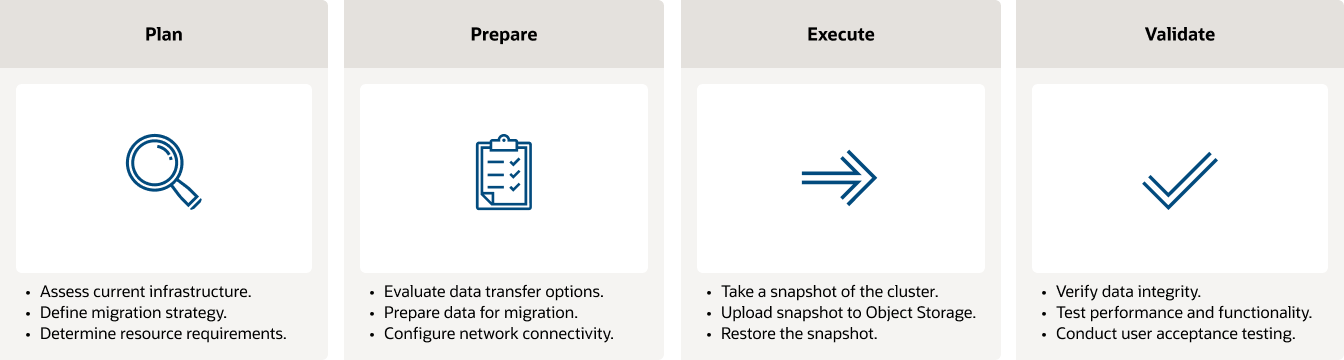
Below are steps to consider when planning your OpenSearch migration to Oracle Cloud Infrastructure. Steps fall into four categories: A) Plan, B) Prepare, C) Execute, D) Validate. What follows is a list of steps, broken down by category.
Category A: Plan (this category is visually represented by the image of a looking glass)
- Step 1: Assess current infrastructure.
- Step 2: Define migration strategy.
- Step 3: Determine resource requirements.
Category B: Prepare (this category is visually represented by the image of a checklist)
- Step 4: Evaluate data transfer options.
- Step 5: Prepare data for migration.
- Step 6: Configure network connectivity.
Category C: Execute (this category is visually represented by the image of an arrow)
- Step 7: Take a snapshot of the cluster.
- Step 8: Upload snapshot to Object Storage.
- Step 9: Restore the snapshot.
Category D: Validate (this category is visually represented by the image of checkmark)
- Step 10: Verify data integrity.
- Step 11: Test performance and functionality.
- Step 12: Conduct user acceptance testing.
Step-by-step migration guides
You can bring existing clusters from your external OpenSearch installations to Oracle Cloud Infrastructure. This enables you to take advantage of the managed service capabilities provided by Oracle Cloud Infrastructure Search with OpenSearch. Having infinite scalability for both compute and storage allows you to scale cluster resources up or down quickly. In addition, Oracle Cloud Infrastructure FastConnect and private subnets provide private high-speed access to your cluster that makes it an extension of your data center network. Access step-by-step migration guides below.
Here’s a high-level summary of how to migrate an OpenSearch cluster to Oracle Cloud Infrastructure.
- Take a snapshot of the cluster.
- Upload the snapshot to Oracle Cloud Infrastructure Object Storage.
- Create the destination cluster and register the repository.
- Restore the snapshot.
Benefits of OCI Search with OpenSearch
- The most powerful open source search engine: OpenSearch is forked from Elasticsearch and Kibana and contributed to by numerous companies, including Oracle and AWS.
- Fully managed service: We remove the operational burden of managing search infrastructure by automating typical maintenance activities, including patching, updating, backups, and no-downtime resizing.
- Optimized performance: With OCI flexible shapes you can build any combination of CPU and RAM to optimize your performance.
- Low cost: We offer competitive pricing with a very low management fee.
- Fast migration: Migrating from an existing OpenSearch deployment—whether self-managed or hosted—is quick. Restore from a working backup configuration and/or point APIs to an OpenSearch endpoint.
 The Oracle AI Playbook series
We've compiled the secrets to our people, process, data, and systems strategy. And we want to share them with you.
Get started with OCI Search with OpenSearch
Learn with a hands-on lab
The best way to learn is to try it yourself. Use our tutorials and hands-on labs with the Oracle Cloud Free Tier, your own Oracle Cloud tenancy, or for selected solutions in an Oracle-provided free lab environment.
-
Search and visualize data using OCI Search
Check out the OCI Search tutorial, where you’ll create a cluster, connect to the cluster, ingest data, and run sample search commands. You'll also be shown how to create OpenSearch Dashboards and visualized data.
Start this lab about searching and visualizing data using OCI Search -
Search documents and images stored in OCI Object Storage using OpenSearch, AI Vision, and text recognition
Search documents uploaded to Object Storage with a Google-like search engine. Document examples include Microsoft Word documents, images, and ID cards.
Start this lab about searching documents and images stored in OCI Object using OpenSearch -
Get started with OCI core services
Explore basic OCI services, including OCI Compute, Networking, and Storage.
Start this lab about getting started with OCI core services -
Search documents stored in object storage using OpenSearch, generative AI, semantic search, and RAG
Using low-code tools, create a generative AI search to search documents using OpenSearch and a Google-like search interface created with Oracle Visual Builder.
Start this lab about searching documents stored in object storage using OpenSearch, generative AI, semantic search, and RAG
Learn with step-by-step how-tos
The best way to learn is through hands-on experience. Follow these step-by-step tutorials to make the most of Oracle Cloud Infrastructure services.
-
Integrate OCI with OpenSearch and LangChain Within OCI Data Science Notebook
Learn how LangChain provides an easy-to-use framework for creating and managing complex LLM workflows, allowing developers to streamline the integration between LLMs and OpenSearch.
See the tutorial about Integrate OCI with OpenSearch and LangChain -
Integrate LangChain, OCI Data Science Notebook, OCI with OpenSearch, and OCI Generative AI to Accelerate LLM Development for RAG and Conversational Search
Discover how seamless integration across LangChain, OCI with OpenSearch, AI Quick Actions, and OCI Generative AI can speed up LLM application development for custom business use cases.
See the tutorial about Integrate LangChain, OCI Data Science Notebook -
Create a RAG-Based Chatbot Using Oracle Cloud Infrastructure Search with OpenSearch
Create a retrieval-augmented generation–based chatbot using OCI with OpenSearch as a vector database and OCI Generative AI service models (such as Cohere and Llama).
See the tutorial about Create a RAG-Based Chatbot Using Oracle Cloud Infrastructure Search with OpenSearch -
Search and Visualize Data Using Oracle Cloud Infrastructure Search with OpenSearch
Run sample search commands and visualize data in OpenSearch dashboards.
See the tutorial about Search and Visualize Data Using Oracle Cloud Infrastructure Search with OpenSearch
Explore more than 150 best-practice designs
See how our architects and other customers deploy a wide range of workloads, from enterprise apps to HPC, from microservices to data lakes. Understand the best practices, hear from other customer architects in our Built & Deployed series, and even deploy many workloads with our "click to deploy" capability—or do it yourself from our GitHub repo.
Contact sales
Interested in learning more about Oracle Cloud Infrastructure? Let one of our experts help.
-
They can answer questions such as
- How do I get started with Oracle Cloud?
- What kinds of workloads can I run on OCI?
- What types of services does OCI offer?
Try 20+ Always Free cloud services, with a 30-day trial for even more
Oracle offers a Free Tier with no time limits on more than 20 services such as Autonomous AI Database, Arm Compute, and Storage, as well as US$300 in free credits to try additional cloud services. Get the details and sign up for your free account today.
-
What’s included with Oracle Cloud Free Tier?
- Two Autonomous AI Database instances, 20 GB each
- AMD and Arm Compute VMs
- 200 GB total block storage
- 10 GB object storage
- 10 TB outbound data transfer per month
- 10+ more Always Free services
- US$300 in free credits for 30 days for even more