
|
|
Transliterate |
The Transliterate processor converts strings from one writing system (such as Arabic) to another (such as Latin). This is a largely phonetic operation which attempts to create an equivalent of the original string in the target writing system, based on the sounds that the string represents. No attempt is made to translate the string. For example, the Arabic string which sounds like 'bin' when read aloud and which is a common component of Arabic names is transliterated to the Latin string "bin", not translated to its literal meaning, 'son of'.
Note that a single string in the original writing system may have several valid transliterations. For example, 'bin' may also be transliterated as 'ben'. Some names may have very many alternate transliterations. The Transliterate processor aims to provide a single, standard form of the original string, not all the possible alternative transliterations. Instead, alternative transliterations are recognized as part of the matching process, where it is managed in a similar way to recognizing alternative spellings of non-transliterated names.
The OEDQ Transliterate processor is built around the ICU4J libraries provided by ICU. ICU is released under a nonrestrictive open source license that is suitable for use with both commercial software and with other open source or free software. For more information about ICU, please visit the ICU website. The ICU license can be read in full here.
Use the Transliterate processor to convert strings in a phonetically appropriate manner from one writing system to another. This is useful when matching strings provided in one writing system against reference data that is provided in a different writing system. For example, international watch lists are often provided only in Latin script.
|
Note: The Transliterate processor is not the only available tool for handling alternate writing systems in OEDQ. Depending on the complexity of the transliteration requirements and the support for the various writing systems in ICU4J, other approaches may be more reliable. For example, it is possible to implement transliteration using a combination of the Replace and Character Replace processors, along with a suitable set of reference data for the source and target writing systems. |
Any number of String attributes, or arrays of String attributes, that you wish to transliterate. There is no need to transliterate Number or Date attributes, as they are stored in a format which is independent of any particular writing system. Strings containing numbers or dates will be converted to the target writing system in the most appropriate fashion, but this is not a phonetic operation.
|
Option |
Type |
Purpose |
Default Value |
|
List of possible transliteration options. |
Standard List Resource |
Defines the source and target writing systems to be used in transliterating the input. |
The default selection is 'Any to Latin'. |
|
Data attribute |
Type |
Purpose |
Value |
|
[Attribute Name].Transliterated |
Derived |
The transliterated version of the attribute value. |
The value of the original attribute, transliterated into the target writing system. |
None
None
|
Execution Mode |
Supported |
|
Batch |
Yes |
|
Real-time Monitoring |
Yes |
|
Real-time Response |
Yes |
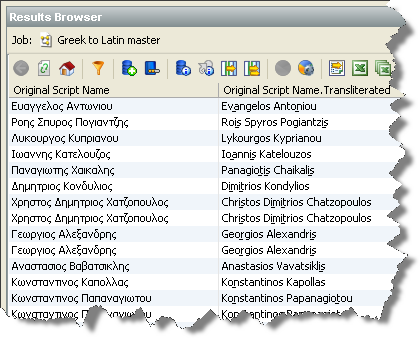
The Transliterate processor does not output any summary data. The transliterated input value is displayed with the input attributes in the data view.
None
In the following example, the names in the input data have been transliterated from Greek ("Original Script Name") to Latin ("Original Script Name.Transliterated"):
This license information pertains only to the ICU libraries used within the Transliterate processor. It does not affect any other part of the product, including the additional code used to create the Transliterate processor, and nor does it affect the rest of your OEDQ license in any way. The complete ICU license is included here in fulfillment of its own terms:
COPYRIGHT AND PERMISSION NOTICE
Copyright (c) 1995-2009 International Business Machines Corporation and others
All rights reserved.
Permission is hereby granted, free of charge, to any person obtaining a copy of this software and associated documentation files (the "Software"), to deal in the Software without restriction, including without limitation the rights to use, copy, modify, merge, publish, distribute, and/or sell copies of the Software, and to permit persons to whom the Software is furnished to do so, provided that the above copyright notice(s) and this permission notice appear in all copies of the Software and that both the above copyright notice(s) and this permission notice appear in supporting documentation.
THE SOFTWARE IS PROVIDED "AS IS", WITHOUT WARRANTY OF ANY KIND, EXPRESS OR IMPLIED, INCLUDING BUT NOT LIMITED TO THE WARRANTIES OF MERCHANTABILITY, FITNESS FOR A PARTICULAR PURPOSE AND NONINFRINGEMENT OF THIRD PARTY RIGHTS. IN NO EVENT SHALL THE COPYRIGHT HOLDER OR HOLDERS INCLUDED IN THIS NOTICE BE LIABLE FOR ANY CLAIM, OR ANY SPECIAL INDIRECT OR CONSEQUENTIAL DAMAGES, OR ANY DAMAGES WHATSOEVER RESULTING FROM LOSS OF USE, DATA OR PROFITS, WHETHER IN AN ACTION OF CONTRACT, NEGLIGENCE OR OTHER TORTIOUS ACTION, ARISING OUT OF OR IN CONNECTION WITH THE USE OR PERFORMANCE OF THIS SOFTWARE.
Except as contained in this notice, the name of a copyright holder shall not be used in advertising or otherwise to promote the sale, use or other dealings in this Software without prior written authorization of the copyright holder.
All trademarks and registered trademarks mentioned herein are the property of their respective owners.
Oracle ® Enterprise Data Quality Help version 9.0
Copyright ©
2006,2011 Oracle and/or its affiliates. All rights reserved.