
 Creating a Trust Store File
 Before You Begin
This 10-minute tutorial shows you how to create a trust store file for the Big Data Cloud cluster.
This is the first tutorial in the Analyzing and Visualizing Data on Big Data Cloud series. Perform the tutorials sequentially.
- Creating a Trust Store File
- Configuring the Memory Settings for the Spark Thrift Server Process
- Connecting Oracle Data Visualization Desktop to Big Data Cloud
- Creating a Data Visualization Desktop Data Set
- Exploring and Visualizing Data Using Oracle Data Visualization Desktop
What Do You Need?
- A running BDC cluster
- code_snippet.txt
 Create
a Trust Store File
Create
a Trust Store File
- Navigate to the Big Data Cloud Console Notebook page and click Citi Bike Trip note.
- Copy code_snippet.txt
and paste it in the empty paragraph.
- Set the title as Script to create Trust Store file for your BDC instance.
- Click Run the paragraph icon to run the script.
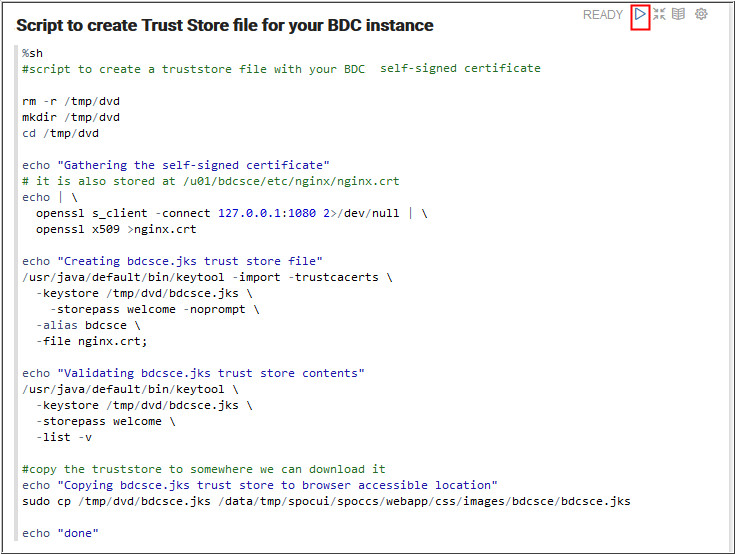
Description of the illustration a4.jpg - Click Trust Store File to download the Trust Store file to your local machine where DVD is installed.
- Save the file as bdcsce.jks.
- Copy the downloaded Trust Store File (bdcsce.jks) to this
location:
C:/Users/USERNAME/AppData/Local/DVDesktop/components/OBIS/bdcsce/bdcsce.jks.
Note: You will need to create the bdcsce subdirectory the first time you do this.
 Next
Tutorial
Next
Tutorial
Configuring the Memory Settings for the Spark Thrift Server Process
 Want
to Learn More?
Want
to Learn More?