IaaS and PaaS Services Highlights
Oracle Cloud Infrastructure (OCI) offers a broad catalog of commercially available infrastructure-as-a-service (IaaS) and platform-as-a-service (PaaS) services. These services are offered in various deployment models, including Oracle-managed services, customer-managed virtual machines, and Oracle-managed serverless instances.
The following page walks through various categories of the current commercially available IaaS and PaaS services which our customers can leverage in their deployments.
Note: All prices, listed in CAD, are as of December 2024 and are subject to change. Volume discounts may be applicable for Oracle Universal Credits subscriptions. Please contact an Oracle sales representative for an official quote.
OCI Compute (IaaS)
Oracle Cloud Infrastructure (OCI) Compute lets you provision and manage compute hosts, known as instances. You can create instances as needed to meet your compute and application requirements. After you create an instance, you can securely access it from your computer, restart it, attach and detach volumes, and terminate it when you're done with it.
Oracle Cloud Infrastructure offers both bare metal and virtual machine instances.
- Bare metal: A bare metal compute instance gives you dedicated physical server access for highest performance and strong isolation.
- Virtual machine: A virtual machine (VM) is an independent computing environment that runs on top of physical bare metal hardware. The virtualization makes it possible to run multiple VMs that are isolated from each other. VMs are ideal for running applications that do not require the performance and resources (CPU, memory, network bandwidth, or storage) of an entire physical machine.
An Oracle Cloud Infrastructure Compute VM instance runs on the same hardware as a bare metal instance, leveraging the same cloud-optimized hardware, firmware, software stack, and networking infrastructure.
Compute Shapes
A shape is a template that determines the number of OCPUs, amount of memory, and other resources that are allocated to an instance. Compute shapes are available with AMD processors, Intel processors, and Arm-based processors.
Oracle Cloud Infrastructure offers a variety of shapes that are designed to meet a range of compute and application requirements.
- Standard shapes: Designed for general purpose workloads and suitable for a wide range of applications and use cases. Standard shapes provide a balance of cores, memory, and network resources. Standard shapes are available with Intel, AMD, and Arm-based processors.
- Dense I/O shapes: Designed for large databases, big data workloads, and applications that require high performance local storage. Dense I/O shapes include locally attached NVMe-based SSDs.
- GPU shapes: Designed for hardware-accelerated workloads. GPU shapes include Intel or AMD CPUs and NVIDIA graphics processors. Some bare metal GPU shapes support cluster networking.
- High performance computing (HPC): Designed for high performance computing workloads that require high frequency processor cores. Bare metal HPC and optimized shapes support cluster networking.
- Optimized shapes: These are flexible virtual machine shapes and/or bare metal shapes designed to support multiple workload types, including high performance computing workloads requiring high frequency processor cores, and memory optimized use cases that require a higher memory to CPU ratio.
Compute Shape Pricing
You can use the Cost Estimator to estimate your expected monthly project costs with Oracle Cloud Infrastructure. For detailed information about billing, see Billing and Cost Management and the Oracle Compute Cloud Services section of Oracle PaaS and IaaS Universal Credits Service Descriptions (PDF).
Note: In some cases, SKU numbers are common within a series of instances regardless of the actual shape and its configuration. As an example, all shapes under the series VM.Standard.E4.Flex have the same SKUs (i.e. B93113, B93114) even though the series provides thousands of unique shape offerings. This means that even though multiple shapes share common SKU numbers, those shapes are unique OCI offerings with unique product specifications that customers can provision. The final pricing for each unique shape is calculated based on the amount of OCPU and RAM specified during provisioning.
Following are the various shape options depending upon the workloads and use cases.
Standard Shapes (General or Standard Purpose)
Designed for general purpose workloads and suitable for a wide range of applications and use cases. Standard shapes provide a balance of cores, memory, and network resources. Standard shapes are available with Intel, AMD, and Arm-based processors.
Standard shapes include bare metal (BM) shapes, which are compute instances that give you dedicated physical server access for highest performance and strong isolation, and virtual machine (VM) shapes, which are independent computing environments that run on top of physical bare metal hardware.
These are the VM standard series.
- VM.Standard3: X9-based standard compute.
Processor: Intel Xeon Platinum 8358. Base frequency 2.6 GHz, max turbo frequency 3.4 GHz. - VM.Standard.E2.1.Micro: E2-based, E3-based, or E4-based standard compute. Oracle Cloud Infrastructure assigns one of the following processors:
- AMD EPYC 7551. Base frequency 2.0 GHz, max boost frequency 3.0 GHz.
- AMD EPYC 7742. Base frequency 2.25 GHz, max boost frequency 3.4 GHz.
- AMD EPYC 7J13. Base frequency 2.55 GHz, max boost frequency 3.5 GHz.
- VM.Standard.E4: E4-based standard compute.
Processor: AMD EPYC 7J13. Base frequency 2.55 GHz, max boost frequency 3.5 GHz. - VM.Standard.E5: E5-based standard compute.
Processor: AMD EPYC 9J14. Base frequency 2.4 GHz, max boost frequency 3.7 GHz. - VM.Standard.A1: Ampere A1 Compute Arm-based standard compute. Each Oracle CPU (OCPU) corresponds to a single hardware execution thread.
Processor: Ampere Altra Q80-30. Max frequency 3.0 GHz. - VM.Standard.A2: OCI Ampere A2 Compute Arm-based standard compute. Each OCPU corresponds to two hardware execution threads (2 cores).
Processor: AmpereOne A160-30. Max frequency 3.0 GHz.
These are the BM standard series.
- BM.Standard3: X9-based standard compute.
Processor: Intel Xeon Platinum 8358. Base frequency 2.6 GHz, max turbo frequency 3.4 GHz. - BM.Standard.E4: E4-based standard compute.
Processor: AMD EPYC 7J13. Base frequency 2.55 GHz, max boost frequency 3.5 GHz.
For additional information on OCI Standard shapes, refer to Compute documentation.
Shape options and pricing information
| Shape | OCPU | Memory (GB) | Compute price (per hour) |
|---|---|---|---|
| VM.Standard3.Flex | 1 OCPU minimum, 32 OCPU maximum |
1 GB minimum, 512 GB maximum |
$0.052424 per dynamically selected OCPU $0.0019659 per dynamically selected GB memory |
| VM.Standard.E4.Flex | 1 OCPU minimum, 64 OCPU maximum |
1 GB minimum, 1024 GB maximum |
$0.032765 per OCPU $0.0019659 per GB memory |
| VM.Standard.E5.Flex | 1 OCPU minimum, 94 OCPU maximum |
1 GB minimum, 1049 GB maximum |
$0.039318 per dynamically selected OCPU $0.0026212 per dynamically selected GB memory |
| VM.Standard.A1.Flex | 1 OCPU minimum, 80 OCPU maximum |
1 GB minimum, 512 GB maximum |
$0.013106 per dynamically selected OCPU $0.0019659 per dynamically selected GB memory |
| VM.Standard.A2.Flex | 1 OCPU minimum, 78 OCPU maximum |
1 GB minimum, 946 GB maximum |
$0.0183484 per dynamically selected OCPU $0.0026212 per dynamically selected GB memory |
| VM.Standard.E2.1.Micro | 1 | 1 | $0.00 (Always free instance) |
| VM.Standard.E5.Flex (2/24) | 2 | 24 | $0.14 |
| VM.Standard.E5.Flex (4/48) | 4 | 48 | $0.28 |
| VM.Standard.E5.Flex (6/72) | 6 | 72 | $0.42 |
| VM.Standard.E5.Flex (8/96) | 8 | 96 | $0.56 |
| VM.Standard.E5.Flex (10/120) | 10 | 120 | $0.70 |
| VM.Standard.E5.Flex (12/144) | 12 | 144 | $0.84 |
| VM.Standard.E5.Flex (14/168) | 14 | 168 | $0.98 |
| VM.Standard.E5.Flex (16/192) | 16 | 192 | $1.12 |
Note: Shapes with the word “flex” in the shape name are flexible shapes. A flexible compute shape is a shape that lets you customize the number of OCPUs and the amount of memory when launching or resizing your VM. When you create a VM instance using a flexible shape, you select the number of OCPUs and the amount of memory (in a fine-grained manner) that you need for the workloads running on the instance. For example, OCI empowers you to adjust the levers and create a shape with 2 OCPUs (or 3 OCPUs, 4 OCPUs, etc.) and 100 GB or more of attached RAM). The network bandwidth and number of VNICs scale proportionately with the number of OCPUs. This way, you are not restricted to preconfigured combinations of RAM and CPU (commonly referred to as t-shirt sizes), but instead have complete control over the specifications to accurately meet your workload requirements and thus avoid any overprovisioning. This ultimately helps manage cost by right-sizing your instances instead of up-sizing them to the closest available shape.
For more granular pricing information about this service and to estimate pricing for a specified timeframe (daily, monthly, annual, etc.), visit the OCI Cost Estimator and key in the respective shape information in the advanced search option.
Compute Optimized Shapes
These compute shapes support high performance computing applications and workloads that require high performance, with high-frequency processor cores. OCI provides flexible shapes to finely configure an instance with a high core-to-memory ratio, thus enabling the high performance and compute optimization.
A flexible compute shape is a shape that lets you customize the number of OCPUs and the amount of memory when launching or resizing your VM. When you create a VM instance using a flexible shape, you select the number of OCPUs and the amount of memory (in a fine-grained manner) that you need for the workloads running on the instance. For example, OCI empowers you to adjust the levers and create a shape with 2 (or more) OCPUs and 100 GB of attached RAM (or 101 GB, 102 GB, etc.). The network bandwidth and number of VNICs scale proportionately with the number of OCPUs. This way you are not restricted to preconfigured combinations of RAM and CPU (commonly referred to as t-shirt sizes), but instead have complete control over the specifications to accurately meet your workload requirements and thus avoid any overprovisioning. This ultimately helps manage cost by right-sizing your instances instead of up-sizing them to the closest available shape. The OCI flexible shapes model provides true optimization of either compute or memory as and when an application requires, regardless of whether it is categorized as “Standard” or “Optimized.” As an example, VM.Standard.E4.Flex can be both compute optimized and memory optimized by dynamically selecting the right sizing for your specific requirements, including to fit a CPU (compute) dominant or RAM (memory) dominant requirement. Customers can make the selection by simply moving the slider as explained below.
Flexible shapes provide a simple user interface for customers to select a shape with its preferred number of CPUs and memory, based on an application workload (CPU, memory, and networking). The user interface provides a slider and field where customers can specify these in a granular manner. Below are few screenshots of how a customer would deploy the flexible shapes:
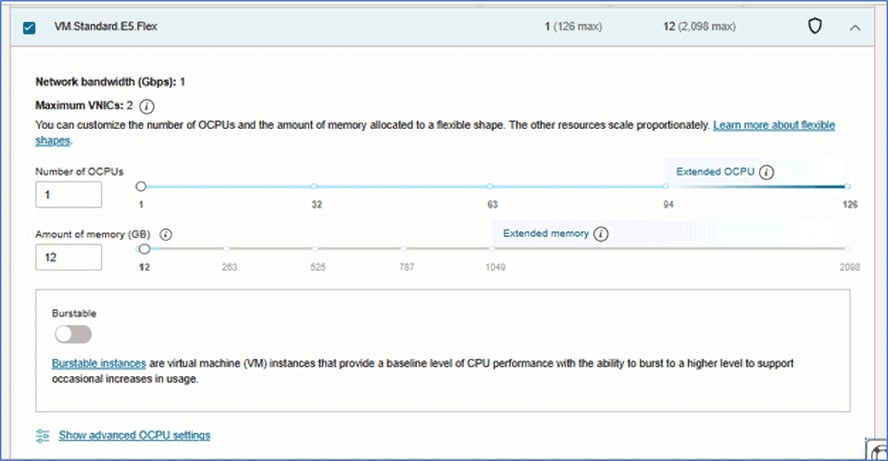
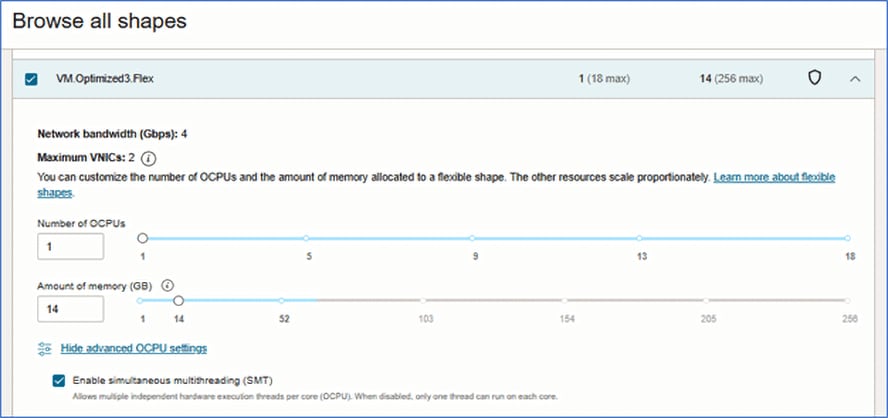
In the above examples, the sliders allow customers to create shapes ranging from 1 OCPU to 126 OCPU for compute, and from 1 GB to 2098 GB independently for memory. This means customers could create up to 4,608 unique shapes with just the VM.Optimized3.Flex series alone (i.e. 18 OCPU options x 256 RAM options) to suit its exact applications requirements (CPU and memory, with networking scaling proportionately).
The following are some of the series of shapes suitable for the compute-optimized use case:
- VM.Optimized3: Processor: Intel Xeon 6354.
Base frequency 3.0 GHz, max turbo frequency 3.6 GHz. - VM.Standard.E4: E4-based standard compute.
Processor: AMD EPYC 7J13. Base frequency 2.55 GHz, max boost frequency 3.5 GHz. - VM.Standard.E5: E5-based standard compute.
Processor: AMD EPYC 9J14. Base frequency 2.4 GHz, max boost frequency 3.7 GHz. - VM.Standard.A1: OCI Ampere A1 Compute Arm-based standard compute. Each OCPU corresponds to a single hardware execution thread.
Processor: Ampere Altra Q80-30. Max frequency 3.0 GHz. - VM.Standard.A2: OCI Ampere A2 Compute Arm-based standard compute. Each OCPU corresponds to two hardware execution threads (2 cores).
Processor: AmpereOne A160-30. Max frequency 3.0 GHz. - BM.Optimized3: Processor: Intel Xeon 6354.
Base frequency 3.0 GHz, max turbo frequency 3.6 GHz. - BM.HPC.E5: Processor: AMD EPYC 9J14.
Base frequency 2.4 GHz, max boost frequency 3.7 GHz.
For additional information on OCI Compute Optimized shapes, refer to Compute documentation.
Shape options and pricing information
| Shape (OCPU/RAM) | OCPU | Memory (GB) | Compute price (per hour) |
|---|---|---|---|
| VM.Optimized3.Flex | 1 OCPU minimum, 18 OCPU maximum | 1 GB minimum, 256 GB maximum | $0.0707 per OCPU $0.0019659 per GB memory |
| VM.Standard.E4.Flex | 1 OCPU minimum, 64 OCPU maximum | 1 GB minimum, 1024 GB maximum | $0.032765 per OCPU $0.0019659 per GB memory |
| VM.Standard.E5.Flex | 1 OCPU minimum, 94 OCPU maximum | 1 GB minimum, 1049 GB maximum | $0.039318 per dynamically selected OCPU $0.0026212 per dynamically selected GB memory |
| VM.Standard.A1.Flex | 1 OCPU minimum, 80 OCPU maximum | 1 GB minimum, 512 GB maximum | $0.013106 per dynamically selected OCPU $0.0019659 per dynamically selected GB memory |
| VM.Standard.A2.Flex | 1 OCPU minimum, 78 OCPU maximum | 1 GB minimum, 946 GB maximum | $0.0183484 per dynamically selected OCPU $0.0026212 per dynamically selected GB memory |
| VM.Standard.E4.Flex (16/64) | 16 | 64 | $0.65 |
| VM.Standard.E5.Flex (18/72) | 18 | 72 | $0.90 |
| VM.Standard.A1.Flex (20/80) | 20 | 80 | $0.42 |
| VM.Standard.A2.Flex (22/88) | 22 | 88 | $0.63 |
| VM.Optimized3.Flex (1/4) | 1 | 4 | $0.08 |
| VM.Optimized3.Flex (2/8) | 2 | 8 | $0.16 |
| VM.Optimized3.Flex (3/12) | 3 | 12 | $0.24 |
| VM.Optimized3.Flex (4/16) | 4 | 16 | $0.31 |
| VM.Optimized3.Flex (5/20) | 5 | 20 | $0.39 |
| VM.Optimized3.Flex (6/24) | 6 | 24 | $0.47 |
Note: Shapes with the word “flex” in the shape name are flexible shapes. A flexible compute shape is a shape that lets you customize the number of OCPUs and the amount of memory when launching or resizing your VM. When you create a VM instance using a flexible shape, you select the number of OCPUs and the amount of memory (in a fine-grained manner) that you need for the workloads running on the instance. For example, OCI empowers you to adjust the levers and create a shape with 2 OCPUs (or 3 OCPUs, 4 OCPUs, and so on) and 100 GB or more of attached RAM. The network bandwidth and number of VNICs scale proportionately with the number of OCPUs. This way, you are not restricted to preconfigured combinations of RAM and CPU (commonly referred to as t-shirt sizes), but instead have complete control over the specifications to accurately meet your workload requirements and thus avoid any overprovisioning. This ultimately helps manage cost by right-sizing your instances instead of up-sizing them to the closest available shape.
For more granular pricing information about this service and to estimate pricing for a specified timeframe (daily, monthly, annual, etc.), visit the OCI Cost Estimator and key in the respective shape information in the advanced search option.
Memory Optimized Shapes
For memory-optimized workload requirements and applications, such as big data processing engines or in-memory databases involving large datasets, OCI provides flexible shapes to finely configure an instance with a high memory-to-core ratio thus enabling the fast processing required by such workloads.
A flexible compute shape is a shape that lets you customize the number of OCPUs and the amount of memory when launching or resizing your VM. When you create a VM instance using a flexible shape, you select the number of OCPUs and the amount of memory (in a fine-grained manner) that you need for the workloads running on the instance. For example, OCI empowers you to adjust the levers and create a shape with 2 (or more) OCPUs and 100 GB of attached RAM (or 101 GB, 102 GB, etc.). The network bandwidth and number of VNICs scale proportionately with the number of OCPUs. This way you are not restricted to preconfigured combinations of RAM and CPU (commonly referred to as t-shirt sizes), but instead have complete control over the specifications to accurately meet your workload requirements and thus avoid any overprovisioning. This ultimately helps manage cost by right-sizing your instances instead of up-sizing them to the closest available shape. The shapes with more memory and cores than standard shapes are also referred extended memory VM instances. For more information, refer to Extended Memory VM instances.
The OCI flexible shapes model provides true optimization of either compute or memory as and when an application requires, regardless of whether it is categorized as “Standard” or “Optimized.” As an example, VM.Standard.E4.Flex can be both compute optimized and memory optimized by dynamically selecting the right sizing for your specific requirements, including to fit a CPU (compute) dominant or RAM (memory) dominant requirement. Customers can make the selection by simply moving the slider as explained below. Flexible shapes provide a simple user interface for customers to select a shape with its preferred number of CPUs and memory, based on an application workload (CPU, memory, and networking). The user interface provides a slider and field where customers can specify these in a granular manner. Below are few screenshots of how a customer would deploy the flexible shapes:
In the above examples, the sliders allow customers to create shapes ranging from 1 OCPU to 126 OCPU for compute, and from 1 GB to 2098 GB independently for memory. This means customers could create up to 4,608 unique shapes with just the VM.Optimized3.Flex series alone (i.e. 18 OCPU options x 256 RAM options) to suit its exact applications requirements (CPU and memory, with networking scaling proportionately).
The following are some of the series of VM shapes suitable for the memory optimized use case:
- VM.Standard.E4: E4-based standard compute.
Processor: AMD EPYC 7J13. Base frequency 2.55 GHz, max boost frequency 3.5 GHz. - VM.Standard.E5: E5-based standard compute.
Processor: AMD EPYC 9J14. Base frequency 2.4 GHz, max boost frequency 3.7 GHz. - VM.Standard3: X9-based standard compute.
Processor: Intel Xeon Platinum 8358. Base frequency 2.6 GHz, max turbo frequency 3.4 GHz. - VM.Standard.A1: OCI Ampere A1 Compute Arm-based standard compute. Each OCPU corresponds to a single hardware execution thread.
Processor: Ampere Altra Q80-30. Max frequency 3.0 GHz. - VM.Standard.A2: OCI Ampere A2 Compute Arm-based standard compute. Each OCPU corresponds to two hardware execution threads (2 cores).
Processor: AmpereOne A160-30. Max frequency 3.0 GHz. - VM.DenseIO.E4: E4-based dense I/O compute.
Processor: AMD EPYC 7J13. Base frequency 2.55 GHz, max boost frequency 3.5 GHz. (Provides high proportion of memory to CPU for memory-optimized use cases.) - VM.DenseIO.E5: E5-based dense I/O compute.
Processor: AMD EPYC 9J14. Base frequency 2.4 GHz, max boost frequency 3.7 GHz. (Provides high proportion of memory to CPU for memory-optimized use cases.)
In addition to VM shapes, the following table also includes the following series of DVH shapes:
- DVH.Standard3: X9-based standard compute.
Processor: Intel Xeon Platinum 8358. Base frequency 2.6 GHz, max turbo frequency 3.4 GHz. - DVH.Standard.E4: E4-based standard compute.
Processor: AMD EPYC 7J13. Base frequency 2.55 GHz, max boost frequency 3.5 GHz.
Shape options and pricing information
| Shape (OCPU/RAM) | OCPU | Memory (GB) | Compute price (per hour) |
|---|---|---|---|
| VM.Optimized3.Flex | 1 OCPU minimum, 18 OCPU maximum | 1 GB minimum, 256 GB maximum | $0.0707 per OCPU $0.0019659 per GB memory |
| VM.Standard.E4.Flex | 1 OCPU minimum, 64 OCPU maximum | 1 GB minimum, 1024 GB maximum | $0.032765 per OCPU $0.0019659 per GB memory |
| VM.Standard.E5.Flex | 1 OCPU minimum, 94 OCPU maximum | 1 GB minimum, 1049 GB maximum | $0.039318 per dynamically selected OCPU $0.0026212 per dynamically selected GB memory |
| VM.Standard.A1.Flex | 1 OCPU minimum, 80 OCPU maximum | 1 GB minimum, 512 GB maximum | $0.013106 per dynamically selected OCPU $0.0019659 per dynamically selected GB memory |
| VM.Standard.A2.Flex | 1 OCPU minimum, 78 OCPU maximum | 1 GB minimum, 946 GB maximum | $0.0183484 per dynamically selected OCPU $0.0026212 per dynamically selected GB memory |
| VM.Standard.E4.Flex (1/16) | 1 | 16 | $0.06 |
| VM.Standard.E5.Flex (2/32) | 2 | 32 | $0.13 |
| VM.Standard.A1.Flex (4/64) | 4 | 64 | $0.13 |
| VM.Standard.A2.Flex (6/96) | 6 | 96 | $0.36 |
| VM.Standard3.Flex (8/108) | 8 | 108 | $0.63 |
| VM.DenseIO.E4.Flex (16/256) | 16 | 256 | $2.12 |
| VM.DenseIO.E5.Flex (48/576) | 48 | 576 | $6.67 |
| VM.Standard.E5.Flex (36/576) | 36 | 576 | $2.93 |
| VM.Standard.E5.Flex (40/640) | 40 | 640 | $3.25 |
| VM.Standard.E5.Flex (44/704) | 44 | 704 | $3.58 |
Note: Shapes with the word “flex” in the shape name are flexible shapes. A flexible compute shape is a shape that lets you customize the number of OCPUs and the amount of memory when launching or resizing your VM. When you create a VM instance using a flexible shape, you select the number of OCPUs and the amount of memory (in a fine-grained manner) that you need for the workloads running on the instance. For example, OCI empowers you to adjust the levers and create a shape with 2 OCPUs (or 3 OCPUs, 4 OCPUs, and so on) and 100 GB or more of attached RAM. The network bandwidth and number of VNICs scale proportionately with the number of OCPUs. This way, you are not restricted to preconfigured combinations of RAM and CPU (commonly referred to as t-shirt sizes), but instead have complete control over the specifications to accurately meet your workload requirements and thus avoid any overprovisioning. This ultimately helps manage cost by rightsizing your instances instead of up-sizing them to the closest available shape.
For more granular pricing information about this service and to estimate pricing for a specified timeframe (daily, monthly, annual, etc.), visit the OCI Cost Estimator and key in the respective shape information in the advanced search option.
Specialized Shapes
Specialized shapes include bare metal shapes, virtual machine shapes, and dedicated virtual machine host shapes. BM shapes are compute instances that give you dedicated physical server access for highest performance and strong isolation. VM shapes are independent computing environments that run on top of physical bare metal hardware. DVH shapes let you run Oracle Cloud Infrastructure Compute VM instances on dedicated servers that are single tenant and not shared with other customers.
GPU Shapes (Instances for GPU-Supported Processes)
OCI GPU shapes are specialized instance types designed for hardware-accelerated workloads that require GPU-supported processes. GPU shapes include Intel or AMD CPUs and NVIDIA graphics processors.
These are the VM GPU series:
- VM.GPU2: X7-based GPU compute.
- GPU: NVIDIA Tesla P100 16 GB
- CPU: Intel Xeon Platinum 8167M. Base frequency 2.0 GHz, max turbo frequency 2.4 GHz.
- VM.GPU3: X7-based GPU compute.
- GPU: NVIDIA Tesla V100 16 GB
- CPU: Intel Xeon Platinum 8167M. Base frequency 2.0 GHz, max turbo frequency 2.4 GHz.
- VM.GPU.A10: X9-based GPU compute.
- GPU: NVIDIA A10 24 GB
- CPU: Intel Xeon Platinum 8358. Base frequency 2.6 GHz, max turbo frequency 3.4 GHz.
For additional information on GPU shapes, refer to Compute documentation.
Pricing information
| Shape (GPU count & type) | OCPU | GPU memory (GB) | CPU memory (GB) | Part number/SKU for price calculations | Compute price (per hour) |
|---|---|---|---|---|---|
| VM.GPU2.1 (GPU: 1xP100) |
12 | 16 | 72 | B88518, B91961, B91962 | $1.671015 |
| VM.GPU3.1 (GPU: 1xV100) |
6 | 16 | 90 | B89734, B91961, B91962 | $3.87 |
| VM.GPU3.2 (GPU: 2xV100) |
12 | 32 | 180 | B89734, B91961, B91962 | $7.73 |
| VM.GPU3.4 (GPU: 4xV100) |
24 | 64 | 360 | B89734, B91961, B91962 | $15.47 |
| VM.GPU.A10.1 (GPU: 1xA10) |
15 | 24 | 240 | B95909, B91961, B91962 | $2.62 |
| VM.GPU.A10.2 (GPU: 2xA10) |
30 | 48 | 480 | B95909, B91961, B91962 | $5.24 |
Note: SKU numbers are common within a series of instances regardless of the actual shape and its configuration. As an example, all shapes under the series VM.GPU3 have the same SKUs (i.e. B89734, B91961, B91962) even though the series provides at least three unique shape offerings. This means that even though multiple shapes share common SKU numbers, those shapes are unique OCI offerings with unique product specifications. The final pricing for the shape is calculated based on the configured amount of OCPU and RAM during provisioning.
For more granular pricing information about this service and to estimate pricing for a specified timeframe (daily, monthly, annual, etc.), visit the OCI Cost Estimator and key in the respective SKU/part number in the advanced search option.
Dense I/O Shapes (Specialized Instances for Enhanced Storage Capabilities)
Designed for large databases, big data workloads, and applications that require high performance local storage. Dense I/O shapes include locally attached NVMe-based SSDs.
A flexible compute shape is a shape that lets you customize the number of OCPUs and the amount of memory when launching or resizing your VM. When you create a VM instance using a flexible shape, you select the number of OCPUs and the amount of memory (in a fine-grained manner) that you need for the workloads running on the instance. For example, OCI empowers you to adjust the levers and create a shape with 2 (or more) OCPUs and 100 GB of attached RAM (or 101 GB, 102 GB, etc.). The network bandwidth and number of VNICs scale proportionately with the number of OCPUs. This way you are not restricted to preconfigured combinations of RAM and CPU (commonly referred to as t-shirt sizes) but instead have complete control over the specifications to accurately meet your workload requirements and thus avoid any overprovisioning. This ultimately helps manage cost by rightsizing your instances instead of upsizing them to the closest available shape. Note that shapes with the word “flex” in the shape name are flexible shapes.
This is the VM dense I/O series:
- VM.DenseIO.E4: E4-based dense I/O compute. Processor: AMD EPYC 7J13. Base frequency 2.55 GHz, max boost frequency 3.5 GHz.
- VM.DenseIO.E5: E5-based dense I/O compute. Processor: AMD EPYC 9J14. Base frequency 2.4 GHz, max boost frequency 3.7 GHz.
This is the bare metal dense I/O series.
- BM.DenseIO.E4: E4-based dense I/O compute.
Processor: AMD EPYC 7J13. Base frequency 2.55 GHz, max boost frequency 3.5 GHz. - BM.DenseIO.E5: E5-based dense I/O compute.
Processor: AMD EPYC 9J14. Base frequency 2.4 GHz, max boost frequency 3.7 GHz.
For additional information on dense I/O shapes, refer to Compute documentation.
Pricing information
| Shape (OCPU/RAM configuration) | OCPU | Memory (GB) | Part number/SKU for price calculations | Compute price (per hour) |
|---|---|---|---|---|
| VM.DenseIO.E5.Flex (8/96) | 8 | 96 | B98202, B98203, B98204 | $1.11 |
| VM.DenseIO.E5.Flex (16/192) | 16 | 192 | B98202, B98203, B98204 | $2.22 |
| VM.DenseIO.E5.Flex (24/288) | 24 | 288 | B98202, B98203, B98204 | $3.33 |
| VM.DenseIO.E5.Flex (32/384) | 32 | 384 | B98202, B98203, B98204 | $4.44 |
| VM.DenseIO.E5.Flex (40/480) | 40 | 480 | B98202, B98203, B98204 | $5.56 |
| VM.DenseIO.E5.Flex (48/576) | 48 | 576 | B98202, B98203, B98204 | $6.67 |
| VM.DenseIO.E4.Flex (8/128) | 8 | 128 | B93121, B93122, B93123 | $0.51 |
| BM.DenseIO.E4.128 | 128 | 2048 | B93121, B93122, B93123 | $12.58 |
| BM.DenseIO.E5.128 | 128 | 1536 | B98202, B98203, B98204 | $15.60 |
For more granular pricing information about this service and to estimate pricing for a specified timeframe (daily, monthly, annual, etc.), visit the OCI Cost Estimator and key in the respective SKU/part number in the advanced search option.
Block, Object, and File Storage (IaaS)
Oracle Cloud Infrastructure provides customers with scalable, high performance computing and low-cost cloud storage options. Through on-demand local, object, file, block, and archive storage, Oracle Cloud addresses key storage workload requirements and use cases. Customers can use the data transfer service to safely and securely move their data to the cloud.
OCI Block Volumes (Storage)
The Oracle Cloud Infrastructure (OCI) Block Volumes service lets you dynamically provision and manage block storage volumes. You can create, attach, connect, and move volumes, as well as change volume performance as needed to meet your storage, performance, and application requirements. After you attach and connect a volume to an instance, you can use the volume like a regular hard drive. You can also disconnect a volume and attach it to another instance without the loss of data.
These components are required to create a volume and attach it to an instance.
- Instance: A bare metal or virtual machine (VM) host running in the cloud.
- Volume attachment: There are two types of volume attachments.
- iSCSI: A TCP/IP-based standard used for communication between a volume and attached instance.
- Paravirtualized: A virtualized attachment available for VMs.
- Volume: There are two types of volumes.
- Block volume: A detachable block storage device that allows you to dynamically expand the storage capacity of an instance.
- Boot volume: A detachable boot volume device that contains the image used to boot a Compute instance.
For more information on the product functionality, refer to Block Volumes documentation.
Pricing information
| SKU | Product | Unit | Unit price |
|---|---|---|---|
| B91961 | Block Volumes Storage | Gigabyte storage capacity per month | $0.0334203 |
| B91962 | Block Volumes Performance Units | Performance Units per gigabyte per month | $0.00222802 |
For more granular pricing information about this service and to estimate pricing for a specified timeframe (daily, monthly, annual, etc.), visit the OCI Cost Estimator and key in the respective SKU/part number in the advanced search option.
OCI Object Storage
Oracle Cloud Infrastructure (OCI) Object Storage service is an internet-scale, high performance storage platform that offers reliable and cost-efficient data durability. The Object Storage service can store an unlimited amount of unstructured data of any content type, including analytic data and rich content, such as images and videos.
With OCI Object Storage, you can safely and securely store or retrieve data directly from the internet or from within the cloud platform. OCI Object Storage offers multiple management interfaces that let you easily manage storage at scale. The elasticity of the platform lets you start small and scale seamlessly, without experiencing any degradation in performance or service reliability.
The Standard tier is the primary, default storage tier used for OCI Object Storage service data. The Standard storage tier is "hot" storage used for data that you need to access quickly, immediately, and frequently. Data accessibility and performance justifies a higher price to store data in the Standard tier.
You can choose a default storage tier (Standard or Archive) by creating a bucket. When set at bucket creation, you cannot change the default storage tier for a bucket. When you upload objects to a bucket, the objects are automatically assigned the default storage tier of the bucket (Standard). You can, however, change the storage tier of an object to either Infrequent Access or Archive.
Standard storage tier buckets can contain a mix of objects with different storage tier assignments. An object remains in the Standard bucket, even if the object is archived, restored, or its tier assignment is changed.
Some primary use cases for the Standard storage tier include the following:
- Content repository for accessible scalable data, images, logs, and video
- Repository for accessible backups
- Data repository for Hadoop/big data. Provides a scalable storage platform to store large datasets and operate seamlessly on those datasets. The HDFS Connector for Object Storage provides connectivity to various big data analytic engines such as Apache Spark and MapReduce. This connectivity enables the analytics engines to work directly with data stored in Object Storage. For more information, see Object Storage Hadoop Support.
For more information on the product functionality, refer to Object Storage documentation.
Pricing information
| SKU | Product | Unit | Unit price |
|---|---|---|---|
| B91627 | Oracle Cloud Infrastructure - Object Storage - requests | 10,000 requests per month | $0.00445604 |
| B91628 | Oracle Cloud Infrastructure - Object Storage - storage | Gigabyte storage capacity per month | $0.0334203 |
For more granular pricing information about this service and to estimate pricing for a specified timeframe (daily, monthly, annual, etc.), visit the OCI Cost Estimator and key in the respective SKU/part number in the advanced search option.
OCI File Storage
Oracle Cloud Infrastructure (OCI) File Storage service provides a durable, scalable, secure, enterprise-grade network file system. You can connect to a File Storage service file system from any bare metal, virtual machine, or container instance in your Virtual Cloud Network (VCN). You can also access a file system from outside the VCN using VCN peering, Oracle Cloud Infrastructure FastConnect, and Internet Protocol Security (IPSec) virtual private network (VPN).
OCI File Storage is designed to meet the needs of applications and users that require an enterprise file system across a wide range of use cases, including the following:
- General purpose file storage: Access to an unlimited pool of file systems to manage growth of structured and unstructured data.
- Big data and analytics: Run analytic workloads and use shared file systems to store persistent data.
- Lift and shift of enterprise applications: Migrate existing Oracle applications that need NFS storage, such as Oracle E-Business Suite and PeopleSoft.
- Databases and transactional applications: Run test and development workloads with Oracle, MySQL, or other databases.
- Backups, business continuity, and disaster recovery: Host a secondary copy of relevant file systems from on-premises to the cloud for backup and disaster recovery purposes.
- Microservices and Docker: Deliver stateful persistence for containers. Easily scale as your container-based environments grow.
For more information on the product functionality, refer to File Storage documentation.
Pricing information
| SKU | Product | Unit | Unit price |
|---|---|---|---|
| B89057 | File Storage | Gigabyte storage capacity per month | $0.39318 |
For more granular pricing information about this service and to estimate pricing for a specified timeframe (daily, monthly, annual, etc.), visit the OCI Cost Estimator and key in the respective SKU/part number in the advanced search option.
OCI Object Storage—Infrequent Access
The Infrequent Access tier is "cool" storage used for data that you access infrequently but must be available immediately when needed. Storage costs are less than the Standard tier.
If you're uploading an object to a Standard default storage tier bucket, you can explicitly assign the object to the lower-cost Infrequent Access storage tier.
The Infrequent Access tier has a minimum storage retention period and data retrieval fees.
- The minimum storage retention period for the Infrequent Access tier is 31 days. If you delete or overwrite objects in the Infrequent Access tier before the retention requirements are met, you are charged the prorated cost of storing the data for the full 31 days.
- When you need to access objects stored in this tier, you are charged a per GiB data retrieval fee.
Note: Note: Minimum retention penalties are charged only when deletes and overwrites result in data removal. Deletes and overwrites in a version-enabled bucket that creates a previous version rather than removing data, which doesn't result in a penalty.
Some primary use cases for the Infrequent Access storage tier include the following:
- Backups of on-premises data
- Repository for rarely accessed backups
- Storage for data replicated or copied from another region
For more information on the product functionality, refer to Object Storage—Infrequent Access documentation.
Pricing information
| SKU | Product | Unit | Unit price |
|---|---|---|---|
| B93000 | Infrequent Access Storage – storage | Gigabyte storage capacity per month | $0.013106 |
For more granular pricing information about this service and to estimate pricing for a specified timeframe (daily, monthly, annual, etc.), visit the OCI Cost Estimator and key in the respective SKU/part number in the advanced search option.
OCI Cold Storage Services (IaaS)
OCI provides cost-effective cold storage options that enable long-term retention of data in its native and encrypted format. Following are the cold storage options:
OCI Archive Storage
Use Oracle Cloud Infrastructure (OCI) Archive Storage to store data that is accessed infrequently and requires a longer retention period.
OCI Archive Storage is ideal for storing data that is seldom accessed but requires long retention periods. OCI Archive Storage is more cost effective than OCI Object Storage for preserving cold data. Unlike Object Storage, Archive Storage data retrieval is not instantaneous.
Oracle Cloud Infrastructure supports multiple storage tiers that offer cost and performance flexibility. Archive is the default storage tier for Archive Storage buckets.
Ways to Access Archive Storage
OCI Archive Storage and Object Storage use the same management interfaces.
- The Console is an easy-to-use, browser-based interface. To access Archive Storage in the console, do the following:
- Sign in to the Console.
- Open the navigation menu and click Storage. Under Object Storage, click Buckets. A list of the buckets in the compartment you're viewing is displayed. If you don’t see the one you're looking for, verify that you’re viewing the correct compartment. (Select from the list on the left side of the page).
- Click the name of the Archive Storage tier bucket you want to manage.
- The command line interface (CLI) provides both quick access and full functionality without the need for programming. The syntax for CLI commands includes specifying a service. You use the Object Storage service designation “oci os” to manage Archive Storage using the CLI.
- The REST API provides the most functionality but requires programming expertise. API reference and endpoints provide endpoint details and links to the available API reference documents.
- OCI Object Storage is accessible with the following APIs:
- Object Storage Service
- Amazon S3 Compatibility API
- Swift API (for use with Oracle RMAN)
- Oracle Cloud Infrastructure provides SDKs that interact with Archive Storage and Object Storage without you having to create a framework. For general information about using the SDKs, see SDKs and the CLI.
For more information on the product functionality, refer to Archive Storage documentation.
Pricing information
| SKU | Product | Unit | Unit price |
|---|---|---|---|
| B91633 | Archive Storage | Gigabyte storage capacity per month | $0.00340756 |
For more granular pricing information about this service and to estimate pricing for a specified timeframe (daily, monthly, annual, etc.), visit the OCI Cost Estimator and key in the respective SKU/part number in the advanced search option.
Solid State Drive (SSD)–Based High Performance Storage
OCI provides options for deploying solid state drive–based high performance storage. See below for more information on these options.
OCI Block Volumes (SSD Storage)
All OCI Block volumes are by-default designed for high performance use cases providing persistent, durable, high performance data storage. Industry-leading, highest performance NVMe solid state drives (SSD) make up the block volume storage infrastructure.
Backed up by a performance SLA, they deliver high performance and are enabled without using storage caching.
OCI Block Volumes lets you dynamically provision and manage block storage volumes. You can create, attach, connect, and move volumes, as well as change volume performance as needed to meet your storage, performance, and application requirements.
For more information on the product functionality, refer to Block Volumes documentation.
Pricing information
| SKU | Product | Unit | Unit price |
|---|---|---|---|
| B91961 | Block Volumes Storage | Gigabyte storage capacity per month | $0.0334203 |
| B91962 | Block Volumes Performance Units | Performance Units per gigabyte per month | $0.00222802 |
For more granular pricing information about this service and to estimate pricing for a specified timeframe (daily, monthly, annual, etc.), visit the OCI Cost Estimator and key in the respective SKU/part number in the advanced search option.
Local NVMe SSD Storage
Some compute instance shapes in Oracle Cloud Infrastructure include locally attached NVMe devices. These devices provide extremely low latency, high performance block storage that is ideal for big data, OLTP, and any other workload that can benefit from high performance block storage. Each shape varies on multiple dimensions, including memory, CPU cores, network bandwidth, and the option of local NVMe SSD storage found in dense I/O and HPC shapes.
NVMe devices are not protected in any way; they are individual devices locally installed on your instance. Oracle Cloud Infrastructure does not take images, back up, or use RAID or any other methods to protect the data on NVMe devices. It is your responsibility to protect and manage the durability of the data on these devices.
For more information on the product functionality, refer to NVMe documentation.
Pricing information
NVMe storage is priced along with the respective compute instances.
| SKU | Product | Unit | Unit price |
|---|---|---|---|
| B98204 | OCI - Compute - Dense I/O - E5 – NVMe | NVMe terabyte per hour | $0.08020872 |
For more granular pricing information about this service and to estimate pricing for a specified timeframe (daily, monthly, annual, etc.), visit the OCI Cost Estimator and key in the respective SKU/part number in the advanced search option.
Container Services
Oracle Cloud Infrastructure (OCI) delivers a robust suite of cloud native container services that streamline modern application development and deployment. With OCI, developers can build, deploy, and scale applications effortlessly using Kubernetes, containers, serverless computing, and other container workflow services. Whether you’re modernizing legacy systems or creating cloud native applications, OCI provides secure, scalable, and highly available environments to meet your needs.
OCI’s integrated containers services, including Oracle Cloud Infrastructure Kubernetes Engine (OKE)—Enhanced Clusters, OKE—Basic Clusters, OKE—Virtual Node, OKE on Oracle Compute Cloud at Customer (C@C), OCI Container Instances, OCI Container Registry, OCI Functions, OpenShift Container platform on OCI, and Oracle WebLogic Suite for Oracle Cloud Infrastructure. OCI Kubernetes Engine enables teams to innovate faster while reducing complexity. These services are designed to work seamlessly with OCI’s high-performance infrastructure, offering unmatched performance, cost-efficiency, and enterprise-grade security.
The following are additional details on few of these services.
OCI Kubernetes Engine—Enhanced Clusters
Oracle Cloud Infrastructure Kubernetes Engine (OKE) is a fully managed PaaS, scalable, and highly available service that you can use to deploy your containerized applications to the cloud. Use OKE when your development team wants to reliably build, deploy, and manage cloud native applications. You specify whether to run applications on virtual nodes or managed nodes, and OKE provisions them on Oracle Cloud Infrastructure in an existing OCI tenancy.
OKE uses Kubernetes—the open source system for automating deployment, scaling, and management of containerized applications across clusters of hosts. Kubernetes groups the containers that make up an application into logical units (called pods) for easy management and discovery. OKE uses versions of Kubernetes certified as conformant by the Cloud Native Computing Foundation (CNCF). OKE is itself ISO-compliant (ISO-IEC 27001, 27017, 27018).
Enhanced clusters support all available features, including features not supported by basic clusters, enabling you to:
- Deploy and configure cluster add-ons in a more granular way. You can manage both essential add-ons, such as CoreDNS and kube-proxy, as well as a growing portfolio of optional add-ons, such as the Kubernetes Dashboard. You can install or disable specific add-ons, select add-on versions, opt into and out of automatic updates by Oracle, and manage add-on-specific customizations. Oracle manages the lifecycle of the add-ons, so you don't have to deploy the add-ons yourself.
- Strengthen cluster security by using workload identity. Workload identity enables you to define Oracle Cloud Infrastructure (OCI) Identity and Access Management (IAM) policies that authorize specific pods to make OCI API calls and access OCI resources. You scope the policies to the Kubernetes service account associated with application pods, allowing the applications running inside those pods to directly access the API based on the permissions provided by the policies. In addition, OCI Audit automatically tracks all API calls made by Kubernetes workloads running on the cluster.
- Provision more worker nodes in the cluster. With more worker nodes in a single cluster, you can deploy larger workloads on that cluster to achieve better resource utilization and lower operational overhead. And you have fewer, larger environments to secure, monitor, upgrade, and manage. For more information about the number of worker nodes supported on an enhanced cluster, see Kubernetes Engine Limits.
You can access OKE to define and create Kubernetes clusters using the Console and the REST API. You can access the clusters you create using the Kubernetes command line (kubectl), the Kubernetes Dashboard, and the Kubernetes API.
For more information on the product functionality, refer to Container Engine documentation.
Pricing information
| Part number | Product | Unit | Unit price |
|---|---|---|---|
| B96545 | OCI Kubernetes Engine - Enhanced Clusters | Cluster per hour | $0.13106 |
For more granular pricing information about this service and to estimate pricing for a specified timeframe (daily, monthly, annual, etc.), visit the OCI Cost Estimator and key in the respective SKU/part number in the advanced search option.
OCI Kubernetes Engine with Virtual Nodes
OCI Kubernetes Engine with virtual nodes provide a serverless Kubernetes experience, enabling you to run containerized applications at scale without the operational overhead of managing, scaling, upgrading, and troubleshooting the node infrastructure. Virtual nodes provide granular pod-level elasticity and pay-per-use pricing. As a result, you can scale deployments without taking into consideration the cluster's capacity, simplifying the execution of scalable workloads, such as high-traffic web applications and data processing jobs. You create virtual nodes by creating virtual node pools in enhanced clusters.
In contrast, managed nodes are OCI Compute instances running in your tenancy that you control and configure with a shared operational responsibility. OCI Kubernetes Engine provisions and updates the Kubernetes software on managed nodes. For a detailed comparison of virtual nodes and managed nodes, see Comparing Virtual Nodes with Managed Nodes.
Virtual nodes provide you with the flexibility to satisfy application requirements. You can control the Kubernetes pod placement based on an availability needs, selecting the OCI Compute processor shape, CPU, and memory most suited for an application. Hypervisor-level isolation for pods enable you to run any type of application on virtual nodes, including untrusted workloads.
Kubernetes Engine with virtual nodes delivers seamless upgrades of Kubernetes clusters. The Kubernetes software is upgraded, and security patches are applied while respecting application availability requirements.
Virtual nodes enable you to optimize the cost of running Kubernetes workloads. You pay for the exact compute resources consumed by each Kubernetes pod instead of paying for whole servers that might have unused capacity.
Pricing information
| Part number | Product | Unit | Unit price |
|---|---|---|---|
| B96109 | OCI Kubernetes Engine with virtual nodes | Virtual node per hour | $0.019659 |
OCI Kubernetes Engine—Basic Clusters
OCI Kubernetes Engine (OKE) Basic Clusters is an entry-level container hosting offering that provides essential Kubernetes functionality without some of the advanced features and management options that OKE Enhanced Clusters includes, such as virtual nodes, cluster add-on management, workload identity, node cycling, self-managed nodes, and additional worker nodes per cluster. Basic clusters come with a service-level objective (SLO) but not a financially backed service-level agreement (SLA).
Notable features supported differently by basic clusters
Some features are supported differently in basic clusters when compared to enhanced clusters:
- Managed and virtual node pools: In a basic cluster, you can only create managed node pools (rather than the managed and virtual node pools you can create in an enhanced cluster). Load balancing, pod networking, autoscaling, and application log viewing are supported differently with managed nodes and node pools.
- Cluster add-ons: In a basic cluster, you have more responsibility and less flexibility when managing cluster add-ons. You are responsible for upgrading essential add-ons, but you cannot install or disable specific add-ons, select add-on versions, opt into and out of automatic updates by Oracle, or manage add-on specific customizations. In addition, you are responsible for installing, managing, and maintaining any optional add-ons you want in the cluster.
- Permissions: In a basic cluster, you have to define OCI IAM policies that authorize users and instances.
Pricing information
| Part number | Product | Unit | Unit price |
|---|---|---|---|
| Free service | OCI Kubernetes Engine—Basic Clusters | Free service | |
OCI Container Instances
Oracle Cloud Infrastructure (OCI) Container Instances is a serverless, PaaS compute service that enables you to instantly run containers without managing any servers. With it, you can easily run applications on serverless compute optimized for containers.
Using Container Instances, you can easily launch one or more containers with the flexibility to specify compute shape, resource allocation, networking, and other optional configurations. OCI Container Instances run in a dedicated environment with strong isolation for improved security. You pay the same price for the CPU and memory resources as you would for OCI Compute instances for the chosen shape, making Container Instances the best value option for running containers in the cloud.
For more information on the product functionality, refer to Container Instances documentation.
Pricing information
| Part number | Product | Unit | Unit price |
|---|---|---|---|
| Included service for customers with OCI subscription | OCI Container Instances | Included service (price for underlying compute capacity applies as below) | |
| B93297 | Compute – Ampere A1 – OCPU | OCPU per hour | $0.013106 |
| B93298 | Compute – Ampere A1 – Memory | Gigabyte per hour | $0.0019659 |
| B93113 | Compute - Standard - E4 - OCPU | OCPU per hour | $0.032765 |
| B93114 | Compute - Standard - E4 - Memory | Gigabyte per hour | $0.0019659 |
| B92306 | Compute - Standard - E3 - OCPU | OCPU per hour | $0.032765 |
| B92307 | Compute - Standard - E3 - Memory | Gigabyte per hour | $0.0019659 |
For more granular pricing information about this service and to estimate pricing for a specified timeframe (daily, monthly, annual, etc.), visit the OCI Cost Estimator and key in the respective SKU/part number in the advanced search option.
Oracle Application Container Cloud Service
Oracle Application Container Cloud Service is a PaaS solution that lets you deploy Java SE, Node.js, PHP, Python, Ruby, Go, and .NET core applications to Oracle Cloud. You can also deploy Java EE web applications.
Subscribing to Application Container Cloud Service makes all types of applications available when you deploy your application. Your application runs in a Docker container.
With Oracle Application Container Cloud Service, you can use the following key features:
- A preconfigured environment for Java SE, Java EE, Node.js, PHP, Python, Ruby, Go, and .NET core applications.
- Java SE advanced features such as Java Flight Recorder, Java Mission Control, advanced memory management, and ongoing and timely security updates.
- An open platform that supports all Java frameworks and containers such as Spring, Play, Tomcat, and Jersey.
- Support for Java Virtual Machine (JVM)–based languages such as JRuby. You can run any language that uses the JVM on this service.
- Enterprise-grade support from Oracle.
- Web-based user interface and REST API.
In addition, you can integrate with other Oracle Cloud services, develop your application on your local system, or use Oracle Developer Cloud Service.
For more information on the product functionality, refer to Application Container Cloud Service documentation.
Pricing information
| Part number | Product | Unit | Unit price |
|---|---|---|---|
| B88305 | Oracle Application Container Cloud Service | Gigabyte memory per hour | $0.131 |
For more granular pricing information about this service and to estimate pricing for a specified timeframe (daily, monthly, annual, etc.), visit the OCI Cost Estimator and key in the respective SKU/part number in the advanced search option.
OCI Container Registry
Oracle Cloud Infrastructure (OCI) Container Registry is an open standards–based, PaaS, Oracle-managed Docker registry service for securely storing and sharing container images. Engineers can easily push and pull Docker images with the familiar Docker command line interface (CLI) and API. To support container lifecycles, OCI Container Registry works with OCI Kubernetes Engine, Identity and Access Management (IAM), Visual Builder Studio, and third-party developer and DevOps tools.
OCI Container Registry supports private access from other Oracle Cloud Infrastructure resources in a virtual cloud network (VCN) in the same region through a service gateway. Setting up and using a service gateway on a VCN lets resources (such as worker nodes in clusters managed by OCI Kubernetes Engine) access OCI services, such as Container Registry, without exposing them to the public internet. No internet gateway is required, and resources can be in a private subnet and use only private IP addresses.
For more information on the product functionality, refer to Container Registry documentation.
Pricing information
| Part number | Product or SKU name | Unit | Unit price |
|---|---|---|---|
| Included service for customers with OCI subscription | OCI Container Registry | Included service (price for underlying storage capacity applies as below) | |
| B91627 | Oracle Cloud Infrastructure – Object Storage – requests | 10,000 requests per month | $0.00445604 |
| B91628 | Oracle Cloud Infrastructure – Object Storage – storage | Gigabyte storage capacity per month | $0.0334203 |
OCI Functions
Oracle Cloud Infrastructure (OCI) Functions is a fully managed, multitenant, highly scalable, on-demand, functions-as-a-service platform (PaaS). It is built on enterprise-grade Oracle Cloud Infrastructure and powered by the Fn Project open source engine.
OCI Functions is based on Fn Project. Fn Project is an open source, container native, serverless platform that can be run anywhere—in the cloud or on-premises. Fn Project is easy to use, extensible, and performant. You can download and install the open source distribution of Fn Project, develop and test a function locally, and then use the same tooling to deploy that function to OCI Functions.
Use OCI Functions (sometimes abbreviated to just Functions and formerly known as Oracle Functions) when you want to focus on writing code to meet business needs.
The serverless and elastic architecture of OCI Functions means there’s no infrastructure administration or software administration for you to perform. You don’t provision or maintain compute instances, and operating system software patches and upgrades are applied automatically. OCI Functions helps ensure that your app is highly available, scalable, secure, and monitored. With OCI Functions, you can write code in Java, Python, Node, Go, Ruby, and C# (and for advanced use cases, bring your own Dockerfile and Graal VM). You can then deploy your code, call it directly, or trigger it in response to events, and get billed only for the resources consumed during the execution.
You can access OCI Functions using the Console, a CLI, or a REST API. You can invoke the functions you deploy to OCI Functions using the CLI or by making signed HTTP requests.
For more information on the product functionality, refer to Functions documentation.
Pricing information
| Part number | Product | Unit | Unit price |
|---|---|---|---|
| B90618 | Oracle Functions – Invocations | 1 million function invocations | $0.26212 |
| B90617 | Oracle Functions - Execution Time | 10,000 GB memory-seconds | $0.18571202 |
For more granular pricing information about this service and to estimate pricing for a specified timeframe (daily, monthly, annual, etc.), visit the OCI Cost Estimator and key in the respective SKU/part number in the advanced search option.
PaaS Services for Developer Tools
OCI Resource Manager
Oracle Cloud Infrastructure (OCI) Resource Manager is a PaaS service that automates deployment and operations for all Oracle Cloud Infrastructure resources. Unlike infrastructure-as-code (IaC) offerings from other clouds, the service is based on open source Terraform software—a popular industry standard that allows DevOps engineers to develop and deploy their infrastructure anywhere.
The Resource Manager Terraform host comes with the following tools preinstalled:
| Tool | Version |
|---|---|
| Tool | Version |
| Ansible | 2.11.3 |
| Docker | 19.03.11 |
| Fn | 0.6.3 |
For more information on the product functionality, refer to Resource Manager documentation.
Pricing information
| Product name | Part number & pricing |
|---|---|
| OCI Resource Manager | Included service for customers with OCI subscription |
OCI DevOps
Oracle Cloud Infrastructure (OCI) DevOps is an end-to-end, continuous integration and continuous delivery (CI/CD) platform for developers.
Using this PaaS solution, DevOps engineers can easily build, test, and deploy software and applications on Oracle Cloud. The DevOps build and deployment pipelines reduce change-driven errors and decreases the amount of time customers spend on building and deploying releases. The service also provides private Git repositories to store your code and supports connections to external code repositories.
With OCI DevOps service, you can do the following:
- Create private code repositories to store and manage source code.
- Connect to external repositories such as GitHub, GitLab, Bitbucket Cloud, Visual Builder Studio, Bitbucket Server, and GitLab Server.
- Build and test your latest changes in a build pipeline with a service-managed build runner.
- Set up a trigger to automatically run your build pipeline from a source code commit or pull request. Optionally run a deployment pipeline on the successful build run for a complete CI/CD automation.
- Orchestrate your software deployment across regions to OCI platforms, such as OCI Kubernetes Engine, Compute instances, and Functions.
- Avoid downtime during deployments through the blue-green and canary deployment strategies.
- Automate the complexity of updating applications. Automation reduces the chance of human error that might introduce a security vulnerability.
- Enhance security and reduce risk in delivery. As DevOps enables faster software delivery, security bugs can be resolved quickly by rolling out a fix.
For more information on the product functionality, refer to DevOps documentation.
Pricing information
There is no charge for executing a pipeline with OCI DevOps. For CI builds, customers are charged only for the OCPU and memory used by build runner instances. Deployment pipelines to OCI Compute resources are free.
| Part number | Product or SKU name | Unit | Unit price |
|---|---|---|---|
| Included service for customers with OCI Subscription | OCI DevOps | Included service (price for DevOps registries, repositories, and monthly runs apply as below) | – |
| B93113 | For monthly runs, compute standard 4 CPUs | OCPU per hour | $0.032765 |
| B93114 | For monthly runs, compute standard 4 CPUs memory | OCPU per hour | $0.0019659 |
| B91628 | For repositories and registries, Object Storage | Gigabyte storage capacity per month | $0.0334203 |
For more granular pricing information about this service and to estimate pricing for a specified timeframe (daily, monthly, annual, etc.), visit the OCI Cost Estimator and key in the respective SKU/part number in the advanced search option.
Oracle Visual Builder Studio
Oracle Visual Builder Studio is a robust application development PaaS that helps your team effectively plan and manage your work throughout all stages of the AppDev lifecycle: design, build, test, and deploy. It makes it easy for your entire team to develop the artifacts they need.
- Oracle Cloud Applications developers, who need to extend their applications with business-specific customizations
- Low-code developers, who want to create applications using a visual designer
- Experienced programmers, who want to modify the source code for applications created by others or to develop bespoke apps using the web programming language of their choice
For more information on the product functionality, refer to Visual Builder Studio documentation.
Pricing information
| Part number | Product | Unit | Unit price |
|---|---|---|---|
| B90203 | Visual Builder Studio, additional storage (first 20 GB is included with subscription) | Gigabyte storage capacity per month | $2.09696 |
For more granular pricing information about this service and to estimate pricing for a specified timeframe (daily, monthly, annual, etc.), visit the OCI Cost Estimator and key in the respective SKU/part number in the advanced search option.
Oracle APEX
Oracle APEX is a fully managed PaaS, low-code application development platform for building and deploying modern cloud, mobile, and data-driven applications in Oracle Cloud. Business users and application developers can create enterprise applications 20X faster than coding—without having to learn complex web technologies.
APEX provides you with an easy-to-use browser-based environment to load data, manage database objects, develop REST interfaces, and build applications that look and run great on both desktop and mobile devices. You can use APEX to develop solutions that perform a wide variety of tasks, including the following:
- Import spreadsheets and develop a single source of truth in minutes
- Create compelling data visualizations against your existing data
- Deploy productivity applications to elegantly solve a business need
- Manage mission-critical data
APEX embraces SQL. Anything you can express with SQL can be easily employed in an APEX application. APEX also enables low-code development, providing developers with powerful data management and data visualization components that deliver modern, responsive end user experiences out of the box. Instead of writing code by hand, you can use intelligent wizards to guide you through the rapid creation of applications and components.
APEX provides a preconfigured, fully managed, and secure environment to both build and deploy world-class, data-centric applications. There are no limits on the number of developers or end users for your applications.
For more information on the product functionality, refer to APEX Service documentation.
Pricing information
| Part number | Product | Unit | Unit price |
|---|---|---|---|
| B99709 | Oracle APEX - ECPU | ECPU per hour | $0.10576542 |
| B95706 | Oracle Autonomous Database storage for transaction processing | Gigabyte storage capacity per month | $0.15150536 |
For more granular pricing information about this service and to estimate pricing for a specified timeframe (daily, monthly, annual, etc.), visit the OCI Cost Estimator and key in the respective SKU/part number in the advanced search option.
OCI Code Editor
Oracle Cloud Infrastructure (OCI) Code Editor provides a rich, in-console PaaS editing environment that enables you to edit code and update service workflows and scripts without having to switch between the Console and your local development environment. Code Editor provides a convenient way to perform common code updates for various services, such as creating and deploying Functions, editing Terraform configurations used with Resource Manager stacks, or creating and editing an API.
Code Editor includes the following features:
- Rich native support for more than a dozen programming languages, including syntax highlighting, intelligent completions, bracket matching, linting, code navigation (go-to method definition, find all references), and refactoring.
- Managed OCI service plugins that provide a native, integrated experience for supported OCI services, offering specific functionality and coding workflows for each supported service. For example, the Functions plugin allows developers to edit deploy and invoke functions from within the Code Editor window.
- Git integration that enables you to clone any Git-based repository, track changes made to files, and commit, pull, and push code directly from within the Code Editor, allowing you to contribute code and revert code changes with ease.
- Direct integration with Cloud Shell allows you to read and edit code files stored in the Cloud Shell home directory and have direct access to more than 30 cloud-based tools preinstalled with Cloud Shell.
- Comprehensive workspace and user management control enables you to manage your code projects as independent workspaces. For example, you can modify and set persistent settings that apply to folders in a workspace instead of modifying environment configurations each time.
- Complete personalization of fonts, color schemes, screen layouts, keyboard shortcuts, and language localization.
- Persistent state across sessions autosaves progress and persists state across multiple user sessions, so Code Editor automatically opens the last edited page on startup.
For more information on the product functionality, refer to Code Editor documentation.
Pricing information
| Product name | Product number & price |
|---|---|
| OCI Code Editor | Included service for customers with OCI subscription |
OCI Artifacts Registry
Oracle Cloud Infrastructure (OCI) Artifacts Registry is a repository service (PaaS) for storing, sharing, and managing software development packages.
With Artifacts Registry, you can manage artifacts as follows:
- Make artifacts immutable
- Identify artifacts with secure hash
- Add versions
- Upload and download
- Fetch the latest
- Control visibility and permissions
In the DevOps service, you can include artifacts from Artifacts Registry or Container Registry and perform the following tasks:
- Create a deployment pipeline in the DevOps service
- Define stages for delivering artifacts to a target environment
- Point to the artifacts stored in Artifacts Registry or Container Registry
- Run the DevOps deployment and deliver the artifacts to the target environment
For more information on the product functionality, refer to Artifacts Registry documentation.
Pricing information
| Part number | Product or SKU name | Unit | Unit price |
|---|---|---|---|
| Included service for customers with OCI Subscription | OCI Artifacts Registry | Included service (price for underlying storage capacity applies as below) | |
| B91627 | Oracle Cloud Infrastructure - Object Storage - requests | 10,000 requests per month | $0.00445604 |
| B91628 | Oracle Cloud Infrastructure - Object Storage - storage | Gigabyte storage capacity per month | $0.0334203 |
For more granular pricing information about this service and to estimate pricing for a specified timeframe (daily, monthly, annual, etc.), visit the OCI Cost Estimator and key in the respective SKU/part number in the advanced search option.
OCI API Gateway
The API Gateway is a PaaS service that enables you to publish APIs with private endpoints that are accessible from within your network and which you can expose with public IP addresses if you want them to accept internet traffic. The endpoints support API validation, request and response transformation, CORS, authentication and authorization, and request limiting.
With API Gateway, you create one or more API gateways in a regional subnet to process traffic from API clients and route it to back-end services. You can use a single API gateway to link multiple back-end services, such as load balancers, compute instances, and OCI Functions, into a single consolidated API endpoint.
You can access the API Gateway service to define API gateways and API deployments using the Console and the REST API.
The API Gateway service is integrated with Oracle Cloud Infrastructure Identity and Access Management, which provides easy authentication with native Oracle Cloud Infrastructure identity functionality.
To get set up and running quickly with the API Gateway service, see the QuickStart Guide. A number of related Developer Tutorials are also available.
Pricing information
| Part number | Product | Unit | Unit price |
|---|---|---|---|
| B92072 | API Gateway | 1,000,000 API Calls | $3.9318 |
For more granular pricing information about this service and to estimate pricing for a specified timeframe (daily, monthly, annual, etc.), visit the OCI Cost Estimator and key in the respective SKU/part number in the advanced search option.
OCI Search with OpenSearch
Oracle Cloud Infrastructure (OCI) Search with OpenSearch is a managed service (PaaS) that you can use to build in-application search solutions to enable you to search large data sets and return results in milliseconds, without having to focus on managing your infrastructure.
Search with OpenSearch handles all the management and operations of search clusters, including operations such as security updates, upgrades, resizing, and scheduled backups. This allows you to focus your resources on building features for your OpenSearch solutions.
Concepts
The following concepts are key to understanding OCI Search with OpenSearch.
- Cluster
A cluster is the set of compute instances that provide the OpenSearch functionality. Each instance is a node in the cluster. The type of node is what determines the functionality and tasks performed by the instance. Each cluster is composed of one or more data nodes, leader nodes, and OpenSearch Dashboard nodes. - Data nodes
Data nodes store the data for OpenSearch and handle the operations related to searching, managing, and aggregating the OpenSearch data. A node configured for the data role can fill any of the specialized data node roles. When configuring your cluster's data nodes, the minimum memory required per node is 20 GB. - Leader nodes
Leader nodes, formerly master nodes, manage the cluster operations, monitor the node status, and route the network traffic for the cluster. The leader node is responsible for cluster-wide actions, such as creating or deleting an index, tracking which nodes are part of the cluster, and deciding which shards to allocate to which nodes. Stable leader nodes are important for cluster health. When configuring your cluster's leader nodes, the minimum memory required per node is 20 GB. - OpenSearch Dashboard nodes
OpenSearch Dashboard nodes manage and provide access to the OpenSearch Dashboards for your cluster. When configuring your cluster's OpenSearch Dashboard, the minimum memory required per node is 8 GB. - OpenSearch Dashboards
OpenSearch Dashboards are a visualization tool for your OpenSearch data and can also be used as the user interface for some OpenSearch plugins. They enable you to create interactive data dashboards with real-time data. - Private endpoints
When you create a cluster, search with OpenSearch sets up private endpoints to provide access to the cluster and the cluster's OpenSearch Dashboards. This network setup helps ensure that all network traffic stays within the cluster's VCN in the tenancy. For more information, see Private Endpoints. To create a cluster, you need to configure the required permissions for search with OpenSearch to create private endpoints, see Service and User Permissions.
For more information on product functionality, refer to OCI OpenSearch documentation.
Pricing information
| Part number | Product | Unit | Unit price |
|---|---|---|---|
| B93709 | OCI Search with OpenSearch HA | Node per hour | $0.32765 |
For more granular pricing information about this service and to estimate pricing for a specified timeframe (daily, monthly, annual, etc.), visit the OCI Cost Estimator and key in the respective SKU/part number in the advanced search option.
Oracle Integration Cloud Service
Oracle Integration is a secure, unified platform (PaaS) that lets you connect cloud and on-premises applications, automate business processes, gain insight into your business through business metrics analysis, and develop web and mobile applications.
With Oracle Integration, you can do the following:
- Develop integrations to design, monitor, and manage connections between your applications
- Create process applications to automate and manage your business workflows
- Analyze results to gain insight into your business
- Build custom web and mobile applications
Oracle Visual Builder, part of Oracle Integration, provides all the necessary tools for you to build, publish, and host modern web and mobile applications. With it, you can do the following tasks:
- Configure and customize Oracle Cloud Applications using the same development environment that Oracle Cloud Applications are built on.
- Use cloud-based visual tools to rapidly create and host web and mobile applications with minimal coding required.
- Use the what-you-see-is-what-you-get (WYSIWYG) page designer to drag and drop UI components and visually create your pages.
- Create custom reusable business objects that store data, implement business logic, and connect to processes.
- Publish your application with the push of a button and make it available to users.
- Easily connect REST APIs to integrate data from other applications into yours. For more complex needs, developers can extend the functionality of the application using standard JavaScript, HTML, and CSS.
For more information on product functionality, refer to OCI Application Integration documentation.
Pricing information
| Part number | Product | Unit | Unit price |
|---|---|---|---|
| B89639 | Oracle Integration Cloud Service - Standard | 5K messages per hour | $0.84559912 |
| B89643 | Oracle Integration Cloud Service - Standard - BYOL | 20K messages per hour | $0.42279956 |
| B89640 | Oracle Integration Cloud Service - Enterprise | 5K messages per hour | $1.69106718 |
| B89644 | Oracle Integration Cloud Service - Enterprise - BYOL | 20K messages per hour | $0.42279956 |
For more granular pricing information about this service and to estimate pricing for a specified timeframe (daily, monthly, annual, etc.), visit the OCI Cost Estimator and key in the respective SKU/part number in the advanced search option.
Oracle Java Cloud Service
With Oracle Java Cloud Service, you can quickly create, configure, manage, and scale your Java Enterprise Edition application environment in Oracle Cloud—and in a fraction of the time that it would normally take on-premises.
You use a simple wizard to rapidly create an Oracle Java Cloud Service instance, which is a complete application environment provisioned on top of infrastructure provided by Oracle Cloud Infrastructure Compute Classic or Oracle Cloud Infrastructure Compute. The service instance includes Oracle WebLogic Server as the application container, and Oracle Traffic Director as the software load balancer. Optionally, during provisioning, you can specify Oracle Coherence for caching and data grid functionality. With capabilities such as elastic compute and storage, you can run any workload in Oracle Java Cloud Service and easily scale out your environment based on your current business requirements.
Each service instance has a single Oracle WebLogic Server domain that consists of one WebLogic administration server and a cluster of managed servers to host your Java application deployments. When Oracle Coherence is enabled for a service instance, there is a second cluster of managed servers that provide an in-memory data grid for your applications. Optionally, you can configure a load balancer, particularly if you have configured more than one managed server.
The entire Oracle Java Cloud Service environment, including the WebLogic domain and cluster, and the storage volumes and network settings, is visible and customizable. The following table summarizes the key interfaces to Oracle Java Cloud Service:
| Type of access | Description |
|---|---|
| Web browser | Use the Oracle Java Cloud Service Console to create service instances and to perform lifecycle operations, such as backup, restore, and patch. You can also scale a service instance using the same console. |
| WebLogic Server Administration Console | Use the WebLogic Server Administration Console to deploy and undeploy Java EE applications and to manage application users and groups. |
| Fusion Middleware Control | Use the Oracle Enterprise Manager Fusion Middleware Control for WebLogic Server to administer your Oracle Fusion Middleware application environments, for example, Oracle Application Development Framework applications. |
| Load Balancer Console | If load balancing is enabled for an Oracle Java Cloud Service instance, you can use the web console of the load balancer to configure it. |
| REST API | Use REST API calls to manage Oracle Java Cloud Service from a terminal, script, or custom program. |
| Command line interface (CLI) | Use the CLI to manage Oracle Java Cloud Service by using a command line or script. |
| Secure Shell (SSH) | Access the nodes of an Oracle Java Cloud Service instance through SSH. After you use SSH to access a node, you can run WLST and other command line applications within the node. |
| Virtual network computing (VNC) | Remotely access the graphical desktop of a node in an Oracle Java Cloud Service instance with a combination of VNC client and SSH tunnel. |
| WebLogic Scripting Tool (WLST) | Use WLST commands locally or remotely, in online or offline mode.
|
| Integrated development environment (IDE) | Deploy applications to an Oracle Java Cloud Service instance from an IDE such as Oracle Enterprise Pack for Eclipse. |
| Oracle Developer Cloud Service (Not available on Oracle Cloud@Customer) | Oracle Java Cloud Service comes with a complimentary instance of Oracle Developer Cloud Service, a cloud-based software development and collaboration platform. It provides source control, issue tracking, and continuous integration capabilities. You can use Oracle Developer Cloud Service to automate the deployment of applications to Oracle Java Cloud Service. |
For more information on product functionality, refer to Oracle Java Cloud Service documentation (PDF).
Pricing information
| Part number | Product | Unit | Unit price |
|---|---|---|---|
| B88288 | Oracle Java Cloud Service - Standard | OCPU per hour | $0.40589282 |
| B88287 | Oracle Java Cloud Service - Enterprise | OCPU per hour | $0.40589282 |
| B88289 | Oracle Java Cloud Service - High Performance | OCPU per hour | $1.01466652 |
For more granular pricing information about this service and to estimate pricing for a specified timeframe (daily, monthly, annual, etc.), visit the OCI Cost Estimator and key in the respective SKU/part number in the advanced search option.
Database Services
Oracle Autonomous Database
Oracle Autonomous Database (PaaS) uses machine learning to automate database tuning, security, backups, updates, and other routine management tasks traditionally performed by DBAs. Unlike a conventional database, Oracle Autonomous Database performs all these tasks and more without human intervention.
There are several benefits of an autonomous database.
- Maximum database uptime, performance, and security―including automatic patches and fixes
- Elimination of manual, error-prone management tasks through automation
- Reduced costs and improved productivity by automating routine tasks
With Oracle Autonomous Database, you can bring AI to your data.
- Get quick insights from your data via contextual conversations in natural language, without complex manual operations.
- Use large language models (LLMs) with built-in AI Vector Search and your proprietary data to get more accurate answers. There’s no need to duplicate data to a separate vector database.
- Rapidly build and deploy machine learning models in-database at scale—even without any coding.
For more information on the product functionality, refer to Autonomous Database documentation.
Pricing information
| Part number | Product | Unit | Unit price |
|---|---|---|---|
| B95701 | Oracle Autonomous Data Warehouse – ECPU | ECPU per hour | $0.4403616 |
| B95702 | Oracle Autonomous Transaction Processing – ECPU | ECPU per hour | $0.4403616 |
| B95703 | Oracle Autonomous Data Warehouse – ECPU – BYOL | ECPU per hour | $0.10576542 |
| B95704 | Oracle Autonomous Transaction Processing – ECPU – BYOL | ECPU per hour | $0.10576542 |
| B95712 | Oracle Autonomous Data Warehouse – Dedicated – ECPU | ECPU per hour | $0.4403616 |
| B95713 | Oracle Autonomous Transaction Processing – Dedicated – ECPU | ECPU per hour | $0.4403616 |
| B95714 | Oracle Autonomous Data Warehouse – Dedicated – ECPU – BYOL | ECPU per hour | $0.10576542 |
| B95715 | Oracle Autonomous Transaction Processing – Dedicated – ECPU – BYOL | ECPU per hour | $0.10576542 |
| B95754 | Oracle Autonomous Database Storage | Gigabyte storage capacity per month | $0.03197864 |
| B99593 | Oracle Globally Distributed Autonomous Transaction Processing – Dedicated | ECPU per hour | $0.50641584 |
| B99594 | Oracle Globally Distributed Autonomous Transaction Processing – Dedicated – BYOL | ECPU per hour | $0.12162368 |
| B99593 | Oracle Globally Distributed Autonomous Data Warehouse – Dedicated | ECPU per hour | $0.50641584 |
| B99594 | Oracle Globally Distributed Autonomous Data Warehouse – Dedicated – BYOL | ECPU per hour | $0.12162368 |
| B95706 | Oracle Autonomous Database Storage for Transaction Processing | Gigabyte storage capacity per month | $0.03197864 |
| B93380 | Exadata Cloud Infrastructure – Quarter Rack – X9M | Hosted environment per hour | $19.02493172 |
For more granular pricing information about this service and to estimate pricing for a specified timeframe (daily, monthly, annual, etc.), visit the OCI Cost Estimator and key in the respective SKU/part number in the advanced search option.
Oracle Exadata Database Service
Oracle Exadata Database Service is a PaaS that delivers proven Oracle Database capabilities on purpose-built, optimized Oracle Exadata infrastructure in the public cloud and on Cloud@Customer. Built-in cloud automation, elastic resource scaling, industry-leading security, and fast performance for all Oracle Database workloads help you simplify management and reduce costs.
You can develop innovative applications and improve operations with Oracle Database 23ai and take advantage of AI Vector Search for semantic search, JSON Relational Duality for powerful and efficient document handling, and much more.
You can provision flexible X8M and X9M systems that allow you to add database compute servers and storage servers to your system as your needs grow. X8M and X9M systems offer RDMA over Converged Ethernet (RoCE) networking for high bandwidth and low latency, persistent memory (PMEM) modules, and intelligent Exadata software. X8M and X9M systems can be provisioned using a shape equivalent to a quarter rack X8 or X9M system, and then database and storage servers can be added at any time after provisioning.
For more information on the product functionality, refer to Exadata Database Service documentation.
Pricing information
| Part number | Product | Unit | Unit price |
|---|---|---|---|
| B93380 | Exadata Cloud Infrastructure – Quarter Rack – X9M | Hosted environment per hour | $19.02493172 |
| B88592 | Exadata Database OCPU – Dedicated Infrastructure | OCPU per hour | $1.76157746 |
For more granular pricing information about this service and to estimate pricing for a specified timeframe (daily, monthly, annual, etc.), visit the OCI Cost Estimator and key in the respective SKU/part number in the advanced search option.
HeatWave MySQL Database Service
HeatWave MySQL is a fully managed database PaaS, powered by the integrated HeatWave in-memory query accelerator. It is the only cloud native database service that combines transactions, analytics, and machine learning services into HeatWave MySQL, delivering real-time, secure analytics without the complexity, latency, and cost of ETL duplication. It is developed, managed, and supported by the Oracle MySQL team.
For more information on the product functionality, refer to HeatWave MySQL documentation.
Pricing information
| Part number | Product | Unit | Unit price |
|---|---|---|---|
| B96626 | OCI – HeatWave | HeatWave capacity per hour | $0.0144166 |
| B96625 | OCI – HeatWave – Storage | Gigabyte storage capacity per month | $0.026212 |
For more granular pricing information about this service and to estimate pricing for a specified timeframe (daily, monthly, annual, etc.), visit the OCI Cost Estimator and key in the respective SKU/part number in the advanced search option.
OCI Database with PostgreSQL
Oracle’s innovative, managed PostgreSQL service, OCI Database with PostgreSQL, is a PaaS that combines cutting-edge, open source technology with the robustness and speed of Oracle Cloud Infrastructure. Oracle harnesses the strengths of both to offer higher performance with OCI Database Optimized Storage.
OCI Database with PostgreSQL dynamically scales storage based on your requirements, helps ensure that the systems are always up to date with the latest security fixes, automates backups, and frees DBAs from the constant loop of routine tasks while staying true to open source code.
For more information on the product functionality, refer to Database with PostgreSQL documentation.
Pricing information
| Part number | Product | Unit | Unit price |
|---|---|---|---|
| B99062 | Database Optimized Storage | Gigabyte storage capacity per month | $0.0943632 |
| B99060 | Database with PostgreSQL – X86 | OCPU per hour | $0.1284388 |
For more granular pricing information about this service and to estimate pricing for a specified timeframe (daily, monthly, annual, etc.), visit the OCI Cost Estimator and key in the respective SKU/part number in the advanced search option.
Oracle NoSQL Database
Oracle NoSQL Database offers on-demand throughput and storage based provisioning that supports JSON and table and key-value data types, all with flexible transaction guarantees.
Key features of Oracle NoSQL Database include the following:
- Fully managed with zero administration: Developers do not need to administer data servers or the underlying infrastructure and security. Oracle maintains the hardware and software, which allows developers to focus on building applications.
- Faster development life cycle: After purchasing access to the service, developers write their applications, and then connect to the service using their credentials. Reading and writing data can begin immediately. Oracle performs database management, storage management, high availability, and scalability, which helps developers concentrate on delivering high performance applications.
- High performance and predictability: Oracle NoSQL Database takes advantage of the latest component technologies in Oracle Cloud Infrastructure by providing high performance at scale. Developers know that their applications return data with predictable latencies, even as their throughput and storage requirements increase.
- On-demand throughput and storage provisioning: Oracle NoSQL Database scales to meet application throughput performance requirements with low and predictable latency. As workloads increase with periodic business fluctuations, applications can increase their provisioned throughput to maintain a consistent user experience. As workloads decrease, the same applications can reduce their provisioned throughput, resulting in lower operating expenses. The same holds true for storage requirements. Those can be adjusted based on business fluctuations. You can increase or decrease the storage using the OCI Console or the TableRequest API.
You can choose between an on-demand capacity allocation or provisioned-based capacity allocation.
- With on-demand capacity, you don't need to provision the read or write capacities for each table. You only pay for the read and write units that are consumed. Oracle NoSQL Database automatically manages the read and write capacities to meet the needs of dynamic workloads.
- With provisioned capacity, you can increase or decrease the throughput using the OCI Console or the TableRequest API.
For more information on the product functionality, refer to NoSQL documentation.
Pricing information
| Part number | Product | Unit | Unit price |
|---|---|---|---|
| B93710 | Oracle NoSQL Database - Write - Auto | Write unit per month | $4.108731 |
| B93711 | Oracle NoSQL Database - Read - Auto | Read unit per month | $0.209696 |
| B89739 | Oracle NoSQL Database - Storage | Gigabyte storage capacity per month | $0.0864996 |
| B87191 | Oracle NoSQL Database - Regional Replicated Write | Write unit per month | $0.471816 |
For more granular pricing information about this service and to estimate pricing for a specified timeframe (daily, monthly, annual, etc.), visit the OCI Cost Estimator and key in the respective SKU/part number in the advanced search option.
Oracle Base Database Service
Oracle Base Database Service enables you to maintain absolute control over your data while using the combined capabilities of Oracle Database and Oracle Cloud Infrastructure.
Oracle Base Database Service (PaaS) offers database systems on virtual machines. They are available as single-node database systems and multi-node RAC database systems on OCI. You can manage these database systems by using the OCI Console, the OCI API, the OCI CLI, the Oracle Database CLI (DBCLI), Enterprise Manager, or SQL Developer.
Oracle Base Database Service supports the following Oracle Database editions:
- Standard Edition
- Enterprise Edition
- Enterprise Edition - High Performance
- Enterprise Edition - Extreme Performance
Oracle Base Database Service supports the following Oracle Database versions:
- Oracle Database 23ai
- Oracle Database 21c
- Oracle Database 19c
Administering the database system: The following are some of the administrative tasks that you can perform on the database:
- Upgrade the database system: You can upgrade the system that uses earlier versions to the current version. For more information, see Upgrade a Database System.
- Update the operating system of a database system: You must update the operating system (OS) of your database systems periodically. You must back up your database before performing an OS update. For more information, see Update a Database System.
- Upgrade the database in a database system: You can upgrade database instances that use earlier Oracle Database versions to later Oracle Database versions. For more information, see Upgrade a Database.
- Update the database in a database system: You must update the database in your database system periodically to help ensure proper functioning. Oracle recommends updating it before you update the database within that database system. For more information, see Update a Database.
For more information on the product functionality, refer to Base Database documentation.
Pricing information
| Part number | Product | Unit | Unit price |
|---|---|---|---|
| B90570 | Oracle Base Database Service - Enterprise | OCPU per hour | $0.56368906 |
| B91961 | Storage - Block Volumes - Storage | Gigabyte storage capacity per month | $0.0334203 |
| B91962 | Storage - Block Volumes - Performance Units | Performance Units per gigabyte per month | $0.00222802 |
For more granular pricing information about this service and to estimate pricing for a specified timeframe (daily, monthly, annual, etc.), visit the OCI Cost Estimator and key in the respective SKU/part number in the advanced search option.
Oracle Exadata Database Service on Exascale Infrastructure
Oracle Exadata Database Service on Exascale Infrastructure (ExaDB-XS) provides the same PaaS cloud service experience as Exadata Database Service on Dedicated Infrastructure, but without requiring each customer to subscribe to dedicated infrastructure. Customers can start with a small virtual machine (VM) cluster and easily scale as needs grow. Oracle manages all the physical infrastructure in a shared multitenancy infrastructure service model.
Oracle Exascale is the underlying technology and the foundation for this service. Exadata Database Service on Exascale Infrastructure is the next-generation architecture of Oracle Exadata. It increases storage efficiency, simplifies database provisioning, and combines the extreme performance of Exadata smart software with the cost and elasticity benefits of modern clouds. Storage for database files resides in an Oracle Exadata Exascale Storage Vault. The Storage Vault provides high performance and scalable Exadata smart storage. Storage can be scaled online as needed, with a single command, and that storage becomes available for immediate use. Unlike the dedicated infrastructure version, Exadata Database Service on Exascale Infrastructure does not require you to manage adding storage servers to the system or manage storage allocations.
Exascale also provides the benefits of redirect-on-write storage technology. With ExaDB-XS, you can provision thin clones of pluggable databases (PDBs) quickly, with space efficiency, because unchanged blocks are shared between parent and clone PDBs without being duplicated. This feature can be especially useful for development and test environments. You can create numerous thin clones of a PDB economically. For example, you can potentially give each of your developers their own PDB clone. Because Exadata Exascale has all the performance advantages of Exadata, development environments provisioned with thin clones are representative of Exadata production environments and not merely copies of the data.
Subscription to Oracle Exadata Database Service on Exascale Infrastructure can include all the required Oracle Database software licenses, or you can choose to bring Oracle Database software licenses that you already own to Oracle Exadata Database Service onto Exascale Infrastructure.
If you choose to include Oracle Database software licenses in your Oracle Exadata Database Service on Exascale Infrastructure subscription, then the included licenses contain all the features of Oracle Database Enterprise Edition, plus all the database enterprise management packs and all the Enterprise Edition options, such as Oracle Database In-Memory and Oracle Real Application Clusters (Oracle RAC). Oracle Exadata Database Service on Exascale Infrastructure also comes with cloud-specific software tools that assist with administration tasks, such as backup, recovery, and patching.
For more information on product functionality, refer to OCI Exascale documentation.
Pricing information
| Part number | Product | Unit | Unit price |
|---|---|---|---|
| B107951 | Oracle Exadata Exascale VM Filesystem Storage | Gigabyte (GB) Storage Capacity per month | $0.0557005 |
| B107952 | Oracle Exadata Exascale Smart Database Storage | Gigabyte (GB) storage capacity per month | $0.15150536 |
| B109355 | Oracle Exadata Exascale RDMA Compute Infrastructure | ECPU per hour | $0.032765 |
| B109356 | Oracle Exadata Exascale Database ECPU | ECPU per hour | $0.4403616 |
For more granular pricing information about this service and to estimate pricing for a specified timeframe (daily, monthly, annual, etc.), visit the OCI Cost Estimator and key in the respective SKU/part number in the advanced search option.
Network and Security Services
OCI FastConnect
Oracle Cloud Infrastructure (OCI) FastConnect is a dedicated, private connection between OCI and your environment, with port speeds from 1G to 400G and no per-byte charge for data movement. The service is Oracle managed (PaaS) and provides multiple configuration options for customers.
Uses for FastConnect
When you set up FastConnect virtual circuits, you can choose to use private peering or public peering. The details vary depending on whether you are using a FastConnect partner, a third-party provider, or colocation.
- Private peering: To extend your existing infrastructure into a virtual cloud network (VCN) in OCI (for example, to implement a hybrid cloud or a lift-and-shift scenario). Communication across the connection is with IPv4 private addresses (typically RFC 1918).
- Public peering: To access public services in OCI without using the internet. For example, Object Storage, the OCI Console and APIs, or public load balancers in your VCN. Communication across the connection is with IPv4 public IP addresses. Without FastConnect, the traffic destined for public IP addresses would be routed over the internet. With FastConnect, that traffic goes over your leased physical connection.
For more information on the product functionality, refer to FastConnect documentation.
Pricing information
| Part number | Product | Unit | Unit price |
|---|---|---|---|
| B88325 | OCI - FastConnect 1 Gbps | Port hour | $0.2785025 |
| B88326 | OCI - FastConnect 10 Gbps | Port hour | $1.671015 |
| B93126 | OCI - FastConnect 100 Gbps | Port hour | $14.08895 |
| B107975 | OCI - FastConnect 400 Gbps | Port hour | $26.212 |
For more granular pricing information about this service and to estimate pricing for a specified timeframe (daily, monthly, annual, etc.), visit the OCI Cost Estimator and key in the respective SKU/part number in the advanced search option.
OCI Network Firewall
Oracle Cloud Infrastructure (OCI) Network Firewall is a cloud native managed firewall service (PaaS) built using industry-leading Palo Alto Networks’ next-generation firewall technology. It's a stateful network firewall service that is highly scalable, with built-in regional high availability. With Network Firewall’s flexible policy enforcement, you can easily apply granular security controls to inbound, outbound, and lateral traffic to your workloads on OCI. You can configure OCI Network Firewall to monitor (log), filter (allow/deny), and generate events and alarms based on match criteria such as IP address, URL, and application layer metadata.
A network firewall is a highly available and scalable instance that you create in the subnet of choice. The firewall applies business logic specified in an attached firewall policy to the network traffic. Routing in the VCN is used to direct traffic to and from the firewall.
By default, the Network Firewall service provides a throughput rate of 4 Gbps. However, you can request an increase to 25 Gbps.
Security Features
Oracle Cloud Infrastructure Network Firewall provides the following security features:
- Stateful network filtering: Create stateful network filtering rules that allow or deny network traffic based on source IP (IPv4 and IPv6), destination IP (IPv4 and IPv6), port, and protocol.
- Custom URL and FQDN filtering: Restrict ingress and egress traffic to a specified list of fully qualified domain names (FQDNs), including wild cards and custom URLs.
- Intrusion detection and prevention (IDPS): Monitor networks for malicious activity. Log information, report, or block the activity.
- SSL inspection: Decrypt and inspect TLS-encrypted traffic with ESNI support for security vulnerabilities. Encrypted Server Name Indication (ESNI) is a TLSv1.3 extension that encrypts the Server Name Indication (SNI) in the TLS handshake.
- Intra VCN subnet traffic inspection: Route traffic between two VCN subnets through a network firewall.
- Inter VCN traffic inspection: Route traffic between two VCNs through a network firewall.
For more information on the product functionality, refer to Network Firewall documentation.
Pricing information
| Part number | Product | Unit | Unit price |
|---|---|---|---|
| B95403 | Network Firewall Instance | Instance per hour | $3.60415 |
| B95404 | Network Firewall Data Processing - Gigabyte of data processed (Greater than 10240 gigabytes of data processed) | Gigabyte (GB) of data processed | $0.013106 |
For more granular pricing information about this service and to estimate pricing for a specified timeframe (daily, monthly, annual, etc.), visit the OCI Cost Estimator and key in the respective SKU/part number in the advanced search option.
OCI Flexible Network Load Balancer
Oracle Cloud Infrastructure (OCI) Flexible Network Load Balancer is a highly available, cloud native service (PaaS) to distribute incoming application connections automatically, from the internet and internally, to multiple compute resources for resiliency and performance. Load balancers can distribute traffic across multiple fault domains, availability domains, and OCI regions based on persistence, request, and URL characteristics.
OCI Flexible Network Load Balancer service (Network Load Balancer) provides automated traffic distribution from one entry point to multiple backend servers in your virtual cloud network (VCN). It operates at the connection level and load balances incoming client connections to healthy backend servers based on Layer 3/Layer 4 (IP protocol) data. The service offers a load balancer with your choice of a regional public or private IP address that is elastically scalable and scales up or down based on client traffic with no bandwidth configuration requirement.
Network Load Balancer provides the benefits of flow high availability, source and destination IP addresses, and port preservation. It is designed to handle volatile traffic patterns and millions of flows, offering high throughput while maintaining ultra low latency. Network load balancers have a default concurrent connection limit of 330,000 connections per availability domain (AD). In three AD regions, by default, network load balancers have a concurrent connection limit of one million. Network Load Balancer is the ideal load balancing solution for latency sensitive workloads.
For more information on the product functionality, refer to Flexible Load Balancer documentation.
Pricing information
| Part number | Product | Unit | Unit price |
|---|---|---|---|
| B93030 | Load Balancer Base – Greater than one (1) Load Balancer instance per hour | Mbps per hour | $0.01480978 |
| B93031 | Load Balancer - Bandwidth Usage - Greater than ten (10) Mbps per hour | Mbps per hour | $0.00013106 |
For more granular pricing information about this service and to estimate pricing for a specified timeframe (daily, monthly, annual, etc.), visit the OCI Cost Estimator and key in the respective SKU/part number in the advanced search option.
OCI Identity and Access Management (IAM)
Oracle Cloud Infrastructure Identity and Access Management (IAM) is a cloud native service (PaaS) of OCI that provides enterprise-class identity and access management features, such as strong, adaptive authentication, user lifecycle management (LCM), and single sign-on (SSO) to enterprise applications. OCI IAM is deployed as identity domain(s) in OCI. Included domain(s) allow organizations to manage access to their Oracle Cloud services (network, compute, storage, etc.) and Oracle SaaS applications.
Customers can choose to upgrade or create additional identity domains to accommodate other use cases, such as managing workforce access to non-Oracle applications, enabling consumer access to customer-facing applications, or embedding IAM into custom-developed applications.
Understand Identity Domain Types
IAM has five different identity domain types to address different organizational needs. Here are summaries of all of them to help you understand which identity domain type(s) best suit your requirements when you create an identity domain. Check the features and limits below to select the identity domain type that's right for you.
- Free: When you create an OCI tenancy, you are automatically provisioned with a Free identity domain. This domain type allows you to use the IAM service to manage access to Oracle’s infrastructure and platform resources. Use this domain type to learn about the IAM service and to manage access to OCI IaaS and PaaS resources. This domain type should include everything you need to manage OCI. But if you require higher limits or additional features, you can change to a different identity domain type.
- Oracle Apps: Some Oracle PaaS and SaaS applications offer an Oracle Apps identity domain, which allows you to use the IAM service to manage access to the subscribed service. In most cases, the identity domain is either provided by the service at provisioning time or a preexisting domain will automatically become an Oracle Apps domain when a registered service is attached to it. This domain type should include everything you need to manage access to your subscribed Oracle service. But if you require higher limits or additional features, you can change to a different identity domain type.
- Oracle Apps Premium: Oracle Apps Premium identity domains add support for hybrid IAM scenarios, which extend the IAM service to manage access for on-premises or OCI-hosted Oracle applications, such as Oracle E-Business Suite, PeopleSoft, and Oracle Database. While this identity domain type is intended primarily for use with Oracle Applications, it also allows you to manage access for a limited number of third-party or custom applications.
- Premium: Premium identity domains provide the full IAM feature set and highest limits for employee and workforce use cases giving you enterprise-ready access management across hybrid IT environments. It includes all supported integration types and unlimited third-party applications. This is the ideal domain type if you are standardizing on OCI IAM as your enterprise identity and access management provider.
- External User: External identity domains provide a robust IAM feature set for nonemployee use cases, consumer-facing apps, and custom app development. This domain type provides relevant features for these scenarios, such as user self-service, social sign in, and consent management.
For more information on the product functionality, refer to IAM documentation.
Pricing information
| Part number | Product | Unit | Unit price |
|---|---|---|---|
| B93493 | Identity and Access Management - External User | User per month | $0.0209696 |
| B93494 | Identity and Access Management - Oracle Apps Premium | User per month | $0.32765 |
| B93495 | Identity and Access Management - Premium | User per month | $4.19392 |
For more granular pricing information about this service and to estimate pricing for a specified timeframe (daily, monthly, annual, etc.), visit the OCI Cost Estimator and key in the respective SKU/part number in the advanced search option.
Oracle Cloud Guard
Cloud Guard is a cloud native service (PaaS) that helps customers monitor, identify, achieve, and maintain a strong security posture on Oracle Cloud. Use the service to examine your OCI resources for security weakness related to configuration, and your Oracle Cloud Infrastructure operators and users for risky activities. Upon detection, Cloud Guard can suggest, assist, or take corrective actions, based on your configuration.
The following terms are important for you to understand as you work with Cloud Guard:
Target
Defines the scope of what Cloud Guard is to check. For OCI, this scope is tied to the compartment where the target is defined and all the child compartments from that point until another target is encountered. The other target that's encountered takes over from that point into any descending compartments.
- A target can consist of your entire OCI tenancy (target at the root compartment).
- To monitor IAM policies, the root compartment must be a target.
- You must specify at least one target when you enable Cloud Guard. You can modify that target and define more targets later.
- Targets can't overlap, and only a single target at a time is applied to a compartment and its resources.
- A compartment (and its children) can be exempted from checks by being declared a target, but not having detector recipes applied to that target.
Detector
Performs checks and identifies potential security problems based on their type and configuration.
Detector recipe
Provides the baselines for examining the resources and activities in the target.
Problem
Any action or setting on a resource that could potentially cause a security problem. Cloud Guard monitors your Oracle Cloud Infrastructure tenancy's network activity to identify and resolve problems. Problems include the following:
- Are created when Cloud Guard discovers a deviation from a detector rule
- Are defined by the type of detector that creates them: activity or configuration
- Contain data about the specific type of issue that was found
- Can be resolved, dismissed, or remediated
Responder
An action that Cloud Guard can take when a detector has identified a problem. The available actions are resource specific.
For more information on the product functionality, refer to Cloud Guard documentation.
Pricing information
| Product name | Product number and price |
|---|---|
| Oracle Cloud Guard | Included service for customers with OCI subscription |
Oracle Cloud Guard Instance Security
Instance Security provides runtime security for workloads in OCI Compute virtual and bare metal hosts. Instance Security expands Cloud Guard’s security posture from cloud security posture management to cloud workload protection. It helps ensure that security needs are met in one place with consistent visibility and holistic understanding of the security state of infrastructure.
Instance Security collects important security information about compute hosts, such as security alerts (called problems in Cloud Guard), vulnerabilities, and open ports to provide you with actionable guidance for detection and prevention. You can detect suspicious processes, open port creation, and script execution for workloads, with OS-level visibility. Instance Security provides new Oracle-managed ready-to-use detections and customer-managed queries for threat hunting use cases.
Instance Security is natively integrated with OCI Logging so you can easily export logs to your third-party security tooling.
For more information on the product functionality, refer to Cloud Guard—Instance Security documentation.
Pricing information
| Part number | Product | Unit | Unit price |
|---|---|---|---|
| B108188 | Oracle Cloud Guard - Instance Security Enterprise | Node per hour | $0.00904314 |
| B108190 | Oracle Cloud Guard Instance Security Ad Hoc Queries Enterprise | Requests | $0.0013106 |
OCI Bastion
Oracle Cloud Infrastructure (OCI) Bastion service provides restricted and time-limited secure access to resources that don't have public endpoints and require strict resource access controls. Examples include compute instances, bare metal and virtual machines, HeatWave MySQL, ATP, OKE, and any other resource that allows Secure Shell (SSH) protocol access. With Oracle Cloud Infrastructure (OCI) Bastion service, customers can enable access to private hosts without deploying and maintaining a jump host. In addition, customers gain an improved security posture with identity-based permissions and a centralized, audited, and time-bound SSH session. OCI Bastion removes the need for a public IP for bastion access, eliminating the hassle and potential attack surface from remote access.
Bastions are Oracle-managed services (PaaS). You use a bastion to create SSH sessions that provide access to other private resources. But you can't connect directly to a bastion with SSH and administer or monitor it like a traditional host.
For more information on the product functionality, refer to Bastion documentation.
Pricing information
| Product name | Product number & price |
|---|---|
| OCI Bastion | Included service for customers with OCI subscription |
OCI Key Management Service
Oracle Cloud Infrastructure (OCI) Key Management Service (KMS) is a cloud-based PaaS service that provides centralized management and control of encryption keys for data stored in OCI. This customer-managed encryption offers the following services:
- OCI Vault: OCI Vault is a customer-managed encryption service that enables you to control the keys that are hosted in OCI hardware security modules (HSMs), which Oracle manages and administers. OCI Vault offers the following options:
- Virtual Vault: Virtual Vault is a multitenant encryption service where your keys are stored in HSM partitions that also host keys of other customers. It’s the default encryption service in OCI Vault.
- Private Vault: Private Vault is a single-tenant encryption service that stores keys in a dedicated HSM partition with dedicated cores that are isolated to your tenancy.
- OCI External Key Management: External KMS enables you to use your own, third-party key management system to protect data in OCI services. You control the keys and HSM outside OCI and are responsible for the administration and manageability of those HSMs. Your master keys are always stored outside OCI and never imported into OCI External KMS, so the encrypt and decrypt operations happen outside of OCI.
- Coming soon—OCI Dedicated Key Management Service: OCI Dedicated KMS is single-tenant HSM partition as a service that provides a fully isolated environment for storing and managing encryption keys. The difference between Private Vault and OCI Dedicated KMS is how the HSM partitions are controlled. With OCI Dedicated KMS, you can control and claim ownership of the HSM partitions and use standard interfaces, such as PKCS#11, to perform cryptographic operations. Oracle still administers these HSM partitions for security and firmware patching.
OCI Key Management Service supports various functionalities to enable you to control your keys and help maintain the required security protection for your data in OCI services. Below is the feature matrix for critical functionalities across different services within OCI KMS.
| Capabilities | Virtual vault | Private vault | Dedicated KMS | External KMS |
|---|---|---|---|---|
| FIPS 140-2 Level 3 HSMs | Yes | Yes | Yes | External |
| Symmetric (AES) encryption | Yes | Yes | Yes | Yes |
| Asymmetric (RSA and ECDSA) encryption | Yes | Yes | Yes | No |
| Software keys | Yes | Yes | No | External |
| Backup/restore | No | Yes | Yes | No |
| Cross region replication | Coming soon | Yes | No | No |
| Bring Your Own Key | Yes | Yes | Yes | External |
| OCI services integration (storage, database, SaaS) | Yes | Yes | No | Yes |
| Automatic key rotation | Coming soon | Coming soon | No | No |
| Audit log | Yes | Yes | Yes | Yes |
| Scheduled delete | Yes | Yes | Yes | Yes |
For more information on product functionality, refer to OCI Key Management documentation.
Pricing information
| Part number | Product | Unit | Unit price |
|---|---|---|---|
| B90328 | OCI - Key Management - Private Vault | Virtual Private Vault per hour | $4.8806744 |
| B92092 | Key Management Service - Key Versions | Key Version per month | $0.0 |
| B98100 | OCI - External Key Management | Key Version per month | $3.9318 |
| B99597 | OCI - Dedicated Key Management (minimum 3 HSM partitions) | HSM partition per hour | $2.29355 |
For more granular pricing information about this service and to estimate pricing for a specified timeframe (daily, monthly, annual, etc.), visit the OCI Cost Estimator and key in the respective SKU/part number in the advanced search option.
Oracle Access Governance
Oracle Access Governance is a modern, cloud native identity governance and administration PaaS solution that provides enterprise-wide visibility to manage access across all your cloud services and on-premises systems. It offers dynamic access control, a prescriptive analytics-driven access review process that helps customers automate access provisioning, get insights into access permissions, identify anomalies, and remediate security risks. By combining simplicity, automation, and robust security features, Oracle Access Governance helps you confirm that workforce and consumers in your enterprise have only the necessary access to the right resources for performing their jobs—and only when needed.
Enterprises use multiple digital platforms, cloud services, and interconnected systems but often have isolated systems to manage identities and their access information. Such fragmented identity and access management systems can result in access inconsistency, rubber-stamped processes, excessive permissions, and outdated governance processes.
Oracle Access Governance helps enterprises to do the following:
- Set up low-code integrations across multiple applications and services within the ecosystem.
- Enhance transparency and control over access rights by offering a 360-degree view of user access privileges, providing details on who has access to what.
- Minimize risks associated with excessive permissions by offering a granular, customizable, and dynamic access control system based on access requests, roles, attributes, and policy
- Optimize access compliance and certification process by leveraging easily configured ad-hoc and periodic certifications and event- and time-based microcertifications.
- Reduce certification fatigue by supporting analytics-driven insights and actionable recommendations.
Oracle Access Governance capabilities
- Identity orchestration: Oracle Access Governance supports various specialized (API-based, Agent-based), and generic integrations (Generic REST and Flat File) by establishing secure and low-code integrations with the on-premises or cloud systems. By utilizing these integrations, Oracle Access Governance can:
- Fetch identity data and identity attributes from an Authoritative Source (i.e., a trusted source of identities and their attributes), for example, Oracle Human Capital Management (HCM), Active Directory, or Lightweight Directory Access Protocol (LDAP).
- Fetch access information from Managed Systems (i.e., applications containing account and permissions), such as Oracle Database, Microsoft Teams, and so on.
- Define identity correlation and account matching rules
- Transform inbound and outbound data for identity and account attributes
- Identity management: As part of Identity Management and Access Management, Oracle Access Governance offers the following identity management features:
- Self-service: Permits the staff in your enterprise to manage certain details of their own identity and access privileges, without the intervention of an administrator. For example, they can request access to resources, delegate business processes, examine access reviews, and view who has access to what resources.
- Lifecycle management: Manages identity creation, modification, access provisioning, and administration, including onboarding, internal transferring, and offboarding for an identity.
- Fulfilment: Helps account reconciliation and access provisioning for your enterprise staff. synchronizing user accounts and permissions, managing unmatched accounts) (creating user accounts, assigning them appropriate permissions)
- Access control: Manages and regulates access permissions within your organization using the access control framework which offers the following permission models:
- Access request and approval
- Role-based access control (RBAC): Assign permissions to users associated with their job profile or functions. For example, system administrators, managers, developers, etc.
- Attribute-based access control (ABAC): Assign membership to identity collections based on core or custom identity attributes, such as location, address, email address, etc.
- Policy-based access control (PBAC): Assign permissions to users by defining a policy. For example, users with an “HR” role can view and manage sensitive employee data.
- Access certification: Addresses regulatory compliance requirements related to the principle of least-privilege access by running ad-hoc, periodic access certifications event- or time-based microcertifications.
- Process automation: Offers sequential and parallel code-less, approval workflows for access reviews and request approvals, prescriptive analytics-based access insights with recommendations, and automated access provisioning.
- Compliance: It provides out-of-the-box reports with graphical insights and audits for various compliance activities, such as HIPAA and SOX.
For more information on product functionality, refer to Oracle Access Governance documentation.
Pricing information
| Part number | Product | Unit | Unit price |
|---|---|---|---|
| B97172 | Oracle Access Governance for Oracle Cloud Infrastructure - Workforce User | Workforce user per month | $0.13106 (first 100K units only) $0.0065 |
| B97173 | Oracle Access Governance for Oracle Workloads - Workforce User | Workforce user per month | $2.62 (first 10K units) $0.98 (10K to 30K units) $0.13 (more than 30K units) |
| B97180 | Oracle Access Governance for Oracle Workloads - Consumer User | Consumer user per month | $0.0209696 |
| B97181 | Oracle Access Governance Premium - Workforce User | Workforce user per month | $3.93 (first 10K units) $1.48 (10K to 30K units) $0.19 (more than 30K units) |
| B97179 | Oracle Access Governance Premium - Consumer User | Consumer user per month | $0.0209696 |
For more granular pricing information about this service and to estimate pricing for a specified timeframe (daily, monthly, annual, etc.), visit the OCI Cost Estimator and key in the respective SKU/part number in the advanced search option.
OCI Domain Name System (DNS)
Oracle Cloud Infrastructure (OCI) DNS helps you create and manage your DNS zones. You can create zones, add records to zones, and allow Oracle Cloud Infrastructure's edge network to handle your domain's DNS queries.
OCI DNS translates human-readable domain names into machine-readable IP addresses. A DNS nameserver stores the DNS records for a zone and responds with answers to queries against its database. When you type a domain name into a browser, the computer OS queries several DNS nameservers until it finds the authoritative nameserver for that domain. The authoritative nameserver then responds with an IP address or other requested record data. The answer is then relayed back to the browser and the DNS record is resolved to the web page.
The DNS service offers the following configurations and features:
- Public DNS: Create zones with publicly available domain names reachable on the internet. You need to register with a DNS registrar (delegation).
- Private DNS: Provides hostname resolution for applications running within and between virtual cloud networks.
- Secondary DNS: Provides redundancy for primary DNS servers.
- Reverse DNS: (RDNS) Maps an IP address to a hostname.
Traffic Management helps you guide traffic to endpoints based on various conditions, including endpoint health and the geographic origins of DNS requests. Use Traffic Management steering policies to serve intelligent responses to DNS queries, meaning different answers (endpoints) might be served for the query depending on the logic defined in the policy.
The following list describes the components used to build a Traffic Management steering policy.
- Steering policies: A framework to define the traffic management behavior for zones. Steering policies contain rules that help to intelligently serve DNS answers.
- Attachments: Allows you to link a steering policy to zones. An attachment of a steering policy to a zone blocks all records at its domain that are of a covered record type, constructing DNS responses from its steering policy rather than from that domain's records. A domain can have at most one attachment covering any particular record type.
- Rules: The guidelines steering policies used to filter answers based on the properties of a DNS request, such as the request’s geolocation or the health of endpoints.
- Answers: Answers contain the DNS record data and metadata to be processed in a steering policy.
For more information on product functionality, refer to DNS documentation.
Pricing information
| Part number | Product | Unit | Unit price |
|---|---|---|---|
| B88525 | Networking DNS | 1,000,000 queries | $1.11401 |
| B90327 | Networking - DNS Traffic Management | 1,000,000 DNS Traffic Management queries | $5.2424 |
For more granular pricing information about this service and to estimate pricing for a specified timeframe (daily, monthly, annual, etc.), visit the OCI Cost Estimator and key in the respective SKU/part number in the advanced search option.
Artificial Intelligence and Machine Learning Services
OCI Generative AI
Oracle Cloud Infrastructure (OCI) Generative AI is a fully managed service (PaaS) that provides a set of state-of-the-art, customizable large language models (LLMs) that cover a wide range of use cases for text generation.
The OCI Generative AI service includes the following foundational models:
- Generation
Give instructions to generate text or extract information from your text. - Summarization
Summarize the text with your instructed format, length, and tone. - Embedding
Convert text to vector embeddings to use in applications for semantic searches, recommender systems, text classification, and text clustering.
For more information on the product functionality, refer to Gen AI Service documentation.
Pricing information
| Part number | Product | Unit | Unit price |
|---|---|---|---|
| B108078 | OCI Generative AI - Large Cohere | 10,000 transactions | $0.02870214 |
| B108078 | OCI Generative AI - Small Cohere | 10,000 transactions | $0.0052424 |
| B108079 | OCI Generative AI - Embed Cohere | 10,000 transactions | $0.0013106 |
| B108080 | OCI Generative AI – Llama2-70 | 10,000 transactions | $0.019659 |
| B108082 | OCI Generative AI- Large Cohere - Dedicated | AI unit per hour | $31.4544 |
| B108083 | OCI Generative AI- Small Cohere - Dedicated | AI unit per hour | $8.5189 |
| B108084 | OCI Generative AI- Embed Cohere - Dedicated | AI unit per hour | $14.28554 |
| B108085 | OCI Generative AI- Llama2-70 - Dedicated | AI unit per hour | $15.7272 |
For more granular pricing information about this service and to estimate pricing for a specified timeframe (daily, monthly, annual, etc.), visit the OCI Cost Estimator and key in the respective SKU/part number in the advanced search option.
Oracle Digital Assistant
Oracle Digital Assistant is a platform (PaaS) that allows you to create and deploy digital assistants, which are AI-driven interfaces that help users accomplish a variety of tasks in natural language conversations. The service delivers a complete AI platform to create conversational experiences for business applications through text, chat, and voice interfaces.
A digital assistant enables a user to interact with multiple skills through a unified user interface. To help facilitate this, a digital assistant performs the following functions:
- Greets the user upon access.
- Upon user request, lists what it can do and provide entry points into the given skills.
- Routes explicit user requests to the appropriate skill.
- Handles interruptions to flows.
For example, if a user inputs something that reflects a different intent or which requires a different skill, the digital assistant prompts the user to confirm a transition to the desired flow. And once that new flow is completed, offers to return the user to the preceding flow. - Handles disambiguation.
For example, if a user types ”cancel,” it may need to prompt the user whether to cancel a request that she previously made, to leave the existing flow, or to exit the bot entirely. - Handles requests to exit the bot.
For more information on the product functionality, refer to Digital Assistant documentation.
Pricing information
| Part number | Product | Unit | Unit price |
|---|---|---|---|
| B90260 | Oracle Digital Assistant Cloud Service | Requests per hour | $0.03040592 |
For more granular pricing information about this service and to estimate pricing for a specified timeframe (daily, monthly, annual, etc.), visit the OCI Cost Estimator and key in the respective SKU/part number in the advanced search option.
OCI Language
Oracle Cloud Infrastructure (OCI) Language is a serverless, multitenant service (PaaS) accessible using REST API calls. With pretrained and custom models, you can process unstructured text and extract insights without data science expertise.
OCI Language’s pretrained models are often retrained and monitored to provide the best results. You can automate sophisticated text analysis at scale without any machine learning expertise.
OCI Language service has the following pretrained language processing capabilities:
- Language detection
Detects languages based on the provided text and includes a confidence score. - Text classification
Identifies the document category and subcategory that the text belongs to. - Named entity recognition
Identifies common entities, people, places, locations, email, and so on. - Key phrase extraction
Extracts an important set of phrases from a block of text. - Sentiment analysis
Identifies aspects from the provided text and classifies each into positive, negative, or neutral polarity. - Text translation
Translate text into the language of your choice. - Personal identifiable information
Personal identifiable information (PII) detection identifies, classifies, and de-identifies private information in unstructured text
Creating custom models can be done using named entity recognition and text classification.
For more information on the product functionality, refer to Language documentation.
Pricing information
| Part number | Product | Unit | Unit price |
|---|---|---|---|
| B93423 | OCI - AI Services - Language - Pre-trained Inferencing Greater than 5,000 Transactions |
1,000 transactions | $0.327653 |
| B95920 | OCI - Language - Text Translation Greater than 1,000 transactions |
1,000 transactions | $13.1063 |
| B95919 | OCI - Language - Custom Training Greater than 15 hours |
Training hour | $1.9659 |
For more granular pricing information about this service and to estimate pricing for a specified timeframe (daily, monthly, annual, etc.), visit the OCI Cost Estimator and key in the respective SKU/part number in the advanced search option.
OCI Document Understanding
Oracle Cloud Infrastructure (OCI) Document Understanding is an AI service (PaaS) that enables developers to extract text, tables, and other key data from document files through APIs and command-line interface tools. With OCI Document Understanding, you can automate tedious business processing tasks with prebuilt AI models and customize document extraction to fit your industry-specific needs.
You can upload documents to detect and classify text and objects in them. You can process individual files or batches of documents using the ProcessorJob API endpoint. The following pretrained models are supported:
- Optical character recognition: Document Understanding can detect and recognize text in a document.
- Text extraction: Document Understanding provides the word level and line-level text, and the bounding box coordinates of where the text is found.
- Key-value extraction: Document Understanding extracts a predefined list of key-value pair information from receipts, invoices, passports, and driver IDs.
- Table extraction: Document Understanding extracts content in tabular format, maintaining the row and column relationships of cells.
- Document classification: Document Understanding classifies documents into different types based on visual appearance, high-level features, and extracted keywords. For example, document type, such as invoice, receipt, and resume.
- Optical character recognition PDF: Document Understanding generates a searchable PDF file in OCI Object Storage.
For more information on the product functionality, refer to Document Understanding documentation.
Pricing information
| Part number | Product | Unit | Unit price |
|---|---|---|---|
| B96113 | OCI Document Understanding - Custom Training (Greater than 15 training hour) | Training hour | $1.9659 |
| B97193 | OCI Document Understanding - Custom Document Properties (Greater than 5,000 transactions) | 1,000 transactions | $1.96593 |
| B97194 | OCI Document Understanding - Custom Document Extraction (Greater than 5,000 transactions) | 1,000 transactions | $39.3183 |
| B96110 | OCI Document Understanding - OCR (Greater than 5,000 transactions) | 1,000 transactions | $1.31063 |
| B96111 | OCI Document Understanding - Document Properties (Greater than 5,000 transactions) | 1,000 transactions | $0.327653 |
| B96112 | OCI Document Understanding - Document Extraction (Greater than 5,000 transactions) | 1,000 transactions | $13.1063 |
For more granular pricing information about this service and to estimate pricing for a specified timeframe (daily, monthly, annual, etc.), visit the OCI Cost Estimator and key in the respective SKU/part number in the advanced search option.
OCI Speech
Oracle Cloud Infrastructure (OCI) Speech is an AI service (PaaS) which can transcribe customer service calls, automate subtitling, and generate metadata for media assets to create a fully searchable archive.
OCI Speech harnesses the power of spoken language, enabling you to easily convert media files containing human speech into highly exact text transcriptions. The service is an OCI native application that you can access using the Console, REST API, CLI, and SDK. In addition, you can use OCI Speech service in an OCI Data Science notebook session.
OCI Speech uses automatic speech recognition (ASR) technology to provide a grammatically correct transcription. Speech handles low-fidelity media recordings and transcribes challenging recordings, such as meetings or call centers calls. Using OCI Speech, you can turn files stored in OCI Object Storage or a data asset into exact, normalized, timestamped, and profanity-filtered text. This functionality is only available with OCI Speech. For example, you could index the output of speech (a text file) using OCI Data Lake. Without the downstream services, this capability doesn’t exist OCI Speech.
OCI Speech provides the following capabilities:
- Accurate transcriptions: Produces an accurate and easy-to-use JSON and SubRip Subtitle files written directly to the OCI Object Storage bucket you choose. You can take advantage of the transcription and integrate it directly with your applications and use it for subtitles or content search and analysis.
- Whisper model: Multilingual data is collected from the web and supports files based voice-to-text transcription for more than 50 languages.
- Timestamped JSON: The transcription provides a timestamp for each token (word). You can use the timestamp to search and find the text you're looking for within the media file then quickly jump to that location.
- Multilingual: Produces accurate transcriptions in English, English-Great Britain, English-Australia, English-India, Spanish, Portuguese, French, Italian, German, and Hindi.
- Asynchronous API: Straightforward asynchronous APIs with transcription task batching. The APIs enable canceling jobs that aren't yet processed, saving time and money.
- Text normalizations: Provides text normalizations for numbers, addresses, currencies, and so on. With text normalizations, you get a higher-quality transcription from artificial intelligence that's easier to read and understand.
- Profanity filtering: Allows you to remove, mask, or tag words that are offensive from the transcription.
- Confidence score per word and transcription: Produces word and transcription confidence scores on the generated JSON file. You can use the confidence scores to quickly identify words that require attention.
- Closed captions: Provides you with an SRT file as an extra output format. Use the SRT to add closed captions to video files.
- Punctuation: Long text requires punctuation, so OCI Speech punctuates the transcribed content automatically.
- Telephony ready: Files can be 8 kHz or 16 kHz, and each are automatically detected so that the correct model is applied. With this capability, you can transcribe telephone recordings.
For more information on the product functionality, refer to Speech documentation.
Pricing information
| Part number | Product | Unit | Unit price |
|---|---|---|---|
| B94896 | Speech | Transcription hour | $0.6553 |
For more granular pricing information about this service and to estimate pricing for a specified timeframe (daily, monthly, annual, etc.), visit the OCI Cost Estimator and key in the respective SKU/part number in the advanced search option.
OCI Vision
Oracle Cloud Infrastructure (OCI) Vision is a serverless, multitenant (PaaS) service, accessible using the Console or over REST APIs. You can upload images to detect and classify objects in them. If you have lots of images, you can process them in batch using asynchronous API endpoints.
Vision's features are thematically split between Document AI for document-centric images and Image Analysis for object and scene-based images. Pretrained models and custom models are supported.
Image Analysis Pretrained Models
- Object detection: OCI Vision detects the location of objects in an image, such as a person, a car, a tree, or a dog. The output includes the bounding box coordinates for each object found.
- Image classification: OCI Vision categorizes scene-based features and objects in an image.
- Face detection: Face detection lets you pass an image or a batch of images to OCI Vision to detect faces, locations, features, and visual quality.
- Optical character recognition (OCR): OCI Vision can find and digitize text in an image.
Image Analysis Custom Models
- Custom object detection: Build a model to detect the location of custom objects in an image. The output includes the bounding box coordinates for each object found.
- Custom image classification: Build a model to identify objects and scene-based features in an image.
Document AI—Pretrained models
- Optical character recognition (OCR): OCI Vision can detect and recognize text in a document.
- Document classification: OCI Vision can classify a document, for example, whether the document is a tax form, an invoice, or a receipt.
- Language classification: OCI Vision classifies the language of a document based on its visual features.
- Table extraction: OCI Vision extracts content in tabular format, maintaining the row and column relationships of cells.
- Key-value extraction: OCI Vision identifies values for common fields in receipts.
- Optical character recognition (OCR) PDF: OCI Vision generates a searchable PDF file in your Object Storage.
For more information on the product functionality, refer to Vision documentation.
Pricing information
| Part number | Product | Unit | Unit price |
|---|---|---|---|
| B94973 | Vision - Image Analysis | 1,000 transactions | $0.32765 |
| B94974 | Vision - OCR | 1,000 transactions | $1.3106 |
For more granular pricing information about this service and to estimate pricing for a specified timeframe (daily, monthly, annual, etc.), visit the OCI Cost Estimator and key in the respective SKU/part number in the advanced search option.
Analytics and Big Data Services
OCI Data Science
Oracle Cloud Infrastructure (OCI) Data Science is a fully managed platform (PaaS) for teams of data scientists to build, train, deploy, and manage machine learning (ML) models using Python and open source tools. Use a JupyterLab-based environment to experiment and develop models. Scale up model training with NVIDIA GPUs and distributed training. Take models into production and keep them healthy with ML operations (MLOps) capabilities, such as automated pipelines, model deployments, and model monitoring.
OCI Data Science service offers the following benefits:
- Provides data scientists with a collaborative, project-driven workspace.
- Enables self-service, serverless access to infrastructure for data science workloads.
- Includes Python-centric tools, libraries, and packages developed by the open source community and the Oracle Accelerated Data Science Library, which supports the end-to-end lifecycle of predictive models:
- Data acquisition, profiling, preparation, and visualization
- Feature engineering
- Model training (including Oracle AutoML)
- Model evaluation, explanation, and interpretation (including Oracle MLX)
- Integrates with the rest of the Oracle Cloud Infrastructure stack, including Functions, Data Flow, Autonomous Data Warehouse, and Object Storage.
- Model deployment as resources to deploy models as web applications (HTTP API endpoints).
- Data Science jobs enable you to define and run repeatable machine learning tasks on a fully managed infrastructure.
- Pipelines enable you to execute end-to-end ML workflows.
- Includes policies, and vaults to control access to compartments and resources.
- Includes metrics that provide insight into the health, availability, performance, and utilization of your Data Science resources.
- Helps data scientists concentrate on methodology and domain expertise to deliver models to production.
For more information on the product functionality, refer to Data Science Service documentation.
Pricing information
Usage of OCI Data Science depends on Oracle Cloud Infrastructure Compute, Load Balancer, Object Storage, and Block Storage services and draws down against the SKUs listed below:
Data Science Notebook Sessions
| Part number | Product | Unit | Unit price |
|---|---|---|---|
| Included service for customers with an OCI subscription | OCI Data Science | Included service (price for underlying compute and storage capacity applies as below) | |
| B88514 | Compute - Virtual Machine Standard - X7 | OCPU per hour | $0.0836 |
| B92306 | Compute - Standard - E3 - OCPU | OCPU per hour | $0.0328 |
| B92307 | Compute - Standard - E3 - Memory | Gigabyte per hour | $0.0020 |
| B93113 | Compute - Standard - E4 - OCPU | OCPU per hour | $0.0328 |
| B93114 | Compute - Standard - E4 - Memory | Gigabyte per hour | $0.0020 |
| B94176 | Compute - Virtual Machine Standard - X9 | OCPU per hour | $0.0524 |
| B94177 | Compute - Virtual Machine Standard - X9 - Memory | Gigabyte per hour | $0.0020 |
| B93311 | Compute - Virtual Machine Optimized - X9 | OCPU per hour | $0.0708 |
| B93312 | Compute - Virtual Machine Optimized - X9 - Memory | Gigabyte per hour | $0.0020 |
| B88518 | VM.GPU2.1 (NVIDIA P100) | GPU per hour | $1.6710 |
| B89734 | VM.GPU3.x (NVIDIA V100 Tensor Core - 16 GB) | GPU per hour | $3.8663 |
| B88517 | BM.GPU2.2 (2 x NVIDIA P100) | GPU per hour | $1.6710 |
| B89734 | BM.GPU3.8 (8 x NVIDIA V100 Tensor Core) | GPU per hour | $3.8663 |
| B92740 | BM.GPU4.8 (8 x NVIDIA A100 40 GB Tensor Core) | GPU per hour | $3.9973 |
| B95909 | BM.GPUA10.4 (4 x NVIDIA A10 Tensor Core) | GPU per hour | $2.6212 |
| B95909 | VM.GPU.A10.1 (1 x NVIDIA A10 Tensor Core) | GPU per hour | $2.6212 |
| B95909 | VM.GPU.A10.2 (2 x NVIDIA A10 Tensor Core) | GPU per hour | $2.6212 |
| B91961 | Block Volumes Storage | Gigabyte storage capacity per month | $0.0334 |
| B91962 | Block Volumes Performance Units | Performance Units per gigabyte per month | $0.0022 |
Data Science Model Catalog Storage
| Part number | Product | Unit | Unit price |
|---|---|---|---|
| B91628 | Object Storage – Storage Over 10 Gigabytes Storage Capacity Per Month |
Gigabyte storage capacity per month | $0.0334203 |
Data Science Model Deployment
| Part number | Product | Unit | Unit price |
|---|---|---|---|
| B88514 | Compute - Virtual Machine Standard - X7 | OCPU per hour | $0.0328 |
| B92306 | Compute - Standard - E3 - OCPU | OCPU per hour | $0.0020 |
| B92307 | Compute - Standard - E3 - Memory | Gigabyte per hour | $0.0328 |
| B93113 | Compute - Standard - E4 - OCPU | OCPU per hour | $0.0020 |
| B93114 | Compute - Standard - E4 - Memory | Gigabyte per hour | $0.0524 |
| B94176 | Compute - Virtual Machine Standard - X9 | OCPU per hour | $0.0020 |
| B94177 | Compute - Virtual Machine Standard - X9 - Memory | Gigabyte per hour | $0.0708 |
| B93311 | Compute - Virtual Machine Optimized - X9 | OCPU per hour | $0.0020 |
| B93312 | Compute - Virtual Machine Optimized - X9 - Memory | Gigabyte per hour | $0.0836 |
| B88518 | VM.GPU2.1 (NVIDIA P100) | GPU per hour | $1.6710 |
| B89734 | VM.GPU3.x (NVIDIA V100 Tensor Core - 16 GB) | GPU per hour | $3.8663 |
| B88517 | BM.GPU2.2 (2 x NVIDIA P100) | GPU per hour | $1.6710 |
| B89734 | BM.GPU3.8 (8 x NVIDIA V100 Tensor Core) | GPU per hour | $3.8663 |
| B92740 | BM.GPU4.8 (8 x NVIDIA A100 40 GB Tensor Core) | GPU per hour | $3.9973 |
| B95909 | BM.GPUA10.4 (4 x NVIDIA A10 Tensor Core) | GPU per hour | $2.6212 |
| B95909 | VM.GPU.A10.1 (1 x NVIDIA A10 Tensor Core) | GPU per hour | $2.6212 |
| B95909 | VM.GPU.A10.2 (2 x NVIDIA A10 Tensor Core) | GPU per hour | $2.6212 |
| B93030 | Load Balancer Base | Load Balancer hour | $0.0148 |
| B93031 | Load Balancer Bandwidth | Mbps per hour | $0.0001 |
| B91961 | Block Volumes Storage | Gigabyte storage capacity per month | $0.0334 |
| B91962 | Block Volumes Performance Units | Performance Units per gigabyte per month | $0.0022 |
Data Science Jobs
| Part number | Product | Unit | Unit price |
|---|---|---|---|
| B88514 | Compute - Virtual Machine Standard - X7 | OCPU per hour | $0.0836 |
| B92306 | Compute - Standard - E3 - OCPU | OCPU per hour | $0.0328 |
| B92307 | Compute - Standard - E3 - Memory | Gigabyte per hour | $0.0020 |
| B93113 | Compute - Standard - E4 - OCPU | OCPU per hour | $0.0328 |
| B93114 | Compute - Standard - E4 - Memory | Gigabyte per hour | $0.0020 |
| B94176 | Compute - Virtual Machine Standard - X9 | OCPU per hour | $0.0708 |
| B94177 | Compute - Virtual Machine Standard - X9 - Memory | Gigabyte per hour | $0.0020 |
| B93311 | Compute - Virtual Machine Optimized - X9 | OCPU per hour | $1.6710 |
| B93312 | Compute - Virtual Machine Optimized - X9 - Memory | Gigabyte per hour | $3.8663 |
| B88518 | VM.GPU2.1 (NVIDIA P100) | GPU per hour | $1.6710 |
| B89734 | VM.GPU3.x (NVIDIA V100 Tensor Core - 16 GB) | GPU per hour | $3.8663 |
| B88517 | BM.GPU2.2 (2 x NVIDIA P100) | GPU per hour | $3.9973 |
| B89734 | BM.GPU3.8 (8 x NVIDIA V100 Tensor Core) | GPU per hour | $2.6212 |
| B92740 | BM.GPU4.8 (8 x NVIDIA A100 40 GB Tensor Core) | GPU per hour | $2.6212 |
| B95909 | BM.GPUA10.4 (4 x NVIDIA A10 Tensor Core) | GPU per hour | $2.6212 |
| B95909 | VM.GPU.A10.1 (1 x NVIDIA A10 Tensor Core) | GPU per hour | $0.0334 |
| B95909 | VM.GPU.A10.2 (2 x NVIDIA A10 Tensor Core) | GPU per hour | $0.0022 |
| B91961 | Block Volumes Storage | Gigabyte storage capacity per month | $0.0022 |
| B91962 | Block Volumes Performance Units | Performance Units per gigabyte per month | $0.0334 |
| B91628 | Object Storage – Storage First 10 Gigabytes Storage Capacity Per Month |
Gigabyte storage capacity per month | $0.0836 |
| B91628 | Object Storage – Storage Over 10 Gigabytes Storage Capacity Per Month |
Gigabyte storage capacity per month | $0.0328 |
For more granular pricing information about this service and to estimate pricing for a specified timeframe (daily, monthly, annual, etc.), visit the OCI Cost Estimator and key in the respective SKU/part number in the advanced search option.
Oracle Big Data
Oracle Big Data is a fully managed, automated cloud service (PaaS) that provides enterprises with a cost-effective Hadoop environment. Customers easily create secure and scalable Hadoop-based data lakes that can quickly process large amounts of data.
Big Data Service includes the following:
- A Hadoop stack that includes an installation of Oracle Distribution including Apache Hadoop (ODH). ODH includes Apache Ambari, Apache Hadoop, Apache HBase, Apache Hive, Apache Spark, and other services for working with and securing big data.
For a detailed list of what's in ODH, see About Oracle Distribution Including Apache Hadoop (ODH). - Oracle Cloud Infrastructure features and resources, including identity management, networking, compute, storage, and monitoring.
- A REST API for creating and managing clusters.
- The ability to create clusters of any size, based on native OCI shapes. For example, you can create small, short-lived clusters in flexible virtual environments, very large, long-running clusters on dedicated hardware, or any combination between.
- Optional secure, high availability (HA) clusters.
- Oracle Cloud SQL integration, for analyzing data across Apache Hadoop, Apache Kafka, NoSQL, and object stores using Oracle SQL query language.
- Full access to customize what is deployed on your Big Data clusters.
For more information on the product functionality, refer to Big Data Service documentation.
Pricing information
| Part number | Product | Unit | Unit price |
|---|---|---|---|
| B93555 | Oracle Big Data Service | OCPU per hour | $0.019659 |
| B91128 | Oracle Big Data Service - Compute - Standard | OCPU per hour | $0.17614464 |
| B91129 | Oracle Big Data Service - Compute - Dense I/O | OCPU per hour | $0.2804684 |
| B91130 | Oracle Big Data Service - Compute - HPC | OCPU per hour | $0.20130816 |
| B91121 | Oracle Cloud SQL | OCPU per hour | $0.1408895 |
For more granular pricing information about this service and to estimate pricing for a specified timeframe (daily, monthly, annual, etc.), visit the OCI Cost Estimator and key in the respective SKU/part number in the advanced search option.
OCI Data Flow
Oracle Cloud Infrastructure (OCI) Data Flow is a fully managed Apache Spark service (PaaS) that performs processing tasks on extremely large datasets—without infrastructure to deploy or manage. Developers can also use Spark Streaming to perform cloud ETL on their continuously produced streaming data. This enables rapid application delivery because developers can focus on app development, not infrastructure management.
Data Flow is a cloud-based serverless platform with a rich user interface. Being serverless means there is no infrastructure for you to deploy or manage.
Data Flow commands are available as part of the Oracle Cloud Infrastructure CLI. With them, you can do the following:
- Connect to Apache Spark data sources
- Create reusable Apache Spark applications
- Launch Apache Spark jobs in seconds
- Create Apache Spark applications using SQL, Python, Java, Scala, or spark-submit
- Manage all Apache Spark applications from a single platform
- Process data in the cloud or on-premises in your data center
- Create Big Data building blocks that you can easily assemble into advanced Big Data applications
For more information on the product functionality, refer to Data Flow documentation.
Pricing information
Usage of OCI Data Flow depends on Oracle Cloud Infrastructure Compute and Block Storage Services and will draw down against the SKUs listed below:
| Part number | Product | Unit | Unit price |
|---|---|---|---|
| Included service for customers with an OCI subscription | OCI Data Flow | Included service (price for underlying compute and storage capacity applies as below) | |
| B88514 | Oracle Cloud Infrastructure – Compute - Virtual Machine Standard X7 | OCPU per hour | $0.08355075 |
| B91961 | Oracle Cloud Infrastructure – Block Volumes Storage | Gigabyte storage capacity per month | $0.0334203 |
For more granular pricing information about this service and to estimate pricing for a specified timeframe (daily, monthly, annual, etc.), visit the OCI Cost Estimator and key in the respective SKU/part number in the advanced search option.
Oracle Analytics platform
Oracle Analytics platform is a cloud native service (PaaS) that provides the capabilities required to address the entire analytics process, including data ingestion and modeling, data preparation and enrichment, and visualization and collaboration, without compromising security and governance. Embedded machine learning and natural language processing technologies help increase productivity and build an analytics-driven culture in organizations.
Oracle Analytics Cloud, part of Oracle’s analytics platform, is an Oracle-managed service delivered on Oracle Cloud Infrastructure. Oracle Analytics Cloud supports your entire analytics workflow.
- Data connectivity: Unify your data sources using a wide range of out-of-the-box data connections. Or use Java Database Connectivity (JDBC) for other sources and legacy systems. Access all your data, including personal datasets, such as Excel or CSV, wherever they’re located. Securely create, manage, and share connections with your team or across the organization.
- Data preparation: Ingest, profile, and cleanse your data using a variety of algorithms.
- Data flow: Transform and aggregate your data, and then run machine learning models at scale.
- Data modeling: Develop trusted and governed semantic models to help ensure a consistent view of business-critical data. Use semantic models to help ensure trusted numbers across your enterprise, regardless of which visualization you choose. Business users can directly join tables through self-service and share self-service data models with their colleagues.
- Data visualization: Visualize and explore your data, on any device, on-premises and in the cloud. See the signals in your data and make complex ideas engaging, meaningful, and easy to understand.
- Data discovery: Subject matter experts can easily collaborate with other business users, blending intelligent analysis at scale and machine learning insights.
- Data collaboration: Large organizations and small teams can share data more simply, without the need to manage or consolidate multiple versions of spreadsheets, and quickly perform ad hoc analysis of their spreadsheet data. Data-level security enables fine-grained access to help make sure that your team or users can share reports but see only data they have access to.
- Data access: Stay connected with automated delivery of analytics and monitor ongoing business performance from anywhere at any time. Mobile apps learn from your unique patterns and data interests to deliver intelligent recommendations for further analysis or data exploration.
- Data-driven: Application developers can utilize interfaces that enable them to extend, customize, and embed rich analytic experiences in the application flow.
For more information on the product functionality, refer to Analytics Platform documentation.
Pricing information
| Part number | Product | Unit | Unit price |
|---|---|---|---|
| B92683 | Oracle Analytics Cloud - Enterprise | User per month | $104.848 |
| B92682 | Oracle Analytics Cloud - Professional | User per month | $20.9696 |
| B89637 | Oracle Analytics Cloud - Enterprise - BYOL | OCPU per hour | $0.4227996 |
| B89630 | Oracle Analytics Cloud - Professional | OCPU per hour | $1.40928818 |
| B89631 | Oracle Analytics Cloud - Enterprise | OCPU per hour | $2.81857636 |
For more granular pricing information about this service and to estimate pricing for a specified timeframe (daily, monthly, annual, etc.), visit the OCI Cost Estimator and key in the respective SKU/part number in the advanced search option.
OCI Anomaly Detection
Oracle Cloud Infrastructure (OCI) Anomaly Detection is a multitenant service (PaaS) that analyzes large volume of multivariate or univariate time series data.
OCI Anomaly Detection is accessible over public REST APIs by authenticated users by using the OCI CLI, SDK, or Console. The service is powered by ML and statistical algorithms that understand the complex relationships between different signals in diverse system components. OCI Anomaly Detection helps you analyze your data to find patterns that could indicate errors, unusual events, or potential fraud by monitoring your critical assets and detecting anomalies early with high precision.
The Anomaly Detection service provides you with a rich set of tools to identify undesirable events or observations in business data in real time so that you can act to avoid business disruptions.
What Is Anomaly Detection?
Anomaly detection is the identification of rare items, events, or observations in data that differ significantly from the expectation.
OCI Anomaly Detection helps with analyzing large amounts of data and identifying the anomalies at the earliest possible time with maximum accuracy.
The use of OCI Anomaly Detection spans across different sectors, such as the following:
- Utility
- Oil and gas
- Transportation
- Manufacturing
- Telecommunications
- Banking
- Insurance
- Web businesses
- Ecommerce
In each of these sectors, you can use OCI Anomaly Detection to identify undesirable business incidents and observations and provide the magnitude of anomaly as the difference between expected and actual values. Anomaly Detection helps you define business-specific alerts and actions. It also helps you to identify anomalies in multivariate and univariate datasets by either taking advantage of interrelationships between signals or by identifying trends in individual signals.
The anomaly detection service uses an innovative statistical method that helps to identify anomalies at the earliest possible time. Also, it productizes univariate and multivariate state estimation methods with sequential probability ratio test techniques.
For more information on the product functionality, refer to Anomaly Detection documentation.
Pricing information
| Part number | Product | Unit | Unit price |
|---|---|---|---|
| B93545 | OCI AI Services - Anomaly Detection | 1,000 transactions | $13.1063 |
For more granular pricing information about this service and to estimate pricing for a specified timeframe (daily, monthly, annual, etc.), visit the OCI Cost Estimator and key in the respective SKU/part number in the advanced search option.
OCI Data Integration
Oracle Cloud Infrastructure (OCI) Data Integration is a fully managed, multitenant service (PaaS) that helps data engineers and developers with data movement and data loading tasks. Powered by Spark ETL or ELT processes, a large volume of data can be ingested from a variety of data assets, then cleansed, transformed, and reshaped and efficiently loaded to OCI target data assets.
Administrators, data engineers, ETL developers, and operators are among the different types of data professionals who can use OCI Data Integration in the following ways:
- Administrators: Oversee, manage, and monitor lifecycle management and security policies for the service
- Data engineers and ETL developers: Develop, build, and test data integration solutions
- Operators: Manage, monitor, and diagnose data integration executions
Getting Started with OCI Data Integration
Before you get started, the administrator must satisfy connectivity requirements so that the service can establish a connection to your data sources. The administrator then creates workspaces and gives you access to them. You use workspaces to stay organized and easily manage different data integration environments.
For each data integration solution, data assets are registered to identify the source and target data sources to use. When you're ready to start designing a data integration solution, OCI Data Integration provides integration and data loader tasks.
To create an integration task, start with a data flow. The designer in Data Integration is an easy-to-use graphical user interface where you can select from different operators and visually build the data flow. It includes validation and debug features to help you identify and correct potential issues before running the task.
When you create a data loader task, you specify your source data asset, and then configure transformations to cleanse and process the data as it is loaded into the target data asset.
To execute a specific set of processes in a sequence, you create a pipeline. Designing a pipeline is like building a data flow, where you use operators to add the tasks and activities you want. After building a pipeline, you create a pipeline task that uses the pipeline.
After you create tasks, you publish them to the default application in Data Integration or to your own application. From an application, you run tasks and monitor their progress and status. You can also schedule tasks for automated runs.
For more information on the product functionality, refer to Data Integration documentation.
Pricing information
| Part number | Product | Unit | Unit price |
|---|---|---|---|
| B92599 | OCI Data Integration - Data Processed | Gigabyte of data processed per hour | $0.052424 |
| B92598 | OCI Data Integration - Workspace Usage | Workspace usage per hour | $0.209696 |
For more granular pricing information about this service and to estimate pricing for a specified timeframe (daily, monthly, annual, etc.), visit the OCI Cost Estimator and key in the respective SKU/part number in the advanced search option.
OCI Streaming
Oracle Cloud Infrastructure (OCI) Streaming provides a fully managed, scalable, and durable solution for ingesting and consuming high-volume data streams in real time. Use OCI Streaming for any use case in which data is produced and processed continually and sequentially in a publish-subscribe messaging model.
You can use Streaming for the following tasks:
- Messaging
Use Streaming to decouple the components of large systems. Producers and consumers can use Streaming as an asynchronous message bus and act independently and at their own pace. - Metric and log ingestion
Use Streaming as an alternative for traditional file-scraping approaches to help make critical operational data more quickly available for indexing, analysis, and visualization. - Web or mobile activity data ingestion
Use Streaming for capturing activity from websites or mobile apps, such as page views, searches, or other user actions. You can use this information for real-time monitoring and analytics and in data warehousing systems for offline processing and reporting. - Infrastructure and apps event processing
Use Streaming as a unified entry point for cloud components to report their lifecycle events for audit, accounting, and related activities.
Streaming features
Streaming provides the following features:
- Fully managed
Streaming is fully managed, from the underlying infrastructure to its provisioning, deployment, maintenance, security patching, and replication. Integration with OCI Monitoring and default metrics make operations easy.
Oracle manages stream partitions, and consumer groups can handle your message offsets. - Durability and availability
Messages published to the Streaming service are synchronously replicated across three availability domains when available. In regions with a single availability domain, the data is replicated across multiple fault domains. This helps ensure that even the failure of an availability domain or fault domain does not result in data loss. The result is highly durable data. - Security
Streaming data is encrypted both at rest and in transit, ensuring message integrity. You can let Oracle manage encryption or use Oracle Cloud Infrastructure Vault to securely store and manage your own encryption keys if you need to meet specific compliance or security standards.
Integration with Oracle Cloud Infrastructure Identity and Access Management (IAM) lets you control who and what services can access which keys and what they can do with those resources.
Private endpoints restrict access to a specified virtual cloud network (VCN) within your tenancy so that its streams cannot be accessed through the internet. - Stream processing
Streaming's integration with Oracle Cloud Infrastructure Connector Hub means that you can designate a stream as a data source, use OCI Functions to transform the stream's messages, and output the transformed messages to Object Storage or any other supported Connector Hub target while maintaining Streaming's order guarantees. - Kafka compatibility
Streaming makes it possible to offload the setup, maintenance, and management of the infrastructure that hosting your own Apache Kafka cluster requires.
Streaming is compatible with most Kafka APIs, allowing you to use applications written for Kafka to send messages to and receive messages from the Streaming service without having to rewrite your code. See Using Kafka APIs for more information.
Streaming also takes advantage of the Kafka Connect ecosystem to interface directly with first-party and third-party products by using out-of-the-box Kafka source and sink connectors.
For more information on product functionality, refer to OCI Streaming documentation.
Pricing information
| Part number | Product | Unit | Unit price |
|---|---|---|---|
| B90938 | Streaming - PUT or GET | Gigabytes of data transferred | $0.032765 |
| B90939 | Streaming - Storage | Gigabyte per hour | $0.00026212 |
For more granular pricing information about this service and to estimate pricing for a specified timeframe (daily, monthly, annual, etc.), visit the OCI Cost Estimator and key in the respective SKU/part number in the advanced search option.
OCI Logging Analytics
Logging Analytics is a cloud solution (PaaS) in Oracle Cloud Infrastructure that lets you index, enrich, aggregate, explore, search, analyze, correlate, visualize, and monitor all log data from your applications and system infrastructure, in the cloud or on-premises.
OCI Logging Analytics provides multiple ways of gaining operational insights from your logs.
- Use the log explorer UI
- Aggregate log information into dashboards
- Utilize the APIs to ingest and analyze data
- Integrate with other Oracle Cloud Infrastructure services
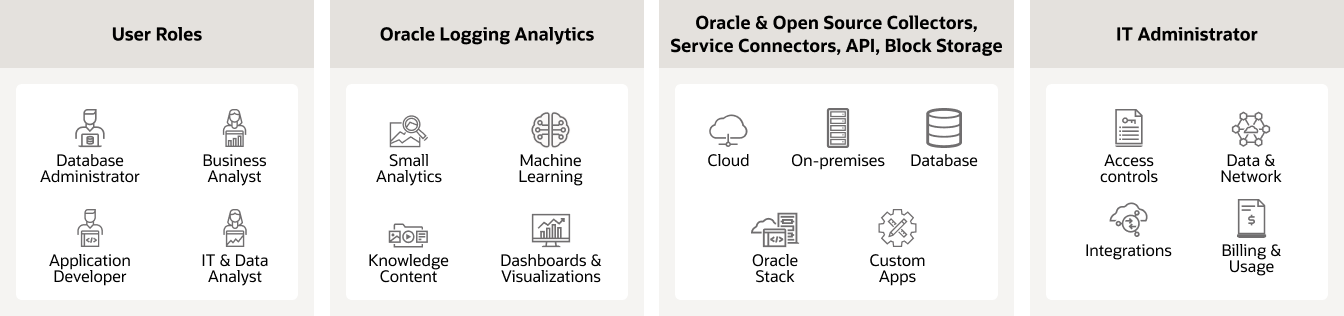
The interactive visualizations provide several possibilities to slice and dice the data. Use the Cluster feature to reduce millions of log entries down to a small set of interesting log signatures, making it easy for you to review. The Link feature enables you to analyze logs in a transaction or identify anomalous patterns using the grouped view.
For more information on product functionality, refer to OCI Logging Analytics documentation.
Pricing information
| Part number | Product | Unit | Unit price |
|---|---|---|---|
| B95634 | Logging Analytics - Active Storage | Logging Analytics storage unit per month | $487.5432 |
| B92809 | Logging Analytics - Archival Storage | Logging Analytics storage unit per month | $0.026212 |
For more granular pricing information about this service and to estimate pricing for a specified timeframe (daily, monthly, annual, etc.), visit the OCI Cost Estimator and key in the respective SKU/part number in the advanced search option.