
|
|
Character Profiler |
The Character Profiler discovers all the distinct characters that exist in a number of text attributes, and how often they occur.
The Character Profiler is particularly useful to find unexpected characters in text attributes that may need to be checked for on an ongoing basis (using Invalid Character Check), removed (using Denoise) or replaced (using Character Replace). Normalizing character discrepancies is also useful before Parsing.
The results are created so that they can easily be added to Reference Data for any of the above purposes.
Also, where a source of data contains records from a number of different countries, the Character Profiler can help to understand the ranges of characters in the data.
Any String attributes that you wish to search for character instances.
None
None
None
|
Execution Mode |
Supported |
|
Batch |
Yes |
|
Real-time Monitoring |
Yes |
|
Real-time Response |
Yes |
The Character Profiler produces a summary view of its results, showing the following statistics:
|
Statistic |
Meaning |
|
Character |
The character found in the data (See Note below) |
|
Decimal |
The decimal Unicode character reference. Note that a hash character is used to prefix the character references, so that the references can be used directly in Reference Data. |
|
Hex |
The hexadecimal Unicode character reference. Note that #x is used to prefix the character references, so that the references can be used directly in Reference Data. |
|
Total |
The total number of occurrences of the character across the selected input attributes. |
|
Record Count |
The number of records containing the character in any of the selected input attributes. |
|
[Attribute name] Total |
The number of occurrences of the character in the attribute. |
|
[Attribute name] Record Count |
The number of records containing the character in the attribute. |
|
Note: If you see a square character in the Results Browser, this is likely to be because you do not have the required fonts installed on your client to view the actual character, or (in rare cases) because the fonts are installed but require custom font.properties files to be correctly rendered in OEDQ and other Java applications. If you copy and paste the character into another application (such as Microsoft Excel) and still cannot see it correctly (in this case, it will typically be represented by a ?), you do not have the required fonts installed. |
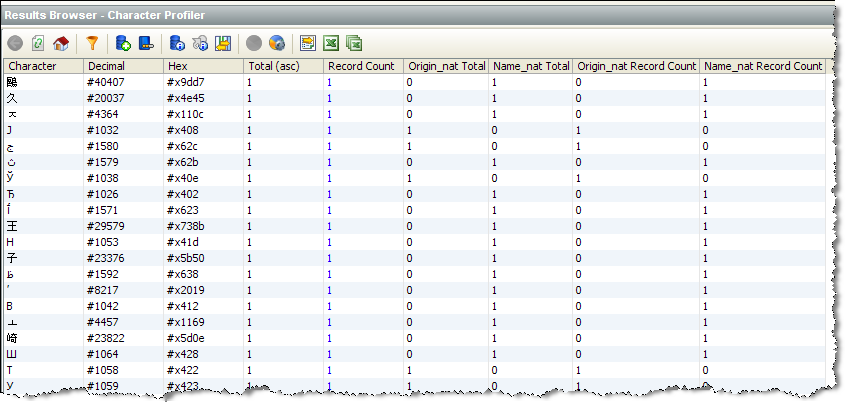
In this example, The Character Profiler is used to find unusual characters in some multi-language data from a Unicode database. The user chooses to look at the low frequency characters first by sorting the results by the Total column (ascending):
Oracle ® Enterprise Data Quality Help version 9.0
Copyright ©
2006,2011 Oracle and/or its affiliates. All rights reserved.