 文章
服务器与存储管理
文章
服务器与存储管理
如何在专用 IP Oracle Solaris 区域集群上部署 Oracle RAC
作者:Vinh Tran
如何创建专用 IP Oracle Solaris 区域集群、在专用 IP 区域集群中安装和配置 Oracle Grid Infrastructure 12c 和 Oracle Real Application Clusters (Oracle RAC) 12c 以及为 Oracle RAC 实例创建 Oracle Solaris Cluster 4.2 资源。
2014 年 10 月发布
|
简介
过程概述
前期准备
创建专用 IP 区域集群
为区域集群创建 Oracle RAC 框架资源
在区域集群
zc-rac 中设置根环境为 Oracle 软件创建用户和组
在 Oracle Solaris 区域集群节点中安装 Oracle Grid Infrastructure 12c
安装 Oracle Database 12.1 并创建数据库
验证数据库状态
创建 Oracle Solaris Cluster 资源
另请参见
关于作者
本文介绍如何在 Oracle Solaris 11.2 上的 Oracle Solaris Cluster 4.2 环境中创建专用 IP Oracle Solaris 区域集群、在区域集群中安装和配置 Oracle Grid Infrastructure 12c 和 Oracle RAC 12c 以及为 Oracle RAC 实例创建 Oracle Solaris Cluster 4.2 资源。
下表提供介绍如何使用其他版本的软件执行类似任务的其他文章的链接。
| 文章 | Oracle RAC 版本 | Oracle Solaris 版本 | Oracle Solaris Cluster 版本 |
|---|---|---|---|
| “如何在 Oracle Solaris 区域集群上部署 Oracle RAC 11.2.0.2” | 11.2.0.2 | 10 | 3.3 |
| “如何在区域集群上部署 Oracle RAC 11.2.0.3” | 11.2.0.3 | 10 | 3.3 |
| “如何在 Oracle Solaris 11 区域集群上部署 Oracle RAC” | 11.2.0.3 | 11 | 4.0 |
简介
Oracle Solaris Cluster 提供创建高可用性区域集群的功能。一个区域集群包含多个 Oracle Solaris 区域,每个区域分别驻留在各自独立的服务器上;组成集群的各个区域链接成一个虚拟集群。因为区域集群之间是相互隔离的,所以各区域集群的安全性将得到加强。此外,由于区域是聚集在一起的,所以各区域所承载应用的可用性得到了提高。由于一个物理集群上可存在多个区域集群,提供了在一个集群上整合多集群应用的方法。
通过在区域集群内安装 Oracle RAC,即可同时运行一个 Oracle 数据库的多个实例。这样,您便可以为同一数据库创建不同的数据库版本或进行不同的部署(例如,一个用于生产,一个用于开发)。使用此架构,您还可以将多层解决方案的不同部分部署到不同的虚拟区域集群中。例如,您可以将 Oracle RAC 和应用服务器部署在同一集群的不同区域中。使用该方法可以在充分利用 Oracle Solaris Cluster 简化管理的同时将层和管理域相互隔离开来。
有关在区域集群中部署 Oracle RAC 时各种可用配置的信息,请参见“在 Oracle Solaris 区域集群上运行 Oracle Real Application Clusters”白皮书。
注:本文并非 性能测试最佳实践指南,不涉及以下主题:
- Oracle Solaris 操作系统安装
- 存储配置
- 网络配置
- Oracle Solaris Cluster 安装
注:有关如何安装 Oracle Solaris Cluster 4.0 的信息,请参见文章“如何在 Oracle Solaris 11 上使用 Oracle Solaris Cluster 4.0 安装和配置双节点集群”。
过程概述
本文介绍如何利用 Oracle 自动存储管理在一个 Oracle Solaris Cluster 四节点区域集群配置中安装 Oracle RAC(参见图 1)。
需要执行三个主要步骤:
- 创建一个区域集群,并在该区域集群内创建特定的 Oracle RAC 基础架构。
- 准备环境,然后安装并配置 Oracle Grid Infrastructure 和 Oracle RAC 12c 数据库。
- 创建 Oracle Solaris Cluster 资源,将这些资源彼此关联并使其联机。
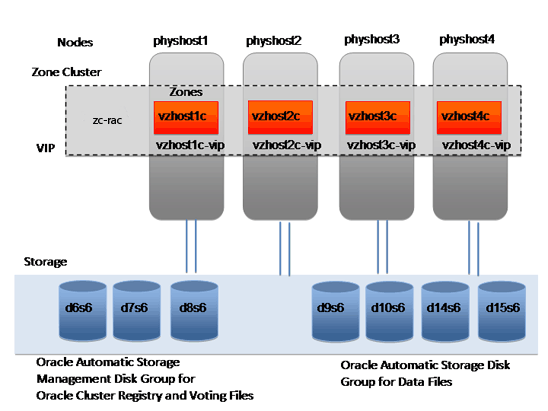
图 1. 四节点区域集群配置
前期准备
确保完成以下前期准备:
- 确保安装 Oracle Solaris 11.2 并启用网络名称服务。在本例中,使用了 DNS 和 LDAP 名称服务。
- 确保使用
ha-cluster-full软件包安装和配置 Oracle Solaris Cluster 4.2。 - 确保识别共享磁盘,也称作
/dev/did/rdsk设备。清单 1 是如何从任意集群节点的全局区域中识别共享磁盘的示例:
phyhost1# cldev status

=== Cluster DID Devices ===

Device Instance            Node               Status
---------------            ----               ------
/dev/did/rdsk/d1           phyhost1           Ok

/dev/did/rdsk/d10          phyhost1           Ok
                           phyhost2           Ok
                           phyhost3           Ok
                           phyhost4           Ok

/dev/did/rdsk/d14          phyhost1           Ok
                           phyhost2           Ok
                           phyhost3           Ok
                           phyhost4           Ok

/dev/did/rdsk/d15          phyhost1           Ok
                           phyhost2           Ok
                           phyhost3           Ok
                           phyhost4           Ok

/dev/did/rdsk/d16          phyhost1           Ok
                           phyhost2           Ok
                           phyhost3           Ok
                           phyhost4           Ok

/dev/did/rdsk/d17          phyhost1           Ok
                           phyhost2           Ok
                           phyhost3           Ok
                           phyhost4           Ok

/dev/did/rdsk/d18          phyhost1           Ok
                           phyhost2           Ok
                           phyhost3           Ok
                           phyhost4           Ok

/dev/did/rdsk/d19          phyhost2           Ok

/dev/did/rdsk/d2           phyhost1           Ok

/dev/did/rdsk/d20          phyhost2           Ok

/dev/did/rdsk/d21          phyhost3           Ok

/dev/did/rdsk/d22          phyhost3           Ok

/dev/did/rdsk/d23          phyhost4           Ok

/dev/did/rdsk/d24          phyhost4           Ok


/dev/did/rdsk/d6           phyhost1           Ok
                           phyhost2           Ok
                           phyhost3           Ok
                           phyhost4           Ok

/dev/did/rdsk/d7           phyhost1           Ok
                           phyhost2           Ok
                           phyhost3           Ok
                           phyhost4           Ok

/dev/did/rdsk/d8           phyhost1           Ok
                           phyhost2           Ok
                           phyhost3           Ok
                           phyhost4           Ok

/dev/did/rdsk/d9           phyhost1           Ok
                           phyhost2           Ok
                           phyhost3           Ok
                           phyhost4           Ok
清单 1. 识别共享磁盘
清单 1 输出显示
phyhost1、phyhost2、phyhost3和phyhost4共享磁盘d6、d7、d8、d9、d10、d14、d15、d16、d17和d18。Oracle 自动存储管理磁盘组将使用下列共享磁盘来存储 Oracle 集群注册表和表决文件:
/dev/did/rdsk/d6s6/dev/did/rdsk/d7s6/dev/did/rdsk/d8s6
Oracle 自动存储管理磁盘组将使用下列共享磁盘来存储数据文件:
/dev/did/rdsk/d9s6/dev/did/rdsk/d10s6/dev/did/rdsk/d14s6/dev/did/rdsk/d15s6
在本示例中,分片 6 为 102 GB。有关磁盘大小要求的信息,请参见 Oracle Grid Infrastructure 安装指南。
- 确保已在公共网络上分配了 Oracle 虚拟 IP (VIP) 和单客户端访问名称 (SCAN) IP,例如:
vzhost1d,IP 地址 10.134.35.99,用于 SCAN IP 地址。vzhost1c-vip,IP 地址 10.134.35.100,用作vzhost1c的 VIP 地址。vzhost2c-vip,IP 地址 10.134.35.101,用作vzhost2c的 VIP 地址。vzhost3c-vip,IP 地址 10.134.35.102,用作vzhost3c的 VIP 地址。vzhost4c-vip,IP 地址 10.134.35.103,用作vzhost4c的 VIP 地址。
注:切勿 在网络上任何地方(包括集群中)手动绑定上述 IP 地址。
- 确保已为专用 IP 区域配置创建 VNIC。例如,键入以下命令在物理网络接口
net0和net4上创建名为vnic1和vnic2的 VNIC。
# dladm create-vnic -l  net0 vnic1
# dladm create-vnic -l  net4 vnic2
创建专用 IP 区域集群
- 使用
sysconfig工具创建系统配置文件:
- 键入以下命令:
# sysconfig create-profile -o /var/tmp/zc2.xml -g location,identity,naming_services,users
- 按 F2 转到 Network 屏幕。键入
physhost1as作为计算机名称。 - 按 F2 进入 DNS Name Service 屏幕。选择 Configure DNS。
- 按 F2 进入 DNS 服务器地址屏幕。键入 DNS 服务器的 IP 地址。至少需要一个 IP 地址。
DNS Server IP address: 192.168.1.10
DNS Server IP address: 192.168.1.11
- 按 F2 进入 DNS Search List 屏幕。在进行 DNS 查询时,输入一系列要搜索的域。如果没有输入域,将只搜索为该系统选择的 DNS 域。
Search domain: us.oracle.com
Search domain: oracle.com
Search domain:
- 按 F2 进入 Alternate Name Service 屏幕。从列表中选择 LDAP。
- 按 F2 进入下一个屏幕,指定 LDAP 名称服务器的域名。使用准确的大小写和标点符号键入域名。
Domain Name: us.oracle.com
- 按 F2 进入下一个屏幕,指定 LDAP 配置文件。
Profile name: <name>
Profile server host name or IP address: 192.168.1.12
Search base: dc=us,dc=oracle,dc=com
- 按 F2 进入 LDAP Proxy 屏幕。如果使用代理,选择 Yes。
- 按 F2 进入 LDAP Profile Proxy Bind Information 屏幕。键入代理绑定可识别名称。
Proxy bind distinguished name: myproDN="cn=s_admin,ou=adminusers,dc=oracle,dc=com"
Proxy bind password: <password>
- 按 F2 进入 Time Zone:Regions 屏幕。选择包含您所在时区的区域。
- 按 F2 进入 Time Zone:Locations 屏幕。选择包含您所在时区的位置。
- 按 F2 进入 Time Zone 屏幕。选择您所在的时区。
- 按 F2 进入 Users 屏幕。为系统定义 root 密码,并为自己创建一个用户帐户。还创建一个用户帐户。
- 按 F2 进入 System Configuration Summary 屏幕。检查所有设置。
Time Zone: US/Pacific

Language: *The following can be changed when logging in.
Default language: C/POSIX
Terminal type: vt100

Users:
No user account

Network:
Computer name: physhost1
Name service: DNS
DNS servers: 192.168.1.10 192.168.1.11
DNS Domain search list: us.oracle.com oracle.com
Domain: us.oracle.com
Note: DNS will be configured to resolve host and IP node names.
This setting can be modified upon rebooting. For example:
# svccfg -s svc:/system/name-service/switch
svc:/system/name-service/switch> setprop config/host="cluster files dns "
svc:/system/name-service/switch> quit
# svcadm refresh svc:/system/name-service/switch
See nsswitch.conf(4), svccfg(1M) and nscfg(1M).
- 按 F2 应用设置。
- 键入以下命令:
- 创建一个名为
zone.cfg的文件,包含以下内容:
create
set zonepath=/export/zones/zc-rac
set brand=solaris
set autoboot=true
set limitpriv=default,proc_priocntl,proc_clock_highres
set enable_priv_net=true
set ip-type=exclusive
add dedicated-cpu
set ncpus=16
end
add capped-memory
set physical=12g
set swap=12g
set locked=12g
end
add node
set physical-host=phyhost1
set hostname=vzhost1c
add net
set address=vzhost1c
set physical=vnic1
end
add net
set physical=vnic2
end
end
add node
set physical-host=phyhost2
set hostname=vzhost2c
add net
set address=vzhost2c
set physical=vnic1
end
add net
set physical=vnic2
end
end
add node
set physical-host=phyhost3
set hostname=vzhost3c
add net
set address=vzhost3c
set physical=vnic1
end
add net
set physical=vnic2
end
end
add node
set physical-host=phyhost4
set hostname=vzhost4c
add net
set address=vzhost4c
set physical=vnic1
end
add net
set physical=vnic2
end
end
add net
set address=vzhost1d
end
add net
set address=vzhost1c-vip
end
add net
set address=vzhost2c-vip
end
add net
set address=vzhost3c-vip
end
add net
set address=vzhost4c-vip
end
add device
set match="/dev/did/rdsk/d6s6"
end
add device
set match="/dev/did/rdsk/d7s6"
end
add device
set match="/dev/did/rdsk/d8s6"
end
add device
set match="/dev/did/rdsk/d9s6"
end
add device
set match="/dev/did/rdsk/d10s6"
end
add device
set match="/dev/did/rdsk/d14s6"
end
add device
set match="/dev/did/rdsk/d15s6"
end
add device
set match="/dev/did/rdks/d16s6"
end
add device
set match="/dev/did/rdsk/d17s6"
end
add device
set match="/dev/did/rdsk/d18s6"
end
- 如果 SCAN 主机名
vzhost1d解析为多个 IP 地址,则这些 IP 地址中的每一个均应配置单独的全局网络资源。例如,如果vzhost1d解析为三个 IP 地址(10.134.35.97、10.134.35.98 和 10.134.35.99),则应向zone.cfg文件添加以下全局网络资源:
add net
set address=10.134.35.97
end
add net
set address=10.134.35.98
end
add net
set address=10.134.35.99
end
- 以
root身份运行以下命令,从一个节点创建集群:
# clzonecluster configure -f /var/tmp/zone.cfgzc-rac # clzonecluster install -c /var/tmp/zc2.xml/sc_profile.xml zc-rac # clzonecluster status === Zone Clusters === --- Zone Cluster Status --- Name Node Name Zone HostName Status Zone Status ---- --------- ------------- ------ ----------- zc-rac phyhost1 vzhost1c Offline Installed phyhost2 vzhost2c Offline Installed phyhost3 vzhost3c Offline Installed phyhost4 vzhost4c Offline Installed # clzc boot zc-rac # clzc status === Zone Clusters === --- Zone Cluster Status --- Name Node Name Zone HostName Status Zone Status ---- --------- ------------- ------ ----------- zc-rac phyhost1 vzhost1c Online Running phyhost2 vzhost2c Online Running phyhost3 vzhost3c Online Running phyhost4 vzhost4c Online Running - 配置区域 IP 地址:
root@phyhost1:/var/tmp# zloginzc-rac
root@vzhost1c:~# dladm show-link
LINK                CLASS     MTU    STATE    OVER
clprivnet2          phys      65520  up       --
zcRacPriv.ibd6      part      65520  up       ?
zcRacPriv.ibd7      part      65520  up       ?
vnic4vnic      1500   up       ?
vnic5vnic      1500   up       ?
zcRacStor.ibd6      part      65520  unknown  ?
zcRacStor.ibd7      part      65520  unknown  ?
root@vzhost1c:~# ipadm show-addr
ADDROBJ           TYPE     STATE        ADDR
lo0/v4            static   ok           127.0.0.1/8
zcRacPriv.ibd6/?  static   ok           172.16.4.129/26
zcRacPriv.ibd7/?  static   ok           172.16.4.193/26
clprivnet2/?      static   ok           172.16.4.65/26
lo0/v6            static   ok           ::1/128
root@vzhost1c:~# ipadm create-ip vnic4
root@vzhost1c:~# ipadm create-ip vnic5
root@vzhost1c:~# ipadm create-ipmp rac_ipmp1
root@vzhost1c:~# ipadm add-ipmp -i vnic4 -i vnic5 rac_ipmp1
root@vzhost1c:~# ipadm create-addr -T static -a 10.134.54.40/24 rac_ipmp1/v4
root@vzhost1c:~# ipadm set-ifprop -p standby=on -m ip vnic5
root@vzhost1c:~# ipmpstat -g
GROUP       GROUPNAME   STATE     FDT       INTERFACES
sc_ipmp1    rac_ipmp1    ok        --        vnic4 (vnic
- 要配置内核参数值,请向
/etc/project文件添加资源控制值。有关更多信息,请参见 适用于 Oracle Solaris 的 Oracle Database 12c 第 1 版安装指南 中的 D.1 节。完成后,检查/etc/project文件中的值。输出应类似如下所示:
# cat /etc/project
system:0::::
user.root:1::::
noproject:2::::
default:3::::process.max-file-descriptor=(basic,1024,deny),(priv,65536,deny);process.max-sem-nsems=
(privileged,1024,deny);process.max-sem-ops=(privileged,512,deny);project.max-msg-ids=
(privileged,4096,deny);project.max-sem-ids=(privileged,65535,deny);project.max-shm-ids=
(privileged,4096,deny);project.max-shm-memory=(privileged,466003951616,deny);project.max-tasks=
(priv,131072,deny)
group.staff:10::::
为区域集群创建 Oracle RAC 框架资源
要以 root 身份创建 Oracle RAC 框架,请从一个节点执行以下步骤:
- 从任意全局区域集群节点执行
clsetup:
# /usr/cluster/bin/clsetup *** Main Menu *** Please select from one of the following options: 1) Quorum 2) Resource groups 3) Data Services 4) Cluster interconnect 5) Device groups and volumes 6) Private hostnames 7) New nodes 8) Zone Cluster 9) Other cluster tasks ?) Help with menu options q) Quit Option: 3 *** Data Services Menu *** Please select from one of the following options: * 1) Apache Web Server * 2) Oracle Database * 3) NFS * 4) Oracle Real Application Clusters * 5) PeopleSoft Enterprise Application Server * 6) Highly Available Storage * 7) Logical Hostname * 8) Shared Address * 9) Per Node Logical Hostname *10) WebLogic Server * ?) Help * q) Return to the Main Menu Option: 4 *** Oracle Solaris Cluster Support for Oracle RAC *** Oracle Solaris Cluster provides a support layer for running Oracle Real Application Clusters (RAC) database instances. This option allows you to create the RAC framework resource group, storage resources, database resources and administer them, for managing the Oracle Solaris Cluster support for RAC. After the RAC framework resource group has been created, you can use the Oracle Solaris Cluster system administration tools to administer a RAC framework resource group that is configured on a global cluster. To administer a RAC framework resource group that is configured on a zone cluster, instead use the appropriate Oracle Solaris Cluster command. Is it okay to continue (yes/no) [yes]? Please select from one of the following options: 1) Oracle RAC Create Configuration 2) Oracle RAC Ongoing Administration q) Return to the Data Services Menu Option: 1 >>> Select Oracle Real Application Clusters Location <<< Oracle Real Application Clusters Location: 1) Global Cluster 2) Zone Cluster Option [2]: 2 >>> Select Zone Cluster <<< From the list of zone clusters, select the zone cluster where you would like to configure Oracle Real Application Clusters. 1) zc-rac ?) Help d) Done Selected: [zc-rac] >>> Select Oracle Real Application Clusters Components to Configure <<< Select the component of Oracle Real Application Clusters that you are configuring: 1) RAC Framework Resource Group 2) Storage Resources for Oracle Files 3) Oracle Clusterware Framework Resource 4) Oracle Automatic Storage Management (ASM) 5) Resources for Oracle Real Application Clusters Database Instances Option [1]: 1 This wizard guides you through the creation and configuration of the Real Application Clusters (RAC) framework resource group. Before you use this wizard, ensure that the following prerequisites are met: * All pre-installation tasks for Oracle Real Application Clusters are completed. * The Oracle Solaris Cluster nodes are prepared. * The data services packages are installed. * All storage management software that you intend to use is installed and configured on all nodes where Oracle Real Application Clusters is to run. Press RETURN to continue >>> Select Nodes <<< Specify, in order of preference, a list of names of nodes where Oracle Real Application Clusters is to run. If you do not explicitly specify a list, the list defaults to all nodes in an arbitrary order. The following nodes are available on the zone cluster z11skgxn: 1) vzhost1c 2) vzhost2c 3) vzhost3c 4) vzhost4c r) Refresh and Clear All a) All ?) Help d) Done Selected: [vzhost1c, vzhost2c, vzhost3c, vzhost4c] Options: d >>> Review Oracle Solaris Cluster Objects <<< The following Oracle Solaris Cluster objects will be created. Select the value you are changing: Property Name Current Setting ============= =============== 1) Resource Group Name rac-framework-rg 2) RAC Framework Resource N...rac-framework-rs d) Done ?) Help Option: d >>> Review Configuration of RAC Framework Resource Group <<< The following Oracle Solaris Cluster configuration will be created. To view the details for an option, select the option. Name Value ==== ===== 1) Resource Group Name rac-framework-rg 2) RAC Framework Resource N...rac-framework-rs c) Create Configuration ?) Help Option: c - 从任意全局区域集群节点验证 Oracle RAC 框架资源的状态:
# clrs status -Z zc-rac

=== Cluster Resources ===

Resource Name         Node Name      State      Status Message
-------------         ---------      -----      --------------
rac-framework-rs       vzhost1c      Online     Online
                       vzhost2c      Online     Online
                       vzhost3c      Online     Online
                       vzhost4c      Online     Online
在区域集群 zc-rac 中设置根环境
以 root 身份在每个 全局区域集群节点(phyhost1、phyhost2、phyhost3 和 phyhost4)执行以下步骤:
- 登录非全局区域节点:
# /usr/sbin/zloginzc-rac
[Connected to zone 'zc-rac' pts/2]
Last login: Thu Aug 25 17:30:14 on pts/2
Oracle Corporation      SunOS 5.11     11.2 June 2014
- 在每个区域集群节点上安装
make:
- 检查节点上是否存在
make、assembler和x11-info-clients软件包。
# pkg list *make*
- 如果这些软件包不存在,则执行以下命令安装软件包:
# pkg install developer/build/make
# pkg install developer/build/assembler
# pkg install x11-info-clients
# pkg install x11/diagnostic/x11-info-clients
- 检查节点上是否存在
- 启用 Oracle Clusterware 的集群时间同步服务,令其在每个区域节点上以观察模式运行:
# touch /etc/inet/ntp.conf
# svcadm enable svc:/network/ntp
- 在每个区域节点的
/etc/ssh/sshd_config中将PermitRootLogin no更改为PermitRootLogin yes:root@vzhost1c:~# svcadm disable ssh root@vzhost1c:~# svcadm enable ssh
为 Oracle 软件创建用户和组
- 以
root身份在各 节点上执行以下命令:
# groupadd -g 300 oinstall
# groupadd -g 301 dba
# useradd -g 300 -G 301 -u 302 -d /u01/ora_home -s /usr/bin/bash ouser
# mkdir -p /u01/ora_home
# chown ouser:oinstall /u01/ora_home
# mkdir /u01/oracle
# chown ouser:oinstall /u01/oracle
# mkdir /u01/grid
# chown ouser:oinstall /u01/grid
# mkdir /u01/oraInventory
# chown ouser:oinstall /u01/oraInventory
- 在软件所有者
ouser的.bash_profile文件中包含以下路径:
export ORACLE_BASE=/u01/oracle
export ORACLE_HOME=/u01/oracle/product/12.1
export AWT_TOOLKIT=XToolkit
- 为软件所有者
ouser创建密码:
# passwd ouser
New Password:
Re-enter new Password:
passwd: password successfully changed for ouser
- 以
ouser身份在各 节点上设置 SSH:
$ ssh-keygen -t rsa
Generating public/private rsa key pair.
Enter file in which to save the key (/u01/ora_home/.ssh/id_rsa):
Enter passphrase (empty for no passphrase):
Enter same passphrase again:
Your identification has been saved in /u01/ora_home/.ssh/id_rsa.
Your public key has been saved in /u01/ora_home/.ssh/id_rsa.pub.
The key fingerprint is:
e6:63:c9:71:fe:d1:8f:71:77:70:97:25:2a:ee:a9:33 local1@vzhost1c
$
$ pwd
/u01/ora_home/.ssh
- 在第一个节点
vzhost1c上,键入以下命令:
$ cd /u01/ora_home/.ssh
$ cat id_rsa.pub >> authorized_keys
$ chmod 600 authorized_keys
$ scp authorized_keys vzhost2c:/u01/ora_home/.ssh
- 在第二个节点
vzhost2c上,键入以下命令:
$ cd /u01/ora_home/.ssh
$ cat id_rsa.pub >> authorized_keys
$ scp authorized_keys vzhost3c:/u01/ora_home/.ssh
- 在第三个节点
vzhost3c上,键入以下命令:
$ cd /u01/ora_home/.ssh
$ cat id_rsa.pub >> authorized_keys
$ scp authorized_keys vzhost4c:/u01/ora_home/.ssh
- 在第四个节点
vzhost4c上,键入以下命令:
$ cd /u01/ora_home/.ssh
$ cat id_rsa.pub >> authorized_keys
$ scp authorized_keys vzhost1c:/u01/ora_home/.ssh
- 在第一个节点
vzhost1c上,键入以下命令:
$ cd /u01/ora_home/.ssh
$ scp authorized_keys vzhost2c:/u01/ora_home/.ssh
$ scp authorized_keys vzhost3c:/u01/ora_home/.ssh
- 在各 节点上,测试 SSH 设置:
$ ssh vzhost1c date
$ ssh vzhost2c date
$ ssh vzhost3c date
$ ssh vzhost4c date
- 在每个 本地区域集群节点上,以
root身份设置 Oracle 自动存储管理候选磁盘:
# for i in 6 7 8 9 10 14 15 > do > chown ouser:oinstall /dev/did/rdsk/d${i}s6 > chmod 660 /dev/did/rdsk/d${i}s6 > done - 以软件所有者身份,从本地区域集群中的一个 节点执行以下操作:
$ for i in 6 7 8 9 10 14 15
> do
> dd if=/dev/zero of=/dev/did/rdsk/d${i}s6 bs=1024k count=200
> done
在 Oracle Solaris 区域集群节点中安装 Oracle Grid Infrastructure 12c
- 以软件所有者身份,在一个 节点上执行以下命令:
$ bash
$ export DISPLAY=<hostname>:<n>
$ cd <PATH to 12.1 based software image>/grid/
$ ./runInstaller
Starting Oracle Universal Installer...

Checking Temp space: must be greater than 180 MB.   Actual 16796 MB    Passed
Checking swap space: must be greater than 150 MB.   Actual 19527 MB    Passed
Checking monitor: must be configured to display at least 256 colors.    Actual
16777216    Passed
Preparing to launch Oracle Universal Installer from
/tmp/OraInstall2014-08-04_02-34-26PM. Please wait ...
- 键入 Y 继续。
- 向 Oracle Universal Installer 提供以下输入:
- 在 Select Installation Option 屏幕上,选择 Install and Configure Oracle Grid Infrastructure for a Cluster。
- 在 Select Cluster Type 屏幕上,选择 Configure a Standard Cluster。
- 在 Select Installation Type 屏幕上,选择 Advanced Installation。
- 在 Select Product Languages 屏幕上,选择 English。
- 在 Grid Plug and Play Information 屏幕上,选择以下各项:
- 为 Cluster Name 选择 vzhost-cluster。
- 为 SCAN Name 选择 vzhost1d。
- 为 SCAN Port 选择 1521。
本例中未使用 GNS。
- 在 Cluster Node Information 屏幕上,指定以下内容:
Public Hostname     Virtual Hostname
vzhost1c            vzhost1c-vip
vzhost2c            vzhost2c-vip
vzhost3c            vzhost3c-vip
vzhost4c            vzhost4c-vip
- 在 Specify Network Interface Usage 屏幕上,选择一个公共网络和一个专用网络,如图 2 所示。对于其余网络,选择 Do Not Use。
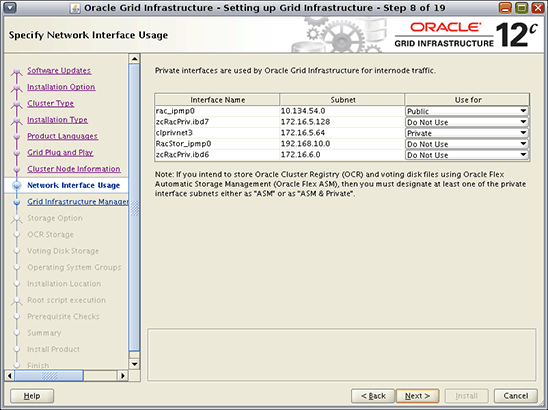
图 2. 指定网络接口用途
- 在 Grid Infrastructure Management Repository Option 屏幕上,选择 Yes。
- 在 Storage Option Information 屏幕上,选择 Use Standard ASM for Storage。
- 在 Create ASM Disk Group 屏幕上,按照图 3 所示执行以下操作:
- 单击 Change Discovery Path 按钮。
- 在 Change Discovery Path 对话框中,将发现路径指定为
/dev/did/rdsk/d*s6。 - 在 Disk group name 文本框中,键入
crsdg。 - 选择 /dev/did/rdsk/d6s6、/dev/did/rdsk/d7s6 和 /dev/did/rdsk/d8s6 作为候选磁盘。
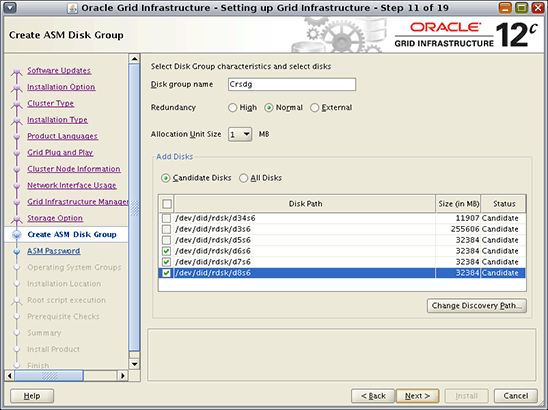
图 3. 创建 Oracle 自动存储管理磁盘组
- 在 Specify ASM Password 屏幕上,输入 SYS 和 ASMSNMP 帐户的用户名和密码。
- 在 Privileged Operating System Groups 屏幕上,为 Oracle ASM Administrator (OSASM)、Oracle ASM DBA (OSDBA for ASM)和 Oracle ASM Operator (OSOPER for ASM) 指定一个组。在本例中,使用默认组。
- 在 Software Installation Location 屏幕上,指定以下内容:
- 为 Oracle Base 键入
/u01/oracle。 - 为 Software Location 键入
/u01/grid/product/12.1。
- 为 Oracle Base 键入
- 在 Create Inventory 屏幕上,选择 /u01/oraInventory 作为 Inventory Directory。
- 如果您希望自动运行配置脚本
root.sh,则在 root script execution configuration 屏幕上输入root密码。 - 在 Perform Prerequisite Checks 屏幕上,选择 Ignore All。
- 在 Summary 屏幕上,单击 Install 开始安装软件。
- 在 Install Product 屏幕上,在对话框中确认执行配置脚本,如图 4 所示。
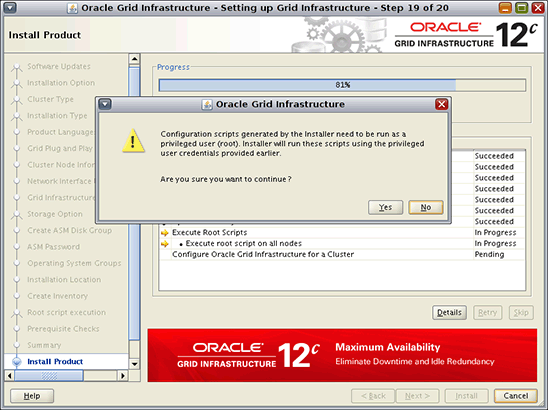
图 4. 确认执行配置脚本的消息
- 如果看到错误消息
INS-20802 Oracle Cluster Verification Utility failed,单击 OK 和 Skip。然后,单击 Next 继续。 - 如果看到警告
[INS-32091] Software installation was successful.But some configuration assistants failed, were canceled or skipped,单击 Yes 继续。Oracle Grid Infrastructure 12.1 安装完成。
- 从任意节点检查 Oracle Grid Infrastructure 资源的状态:
[root@vzhost1c ~]# /u01/grid/product/12.1/bin/crsctl status res -t
--------------------------------------------------------------------------------
Name           Target  State        Server                   State details
--------------------------------------------------------------------------------
Local Resources
--------------------------------------------------------------------------------
ora.CRSDG.dg
               ONLINE  ONLINE       vzhost1c                 STABLE
               ONLINE  ONLINE       vzhost2c                 STABLE
               ONLINE  ONLINE       vzhost3c                 STABLE
               ONLINE  ONLINE       vzhost4c                 STABLE
ora.LISTENER.lsnr
               ONLINE  ONLINE       vzhost1c                 STABLE
               ONLINE  ONLINE       vzhost2c                 STABLE
               ONLINE  ONLINE       vzhost3c                 STABLE
               ONLINE  ONLINE       vzhost4c                 STABLE
ora.asm
               ONLINE  ONLINE       vzhost1c                 STABLE
               ONLINE  ONLINE       vzhost2c                 Started,STABLE
               ONLINE  ONLINE       vzhost3c                 Started,STABLE
               ONLINE  ONLINE       vzhost4c                 Started,STABLE
ora.net1.network
               ONLINE  ONLINE       vzhost1c                 STABLE
               ONLINE  ONLINE       vzhost2c                 STABLE
               ONLINE  ONLINE       vzhost3c                 STABLE
               ONLINE  ONLINE       vzhost4c                 STABLE
ora.ons
               ONLINE  ONLINE       vzhost1c                 STABLE
               ONLINE  ONLINE       vzhost2c                 STABLE
               ONLINE  ONLINE       vzhost3c                 STABLE
               ONLINE  ONLINE       vzhost4c                 STABLE
--------------------------------------------------------------------------------
Cluster Resources
--------------------------------------------------------------------------------
ora.LISTENER_SCAN1.lsnr
      1        ONLINE  ONLINE       vzhost3c                 STABLE
ora.LISTENER_SCAN2.lsnr
      1        ONLINE  ONLINE       vzhost2c                 STABLE
ora.LISTENER_SCAN3.lsnr
      1        ONLINE  ONLINE       vzhost1c                 STABLE
ora.MGMTLSNR
      1        ONLINE  ONLINE       vzhost1c                 172.16.4.65,STABLE
ora.cvu
      1        ONLINE  ONLINE       vzhost1c                 STABLE
ora.mgmtdb
      1        ONLINE  ONLINE       vzhost1c                 Open,STABLE
ora.oc4j
      1        ONLINE  ONLINE       vzhost1c                 STABLE
ora.scan1.vip
      1        ONLINE  ONLINE       vzhost3c                 STABLE
ora.scan2.vip
      1        ONLINE  ONLINE       vzhost2c                 STABLE
ora.scan3.vip
      1        ONLINE  ONLINE       vzhost1c                 STABLE
ora.vzhost1c.vip
      1        ONLINE  ONLINE       vzhost1c                 STABLE
ora.vzhost2c.vip
      1        ONLINE  ONLINE       vzhost2c                 STABLE
ora.vzhost3c.vip
      1        ONLINE  ONLINE       vzhost3c                 STABLE
ora.vzhost4c.vip
      1        ONLINE  ONLINE       vzhost4c                 STABLE
--------------------------------------------------------------------------------
安装 Oracle Database 12.1 和创建数据库
- 执行以下命令启动 ASM Configuration Assistant,在此位数据库创建名为
swbdg的磁盘组:
$ export DISPLAY=<hostname>:<n>
$ /u01/grid/product/12.1/bin/asmca
- 在 ASM Configuration Assistant 中,执行以下操作:
- 如图 5 所示,在 Disk Groups 选项卡中单击 Create。
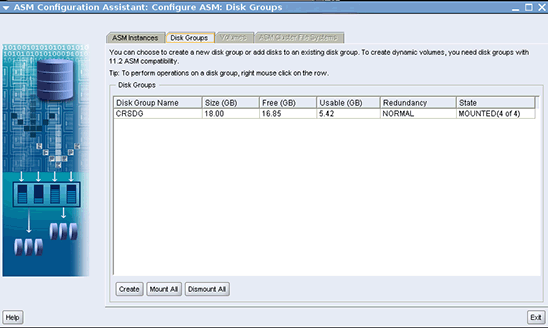
图 5. Disk Groups 选项卡
- 在如图 6 所示的 Create Disk Group 屏幕上,执行以下操作:
- 将 Disk Group Name 指定为
swbdg。 - 选择 /dev/did/rdsk/d9s6、/dev/did/rdsk/d10s6、/dev/did/rdsk/d14s6 和 /dev/did/rdsk/d15s6。
- 键入
fgr1作为磁盘/dev/did/rdsk/d9s6和/dev/did/rdsk/d10s6的 Failure Group。 - 键入
fgr2作为磁盘/dev/did/rdsk/d14s6和/dev/did/rdsk/d15s6的 Failure Group。 - 单击 OK 创建磁盘组。
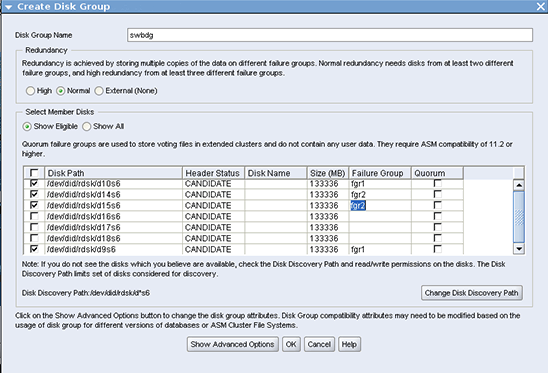
图 6. 创建磁盘组
- 将 Disk Group Name 指定为
swbdg磁盘组创建完毕后,单击 Exit 关闭 ASM Configuration Assistant。
- 如图 5 所示,在 Disk Groups 选项卡中单击 Create。
- 从其中一个 节点运行以下命令打开 Oracle Universal Installer,安装 Oracle Database:
$ export DISPLAY=<hostname>:<n>
$ cd <PATH to 12.1 based software image>/database
$ ./runInstaller
starting Oracle Universal Installer...

Checking Temp space: must be greater than 180 MB.   Actual 20766 MB    Passed
Checking swap space: must be greater than 150 MB.   Actual 23056 MB    Passed
Checking monitor: must be configured to display at least 256 colors.   Actual
16777216    Passed
Preparing to launch Oracle Universal Installer from
/tmp/OraInstall2014-08-05_02-13-31PM. Please wait ...
- 为 Oracle Universal Installer 提供以下输入:
- 在 Configuration Security Updates 屏幕和 Download Software Updates 屏幕上提供所需信息。
- 在 Select Installation Option 屏幕上,选择 Create and configure a database。
- 在 System Class 屏幕上,选择 Server Class。
- 在 Grid Installation Options 屏幕上,选择 Oracle Real Application Clusters database installation。
- 在 Select Cluster Database Type 屏幕上,执行以下操作:
- 选择 Policy-Managed。
- 提供服务器池名称:swbsvr
- 输入 4 作为 Cardinality。
- 单击 Next。
- 在 Select Install Type 屏幕上,选择 Advanced Install。
- 在 Select Product Languages 屏幕上,使用默认值。
- 在 Select Database Edition 屏幕上,选择 Enterprise Edition。
- 在 Specify Installation Location 屏幕上,指定以下内容:
- 为 Oracle Base 选择 /u01/oracle。
- 为 Software Location 选择 /u01/oracle/product/12.1。
- 在 Select Configuration Type 屏幕上,选择 General Purpose/Transaction Processing。
- 在 Specify Database Identifiers 屏幕上,取消选中 Create as Container database。键入
swb作为 Global Database Name。 - 在如图 7 所示的 Specify Configuration Options 屏幕上,使用默认设置。
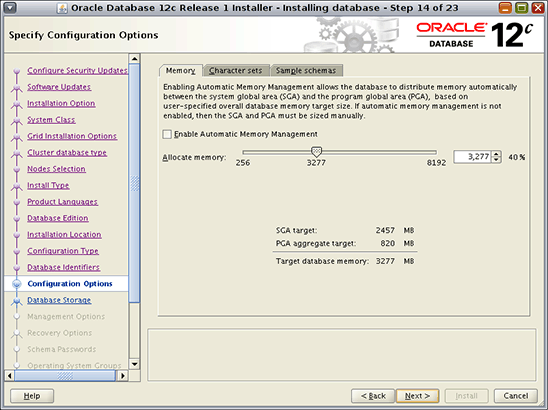
图 7. Specify Configuration Options 屏幕
- 在 Specify Database Storage Options 屏幕上,选择 Oracle Automatic Storage Management。
- 在 Specify Management Options 屏幕上,使用默认选项。
- 在 Specify Recovery Options 屏幕上,选择 Enable recovery 选项。确保选中 Oracle Automatic Storage Management。
- 在 Select ASM Disk Group 屏幕上,选择 SWBDG。
- 在 Specify Schema Passwords 屏幕上,为 SYS、SYSTEM、SYSMAN 和 DBSNMP 帐户指定密码。
- 在 Privileged Operating System Groups 屏幕上,指定以下内容或选择默认选项:
- 为 Database Administrator (OSDBA) Group 选择 dba。
- 为 Database Operator (OSOPER) Group (Optional) 选择 oinstall。
- 为 Database Backup and Recovery (OSBACKUPDBA) group 选择 dba。
- 为 Data Guard administrative (OSDGDBA) group 选择 dba。
- 为 Encryption Keys Management administrative (OSKMDBA) group 选择 dba。
- 在如图 8 所示的 Perform Prerequisite Checks 屏幕上,选择 Ignore All 并单击 Yes 继续。
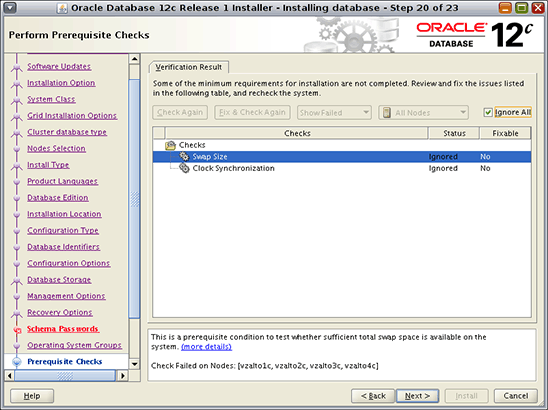
图 8. Perform Prerequisite Checks 屏幕
- 在 Summary 屏幕上,单击 Install。
- 在要您运行配置脚本的子屏幕上,执行以下步骤:
- 打开一个终端。
- 以
root身份登录。 - 在每个 集群节点上运行
root.sh脚本。 - 返回窗口,单击 OK 继续。
- 在 Database Configuration Assistant 对话框中,单击 OK 继续,如图 9 所示。
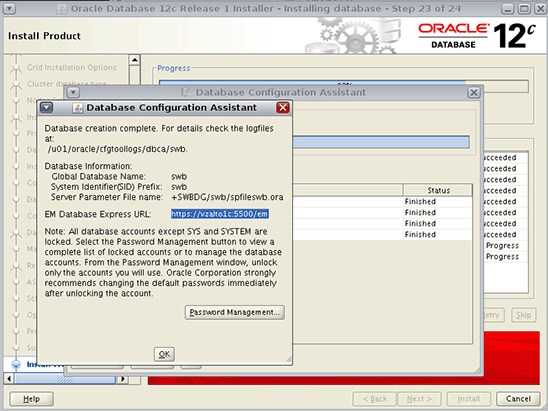
图 9. Database Configuration Assistant 对话框
- 在 Finish 屏幕上,单击 Close 完成安装。
验证数据库状态
键入以下命令,验证数据库状态:
[root@vzhost1c ~]# srvctl config database -dbswb
Database unique name: swb
Database name: swb
Oracle home: /u01/oracle/product/12.1
Oracle user: oracle
Spfile: +SWBDG/swb/spfileswb.ora
Password file: +SWBDG/swb/orapwswb
Domain:
Start options: open
Stop options: immediate
Database role: PRIMARY
Management policy: AUTOMATIC
Server pools: swbsvr
Database instances:
Disk Groups: SWBDG
Mount point paths:
Services:
Type: RAC
Start concurrency:
Stop concurrency:
Database is policy managed

[root@vzhost1c ~]# srvctl status database -d swb
Instance swb_1 is running on node vzhost2c
Instance swb_2 is running on node vzhost3c
Instance swb_3 is running on node vzhost4c
Instance swb_4 is running on node vzhost1c
创建 Oracle Solaris Cluster 资源
使用以下过程创建 Oracle Solaris Cluster 资源。您也可以使用 clsetup 向导。
- 从一个 区域集群节点执行以下命令,在区域集群中注册
SUNW.crs_framework资源类型:
# clrt register SUNW.crs_framework
- 将
SUNW.crs_framework资源类型的一个实例添加到 Oracle RAC 框架资源组:
# clresource create -t SUNW.crs_framework \
-g rac-framework-rg \
-p resource_dependencies=rac-framework-rs \
crs-framework-rs
- 注册可扩展的 Oracle 自动存储管理实例代理资源类型:
# clresourcetype register SUNW.scalable_asm_instance_proxy
- 注册 Oracle 自动存储管理磁盘组资源类型:
# clresourcetype register SUNW.scalable_asm_diskgroup_proxy
- 创建资源组
asm-inst-rg和asm-dg-rg:
# clresourcegroup create -S asm-inst-rgasm-dg-rg
- 设置
asm-inst-rg对rac-fmwk-rg的强正相关性:
# clresourcegroup set -p rg_affinities=++rac-framework-rgasm-inst-rg
- 设置
asm-dg-rg对asm-inst-rg的强正相关性:
# clresourcegroup set -p rg_affinities=++asm-inst-rgasm-dg-rg
- 创建一个
SUNW.scalable_asm_instance_proxy资源并设置资源依赖性:
# clresource create asm-inst-rg \ -t SUNW.scalable_asm_instance_proxy \ -p ORACLE_HOME=/u01/grid/product/12.1 \ -p CRS_HOME=/u01/grid/product/12.1 \ -p "ORACLE_SID{vzhost1c}"=+ASM1 \ -p "ORACLE_SID{vzhost2c}"=+ASM2 \ -p "ORACLE_SID{vzhost3c}"=+ASM3 \ -p "ORACLE_SID{vzhost4c}"=+ASM4 \ -p resource_dependencies_offline_restart=crs-framework-rs \ -d asm-inst-rs - 将 Oracle 自动存储管理磁盘组资源类型添加到
asm-dg-rg资源组:
# clresource create -g asm-dg-rg -t SUNW.scalable_asm_diskgroup_proxy \
-p asm_diskgroups=CRSDG,SWBDG \
-p resource_dependencies_offline_restart=asm-inst-rs \
-d asm-dg-rs
- 在集群节点上,使
asm-inst-rg资源组在托管状态下联机:
# clresourcegroup online -eM asm-inst-rg
- 在集群节点上,使
asm-dg-rg资源组在托管状态下联机:
# clresourcegroup online -eM asm-dg-rg
- 为 Oracle RAC 数据库服务器创建可扩展的资源组以包含代理资源:
# clresourcegroup create -S \
-p rg_affinities=++rac-framework-rg,++asm-dg-rg \
rac-swbdb-rg
- 注册
SUNW.scalable_rac_server_proxy资源类型:
# clresourcetype register SUNW.scalable_rac_server_proxy
- 将数据库资源添加到资源组中:
# clresource create -g rac-swbdb-rg \
-t SUNW.scalable_rac_server_proxy \
-p resource_dependencies=rac-framework-rs \
-p resource_dependencies_offline_restart=crs-framework-rs,asm-dg-rs \
-p oracle_home=/u01/oracle/product/12.1 \
-p crs_home=/u01/grid/product/12.1 \
-p db_name=swb \
-d rac-swb-srvr-proxy-rs
- 使资源组联机:
# clresourcegroup online -emM rac-swbdb-rg
- 检查集群资源的状态:
# clrs status

=== Cluster Resources ===

Resource Name             Node Name      State      Status Message
-------------             ---------      -----      --------------
crs_framework-rs          vzhost1c       Online     Online
                          vzhost2c       Online     Online
                          vzhost3c       Online     Online
                          vzhost4c       Online     Online

rac-framework-rs          vzhost1c       Online     Online
                          vzhost2c       Online     Online
                          vzhost3c       Online     Online
                          vzhost4c       Online     Online

asm-inst-rs               vzhost1c       Online     Online - +ASM1 is UP and ENABLED
                          vzhost2c       Online     Online - +ASM2 is UP and ENABLED
                          vzhost3c       Online     Online - +ASM3 is UP and ENABLED
                          vzhost4c       Online     Online - +ASM4 is UP and ENABLED

asm-dg-rs                 vzhost1c       Online     Online - Mounted: SWBDG
                          vzhost2c       Online     Online - Mounted: SWBDG
                          vzhost3c       Online     Online - Mounted: SWBDG
                          vzhost4c       Online     Online - Mounted: SWBDG

rac-swb-srvr-proxy-rs     vzhost1c       Online     Online - Oracle instance UP
                          vzhost2c       Online     Online - Oracle instance UP
                          vzhost3c       Online     Online - Oracle instance UP
                          vzhost4c       Online     Online - Oracle instance UP
另请参见
下面是其他一些资源:
- Oracle Grid Infrastructure 安装指南
- Oracle Solaris 管理:命名服务和目录服务 指南中的“管理 DNS(任务)”
- Oracle Solaris 管理:命名服务和目录服务 指南中的“管理名称服务切换”
- Oracle Solaris Cluster 4.2 文档库
- 所有 Oracle Solaris Cluster 技术资源
- Oracle Solaris Cluster 4.2 版本说明
- Oracle Solaris Cluster 补丁和更新
- Oracle Solaris Cluster 下载
- Oracle Solaris Cluster 培训
关于作者
Vinh Tran 是 Oracle Solaris Cluster 小组的一名质量工程师。他的职责包括但不限于 Oracle Solaris Cluster 上的 Oracle RAC 认证和资格认定。
| 修订版 1.0,2014 年 10 月 20 日 |

 Printer View