Oracle JDeveloper and Oracle ADF 12c (12.2.1.1.0): New Features
Updated: June 21, 2016
Introduction
Oracle JDeveloper and Oracle Application Developer Framework 12.2.1.1 is a new release following 12.2.1.0 and is part of the larger Fusion Middleware product suite release of 12.2.1.1.
Read on to learn more about the new goodies in this release. As always, we welcome your feedback on the OTN forum.
Note that this document only list new features added between versions 12.2.1.1 and version 12.2.1.0. Documentation on the new features added in 12.2.1.0 is available in the documentation for that version.
Previous Version? If you are looking for the new feature list for a prior 11g or 12c release, please refer to the release documentation page.
New In This Release
- JDeveloper IDE
- ADF View (ADF Faces, Data Visualizations)
- ADF Business Components
- ADF Desktop Integration
JDeveloper IDE
- JUnit bundled Thanks to recent license changes to JUnit, we are no longer required to ship the JUnit libraries in a separate extension bundle. The features for adding, editing and running unit tests are now included in the JDeveloper download.
- New refactoring: Convert lambda to anonymous inner class This is the corollary refactoring to converting an anonymous inner class to use a lambda expression, a feature added in the last release.
ADF View (ADF Faces, Data Visualizations)
Data Visualization Enhancements
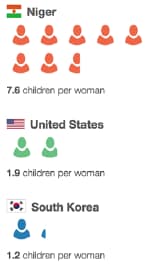
- New visualization: Picto Chart uses discrete icons to visualize an absolute number or relative sizes. It is extensively used in infographics as a more interesting and effective way to present numerical information than traditional tables and lists. (doc link)
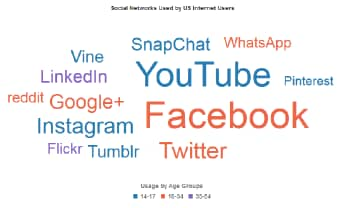
- New visualization: Tag Cloud provides visual representation for text data, typically used to visualize free form text or tag metadata for a website. (doc link)
- New Chart type: Stock Chart is useful for displaying information about a stock on a time axis. Unique to stock charts is the candlestick series which allows for displaying open, close, high, low information for the stock price. (doc link)

- Range Series Type: Range area and range bar charts help visualize data sets with varying low/high values. (doc link)

- Hierarchical labels can now be used to display hierarchical data on the categorical axis charts (doc link)

- Chart Axis now supports logarithmic axis scale.
- Drilling can now be enabled on the chart data items, series, and groups. This causes a drill event to be fired when the user performs the drill interaction. The application can listen to this event to update the chart with the appropriate drilled data.
-
Ability to individually style the categorical axis labels allows for emphasizing specific groups, which is a lot more useful than styling the labels as a whole. Tooltips are now also supported for categorical axis labels.

A number of enhancements are now supported in Gauge components:
- Status Meter Gauge: Ability to specify border and color for plot area, string title, corner radius and border, displaying indicator wider than the plot area (doc link)
- Circular Status Meter Gauge: Ability to control the radius, start angle and angle extent
- Support for human shapes for Rating Gauge and Led Gauge
- Vertical orientation for Rating Gauge


ADF Faces Enhancements
ADF No Longer Requires Special Accessibility Modes
ADF Faces now provides accessible content without the need to set special accessibility modes in ADF Faces applications. Our components are optimized for use with a screen reader by default, eliminating the need for an application screen reader mode. Our components are zoomable by default, eliminating the need for an application large fonts mode. Our components detect when OS high contrast mode is set and automatically render content that is compatible with OS high contrast, eliminating the need for an application high contrast mode.Export to Excel Enhancements
- Enhanced so that the format of the data field is now preserved. The type of the field is used to set the format in the cell in Excel. If a format isn't valid (see documentation on this feature) then the default of using Text is used (doc link)
- Note: This has some impact on the size of the file as it increases because formats are specified
Enhancement to af:table to support client-side caching of rows
- Cache fetched rows in client to eliminate re-fetching when user scrolls back up (doc link)
- The number of rows on the client that can be cached is configured via parameter 'maxClientRows'
Enhancement to af:convertNumber to support conversions using addition negative value formats
- This adds support for new formats for negative numbers (doc link)
- New attributes of negativePrefix and negativeSuffix
- parsing/formatting support in both client and server side using negative prefix/suffix
Enhancement to Calendar printing
- Currently calendar defaults to list view in print mode, irrespective of the active view at the time of launching print behavior. Printing the page directly via browser print is not optimal for other views, since all the views usually sport a vertical scroller and hence are not print friendly.
- This feature allows the calendar to render its active view in print mode. All the views would drop the vertical scroller when in print mode. The splitter between the top and bottom regions in day and week view would be disabled and automatically adjusted such that all the activities in top view are visible. (doc link)
Enhancement to af:masonryLayout to support additional tile sizes
- Previously af:masonryLayout supported tile sizes up to 3x2 or 2x3. (doc link)
- This enhancement adds layouts up to 5x5
New behavior for af:inputDate that opens immediately on the client
- Previously the inputDate needed to go back to the server to get its content (doc link)
- This new option of the af:inputDate makes it open up immediately on the client

Support for Microsoft Edge touch support
- Touch events fired from the Edge browser are now supported
Enhancements to Code Editor
- The code editor now supports code completion so developers can add their own code hints (doc link)
- Show error/warning icon in the gutter/marker of related lines
- In the message label, show total number of errors and total number of warnings, etc.
- Support code-folding
Enhance ADF Faces to support pass-through attributes
- JSF 2.2 already supports pass-through attributes, this enables an application developer to add a non standard attribute (one which is not defined in the component library) to the component's generated DOM. (doc link)
- This feature enables this support for ADF
Enhance panelSpringboard to support swipe gestures to go between child pages
- This feature allows users to swipe on the content area of a panelSpringboard to navigate back and forth between the child pages (doc link)
ADF Business Components
Improvements in REST web services
- Include children in describe: Clients can request information about the collection and nested resources using the new "includeChildren" query parameter. When a resource item is requested and ?includeChildren=true is provided, all children will be recursively included in the describe.(doc link)
- Expand multiple levels of children: The expand query parameter is enhanced to support multiple levels, for example: "app/rest/Accounts/12345?expand=Contacts,Contacts.Addresses" returns all contacts for the account and all addresses for the contacts.(doc link)
- Versioning of REST payload formats is now supported, enabling clients to continue working with older formats when backward incompatible changes are introduced.
- Improved query capabilities: For richer querying support, the ?q query parameter accepts a new SQL-like view criteria filter expression format that identifies the specific rows to retrieve from the resource. The filter can be as simple as a single expression, or you can create more complex filters by combining expressions using the and and or conjunctions with matching sets of parentheses for grouping, for example: (AssignedTo_Id is null) or ( (Priority <= 2) and (RecordName like 'TT-99%')) (doc link)
- Developers can create top-level LOV resources that can be accessed outside the context of a row. These LOV resources can be used by clients in create scenarios with LOV fields. Where the same view object is being used for multiple LOVs, finders can be used to further filter a single LOV resource.(doc links: design time, run time)
- Clients can use the 'links' query parameter to return only the links of interest, e.g. ?links=canonical, next.(doc link)
- Developers can specify that a resource not be visible in the catalog describe. Such resources are not included in the describe unless the client explicitly requests them, e.g. ?include=unlisted.(doc link)
- Developers can control caching configuration per REST resource if a finer level configuration than the application level is desired.(doc link)
- Dynamic Monitoring Service (DMS) metrics can be accessed from Enterprise Manager to monitor key metrics, such as a query's execution time, response code, and the invoking user.(doc link)
Improvements in ADF SOAP data control
- The web service data control now exposes APIs for setting headers and retrieving response headers when making a SOAP request. The APIs can be invoked from Groovy scripts. (doc link)
Improvements in ADF REST data control
-
The REST data control supports making use of HTTP response header parameters, such as If-Match, If-None-Match, Set-Cookie, and Cache-Control. (doc link)
Improvements in Groovy support
-
Enhanced support for Groovy triggers. Entity objects now support Before Create triggers. Groovy triggers and hook points are now available for view objects (formerly available only for entity objects). These hook points can be used, for example, to change bind parameters or modify view criteria before a query is executed, or to make changes before row creation. (doc link)
Improved support for programmatic view objects
- A new framework base class for programmatic view objects implements common methods for programmatic view objects and provides hook points to interact with the view row during various lifecycle phases. (doc link)
ADF Desktop Integration
Design Time Improvement
- Migrate Buttons: Offers developer a chance to migrate buttons to ribbon commands as ADF(di) Button component has been deprecated
Runtime Improvement
- Non-blocking Action Sets: User can interact with a different workbook while download proceeds in parallel
Diagnostics Improvements
- Client Health Check tool, see Doc ID 2010222.1
- Connection Failure Report: Speeds up troubleshooting of connection failure cases, see Doc ID 2094772.1
- Always-on client logging: Light logging shows user's steps, warnings, and errors, see Doc ID 2094378.1
Installation Improvement
- Workbook Download System Check: warns user if add-in is not installed
- Ability to install to roaming application data folder
Platforms
- Adds support for Excel 2016 and for Windows 10
Bug Fix List
The following customer-reported and published bugs have been fixed in this release. This is a small subset of the total number of internal, unpublished bugs fixed.
| Num | Component | Subject |
|---|---|---|
| 23052989 | ADF_FACES | THE ISSUE WITH RTE NEW AND OLD VALUES ISSUE. SPECIFIC TO CHROME BROWSER VER.48 |
| 22918076 | ADF_FACES | MISSING DEFINITION FOR AF:MATCHMEDIABEHAVIOR IN TAG DOC |
| 22551476 | ADF_FACES | VALIDATEDOUBLERANGE: MINIMUM/MAXMIUM VALUES ARE DISPLAYED AS EXPONENTIAL FORMAT |
| 22467141 | ADF_FACES | TABLE FILTER IS NOT HAVING BLANK ITEM ONCE WE SELECT ANY DROPDOWN VALUE. |
| 22454914 | ADF_FACES | ERROR WHILE FILTERING DATE IN ADF TABLE WHEN USING WEB SERVICES AS |
| 22253785 | ADF_FACES | ADF 12C POPUP ISSUE WITH SERVLET USING IE BROWSER |
| 22037469 | ADF_FACES | U+FF0D IN CSS GETS GARBLED IF CSS SKINS ARE PACKAGED IN JAR LIBRARY |
| 21824694 | ADF_FACES | SELECTMANYSHUTTLE FAILS WITH NPE WHEN FIRST SELECTITEM IS NOT RENDERED |
| 21761668 | ADF_FACES | IE10: AF:SELECTONECHOICE INTERMITTENTLY NOT ACTIVATED AFTER APPLYING 21529592. |
| 21669530 | ADF_FACES | RESULT TABLE IN SEARCH POPUP SCROLLS HORIZONTALLY IF SECOND COL CELL SELECTED |
| 21551304 | ADF_FACES | THE ISSUE WITH RTE NEW AND OLD VALUES ISSUE. SPECIFIC TO CHROME BROWSER. |
| 21543733 | ADF_FACES | CAN NOT USE MULTI-BYTE CHARACTERS AS FONT-FAMILY IN CSS |
| 21249050 | ADF_FACES | TABBING THROUGH AF:TABLE ELEMENTS SOMETIMES LOCKS THE CURSOR ON ONE OF THE FIELD |
| 21232808 | ADF_FACES | FOCUS NOT CHANGING FOR LOVS WITH AUTOTAB = TRUE |
| 21154641 | ADF_FACES | TABLE FILTER WITH LOV IS NOT WORKING AS EXPECTED IN INTERNET EXPLORER (IE) |
| 21072959 | ADF_FACES | ACTIONLISTENER CALLS BACKINGBEAN REPEATEDLY BASED ON CLICK COUNTS |
| 21032701 | ADF_FACES | SHOWDETAILITEM BADGE IS NOT RESETTING IN .JSF PAGE |
| 20897175 | ADF_FACES | AF:PANELSPLITTER FACET COLLAPSE MISBEHAVE ON BROWSER WINDOW RESIZE WITH POPUP |
| 20818588 | ADF_FACES | FOCUS DOES NOT NAVIGATE TO THE FIRST EDITABLE FIELD BY ENTER KEY |
| 20675152 | ADF_FACES | THE CHARACTER STRING OF OUTPUTTEXT IN AF:POPUP IS WRAPPED ON IE11 |
| 20411500 | ADF_FACES | TABLE SCROLLBAR SLOWNESS ON FF & IE WHEN SCROLLING WITH MOUSE WHEEL |
| 20396211 | ADF_FACES | RICHTEXTEDITORINSERTBEHAVIOR,ADD LINK : DO NOT WORK IN IE11 |
| 20308131 | ADF_FACES | INPUT::-MS-CLEAR{DISPLAY:NONE;} IN ADF SKIN FILE DOESN'T WORK |
| 19441148 | ADF_FACES | ISSUES WITH KEYBOARD TRAVERSAL OF ADF TABLE COMPONENT |
| 19423486 | ADF_FACES | IMPROPER VALIDATION ERROR FOR AF:INPUTDATE |
| 16505242 | ADF_FACES | USER LEVEL SAVED SEARCH DEFAULT ISSUE |
| 22311391 | ADFSHARE | NPE WHEN CLOSING AN APPLICATION MODULE BY CALLING REMOVE() |
| 21151614 | ADFSHARE | DIAGNOSTIC LOGGING CAN'T BE CONFIGURED AND LOG ANALYZER ISN'T PRESENT FROM JDEV |
| 16463045 | ADS | ADS POJO APP - CHANNEL SHARING IS NOT WORKING ON IE-9 AND CHROME |
| 21551822 | CONTROLLER | IE : PROGRESS INDICATION IN TASK-FLOW OPENED AS DIALOG LOGS ADFC-12000 |
| 19774073 | DATABIND | DROPPING AM METHOD AS BUTTON GENERATES EXPR WITH "DATA" IN IT |
| 17445796 | DATABIND | BINDINGS.XX.QUERYDESCRIPTOR.FILTERCONJUNCTIONCRITERION NOT FOUND |
| 22972203 | DVT | LEGEND DIAGRAM DISPLAY BLACK MARKERS WHEN SWITCHED TO SPANISH LOCALE |
| 22380893 | DVT | OPEN JSFF TAKE A LONG TIME |
| 22121583 | DVT | [JDEV 12.1.3]- ON THE DVT:PROJECTGANTT, DRAG A TASK BAR CAUSES THE TASK BAR TO |
| 21499570 | DVT | CHART IS NOT VISIBLE AT RUN TIME |
| 19261532 | DVT | WRONG TIME HH24:MM FORMAT ON DVT API DOC |
| 22325470 | JBO | WRONG DATA COMING UP IN APPLICATION: MASTER-DETAIL VOS MISBEHAVING ON PASSIVATIO |
| 22074405 | JBO | PROVISION FOR EACH EJB MODULE HAVE ITS OWN APPLICATION SCOPE IS NOT AVAILABLE |
| 22046170 | JBO | ERROR DUE TO CONCURRENT ACCESS VIEWCRITERIA IN SHARED VIEW OBJECT IN SHARED APP |
| 22041525 | JBO | ERROR WHILE TRYING TO ROLLBACK TO SAVE POINT IN TASKFLOW |
| 21198194 | JBO | DEADLOCK SITUATION DETECTED IN ADF APPLICATION |
| 20718278 | JBO | JBO-25001 HAPPENS IF THE CHECKBOX IS IN MASTER VIEW OBJECT |
| 19915978 | JBO | LIST OF VALUES LISTRANGESIZE RT BEHAVIOUR CHANGE 12.1.3 |
| 19912816 | JBO | ESTIMATED ROW COUNT NOT REFRESHED CORRECTLY AFTER EXECUTE OPERATION IS RE-CALLED |
| 3075780 | JDEV | LOCAL INNER CLASS DOES NOT SHOW IN THE STRUCTURE WINDOW |
| 22739207 | TRINIDAD | ERROR OCCURS WHEN UPLOADING A FILE WHICH LENGTH IS 2048 OR MULTIPLES OF 2048 |