OCI Database Migration for MySQL Databases
OCI Database Migration migrates MySQL databases from on-premises or cloud deployments to OCI. The easy-to-use graphical user experience validates and manages online or offline migration workflows. Migration for MySQL databases transparently uses the MySQL Shell, a migration advisor, and GoldenGate.
How migration works
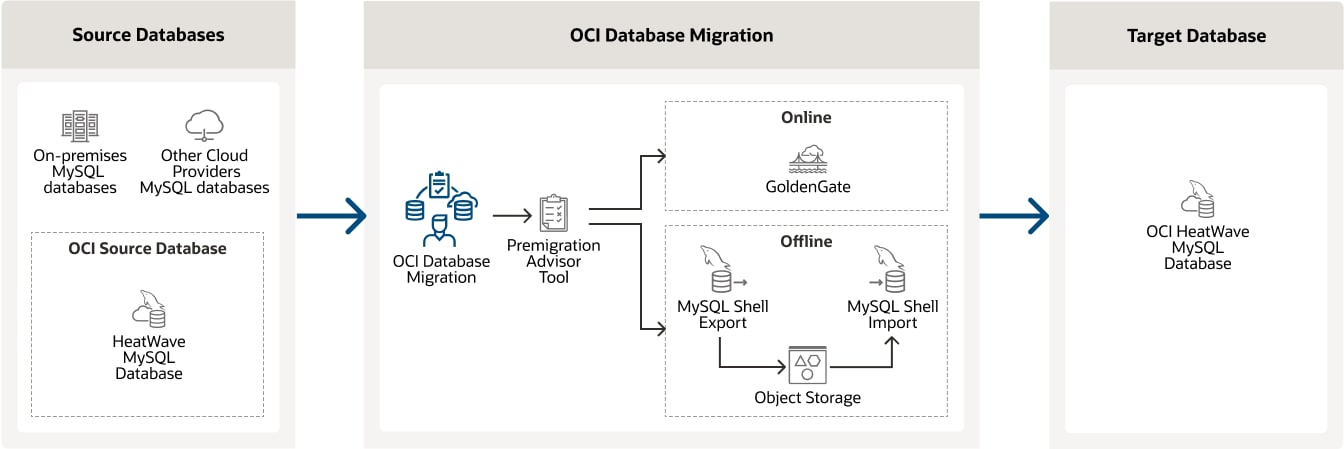
Sources and target
OCI Database Migration for MySQL supports the following MySQL variants, versions, and deployment sources. The flexibility of a logical migration allows for version upgrades and changes to target platforms.

Migration workflows
Workflows meet both simple and complex operational requirements without the need for advanced DBA skills. Migrations can run whether applications are online or offline. For online migrations, an initial load is followed by applying ongoing incremental changes. Logical workflows can also include version upgrades.
| | Oracle Base Database Service | Exadata Database Service | Autonomous AI Database |
|---|---|---|---|
| Logical offline migration | |||
| Logical online migration |
| Category | Workflow | Details |
|---|---|---|
| Business continuity | Offline migration | Applications are offline during migration; Duplicates entire database in one operation |
| Business continuity | Online migration | Applications are online during migration; Captures incremental source database changes in real-time and continuously applies them to target database |
| Data movement | Logical migration | Captures source data and metadata separate from physical data using MySQL Shell and ongoing changes with GoldenGate; Enables source and target databases to be different versions and platforms |
| Network connection | Direct connection | Source and target are on the same physical or virtual network |
Embedded migration advisor
A diagnostic advisor is embedded into the migration workflow. The advisor prioritizes exceptions, suggests resolutions, and generates repair scripts. Users can interactively review the details and either ignore the warnings, exclude source objects, or make repairs. The convenience of this essential step streamlines the migration workflow.
