Choosing your Oracle Cloud account at activation
During activation, you're required to add your Oracle Construction and Engineering SaaS solution to a new or existing Oracle Cloud account. This is an important decision, as it can't be undone once a selection is made.
Oracle Cloud Infrastructure basics
Understanding key Oracle Cloud Infrastructure (OCI) terminology is helpful before deciding which Cloud account to use.
Oracle Cloud account
An Oracle Cloud account is a secure, isolated partition of OCI that is set up for customers when they subscribe to Oracle cloud services. It provides a dedicated and managed environment for creating, organizing, and administering cloud resources.
Data center region
SaaS applications are provisioned in the data center region specified on your order. Data center regions can include multiple locations; for example, the North America data center region includes Ashburn, Phoenix, and Toronto. Production and backup data are permanently stored by Oracle in the data center region that's identified on your order.
Home region
The home region is the geographic location you designate for your tenancy during activation. It can contain subscriptions to multiple data center regions.
The home region is separate than the tenancy provisioned for your SaaS applications. It's where your default identity domain will reside and where you'll manage Identity and Access Management (IAM) resources, such as users, groups, and single sign-on.
Ideally, the chosen home region is geographically close to your organization and users to minimize latency and ensure faster access to resources. The region should also comply with any data privacy laws or regulations that may require your data to be stored within specific geographical boundaries.
You can't change the home region after your tenancy is provisioned.
Root compartment
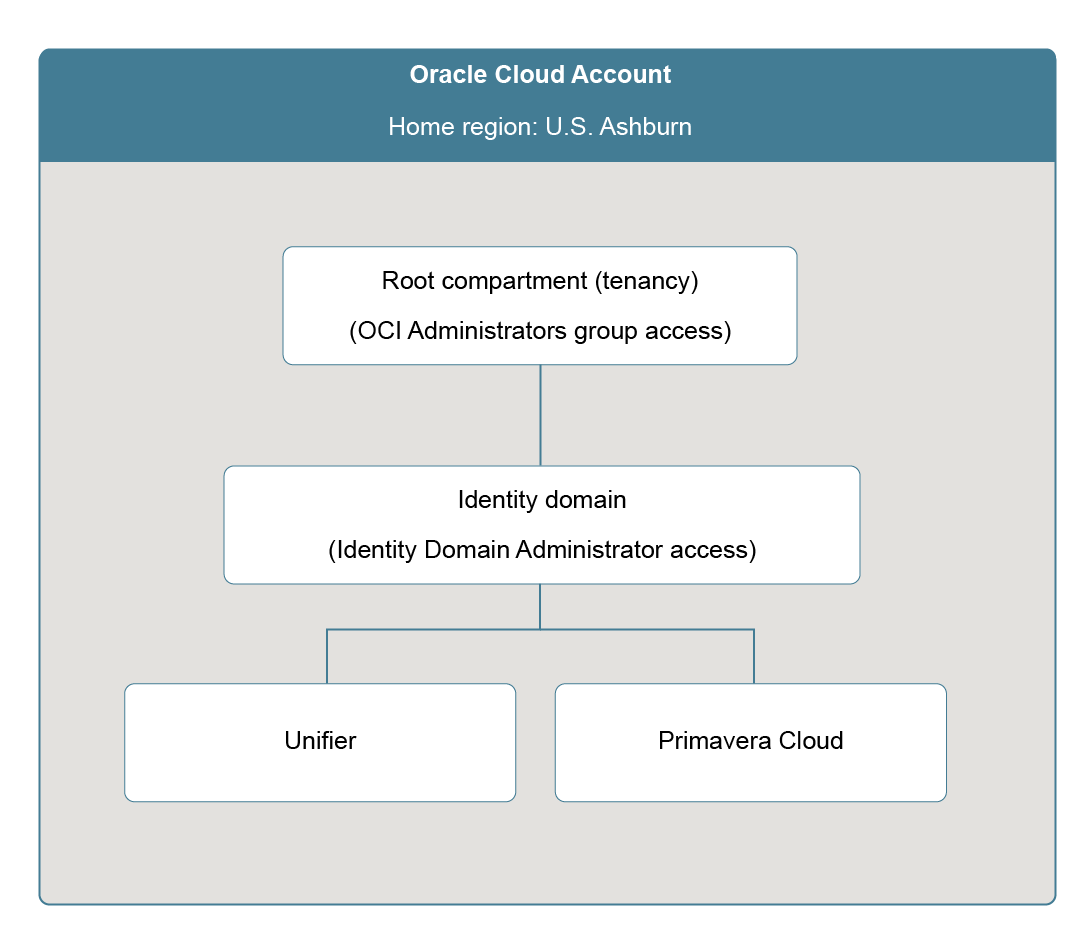
Your Oracle Cloud account contains a Root compartment, which is automatically created when your account is provisioned. The Root compartment is referred to as the tenancy, as it contains all of your organization's compartments, identity domains, and other OCI resources.
Identity domain
Identity domains are tied to compartments and are used to manage users, groups, single sign-on, and more. Your account comes with a default identity domain.
OCI Administrators group
Each OCI tenancy includes an OCI Administrators group, which has full access to the tenancy. Administrators in this group can be referred to as the Cloud Administrator.
For more on this and other OCI terminology, see Oracle Cloud terminology.
OCI account structure example
Making the decision
The decision of whether to create a new account or add your Oracle solution to an existing account cannot be changed after the fact and must be considered carefully.
Create a new Cloud account
You'll need to create a new account if your organization doesn't have other OCI solutions.
If you're unsure whether your organization has other solutions, there are a couple of things you can do:
- See if your email address is associated with another Oracle Cloud account. From the activation email, choose the Add to existing cloud account option, and then select Forgot your cloud account name? You'll be prompted to enter your email address. If applicable, we'll email you a list of accounts you're associated with.
- If you don't have any existing accounts associated with your email, but you think your company might still have one, ask other Administrators in your organization or have your Sales Representative contact Oracle Support for help.
Use an existing Cloud account
You can consider adding your new solution to an existing account if all of the following is true:
- Your organization has other OCI solutions
- It's okay for the OCI Administrators group of the existing tenancy to have access to the new solution
- There are no business or regulatory requirements to separate the new solution from existing solutions and/or users
- The existing tenancy's home region is compliant with your company's data residency and/or business requirements
- The existing account isn't a Free Trial account
Important considerations
You may already have an idea of how you want to proceed, but keep the following considerations in mind before making a final decision.
When creating a new Oracle Cloud account:
- Administrators must log in to each Oracle Cloud account separately to perform administrative tasks, which can be challenging if the same Administrators manage multiple accounts.
When adding to an existing Oracle Cloud account:
- You need to know the tenancy name of the existing account during the activation process. If you don't know the tenancy name of the existing account, contact other Administrators in your organization to verify.
- You need to be part of the OCI Administrators group to activate the new solution into the existing account. If needed, reach out to the other Administrators in your organization to see if they can add you to the group. Or you can forward the activation email to an Administrator who already has the required permissions to complete the activation for you.
- While the OCI Administrators group will have access to all of the compartments and identity domains in your tenancy, you can set up identity domains for different solutions and assign Identity Domain Administrators to them. Identity Domain Administrators only have access to their assigned identity domain, not the entire tenancy.
- While you may have multiple Construction and Engineering environments in your Oracle Cloud account, you'll still need to access and manage each one separately.