Message Center
How to access Message Center
The Messages menu is located in the top right corner of Submittal Exchange. 
You can view all automated emails from Submittal Exchange. These are emails you receive from notifications@submittalexchange.com.
The Messages page is divided into three panes:
- Top pane
- Left pane
- Right pane
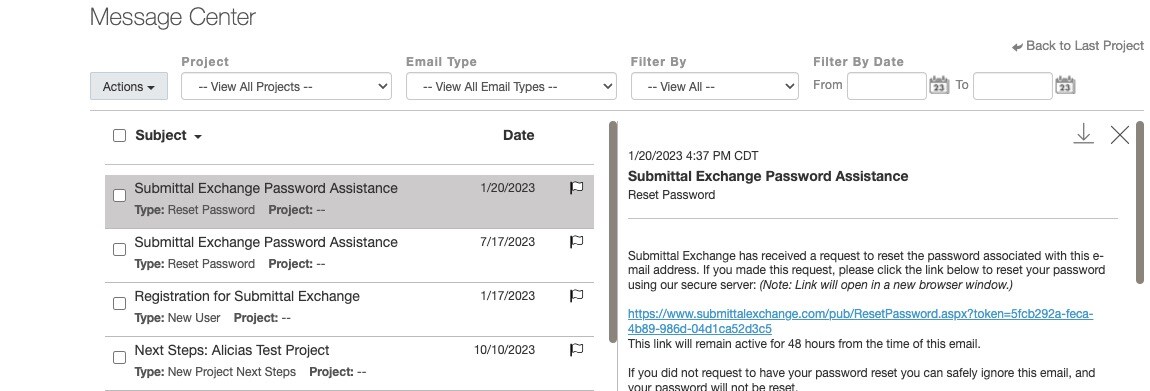
Top Pane
Click Actions. The actions below are available for messages:
- Mark All As Read
- Mark As Read
- Mark As Unread
- Flag As To Do
You can export selected messages to view in other applications. Exported messages are downloaded as .zip. If one message is selected it is exported as an .eml.
In the Project drop-down, you can choose to view all projects or select a specific project.
In the Email Type drop-down, you can select all email types or filter based on a particular type of email. For example, you can filter by Discussion or Consultant Review.
In the Filter By drop-down, you can choose to filter by:
- Flagged
- Has Attachment Link
- Unread Emails
- Read Emails
You can also Filter By Date by selecting a "From" and "To" date.
Left Pane
- View emails based on the selected filter criteria.
- Messages that have attached files are indicated with a paperclip icon.
- Use the checkbox to select individual emails.
- To select all messages, click on the box next to Subject.
- You can use the flag icon to flag individual messages.
Right Pane
After you click on an email in the left pane, the right pane will display the contents of the email you selected. You can also download a single email as an .eml file.